The question

Act I · One variable

You have 171 numbers. Now what?

Annual earnings for 171 full-time working women aged 30. A column of 171 dollar amounts tells you nothing at a glance.

Univariate summary is how we compress that column into a handful of numbers — and a few pictures — that reveal its center, its spread, and its shape.

Where we’re going

  • Summarize a variable with the mean, median, spread, and shape statistics
  • Visualize numerical data — box plots, histograms, density, line charts
  • Compare categories with bar and pie charts
  • Transform skewed data with logarithms; rescale with z-scores
  • Smooth time series with moving averages and seasonal adjustment

Six ideas anchor this chapter

  • Mean vs. median — the average, pulled by outliers; vs. the honest middle value
  • Standard deviation — the typical distance of a point from the mean
  • Quartiles & IQR — \(Q_1\), \(Q_2\), \(Q_3\) split the data in four; IQR \(= Q_3 - Q_1\)
  • Skewness — asymmetry; \(> 1\) means a long right tail
  • Kurtosis — tail heaviness; excess \(> 0\) means more outliers than a bell curve
  • Z-score — \(z_i = (x_i - \bar{x})/s\), a value rescaled to “standard deviations from the mean”

For skewed economic data, the median is usually the more honest “typical” value.

From numbers to a shape

Act II · The investigation

Start with the numbers: center, spread, shape

import pandas as pd                          # tabular data
from scipy import stats                      # skewness & kurtosis

# dataset: 171 full-time working women aged 30, 2010 (earnings in $)
url = "https://raw.githubusercontent.com/quarcs-lab/data-open/master/AED/AED_EARNINGS.DTA"
data = pd.read_stata(url)                    # read the Stata .dta into a DataFrame

data[["earnings"]].describe().round(0)       # count, mean, std, min, quartiles, max
stats.skew(data["earnings"]), stats.kurtosis(data["earnings"])  # shape: 1.71, 4.32 (excess)

↗ Try it in Colab

The mean sits above the median — a telltale of skew

  • Mean \(= \$41{,}413\) but median \(= \$36{,}000\) — a $5,413 gap (15%).
  • Std. dev. \(= \$25{,}527\) — 62% of the mean: enormous spread.
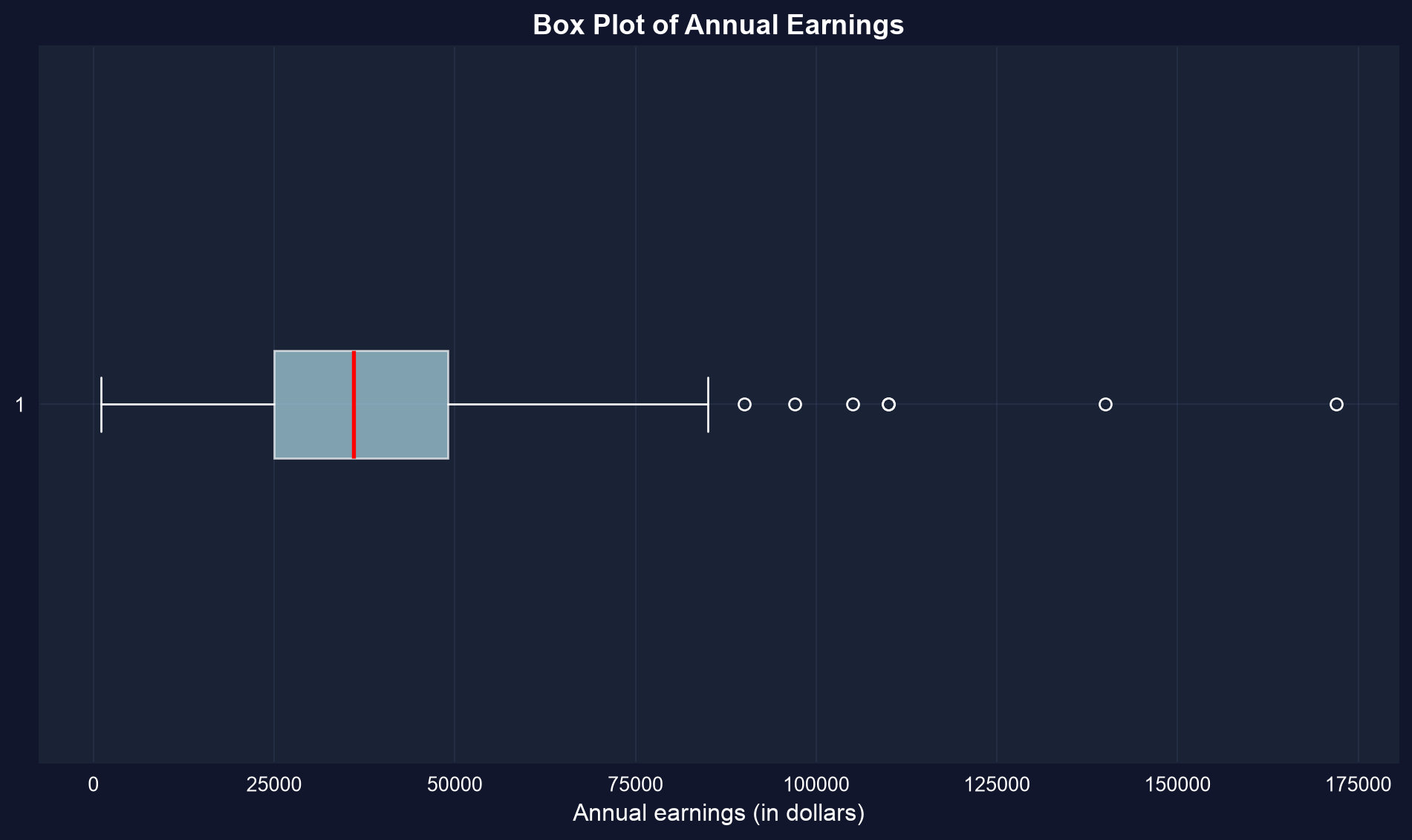
  • \(Q_1 = \$25{,}000\), \(Q_3 = \$49{,}000\) → IQR \(= \$24{,}000\) holds the middle half.
  • Skewness \(= 1.71\) (\(> 1\) = highly skewed); excess kurtosis \(= 4.32\) (heavy tails).

A handful of high earners (max $172,000) drag the mean up; report the median as “typical.”

The box plot draws those statistics in one picture

Box = \(Q_1\) to \(Q_3\) (the middle 50%); red line = median; dots on the right = high-earner outliers.

The median sits left of center and the right whisker is long — the chart is the skew.

A histogram shows the whole distribution — bin width is a choice

import pandas as pd                          # tabular data
import matplotlib.pyplot as plt               # plotting

url = "https://raw.githubusercontent.com/quarcs-lab/data-open/master/AED/AED_EARNINGS.DTA"
earnings = pd.read_stata(url)["earnings"]    # the single variable

fig, ax = plt.subplots(1, 2, figsize=(12, 5))         # two panels side by side
ax[0].hist(earnings, bins=12, color="#22d3ee", edgecolor="black")  # wider bins → coarse shape
ax[1].hist(earnings, bins=25, color="#22d3ee", edgecolor="black")  # narrower bins → fine detail
plt.show()                                   # render the histograms

↗ Try it in Colab

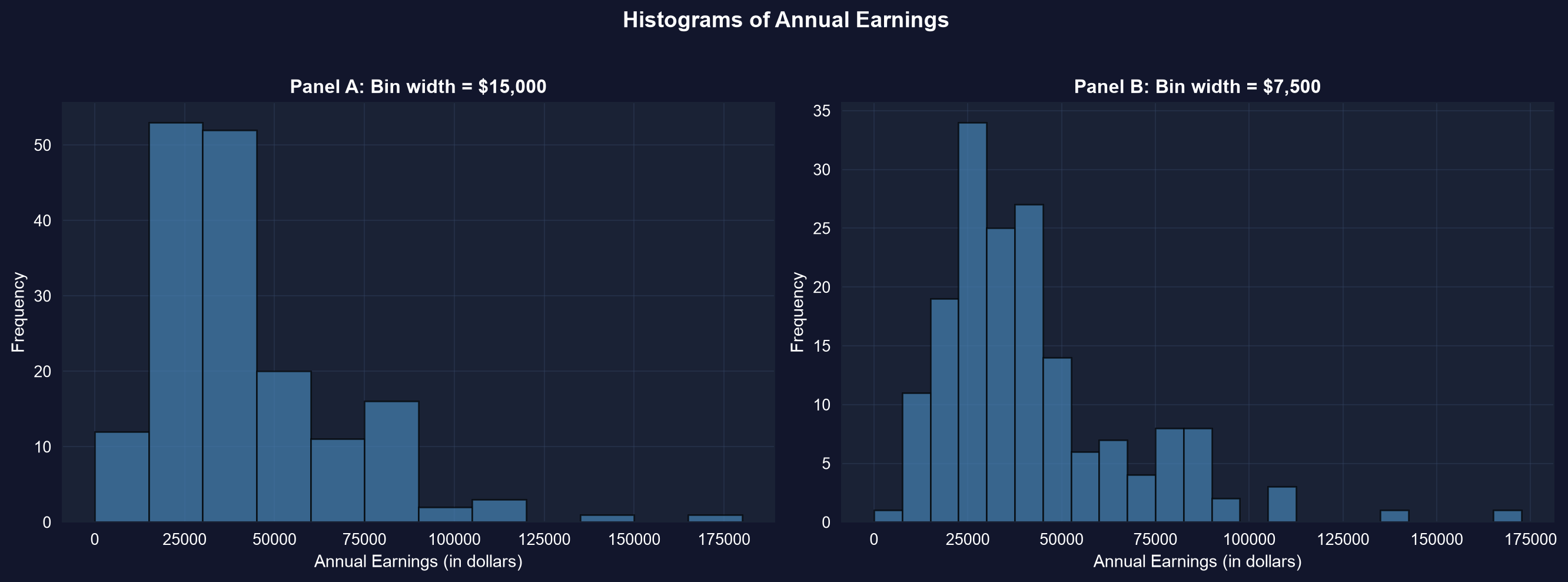
Wide bins give the shape; narrow bins give the detail

The same 171 earnings at two bin widths. Both show the long right tail; the narrower bins reveal clustering around $25k–$45k.

Always try more than one bin width — each answers a different question.

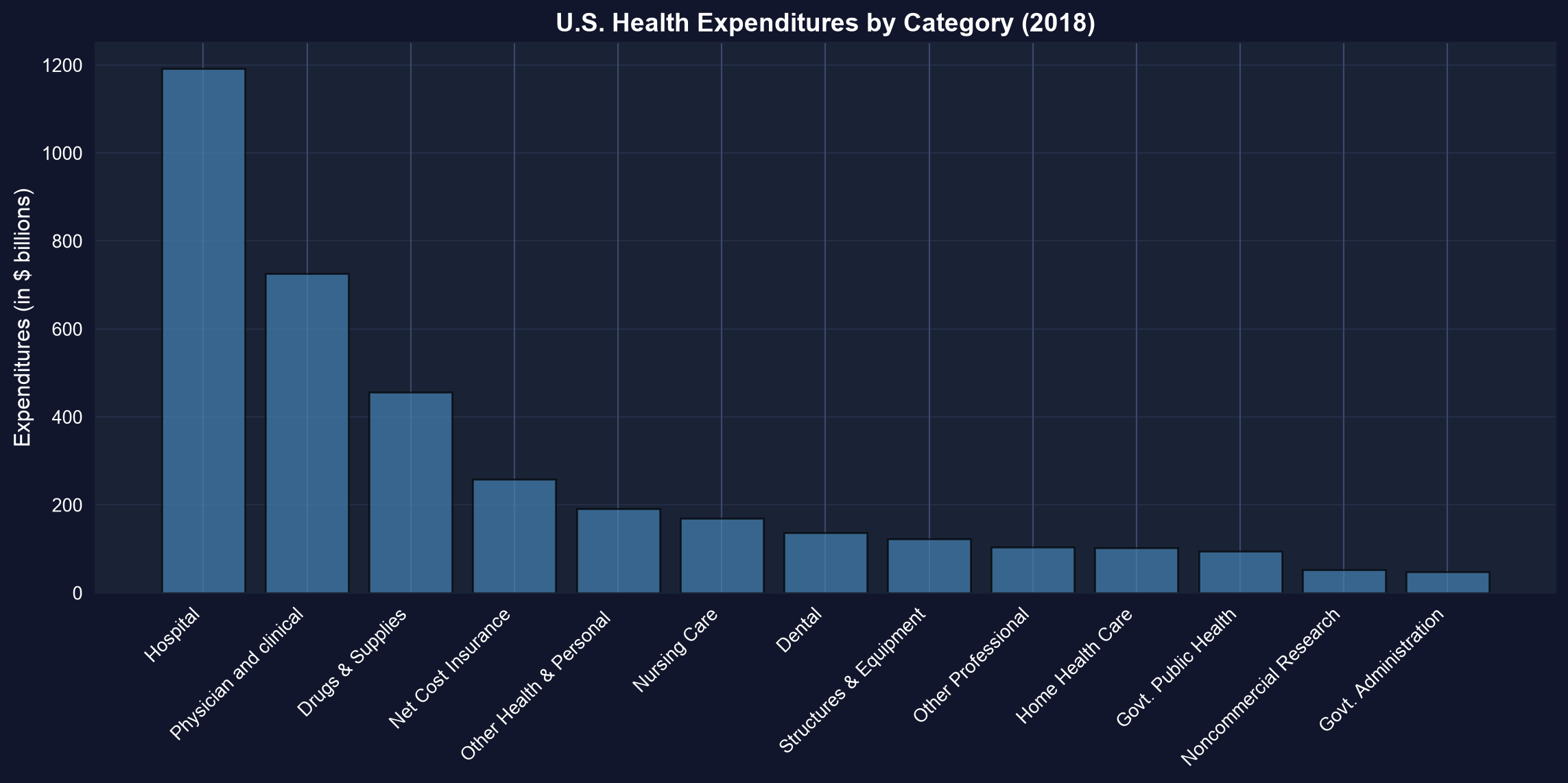
For categories, a bar chart ranks the pieces

U.S. health spending, 2018: hospital care alone is ~1/3 of $3,653B — more than physicians and drugs combined.

Sort categories before plotting so the ranking reads instantly.

Categorical data: count, then show the shares

import pandas as pd                          # tabular data
import matplotlib.pyplot as plt               # plotting

url = "https://raw.githubusercontent.com/quarcs-lab/data-open/master/AED/AED_FISHING.DTA"
data = pd.read_stata(url)                    # 1,182 recreational fishers

counts = data["mode"].value_counts()         # frequency of each fishing site
counts / counts.sum() * 100                  # relative frequency (% of total)
plt.pie(counts, labels=counts.index, autopct="%1.1f%%")  # each slice = a site's share
plt.show()                                   # render the pie chart

↗ Try it in Colab

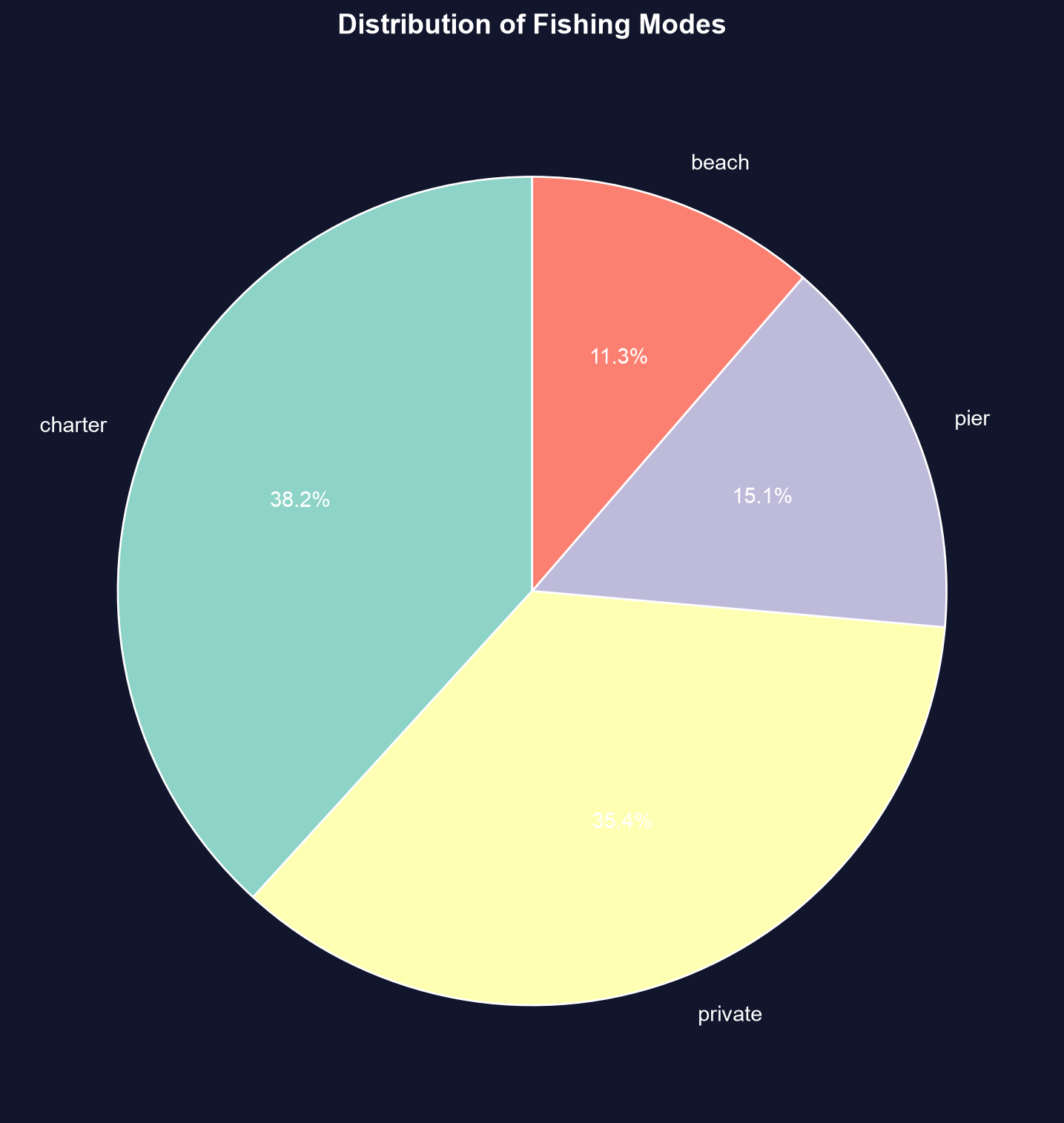
Boat fishing dominates the 1,182 choices

Charter (38.2%) + private (35.4%) = 74% of fishers choose a boat; pier and beach split the rest.

Pie charts show shares; for many categories a sorted bar chart compares them more cleanly.

Logs tame right-skewed economic data

import numpy as np                           # natural logarithm
import pandas as pd                          # tabular data
from scipy import stats                      # skewness

url = "https://raw.githubusercontent.com/quarcs-lab/data-open/master/AED/AED_EARNINGS.DTA"
data = pd.read_stata(url)                    # load the 171 earnings

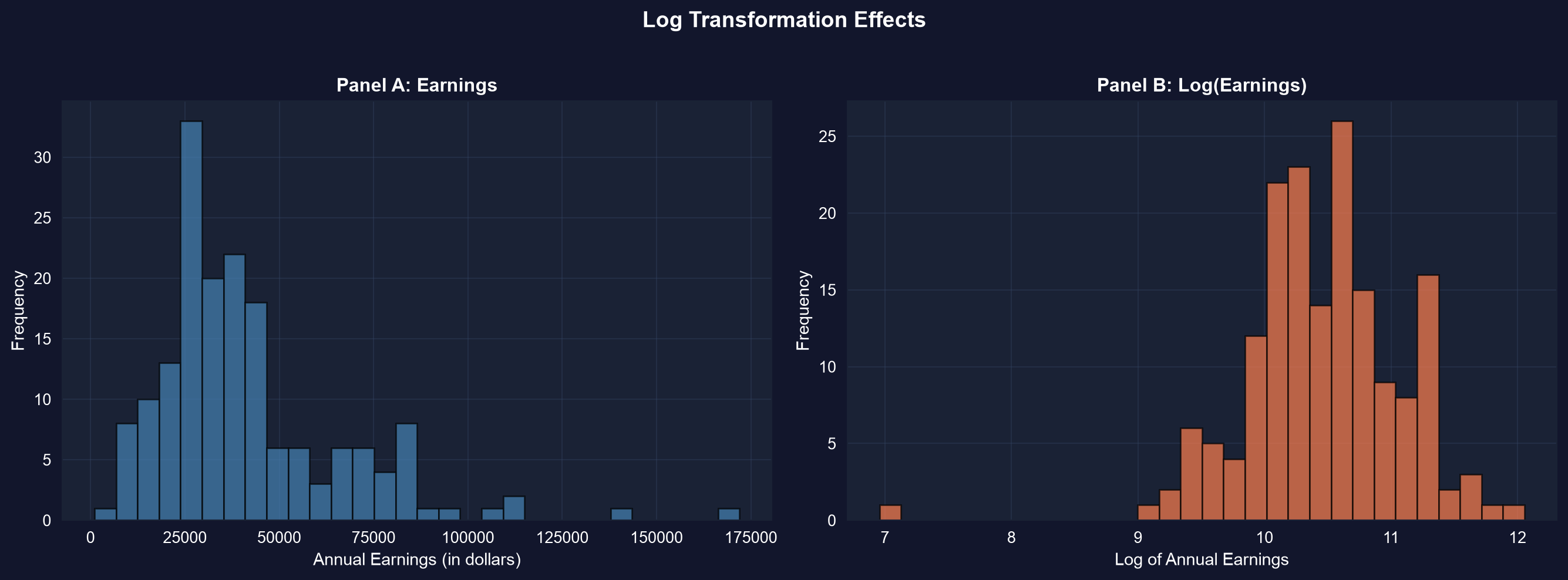
data["ln_earnings"] = np.log(data["earnings"])   # log-transform the skewed variable
stats.skew(data["earnings"])                      # 1.71  → strong right skew
stats.skew(data["ln_earnings"])                   # -0.91 → nearly symmetric

↗ Try it in Colab

The log scale collapses the long tail toward a bell

Panel A: earnings in dollars, strongly right-skewed. Panel B: log(earnings), roughly symmetric — skew falls from 1.71 to −0.91.

Many tests assume a bell shape; the log transform is how skewed economic data gets there.

Time series need smoothing to reveal the trend

import pandas as pd                          # tabular data

url = "https://raw.githubusercontent.com/quarcs-lab/data-open/master/AED/AED_MONTHLYHOMESALES.DTA"
data = pd.read_stata(url).query("year >= 2005")   # monthly U.S. home sales, 2005+
data = data.sort_values("daten")             # ensure time order

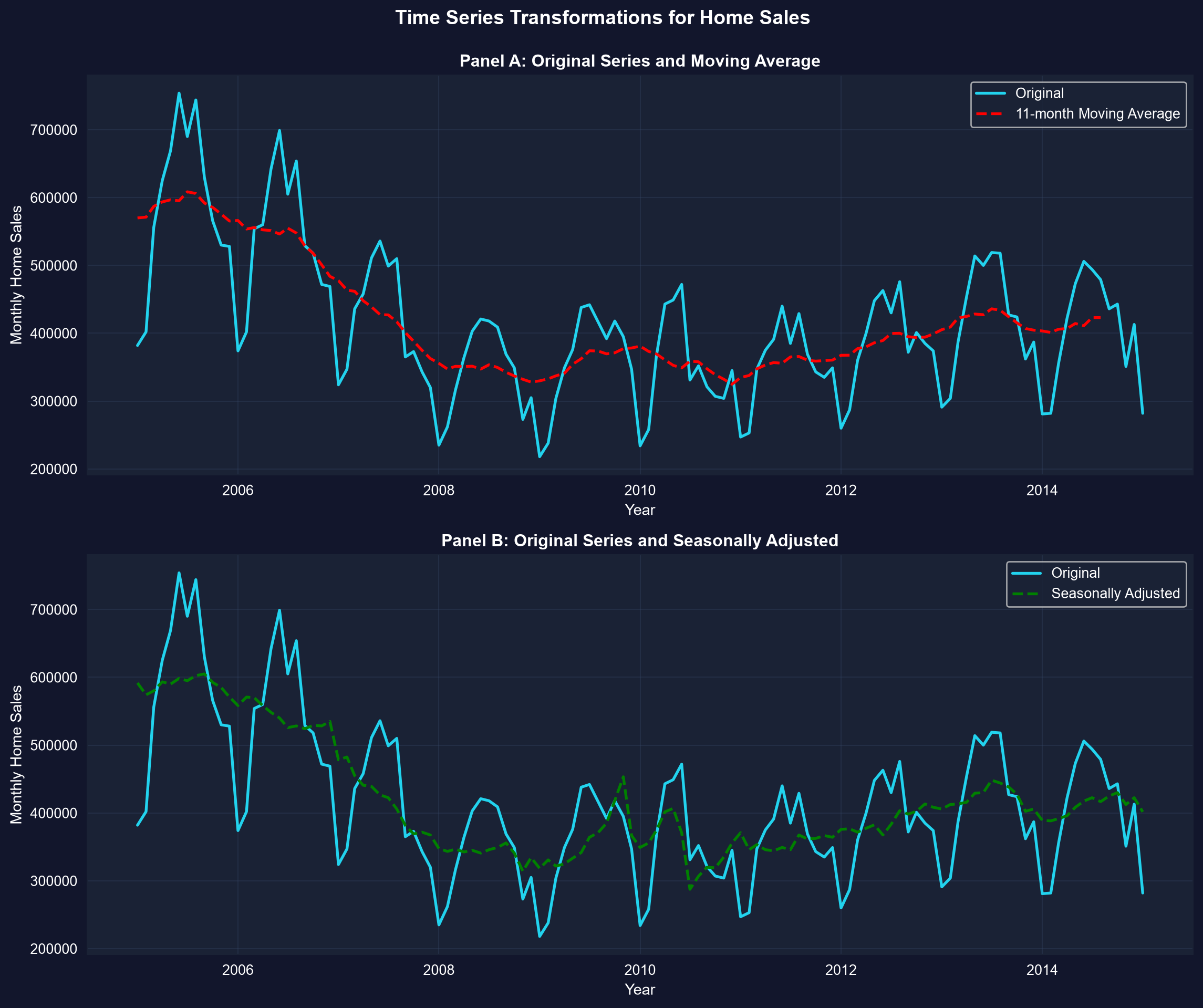
data["ma11"] = data["exsales"].rolling(11, center=True).mean()  # 11-month moving average
data[["exsales", "ma11"]].describe().round(0)     # raw (noisy) vs smoothed series

↗ Try it in Colab

Smoothing reveals the 2007–2011 housing crash

Raw monthly sales zig-zag with the seasons; the 11-month moving average (red) and seasonal adjustment (green) expose the boom–bust–recovery cycle.

A moving average cancels seasonal noise; seasonal adjustment removes the predictable pattern itself.

Reading it right

Act III · The resolution

Choose the summary that matches the shape

Objection. “Just report the mean and a histogram — that’s what a summary is.”

Response. The right summary depends on the shape. For skewed earnings, the mean overstates the “typical” value, so lead with the median and IQR. A histogram’s story changes with its bin width. And a raw time series hides its trend until you smooth it.

Match the tool to the data: skew → median & logs; categories → bars; time → moving averages.

What to carry forward

  • Summarize center (mean/median), spread (std. dev., IQR), and shape (skew, kurtosis).
  • For skewed economic data the median is the honest center; the mean is pulled by outliers.
  • Pick the chart for the data type: histogram/box/line (numerical), bar/pie (categorical).
  • Logs symmetrize right-skewed data; z-scores put different variables on one scale.
  • For time series, moving averages smooth noise and seasonal adjustment removes recurring patterns.

Summarize the numbers, then draw the shape — and let the data pick the tool.