Appendix B — Simulating an RBC model
Chapter 14 outlined the basic building blocks of an RBC model. This appendix will take you through the steps to estimate it and then compute the empirical counterpart to the business cycle data.
The steps are quite simple. Imagine first that you were to do this by hand. Of course the starting point would be your specific model with its associated parameter values. The conditions that describe your model typically will be a combination of FOCs and budget constraints that determine the evolution of variables through time. Plugging the parameter values into the model, you could compute the steady state of the economy (pretty much as we did in Chapter 14). (We use the word “could” because this may be quite difficult.) Once you know the steady state, you could linearise the model around that steady state (pretty much as we did, for example, in Chapter 3). Now you have a linear dynamic system, that can be shocked to compute the trajectory of the variables in response. For an RBC model, you shock it over and over again to get a series for the variables, from which you can compute the correlations that you will confront with the data. This is easy to say but involves computing the saddle path in which variables converge to the equilibrium. And to be able to do this we would also need to check first that that dynamic properties are those required for convergence (also see Chapter 3 and the mathematical appendix for a discussion of this).
Well, if all that looked a bit daunting, you are lucky that most of this work will be done by the computer itself. What remains of this appendix shows you how to go about it.
First of all, you will need to have MATLAB, and we will assume you are minimally knowledgeable. MATLAB offers a free trial, so you may want to practice first using that.
Before starting you need to download Dynare1 which is pre-programmed to run these models. Below we will write the model, and, say, we call it Model1. We will then run Dynare Model1.mod in MATLAB. It is as easy as that, but we have to do some setting up before.
In MATLAB, go to the HOME tab, and look for the Set Path button. In the new window, go to the Add Folder command and search in the Dynare download the “matlab” folder. This means going to “dynare/xxx/matlab” (where xxx means which version of MATLAB you have; in other words, you need to go to the “matlab” folder in Dynare), select that folder, and then select to add this. It typically places it first, but if it does not make sure to use the left buttons to place it first. Then save.
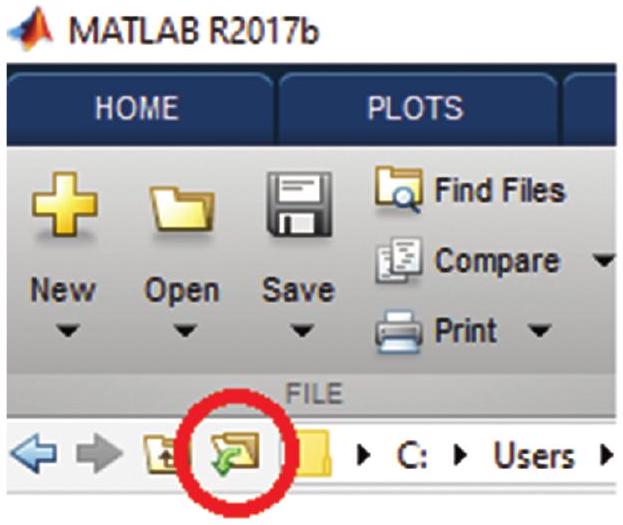
Now we need to open a folder to save the results (any regular folder in your computer will do). We will write the model (see below) and save it in this folder. It is important to save the model with the extension .mod. So if you call the model “Model1” you need to save it in this folder as “Model1.mod”. This will indicate to Matlab that it is a Dynare file when you run “Dynare Model1.mod”. Then, you
have to specify to MATLAB that you are currently working on the desired folder. You can do this by clicking the “browse for folder” button:
Now to the model. The specification we will work with is the same as in Chapter 14. You can find more complex structures (including open-economy versions) within the framework of Dynare. For our purposes of taking a first step in modelling, this simple specification will do.
In what follows we will take you through the steps to run this simple model. First, we need to define the variables.
var y c n ii lambda k z r w;
varexo u_z;
parameters BETA PHI ALPHA VARPHI DELTA;
parameters n_ss r_ss z_ss;
The “var” command sets all the variables of the model, both exogenous and endogenous. In this case, we have output (y), consumption (c), labour (n), investment (ii), the shadow price of consumption (lambda), the stock of capital (k), the nominal interest rate (r), productivity (z), and wages (w). The “varexo” command defines shocks. u_z indicates the exogenous shock that will hit the variable z. The command “parameters” is used to define the parameters of the model. Also, some steady-state values will remain free for our model to match certain moments of the variables.
Next we need to provide a numerical value for these parameters. For this you will typically rely on previous literature, or use the calibration exercises that we saw in the chapter.
Once you’ve figured out what values you want to use, setting the values in the model is straight-forward, and is the next step. (You can later play around by considering the response of the model to different values of these parameters.) Here we assume, for example
ALPHA=1/3;
PHI=2/3;
VARPHI=0.95;
DELTA=0.1;
z_ss=1;
r_ss=0.01;
n_ss=0.32353;
With the variables defined and the parameter values established, we next have to specify the model. We use the command “model” for that. We will conclude the section with the “end” command. We also define a process for the shock, that here will be an autoregressive process.
Lagged and forward variables are indicated by a -1 or +1 respectively, between parentheses, immediately after the variable name, and can be added without any problem. Dynare will work with a loglinearised version, so we need to define our variables as the log version of the original variables. But this is no problem, it just means that where we had \(y\) we write \(\exp (y)\). (This change of variables can only be done with variables that always take positive values, though, so watch out!)
So the model is a series of FOCs and budget constraints. For example, our first equation below is the resource constraint, the second and third are the optimal choice of consumption and labour, the fourth is the FOC relative to capital, and the fifth is the definition of the interest rate. The last equations are the production function, the law of motion of capital, the definition of the real wage as the marginal productivity of labour, and the process for productivity.
model;
// Aggregate Demand
exp(y)=exp(c)+exp(ii);
// FOC for consumption
(1-PHI)/(exp(c))=exp(lambda);
// FOC for labour
PHI/(1-exp(n))=(1-ALPHA)*((exp(y)/exp(n))*exp(lambda));
// FOC for capital
exp(lambda)=BETA*exp(lambda(+1))*(ALPHA*exp(y(+1))/exp(k)+1-DELTA);
// The interest rate equation
exp(r)=exp(z)*ALPHA*(exp(k(-1)))^(ALPHA-1)*(exp(n))^(1-ALPHA);
// Production Function
exp(y)=exp(z)*(exp(k(-1)))^(ALPHA)*(exp(n))^(1-ALPHA);
// Law of movement of capital
exp(k)=(1-DELTA)*exp(k(-1))+exp(ii);
// Wage equation
exp(w)=(1-ALPHA)*exp(z)*exp(k(-1))^ALPHA*exp(n)^(-ALPHA);
// Productivity process
log(exp(z)/z_ss)=VARPHI*log(exp(z(-1))/z_ss)+u_z;
end;
Now we need to compute the steady state, by hand (endogenous variables as a function of exogenous variables). Dynare needs to work with a steady state, so if you don’t write it down, Dynare will try to compute it directly. However, doing so in a non-linear model (like this RBC model) generally will not work. For that reason, it is advisable to provide it manually. To do that, we have to introduce the “steady_state_model” command as shown below. This is not as difficult as it sounds, and understanding the steady state properties of the model is always useful to do. Finally, we need to establish that the initial values for the model are those for the steady state (in logs)
steady_state_model;
BETA=1/(1+r_ss);
y_to_k_ss=(1-BETA*(1-DELTA))/(BETA*ALPHA);
k_ss=((y_to_k_ss)^(1/(1-ALPHA))*(1/z_ss)^(1/(1-ALPHA))*(1/n_ss))^(-1);
y_ss=y_to_k_ss*k_ss;
ii_ss=DELTA*k_ss;
c_ss=y_ss-ii_ss;
lambda_ss=(1-PHI)/c_ss;
w_ss=(1-ALPHA)*z_ss*(k_ss)^ALPHA*n_ss^(-ALPHA);
z=log(z_ss);
y=log(y_ss);
n=log(n_ss);
k=log(k_ss);
c=log(c_ss);
ii=log(ii_ss);
r=log(r_ss);
lambda=log(lambda_ss);
w=log(w_ss);
end;
Then we have to check if the steady state is well defined. For that we use the “steady” and “check” commands, these will compute the eigenvalues of the model around the steady state, to verify that the dynamic properties are the desired ones.
steady;
check;
Next, we have to set the shocks that we want to study. In this simplified model, we want to analyse the effect of a productivity shock. We use the “shocks” command for that. For example, a shock of 10% can be coded as
shocks;
var u_z = .1;
end;
Finally, we set the simulation to allow Dynare to show us the impulse-response functions. We use “stoch_simul” for that
stoch_simul(periods=10000, irf=100, order=1);This completes the script for the model. It has to look something like this
%-----------------------------------------------------------------
% 1. Defining variables
%-----------------------------------------------------------------
// Endogenous variables (7)
var y c n ii lambda k z r w; //
// Exogenous variables (1)
varexo u_z;
// Parameters
parameters BETA PHI ALPHA VARPHI DELTA;
parameters n_ss r_ss z_ss;
%-----------------------------------------------------------------
% 2. Calibration
%------------------------------------------------------------------
ALPHA=1/3;
PHI=2/3;
VARPHI=0.95;
DELTA=0.1;
// Targeted steady state values
z_ss=1;
r_ss=0.01;
n_ss=0.32353;
%-----------------------------------------------------------------
% 3. Model
%------------------------------------------------------------------
model;
//Agreggate Demand
exp(y)=exp(c)+exp(ii) ;
//FOC for the consumption
(1-PHI)/(exp(c))=exp(lambda);
PHI/(1-exp(n))=(1-ALPHA)*((exp(y)/exp(n))*exp(lambda));
exp(lambda)=BETA*exp(lambda(+1))*(ALPHA*exp(y(+1))/exp(k)+1-DELTA);
//Production Function
exp(y)=exp(z)*(exp(k(-1)))^(ALPHA)*(exp(n))^(1-ALPHA);
//interest rate equation
exp(r) = exp(z)*ALPHA*(exp(k(-1)))^(ALPHA-1)*(exp(n))^(1-ALPHA);
//Law of movement of capital
exp(k)=(1-DELTA)*exp(k(-1))+exp(ii) ;
//Wage equation
exp(w)=(1-ALPHA)*exp(z)*exp(k(-1))^ALPHA*exp(n)^(-ALPHA);
//stochastic proccess
log(exp(z)/z_ss)=VARPHI*log(exp(z(-1))/z_ss)+u_z;
end;%----------------------------------------------------------------
% 4. Steady State
%-----------------------------------------------------------------
steady_state_model;
// Computing the steady state and calibrated parameters
BETA=1/(1+r_ss);
y_to_k_ss=(1-BETA*(1-DELTA))/(BETA*ALPHA);
k_ss=((y_to_k_ss)^(1/(1-ALPHA))*(1/z_ss)^(1/(1-ALPHA))*(1/n_ss))^(-1);
y_ss=y_to_k_ss*k_ss;
ii_ss=DELTA*k_ss;
c_ss=y_ss-ii_ss;
lambda_ss=(1-PHI)/c_ss;
w_ss=(1-ALPHA)*z_ss*(k_ss)^ALPHA*n_ss^(-ALPHA);
z=log(z_ss);
y=log(y_ss);
n=log(n_ss);
k=log(k_ss);
c=log(c_ss);
ii=log(ii_ss);
r=log(r_ss);
lambda=log(lambda_ss);
w=log(w_ss);
end;
%-----------------------------------------------------------------
% 4. Computation
%------------------------------------------------------------------
steady;
check;
shocks;
var u_z = .1;
end;
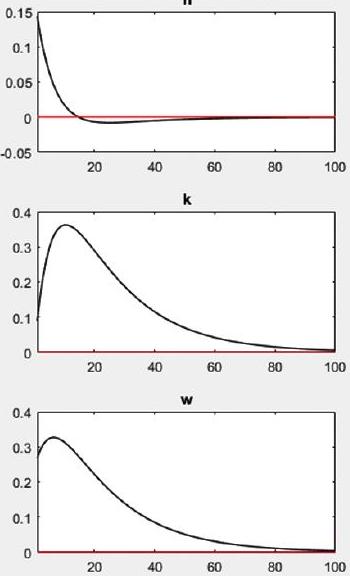
stoch_simul(periods=10000, irf = 100, order = 1);Now we run “Dynare Model1.mod”, and voila! The output will be like this:
STEADY-STATE RESULTS:| y | -0.574132 |
|---|---|
| c | -0.935145 |
| n | -1.12846 |
| ii | -1.76805 |
| lambda | -0.163467 |
| k | 0.534531 |
| z | 0 |
| r | -4.60517 |
| w | 0.148866 |
EIGENVALUES:| Modulus | Real | Imaginary |
|---|---|---|
| 0.8508 | 0.8508 | 0 |
| 0.95 | 0.95 | 0 |
| 1.187 | 1.187 | 0 |
| 3.419e+16 | 3.419e+16 | 0 |
There are 2 eigenvalue (s) larger than 1 in modulus
for 2 forward-looking variable(s)
The rank condition is verified.
fx
Command Window
The rank condition is verified.
MODEL SUMMARY| Number of variables: | 9 |
|---|---|
| Number of stochastic shocks: | 1 |
| Number of state variables: | 2 |
| Number of jumpers: | 2 |
| Number of static variables: | 5 |
MATRIX OF COVARIANCE OF EXOGENOUS SHOCKS| Variables | u_z |
|---|---|
| u_z | 0.100000 |
POLICY AND TRANSITION FUNCTIONS| y | c | n | ii | lambda | k | |
|---|---|---|---|---|---|---|
| Constant | -0.574132 | -0.935145 | -1.128463 | -1.768055 | -0.163467 | 0.534531 |
| k (-1) | 0.198027 | 0.498055 | -0.202960 | -0.492037 | -0.498055 | 0.850796 |
| \(z(-1)\) | 1.236740 | 0.600924 | 0.430110 | 2.699119 | -0.600924 | 0.269912 |
| u_z | 1.301832 | 0.632551 | 0.452748 | 2.841177 | -0.632551 | 0.284118 |
MOMENTS OF SIMULATED VARIABLES
| VARIABLE | MEAN | STD. DEV. | VARIANCE | SKEWNESS |
|---|---|---|---|---|
| y | -0.578647 | 1.576789 | 2.486263 | 0.034337 |
| c | -0.939969 | 1.384754 | 1.917545 | 0.052236 |
| n | -1.128255 | 0.250405 | 0.062703 | -0.097217 |
| ii | -1.771862 | 2.198706 | 4.834307 | -0.012844 |
| lambda | -0.158644 | 1.384754 | 1.917545 | -0.052236 |
| k | 0.528261 | 1.634713 | 2.672288 | 0.056699 |
| z | -0.002473 | 0.995335 | 0.990692 | 0.019705 |
| r | -4.583508 | 6.746014 | 45.508711 | -0.073543 |
| w | 0.144143 | 1.439289 | 2.071554 | 0.047530 |
CORRELATION OF SIMULATED VARIABLES (only the first five columns are legible in the source)
| VARIABLE | y | c | n | ii | lambda |
|---|---|---|---|---|---|
| y | 1.0000 | 0.9771 | 0.6046 | 0.9512 | -0.9771 |
| c | 0.9771 | 1.0000 | 0.4211 | 0.8638 | -1.0000 |
| n | 0.6046 | 0.4211 | 1.0000 | 0.8208 | -0.4211 |
| ii | 0.9512 | 0.8638 | 0.8208 | 1.0000 | -0.8638 |
| lambda | -0.9771 | -1.0000 | -0.4211 | -0.8638 | 1.0000 |
| k | 0.9320 | 0.9878 | 0.2747 | 0.7747 | -0.9878 |
| z | 0.9937 | 0.9470 | 0.6901 | 0.9798 | -0.9470 |
| r | 0.0022 | -0.2107 | 0.7979 | 0.3106 | 0.2107 |
| w | 0.9904 | 0.9971 | 0.4883 | 0.8993 | -0.9971 |
The lambda entries for rows ii to w are illegible in the source and are filled in from the model: \(\lambda = \log(1-\Phi) - c\), so \(\operatorname{corr}(x, \lambda) = -\operatorname{corr}(x, c)\) (as the legible rows confirm).
AUTOCORRELATION OF SIMULATED VARIABLES
| VARIABLE | 1 | 2 | 3 | 4 |
|---|---|---|---|---|
| y | 0.9658 | 0.9290 | 0.8910 | 0.8523 |
| c | 0.9884 | 0.9707 | 0.9483 | 0.9222 |
| n | 0.8232 | 0.6657 | 0.5294 | 0.4110 |
| ii | 0.9145 | 0.8343 | 0.7609 | 0.6936 |
| lambda | 0.9884 | 0.9707 | 0.9483 | 0.9222 |
| k | 0.9954 | 0.9837 | 0.9661 | 0.9440 |
| z | 0.9492 | 0.8983 | 0.8489 | 0.8009 |
| r | 0.8434 | 0.7030 | 0.5807 | 0.4736 |
| w | 0.9820 | 0.9589 | 0.9321 | 0.9025 |
Total computing time : 0h00m37s
Note: warning(s) encountered in MATLAB/Octave code