Appendix C — Simulating a DSGE model
Chapter 15 outlined the basic building blocks of a New Keynesian model. How do we estimate it?
We laid out the framework in Appendix B, so you may want to check out the setup section there. At any rate, we will repeat most of it here, for convenience.
The starting point would be your specific model with its associated parameter values. Again, the conditions that describe your model will typically be a combination of FOCs and budget constraints that determine the evolution of variables through time. Plugging the parameter values in the model, you could compute the steady state of the economy (pretty much as we did in the RBC case). Once you know the steady state, you could linearise the model around that steady state (pretty much as we did for example in Chapter 3). Now you have a linear dynamic system, that can be shocked to compute the trajectory of the variables in response. This is easy to say but involves computing the saddle path in which variables converge to the equilibrium. And to be able to do this you would also need to check first that that dynamic properties are those required for convergence (also see Chapter 3 and the Mathematical Appendix for a discussion of this).
Well, if all that looked a bit daunting, you are lucky that most of this work will be done by the computer itself. What remains of this appendix shows you how to go about it.
These are all quite mechanical steps, so most of the work has already been done for us. First of all, you will need to have MATLAB, and we will assume you are minimally knowledgeable. MATLAB offers a free trial, so you may want to practice first using that.
Before doing this we will need to download Dynare1 which is pre-programmed to run these models. Below we will write the model, say you call it Model1. We will eventually run Dynare Model1.mod in MATLAB. It is as easy as that, but we have to do some setting up before.
In MATLAB, go to the HOME tab, and look for the Set Path button. In the new window, go to the Add Folder command and search in the Dynare download for the “matlab” folder. This means going to “dynare/xxx/matlab” (you need to go to the “matlab” folder in Dynare), select that folder and select to add this. It typically places it first, but if it does not, make sure to use the left buttons to place it first. Then save.
Now we need to open a folder to save the results. Any folder will do. You can do this by clicking the “browse for folder” button
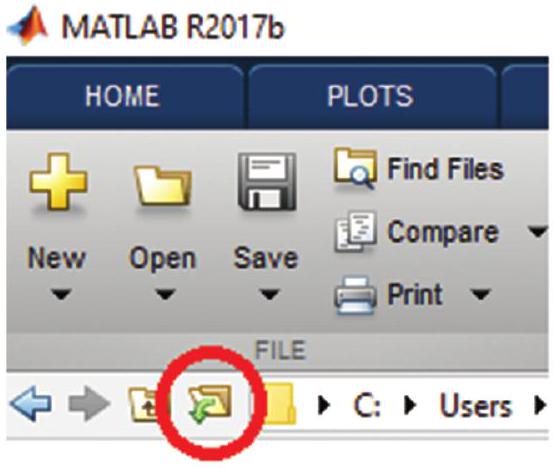
We will write the model (see below) and then we will save this model in this folder. It is important to save the model with the extension “.mod”2. So if you call the model Model1 you need to save it in this folder as Model1.mod. This will indicate to MATLAB it is a Dynare file when you run Dynare Model1.mod.
Now to the model. The specification we will work with here replicates the framework of Chapter 15, but you can find more complex structures (including open-economy versions) within the framework of Dynare. For our purposes of taking a first step in modelling, this simple specification will do.
In what follows we will take you through the steps to run this simple model. First, we need to define the variables. You need to start your code in the editor. Type the following
var pi y i v r;
varexo eps_v;
parameters beta sigma phi alpha phi_pi phi_y rho_v;
The “var” command sets all the variables of the model both exogenous and endogenous. In this case, we have inflation (pi), output (y), nominal interest rate (i), the exogenous shock (v) and the real interest rate (r). The “varexo” command defines shocks. eps_v indicates the exogenous shock that will hit the variable v. The command “parameters” is used to define the parameters of the model.
Our model will implement versions of the equations (15.62), (15.65) and (15.70). The parameters then correspond to those in those equations. We add rho_v, which will be the autoregressive parameter for the shock process (explained below).
Next we need to provide a numerical value for these parameters. For this you will typically rely on previous literature, or use the calibration exercises that we first saw in Chapter 14.
Setting the values is straightforward and is the next step. (You can later play by changing the response of the model to a different value of these parameters). Here we assume, for example
alpha = 3/4;
beta = 0.99;
sigma = 1;
phi = 1;
phi_pi = 1.5;
phi_y = 0.5/4;
rho_v = 0.5;
With the variables defined and the parameter values established, we next have to specify the model. We use the command model for that. We will conclude the section with the end command.
The model is written in a self-explanatory fashion below, which, in this case, as said, replicates equations (15.62), (15.65) and (15.70). We also define a process for the shock, here we define it as an autoregressive process. (Lagged and forward variables are indicated by a -1 or +1 respectively and can be added without any problem.)
model(linear);
// Taylor-Rule
i = phi_pi*pi+phi_y*y+v;
// NKIS-Equation
y = y(+1)-1/sigma*(i-pi(+1));
// NK Phillips Curve
pi = (alpha/(1-alpha))*(1-beta*(1-alpha))*phi*y+beta*pi(+1);
// Autoregressive Error
v = rho_v*v(-1)+eps_v;
// Real rate
r = i-pi(+1);
end;
To check if the steady state is well defined we use the “check” command. It computes the eigenvalues of the model. Generally, the eigenvalues are only meaningful if the linearisation is done around a steady state of the model. It is a device for local analysis in the neighbourhood of this steady state.
check;This will show something like this
| Command Window | ||
|---|---|---|
| Processing outputs … done | ||
| Preprocessing completed. | ||
| EIGENVALUES: | ||
| Modulus | Real | Imaginary |
| 0.5 | 0.5 | 0 |
| 1.645 | 1.645 | 0 |
| 2.771 | 2.771 | 0 |
| There are 2 eigenvalue (s) larger than 1 in modulus for 2 forward-looking variable(s) | ||
| fx >> | The rank condition is verified. | | ||
Next, we have to set the shocks that we want to study. In this simplified model, we want to analyse the effect of an interest rate policy shock. We use the “shocks” command for that. For example, a shock of 6.25%
shocks;
var eps_v = 0.0625;
end;
Finally, we set the simulation to allow Dynare to show us the impulse-response functions. We use “stoch_simul” for that
stoch_simul(periods=1000,irf=12,order=1);This completes the script for the model. It has to look something like this
//-----------------------------------------
// Preamble
//------------------------------------------
// Variables
var pi y i v r;
varexo eps_v;
//
// Parameters
parameters beta sigma phi alpha phi_pi phi_y rho_v;
    alpha=3/4;
    beta = 0.99;
    sigma = 1;
    phi = 1;
    phi_pi = 1.5;
    phi_y = 0.5/4;
    rho_v = 0.5;
//------------------------------------------
// Model
//------------------------------------------
model(linear);
// Taylor-Rule
    i = phi_pi*pi+phi_y*y+v; // eq'n. (25), p. 50
// NKIS-Equation
    y = y(+1)-1/sigma*(i-pi(+1)); // y is output gap (22), equal to actual output if there are only policy shocks
// NK Phillips Curve
    pi = (alpha/(1-alpha))*(1-beta*(1-alpha))*phi*y +beta*pi(+1); // (21) listo
// Autoregressive Error
    v = rho_v*v(-1) + eps_v; // shock to i (bottom p. 50)
// Real rate
r=i-pi (+1) ;
end;
//
//------------------------------------------
// Steady State
//------------------------------------------
check;
//------------------------------------------
// Shocks
//------------------------------------------
shocks;
var eps_v = 0.0625;
end;
//------------------------------------------
// Computation
//------------------------------------------
//stoch_simul(irf=12, nograph);
stoch_simul(periods=10000,irf=12);
Now we run dynare Model1.mod. The output will be like this
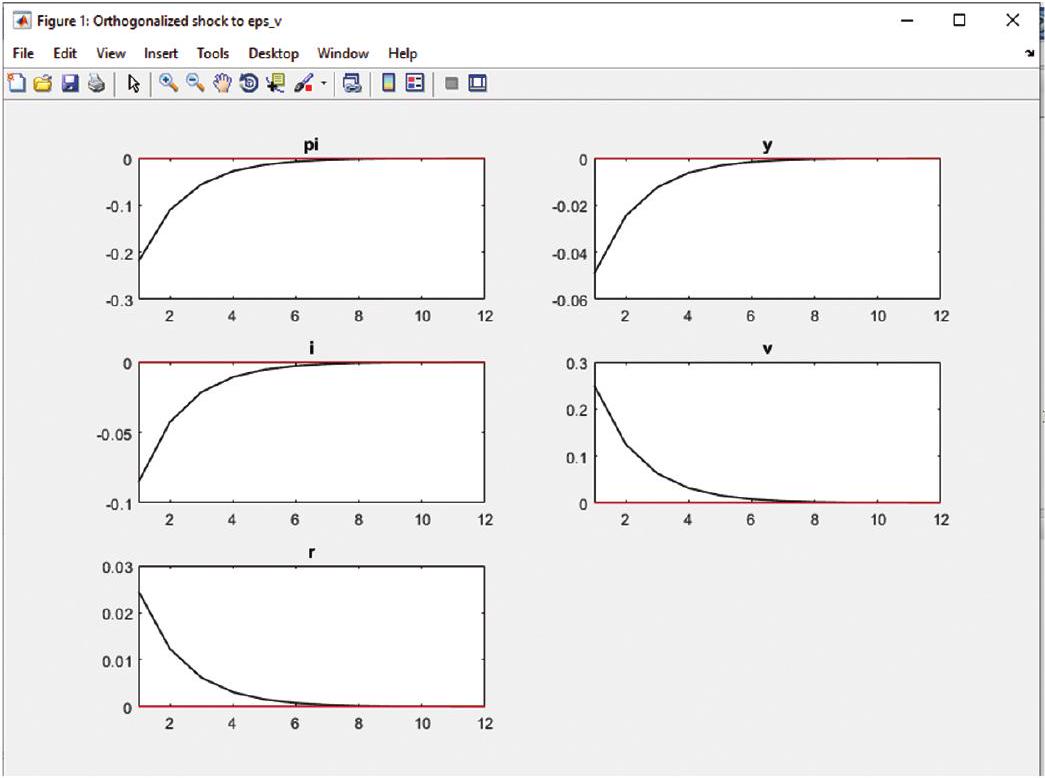
An interest rate shock reduces transitorily output and inflation.
If you are using MAC, maybe MATLAB will be unable to save it with the .mod extension. If that were the case you could write the whole model in a .txt outside of MATLAB and then save it in the appropriate folder.↩︎