flowchart LR
  A["Data"] --> B["Explore"] --> C["Stylized facts"] --> D["Model"] --> E["Compare with data"] --> F["Revise"]
  F -- "a sharper question" --> A
  F -- "a better idea" --> D
  %% Colors live in the theme files (_includes/theme-*.scss), so the diagram follows the light/dark toggle
  classDef data stroke-width:1.5px;
  classDef model stroke-width:1.5px;
  class A,B,C data;
  class D,E,F model;
Data Science and Macroeconomic Models
An AI-powered Python companion to intermediate macroeconomics
Preface
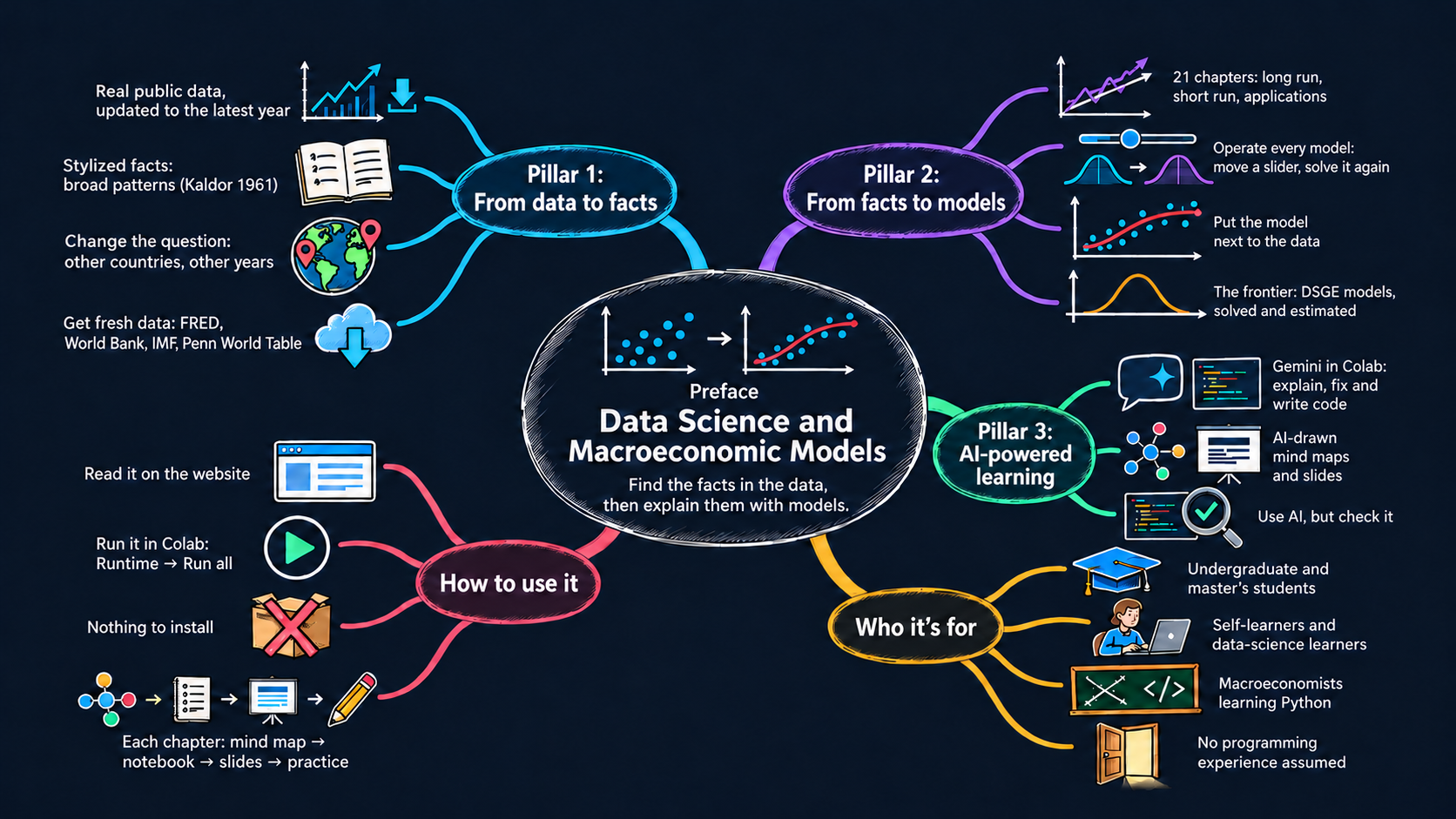
Welcome to Data Science and Macroeconomic Models! This book is an interactive, hands-on companion to Jones (2024), Macroeconomics. It is written for a time when anyone can download the world’s economic data in seconds, solve a model with the move of a slider and ask an AI assistant for help with the code. So it invites you to do macroeconomics, not only to read about it. You will find the big facts in real data yourself, and then build, operate and question the models that try to explain them.
Macroeconomics begins with facts. How fast have living standards risen? Why are some countries so much richer than others? How do output, unemployment and inflation move when the economy turns down? We need answers from the data before we can build a model. Models are our best attempt to explain the facts, and the facts tell us which models deserve our attention. My hope is simple: by the end of this book, you will be as comfortable asking the data a question as you are drawing a diagram, and you will enjoy doing both.
Why this book
The book rests on three pillars:
- Data science: find the facts. You download, plot and explore real macroeconomic data, and you decide for yourself what pattern the data show.
- Macroeconomic models: explain the facts. You move sliders, change parameters and edit the Python code of each model, and you check how well it accounts for the facts you found.
- AI-powered learning: learn faster, and check everything. An AI assistant helps you write and understand the code, and AI-drawn mind maps and lecture slides give you the big picture of every chapter.
Each chapter is an interactive notebook. You can read it on this website or run it in Google Colab, with nothing to install.
Stylized facts: where models begin
A stylized fact is a broad pattern in the data that holds across many countries or over long periods. It is “stylized” because it leaves out details and exceptions. Not every year or every country fits it exactly, but the pattern is strong enough that a good theory should explain it.
The term comes from the economist Nicholas Kaldor. In Kaldor (1961), he argued that theory should start from a summary of the facts, not from convenient assumptions. He then listed six stylized facts of economic growth:
- Output per worker grows at a roughly constant rate over long periods.
- Capital per worker also grows over time.
- The rate of return on capital is roughly constant.
- The ratio of capital to output is roughly constant.
- The shares of labor and capital in national income are roughly constant.
- The growth rate of output per worker differs widely across countries.
These six facts set the agenda for growth theory. With technological progress, the Solow model (Chapters 5 and 6) reproduces the first five. The sixth raised a new question, why countries differ so much, which Chapters 3 to 6 take up.
Stylized facts are not carved in stone. They summarize the data, so new data can revise them. Take labor’s share of income, long described as “about two-thirds.” Jones (2024, Chapter 2) notes that it has drifted down since around 1970. In the Chapter 2 notebook, you check this yourself with the latest U.S. national accounts. Labor earned 0.65 of income on average from 1950 to 2025, close to two-thirds, but its share has been below 0.60 since 2022. Is the old fact still a fact? The data alone do not settle it, but they tell you exactly which question to ask.
Pillar 1: From data to facts
Jones (2024) gives data a central role. Its chapters are full of figures of real economies, and its models are judged by how well they explain what those figures show. This book takes one more step. Instead of reading the facts from a printed figure, you derive them yourself.
Every data figure in this book is interactive. Each one is built from public data, usually updated to the latest available year. You can:
- Explore the figures. Hover over any point to read its value, zoom into a period, or press play to watch countries move over time.
- Change the question. Switch countries, years and variables with simple widgets or a one-line change in the code. Does the fact you see for the United States also hold for Japan, Brazil or Nigeria? Does it survive if the sample starts in 1990 instead of 1960?
- Get fresh data. Appendix B shows how to download data directly from FRED, the World Bank, the IMF, the ECB, Eurostat, the OECD, the Penn World Table, the Maddison Project and Our World in Data. Your facts can be as current as the data.
The aim is not to replace the facts in Jones (2024). It is to make you comfortable asking the data a question and judging the answer, which is what macroeconomists do every day.
Pillar 2: From facts to models
Once you have a fact, you want to know why it holds. That is the job of a model. The models in this book follow those in Jones (2024):
- The long run: the production model, the Solow model and the Romer model of ideas. Appendix D takes them to the Penn World Table: growth accounting splits each economy’s GDP growth into capital, labor and TFP, and development accounting splits its income gap with the United States the same way, for any economies you choose. Appendix E asks whether poor countries catch up: it derives the speed of convergence from the Solow model and measures β- and σ-convergence across 84 countries since
- Appendix F adds human capital to the Solow model and replicates Mankiw, Romer and Weil (1992): saving, schooling and population growth explain most of the income differences across countries, then and with the Penn World Table 11.0.
- The short run: the IS curve, monetary policy, the Phillips curve and the AS/AD framework.
- Applications: consumption, investment, government budgets, trade and exchange rates.
- The frontier: the dynamic stochastic general equilibrium (DSGE) models of Chapter 15, which central banks use for policy analysis and forecasting. Appendix G shows how to write them, solve them with rational expectations and estimate them, with Snowdrop, a free Python package developed at the IMF. Appendix H is the advanced version of Chapter 15: it solves the estimated Smets–Wouters model and recomputes the chapter’s impulse responses.
Here, however, you can operate every model:
- On this website, each model figure of the chapters has a slider. Move it to see how the outcome changes with a parameter.
- In Colab, each model figure has live sliders and buttons that solve the model again as you move them.
- In the code, each model is a few lines of plain Python, right next to its figure. Change a parameter, add a shock or replace an equation, and see what happens. This is where you can go beyond the textbook.
Then you close the loop by putting the model next to the data. Which facts does the model explain? Which does it miss? A model that misses an important fact is not a failure; it is the reason for the next chapter. For example, the Solow model explains much of why some countries are rich and others poor. On its own, however, it cannot explain why growth continues decade after decade. The economics of ideas in Chapter 6 fills that gap.
The chapters compare models with data by eye. Appendix G takes the last step that research takes: it estimates a model. The data choose the parameter values that make them most likely, by maximum likelihood or by Bayesian methods, and the estimation shows which parameters the data can pin down and which they cannot. There you estimate Ireland’s (2004) New Keynesian model on U.S. data from 1948 to 2002 and reproduce its published estimates.
Pillar 3: AI-powered learning
AI tools are changing how we learn, write code and do research. This book puts them to work for you in three ways:
- An AI assistant at your side. Colab includes Gemini, an AI assistant that can explain a line of code, fix an error or write a new plot from a plain-language request. Other assistants, such as Claude or ChatGPT, work just as well. Ask one to explain a model’s equations in plain words, to suggest another country to compare, or to turn your own idea into code. Section A.5 of Appendix A shows how to use Colab’s AI tools, how to write good prompts and how to check the answers.
- AI-drawn mind maps. Every chapter and appendix opens with a mind map: a hand-drawn visual summary of its questions, its facts and its models. The maps were drawn with AI image generation, and I checked every label, equation and number on them against the chapter. Look at the map before you start a chapter, and come back to it when you finish.
- Lecture slides. Every chapter and appendix has a lecture deck, made with AI assistance from the chapter itself, with live charts you can hover over and play with. The Open Lecture Slides badge at the top of each chapter opens it.
Use AI, but check it. An AI assistant can write code that runs and still answers the wrong question. Read what it writes, run it, and compare the result with what you know. Treat it as a fast and tireless study partner, not as an oracle.
How AI helped build this book. I wrote this book with the help of AI tools, and I want to be open about it. Claude (Anthropic) helped me write the code, the text and the lecture slides. Codex (OpenAI) drew the mind maps. Gemini (Google) is the assistant built into Colab, where every notebook runs. I checked every result: the code is run and tested, the numbers are computed from the data, and every figure names its sources.
Key resources for learning
This book
- The website, https://quarcs-lab.github.io/macro102-site/: every chapter, with its interactive figures and model sliders.
- The GitHub repository, quarcs-lab/macro102-site: the notebooks, their sources and the data files behind every figure.
The badges at the top of each chapter
- Open in Colab: run the chapter’s notebook in Google Colab, with live sliders and buttons.
- Open Lecture Slides: the chapter’s lecture deck, with live charts.
- Open Data Apps: a code-free page that collects the chapter’s interactive data charts, in the chapters that have one.
- Model Apps (coming soon): code-free pages with the chapter’s interactive models.
The cycle of the book
Every chapter runs through this cycle at least once. The blue steps are data science; the green steps are macroeconomic modeling. You start with the data and explore them until a pattern stands out. The pattern becomes a stylized fact. A model proposes an explanation, and you compare its predictions with the data. The comparison sends you back either to the data with a sharper question, or to the model with a better idea. In Appendix G the comparison becomes formal: the data estimate the model’s parameters, and the likelihood measures the fit.
A companion to Jones (2024), not a substitute
This book is an interactive data-science companion to Jones (2024). Its 21 chapters have the same titles and follow the same order, so you can work through the two books side by side. I recommend reading a chapter of Jones (2024) first, for the economic reasoning and the full discussion. Then open the matching notebook to work with the data and the models. The notebooks do not repeat the textbook’s explanations, and they do not replace it.
This book is independent. It is not affiliated with or endorsed by the author or the publisher of the textbook. Every figure is an original adaptation, drawn with this book’s own code:
- Data figures are inspired by figures in Jones (2024). They are rebuilt from public data, usually updated to the latest year and extended to other countries.
- Model figures are adapted from its diagrams, with their own parameter values, layout and interactive controls.
A Sources note below every figure names the figure in Jones (2024) that inspired it and links to the data sources, so you can open them and explore the data yourself.
Who this book is for
I wrote this book for anyone who wants to see macroeconomics at work in real data:
- Undergraduate students in intermediate macroeconomics, who want to see the ideas of the course at work in real data and learn practical Python along the way.
- Master’s students in business, public policy and development programs, who need a hands-on, data-driven understanding of the macroeconomy for analysis and policy work.
- Self-learners, who want a hands-on path through macroeconomics at their own pace, with no software to install.
- Data-science learners, who know some Python and want meaningful economic questions to apply it to.
- Macroeconomists, who know the theory and want to learn Python for data science with models they already know, and who want a free Python alternative to Dynare and IRIS for solving and estimating DSGE models (Appendices G and H).
No programming experience is assumed. Appendix A is a guided tour of Colab, Python, Colab’s AI tools for coding and learning, and the data-science libraries used in the book. Appendix C reviews the math, with Python code for each calculation.
How the book is organized
Like Jones (2024), this book is built around one famous graph: U.S. GDP per person since 1870. The graph shows a long-run upward trend and short-run fluctuations around it, and it raises the question of what the future holds. The chapters are grouped into four parts, as in the sidebar:
- Preliminaries (Chapters 1–2): what macroeconomics studies and how we measure the macroeconomy.
- The Long Run (Chapters 3–8): economic growth, production, the Solow model, ideas, the labor market and inflation.
- The Short Run (Chapters 9–15): economic fluctuations, the Great Recession and the Covid-19 pandemic, the IS curve, monetary policy and the Phillips curve, the AS/AD framework, financial crises and DSGE models.
- Applications (Chapters 16–21): consumption, investment, the government, international trade and exchange rates, and parting thoughts on what macroeconomics has learned and what remains open.
- Appendices A–H: first the tools (A–C): Colab and Python, live access to macroeconomic data and a math review. Then economic growth (D–F): growth and development accounting, growth and convergence across countries, and the augmented Solow growth model. Last, DSGE models (G–H): DSGE modeling with Python, and the Smets–Wouters model of Chapter 15 solved in Python.
Every chapter has the same structure:
- A mind map and the chapter’s badges (Colab, lecture slides and, where available, data apps) open the chapter.
- A Model overview builds the chapter’s main model step by step, from assumptions to solution and predictions, and ends with the model in code.
- Thematic sections work through the chapter’s figures (Fig. 1, Fig. 2, …). Each figure comes with a goal, the code that draws it, and a “What to notice” summary.
- Your turn tasks, with hints, ask you to change the data or the model and interpret the result.
- Concluding remarks sum up what the data showed and what the models explained.
- Practice problems (conceptual, data-based and modeling), with hints and full solutions, close Chapters 1–20.
How to use this book
Getting started
- On this website you can read every chapter, see all the figures, hover over the data points and move the precomputed sliders under each model figure.
- In Google Colab you can run the code yourself. Click the Open in Colab badge at the top of a chapter, then choose Runtime → Run all. Every model figure gets live sliders and buttons, and you can try every “Your turn” task in an empty code cell.
- No installation is needed. Colab already has
numpy,pandas,plotlyandipywidgets, and the data are read directly from this book’s GitHub repository. The appendices that need extra packages install them in their first code cell: Appendix B its data libraries, and Appendices G and H the Snowdrop package (about 20 seconds). - New to Python or Colab? Start with Appendix A.
For each chapter
Read the chapter in Jones (2024) first. The textbook gives you the economic reasoning and the full discussion. The notebook then lets you work with the data and the models behind it.
Look at the mind map. The map at the top of the chapter shows its questions, its facts and its models at a glance. Click it to open the full-size image.
Open the notebook. Read it on this website, or click Open in Colab and choose Runtime → Run all to bring every chart and slider to life.
Explore the data figures. Hover, zoom, press play and switch countries. Ask yourself whether the fact holds for other countries and other years.
Operate the models. Before you move a slider, predict what will happen. Then move it and check your prediction against the chart.
Do the “Your turn” tasks. Each one asks you to change the data or the model and to interpret the result. Try it yourself before you open the hint.
Ask an AI assistant when you are stuck. Ask Gemini in Colab to explain a line of code or an equation, or to help you with a “Your turn” task. Then check its answer.
Study the lecture slides. The Open Lecture Slides badge opens the chapter’s deck, a compact review of its facts and models with live charts.
Open the Data Apps. When the chapter has them, the Open Data Apps badge opens a code-free page with all its interactive data charts in one place.
Try the practice problems. Conceptual, data-based and modeling problems close the chapter. Work on each one before you look at the hints and the full solution.
Chapters

Appendices
Acknowledgments
This book stands on the shoulders of many people, institutions and projects.
Jones (2024). Macroeconomics is the textbook this book accompanies. Its clear models and its use of data in every chapter inspired the questions, the figures and the order of this book. This book is independent of it, and any errors here are my own.
The data producers. Every figure is built from data that public institutions collect and share freely: the Federal Reserve Bank of St. Louis (FRED), the U.S. Bureau of Economic Analysis, the Bureau of Labor Statistics and the Congressional Budget Office, the World Bank, the IMF, the OECD, Eurostat, the European Central Bank, the Bank for International Settlements, the Penn World Table, the Maddison Project, Our World in Data and many others. The Sources note under each figure names them.
The open-source community. Python, NumPy, pandas, Plotly, ipywidgets, SciPy, SymPy, statsmodels, Jupyter and Quarto make this book possible, and Snowdrop, developed at the IMF, brings DSGE models to Python. I am grateful to everyone who writes, maintains and documents these tools.
Google Colab and Gemini. Colab gives every reader a free Python environment in the browser, and Gemini an AI assistant right next to the code.
Now, let’s begin. Open Chapter 1, run the first cell, and start asking the data your own questions.
© 2026 Carlos Mendez. Licensed under CC BY-NC 4.0.
You may share and adapt this material for non-commercial purposes, with attribution. The license covers the text, code and charts written for this book. It does not cover Jones (2024), Macroeconomics, whose figures and equations these notebooks adapt with attribution, nor third-party data, which keep their producers’ terms (see each chapter’s Sources notes).