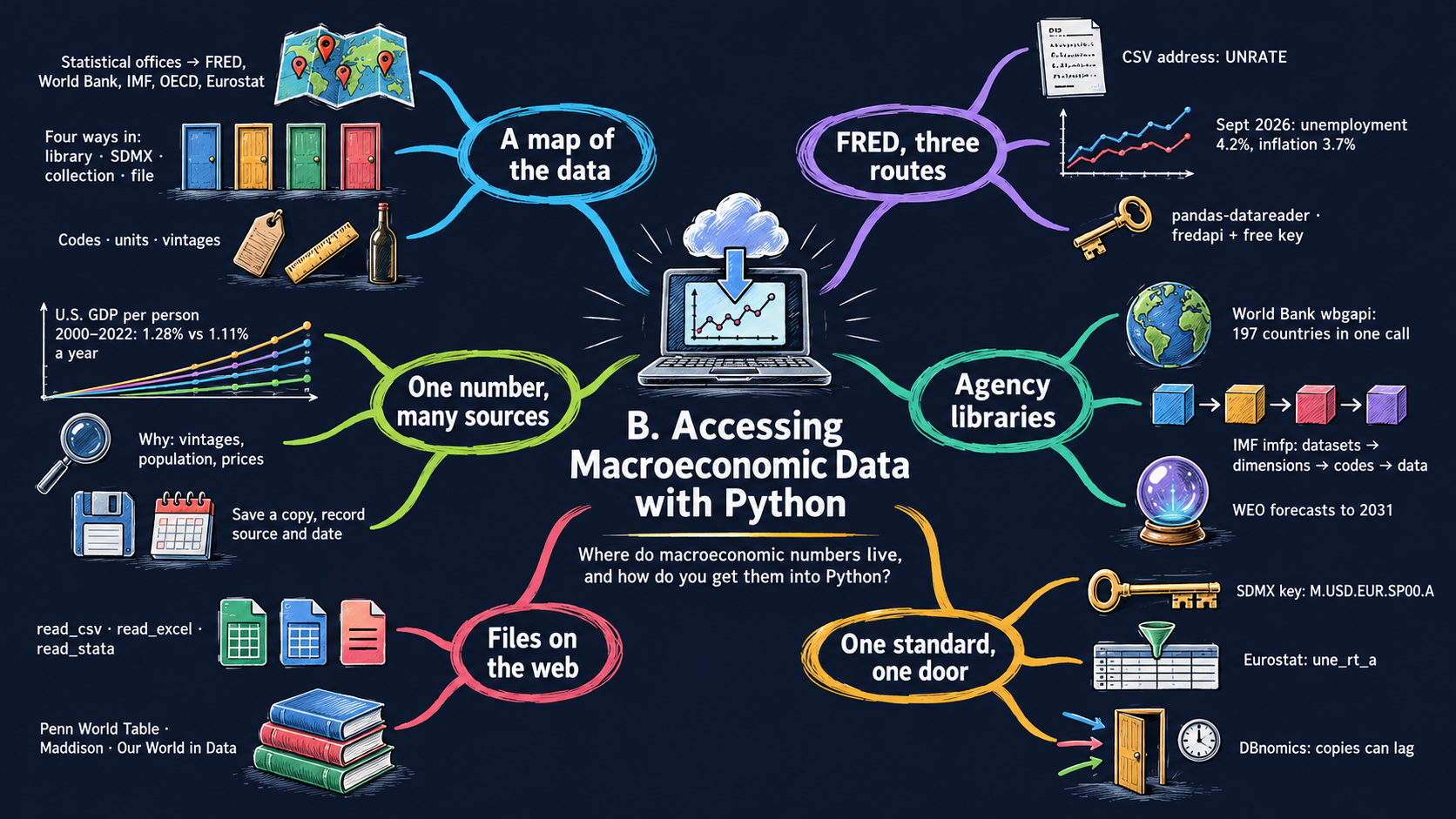
Macroeconomics runs on data: GDP, unemployment, inflation, interest rates, exchange rates. All of these are free to download, and Python can download them for you. Every example here downloads live data, so your numbers may be more recent than the ones printed on the website. By the end of this appendix you will be able to:
name the main sources of macroeconomic data and say what each one is good for;
tell apart the four ways of getting data into Python: a specialized library, a general library for many agencies, a collection of many sources in one place, and reading a file straight from its web address;
download series from FRED, the World Bank, the IMF, the ECB, Eurostat and the OECD with a few lines of code;
read the Penn World Table, the Maddison Project Database and Our World in Data directly from their files on the internet;
compare the same number from several sources and explain why they differ;
keep good habits: find the right series code, check units and dates, save a copy and record your sources.
B.1 A map of macroeconomic data sources
The table lists the sources used most often in macroeconomics, and in this book. Each row says who publishes the data, what they cover and the easiest way to reach them from Python. You do not need to remember it: come back to it when you look for a series.
one website and one Python library for the data of many providers: IMF, OECD, Eurostat, ECB, BIS and national statistical offices
dbnomics
Most numbers start life at a national statistical office, such as the U.S. Bureau of Economic Analysis (BEA) or Bureau of Labor Statistics (BLS). FRED, the World Bank, the IMF and the others collect these numbers, check them and put them in one place. That is why the same series often appears in several sources.
one library per source; libraries change over time
2. A general library that speaks SDMX, a data standard shared by many agencies
sdmx1 for the ECB, IMF, OECD and Eurostat
the same code for many agencies
you must learn each dataset’s “key” (its dimensions)
3. A collection of many sources in one place
dbnomics
one library and one search website for many providers
its copy can lag a few months behind the original
4. Read a file straight from its web address
FRED CSV, Penn World Table, Maddison, Our World in Data
works for any file on the internet, with pandas alone
you must find the address, and it can change
Three ideas to keep in mind
Series codes. Every series has a short code. UNRATE is the U.S. unemployment rate in FRED, and NY.GDP.PCAP.KD is GDP per person in constant dollars at the World Bank. Codes are precise; names are not. The first step is always to find the right code, using the source’s website or a search function.
Units. Read the units before you compute anything: percent or fraction, dollars or thousands of dollars, current or constant prices, monthly or annual, seasonally adjusted or not.
Vintages. Statistical offices revise their numbers as better information arrives. The GDP growth rate you download today for 2024 may differ from the one published in 2025. Each release is a vintage. Always write down when you downloaded your data.
B.2 Setup
Colab already has pandas, NumPy and Plotly. The data libraries of this appendix are not installed yet, so the first code cell installs them with %pip install. This takes about half a minute, and you need to do it once per Colab session.
Python note. Lines that start with % are not Python: they are commands for the notebook itself. %pip install name installs a library from the Python Package Index (PyPI), the online catalog of Python libraries. -q (“quiet”) hides most of the messages. The library imfp asks for exact versions of pandas and requests that Colab may not have; --no-deps (“no dependencies”) tells pip to keep Colab’s own versions, which work fine. If you see a note saying you may need to restart the kernel, you can ignore it.
# Install the data libraries this appendix uses (about 30 seconds, once per session)%pip install -q wbgapi fredapi pandas-datareader sdmx1 dbnomics eurostat%pip install -q --no-deps imfp
Note: you may need to restart the kernel to use updated packages.
Note: you may need to restart the kernel to use updated packages.
The setup cell loads the libraries we use everywhere and sets the look of the charts. Each data library is imported in its own section, right where we first need it, so you can see which line belongs to which source.
# Libraries used in every sectionimport numpy as np # numbers and arraysimport pandas as pd # data tablesimport plotly.express as px # quick charts from data tablesimport plotly.io as pio# One light blue/green look for every chartBLUE, TEAL, GREEN, GRAY ="#16528c", "#008070", "#7fb23a", "#8a96a3"pio.templates.default ="plotly_white"pio.templates["plotly_white"].layout.update(width=860, height=480) # same size in Colab and on the websitepx.defaults.color_discrete_sequence = [BLUE, TEAL, GREEN, "#c4651a", "#8e5ea2", "#5aa0d8", "#0b4f47"]# Readable tick labels for ratio (log) scalesLOG_TICKS = [100, 300, 1000, 3000, 10000, 30000, 100000]# The prepared data files of the chapters live in the book's GitHub repositoryBOOK_DATA ="https://raw.githubusercontent.com/quarcs-lab/macro102-site/main/data/"# The date of this run: data change over time, so we print it next to our resultsTODAY = pd.Timestamp.today().strftime("%Y-%m-%d")print("Data downloaded on", TODAY)
Data downloaded on 2026-10-17
B.3 FRED
FRED (Federal Reserve Economic Data) is the first place to look for U.S. macroeconomic data, and it has many international series too. Every series has a page on the FRED website. For example, the U.S. unemployment rate lives at fred.stlouisfed.org/series/UNRATE: the code UNRATE is the last part of the address. To find a code, type what you want in the search box of the FRED website.
FRED gives you three routes into Python. We try all three.
B.3.1 Way 4: read the CSV file of a series
Every FRED series can be downloaded as a CSV file (a plain text table with values separated by commas) from an address that ends with its code. pd.read_csv reads a CSV file, and it accepts a web address as easily as a file on your computer. This route needs no extra library and no registration.
Python note.parse_dates=["observation_date"] tells pandas that this column holds dates, so that charts put them on a time axis. .tail() shows the last five rows of a table, .head() the first five.
# The address of a FRED series: a fixed beginning plus the series codeurl ="https://fred.stlouisfed.org/graph/fredgraph.csv?id=UNRATE"unrate = pd.read_csv(url, parse_dates=["observation_date"])unrate.tail()
observation_date
UNRATE
940
2026-05-01
4.3
941
2026-06-01
4.2
942
2026-07-01
4.1
943
2026-08-01
4.1
944
2026-09-01
4.2
We will download several series, so we wrap these lines in a small function. Give it a code, and it returns the table, with the date column renamed to the shorter date.
def read_fred(code):"""Download one FRED series as a table with the columns date and <code>.""" url ="https://fred.stlouisfed.org/graph/fredgraph.csv?id="+ code table = pd.read_csv(url, parse_dates=["observation_date"])return table.rename(columns={"observation_date": "date"})cpi = read_fred("CPIAUCSL") # the consumer price index for all urban consumerscpi.tail()
date
CPIAUCSL
952
2026-05-01
333.979
953
2026-06-01
332.568
954
2026-07-01
332.813
955
2026-08-01
334.131
956
2026-09-01
336.298
The consumer price index (CPI) is a price level. Inflation is its growth rate. With monthly data, the inflation rate over the past 12 months is
In pandas, .shift(12) moves a column down by 12 rows, so each row can see the value from 12 months earlier.
cpi["inflation"] = (cpi["CPIAUCSL"] / cpi["CPIAUCSL"].shift(12) -1) *100# Put unemployment and inflation side by side in one table, matched by datefred = read_fred("UNRATE").merge(cpi[["date", "inflation"]], on="date")fred = fred.rename(columns={"UNRATE": "Unemployment rate", "inflation": "Inflation rate (CPI, 12 months)"})fred = fred[fred["date"] >="1960-01-01"]fred.tail()
date
Unemployment rate
Inflation rate (CPI, 12 months)
940
2026-05-01
4.3
4.166615
941
2026-06-01
4.2
3.463531
942
2026-07-01
4.1
3.303856
943
2026-08-01
4.1
3.353016
944
2026-09-01
4.2
3.717251
Plotly Express draws one line per category when the table is in long format: one row per date and series. .melt turns our wide table (one column per series) into a long one.
fred_long = fred.melt(id_vars="date", var_name="series", value_name="percent")latest = fred.dropna().iloc[-1] # the last month with both numbersprint(f"Latest month: {latest['date']:%B %Y}")print(f"Unemployment rate: {latest['Unemployment rate']:.1f} percent")print(f"Inflation rate: {latest['Inflation rate (CPI, 12 months)']:.1f} percent")fig = px.line(fred_long, x="date", y="percent", color="series", title="U.S. unemployment and inflation, monthly, from FRED", labels={"date": "", "percent": "Percent", "series": ""})fig.update_layout(legend=dict(orientation="h", y=1.02, yanchor="bottom", x=0))fig.show()
Sources. Data: U.S. Bureau of Labor Statistics through FRED, series UNRATE (unemployment rate, seasonally adjusted) and CPIAUCSL (consumer price index, seasonally adjusted); inflation is our own 12-month percent change. Unemployment and inflation are studied in Chapters 7, 8 and 12 of Jones (2024), Macroeconomics, 6th ed.
What to notice. Both series come from one line of code each. Inflation peaked in the 1970s and early 1980s, fell for decades, and jumped again in 2021–2022. Unemployment spikes in every recession; the spike of April 2020 (the COVID-19 pandemic) is the highest in the chart.
B.3.2 Way 1: pandas-datareader
The library pandas-datareader reads FRED (and a few other sources) into a pandas table. Its advantage: you can ask for several series in one call, and it lines them up by date for you.
Python note.import pandas_datareader.data as web loads the part of the library we need and gives it the short nickname web. Notice that you installpandas-datareader (with a hyphen) but importpandas_datareader (with an underscore): Python names cannot contain hyphens.
import pandas_datareader.data as web# Real GDP and real personal consumption, quarterly, billions of chained 2017 dollarsmacro = web.DataReader(["GDPC1", "PCECC96"], "fred", start="2000-01-01")macro["consumption share"] = macro["PCECC96"] / macro["GDPC1"]macro.tail()
GDPC1
PCECC96
consumption share
DATE
2025-04-01
23884.563
16378.319
0.685728
2025-07-01
24112.966
16526.176
0.685365
2025-10-01
24125.479
16604.582
0.688259
2026-01-01
24274.383
16634.157
0.685256
2026-04-01
24408.011
16788.685
0.687835
B.3.3 Way 1: fredapi, with a free API key
The library fredapi uses FRED’s official API (application programming interface: a web address designed for programs rather than people). It can also search FRED from Python. To use it you need a free API key, a personal password for programs:
In Colab, click the key icon (Secrets) in the left sidebar, choose Add new secret, name it FRED_API_KEY, paste your key as its value, and switch on Notebook access.
Run the cell below.
Never type a key directly into a notebook that you share: anybody who sees the notebook could use it. Colab Secrets keep it out of the notebook. Without a key, the cell below just prints a message and moves on.
Python note.try: runs a block of code, and except: says what to do if it fails, instead of stopping with an error. Here it fails outside Colab, or when no secret called FRED_API_KEY exists.
FRED_API_KEY =Nonetry:from google.colab import userdata FRED_API_KEY = userdata.get("FRED_API_KEY")exceptException:print("No FRED API key found, so this example is skipped. Follow steps 1-3 above to add one.")if FRED_API_KEY:from fredapi import Fred fred_api = Fred(api_key=FRED_API_KEY) found = fred_api.search("real gross domestic product per capita")print(found[["title", "frequency_short", "units_short", "popularity"]].head(10)) gdp = fred_api.get_series("GDPC1", observation_start="2020-01-01")print(gdp.tail())
No FRED API key found, so this example is skipped. Follow steps 1-3 above to add one.
Your turn. Use read_fred to download the 10-year Treasury bond yield, code DGS10, and the federal funds rate, code FEDFUNDS. Print the last rows of each. Which one is monthly, and which one is daily?
Hint
bond = read_fred("DGS10") and then bond.tail(). Look at the dates in the first column: consecutive days or the first day of each month? You can also open fred.stlouisfed.org/series/DGS10 to check.
# Your turn: try it here
B.4 World Bank: wbgapi
The World Bank’s World Development Indicators (WDI) are the standard source for comparing countries over time. The library wbgapi, written by the World Bank, reads them. We import it with the nickname wb.
The first job is to find the code of an indicator. wb.series.info(q=...) searches the indicator names.
import wbgapi as wbwb.series.info(q="GDP per capita")
id
value
NY.GDP.PCAP.CD
GDP per capita (current US$)
NY.GDP.PCAP.CN
GDP per capita (current LCU)
NY.GDP.PCAP.KD
GDP per capita (constant 2015 US$)
NY.GDP.PCAP.KD.ZG
GDP per capita growth (annual %)
NY.GDP.PCAP.KN
GDP per capita (constant LCU)
NY.GDP.PCAP.PP.CD
GDP per capita, PPP (current international $)
NY.GDP.PCAP.PP.KD
GDP per capita, PPP (constant 2021 international $)
7 elements
The list shows the same idea measured in different ways: current or constant dollars, at market exchange rates or at purchasing power parity (PPP). NY.GDP.PCAP.KD, in constant 2015 U.S. dollars, removes inflation, so it is the one to use for growth over time. Countries have three-letter codes, which wb.economy.info finds.
wb.economy.info(q="Korea")
id
value
region
incomeLevel
KOR
Korea, Rep.
EAS
HIC
PRK
Korea, Dem. People's Rep.
EAS
LIC
2 elements
wb.data.DataFrame(indicator, countries, time=...) downloads the data. numericTimeKeys=True labels the years as numbers (2020) instead of text ("YR2020"), and labels=True adds the country names.
countries = ["USA", "CHN", "IND", "KOR", "BRA"]gdppc = wb.data.DataFrame("NY.GDP.PCAP.KD", countries, time=range(1960, 2030), numericTimeKeys=True, labels=True)gdppc.iloc[:, :6] # all rows, the first 6 columns
Country
1960
1961
1962
1963
1964
economy
BRA
Brazil
2603.519010
2743.388888
2838.472299
2772.579949
2785.074432
KOR
Korea, Rep.
1037.728992
1077.104640
1087.793622
1153.234869
1229.369989
IND
India
312.777848
316.739645
318.381946
329.641495
346.011883
CHN
China
241.382661
177.349529
166.085165
178.744599
206.394593
USA
United States
18991.544600
19108.935362
19965.143574
20545.784245
21437.584071
The table is wide: one row per country and one column per year. As in B.3, we melt it into a long table for Plotly. A ratio (log) scale shows growth rates as slopes, so that equal slopes mean equal growth rates (Appendix A, Section A.5.5).
gdppc_long = gdppc.melt(id_vars="Country", var_name="year", value_name="gdp_pc").dropna()print("Years:", gdppc_long["year"].min(), "to", gdppc_long["year"].max())fig = px.line(gdppc_long, x="year", y="gdp_pc", color="Country", log_y=True, title="GDP per person in five economies, World Bank WDI", labels={"year": "", "gdp_pc": "GDP per person, constant 2015 dollars (ratio scale)","Country": ""})fig.update_yaxes(tickvals=LOG_TICKS, tickformat=",")fig.show()
What to notice. China’s and Korea’s lines are the steepest: their incomes grew fastest. Brazil’s line is much flatter after 1980: its income per person grew slowly.
A snapshot across all countries
wbgapi can download several indicators for every country at once. Below we take GDP per person at PPP (the right measure for comparing living standards across countries) and life expectancy in one year. columns="series" puts each indicator in its own column, and skipAggs=True leaves out groups of countries such as “World” or “Euro area”.
YEAR =2023snapshot = wb.data.DataFrame(["NY.GDP.PCAP.PP.KD", "SP.DYN.LE00.IN"], "all", time=YEAR, skipAggs=True, columns="series", labels=True)snapshot = snapshot.rename(columns={"NY.GDP.PCAP.PP.KD": "gdp_pc_ppp", "SP.DYN.LE00.IN": "life_expectancy"})snapshot = snapshot.dropna()print(len(snapshot), "countries have both numbers in", YEAR)snapshot.head()
197 countries have both numbers in 2023
Country
gdp_pc_ppp
life_expectancy
economy
ZWE
Zimbabwe
5218.045266
62.775
ZMB
Zambia
3673.484197
66.349
PSE
West Bank and Gaza
5562.424426
65.170
VNM
Viet Nam
13534.799784
74.588
VUT
Vanuatu
3782.826490
71.477
wb.economy.DataFrame lists every economy with its region and income group. We merge the income group into our table, and a dictionary turns the World Bank’s codes into names.
What to notice. Life expectancy rises steeply with income among poor countries and flattens among rich ones. Hover over a dot to see the country’s name.
Your turn. Search for the indicator code of the unemployment rate with wb.series.info(q="unemployment"), then download it for Spain, Germany and South Africa (codes ESP, DEU, ZAF) from 2000 on and show the table.
Hint
The modeled ILO estimate is SL.UEM.TOTL.ZS. Then: wb.data.DataFrame("SL.UEM.TOTL.ZS", ["ESP", "DEU", "ZAF"], time=range(2000, 2030), numericTimeKeys=True, labels=True).
# Your turn: try it here
B.5 IMF: imfp
The International Monetary Fund publishes the World Economic Outlook (WEO) twice a year, in April and October. Its database has GDP growth, inflation, unemployment and government debt for about 190 countries, and, unlike most sources, forecasts for the next five years. The library imfp reads it, and every other dataset on the IMF’s data portal, in four steps:
imf_get_dataflows(): which datasets exist?
imf_get_datastructure(dataset): which dimensions does a dataset have (country, indicator, frequency)?
imf_get_codelists(dimension, dataset): which codes can each dimension take?
imf_get(dataset, {dimension: codes}): download the data.
import imfp# Step 1: the IMF's datasets; .str.contains keeps the rows whose name contains a worddatasets = imfp.imf_get_dataflows()print(len(datasets), "datasets")datasets[datasets["name"].str.contains("World Economic Outlook")][["id", "name"]]
224 datasets
id
name
196
WEO_2026_APR_VINTAGE
World Economic Outlook (WEO) 2026 April
209
WEO_2025_OCT_VINTAGE
World Economic Outlook (WEO) 2025 October
212
WEO
World Economic Outlook (WEO)
The dataset called just WEO is the latest edition; the others are older editions (vintages), kept so that you can see what the IMF predicted at the time.
# Step 2: the dimensions of the WEOprint(imfp.imf_get_datastructure("WEO"))# Step 3: the indicator codes; we keep those about GDP at constant pricesindicators = imfp.imf_get_codelists("INDICATOR", "WEO")indicators[indicators["name"].str.contains("constant prices", case=False)][["code", "name"]]
  dimension_id       type  position
0      COUNTRY  Dimension         0
1    INDICATOR  Dimension         1
2    FREQUENCY  Dimension         2
code
name
10
NGDP_RPCHMK
Gross domestic product (GDP), Constant prices,...
16
NGDP_RPCH
Gross domestic product (GDP), Constant prices,...
18
NGDP_R
Gross domestic product (GDP), Constant prices,...
48
NGDPRPC
Gross domestic product (GDP), Constant prices,...
91
NGDPRPPPPC
Gross domestic product (GDP), Constant prices,...
NGDP_RPCH is the growth rate of real GDP (“constant prices, percent change”). Step 4 downloads it for five countries. The columns TIME_PERIOD and OBS_VALUE hold the year and the value.
# Step 4: the dataweo = imfp.imf_get("WEO", {"COUNTRY": ["USA", "CHN", "IND", "DEU", "BRA"], "INDICATOR": "NGDP_RPCH"})weo["year"] = weo["TIME_PERIOD"].astype(int) # the years arrive as text: make them numbersnames = {"USA": "United States", "CHN": "China", "IND": "India", "DEU": "Germany", "BRA": "Brazil"}weo["country"] = weo["COUNTRY"].map(names)weo = weo[weo["year"] >=2000]print("Years:", weo["year"].min(), "to", weo["year"].max())weo[["country", "year", "OBS_VALUE", "COUNTRY_UPDATE_DATE"]].tail()
Years: 2000 to 2031
country
year
OBS_VALUE
COUNTRY_UPDATE_DATE
255
United States
2027
2.292985
9/30/2026
256
United States
2028
2.056286
9/30/2026
257
United States
2029
1.880588
9/30/2026
258
United States
2030
1.753132
9/30/2026
259
United States
2031
1.755000
9/30/2026
The latest years are projections. In the most recent WEO, the numbers from the current year on are forecasts for most countries (for a few, the last year or two of “data” are estimates too). We shade them.
FIRST_FORECAST = pd.Timestamp.today().year # the current yearfig = px.line(weo, x="year", y="OBS_VALUE", color="country", markers=True, title="Real GDP growth with IMF forecasts, World Economic Outlook", labels={"year": "", "OBS_VALUE": "Real GDP growth, percent per year", "country": ""})fig.add_vrect(x0=FIRST_FORECAST -0.5, x1=weo["year"].max() +0.5, fillcolor=GRAY, opacity=0.15, line_width=0, annotation_text="IMF forecasts", annotation_position="top left")fig.add_hline(y=0, line_color=GRAY, line_width=1)fig.show()
Sources. Data: International Monetary Fund, World Economic Outlook database, indicator NGDP_RPCH (gross domestic product, constant prices, percent change), downloaded from the IMF data portal with imfp. Growth over the business cycle is the subject of Chapter 9 of Jones (2024), Macroeconomics, 6th ed.
What to notice. Actual growth jumps around: the 2009 financial crisis and the 2020 pandemic stand out. The forecasts are smooth lines, because the IMF assumes that each economy returns gradually to its normal growth rate.
Your turn. Download the WEO unemployment rate (indicator code LUR) for the same five countries and draw it with px.line. Which country has the highest unemployment rate in the latest forecast year?
Hint
Copy the Step 4 cell and replace "NGDP_RPCH" by "LUR". Some countries have no unemployment data in the WEO; their lines will be missing. To see the last year, use table[table["year"] == table["year"].max()].
# Your turn: try it here
B.6 SDMX: one library for many agencies (sdmx1)
Many central banks and statistical agencies share one standard for publishing data, called SDMX (Statistical Data and Metadata eXchange). The library sdmx1 (imported as sdmx) speaks this standard, so the same few lines of code work for the ECB, the IMF, the OECD, Eurostat and others. Here is the list of agencies it knows:
In SDMX, every series is identified by a key: one code for each dimension of the dataset. The ECB’s exchange-rate dataset EXR has the dimensions frequency (M = monthly), currency (USD), the currency it is measured against (EUR), the type of rate (SP00 = spot rate) and how it is summarized (A = average over the period). You can browse the series and their keys on the ECB Data Portal.
Python note.sdmx.to_pandas returns a pandas Series (a single column with an index), and .reset_index() turns it into a table with one column per dimension and a value column.
print(f"Lowest: {usd['value'].min():.2f} dollars per euro, in {usd.loc[usd['value'].idxmin(), 'date']:%B %Y}")print(f"Highest: {usd['value'].max():.2f} dollars per euro, in {usd.loc[usd['value'].idxmax(), 'date']:%B %Y}")fig = px.line(usd, x="date", y="value", title="How many U.S. dollars one euro buys, monthly average, ECB", labels={"date": "", "value": "U.S. dollars per euro"})fig.update_traces(line_color=BLUE)fig.show()
Lowest: 0.85 dollars per euro, in June 2001
Highest: 1.58 dollars per euro, in July 2008
Sources. Data: European Central Bank, ECB Data Portal, series EXR.M.USD.EUR.SP00.A (euro reference exchange rate, U.S. dollar, monthly average), downloaded with sdmx1. Exchange rates are the subject of Chapter 20 of Jones (2024), Macroeconomics, 6th ed.
What to notice. Exchange rates move a lot: the euro has been worth well below one dollar and well above 1.5 dollars. A higher line means a stronger euro.
The same code for another agency
To prove the point, here is Eurostat’s annual unemployment rate (the table une_rt_a that Section B.7 uses), this time through sdmx1. Only the agency (ESTAT), the dataset and the key change. Here the key is written as one text, with the codes of the dimensions in their fixed order, separated by dots: frequency, age, unit, sex and country. A + asks for several codes at once: Spain (ES) and Germany (DE).
estat = sdmx.Client("ESTAT")message = estat.data("une_rt_a", key="A.Y15-74.PC_ACT.T.ES+DE")unemployment = sdmx.to_pandas(message).reset_index()unemployment[["geo", "TIME_PERIOD", "value"]].tail()
geo
TIME_PERIOD
value
29
ES
2021
14.9
30
ES
2022
13.0
31
ES
2023
12.2
32
ES
2024
11.4
33
ES
2025
10.5
Your turn. Change the ECB key to download the monthly exchange rate of the Japanese yen (JPY) or the British pound (GBP) against the euro since 1999, and draw it.
Hint
Copy the ECB cell and change "CURRENCY": "USD" to "CURRENCY": "JPY". Then copy the chart cell, replacing usd by the name of your new table.
# Your turn: try it here
B.7 Eurostat: the eurostat package
Eurostat is the statistical office of the European Union. Every table in its database has a code, shown next to its name on the website. For example, une_rt_a is the annual unemployment rate. The library eurostat downloads a table by its code. Big tables have many dimensions, so first we ask which ones exist.
import eurostatprint(eurostat.get_pars("une_rt_a")) # the dimensions of the table
['freq', 'age', 'unit', 'sex', 'geo']
filter_pars keeps only the rows we want: all ages from 15 to 74, both sexes (T = total), and the rate as a percentage of the labor force (PC_ACT). The table arrives in wide format, with one column per year.
filters = {"age": "Y15-74", "sex": "T", "unit": "PC_ACT"}eu_unemp = eurostat.get_data_df("une_rt_a", filter_pars=filters)eu_unemp = eu_unemp.rename(columns={"geo\\TIME_PERIOD": "geo"}) # a shorter name for the country columnLAST = eu_unemp.columns[-1] # the last column is the latest yeareu_unemp.iloc[:5, :8]
freq
age
unit
sex
geo
2003
2004
2005
0
A
Y15-74
PC_ACT
T
AT
NaN
NaN
NaN
1
A
Y15-74
PC_ACT
T
BA
NaN
NaN
NaN
2
A
Y15-74
PC_ACT
T
BE
NaN
NaN
NaN
3
A
Y15-74
PC_ACT
T
BG
NaN
NaN
NaN
4
A
Y15-74
PC_ACT
T
CH
NaN
NaN
NaN
The empty cells (NaN, “not a number”, the way pandas marks missing values) in the first years are normal: the series of many countries start later. The countries have two-letter codes (EL is Greece, EU27_2020 the European Union). get_dic gives their names, as a list of (code, name) pairs, which dict turns into a dictionary.
geo_names =dict(eurostat.get_dic("une_rt_a", "geo"))eu_unemp["country"] = eu_unemp["geo"].map(geo_names)eu_unemp.loc[eu_unemp["geo"] =="EU27_2020", "country"] ="European Union"# a shorter labellatest = eu_unemp[["geo", "country", LAST]].dropna().sort_values(LAST)latest = latest[~latest["geo"].str.startswith("EA")] # drop the euro-area aggregatesprint("Year:", LAST, "-", len(latest) -1, "countries and the European Union")latest.tail()
Year: 2025 - 34 countries and the European Union
geo
country
2025
12
EL
Greece
8.9
15
FI
Finland
9.7
13
ES
Spain
10.5
26
MK
North Macedonia
11.5
1
BA
Bosnia and Herzegovina
12.2
latest["group"] ="Country"latest.loc[latest["geo"] =="EU27_2020", "group"] ="European Union"fig = px.bar(latest, x=LAST, y="country", color="group", orientation="h", height=750, color_discrete_map={"Country": TEAL, "European Union": BLUE}, title=f"Unemployment rates in Europe, {LAST}, Eurostat", labels={LAST: "Unemployment rate, percent of the labor force (ages 15-74)", "country": "","group": ""})fig.update_yaxes(categoryorder="total ascending") # sort all bars by length, the EU bar includedfig.show()
Sources. Data: Eurostat, table une_rt_a (unemployment by sex and age, annual data), ages 15–74, downloaded with the eurostat package. Unemployment is the subject of Chapter 7 of Jones (2024), Macroeconomics, 6th ed.
What to notice. Unemployment rates differ a lot across Europe, even inside one common market and, for many countries, one common currency. Spain and Finland have the highest rates in the European Union; some countries of the Western Balkans, outside the Union, are higher still.
Your turn. Draw the unemployment rate of youth (ages 15 to 24) instead. Which countries are at the top?
Hint
Change the age filter to "Y15-24" in the filters dictionary and run the cells of this section again. Do not forget to change the axis label of the chart.
# Your turn: try it here
B.8 DBnomics: one door to many providers
DBnomics collects the data of many providers (the IMF, OECD, Eurostat, ECB, BIS, national statistical offices and more) in one place, with one search website and one Python library. Each series has an address of the form provider / dataset / series. You find it by searching the DBnomics website: the address is shown on every series page.
The function fetch_series takes one or several such addresses:
from dbnomics import fetch_seriesus_growth = fetch_series("IMF/WEO:latest/USA.NGDP_RPCH.pcent_change")print(us_growth.columns.tolist())us_growth[["series_name", "period", "value"]].tail()
You can also give the provider, the dataset and the codes of each dimension. Below we take the OECD’s monthly unemployment rates for five countries, from its Key Economic Indicators dataset.
Sources. Data: OECD, Key Economic Indicators (dataset DSD_KEI@DF_KEI, measure UNEMP, monthly unemployment rate), through DBnomics. Unemployment across countries is discussed in Chapter 7 of Jones (2024), Macroeconomics, 6th ed.
What to notice. The U.S. rate jumps far higher in 2020 than the others: European countries and Japan protected jobs with short-time work schemes, while U.S. firms laid workers off and rehired them later.
Watch out. DBnomics keeps a copy of each provider’s data, and some copies lag behind the original by months. Always look at the latest date, as the cell above does, before you rely on it.
Your turn. Look up the U.S. series of central bank policy rates from the BIS on DBnomics, with the address "BIS/WS_CBPOL/M.US". What is the latest month in the DBnomics copy?
Hint
rates = fetch_series("BIS/WS_CBPOL/M.US"), then rates[["period", "value"]].tail(). Compare the last date with today’s date. Try "M.XM" (the euro area) and "M.JP" (Japan) too.
# Your turn: try it here
B.9 Reading data files straight from the web
Some of the most important datasets in macroeconomics have no Python library. They are published as files, in CSV, Excel or Stata format. pandas reads all of them from a web address:
File type
pandas function
Example
CSV (.csv)
pd.read_csv(address)
FRED, Our World in Data, this book’s files
Excel (.xlsx)
pd.read_excel(address, sheet_name=...)
Maddison Project Database
Stata (.dta)
pd.read_stata(address)
Penn World Table
The only hard part is finding the address of the file. The examples below show how.
B.9.1 The Penn World Table
The Penn World Table (PWT) measures real GDP, employment, hours, capital and productivity in a way that can be compared across countries. Chapters 3 to 6 use it a lot. Its files are stored at DataverseNL, a data archive. Each dataset there has a permanent identifier (a DOI), and Dataverse has an API that lists the files of a dataset with their numbers.
Python note. The library requests downloads anything from the web. .json() reads the reply, which comes in JSON format (nested lists and dictionaries), and pd.json_normalize flattens it into a table.
The main file is pwt110.dta, a Stata file. Its download address is https://dataverse.nl/api/access/datafile/ followed by the file’s id. (The Excel version, pwt110.xlsx, works too: read it with pd.read_excel(address, sheet_name="Data"). The Stata file is smaller and faster.)
The variable rgdpo is real GDP on the output side, in millions of 2021 dollars at PPP, and emp is the number of people employed, in millions. Their ratio is GDP per worker, a measure of labor productivity. We compare it with the United States, year by year.
pwt["gdp_per_worker"] = pwt["rgdpo"] / pwt["emp"]us = pwt[pwt["countrycode"] =="USA"][["year", "gdp_per_worker"]]us = us.rename(columns={"gdp_per_worker": "us_gdp_per_worker"})pwt = pwt.merge(us, on="year")pwt["relative_to_us"] =100* pwt["gdp_per_worker"] / pwt["us_gdp_per_worker"]catch_up = pwt[pwt["countrycode"].isin(["KOR", "DEU", "MEX", "BRA", "CHN", "IND"]) & (pwt["year"] >=1960)]fig = px.line(catch_up, x="year", y="relative_to_us", color="country", title="GDP per worker relative to the United States, Penn World Table 11.0", labels={"year": "", "relative_to_us": "GDP per worker, United States = 100", "country": ""})fig.show()
Sources. Data: Feenstra, Inklaar and Timmer (2015), Penn World Table 11.0, file pwt110.dta from DataverseNL; GDP per worker is rgdpo / emp. Chart: related to the productivity comparisons of Chapters 3 and 4 of Jones (2024), Macroeconomics, 6th ed.
What to notice. Korea’s line climbs steadily: a worker there produced less than a tenth of what a U.S. worker produced in 1960, and well over half by the 2020s. China’s climb starts later, around 2000. Mexico moved the other way: relative to the United States, its workers produce much less today than in 1980.
B.9.2 The Maddison Project Database
The Maddison Project Database estimates GDP per person and population over two thousand years. It is one Excel file with several sheets (Notes, Sources, GDPpc, Population, Full data, …). The sheet Full data is already in long format. It is stored at DataverseNL too, so we use the same kind of address.
What to notice. Around 1820 the five economies were much closer than today. The United Kingdom and the United States pulled away first; Japan caught up in the 20th century; China and India took off only in the last few decades.
OWID asks programs to say who they are, with a User-Agent header (a short label sent with the request). In pandas, storage_options passes it along; without it, OWID sometimes refuses the download.
OWID_URL ="https://ourworldindata.org/grapher/share-of-population-in-extreme-poverty.csv"poverty = pd.read_csv(OWID_URL, storage_options={"User-Agent": "Our World In Data data fetch/1.0"})SHARE = poverty.columns[3] # the column with the poverty rate (its name is long)print("Column:", SHARE)poverty.tail()
Column: Share of population in poverty ($3 a day)
Entity
Code
Year
Share of population in poverty ($3 a day)
Population
World region according to OWID
59367
Zimbabwe
ZWE
2019
49.219894
15271377.0
Africa
59368
Zimbabwe
ZWE
2020
NaN
15526887.0
Africa
59369
Zimbabwe
ZWE
2021
NaN
15797220.0
Africa
59370
Zimbabwe
ZWE
2022
NaN
16069061.0
Africa
59371
Zimbabwe
ZWE
2023
NaN
16340829.0
Africa
regions = ["World", "Sub-Saharan Africa (WB)", "South Asia (WB)", "East Asia and Pacific (WB)","Latin America and Caribbean (WB)"]poor = poverty[poverty["Entity"].isin(regions) & (poverty["Year"] >=1990)]fig = px.line(poor, x="Year", y=SHARE, color="Entity", category_orders={"Entity": regions}, title="Share of people in extreme poverty, by region, Our World in Data", labels={"Year": "", SHARE: "Percent of the population", "Entity": ""})fig.show()
Sources. Data: World Bank, Poverty and Inequality Platform, as processed by Our World in Data (share of the population living below the international poverty line of 3 dollars a day, in 2021 prices). The most recent years are World Bank projections from older household surveys. Chart: related to the discussion of growth and poverty in Chapter 3 of Jones (2024), Macroeconomics, 6th ed.
What to notice. Extreme poverty in East Asia fell from a majority of the population in 1990 to almost nothing, mostly because of growth in China. Sub-Saharan Africa now holds most of the world’s extreme poor.
B.9.4 This book’s own data files
Every chapter notebook reads its data the same way: pd.read_csv with the address of a CSV file in the book’s GitHub repository. On GitHub, the Raw button of a file gives its plain address, which starts with https://raw.githubusercontent.com/. Each chapter folder has a README.md that says where every file comes from.
# The U.S. unemployment rate prepared for Chapter 7 (folder data/ch07)book_unrate = pd.read_csv(BOOK_DATA +"ch07/fig7-2.csv", parse_dates=["date"])print("From", f"{book_unrate['date'].min():%B %Y}", "to", f"{book_unrate['date'].max():%B %Y}")book_unrate.tail()
From January 1950 to September 2026
date
unemployment_rate
915
2026-05-01
4.3
916
2026-06-01
4.2
917
2026-07-01
4.1
918
2026-08-01
4.1
919
2026-09-01
4.2
Your turn. Use the Penn World Table already in memory (pwt) to draw the human capital indexhc (based on years of schooling and the returns to education) for Korea, India and the United States since 1950.
Hint
Select the countries with pwt[pwt["countrycode"].isin(["KOR", "IND", "USA"])], then use px.line(table, x="year", y="hc", color="country").
# Your turn: try it here
B.10 Putting it together: one number, many sources
How fast has income per person grown in the United States since 2000? Five of our sources can answer, and we already know how to reach each of them. We collect U.S. real GDP per person from each one into a single table with one column per source.
FRED: series A939RX0Q048SBEA (real GDP per capita, quarterly), averaged over each year.
World Bank:NY.GDP.PCAP.KD (constant 2015 dollars).
IMF WEO:NGDPRPC (GDP per capita, constant prices, national currency).
Penn World Table:rgdpna / pop (real GDP from the national accounts, per person).
Maddison Project:gdppc.
# FRED: quarterly data, so we average the four quarters of each yearfred_pc = read_fred("A939RX0Q048SBEA")fred_pc["year"] = fred_pc["date"].dt.yearfred_pc = fred_pc[fred_pc["year"] < pd.Timestamp.today().year] # complete years onlyfred_pc = fred_pc.groupby("year")["A939RX0Q048SBEA"].mean().rename("FRED")# World Bankwb_pc = wb.data.DataFrame("NY.GDP.PCAP.KD", "USA", time=range(1990, 2030), numericTimeKeys=True)wb_pc = wb_pc.T["USA"].rename("World Bank") # .T swaps rows and columns: years become rows# IMF World Economic Outlookimf_pc = imfp.imf_get("WEO", {"COUNTRY": "USA", "INDICATOR": "NGDPRPC"})imf_pc["year"] = imf_pc["TIME_PERIOD"].astype(int)imf_pc = imf_pc.set_index("year")["OBS_VALUE"].rename("IMF WEO")print(fred_pc.tail(3), wb_pc.tail(3), imf_pc.tail(3), sep="\n\n")
year
2023    67412.25
2024    68788.50
2025    70020.25
Name: FRED, dtype: float64

2023    65667.28158
2024    66856.51317
2025    67945.61465
Name: World Bank, dtype: float64

year
2029    75400.028306
2030    76495.271236
2031    77616.076824
Name: IMF WEO, dtype: float64
# Penn World Table and Maddison: already in memory from B.9us_pwt = pwt[pwt["countrycode"] =="USA"].copy()us_pwt["gdp_pc"] = us_pwt["rgdpna"] / us_pwt["pop"]pwt_pc = us_pwt.set_index("year")["gdp_pc"].rename("Penn World Table")pwt_pc.index = pwt_pc.index.astype(int)mad_pc = maddison[maddison["countrycode"] =="USA"].set_index("year")["gdppc"].rename("Maddison")# One table: pd.concat puts the five columns side by side, matching the yearssources = pd.concat([fred_pc, wb_pc, imf_pc, pwt_pc, mad_pc], axis=1).sort_index()sources.loc[2000:]
FRED
World Bank
IMF WEO
Penn World Table
Maddison
2000
49914.50
48616.254628
49933.506536
55171.319764
45886.470498
2001
49893.25
48597.424612
49894.568179
55150.784119
45878.009154
2002
50260.25
48967.366122
50249.115510
55540.626532
46266.295891
2003
51189.00
49905.523308
51171.720936
56537.223348
47157.995271
2004
52681.25
51348.347339
52659.768913
58135.489032
48492.717123
2005
54014.25
52649.571306
53992.383025
59564.502594
49654.761425
2006
54993.50
53596.315236
54973.253207
60605.494371
50489.860022
2007
55560.00
54152.829267
55522.604102
61182.167520
50901.744705
2008
55105.25
53703.962898
55072.230718
60623.798447
50275.746337
2009
53212.50
51863.618342
53189.724236
58476.410696
48452.933504
2010
54188.25
52812.682987
54206.538072
59465.698228
49266.915862
2011
54603.00
53215.536231
54664.954464
59811.016490
49675.000000
2012
55422.25
54000.841078
55520.798685
60599.392924
50436.435497
2013
56171.75
54728.860180
56308.601530
61303.725190
51010.798103
2014
57137.75
55665.241119
57315.088299
62266.476411
51796.619218
2015
58363.25
56849.469792
58579.251546
63508.724960
52808.154135
2016
58967.75
57430.849930
59221.631639
64064.513971
53301.015067
2017
60000.75
58435.970754
60292.978357
65041.236929
54152.364519
2018
61417.50
59817.655680
61750.700319
66400.670332
55454.669438
2019
62676.50
61047.964824
63052.318238
67565.207594
56469.263659
2020
61127.00
59533.609024
61225.660175
65783.138914
54379.206512
2021
64828.50
63096.785615
64839.516732
69617.537868
57522.704626
2022
66037.25
64322.233282
66057.138042
71079.677954
58487.465861
2023
67412.25
65667.281580
67438.383199
72718.486651
NaN
2024
68788.50
66856.513170
68810.761710
NaN
NaN
2025
70020.25
67945.614650
70032.247214
NaN
NaN
2026
NaN
NaN
71464.142787
NaN
NaN
2027
NaN
NaN
72918.930070
NaN
NaN
2028
NaN
NaN
74218.701379
NaN
NaN
2029
NaN
NaN
75400.028306
NaN
NaN
2030
NaN
NaN
76495.271236
NaN
NaN
2031
NaN
NaN
77616.076824
NaN
NaN
The five columns are in different units: chained 2017 dollars, constant 2015 dollars, PPP dollars and so on. To compare them, we turn each into an index equal to 100 in 2000. Then we compute the average annual growth rate between 2000 and the last year that all five sources cover:
END =int(sources.dropna().index.max()) # the last year with all five sourcesindex =100* sources.loc[2000:END] / sources.loc[2000]growth =100* ((sources.loc[END] / sources.loc[2000]) ** (1/ (END -2000)) -1)print(f"Average annual growth of U.S. real GDP per person, 2000-{END}, percent:")print(growth.round(2).to_string())
Average annual growth of U.S. real GDP per person, 2000-2022, percent:
FRED                1.28
World Bank          1.28
IMF WEO             1.28
Penn World Table    1.16
Maddison            1.11
index_long = index.reset_index(names="year").melt(id_vars="year", var_name="source", value_name="index")fig = px.line(index_long, x="year", y="index", color="source", title=f"U.S. real GDP per person in five sources, 2000 = 100 (2000-{END})", labels={"year": "", "index": "Index, 2000 = 100", "source": ""})fig.show()
What to notice. The five sources tell the same story, but not with exactly the same numbers. In our run, FRED, the World Bank and the IMF, which all copy the latest official U.S. numbers, agree almost exactly. The Penn World Table and the Maddison Project show slower growth. Why do sources differ?
Vintages. Each source copied the official U.S. numbers at a different time, and the BEA revises GDP every year. FRED is updated within days; the Penn World Table and the Maddison Project only every few years.
Population. GDP per person divides by population, and the sources use different population estimates (from the Census Bureau, the United Nations or their own).
Prices and methods. The sources measure real GDP in different base years and, for the Penn World Table and the Maddison Project, convert it with their own international prices.
The lesson: always say where a number comes from, and compare sources when a result matters.
Your turn. Repeat the comparison for 2010 to the last common year. Are the differences between the sources larger or smaller than for 2000 onwards?
Hint
In the cell that computes index and growth, replace each 2000 by 2010. Remember the exponent: 1 / (END - 2010).
# Your turn: try it here
B.11 Good habits and going further
Keep a copy and record your sources
Save what you download. Sources change, revise and sometimes move their files. table.to_csv("name.csv") saves a table in the Colab session (see the Files icon in the left sidebar). A Colab session is temporary, so download the file to your computer from there, or save it in your Google Drive.
Write down the source, the series code and the date next to every result, as the Sources notes in this book do. TODAY, defined in the setup cell, holds the date of your download.
Check the units and the latest date before you compute anything (.tail() is your friend).
Keep keys secret. Store API keys in Colab Secrets, never in the notebook.
Be polite to the servers. Download what you need once and reuse the table, instead of downloading the same data again in every cell.
# Save a table with the download date in its namefile_name =f"us_unemployment_inflation_{TODAY}.csv"fred.to_csv(file_name, index=False)print("Saved", file_name)
Saved us_unemployment_inflation_2026-10-17.csv
When a download fails
Servers are sometimes down, busy or changed. A download that fails stops the notebook with an error, often an HTTPError or a ConnectionError. Wait a minute and run the cell again. If it keeps failing, try and except let you fall back on a copy, such as the prepared file of this book:
try: unemployment_rate = read_fred("UNRATE")print("Downloaded from FRED")exceptExceptionas problem:print("FRED did not answer:", problem) unemployment_rate = pd.read_csv(BOOK_DATA +"ch07/fig7-2.csv", parse_dates=["date"])print("Using the copy stored in the book's repository instead")
Downloaded from FRED
Common errors and how to fix them
Error message
What it usually means
What to do
ModuleNotFoundError: No module named 'wbgapi'
the library is not installed in this session
run the %pip install cell of Section B.2 again
HTTPError: HTTP Error 404: Not Found
the web address or the series code is wrong
check the code on the source’s website; copy it exactly
HTTPError: HTTP Error 403: Forbidden
the server refused the program
add a User-Agent, as for Our World in Data (B.9.3)
HTTPError: HTTP Error 429 or 503
too many requests, or the server is busy
wait a minute and try again; download less often
KeyError: 'value'
a column name that does not exist
print table.columns and use the exact name
an empty table
no data for this combination of codes
check each code of the key; try fewer filters
ValueError in pd.read_excel
wrong sheet name
open the file in a spreadsheet and check the sheet names
Macroeconomic data are free. The main sources are FRED, the World Bank, the IMF, the OECD, Eurostat, the ECB and the BIS for official statistics, and the Penn World Table, the Maddison Project and Our World in Data for comparisons across countries and over the long run.
Python reaches them in four ways: specialized libraries (wbgapi, imfp, fredapi, eurostat), a general SDMX library (sdmx1), a collection of many sources (dbnomics), and reading CSV, Excel or Stata files straight from their web addresses with pandas.
Every series has a code. Find it first, then check the units and the latest date of what you downloaded.
The same number differs a little across sources because of vintages, population estimates and methods. Always record where and when you got your data.
Every chapter of this book reads prepared copies of these data from its GitHub repository. You can now go back to the original sources, update them, and extend any chapter to other countries and years.