# @title Setup: libraries, chart colors and the data location
# Text after a "#" is a comment: Python ignores it, it is there for human readers.

# Step 1: load the libraries. `import` loads a library, a toolbox written by
# other people, and `as np` gives it a short nickname, so the code stays short.
import numpy as np                              # numbers and arrays
import pandas as pd                             # data tables
import plotly.express as px                     # quick charts from data tables
import plotly.graph_objects as go               # charts built piece by piece
import plotly.io as pio                         # settings shared by every chart
from plotly.subplots import make_subplots       # several panels in one figure
# sliders, buttons and menus for the interactive figures
from ipywidgets import interact, fixed, FloatSlider, IntSlider, ToggleButtons, Dropdown, SelectMultiple

# Step 2: one light blue/green look for every chart
BLUE, TEAL, GREEN, GRAY = "#16528c", "#008070", "#7fb23a", "#8a96a3"
pio.templates.default = "plotly_white"
# the same chart size in Colab and on the website
pio.templates["plotly_white"].layout.update(width=860, height=480)
px.defaults.color_discrete_sequence = [BLUE, TEAL, GREEN, "#5aa0d8", "#0b4f47"]
WIDE = {"description_width": "initial"}         # show the full slider labels

# Step 3, Colab only: let Plotly charts appear inside the interactive widgets.
# `try` runs the indented lines; if the import fails (we are not in Colab),
# `except` skips them.
try:
    import google.colab
    google.colab.output.enable_custom_widget_manager()
except ImportError:
    pass                                        # not running in Colab: nothing to do

# Step 4: the data files of this chapter live in the book's GitHub repository
DATA_URL = "https://raw.githubusercontent.com/quarcs-lab/macro102-site/main/data/ch13/"13. Stabilization Policy and the AS/AD Framework
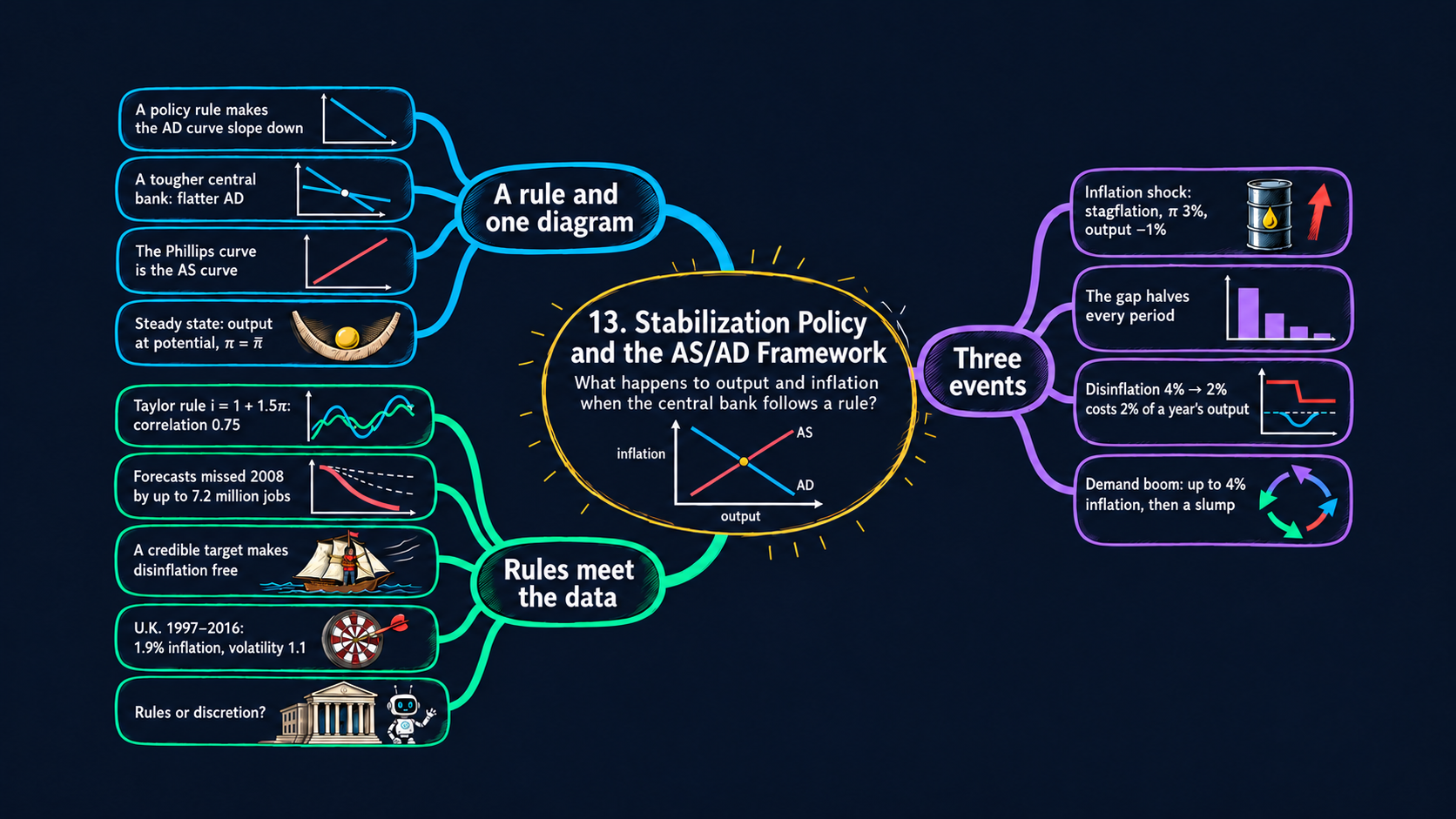




Learning goals
Chapters 11 and 12 built the short-run model from three pieces: the IS curve, the MP curve and the Phillips curve. In those chapters the central bank chose the interest rate case by case. This chapter gives it a rule, and the whole short-run model then fits in one familiar diagram. By the end of it you will be able to:
- derive the aggregate demand (AD) curve by substituting a monetary policy rule into the IS curve, and read the Phillips curve as an aggregate supply (AS) curve;
- derive the model’s steady state, its solution for one period, and the rule by which the inflation gap shrinks each period; use them to follow an inflation shock, a disinflation and an aggregate demand shock;
- read the comparative statics: how the policy response, the slope of the AS curve and the shocks change the first-period effects, the speed of recovery and the total output cost; explain why expectations, credibility and inflation targets matter for the cost of fighting inflation;
- test the model on U.S. data, and on data for dozens of other countries: policy rates against the policy rule, inflation-output loops, and three centuries of inflation;
- in Python: write one
simulateloop and reuse it in many figures, build tables from lists of dictionaries, reshape data withmelt, join tables withmerge, and compare two vintages of the same data.
Model overview
Picture Islandia again, the small island country of the earlier chapters. Its central bank, the Bank of Islandia, no longer decides the interest rate meeting by meeting. It has published a rule instead: when inflation runs above its target the real interest rate goes up, and when inflation runs below it the rate goes down. What does such a rule do when the price of fuel for Islandia’s boats jumps, when islanders go on a spending spree, or when the Bank wants lower inflation for good? This section builds the AS/AD model to answer, and we follow Islandia through every step.
NoteThe big idea
The question. When the central bank sets its interest rate by a fixed rule, how do output and inflation react to a shock, and how does the economy find its way back to normal?
The answer in one sentence. The rule turns the IS curve into a downward-sloping aggregate demand (AD) curve, the Phillips curve is an upward-sloping aggregate supply (AS) curve, and because firms expect last period’s inflation, the AS curve keeps moving until the economy is back at its steady state, with output at potential and inflation on target.
What goes in and what comes out. We choose the inflation target, the policy response, the interest sensitivity of spending, the slope of the Phillips curve and the shocks. The model gives back output and inflation in every period: on impact, on the way back, and in the steady state, together with the total output cost of each episode.
Road map.
- The policy rule and the AD curve: the IS curve of Chapter 11 plus a rule for the interest rate.
- The Phillips curve as the AS curve: the Phillips curve of Chapter 12, written in levels.
- The AS/AD model: steady state and dynamics: the steady state, one period, the path over time, the total output cost, and the chapter’s three events (an inflation shock, a disinflation and a demand shock).
- The rule for the nominal interest rate, and richer rules: the rate central banks actually set, and a rule that also watches output.
- Expectations and credibility: expectations that look ahead, and why being believed saves output.
- Model in code: the key results as Python functions, each checked with numbers. Every later section reuses them.
Notation. A bar over a letter marks a parameter: a number we take from outside the model. Letters without a bar are endogenous variables, which the model determines. The subscript \(t\) counts periods (years).
| Symbol | Meaning | Type |
|---|---|---|
| \(\tilde{Y}_t\) | short-run output: the percentage gap between actual and potential output | endogenous |
| \(\pi_t\) | inflation in period \(t\), in percent | endogenous |
| \(R_t\), \(i_t\) | the real and the nominal interest rate | endogenous |
| \(\pi^e_t\) | the inflation firms expect for period \(t\) | endogenous |
| \(\bar{\pi}\) | the inflation target | parameter |
| \(\bar{m}\) | the policy response: how hard the rule leans against inflation | parameter |
| \(\bar{r}\) | the marginal product of capital, the normal real interest rate | parameter |
| \(\bar{a}\), \(\bar{b}\) | the aggregate demand shock, and the interest sensitivity of spending | parameters |
| \(\bar{\nu}\), \(\bar{o}\) | the slope of the Phillips curve, and the inflation shock | parameters |
| \(\bar{x}\) | the weight on output in the richer rule (fourth block) | parameter |
| \(c\) | credibility, a share between 0 and 1 (fifth block, our addition) | parameter |
| \(\lambda\) | our shorthand for \(1/(1 + \bar{b}\bar{m}\bar{\nu})\) (third block) | notation |
| \(\tilde{Y}^*, \pi^*\) | a star marks the steady state | endogenous |
| \(\Delta\pi_t\) | the change in inflation, \(\pi_t - \pi_{t-1}\) | notation |
Islandia’s baseline. All worked examples, and every diagram of this notebook, use one set of numbers: an inflation target \(\bar{\pi} = 2\) percent (the target of most large central banks), the policy response \(\bar{m} = 1/2\) that John Taylor proposed (used again in Fig. 16), the interest sensitivity \(\bar{b} = 2\) of Chapter 11’s example, and an illustrative Phillips-curve slope \(\bar{\nu} = 1\). The shocks are an inflation shock \(\bar{o} = 2\) points for one period, a demand shock \(\bar{a} = 2\) points for nine periods, and a cut in the target from 4 to 2 percent (the numbers of textbook Fig. 13.20).
The policy rule and the AD curve
Assumptions
1. The IS curve (Chapter 11). Islandia’s short-run output depends on the real interest rate \(R_t\):
\[\tilde{Y}_t = \bar{a} - \bar{b}\,(R_t - \bar{r}).\]
When borrowing costs more than the marginal product of capital \(\bar{r}\), Harbor Boatworks puts off new workshops and islanders put off big purchases, so spending falls below normal. The parameter \(\bar{b} > 0\) says how strongly spending reacts. The aggregate demand shock \(\bar{a}\) moves spending at every interest rate.
2. A monetary policy rule. In Chapter 12 the central bank picked \(R_t\) through the MP curve. Now the Bank of Islandia follows a rule, a fixed recipe that maps what it observes into an interest rate:
\[R_t - \bar{r} = \bar{m}\,(\pi_t - \bar{\pi}).\]
Here \(\bar{\pi}\) is the inflation target and \(\bar{m} > 0\) is the policy response. The recipe has two steps: measure how far inflation is from the target, then set the real interest rate \(\bar{m}\) times that many points above \(\bar{r}\). With \(\bar{m} = 1/2\), inflation of 3 percent, one point above the target, calls for a real rate half a point above \(\bar{r}\), and inflation of 1 percent calls for a rate half a point below it. The rule looks at inflation only; the fourth block lets it look at output too.
Solving the model
The rule gives exactly the interest-rate gap \(R_t - \bar{r}\) that appears in the IS curve, so we substitute it (Appendix C.9):
\[\tilde{Y}_t = \bar{a} - \bar{b}\,\underbrace{(R_t - \bar{r})}_{=\ \bar{m}(\pi_t - \bar{\pi})} = \bar{a} - \bar{b}\,\bar{m}\,(\pi_t - \bar{\pi}).\]
ImportantKey result: the policy rule and the AD curve
\[R_t - \bar{r} = \bar{m}\,(\pi_t - \bar{\pi}) \tag{1}\]
\[\text{AD:}\quad \tilde{Y}_t = \bar{a} - \bar{b}\bar{m}\,(\pi_t - \bar{\pi}) \tag{2}\]
The interest rate has dropped out: the AD curve links two endogenous variables, output and inflation.
Islandia in numbers. In the baseline \(\bar{b}\bar{m} = 2 \times 0.5 = 1\). With inflation at 3 percent, the rule sets \(R_t - \bar{r} = 0.5 \times (3 - 2) = 0.5\), and the IS curve turns that into \(\tilde{Y}_t = 0 - 2 \times 0.5 = -1\) percent.
In the diagram output goes on the horizontal axis and inflation on the vertical axis, so we also solve (2) for \(\pi_t\). Move the inflation term to the left and \(\tilde{Y}_t\) to the right, then divide by \(\bar{b}\bar{m}\):
\[\bar{b}\bar{m}\,(\pi_t - \bar{\pi}) = \bar{a} - \tilde{Y}_t \quad\Longrightarrow\quad \pi_t = \bar{\pi} + \frac{\bar{a} - \tilde{Y}_t}{\bar{b}\bar{m}}.\]
So the AD curve is a straight line through the point \((\tilde{Y}, \pi) = (\bar{a}, \bar{\pi})\) with slope \(-1/(\bar{b}\bar{m})\). In the baseline each point of inflation above the target costs Islandia one point of output.
TipIn words: why the AD curve slopes down
The slope comes from the Bank of Islandia, not from shoppers who react to prices as on a market demand curve. When the Bank sees inflation above its target, it raises the real interest rate. Harbor Boatworks and the islanders then spend less, and output drops below potential. A weaker economy pulls inflation down later, and that is exactly what the Bank wants.
What the model predicts
The AD curve is a straight line, so each effect below is the same at every point of it (Appendix C.7):
| A change in … | effect on \(\tilde{Y}_t\) at a given \(\pi_t\) | in the AS/AD diagram |
|---|---|---|
| inflation \(\pi_t\), up 1 point | \(-\bar{b}\bar{m}\) (baseline \(-1\)) | a movement along the AD curve (Fig. 2) |
| demand shock \(\bar{a}\), up 1 point | \(+1\) | AD shifts right by 1 point, or up by \(1/(\bar{b}\bar{m})\) |
| target \(\bar{\pi}\), up 1 point | \(+\bar{b}\bar{m}\) | AD shifts up by 1 point, or right by \(\bar{b}\bar{m}\) |
| policy response \(\bar{m}\) or sensitivity \(\bar{b}\), up | output reacts more to inflation | AD turns around \((\bar{a}, \bar{\pi})\) and gets flatter (Fig. 3) |
Two facts are worth keeping:
- \(\bar{b}\) and \(\bar{m}\) enter only through their product \(\bar{b}\bar{m}\). A tougher central bank and a more interest-sensitive economy give the same AD curve.
- Inflation on target always goes with \(\tilde{Y}_t = \bar{a}\). Whatever \(\bar{m}\) is, with no demand shock the Bank wants output at potential when inflation is on target.
The AD curve slopes down because the central bank leans against inflation, not because buyers dislike high prices.
NoteCheck your understanding
1. Inflation in Islandia reaches 3.5 percent, with no demand shock and the baseline rule. What real-rate gap \(R_t - \bar{r}\) does the Bank of Islandia set, and where does output end up?
Answer
Rule (1) gives \(R_t - \bar{r} = 0.5 \times (3.5 - 2) = 0.75\) points. The AD curve (2) then gives \(\tilde{Y}_t = -2 \times 0.75 = -1.5\) percent: output falls one and a half points below potential.
2. Islandia’s spending becomes twice as sensitive to the interest rate (\(\bar{b}\) doubles), while the Bank keeps its rule. Could the Bank get the same AD curve without that change, just by its own choice?
Answer
Yes. Equation (2) depends on \(\bar{b}\) and \(\bar{m}\) only through the product \(\bar{b}\bar{m}\). Doubling \(\bar{m}\) instead of \(\bar{b}\) doubles the same product, so the AD curve turns to exactly the same flatter line.
The Phillips curve as the AS curve
Assumptions
3. The Phillips curve (Chapter 12). The change in inflation rises with short-run output and with inflation shocks \(\bar{o}\), such as a jump in the price of the fuel that Islandia’s boats burn:
\[\Delta\pi_t \equiv \pi_t - \pi_{t-1} = \bar{\nu}\tilde{Y}_t + \bar{o}, \qquad \bar{\nu} > 0.\]
4. Adaptive expectations. Firms such as Harbor Boatworks expect this period’s inflation to equal last period’s: \(\pi^e_t = \pi_{t-1}\). When period \(t\) begins, \(\pi_{t-1}\) is already known, so it is a given number for the period, not an unknown.
Solving the model
Write out \(\Delta\pi_t\) and add \(\pi_{t-1}\) to both sides:
\[\pi_t - \pi_{t-1} = \bar{\nu}\tilde{Y}_t + \bar{o} \quad\Longrightarrow\quad \pi_t = \pi_{t-1} + \bar{\nu}\tilde{Y}_t + \bar{o}.\]
ImportantKey result: the AS curve
\[\text{AS:}\quad \pi_t = \pi_{t-1} + \bar{\nu}\tilde{Y}_t + \bar{o} \tag{3}\]
Using \(\pi_{t-1} = \pi^e_t\), it reads \(\pi_t = \pi^e_t + \bar{\nu}\tilde{Y}_t + \bar{o}\): inflation is what firms expected, plus a push from a hot economy, plus any shock. In the diagram it is a straight line with slope \(\bar{\nu}\) that crosses \(\tilde{Y} = 0\) at the height \(\pi_{t-1} + \bar{o}\).
Islandia in numbers. Last year’s inflation was 2 percent and there is no shock. If output runs one point above potential, then with \(\bar{\nu} = 1\) this year’s inflation is \(2 + 1 \times 1 = 3\) percent.
TipIn words: how Harbor Boatworks sets its prices
Harbor Boatworks raises its prices in step with the inflation it expects. When orders pile up and output runs above potential, it pays overtime and runs its slipways harder, so it raises prices faster than that to cover the extra cost. In a slump it raises them more slowly. A fuel shock adds to its costs whatever the state of demand.
What the model predicts
| A change in … | effect on \(\pi_t\) at a given \(\tilde{Y}_t\) | in the AS/AD diagram |
|---|---|---|
| output \(\tilde{Y}_t\), up 1 point | \(+\bar{\nu}\) | a movement along the AS curve |
| last period’s inflation \(\pi_{t-1}\), up 1 point | \(+1\) | AS shifts up by 1 point, next period too |
| inflation shock \(\bar{o}\) | \(+\bar{o}\) while the shock lasts | AS shifts up by \(\bar{o}\) (Fig. 6) |
| slope \(\bar{\nu}\), up | prices react more to booms and slumps | AS turns around \((0, \pi_{t-1} + \bar{o})\) and gets steeper |
The second row is the engine of the whole chapter. Whenever this period’s inflation differs from last period’s, next period’s AS curve sits at a different height. The AS curve keeps moving until inflation stops changing.
This year’s inflation becomes next year’s expected inflation, so the AS curve keeps moving until inflation stops changing.
NoteCheck your understanding
1. Islandia’s inflation was 2 percent last year. This year output is 1.5 points above potential, and a fuel shock \(\bar{o} = 1\) hits. With \(\bar{\nu} = 1\), what is this year’s inflation?
Answer
The AS curve (3) gives \(\pi_t = 2 + 1 \times 1.5 + 1 = 4.5\) percent: 1.5 points from the boom and 1 point from the fuel shock.
2. Inflation came in at 3 percent this year instead of 2. Why does that matter for next year, even if output is back at potential and fuel prices are normal?
Answer
With adaptive expectations, next year’s AS curve starts from \(\pi_{t-1} = 3\), one point higher (the second row of the table). Even at potential output, inflation then stays at 3 percent unless something pushes it down.
The AS/AD model: steady state and dynamics
Assumptions
5. Equilibrium in every period. In each period \(t = 1, 2, 3, \dots\) both the AD curve (2) and the AS curve (3) hold. The two unknowns are \(\tilde{Y}_t\) and \(\pi_t\). Last period’s inflation \(\pi_{t-1}\) and this period’s shocks \(\bar{a}\) and \(\bar{o}\) are given.
6. Shocks are temporary. Both shocks are zero in the long run. For \(\bar{a}\) the reason is the resource constraint: at potential output, the shares of consumption, investment, government purchases and net exports add up to one, so Islandia’s demand cannot stay above normal for ever. Period 0 is the steady state the economy starts from.
Solving the model
Step 1: the steady state. In a steady state there are no shocks (\(\bar{a} = \bar{o} = 0\)) and inflation does not change, \(\pi_t = \pi_{t-1} = \pi^*\). Put this into the AS curve (3): \(\pi^* = \pi^* + \bar{\nu}\tilde{Y}^*\), so \(\bar{\nu}\tilde{Y}^* = 0\), and since \(\bar{\nu} > 0\), \(\tilde{Y}^* = 0\). Put \(\tilde{Y}^* = 0\) and \(\bar{a} = 0\) into the AD curve (2): \(0 = -\bar{b}\bar{m}(\pi^* - \bar{\pi})\), and since \(\bar{b}\bar{m} > 0\), \(\pi^* = \bar{\pi}\).
ImportantKey result: the steady state
\[\tilde{Y}^* = 0, \qquad \pi^* = \bar{\pi} \tag{4}\]
In the long run output is at potential and the central bank’s target becomes the economy’s inflation rate, whatever the values of \(\bar{m}\), \(\bar{b}\) and \(\bar{\nu}\). Islandia’s steady state has inflation of 2 percent and no output gap.
Step 2: one period. Take \(\pi_{t-1}\) as given and substitute the AS curve (3) for \(\pi_t\) in the AD curve (2):
\[\tilde{Y}_t = \bar{a} - \bar{b}\bar{m}\,(\pi_{t-1} + \bar{\nu}\tilde{Y}_t + \bar{o} - \bar{\pi}).\]
Multiply out the bracket, keeping the \(\tilde{Y}_t\) term apart:
\[\tilde{Y}_t = \bar{a} - \bar{b}\bar{m}\,(\pi_{t-1} - \bar{\pi} + \bar{o}) - \bar{b}\bar{m}\bar{\nu}\,\tilde{Y}_t.\]
Move the last term to the left, \(\tilde{Y}_t + \bar{b}\bar{m}\bar{\nu}\tilde{Y}_t = (1 + \bar{b}\bar{m}\bar{\nu})\tilde{Y}_t\), and divide:
\[\tilde{Y}_t = \frac{\bar{a} - \bar{b}\bar{m}\,(\pi_{t-1} - \bar{\pi} + \bar{o})}{1 + \bar{b}\bar{m}\bar{\nu}}.\]
For inflation, subtract \(\bar{\pi}\) from both sides of the AS curve, \(\pi_t - \bar{\pi} = (\pi_{t-1} - \bar{\pi} + \bar{o}) + \bar{\nu}\tilde{Y}_t\), and insert the output solution:
\[\pi_t - \bar{\pi} = (\pi_{t-1} - \bar{\pi} + \bar{o})\left[1 - \frac{\bar{b}\bar{m}\bar{\nu}}{1 + \bar{b}\bar{m}\bar{\nu}}\right] + \frac{\bar{\nu}\bar{a}}{1 + \bar{b}\bar{m}\bar{\nu}}.\]
The bracket equals \(\dfrac{1 + \bar{b}\bar{m}\bar{\nu} - \bar{b}\bar{m}\bar{\nu}}{1 + \bar{b}\bar{m}\bar{\nu}} = \dfrac{1}{1 + \bar{b}\bar{m}\bar{\nu}}\).
ImportantKey result: output and inflation in one period
\[\tilde{Y}_t = \frac{\bar{a} - \bar{b}\bar{m}\,(\pi_{t-1} - \bar{\pi} + \bar{o})}{1 + \bar{b}\bar{m}\bar{\nu}} \tag{5}\]
\[\pi_t - \bar{\pi} = \frac{(\pi_{t-1} - \bar{\pi}) + \bar{o} + \bar{\nu}\bar{a}}{1 + \bar{b}\bar{m}\bar{\nu}} \tag{6}\]
To keep the formulas short we write \(\lambda \equiv 1/(1 + \bar{b}\bar{m}\bar{\nu})\). This shorthand is ours, not the textbook’s. It lies between 0 and 1.
Islandia in numbers. In the baseline \(\bar{b}\bar{m}\bar{\nu} = 2 \times 0.5 \times 1 = 1\), so \(\lambda = 1/2\).
TipIn words: the Bank splits the pressure
Equation (6) adds up the inflation pressure that reaches Islandia in period \(t\): the gap inherited from last period, plus the inflation shock, plus the push from a demand shock. Only the share \(\lambda\) of it shows up as inflation above the target. The Bank’s rule absorbs the rest by holding output below potential, as equation (5) shows. In the baseline Islandia feels half of the pressure as inflation.
Step 3: the path back to the steady state. Once the shocks are over, set \(\bar{a} = \bar{o} = 0\) in equation (6) and in the AD curve (2), and write \(\lambda\) for the fraction:
ImportantKey result: the path back
\[\pi_t - \bar{\pi} = \lambda\,(\pi_{t-1} - \bar{\pi}), \qquad \tilde{Y}_t = -\bar{b}\bar{m}\,(\pi_t - \bar{\pi}) \tag{7}\]
Each period the inflation gap, and with it the recession, shrinks by the same factor \(\lambda\). In Islandia’s baseline, with \(\lambda = 1/2\), both halve every period.
The first part is a difference equation (Appendix C.10). Apply it again and again, starting from some period \(s\):
\[\pi_t - \bar{\pi} = \lambda(\pi_{t-1} - \bar{\pi}) = \lambda^2(\pi_{t-2} - \bar{\pi}) = \dots = \lambda^{t-s}(\pi_s - \bar{\pi}).\]
The fall in the gap from one period to the next is \((\pi_{t-1} - \bar{\pi}) - (\pi_t - \bar{\pi}) = (1 - \lambda)(\pi_{t-1} - \bar{\pi})\), proportional to the gap itself. So the economy moves fastest when it is farthest from the steady state: the principle of transition dynamics of the Solow model (Chapter 5) holds here too. Because \(\lambda < 1\), the gap always dies out, and the economy always returns to the steady state (4).
Step 4: the total output cost of an episode. Add up the AS curve, \(\pi_t - \pi_{t-1} = \bar{\nu}\tilde{Y}_t + \bar{o}_t\), over the periods \(t = 1, \dots, T\), writing \(\bar{o}_t\) for the shock of period \(t\). On the left, every middle term cancels:
\[(\pi_1 - \pi_0) + (\pi_2 - \pi_1) + \dots + (\pi_T - \pi_{T-1}) = \pi_T - \pi_0.\]
So \(\pi_T - \pi_0 = \bar{\nu}\sum_t \tilde{Y}_t + \sum_t \bar{o}_t\). Solve for the sum of output:
ImportantKey result: the total output cost
\[\sum_{t=1}^{T}\tilde{Y}_t = \frac{(\pi_T - \pi_0) - \sum_{t=1}^{T}\bar{o}_t}{\bar{\nu}} \tag{8}\]
Take \(T\) large enough for the economy to be back at a steady state. The total output gained or lost then depends only on how far inflation moved in the end, on the inflation shocks, and on the slope \(\bar{\nu}\). Each point by which inflation must come down costs \(1/\bar{\nu}\) points of a year’s output, a number often called the sacrifice ratio.
The policy response \(\bar{m}\) does not appear in (8). An aggressive central bank makes the slump deeper but shorter, not larger in total.
Step 5: the three events. We now apply equations (5) to (8) to the chapter’s three events, with Islandia’s baseline numbers.
Event 1: an inflation shock. Islandia starts at \(\pi_0 = \bar{\pi} = 2\), and in period 1 only the price of boat fuel jumps, \(\bar{o} = 2\). Equation (6) gives \(\pi_1 - \bar{\pi} = \lambda\bar{o} = 1\), so \(\pi_1 = 3\) percent, and equation (5) gives \(\tilde{Y}_1 = -\bar{b}\bar{m}\lambda\bar{o} = -1\) percent. Inflation rises and output falls: stagflation. From period 2 on, equation (7) halves both gaps: inflation is 2.5, 2.25, 2.125, … percent and output −0.5, −0.25, −0.125, … percent. Inflation ends where it started and the shock adds up to 2, so equation (8) gives a total output loss of \(\sum\tilde{Y}_t = -2/\bar{\nu} = -2\) percent of a year’s output.
Event 2: a disinflation. Islandia starts in a steady state with a target of 4 percent, so \(\pi_0 = 4\). From period 1 on the Bank of Islandia aims at \(\bar{\pi}' = 2\). Every formula above holds with \(\bar{\pi}'\) in place of \(\bar{\pi}\). Equation (6): \(\pi_1 - \bar{\pi}' = \lambda(\pi_0 - \bar{\pi}') = 1\), so \(\pi_1 = 3\) percent, halfway between the old and the new target. The AD curve (2) gives \(\tilde{Y}_1 = -\bar{b}\bar{m}(\pi_1 - \bar{\pi}') = -1\) percent. After that the gap to the new target halves every period, and the new steady state (4) has \(\pi^* = \bar{\pi}' = 2\). Inflation falls by 2 points in total with no inflation shocks, so by equation (8) the disinflation costs \(-2/\bar{\nu} = -2\) percent of a year’s output.
Event 3: a demand shock. A wave of optimism lifts islanders’ spending, \(\bar{a} = 2\), in periods 1 to 9. In period 1, equation (6) gives \(\pi_1 - \bar{\pi} = \lambda\bar{\nu}\bar{a} = 1\), so \(\pi_1 = 3\) percent, and equation (5) gives \(\tilde{Y}_1 = \lambda\bar{a} = 1\) percent: a boom with rising inflation. While the shock lasts, inflation drifts toward the point \(C\) where output is at potential. There the AS curve gives \(\pi_t = \pi_{t-1}\), so inflation is stable, and the shifted AD curve gives \(0 = \bar{a} - \bar{b}\bar{m}(\pi^c - \bar{\pi})\). Solving for \(\pi^c\):
ImportantKey result: inflation at point C
\[\pi^c = \bar{\pi} + \frac{\bar{a}}{\bar{b}\bar{m}} \tag{9}\]
Islandia in numbers. In the baseline \(\pi^c = 2 + 2/1 = 4\) percent: while the boom lasts, the Bank tolerates inflation two points above its target, because at that rate its rule just offsets the extra spending.
Subtracting \(\pi^c\) from both sides of equation (6) shows that, while \(\bar{a}\) stays constant, the gap \(\pi_t - \pi^c\) also shrinks by the factor \(\lambda\) each period. After eight periods it is \((1/2)^7 \times (3 - 4) \approx -0.008\), so \(\pi_8 \approx 3.992\) percent. When the optimism fades after period 9, equation (7) applies again: \(\pi_{10} - \bar{\pi} = \lambda(\pi_9 - \bar{\pi}) \approx 1\), so inflation is about 3 percent and output about −1 percent, a recession (point \(D\)). From there both gaps halve on the way back to the steady state. Inflation starts and ends at 2 percent with no inflation shocks, so equation (8) gives \(\sum\tilde{Y}_t = 0\): the boom and the later recession cancel exactly.
NoteCheck your understanding
1. A larger fuel shock hits Islandia: \(\bar{o} = 4\) in period 1 only, with the baseline numbers. What are inflation and output in period 1, and what is the total output loss of the whole episode?
Answer
With \(\lambda = 1/2\), equation (6) gives \(\pi_1 - 2 = 0.5 \times 4 = 2\), so \(\pi_1 = 4\) percent. Equation (5) gives \(\tilde{Y}_1 = -1 \times 2 = -2\) percent. Inflation ends back at 2 percent, so by equation (8) the total loss is \(-4/1 = -4\) percent of a year’s output, twice that of Event 1.
2. The Bank of Islandia doubles its policy response to \(\bar{m} = 1\) before the baseline fuel shock \(\bar{o} = 2\) hits. Is the recession in period 1 deeper or milder? Does the total output loss change?
Answer
Now \(\bar{b}\bar{m}\bar{\nu} = 2\) and \(\lambda = 1/3\), so equation (5) gives \(\tilde{Y}_1 = -2 \times 1 \times 2/3 \approx -1.33\) percent: a deeper recession. But the gap now shrinks to a third each period, so it ends sooner. The total, by equation (8), is still \(-2\) percent of a year’s output, because \(\bar{m}\) does not appear in it.
What the model predicts
The first period after a shock. Equations (5) and (6), for an economy that starts in its steady state:
| Shock | output \(\tilde{Y}_1\) | inflation in period 1 | baseline | what comes next |
|---|---|---|---|---|
| inflation shock \(\bar{o}\) | \(-\bar{b}\bar{m}\lambda\,\bar{o}\) | \(\pi_1 - \bar{\pi} = \lambda\bar{o}\) | \(-1\) and \(+1\) for \(\bar{o} = 2\) | back to the steady state along AD (Figs. 6–9) |
| target cut from \(\bar{\pi}\) to \(\bar{\pi}'\) | \(-\bar{b}\bar{m}\lambda\,(\bar{\pi} - \bar{\pi}')\) | \(\pi_1 - \bar{\pi}' = \lambda(\bar{\pi} - \bar{\pi}')\) | \(-1\), and \(\pi_1 = 3\) | down the new AD curve to \(\bar{\pi}'\) (Figs. 10–11) |
| demand shock \(\bar{a}\) | \(+\lambda\bar{a}\) | \(\pi_1 - \bar{\pi} = \lambda\bar{\nu}\bar{a}\) | \(+1\) and \(+1\) for \(\bar{a} = 2\) | up toward \(\pi^c\), then a slump when it ends (Figs. 12–15) |
The role of the parameters. Recall \(\lambda = 1/(1 + \bar{b}\bar{m}\bar{\nu})\), which falls when \(\bar{m}\) or \(\bar{\nu}\) rises.
| A higher … | recession on impact of \(\bar{o}\), \(\bar{b}\bar{m}\lambda\bar{o}\) | speed of return (\(1 - \lambda\)) | total output cost, equation (8) | inflation at \(C\), equation (9) |
|---|---|---|---|---|
| policy response \(\bar{m}\) | deeper | faster | unchanged | closer to the target |
| AS slope \(\bar{\nu}\) | milder | faster | smaller, \(1/\bar{\nu}\) per point | unchanged |
Five predictions.
- Shocks to prices hurt twice. A one-period fuel shock raises inflation at once, and the Bank then needs a recession lasting many periods to bring it back, because the shock has raised expected inflation.
- Disinflation is costly when expectations are sticky. Lowering the target permanently lowers inflation, but at a total cost of \((\bar{\pi} - \bar{\pi}')/\bar{\nu}\) points of output.
- Booms are paid for with recessions. A temporary demand boom leaves inflation above the target. Only a later slump brings it down, and over the whole episode output sums to zero. What remains is a long spell of high inflation, a net loss, which is why central banks try to keep output at potential.
- Counterclockwise loops. Output above potential pushes inflation up, by the AS curve; inflation above the target makes the central bank push output down, by the AD curve. After the demand shock Islandia goes from \(A\) (0, 2) to \(B\) (1, 3), up toward \(C\) (0, 4), down to \(D\) (−1, 3) and back to \(A\): a counterclockwise loop in the diagram, the pattern tested in Fig. 17.
- The rule reacts only to inflation. A Bank that could see \(\bar{a}\) directly could offset it with the interest rate and avoid the whole cycle. With a rule based on inflation alone, it reacts to a demand shock only once the shock has raised inflation.
Every gap shrinks by the same factor each period, and the total bill for lower inflation depends only on the slope of the AS curve.
NoteCheck your understanding
1. Suppose the Bank of Islandia had a tougher rule, \(\bar{m} = 1\), during the baseline spending boom \(\bar{a} = 2\). At what inflation rate would Islandia settle while the boom lasts?
Answer
Equation (9) gives \(\pi^c = 2 + 2/(2 \times 1) = 3\) percent, instead of 4 percent with \(\bar{m} = 1/2\). A tougher Bank lets inflation drift less far above its target during the boom.
2. Over the whole demand-shock episode, Islandia’s output adds up to zero. Why is the episode still costly?
Answer
Equation (8) says the boom and the later recession cancel in output. But inflation spends many periods above the 2 percent target, near point \(C\) and on the way back from \(D\). That long spell of high inflation is the net loss, so the Bank would rather keep output at potential.
The rule for the nominal interest rate, and richer rules
Assumptions
7. The Fisher equation (Chapter 8). Central banks set a nominal rate, such as the fed funds rate, and the nominal rate is the real rate plus inflation: \(i_t = R_t + \pi_t\).
8. Taylor’s numbers. John Taylor suggested \(\bar{r} = 2\) percent, \(\bar{m} = 1/2\) and \(\bar{\pi} = 2\) percent. We give the Bank of Islandia the same numbers.
9. A rule that also reacts to output. The full Taylor rule adds a term for short-run output, with a weight \(\bar{x} \ge 0\): \(R_t - \bar{r} = \bar{m}(\pi_t - \bar{\pi}) + \bar{x}\tilde{Y}_t\).
Solving the model
The nominal rule. Add \(\pi_t\) to both sides of the rule (1). The left side becomes \(R_t + \pi_t = i_t\):
\[i_t = R_t + \pi_t = \bar{r} + \pi_t + \bar{m}\,(\pi_t - \bar{\pi}).\]
ImportantKey result: the rule for the nominal interest rate
\[i_t = \bar{r} + \pi_t + \bar{m}\,(\pi_t - \bar{\pi}) \tag{10}\]
Collecting the terms in \(\pi_t\) gives \(i_t = (\bar{r} - \bar{m}\bar{\pi}) + (1 + \bar{m})\,\pi_t\): the nominal rate moves by \(1 + \bar{m}\) points for each point of inflation.
Islandia in numbers. With Taylor’s numbers, \(\bar{r} - \bar{m}\bar{\pi} = 2 - 1 = 1\) and \(1 + \bar{m} = 1.5\), so \(i_t = 1 + 1.5\,\pi_t\). At the 2 percent target this gives \(i = 4\) percent, which is \(\bar{r} + \bar{\pi}\). At 4 percent inflation it gives \(i = 7\) percent.
Why the slope must exceed one. The nominal rate moves by \(1 + \bar{m}\) points for each point of inflation, so the real rate \(R_t = i_t - \pi_t\) moves by \(\bar{m}\) points. Suppose the nominal rate rose by less than one for one, so that \(\bar{m} < 0\). Then higher inflation would lower the real rate, the AD curve would slope up, and \(\bar{b}\bar{m}\bar{\nu} < 0\). If \(-1 < \bar{b}\bar{m}\bar{\nu} < 0\), then \(\lambda = 1/(1 + \bar{b}\bar{m}\bar{\nu}) > 1\), and equation (7) makes the inflation gap grow every period. For example, \(\bar{m} = -1/4\) in the baseline gives \(\bar{b}\bar{m}\bar{\nu} = -1/2\) and \(\lambda = 2\): the gap doubles every period, and inflation spirals away from the target. A good rule therefore raises the nominal rate more than one for one with inflation. Equation (10) also shows a limit of the rule: with Taylor’s numbers it asks for a negative nominal rate, which banks can hardly set, as soon as \(1 + 1.5\,\pi_t < 0\), that is, when inflation falls below \(-2/3\) percent. Chapter 14 comes back to this limit.
TipIn words: the real rate must rise
What moves Islandia’s spending is the real rate, the nominal rate minus inflation. If the Bank of Islandia lifted its nominal rate by less than each rise in inflation, borrowing would get cheaper in real terms just when prices speed up. Spending would rise, inflation would climb further, and the gap would feed on itself. Only a nominal rate that outruns inflation pulls the economy back.
The richer rule. Substitute the rule of assumption 9 into the IS curve:
\[\tilde{Y}_t = \bar{a} - \bar{b}\left[\bar{m}(\pi_t - \bar{\pi}) + \bar{x}\tilde{Y}_t\right] = \bar{a} - \bar{b}\bar{m}(\pi_t - \bar{\pi}) - \bar{b}\bar{x}\,\tilde{Y}_t.\]
Collect the \(\tilde{Y}_t\) terms on the left, \((1 + \bar{b}\bar{x})\tilde{Y}_t\), and divide:
\[\tilde{Y}_t = \frac{\bar{a} - \bar{b}\bar{m}\,(\pi_t - \bar{\pi})}{1 + \bar{b}\bar{x}}.\]
What the model predicts
- The real rate rises with inflation. With \(\bar{m} > 0\) each point of inflation lifts the nominal rate by more than a point, so the real rate goes up as well. With Taylor’s numbers, one more point of inflation raises the nominal rate by 1.5 points. Fig. 16 tests equation (10) on the fed funds rate.
- The richer rule keeps every lesson. It gives an AD curve of the same shape, a downward-sloping straight line, but steeper: each point of inflation lowers output by \(\bar{b}\bar{m}/(1 + \bar{b}\bar{x})\) instead of \(\bar{b}\bar{m}\). A demand shock now moves output by only \(\bar{a}/(1 + \bar{b}\bar{x})\): with \(\bar{b} = 2\) and \(\bar{x} = 1/2\) the central bank cancels half of it at once.
- Even the simple rule watches output, indirectly. Booms raise inflation through the AS curve, and the rule answers the inflation, which is one reason why such a simple rule describes actual policy fairly well.
The nominal rate must outrun inflation, so that the real interest rate climbs whenever prices speed up.
NoteCheck your understanding
1. Islandia’s inflation climbs to 6 percent. With Taylor’s numbers, what nominal rate does the Bank of Islandia set, and what real rate does that imply?
Answer
Equation (10) gives \(i = 1 + 1.5 \times 6 = 10\) percent. The real rate is \(10 - 6 = 4\) percent, which matches rule (1): \(\bar{r} + \bar{m}(\pi - \bar{\pi}) = 2 + 0.5 \times 4 = 4\) percent.
2. A new governor proposes to raise the nominal rate by only 0.75 points for each point of inflation. What would happen to an inflation gap of one point in the baseline?
Answer
A slope of \(1 + \bar{m} = 0.75\) means \(\bar{m} = -1/4\), so \(\bar{b}\bar{m}\bar{\nu} = -1/2\) and \(\lambda = 2\). By equation (7) the gap doubles every period, to 2, 4, 8 points: inflation spirals away from the target instead of returning.
Expectations and credibility
Assumptions
10. Expected inflation in general. Drop adaptive expectations and keep expected inflation \(\pi^e_t\) in the AS curve:
\[\pi_t = \pi^e_t + \bar{\nu}\tilde{Y}_t + \bar{o}.\]
11. Rational expectations. Firms use all the information they have to forecast inflation, including the target the central bank announces. An announcement that everyone believes moves \(\pi^e_t\) straight to the new target. In Fig. 20 we measure belief with a credibility share \(c\) between 0 and 1 (our addition): after a cut in the target from \(\bar{\pi}\) to \(\bar{\pi}'\), \(\pi^e = c\,\bar{\pi}' + (1 - c)\,\bar{\pi}\). So when the Bank of Islandia announces a lower target, \(c\) is the share of the cut that Harbor Boatworks builds into its prices.
Solving the model
The algebra of step 2 goes through unchanged, with \(\pi^e_t\) in place of \(\pi_{t-1}\). Equation (5) becomes \(\tilde{Y}_t = \left[\bar{a} - \bar{b}\bar{m}(\pi^e_t - \bar{\pi} + \bar{o})\right]/(1 + \bar{b}\bar{m}\bar{\nu})\), and equation (6) changes in the same way. Take the disinflation from 4 to 2 percent with no shocks. The new target enters the AD curve, and expected inflation is above it by \(\pi^e - \bar{\pi}' = (1 - c)(\bar{\pi} - \bar{\pi}')\).
ImportantKey result: the AS curve with expected inflation, and a credible disinflation
\[\pi_t = \pi^e_t + \bar{\nu}\tilde{Y}_t + \bar{o} \tag{11}\]
In period 1 of the disinflation,
\[\tilde{Y}_1 = -\bar{b}\bar{m}\lambda\,(1 - c)(\bar{\pi} - \bar{\pi}'), \qquad \pi_1 - \bar{\pi}' = \lambda\,(1 - c)(\bar{\pi} - \bar{\pi}').\]
Islandia in numbers. With the baseline numbers, \(c = 0\) gives \(\tilde{Y}_1 = -1\) and \(\pi_1 = 3\) (the adaptive case of Event 2), \(c = 1/2\) gives \(-0.5\) and \(2.5\), and \(c = 1\) gives \(0\) and \(2\).
TipIn words: a believed announcement moves the AS curve
When Harbor Boatworks believes the Bank’s new target, it slows its price increases at once. The AS curve then moves down together with the AD curve, and the Bank needs no recession to convince anyone. When nobody believes the Bank, prices keep rising at the old pace, and only a slump brings them down. Credibility decides which of the two worlds Islandia lives in.
What the model predicts
- A fully credible disinflation is free. When firms believe the new target, the AS curve moves down together with the AD curve, and inflation drops to the new target with output at potential.
- Every bit of credibility saves output. The recession in period 1 shrinks in proportion to \(1 - c\).
- Commitment is valuable. A central bank that might later be tempted to create a surprise boom cannot be fully believed (the time consistency problem). Rules, a reputation for low inflation, and announced inflation targets raise credibility and lower the cost of keeping inflation low.
- Models with fixed expectations can mislead. If a change in policy changes how people form expectations, a model that keeps them fixed gives wrong answers about that policy: this is the Lucas critique.
Being believed is worth output: the more firms trust the new target, the smaller the recession a disinflation needs.
NoteCheck your understanding
1. The Bank of Islandia cuts its target from 4 to 2 percent, and firms give the announcement a credibility of \(c = 3/4\). What are output and inflation in period 1, with the baseline numbers?
Answer
Expected inflation sits \((1 - 0.75) \times 2 = 0.5\) points above the new target. With \(\lambda = 1/2\) and \(\bar{b}\bar{m} = 1\), the box above gives \(\tilde{Y}_1 = -1 \times 0.5 \times 0.5 = -0.25\) percent and \(\pi_1 = 2 + 0.5 \times 0.5 = 2.25\) percent. A quarter of the recession of Event 2 remains.
2. Why can the Bank of Islandia not simply announce the new target and expect full credibility?
Answer
Firms know that, once prices are set, the Bank might be tempted to cut rates for a surprise boom: the time consistency problem. They believe the target only as far as the Bank’s rule, reputation or legal mandate ties its hands, so credibility has to be earned before equation (11) gives a costless disinflation.
NoteRecap
- The AD curve comes from the policy rule: put \(R_t - \bar{r} = \bar{m}(\pi_t - \bar{\pi})\) into the IS curve and output falls as inflation rises (Fig. 1).
- The AS curve is the Phillips curve in levels, \(\pi_t = \pi_{t-1} + \bar{\nu}\tilde{Y}_t + \bar{o}\), and it moves whenever inflation changes (Fig. 5).
- The steady state has output at potential and inflation on target; after a shock every gap shrinks by the factor \(\lambda = 1/(1 + \bar{b}\bar{m}\bar{\nu})\) each period (Fig. 9).
- The total output cost of lowering inflation is \(1/\bar{\nu}\) per point, whatever the policy response; a demand boom is paid back by a later slump (Fig. 11, Fig. 15).
- A good rule raises the nominal rate more than one for one with inflation, \(i_t = 1 + 1.5\,\pi_t\) with Taylor’s numbers (Fig. 16).
- Credibility makes disinflation cheaper, and free when it is complete (Fig. 20).
Model in code
Now we turn the Key results into Python. The section has four parts: the setup (folded, because it is the same in every chapter), the model as functions, numerical checks of the Key results, and the drawing and data tools that the figures use (folded too). Run its cells once, in order. Every later section of the notebook reuses them.
Setup
Run the setup cells once, before anything else. They load the Python libraries, give every chart the same look, store the address of the chapter’s data and define a helper that only the book website needs. You can use the notebook without reading them; open the box if you are curious.
NoteShow the setup code
The first cell loads the libraries and sets the look of the charts. Its comments explain each step.
The website cannot run Python, so each interactive figure also gets a version with a precomputed slider. The next helper builds those versions. Run it and move on.
# @title Helper for the website versions (run this cell; you do not need to read it)
def slider_figure(make_figure, name, values, start, label=None):
    """Join precomputed versions of a figure with one slider (the website cannot run Python).

    Arguments
        make_figure : the function that draws the figure, e.g. a function of Fig. 1
        name        : the argument the slider moves, e.g. "m"
        values      : the values of that argument to precompute
        start       : the value shown first
        label       : the slider's label (the argument name if None)
    Returns
        one Plotly figure with all versions and a slider that shows one at a time
    """
    # Step 1: draw the figure once for every value
    figures = [make_figure(**{name: v}) for v in values]
    first = values.index(start)
    # Step 2: copy every curve into one figure; only the start value's are visible
    fig = go.Figure(layout=figures[first].layout)
    owner = []                          # which precomputed figure each trace is from
    for i, f in enumerate(figures):
        for trace in f.data:
            trace.visible = (i == first)
            fig.add_trace(trace)
            owner.append(i)
    # Step 3: one slider step per value: its curves, title, labels and shapes
    steps = []
    for i, f in enumerate(figures):
        layout = {"title": f.layout.title.to_plotly_json(),
                  "annotations": [a.to_plotly_json() for a in f.layout.annotations],
                  "shapes": [s.to_plotly_json() for s in f.layout.shapes]}
        visible = [o == i for o in owner]
        steps.append(dict(method="update", label=str(values[i]), args=[{"visible": visible}, layout]))
    fig.update_layout(sliders=[dict(active=first, steps=steps, pad=dict(t=60),
                                    currentvalue=dict(prefix=(label or name) + " = "))])
    return fig
The model as functions
Three Key results hold the whole model: the AD curve, equation (2), the AS curve, equations (3) and (11), and the solution for one period, equations (5) and (6). We write each one as a Python function: a named recipe that takes inputs and gives back a result. The cell also stores Islandia’s baseline numbers, which the functions use whenever we do not pass other values.
# Step 1: Islandia's baseline numbers.
# target pi-bar = 2%, policy response m-bar = 1/2, b-bar = 2, Phillips slope nu-bar = 1
PI_BAR, M_BAR, B_BAR, NU_BAR = 2.0, 0.5, 2.0, 1.0
PI_OLD = 4.0            # the inflation target before the disinflation
A_LAST = 9              # the demand shock lasts from period 1 to period 9
T_MAX = 20              # number of periods simulated after each event


# Step 2: the AD curve.
# `def` creates a function. Its inputs are the arguments in parentheses.
# `m=M_BAR` gives m a default value, used whenever we do not pass one.
# The text in triple quotes describes the function.
def ad_output(pi, pi_bar=PI_BAR, m=M_BAR, a=0.0, b=B_BAR):
    """Output on the AD curve at a given rate of inflation.

    Equation (2):  Y~ = a - b m (pi - pi_bar), in percent

    Arguments
        pi     : inflation, in percent (one number or a whole array)
        pi_bar : the inflation target, pi-bar
        m      : the policy response, m-bar
        a      : the aggregate demand shock, a-bar
        b      : the interest sensitivity of spending, b-bar
    Returns
        short-run output Y~, in percent
    """
    # `return` gives back the result
    return a - b * m * (pi - pi_bar)


# Step 3: the AS curve
def as_inflation(Y, pi_e=PI_BAR, nu=NU_BAR, o=0.0):
    """Inflation on the AS curve at a given level of output.

    Equations (3) and (11):  pi = pi_e + nu Y~ + o, with expected inflation pi_e
    (pi_e = pi_{t-1}, last period's inflation, in equation (3))

    Arguments
        Y    : short-run output Y~, in percent (one number or a whole array)
        pi_e : expected inflation, in percent
        nu   : the slope of the Phillips curve, nu-bar
        o    : the inflation shock, o-bar
    Returns
        inflation pi, in percent
    """
    # the height of the curve at Y~ = 0 is expected inflation plus the shock
    return pi_e + nu * Y + o


# Step 4: the solution for one period, where the two curves cross
def solve_asad(pi_e, a=0.0, o=0.0, pi_bar=PI_BAR, m=M_BAR, nu=NU_BAR):
    """Output and inflation in one period: the point where the AD and AS curves cross.

    Equations (5) and (6), with expected inflation pi_e in place of pi_{t-1}:
    Y~ = (a - b m (pi_e + o - pi_bar)) / (1 + b m nu), and pi from the AS curve

    Arguments
        pi_e   : expected inflation, in percent
        a, o   : the demand shock a-bar and the inflation shock o-bar
        pi_bar : the inflation target, pi-bar
        m      : the policy response, m-bar
        nu     : the slope of the Phillips curve, nu-bar
    Returns
        two numbers: output Y~ and inflation pi, in percent
    """
    # equation (5): output where the curves cross (b-bar is always B_BAR here)
    Y = (a - B_BAR * m * (pi_e + o - pi_bar)) / (1 + B_BAR * m * nu)
    # put that output into the AS curve; a comma returns two results at once
    return Y, as_inflation(Y, pi_e, nu, o)
The events of this chapter play out over many periods. Each period, firms expect last period’s inflation, and the economy jumps to the point where that period’s AD and AS curves cross. The simulation below takes one list of demand shocks \(\bar{a}\) and one list of inflation shocks \(\bar{o}\), one value per period. shock_list builds those lists.
def shock_list(size, last):
    """A list of shocks, one per period: `size` in periods 1 to `last`, zero afterwards.

    The shocks of the chapter's events: o-bar for one period from Fig. 6 on,
    a-bar for nine periods from Fig. 12 on.

    Arguments
        size : the size of the shock, in percentage points
        last : the last period with the shock (0: no shock at all)
    Returns
        a list of T_MAX numbers, one for each period 1, 2, ..., T_MAX
    """
    # Step 1: start with an empty list
    values = []
    # Step 2: `range(1, T_MAX + 1)` counts 1, 2, ..., T_MAX, so the `for` loop runs its
    # indented lines once per period t. `if` runs its lines only when its condition
    # is true, and `else` runs the others otherwise.
    for t in range(1, T_MAX + 1):
        if t <= last:
            # `values.append(x)` adds x at the end of the list `values`
            values.append(size)
        else:
            values.append(0.0)
    return values


NO_SHOCK = shock_list(0.0, 0)                   # T_MAX zeros
simulate repeats the solution for one period, period by period, and returns a table with one row per period.
def simulate(a_list, o_list, pi_start=PI_BAR, pi_bar=PI_BAR, m=M_BAR, nu=NU_BAR):
    """Solve the AS/AD model period by period, with adaptive expectations.

    Each period t, firms expect pi_{t-1}; equations (5) and (6) then give Y~ and pi.
    Period 0 is the old steady state, with inflation pi_start.

    Arguments
        a_list   : the demand shock a-bar in periods 1, 2, ... (a list, e.g. from shock_list)
        o_list   : the inflation shock o-bar in the same periods (a list)
        pi_start : inflation in period 0, in percent
        pi_bar   : the inflation target from period 1 on, pi-bar
        m        : the policy response, m-bar
        nu       : the slope of the Phillips curve, nu-bar
    Returns
        a table with one row per period and the columns period, a, o, target, pi_e, Y, pi
    """
    # Step 1: period 0. `dict(period=0, Y=0.0, ...)` is a dictionary: a set of named
    # values. `rows` is a list of dictionaries, one per period.
    rows = [dict(period=0, a=0.0, o=0.0, target=pi_start, pi_e=pi_start, Y=0.0, pi=pi_start)]
    # Step 2: one pass of the loop per period
    for t in range(1, len(a_list) + 1):
        # adaptive expectations: `rows[-1]` is the last element of the list, and
        # `rows[-1]["pi"]` its value named "pi", last period's inflation
        pi_e = rows[-1]["pi"]
        # `Y, pi = ...` unpacks the two results into two variables. The shocks of
        # period t sit at position t - 1, because Python counts from 0.
        Y, pi = solve_asad(pi_e, a_list[t - 1], o_list[t - 1], pi_bar, m, nu)
        rows.append(dict(period=t, a=a_list[t - 1], o=o_list[t - 1], target=pi_bar, pi_e=pi_e, Y=Y, pi=pi))
    # Step 3: `pd.DataFrame(rows)` turns the list of dictionaries into a table,
    # one row per dictionary
    return pd.DataFrame(rows)
Checking the key results
The formulas came from algebra. Now we check them with numbers, one Key result at a time, using Islandia’s baseline. First we try solve_asad on two cases: the steady state, and the first period of an inflation shock.
# Step 1: the steady state, with expected inflation equal to the 2% target
Y, pi = solve_asad(pi_e=2.0)
# An f-string, f"... {value:.2f}", puts a value into the text;
# ":.2f" means "two decimals".
print(f"Steady state (expected inflation = target = 2%):  Y~ = {Y:.2f}%,  pi = {pi:.2f}%")
# Step 2: an inflation shock o = 2 hits that steady state
Y, pi = solve_asad(pi_e=2.0, o=2.0)
print(f"Inflation shock o = 2 hits the steady state:      Y~ = {Y:.2f}%,  pi = {pi:.2f}%")
Steady state (expected inflation = target = 2%): Y~ = 0.00%, pi = 2.00%
Inflation shock o = 2 hits the steady state: Y~ = -1.00%, pi = 3.00%In the steady state output is at potential and inflation equals the target. The shock raises inflation by only 1 point, not 2, because the central bank answers with a recession of 1 percent: with \(\lambda = 1/2\), half of the shock becomes inflation (equation 6).
Check 1: the steady state does not depend on the parameters. Equation (4) says that when expected inflation equals the target, output is at potential and inflation stays on target, whatever \(\bar{m}\) and \(\bar{\nu}\) are.
# Three pairs (m-bar, nu-bar), each with expected inflation on target.
# `for m, nu in [...]` takes the pairs in parentheses one at a time and
# unpacks each into two variables, as `Y, pi = ...` does.
for m, nu in [(0.25, 0.5), (0.5, 1.0), (2.0, 2.0)]:
    Y, pi = solve_asad(pi_e=PI_BAR, m=m, nu=nu)
    # equation (4) predicts Y~ = 0 and pi = pi-bar for every pair
    print(f"m = {m:.2f}, nu = {nu:.1f}:  Y~ = {Y:.2f}%,  pi = {pi:.2f}%   (equation 4: Y~ = 0, pi = {PI_BAR:.1f}%)")
m = 0.25, nu = 0.5: Y~ = 0.00%, pi = 2.00% (equation 4: Y~ = 0, pi = 2.0%)
m = 0.50, nu = 1.0: Y~ = 0.00%, pi = 2.00% (equation 4: Y~ = 0, pi = 2.0%)
m = 2.00, nu = 2.0: Y~ = 0.00%, pi = 2.00% (equation 4: Y~ = 0, pi = 2.0%)Check 2: the gap shrinks by the factor \(\lambda\). We solve the inflation shock period by period with solve_asad, carrying each period’s inflation into the next period’s expectations. Equations (6) and (7) predict an inflation gap of \(\lambda\bar{o}\) in period 1 and \(\lambda^t\bar{o}\) in period \(t\), with output \(-\bar{b}\bar{m}\) times the gap.
# Step 1: `lam`, the share of the inflation gap left after each period
lam = 1 / (1 + B_BAR * M_BAR * NU_BAR)
print(f"Share of the gap left each period: 1 / (1 + b m nu) = {lam:.2f}")
# Step 2: period 0 is the steady state
pi_e = PI_BAR
# Step 3: periods 1 to 6, the simulation against the formula
for t in range(1, 7):
    o = 0.0
    if t == 1:
        o = 2.0         # the inflation shock hits in period 1 only
    Y, pi = solve_asad(pi_e, o=o)
    # equations (6) and (7): the gap is lam^t o; `**` means "to the power of"
    gap = lam ** t * 2.0
    print(f"Period {t}: pi = {pi:.4f}% (formula {PI_BAR + gap:.4f}%),  "
          f"Y~ = {Y:+.4f}% (formula {-B_BAR * M_BAR * gap:+.4f}%)")
    # adaptive expectations: this period's inflation replaces the old
    # expectation, ready for the next pass through the loop
    pi_e = pi
Share of the gap left each period: 1 / (1 + b m nu) = 0.50
Period 1: pi = 3.0000% (formula 3.0000%), Y~ = -1.0000% (formula -1.0000%)
Period 2: pi = 2.5000% (formula 2.5000%), Y~ = -0.5000% (formula -0.5000%)
Period 3: pi = 2.2500% (formula 2.2500%), Y~ = -0.2500% (formula -0.2500%)
Period 4: pi = 2.1250% (formula 2.1250%), Y~ = -0.1250% (formula -0.1250%)
Period 5: pi = 2.0625% (formula 2.0625%), Y~ = -0.0625% (formula -0.0625%)
Period 6: pi = 2.0312% (formula 2.0312%), Y~ = -0.0312% (formula -0.0312%)Check 3: the total output cost. Equation (8) says that the sum of output over a whole episode is \(-\bar{o}/\bar{\nu}\) after an inflation shock and \(-(\bar{\pi} - \bar{\pi}')/\bar{\nu}\) after a disinflation, and that \(\bar{m}\) does not matter. The function below adds up output over 200 periods, long enough to be back at the steady state.
def total_output(o_first=0.0, pi_start=PI_BAR, pi_bar=PI_BAR, m=M_BAR, nu=NU_BAR, periods=200):
    """The sum of output Y~ over a whole episode, to check equation (8).

    The episode is an inflation shock o_first in period 1, or a new target pi_bar.

    Arguments
        o_first  : the inflation shock o-bar in period 1
        pi_start : inflation before the episode, in percent
        pi_bar   : the inflation target during the episode, pi-bar
        m        : the policy response, m-bar
        nu       : the slope of the Phillips curve, nu-bar
        periods  : the number of periods added up
    Returns
        the sum of Y~ over the periods, in percent
    """
    # Step 1: start in the old steady state, with nothing added up yet
    pi_e, total = pi_start, 0.0
    # Step 2: solve each period and add its output to the total
    for t in range(1, periods + 1):
        o = 0.0
        if t == 1:
            o = o_first                         # the shock hits in period 1 only
        Y, pi = solve_asad(pi_e, o=o, pi_bar=pi_bar, m=m, nu=nu)
        total = total + Y                       # add this period's output
        pi_e = pi                               # adaptive expectations
    return total


# Step 3: the shock for three slopes nu-bar, then the disinflation for three m-bar
for nu in [0.5, 1.0, 2.0]:
    print(f"Inflation shock o = 2, nu = {nu:.1f}: sum of Y~ = {total_output(o_first=2.0, nu=nu):+.4f}"
          f"   equation (8): {-2.0 / nu:+.4f}")
for m in [0.25, 0.5, 2.0]:
    print(f"Target 4% -> 2%, m = {m:.2f}:       sum of Y~ = {total_output(pi_start=4.0, m=m):+.4f}"
          f"   equation (8): {(2.0 - 4.0) / NU_BAR:+.4f}")
Inflation shock o = 2, nu = 0.5: sum of Y~ = -4.0000 equation (8): -4.0000
Inflation shock o = 2, nu = 1.0: sum of Y~ = -2.0000 equation (8): -2.0000
Inflation shock o = 2, nu = 2.0: sum of Y~ = -1.0000 equation (8): -1.0000
Target 4% -> 2%, m = 0.25: sum of Y~ = -2.0000 equation (8): -2.0000
Target 4% -> 2%, m = 0.50: sum of Y~ = -2.0000 equation (8): -2.0000
Target 4% -> 2%, m = 2.00: sum of Y~ = -2.0000 equation (8): -2.0000Check 4: inflation at point \(C\). Keep the demand shock \(\bar{a} = 2\) in place for 60 periods. Equation (9) predicts that inflation settles at \(\bar{\pi} + \bar{a}/(\bar{b}\bar{m})\) with output back at potential: 4 percent in the baseline and 3 percent with \(\bar{m} = 1\).
# For the baseline m-bar and for m-bar = 1: 60 periods of a demand shock a = 2
for m in [0.5, 1.0]:
    pi_e = PI_BAR
    for t in range(1, 61):                       # a shock a = 2 that does not end
        Y, pi = solve_asad(pi_e, a=2.0, m=m)
        pi_e = pi
    # the last period against equation (9)
    print(f"m = {m:.1f}: after 60 periods pi = {pi:.4f}%, Y~ = {Y:+.4f}%"
          f"   equation (9): pi_c = {PI_BAR + 2.0 / (B_BAR * m):.4f}%")
m = 0.5: after 60 periods pi = 4.0000%, Y~ = +0.0000% equation (9): pi_c = 4.0000%
m = 1.0: after 60 periods pi = 3.0000%, Y~ = +0.0000% equation (9): pi_c = 3.0000%Check 5: the nominal rule and why its slope must exceed one. With Taylor’s numbers, equation (10) should agree with \(i = 1 + 1.5\,\pi\), and the real rate \(i - \pi\) should rise by \(\bar{m} = 0.5\) for each point of inflation. Then we give the central bank a wrong-signed response, \(\bar{m} = -1/4\), start one point above the target, and watch the gap: with \(\lambda = 2\) it should double every period.
# Step 1: the nominal rate of equation (10) at four inflation rates, with r-bar = 2%
r_bar = 2.0
for pi in [0.5, 2.0, 4.0, 6.0]:
    i = r_bar + pi + M_BAR * (pi - PI_BAR)       # equation (10)
    print(f"pi = {pi:.1f}%:  i = {i:.2f}%  (1 + 1.5 pi = {1 + 1.5 * pi:.2f}%),  real rate i - pi = {i - pi:.2f}%")

# Step 2: a wrong-signed response, starting one point above the target
pi_e = PI_BAR + 1.0
for t in range(1, 5):
    # with m = -0.25 the nominal rate rises by only 0.75 per point of inflation
    Y, pi = solve_asad(pi_e, m=-0.25)
    print(f"m = -0.25, period {t}: inflation gap = {pi - PI_BAR:.2f} points")
    pi_e = pi
pi = 0.5%: i = 1.75% (1 + 1.5 pi = 1.75%), real rate i - pi = 1.25%
pi = 2.0%: i = 4.00% (1 + 1.5 pi = 4.00%), real rate i - pi = 2.00%
pi = 4.0%: i = 7.00% (1 + 1.5 pi = 7.00%), real rate i - pi = 3.00%
pi = 6.0%: i = 10.00% (1 + 1.5 pi = 10.00%), real rate i - pi = 4.00%
m = -0.25, period 1: inflation gap = 2.00 points
m = -0.25, period 2: inflation gap = 4.00 points
m = -0.25, period 3: inflation gap = 8.00 points
m = -0.25, period 4: inflation gap = 16.00 pointsCheck 6: the richer rule. With \(\bar{x} = 1/2\), a demand shock \(\bar{a} = 2\) and inflation on target, the formula above gives \(\tilde{Y} = 2/(1 + 2 \times 0.5) = 1\) percent. We plug that output into the rule and the resulting interest rate into the IS curve: the IS curve must give back the same output.
# Step 1: demand shock, weight on output, inflation on target
a, x, pi = 2.0, 0.5, PI_BAR
# Step 2: output on the richer AD curve
Y = (a - B_BAR * M_BAR * (pi - PI_BAR)) / (1 + B_BAR * x)
# Step 3: the richer rule gives the interest rate gap R - r_bar
rate_gap = M_BAR * (pi - PI_BAR) + x * Y
print(f"Richer AD curve at pi = target: Y~ = {Y:.2f}%   (simple rule: {ad_output(PI_BAR, a=a):.2f}%)")
# Step 4: the IS curve with that interest rate must give back the same output
print(f"IS curve with that interest rate: Y~ = a - b (R - r_bar) = {a - B_BAR * rate_gap:.2f}%")
Richer AD curve at pi = target: Y~ = 1.00% (simple rule: 2.00%)
IS curve with that interest rate: Y~ = a - b (R - r_bar) = 1.00%Check 7: credibility. For the cut in the target from 4 to 2 percent, period 1 should give \(\tilde{Y}_1 = -\bar{b}\bar{m}\lambda(1 - c) \times 2\): −1, −0.5 and 0 percent for credibility 0, 1/2 and 1.
# For credibility c = 0, 1/2 and 1: period 1 of the cut in the target to 2%
for c in [0.0, 0.5, 1.0]:
    # expected inflation after the announcement (equation 11)
    pi_e = c * 2.0 + (1 - c) * PI_OLD
    Y, pi = solve_asad(pi_e, pi_bar=2.0)
    # the formula for period 1; + 0.0 turns -0.0 into 0.0
    formula = -B_BAR * M_BAR * lam * (1 - c) * (PI_OLD - 2.0) + 0.0
    print(f"credibility {c:.1f}: expected pi = {pi_e:.1f}%  ->  pi = {pi:.2f}%, Y~ = {Y:+.2f}%  (formula {formula:+.2f}%)")
credibility 0.0: expected pi = 4.0% -> pi = 3.00%, Y~ = -1.00% (formula -1.00%)
credibility 0.5: expected pi = 3.0% -> pi = 2.50%, Y~ = -0.50% (formula -0.50%)
credibility 1.0: expected pi = 2.0% -> pi = 2.00%, Y~ = +0.00% (formula +0.00%)Last, we try simulate on the inflation shock of Figs. 6 to 9 and show its first six periods.
# the inflation shock: o = 2 in period 1 only, no demand shock. `.head(6)` keeps the
# first six rows of the table, and `.round(3)` rounds every number to three decimals.
simulate(NO_SHOCK, shock_list(2.0, 1)).head(6).round(3)| period | a | o | target | pi_e | Y | pi | |
|---|---|---|---|---|---|---|---|
| 0 | 0 | 0.0 | 0.0 | 2.0 | 2.000 | 0.000 | 2.000 |
| 1 | 1 | 0.0 | 2.0 | 2.0 | 2.000 | -1.000 | 3.000 |
| 2 | 2 | 0.0 | 0.0 | 2.0 | 3.000 | -0.500 | 2.500 |
| 3 | 3 | 0.0 | 0.0 | 2.0 | 2.500 | -0.250 | 2.250 |
| 4 | 4 | 0.0 | 0.0 | 2.0 | 2.250 | -0.125 | 2.125 |
| 5 | 5 | 0.0 | 0.0 | 2.0 | 2.125 | -0.062 | 2.062 |
Inflation jumps to 3 percent in period 1, then falls to 2.5, 2.25, 2.125, …; the gap to the 2 percent target halves every period, and so does the recession. The column target is the inflation target behind each period’s AD curve, and pi_e is expected inflation, the height of that period’s AS curve at \(\tilde{Y} = 0\).
Drawing and data tools
The AS/AD diagrams share a few drawing tools, and the data figures at the end of the chapter share tools that give each country a fixed color and build the website’s country menus. Run them and move on, or open the box to see how they work.
NoteShow the drawing and data tools
Every diagram uses the same axes and the same few drawing steps, so we write them once:
add_adandadd_asdraw one curve and write its name at its right end;add_pointmarks a point with dashed guides to the axes, andadd_arrowdraws an arrow;asad_figurestarts a figure with one or two panels, andasad_axesfixes the axes and writes the title.
The first cell sets the grids and the fixed axes, and draws a curve with its name at its end.
# @title Drawing tools: grids, fixed axes and a curve with its name
# Step 1: the grids. `np.linspace(-15, 15, 241)` creates 241 evenly spaced numbers
# from -15 to 15, one every 0.125. Our model functions work on a whole array at
# once, so one call gives a whole curve.
Y_GRID = np.linspace(-15, 15, 241)          # output levels for the AS curves
PI_GRID = np.linspace(12, -5, 137)          # inflation, high to low, for the AD curves
# Step 2: fixed axes, so that you can see the curves move
X_RANGE, PI_RANGE = [-4, 4], [-1, 8]
FADED = "rgba(0,128,112,0.35)"              # light teal: AS curves of earlier periods


def axis_names(col):
    """The names Plotly gives the axes of a panel: x and y in panel 1, x2 and y2 in panel 2.

    Arguments
        col : the panel, 1 or 2
    Returns
        the names of its horizontal and vertical axes
    """
    # `if` without `else`: the second `return` runs only for panels after the first
    if col == 1:
        return "x", "y"
    return f"x{col}", f"y{col}"


def add_curve(fig, x, y, label, color, dash="solid", col=1):
    """Draw one curve in a panel and write its name at its last point inside the axes.

    Arguments
        fig   : the figure to draw on
        x, y  : the points of the curve (arrays)
        label : the curve's name, e.g. "AD" ("" for none); HTML such as "AS<sub>2</sub>" writes AS2
        color : its color, e.g. TEAL
        dash  : "solid" or "dash"
        col   : the panel to draw in, 1 or 2
    """
    # Step 1: draw the curve; `add_trace(..., row=1, col=2)` draws in the second panel
    fig.add_trace(go.Scatter(x=x, y=y, mode="lines", name=label, showlegend=False,
                             line=dict(color=color, width=3, dash=dash)), row=1, col=col)
    # Step 2: the points inside the axes; `&` is true where both conditions hold
    inside = (x >= X_RANGE[0]) & (x <= X_RANGE[1]) & (y >= PI_RANGE[0]) & (y <= PI_RANGE[1])
    # Step 3: the name at the last point inside: `x[inside]` keeps the values where
    # `inside` is true, and `[-1]` takes the last of them
    if inside.any() and label != "":
        xref, yref = axis_names(col)
        fig.add_annotation(x=x[inside][-1], y=y[inside][-1], xref=xref, yref=yref, text=label,
                           showarrow=False, xanchor="left", yanchor="bottom", font=dict(color=color, size=14))
The next tools draw the two curves of the model, a point with its guides, and an arrow.
# @title Drawing tools: the AD and AS curves, points and arrows
def add_ad(fig, label, color, a=0.0, pi_bar=PI_BAR, m=M_BAR, b=B_BAR, dash="solid", col=1):
    """Draw an AD curve: output on the horizontal axis, inflation on the vertical axis.

    Equation (2), computed by ad_output

    Arguments
        fig, label, color : the figure, the curve's name and its color
        a, pi_bar, m, b   : the demand shock and the parameters of the AD curve
        dash, col         : the line style and the panel
    """
    # the AD curve gives output for each inflation rate of PI_GRID
    add_curve(fig, ad_output(PI_GRID, pi_bar, m, a, b), PI_GRID, label, color, dash, col)


def add_as(fig, label, color, pi_e=PI_BAR, nu=NU_BAR, o=0.0, dash="solid", col=1):
    """Draw an AS curve.

    Equation (3), computed by as_inflation

    Arguments
        fig, label, color : the figure, the curve's name and its color
        pi_e, nu, o       : expected inflation, the slope and the inflation shock
        dash, col         : the line style and the panel
    """
    # the AS curve gives inflation for each output level of Y_GRID
    add_curve(fig, Y_GRID, as_inflation(Y_GRID, pi_e, nu, o), label, color, dash, col)


def add_point(fig, Y, pi, label, col=1, guides=True):
    """Mark the point (Y, pi) with a dot and a label, and dashed lines to both axes.

    Arguments
        fig    : the figure to draw on
        Y, pi  : output and inflation at the point
        label  : the point's name, e.g. "A" ("" for none)
        col    : the panel
        guides : True draws the dashed guides to the axes
    """
    # Step 1: the guides start far outside the chart: the axes cut them off at
    # their edges, wherever these are
    if guides:
        fig.add_trace(go.Scatter(x=[-100, Y, Y], y=[pi, pi, -100], mode="lines", showlegend=False,
                                 hoverinfo="skip", line=dict(color="black", width=1, dash="dash")),
                      row=1, col=col)
    # Step 2: the dot
    fig.add_trace(go.Scatter(x=[Y], y=[pi], mode="markers", name=label, showlegend=False,
                             marker=dict(color="black", size=10)), row=1, col=col)
    # Step 3: the label, well above the dot and a little to the right: clear of the
    # curves and the dashed guides through it
    if label != "":
        xref, yref = axis_names(col)
        fig.add_annotation(x=Y, y=pi, xref=xref, yref=yref, text=label, showarrow=False, xanchor="left",
                           yanchor="bottom", xshift=4, yshift=8, font=dict(size=16))


def add_arrow(fig, x0, y0, x1, y1, col=1):
    """Draw an arrow from (x0, y0) to (x1, y1) in axis units; none if the two points almost coincide.

    Arguments
        fig    : the figure to draw on
        x0, y0 : where the arrow starts
        x1, y1 : where it points
        col    : the panel
    """
    # draw it only if the two points are visibly apart
    if abs(x1 - x0) + abs(y1 - y0) > 0.15:
        xref, yref = axis_names(col)
        fig.add_annotation(x=x1, y=y1, ax=x0, ay=y0, xref=xref, yref=yref, axref=xref, ayref=yref, text="",
                           showarrow=True, arrowhead=3, arrowwidth=2, arrowcolor="black")
The last two drawing tools start a figure and set its axes. The axes stay fixed for every slider setting except a few extreme ones, where asad_axes widens them so that no dot falls off the chart.
# @title Drawing tools: an empty figure and fixed axes that widen only when needed
def asad_figure(cols=1, titles=None):
    """An empty figure with one or more panels side by side.

    Arguments
        cols   : the number of panels
        titles : one short title per panel (None for none)
    Returns
        the empty Plotly figure
    """
    # `make_subplots(rows=1, cols=2)` creates a figure with two panels side by side
    fig = make_subplots(rows=1, cols=cols, subplot_titles=titles, horizontal_spacing=0.1)
    # `update_annotations(yshift=16)` moves every text already in the figure (here only
    # the panel titles) 16 pixels up, clear of curve labels at the top edge
    fig.update_annotations(yshift=16)
    return fig


def asad_axes(fig, title, panels=1):
    """Fixed AS/AD axes in the first panels (no tick in the bottom-left corner) and the title.

    Arguments
        fig    : the figure
        title  : the title, with the readout of the chosen values
        panels : the number of panels that get the AS/AD axes
    """
    # Step 1: widen an axis only if a dot would fall off the chart. `fig.data` is the
    # list of traces already drawn; `min` and `max` give the smaller and the larger
    x_range, pi_range = list(X_RANGE), list(PI_RANGE)
    for trace in fig.data:
        if trace.mode == "markers":
            x_range = [min(x_range[0], trace.x[0] - 0.5), max(x_range[1], trace.x[0] + 0.5)]
            pi_range = [min(pi_range[0], trace.y[0] - 0.4), max(pi_range[1], trace.y[0] + 0.8)]
    # Step 2: round ticks on the usual axes; on wider axes, `tickvals=None` lets
    # Plotly choose the ticks itself
    x_ticks, pi_ticks = list(range(-3, 4)), list(range(0, 8))
    if x_range != X_RANGE or pi_range != PI_RANGE:
        x_ticks, pi_ticks = None, None
    # Step 3: the same axes in every panel, then the title and the legend
    for col in range(1, panels + 1):
        fig.update_xaxes(title_text="Output, Ỹ (percent)", range=x_range, tickvals=x_ticks, zeroline=False,
                         row=1, col=col)
        fig.update_yaxes(title_text="Inflation, π (percent)", range=pi_range, tickvals=pi_ticks,
                         zeroline=False, row=1, col=col)
    fig.update_layout(title=title, legend=dict(x=0.99, y=0.99, xanchor="right", yanchor="top",
                                               bgcolor="rgba(255,255,255,0.8)"))
The data figures at the end of this chapter (Figs. 16–21) can go beyond the textbook’s economies: the same series exist for many other countries. The file countries.csv lists every economy in the chapter’s multi-country files, with its region and whether it belongs to the OECD. We give each country a fixed color, so that it keeps its color when you add or remove others, and two countries that are shown together never share a color. The next cell builds the palette.
# @title Data tools: the color palette
# Step 1: 24 dark colors and 20 more, without the ones too pale on a white page
LIGHT = ["#F7E1A0", "#E2E2E2", "#FBE426", "#16FF32", "#1CFFCE", "#2ED9FF"]
PALETTE = list(px.colors.qualitative.Dark24)
for color in px.colors.qualitative.Alphabet:
    if color not in LIGHT:
        PALETTE.append(color)
# Step 2: this blue is close to the U.S. navy: move it to the end.
# `PALETTE.index(c)` finds the position of color c, `.pop(i)` removes the item at
# that position and returns it, and `.append` puts it at the end.
PALETTE.append(PALETTE.pop(PALETTE.index("#2E91E5")))
group_colors walks through the countries one by one and gives each the first color that suits it.
# @title Data tools: a color for each country
def group_colors(names, groups, fixed=None):
    """A color for each country that no other country of its groups uses, as far as the palette allows.

    Arguments
        names  : the countries, in the order they get their colors
        groups : lists of countries shown together (the website menus)
        fixed  : {country: color} for the book's countries (None for none)
    Returns
        a dictionary {country: color}
    """
    colors = dict(fixed or {})
    for name in names:
        # Step 1: a country with a fixed color keeps it; `continue` goes on to the next
        if name in colors:
            continue
        # Step 2: the colors of the countries already shown with this one.
        # `colors.get(other)` is the color of `other`, or None if it has none yet.
        used = []
        for group in groups:
            if name in group:
                for other in group:
                    used.append(colors.get(other))
        # Step 3: free colors are not used in its groups; new colors by no country
        free, new = [], []
        for color in PALETTE:
            if color not in used:
                free.append(color)
                if color not in colors.values():
                    new.append(color)
        # Step 4: `new + free + PALETTE` joins three lists and `[0]` takes the first
        # item: a color no country uses yet if there is one, else one free in its groups
        colors[name] = (new + free + PALETTE)[0]
    return colors
The website shows the OECD members and eight large emerging economies, so those countries get their colors first.
# @title Data tools: the countries and their colors
# Step 1: the list of countries, and the groups the menus show
countries = pd.read_csv(DATA_URL + "countries.csv")
G7 = ["Canada", "France", "Germany", "Italy", "Japan", "United Kingdom", "United States"]
EMERGING = ["Argentina", "Brazil", "China", "India", "Indonesia", "Russia", "Saudi Arabia", "South Africa"]
BOOK_COLORS = {"United States": BLUE, "United Kingdom": TEAL, "Euro area": GREEN, "Japan": "#5aa0d8"}
OECD_PLUS = list(BOOK_COLORS) + sorted(set(countries.country[countries.oecd]) - set(BOOK_COLORS)) + EMERGING
# Step 2: `countries.groupby("region")` hands over each region's name with its rows,
# so `regions` becomes a list of country lists, one per region
regions = []
for region, rows in countries.groupby("region"):
    regions.append(list(rows.country))
# Step 3: the colors, first for the OECD and emerging economies, then for the rest
rest = sorted(set(countries.country) - set(OECD_PLUS))
INFLATION_COLORS = group_colors(OECD_PLUS + rest, [OECD_PLUS] + regions, BOOK_COLORS)
countries.head()| iso3 | country | region | oecd | |
|---|---|---|---|---|
| 0 | AFG | Afghanistan | Middle East and Africa | False |
| 1 | ALB | Albania | Europe and Central Asia | False |
| 2 | DZA | Algeria | Middle East and Africa | False |
| 3 | ASM | American Samoa | Asia and Pacific | False |
| 4 | AND | Andorra | Europe and Central Asia | False |
missing_or_off writes a short note for a chart title when a chosen country has no data or leaves the chart.
# @title Data tools: a title note for countries without data or off the chart
def missing_or_off(part, column, countries, low, high):
    """Title text naming the chosen countries without data, and those whose values leave the chart.

    Countries with no data in `part`, and countries whose values leave [low, high].

    Arguments
        part      : the data table shown in the chart
        column    : the column on the vertical axis
        countries : the chosen countries
        low, high : the range of the vertical axis
    Returns
        the note, e.g. "; no data: Chile", or "" when every country fits
    """
    # Step 1: sort the countries; `values.empty` is true when a selection has no rows
    missing, off = [], []
    for name in countries:
        values = part[column][part.country == name]
        if values.empty:
            missing.append(name)
        elif values.min() < low or values.max() > high:
            off.append(name)
    # Step 2: the note; `", ".join(names)` glues the names into one text,
    # with a comma between them
    note = ""
    if missing:
        note += "; no data: " + ", ".join(missing)
    if off:
        note += "; off the chart: " + ", ".join(off)
    return note
The website versions of the multi-country figures need two more helpers: a menu that switches between countries, and buttons that list one group of countries in the legend. Run the two cells and move on.
# @title Helpers for the website country menus (run this cell; you do not need to read it)
def compact(fig):
    """Shrink a website figure, so that the saved notebook stays small.

    Short dates, 4 significant digits and a short hover text.

    Arguments
        fig : a Plotly figure
    Returns
        the same figure, smaller
    """
    for trace in fig.data:
        # Step 1: dates as short text
        x = pd.Series(trace.x if trace.x is not None else [], dtype=object).infer_objects()
        if pd.api.types.is_datetime64_any_dtype(x):
            trace.x = x.dt.strftime("%Y-%m-%d").tolist()
        # Step 2: numbers with 4 significant digits
        if trace.y is not None and np.asarray(trace.y).dtype.kind == "f":
            trace.y = [float(f"{v:.4g}") for v in trace.y]
        # Step 3: a short hover text for the lines
        if "lines" in (trace.mode or "") and trace.hovertext is None:
            trace.hovertemplate = "%{fullData.name}<br>%{x}: %{y}<extra></extra>"
    return fig


def menu_figure(make_figure, name, values, start):
    """Join precomputed versions of a figure with one dropdown menu (the website cannot run Python).

    Arguments
        make_figure : the function that draws the figure
        name        : the argument the menu chooses, e.g. "country"
        values      : the values of that argument to precompute
        start       : the value shown first
    Returns
        one Plotly figure with all versions and a menu that shows one at a time
    """
    # Step 1: draw the figure once for every value
    figures = [make_figure(**{name: v}) for v in values]
    first = values.index(start)
    # Step 2: copy every trace into one figure; only the start value's are shown
    fig = go.Figure(layout=figures[first].layout)
    owner, shown = [], []
    for i, f in enumerate(figures):
        for trace in f.data:
            shown.append(True if trace.visible is None else trace.visible)
            trace.visible = shown[-1] if i == first else False
            fig.add_trace(trace)
            owner.append(i)
    # Step 3: one menu entry per value: its traces, title, labels, shapes and axes
    buttons = []
    for i, f in enumerate(figures):
        layout = {"title": f.layout.title.to_plotly_json(),
                  "annotations": [a.to_plotly_json() for a in f.layout.annotations],
                  "shapes": [s.to_plotly_json() for s in f.layout.shapes],
                  "legend.title.text": f.layout.legend.title.text,
                  "xaxis.range": f.layout.xaxis.range, "yaxis.range": f.layout.yaxis.range}
        visible = [shown[j] if o == i else False for j, o in enumerate(owner)]
        buttons.append(dict(label=str(values[i]), method="update", args=[{"visible": visible}, layout]))
    # Step 4: the menu, above the plot
    fig.update_layout(margin=dict(t=110), updatemenus=[dict(type="dropdown", buttons=buttons, active=first,
                                                            x=0, y=1.02, xanchor="left", yanchor="bottom")])
    return compact(fig)
# @title Helper for the website group buttons (run this cell; you do not need to read it)
def group_menu(fig, book, small=8):
"""Buttons that list one group of countries in the legend; the countries in `book` are always drawn.
Arguments
fig : a Plotly figure with one trace per country
book : the textbook's countries, always drawn
small : a group with at most this many countries is drawn at once
Returns
the same figure, with the buttons
"""
# Step 1: the countries of each group, with short names for the regions
names = [t.name for t in fig.data]
short = {"Europe and Central Asia": "Europe", "Asia and Pacific": "Asia-Pacific",
"Middle East and Africa": "Africa, Mideast"}
groups = {"Textbook": list(book), "G7": G7, "Americas": [], "Europe": [], "Asia-Pacific": [],
"Africa, Mideast": []}
for c, r in zip(countries.country, countries.region):
if c in names:
groups[short.get(r, r)].append(c)
# a short legend lists every country
first = ["legendonly" if len(names) <= 40 else False] * len(names)
# Step 2: one button per group: drawn, in the legend only, or hidden
buttons = []
for label, members in groups.items():
# skip a group with no country in the figure
if not set(members) & set(names):
continue
visible = []
# the textbook countries are always drawn; the group's are drawn or listed
for j, n in enumerate(names):
if n in book:
visible.append(True)
elif n in members:
visible.append(True if len(members) <= small else "legendonly")
else:
visible.append(first[j] if label == "Textbook" else False)
buttons.append(dict(label=label, method="restyle", args=[{"visible": visible}]))
# Step 3: start with the first button, and add the buttons above the plot
for trace, v in zip(fig.data, buttons[0]["args"][0]["visible"]):
trace.visible = v
fig.update_layout(margin=dict(t=120), updatemenus=list(fig.layout.updatemenus) + [dict(
type="buttons", direction="right", x=0, y=1.02, xanchor="left", yanchor="bottom", buttons=buttons)])
return compact(fig)Monetary policy rules and the AD curve
We combine the IS curve with the central bank’s rule to get the AD curve, then see how the strength of the policy response changes its slope.
Fig. 1: The aggregate demand curve
Goal. Build the AD curve from the IS curve and the policy rule, and see what each parameter does to it.
\[\left.\begin{array}{ll} \text{IS curve:} & \tilde{Y}_t = \bar{a} - \bar{b}(R_t - \bar{r}) \\ \text{Policy rule:} & R_t - \bar{r} = \bar{m}(\pi_t - \bar{\pi}) \end{array}\right\} \Rightarrow \text{AD curve: } \tilde{Y}_t = \bar{a} - \bar{b}\bar{m}(\pi_t - \bar{\pi})\]
The AD curve slopes down, but not for the reason a demand curve for hamburgers does. It describes the central bank: when inflation is above target, the rule raises the real interest rate, investment falls, and output falls below potential. As with the IS curve, output goes on the horizontal axis.
The dot marks the point where inflation equals the target. There the interest-rate term is zero and output is \(\tilde{Y} = \bar{a}\): with no demand shock, potential output. When you change a parameter, the baseline curve stays behind as a dashed gray line.
The function below draws the figure. It needs only ad_output from Model in code, so all of its code is drawing code: open it to see how the curves, the dot and the title are placed.
Show the drawing code
# @title Drawing code: Fig. 1, the AD curve
def ad_curve(pi_bar=PI_BAR, m=M_BAR, b=B_BAR, a=0.0):
    """The AD curve, with the point where inflation equals the target.

    Draws Fig. 1 (adapted from Fig. 13.1 in Jones). When a parameter differs from the
    baseline, the baseline AD curve stays behind as a dashed gray line.

    Arguments
        pi_bar : the inflation target, pi-bar
        m      : the policy response, m-bar
        b      : the interest sensitivity of spending, b-bar
        a      : the aggregate demand shock, a-bar
    Returns
        a Plotly figure
    """
    fig = asad_figure()
    # Step 1: the baseline curve, dashed gray, only when a parameter has changed.
    # `!=` means "is not equal to", and comparing two groups of numbers in
    # parentheses checks them all at once
    if (pi_bar, m, b, a) != (PI_BAR, M_BAR, B_BAR, 0.0):
        label = "AD (baseline)"
        # no baseline label when the new AD, or its own label, would run into it:
        # `x > 2.4 and y < 4.3` is true only when both conditions hold
        if (
            ad_output(-1.0, pi_bar, m, a, b) > 2.4
            and ad_output(-0.3, pi_bar, m, a, b) < 4.3
        ):
            label = ""
        add_ad(fig, label, GRAY, dash="dash")
    # Step 2: the new AD curve, and the dot where inflation equals the target
    add_ad(fig, "AD", BLUE, a, pi_bar, m, b)
    add_point(fig, a, pi_bar, "π = π̄")
    # Step 3: the title reports the AD equation and output at the target
    asad_axes(
        fig,
        f"AD: Ỹ = {a:.1f} − {b * m:.2f} × (π − {pi_bar:.1f});   "
        f"at π = π̄ = {pi_bar:.1f}%, Ỹ = {a:.1f}%",
    )
    return fig
# Fig. 1 with sliders. `interact` turns each argument of ad_curve into a slider,
# and draws the figure again every time you move one. The `;` at the end only
# hides an extra line of text.
interact(
ad_curve,
pi_bar=FloatSlider(value=2.0, min=0.0, max=5.0, step=0.5,
description="inflation target π̄ (%)", style=WIDE),
m=FloatSlider(value=0.5, min=0.25, max=2.0, step=0.25,
description="policy response m̄", style=WIDE),
b=FloatSlider(value=2.0, min=0.5, max=4.0, step=0.5,
description="interest sensitivity b̄", style=WIDE),
a=FloatSlider(value=0.0, min=-3.0, max=3.0, step=0.5,
description="demand shock ā", style=WIDE),
);Show the code of the website version
# @title Website version: Fig. 1 with a precomputed slider for the demand shock
# one picture of Fig. 1 per value of a-bar; the slider shows one at a time
slider_figure(
    ad_curve,
    "a",
    [-2.0, -1.0, 0.0, 1.0, 2.0],     # the values of a-bar
    start=0.0,
    label="demand shock ā",
)
Source. Adapted from Fig. 13.1 in Jones (2024), Macroeconomics, 6th ed.
What to notice.
- The slope depends on the product \(\bar{b}\bar{m}\): each point of inflation above target costs \(\bar{b}\bar{m} = 1\) point of output in the baseline. Raise \(\bar{m}\) or \(\bar{b}\) and the curve becomes flatter.
- A demand shock \(\bar{a}\) and a new target \(\bar{\pi}\) shift the curve: \(\bar{a}\) moves it right or left, \(\bar{\pi}\) up or down. The dot always sits at \((\bar{a}, \bar{\pi})\).
- A change in inflation itself does not shift the curve; it is a movement along it (Fig. 2).
Your turn. The central bank raises its target from 2 to 3 percent. At an inflation rate of 3 percent, what output does the AD curve now give, compared with the baseline? Check with the sliders and with ad_output.
Hint
Compare ad_output(3.0) with ad_output(3.0, pi_bar=3.0). A higher target means the central bank sees less “excess” inflation at any given rate.
# Your turn: try it hereFig. 2: The AD curve after an inflation shock
Goal. See why higher inflation moves the economy along the AD curve instead of shifting it.
The economy starts in steady state at point \(A\): inflation at the 2 percent target, output at potential. Now inflation jumps to \(\pi' = 3\) percent. The policy rule raises the real interest rate by \(\bar{m}(\pi' - \bar{\pi}) = 0.5\) points, investment falls, and output falls to point \(B\). The readout in the title follows the chain: inflation, then the interest rate, then output. Figs. 2 and 3 share one function.
First we compute the two numbers of the readout. move_along_ad applies the policy rule, equation (1), and then the AD curve, equation (2): the rise in the real interest rate, and output at \(B\).
def move_along_ad(pi_new, m):
    """The policy response and output when inflation moves from the target to pi_new.

    Equation (1):  R - r-bar = m-bar (pi' - pi-bar); then equation (2), the AD curve,
    gives output at point B

    Arguments
        pi_new : the new inflation rate, pi', in percent
        m      : the policy response, m-bar
    Returns
        rate : the rise in the real interest rate, R - r-bar, in points
        Y_B  : output at point B, Y~, in percent
    """
    # the policy rule: the real interest rate rises by m-bar per point of inflation
    rate = m * (pi_new - PI_BAR)
    # the AD curve: output at the new inflation rate
    Y_B = ad_output(pi_new, m=m)
    return rate, Y_B
Show the drawing code
# @title Drawing code: Figs. 2 and 3, a movement along the AD curve
def inflation_rises(pi_new=3.0, m=M_BAR):
    """The AD curve when inflation rises from the target to pi_new: a move from A to B.

    Draws Figs. 2 and 3 (adapted from Figs. 13.2 and 13.3 in Jones). When m is not
    the baseline value, the baseline AD curve stays behind as a dashed gray line.

    Arguments
        pi_new : the new inflation rate, pi', in percent
        m      : the policy response, m-bar
    Returns
        a Plotly figure
    """
    # Step 1: the numbers of the figure (move_along_ad)
    rate, Y_B = move_along_ad(pi_new, m)
    fig = asad_figure()
    # Step 2: the baseline AD curve, dashed gray, only when m-bar has changed
    if m != M_BAR:
        label = "AD (m̄ = 0.5)"
        # no label when the new AD would run into it
        if ad_output(-1.0, m=m) > 2.4 and ad_output(-0.3, m=m) < 4.3:
            label = ""
        add_ad(fig, label, GRAY, dash="dash")
    # Step 3: the AD curve, point A, and point B (no second letter on top of A)
    add_ad(fig, "AD", BLUE, m=m)
    add_point(fig, 0.0, PI_BAR, "A")
    if pi_new != PI_BAR:
        add_point(fig, Y_B, pi_new, "B")
    # Step 4: two arrows: inflation rises (on the left) ...
    add_arrow(fig, -3.7, PI_BAR, -3.7, pi_new)
    # ... so output falls (at the bottom)
    add_arrow(fig, 0.0, -0.6, Y_B, -0.6)
    # Step 5: the title follows the chain: inflation, interest rate, output
    asad_axes(
        fig,
        f"π: {PI_BAR:.1f} → {pi_new:.1f}%   ⇒   R − r̄ = {rate:.2f}   ⇒   "
        f"Ỹ: 0.00 → {Y_B:.2f}%",
    )
    return fig
# Fig. 2 with sliders for the new inflation rate and the policy response
interact(
inflation_rises,
pi_new=FloatSlider(value=3.0, min=0.0, max=6.0, step=0.5,
description="new inflation rate π′ (%)", style=WIDE),
m=FloatSlider(value=0.5, min=0.25, max=2.0, step=0.25,
description="policy response m̄", style=WIDE),
);Show the code of the website version
# @title Website version: Fig. 2 with a precomputed slider for the new inflation rate
# one picture of Fig. 2 per value of the new inflation rate
slider_figure(
    inflation_rises,
    "pi_new",
    [1.0, 1.5, 2.0, 2.5, 3.0, 3.5, 4.0, 5.0],     # the values of pi'
    start=3.0,
    label="new inflation rate π′ (%)",
)
Source. Adapted from Fig. 13.2 in Jones (2024), Macroeconomics, 6th ed.
What to notice.
- Only the point moves; the curve stays put. Inflation of 3 percent brings output to 1 percent below potential.
- Move \(\pi'\) below 2 percent: the central bank cuts the real interest rate and output rises above potential.
- The rule works through the real interest rate: \(R - \bar{r}\) in the title is the size of the policy response.
Key numbers: the policy rule
The textbook’s example: with \(\bar{m} = 1/2\), inflation 2 points above target raises the real interest rate by 1 point. Through the AD curve, that costs \(\bar{b} \times 1 = 2\) points of output.
# The textbook's example: inflation of 4%, 2 points above the 2% target
m, pi = 0.5, 4.0
# equation (1): the rise in the real interest rate
print(
    "Rise in the real interest rate, m (pi - pi_bar) = "
    f"{m * (pi - PI_BAR):.1f} point"
)
# equation (2): output on the AD curve
print(f"Output on the AD curve at pi = 4%:  Y~ = {ad_output(pi):.1f}%")
Rise in the real interest rate, m (pi - pi_bar) = 1.0 point
Output on the AD curve at pi = 4%: Y~ = -2.0%Your turn. Find the inflation rate at which the baseline central bank pushes output to 3 percent below potential. Check your answer with ad_output.
Hint
Solve \(-3 = -\bar{b}\bar{m}(\pi - 2)\) with \(\bar{b}\bar{m} = 1\), then try ad_output(...) with your answer.
# Your turn: try it hereFig. 3: An aggressive monetary policy rule
Goal. See how the policy response \(\bar{m}\) sets the slope of the AD curve.
A central bank with a high \(\bar{m}\) answers each point of extra inflation with a large rise in the real interest rate, and so with a deep recession. Its AD curve is flat: a small change in inflation means a big change in output. Here \(\bar{m} = 1\), twice the baseline, and the dashed gray line is the baseline AD curve. We keep the same rise in inflation as in Fig. 2, so you can compare the two recessions.
# Fig. 3: the same function as Fig. 2, now starting with m-bar = 1
interact(
    inflation_rises,
    pi_new=FloatSlider(value=3.0, min=0.0, max=6.0, step=0.5,
                       description="new inflation rate π′ (%)", style=WIDE),
    m=FloatSlider(value=1.0, min=0.25, max=2.0, step=0.25,
                  description="policy response m̄", style=WIDE),
);
Show the code of the website version
# @title Website version: Fig. 3 with a precomputed slider for the policy response
# one picture of Fig. 3 per value of m-bar
slider_figure(
    inflation_rises,
    "m",
    [0.25, 0.5, 0.75, 1.0, 1.25, 1.5, 1.75],     # the values of m-bar
    start=1.0,
    label="policy response m̄",
)
Source. Adapted from Fig. 13.3 in Jones (2024), Macroeconomics, 6th ed.
What to notice.
- With \(\bar{m} = 1\) the same 1-point rise in inflation lowers output by 2 percent instead of 1.
- The textbook asks what a small \(\bar{m}\) does. Move the slider to 0.25: the AD curve is steep, and the central bank barely reacts to inflation.
- Both curves pass through \(A\): whatever \(\bar{m}\) is, the central bank wants output at potential when inflation is on target.
Your turn. For \(\pi' = 3\) percent, make a small table of output at \(B\) for \(\bar{m}\) = 0.25, 0.5, 1 and 2.
Hint
Use a loop: for m in [0.25, 0.5, 1.0, 2.0]: and print ad_output(3.0, m=m) inside it.
# Your turn: try it hereAggregate supply and the AS/AD diagram
Next comes the AS curve, the Phillips curve in levels. Putting it next to the AD curve gives the diagram that solves the model and shows its steady state.
Fig. 4: The aggregate supply curve
Goal. Read the Phillips curve as an upward-sloping aggregate supply curve.
\[\pi_t = \pi_{t-1} + \bar{\nu}\tilde{Y}_t + \bar{o}\]
At the start of period \(t\), last year’s inflation \(\pi_{t-1}\) is already known. So the Phillips curve is a relation between this year’s inflation and output. When output is above potential, firms work overtime to meet demand, and they raise their prices by more than usual to cover the extra costs: inflation rises. The curve crosses \(\tilde{Y} = 0\) at \(\pi_{t-1}\) (plus any inflation shock \(\bar{o}\)), so it shifts whenever inflation changes.
The function below draws the AS curve with add_as. It needs only as_inflation from Model in code, so all of its code is drawing code.
Show the drawing code
# @title Drawing code: Fig. 4, the AS curve
def as_curve(pi_prev=PI_BAR, nu=NU_BAR, o=0.0):
    """The AS curve, which crosses Y~ = 0 at last year's inflation plus the shock.

    Draws Fig. 4 (adapted from Fig. 13.4 in Jones). When a parameter differs from the
    baseline, the baseline AS curve stays behind as a dashed gray line.

    Arguments
        pi_prev : last year's inflation, pi_{t-1}, in percent
        nu      : the slope of the AS curve, nu-bar
        o       : the inflation shock, o-bar
    Returns
        a Plotly figure
    """
    fig = asad_figure()
    # Step 1: the baseline curve, dashed gray, only when a parameter has changed
    if (pi_prev, nu, o) != (PI_BAR, NU_BAR, 0.0):
        label = "AS (baseline)"
        # no label when the two labels at the right edge would overlap
        if abs(as_inflation(4.0, pi_prev, nu, o) - 6.0) < 0.6:
            label = ""
        add_as(fig, label, GRAY, dash="dash")
    # Step 2: the new AS curve, and the dot where it crosses Y~ = 0
    add_as(fig, "AS", TEAL, pi_prev, nu, o)
    add_point(fig, 0.0, pi_prev + o, "")
    # Step 3: the title reports the AS equation and inflation at Y~ = 0
    asad_axes(
        fig,
        f"AS: π = {pi_prev:.1f} + {nu:.2f} × Ỹ + {o:.1f};   "
        f"at Ỹ = 0, π = {pi_prev + o:.1f}%",
    )
    # room for the label "AS (baseline)" at the right edge
    fig.update_layout(margin=dict(r=120))
    return fig
# Fig. 4 with sliders for last year's inflation, the slope and the shock
interact(
as_curve,
pi_prev=FloatSlider(value=2.0, min=0.0, max=6.0, step=0.5,
description="last year's inflation π_{t−1} (%)", style=WIDE),
nu=FloatSlider(value=1.0, min=0.25, max=2.0, step=0.25,
description="slope ν̄", style=WIDE),
o=FloatSlider(value=0.0, min=-2.0, max=3.0, step=0.5,
description="inflation shock ō", style=WIDE),
);Show the code of the website version
# @title Website version: Fig. 4 with a precomputed slider for last year's inflation
# one picture of Fig. 4 per value of last year's inflation
slider_figure(
    as_curve,
    "pi_prev",
    [1.0, 2.0, 3.0, 4.0, 5.0],     # the values of pi_{t-1}
    start=2.0,
    label="last year's inflation (%)",
)
Source. Adapted from Fig. 13.4 in Jones (2024), Macroeconomics, 6th ed.
What to notice.
- Last year’s inflation and the shock \(\bar{o}\) move the curve up and down, one for one.
- \(\bar{\nu}\) turns the curve around the dot: a steeper curve means prices react more to a boom or a slump.
- Because \(\pi_{t-1}\) is expected inflation, the AS curve carries expectations into the diagram. That is the key to every event below.
Your turn. With \(\pi_{t-1} = 2\) and \(\bar{\nu} = 1\), how far above potential must output be for inflation to reach 3.5 percent? Check it with as_inflation.
Hint
Solve \(3.5 = 2 + 1 \times \tilde{Y}\), then try as_inflation(1.5).
# Your turn: try it hereFig. 5: The AS/AD framework
Goal. Put the two curves in one diagram and find the short-run equilibrium, and the steady state.
This diagram is the whole short-run model: the inputs are the parameters (\(\bar{\pi}\), \(\bar{m}\), \(\bar{\nu}\)) and expected inflation, the outcomes are this period’s output and inflation. In a steady state inflation does not change, so \(\pi_t = \pi_{t-1}\). The AS curve then requires \(\tilde{Y}^* = 0\), and the AD curve then requires \(\pi^* = \bar{\pi}\): inflation on target and output at potential. The readout tells you whether the crossing point is a steady state.
First the economics. short_run_point solves the model for one period, equations (5) and (6), and checks whether the crossing point is a steady state, equation (4).
def short_run_point(pi_e, pi_bar, m, nu):
    """The short-run equilibrium, and whether it is a steady state (Fig. 5).

    Equations (5) and (6) give the point where AS and AD cross; by equation (4), it
    is the steady state only when expected inflation equals the target

    Arguments
        pi_e   : expected inflation, pi_{t-1}, in percent
        pi_bar : the inflation target, pi-bar
        m      : the policy response, m-bar
        nu     : the slope of the AS curve, nu-bar
    Returns
        Y, pi : output Y~ and inflation pi where the curves cross, in percent
        state : "the steady state" or "not a steady state"
    """
    # where the AS and AD curves cross (solve_asad)
    Y, pi = solve_asad(pi_e, pi_bar=pi_bar, m=m, nu=nu)
    # a steady state needs pi_t = pi_{t-1}, so expected inflation must equal the target
    state = "the steady state"
    if pi_e != pi_bar:
        state = "not a steady state"
    return Y, pi, state
Show the drawing code
# @title Drawing code: Fig. 5, the AS/AD diagram
def asad_diagram(pi_e=PI_BAR, pi_bar=PI_BAR, m=M_BAR, nu=NU_BAR):
    """The AS and AD curves and the short-run equilibrium where they cross.

    Draws Fig. 5 (adapted from Fig. 13.5 in Jones).

    Arguments
        pi_e   : expected inflation, pi_{t-1}, in percent
        pi_bar : the inflation target, pi-bar
        m      : the policy response, m-bar
        nu     : the slope of the AS curve, nu-bar
    Returns
        a Plotly figure
    """
    # Step 1: the numbers of the figure (short_run_point)
    Y, pi, state = short_run_point(pi_e, pi_bar, m, nu)
    # Step 2: the two curves, and the dot where they cross
    fig = asad_figure()
    add_as(fig, "AS", TEAL, pi_e, nu)
    add_ad(fig, "AD", BLUE, pi_bar=pi_bar, m=m)
    add_point(fig, Y, pi, "")
    # Step 3: the title says whether the crossing point is a steady state
    asad_axes(fig, f"AS and AD cross at Ỹ = {Y:.2f}%, π = {pi:.2f}%: {state}")
    return fig
# Fig. 5 with sliders for expected inflation and the three parameters
interact(
asad_diagram,
pi_e=FloatSlider(value=2.0, min=0.0, max=6.0, step=0.5,
description="expected inflation π_{t−1} (%)", style=WIDE),
pi_bar=FloatSlider(value=2.0, min=0.0, max=5.0, step=0.5,
description="inflation target π̄ (%)", style=WIDE),
m=FloatSlider(value=0.5, min=0.25, max=2.0, step=0.25,
description="policy response m̄", style=WIDE),
nu=FloatSlider(value=1.0, min=0.25, max=2.0, step=0.25,
description="AS slope ν̄", style=WIDE),
);Show the code of the website version
# @title Website version: Fig. 5 with a precomputed slider for expected inflation
# one picture of Fig. 5 per value of expected inflation
slider_figure(
    asad_diagram,
    "pi_e",
    [1.0, 2.0, 3.0, 4.0, 5.0],     # the values of expected inflation
    start=2.0,
    label="expected inflation (%)",
)
Source. Adapted from Fig. 13.5 in Jones (2024), Macroeconomics, 6th ed.
What to notice.
- When expected inflation equals the target, the curves cross at \((0, \bar{\pi})\) whatever \(\bar{m}\) and \(\bar{\nu}\) are.
- Raise expected inflation to 4 percent: the AS curve shifts up, inflation rises and output falls. The crossing is not a steady state, because inflation will differ from what firms expected, and the AS curve will move again next period. The next figures follow that movement.
- AD slopes down because of the central bank; AS slopes up because of firms’ pricing. Neither is a market demand or supply curve.
Your turn. With expected inflation at 4 percent, what are output and inflation this period? Is the gap to the target of 2 percent larger or smaller than before?
Hint
Try solve_asad(4.0). Compare the inflation it gives with 4 and with the target 2.
# Your turn: try it hereEvent 1: an inflation shock
A one-time jump in inflation, such as an oil price spike, hits an economy in its steady state. We follow the AS/AD diagram period by period as the economy finds its way back.
Fig. 6: The initial response to an inflation shock
Goal. See the first period of Event #1: an inflation shock, such as a lasting rise in the price of oil.
The shock \(\bar{o} = 2\) hits for one period only. It shifts the AS curve up by 2 points, from AS to AS₁. If output stayed at potential, inflation would rise one for one, to 4 percent. But the policy rule fights the higher inflation with a higher interest rate, so the economy slides down the AD curve, from \(A\) to \(B\): inflation rises and output falls at the same time. This is stagflation, the U.S. experience after the oil shocks of the 1970s.
Figs. 6 to 9 show the same event at different periods, so we write one function. It simulates the event with simulate and draws period t: the AS curves of the earlier periods in light teal, the current one in full color, and the path so far, with the textbook’s letters (\(B\), \(C\), \(D\) for periods 1, 2, 3).
The three cells below hold that function and its two helpers, add_event_curves and add_event_path, which the later events reuse. They only call simulate and the drawing tools, so all of their code is drawing code.
Show the drawing code
# @title Drawing code: Figs. 6 to 15, the AS and AD curves of an event
def add_event_curves(fig, path, t, as_periods, m=M_BAR, nu=NU_BAR, col=1):
    """The curves of a simulated event at period t.

    The original AS curve, the AS curves of as_periods (the last one solid, the
    earlier ones light teal), and every AD curve up to period t (today's in blue,
    the older ones dashed gray). Used by Figs. 6 to 15.

    Arguments
        fig        : the figure to draw on
        path       : the simulated event, a table from simulate
        t          : the period shown
        as_periods : the periods whose AS curves are drawn
        m          : the policy response, m-bar
        nu         : the slope of the AS curve, nu-bar
        col        : the panel, 1 or 2
    """
    # Step 1: the original AS and today's. `path.pi_e[s]` is the value of the column
    # pi_e in the row of period s; today's AS crosses Y~ = 0 at pi_e + o
    first, last = path.pi_e[0], as_periods[-1]
    today = path.pi_e[last] + path.o[last]
    # two AS labels closer than this would overlap (a steep AS exits at the top)
    near = 0.6 * max(1, nu)
    same = today == first
    # Step 2: the original AS: solid teal if it is today's, dashed gray otherwise,
    # with no label on top of today's label. `"AS" if c else ""` picks the first
    # value when the condition c holds, the second otherwise
    old_label = "AS" if same or abs(today - first) > near else ""
    color, dash = (TEAL, "solid") if same else (GRAY, "dash")
    add_as(fig, old_label, color, first, nu, dash=dash, col=col)
    # Step 3: the AS curves of as_periods, except those equal to the original AS
    for s in as_periods:
        start = path.pi_e[s] + path.o[s]
        if start != first:
            # a label on the last one, and on the first one if it is far enough away
            named = s == last or (s == as_periods[0] and abs(start - today) > near)
            label = f"AS<sub>{s}</sub>" if named else ""
            color = TEAL if s == last else FADED     # the earlier ones light teal
            add_as(fig, label, color, path.pi_e[s], nu, path.o[s], col=col)
    # Step 4: every AD curve up to period t, each one once. `drawn` lists the pairs
    # (a, target) already drawn; `x in some_list` is true when x is one of them
    drawn = []
    for s in range(t + 1):
        pair = (path.a[s], path.target[s])
        if pair not in drawn:
            drawn.append(pair)
            name = "AD" if s == 0 else f"AD<sub>{s}</sub>"
            # how far this AD lies from today's: 0 for today's AD
            shift = abs(pair[0] - path.a[t] + B_BAR * m * (pair[1] - path.target[t]))
            # no label when an old label would sit on today's label
            if 0 < shift * min(1, 1 / (B_BAR * m)) < 0.6:
                name = ""
            # today's AD in blue, the older ones dashed gray
            color, dash = (BLUE, "solid") if shift == 0 else (GRAY, "dash")
            add_ad(fig, name, color, pair[0], pair[1], m, dash=dash, col=col)
Show the drawing code
# @title Drawing code: Figs. 6 to 15, the path of an event
def add_event_path(fig, path, t, letters, col=1):
    """The economy's path from A (period 0) to period t.

    Dots, an arrow from each period to the next, and the textbook's letters.
    Used by Figs. 6 to 15.

    Arguments
        fig     : the figure to draw on
        path    : the simulated event, a table from simulate
        t       : the last period drawn
        letters : {period: letter}, the textbook's letters, e.g. {1: "B"}
        col     : the panel, 1 or 2
    """
    # Step 1: point A, the old steady state of period 0
    add_point(fig, path.Y[0], path.pi[0], "A", col)
    # Step 2: one arrow and one dot per period
    for s in range(1, t + 1):
        add_arrow(fig, path.Y[s - 1], path.pi[s - 1], path.Y[s], path.pi[s], col)
        # with no shock, no letter on top of A
        moved = (path.Y[s], path.pi[s]) != (path.Y[0], path.pi[0])
        if s in letters and moved:
            add_point(fig, path.Y[s], path.pi[s], letters[s], col)
        else:
            add_point(fig, path.Y[s], path.pi[s], "", col, guides=False)
Show the drawing code
# @title Drawing code: Figs. 6 and 8, the economy t periods after an inflation shock
# the textbook's letters for periods 1-3
SHOCK_LETTERS = {1: "B", 2: "C", 3: "D"}


def inflation_shock(o=2.0, t=1, m=M_BAR, nu=NU_BAR):
    """The AS/AD diagram t periods after a one-period inflation shock o.

    Draws Figs. 6 and 8 (adapted from Figs. 13.6 and 13.8 in Jones).

    Arguments
        o  : the inflation shock in period 1, o-bar
        t  : the period shown
        m  : the policy response, m-bar
        nu : the slope of the AS curve, nu-bar
    Returns
        a Plotly figure
    """
    # Step 1: simulate the event: the shock o hits in period 1 only
    path = simulate(NO_SHOCK, shock_list(o, 1), m=m, nu=nu)
    # Step 2: the curves of periods 1 to t, and the path so far
    fig = asad_figure()
    add_event_curves(fig, path, t, list(range(1, t + 1)), m, nu)
    add_event_path(fig, path, t, SHOCK_LETTERS)
    # Step 3: the title reports period t. `path.loc[t]` is the row of period t, and
    # `now.pi` its value in the column pi. `round(x, 2) + 0.0` rounds to two
    # decimals; adding 0.0 turns a rounded -0.0 into 0.0, so no title shows "-0.00"
    now = path.loc[t]
    Y_now = round(now.Y, 2) + 0.0
    asad_axes(
        fig,
        f"Period {t}: π = {now.pi:.2f}%, Ỹ = {Y_now:.2f}%   "
        f"(shock ō = {o:.1f} in period 1 only)",
    )
    return fig
# Fig. 6 with sliders. `IntSlider` is a slider for whole numbers, here the period t
interact(
inflation_shock,
o=FloatSlider(value=2.0, min=-2.0, max=4.0, step=0.5,
description="inflation shock ō", style=WIDE),
t=IntSlider(value=1, min=1, max=12, step=1,
description="period t", style=WIDE),
m=FloatSlider(value=0.5, min=0.25, max=2.0, step=0.25,
description="policy response m̄", style=WIDE),
nu=FloatSlider(value=1.0, min=0.25, max=2.0, step=0.25,
description="AS slope ν̄", style=WIDE),
);Show the code of the website version
# @title Website version: Fig. 6 with a precomputed slider for the size of the shock
# one picture of Fig. 6 per size of the shock o-bar
slider_figure(
    inflation_shock,
    "o",
    [0.5, 1.0, 1.5, 2.0, 2.5, 3.0, 3.5, 4.0],     # the values of o-bar
    start=2.0,
    label="inflation shock ō",
)
Source. Adapted from Fig. 13.6 in Jones (2024), Macroeconomics, 6th ed.
What to notice.
- The shock of 2 points raises inflation by only 1 point, to 3 percent, because output falls by 1 percent. Half of the shock shows up as inflation, half as recession, since \(\bar{b}\bar{m}\bar{\nu} = 1\).
- Raise \(\bar{m}\): the central bank fights harder, so inflation rises less and the recession is deeper.
- A negative \(\bar{o}\) (say, a fall in oil prices) gives the mirror image: lower inflation and a boom.
Your turn. Use solve_asad to find point \(B\) when the shock is \(\bar{o} = 3\). Then find it again with \(\bar{m} = 1\). Which policy gives less inflation, and what does it cost?
Hint
solve_asad(2.0, o=3.0) and solve_asad(2.0, o=3.0, m=1.0). Expected inflation is still the old 2 percent.
# Your turn: try it hereFig. 7: Two periods after an inflation shock
Goal. See why the AS curve does not jump back after the shock ends.
In period 2 the shock is over, \(\bar{o} = 0\). But firms now expect last period’s inflation, \(\pi_1 = 3\) percent. So the new curve AS₂ crosses \(\tilde{Y} = 0\) at \(\pi_1\), above the original AS (panel a). High inflation raised expected inflation, and expectations adjust only slowly: inflation is sticky. In panel (b) the economy moves from \(B\) to \(C\): inflation falls a little, and the central bank lets output recover a little, though it stays below potential.
The function below draws the two panels. It simulates the event with simulate, as in Fig. 6, so all of its code is drawing code.
Show the drawing code
# @title Drawing code: Fig. 7, two periods after an inflation shock
def two_periods(o=2.0, m=M_BAR, nu=NU_BAR):
    """The AS curve of period 2 (a) and the move from B to C (b).

    Draws Fig. 7 (adapted from Fig. 13.7 in Jones).

    Arguments
        o  : the inflation shock in period 1, o-bar
        m  : the policy response, m-bar
        nu : the slope of the AS curve, nu-bar
    Returns
        a Plotly figure
    """
    # Step 1: simulate the event: the shock o hits in period 1 only
    path = simulate(NO_SHOCK, shock_list(o, 1), m=m, nu=nu)
    # Step 2: two panels; `for col in [1, 2]:` draws the same curves in both
    fig = asad_figure(
        2,
        (
            "(a) Period 2: the AS curve moves to AS<sub>2</sub>",
            "(b) Period 2: the Fed steers the economy to C",
        ),
    )
    for col in [1, 2]:
        add_event_curves(fig, path, 2, [1, 2], m, nu, col)
    # Step 3: panel (a): the path to B, and a dot where AS2 crosses Y~ = 0, at pi_1
    add_event_path(fig, path, 1, SHOCK_LETTERS, col=1)
    add_point(fig, 0.0, path.pi[1], "", col=1)
    # panel (b): the path on to C
    add_event_path(fig, path, 2, SHOCK_LETTERS, col=2)
    # Step 4: the title reports where AS2 starts, and point C
    now = path.loc[2]
    asad_axes(
        fig,
        f"Period 2: AS₂ starts from π₁ = {path.pi[1]:.2f}%; "
        f"C: π = {now.pi:.2f}%, Ỹ = {now.Y:.2f}%",
        panels=2,
    )
    return fig
# Fig. 7 with sliders for the shock and the two parameters
interact(
two_periods,
o=FloatSlider(value=2.0, min=-2.0, max=4.0, step=0.5,
description="inflation shock ō", style=WIDE),
m=FloatSlider(value=0.5, min=0.25, max=2.0, step=0.25,
description="policy response m̄", style=WIDE),
nu=FloatSlider(value=1.0, min=0.25, max=2.0, step=0.25,
description="AS slope ν̄", style=WIDE),
);Show the code of the website version
# @title Website version: Fig. 7 with a precomputed slider for the policy response
# one picture of Fig. 7 per value of m-bar
slider_figure(
    two_periods,
    "m",
    [0.25, 0.5, 1.0, 1.5, 2.0],     # the values of m-bar
    start=0.5,
    label="policy response m̄",
)
Source. Adapted from Fig. 13.7 in Jones (2024), Macroeconomics, 6th ed.
What to notice.
- AS₂ lies between the original AS and AS₁: the shock is gone, but expected inflation is still 3 percent.
- At \(C\) inflation is 2.5 percent and output is −0.5 percent: both gaps are half of what they were at \(B\).
- The economy improves, but slowly. The same sticky expectations that keep inflation high keep the economy in a slump.
Your turn. Find inflation and output in period 2 yourself with solve_asad, starting from expected inflation \(\pi_1 = 3\) and no shock.
Hint
solve_asad(3.0). Compare with row 2 of simulate(NO_SHOCK, shock_list(2.0, 1)).
# Your turn: try it hereFig. 8: Three periods after an inflation shock
Goal. Follow the economy one more period and see the transition dynamics.
In period 3 expected inflation falls again, to \(\pi_2 = 2.5\) percent, so the AS curve shifts down once more, to AS₃, and the economy moves to \(D\). It is the same function as in Fig. 6, now starting at \(t = 3\). Move the period slider to watch the AS curve creep back toward its original position.
# Fig. 8: the same function as Fig. 6, now starting at period t = 3
interact(
    inflation_shock,
    o=FloatSlider(value=2.0, min=-2.0, max=4.0, step=0.5,
                  description="inflation shock ō", style=WIDE),
    t=IntSlider(value=3, min=1, max=12, step=1,
                description="period t", style=WIDE),
    m=FloatSlider(value=0.5, min=0.25, max=2.0, step=0.25,
                  description="policy response m̄", style=WIDE),
    nu=FloatSlider(value=1.0, min=0.25, max=2.0, step=0.25,
                   description="AS slope ν̄", style=WIDE),
);
Show the code of the website version
# @title Website version: Fig. 8 with a precomputed slider for the period
# one picture of Fig. 8 per period t
slider_figure(
    inflation_shock,
    "t",
    [1, 2, 3, 4, 5, 6, 8],     # the periods shown
    start=3,
    label="period t",
)
Source. Adapted from Fig. 13.8 in Jones (2024), Macroeconomics, 6th ed.
What to notice.
- The points \(B\), \(C\), \(D\) all lie on the same AD curve: the policy rule never changes; only the AS curve moves.
- The steps get shorter: the economy moves fastest when it is furthest from the steady state, the same principle of transition dynamics as in the Solow model.
- By period 6 or so the AS curve is hard to tell apart from the original one.
Your turn. How many periods does it take until inflation is within 0.1 point of the 2 percent target?
Hint
Simulate the event, path = simulate(NO_SHOCK, shock_list(2.0, 1)), and look at path[(path.period > 0) & (path.pi < 2.1)]: the first row is the answer. (Period 0 is the old steady state, so we leave it out.)
# Your turn: try it hereFig. 9: The effects of an inflation shock: summary
Goal. See the whole event at once, in the AS/AD diagram and over time.
Panel (a) is the textbook’s summary: the jump from \(A\) to \(B\), then the slow return along the AD curve back to \(A\). Panel (b) adds the same path as two time series, so you can read how long the stagflation lasts. One function draws the summaries of all three events (Figs. 9, 11 and 15).
Two numbers sum up the event: the peak of inflation, and the sum of output over all periods, the total recession of equation (8). inflation_shock_episode simulates the event and computes both.
def inflation_shock_episode(o, m, nu):
    """The whole inflation-shock episode, and its two key numbers (Fig. 9).

    Equations (5) and (6) period by period (simulate); the sum of output is the
    total recession of equation (8), -o-bar / nu-bar

    Arguments
        o  : the inflation shock in period 1, o-bar
        m  : the policy response, m-bar
        nu : the slope of the AS curve, nu-bar
    Returns
        path  : the simulated event, one row per period
        peak  : the highest inflation rate, in percent
        total : the sum of output Y~ over all periods
    """
    # the shock o hits in period 1 only
    path = simulate(NO_SHOCK, shock_list(o, 1), m=m, nu=nu)
    # the peak of inflation, and the total recession (equation 8)
    peak = path.pi.max()
    total = path.Y.sum()
    return path, peak, total
Show the drawing code
# @title Drawing code: Figs. 9, 11 and 15, inflation and output over time
def add_time_paths(fig, path, col=2):
    """Inflation and output over time, with the inflation target, in panel col.

    Panel (b) of Figs. 9, 11 and 15.

    Arguments
        fig  : the two-panel figure
        path : the simulated event, a table from simulate
        col  : the panel to draw in
    """
    # Step 1: inflation and output, one dot per period
    inflation = go.Scatter(
        x=path.period,
        y=path.pi,
        name="Inflation π",
        mode="lines+markers",
        line=dict(color=BLUE, width=3),
    )
    fig.add_trace(inflation, row=1, col=col)
    output = go.Scatter(
        x=path.period,
        y=path.Y,
        name="Output Ỹ",
        mode="lines+markers",
        line=dict(color=GREEN, width=3),
    )
    fig.add_trace(output, row=1, col=col)
    # Step 2: the target, a dotted gray line
    target = go.Scatter(
        x=[0, T_MAX],
        y=[path.target[1], path.target[1]],
        name="Target π̄",
        mode="lines",
        line=dict(color=GRAY, width=2, dash="dot"),
    )
    fig.add_trace(target, row=1, col=col)
    # Step 3: the axes; the vertical one wider than -3 to 7 only if a path leaves it
    fig.update_xaxes(
        title_text="Period",
        range=[-0.5, T_MAX + 0.5],
        tickvals=[0, 5, 10, 15, 20],
        row=1,
        col=col,
    )
    low = min(-3, path.Y.min() - 0.5, path.pi.min() - 0.5)
    high = max(7, path.pi.max() + 0.5)
    fig.update_yaxes(
        title_text="Percent",
        range=[low, high],
        tickvals=list(range(-12, 14, 2)),
        row=1,
        col=col,
    )
Show the drawing code
# @title Drawing code: Fig. 9, the summary of an event and of the inflation shock
def event_summary(path, letters, as_periods, m=M_BAR, nu=NU_BAR):
    """The whole path in the AS/AD diagram (a) and the same path over time (b).

    Draws Figs. 9, 11 and 15 (adapted from Figs. 13.9, 13.11 and 13.15 in Jones),
    without their titles.

    Arguments
        path       : the simulated event, a table from simulate
        letters    : {period: letter}, the textbook's letters
        as_periods : the periods whose AS curves are drawn
        m          : the policy response, m-bar
        nu         : the slope of the AS curve, nu-bar
    Returns
        a Plotly figure
    """
    # panel (a): the AS/AD diagram with the whole path; panel (b): the time paths
    titles = ("(a) The AS/AD diagram", "(b) Inflation and output over time")
    fig = asad_figure(2, titles)
    add_event_curves(fig, path, T_MAX, as_periods, m, nu)
    add_event_path(fig, path, T_MAX, letters)
    add_time_paths(fig, path)
    return fig


def inflation_shock_summary(o=2.0, m=M_BAR, nu=NU_BAR):
    """A one-period inflation shock o, from the jump to B back to the steady state A.

    Draws Fig. 9 (adapted from Fig. 13.9 in Jones).

    Arguments
        o  : the inflation shock in period 1, o-bar
        m  : the policy response, m-bar
        nu : the slope of the AS curve, nu-bar
    Returns
        a Plotly figure
    """
    # Step 1: the episode and its numbers (inflation_shock_episode)
    path, peak, total = inflation_shock_episode(o, m, nu)
    # Step 2: both panels, with the letter B and the AS curve of period 1
    fig = event_summary(path, {1: "B"}, [1], m, nu)
    # Step 3: the title reports the peak and the total recession
    total = round(total, 2) + 0.0                    # + 0.0 avoids "-0.00"
    asad_axes(
        fig,
        f"Shock ō = {o:.1f}: inflation peaks at {peak:.2f}%; sum of Ỹ = {total:.2f}",
    )
    return fig
# Fig. 9 with sliders for the shock and the two parameters
interact(
inflation_shock_summary,
o=FloatSlider(value=2.0, min=-2.0, max=4.0, step=0.5,
description="inflation shock ō", style=WIDE),
m=FloatSlider(value=0.5, min=0.25, max=2.0, step=0.25,
description="policy response m̄", style=WIDE),
nu=FloatSlider(value=1.0, min=0.25, max=2.0, step=0.25,
description="AS slope ν̄", style=WIDE),
);Show the code of the website version
# @title Website version: Fig. 9 with a precomputed slider for the slope of the AS curve
# one picture of Fig. 9 per value of nu-bar
slider_figure(
    inflation_shock_summary,
    "nu",
    [0.25, 0.5, 1.0, 1.5, 2.0],     # the values of nu-bar
    start=1.0,
    label="AS slope ν̄",
)
Source. Adapted from Fig. 13.9 in Jones (2024), Macroeconomics, 6th ed. Panel (b), the time paths of inflation and output, is our addition.
What to notice.
- The shock lasts one period, but inflation stays above target for many periods, and output stays below potential all that time. Price shocks are insidious because they raise expected inflation.
- The sum of output over all periods is −2.00: the total recession needed to undo the shock. A flatter AS curve (smaller \(\bar{\nu}\)) makes it longer and costlier, because prices then react less to a slump.
- Change \(\bar{m}\): the recession becomes deeper but shorter, and the sum of output barely moves.
Key numbers: the inflation gap halves every period
With \(\bar{b}\bar{m}\bar{\nu} = 1\), the AS/AD solution makes the gap between inflation and the target shrink by the factor \(1/(1 + \bar{b}\bar{m}\bar{\nu}) = 1/2\) each period (equation 7).
# The inflation shock, period by period, with the gap to the target
path = simulate(NO_SHOCK, shock_list(2.0, 1))
path["gap"] = path.pi - PI_BAR                   # inflation minus the target
# this period's gap divided by last period's: `path.gap.shift(1)` moves the
# column down by one row, so each row sees last period's gap
path["gap ratio"] = path.gap / path.gap.shift(1)
# `path.loc[0:6, [...]]` keeps rows 0 to 6 and the listed columns
path.loc[0:6, ["period", "Y", "pi", "gap", "gap ratio"]].round(3)| period | Y | pi | gap | gap ratio | |
|---|---|---|---|---|---|
| 0 | 0 | 0.000 | 2.000 | 0.000 | NaN |
| 1 | 1 | -1.000 | 3.000 | 1.000 | inf |
| 2 | 2 | -0.500 | 2.500 | 0.500 | 0.5 |
| 3 | 3 | -0.250 | 2.250 | 0.250 | 0.5 |
| 4 | 4 | -0.125 | 2.125 | 0.125 | 0.5 |
| 5 | 5 | -0.062 | 2.062 | 0.062 | 0.5 |
| 6 | 6 | -0.031 | 2.031 | 0.031 | 0.5 |
From period 2 on the ratio is exactly 0.5. (Period 0 has no gap, so the ratio of period 1 divides by zero and pandas shows inf.) Inflation is 3, 2.5, 2.25, … and output −1, −0.5, −0.25, …
Your turn. Over all periods, the total change in inflation is zero (it starts and ends at 2 percent). Use the AS curve to explain why the sum of output must then be \(-\bar{o}/\bar{\nu} = -2\) (equation 8). Check it with path.Y.sum().
Hint
Add up \(\pi_t - \pi_{t-1} = \bar{\nu}\tilde{Y}_t + \bar{o}_t\) over all periods. The left side adds up to zero, and the shock appears only once.
# Your turn: try it hereEvent 2: disinflation
Now the central bank lowers its inflation target. Because expectations adjust slowly, getting inflation down costs a recession along the way.
Fig. 10: The initial response to disinflation
Goal. See Event #2: the central bank lowers its inflation target, as Paul Volcker’s Fed did in the 1980s.
The economy starts in a steady state with a target, and inflation, of 4 percent. The central bank now adopts a new rule with the target \(\bar{\pi}' = 2\) percent. The target appears only in the AD curve, so AD shifts down to AD₁: at any inflation rate the new rule wants lower output. Inflation of 4 percent is now “too high”, the real interest rate rises, and the economy moves from \(A\) to \(B\). The function reuses add_event_curves and add_event_path: only the event changes.
It simulates the event with simulate, so all of its code is drawing code.
Show the drawing code
# @title Drawing code: Fig. 10, the economy t periods after the target is cut
def disinflation(pi_new=2.0, t=1, m=M_BAR, nu=NU_BAR):
    """The AS/AD diagram t periods after the target is cut from PI_OLD to pi_new.

    Draws Fig. 10 (adapted from Figs. 13.10 and 13.11 in Jones); from period 2 on,
    it also marks the new steady state C.

    Arguments
        pi_new : the new inflation target, pi-bar'
        t      : the period shown
        m      : the policy response, m-bar
        nu     : the slope of the AS curve, nu-bar
    Returns
        a Plotly figure
    """
    # Step 1: simulate the event: inflation starts at PI_OLD, the target is pi_new
    path = simulate(NO_SHOCK, NO_SHOCK, PI_OLD, pi_new, m, nu)
    # Step 2: the curves of periods 1 to t, the path so far, and C after period 1
    fig = asad_figure()
    add_event_curves(fig, path, t, list(range(1, t + 1)), m, nu)
    add_event_path(fig, path, t, {1: "B"})
    if t > 1:
        add_point(fig, 0.0, pi_new, "C")             # the new steady state
    # Step 3: the title reports period t (+ 0.0 avoids "-0.00")
    now = path.loc[t]
    Y_now = round(now.Y, 2) + 0.0
    asad_axes(
        fig,
        f"Target {PI_OLD:.1f} → {pi_new:.1f}%.  "
        f"Period {t}: π = {now.pi:.2f}%, Ỹ = {Y_now:.2f}%",
    )
    return fig
# Fig. 10 with sliders for the new target, the period and the two parameters
interact(
disinflation,
pi_new=FloatSlider(value=2.0, min=0.0, max=4.0, step=0.5,
description="new target π̄′ (%)", style=WIDE),
t=IntSlider(value=1, min=1, max=12, step=1,
description="period t", style=WIDE),
m=FloatSlider(value=0.5, min=0.25, max=2.0, step=0.25,
description="policy response m̄", style=WIDE),
nu=FloatSlider(value=1.0, min=0.25, max=2.0, step=0.25,
description="AS slope ν̄", style=WIDE),
);Show the code of the website version
# @title Website version: Fig. 10 with a precomputed slider for the new target
# one picture of Fig. 10 per value of the new target
slider_figure(
    disinflation,
    "pi_new",
    [0.0, 1.0, 2.0, 3.0, 4.0],     # the values of pi-bar'
    start=2.0,
    label="new target π̄′ (%)",
)
Source. Adapted from Fig. 13.10 in Jones (2024), Macroeconomics, 6th ed.
What to notice.
- Cutting the target by 2 points shifts AD down by exactly 2 points: AD₁ crosses \(\tilde{Y} = 0\) at the new target.
- In period 1, inflation falls only to 3 percent, halfway between the old and the new target, and output falls 1 percent below potential.
- The AS curve has not moved yet: firms still expect 4 percent inflation. Move the period slider to see it shift.
Your turn. Suppose the Fed wants to cut its target from 4 to 1 percent instead. Find period-1 inflation and output.
Hint
solve_asad(4.0, pi_bar=1.0): expected inflation is still the old 4 percent.
# Your turn: try it hereFig. 11: The dynamics of disinflation
Goal. Follow the disinflation to the new steady state \(C\).
After period 1, firms expect lower inflation, so the AS curve shifts down period by period, just as after the inflation shock. The economy slides down AD₁ from \(B\) to the new steady state \(C\), where inflation equals the new target and output is back at potential. The summary function of Fig. 9 draws it; we add the point \(C\).
The key number is the output lost on the way, the cost of the disinflation (equation 8). disinflation_episode simulates the event and computes it.
def disinflation_episode(pi_new, m, nu):
    """The whole disinflation, and the output it costs (Fig. 11).

    Equations (5) and (6) period by period (simulate); by equation (8), the output
    lost is close to (pi-bar - pi-bar') / nu-bar

    Arguments
        pi_new : the new inflation target, pi-bar'
        m      : the policy response, m-bar
        nu     : the slope of the AS curve, nu-bar
    Returns
        path : the simulated event, one row per period
        loss : the output lost over all periods, in percent of potential output
    """
    # inflation starts at the old target PI_OLD; the new target is pi_new
    path = simulate(NO_SHOCK, NO_SHOCK, PI_OLD, pi_new, m, nu)
    # the output lost: minus the sum of output over all periods
    loss = -path.Y.sum()
    return path, loss
Show the drawing code
# @title Drawing code: Fig. 11, the dynamics of disinflation
def disinflation_summary(pi_new=2.0, m=M_BAR, nu=NU_BAR):
    """From A through B to the new steady state C, in the diagram and over time.

    Draws Fig. 11 (adapted from Fig. 13.11 in Jones).

    Arguments
        pi_new : the new inflation target, pi-bar'
        m      : the policy response, m-bar
        nu     : the slope of the AS curve, nu-bar
    Returns
        a Plotly figure
    """
    # Step 1: the episode and its cost (disinflation_episode)
    path, loss = disinflation_episode(pi_new, m, nu)
    # Step 2: both panels, with the letter B, the last AS curve and the point C
    fig = event_summary(path, {1: "B"}, [T_MAX], m, nu)
    add_point(fig, 0.0, pi_new, "C")
    # Step 3: the title reports the output lost
    loss = round(loss, 2) + 0.0                      # + 0.0 avoids "-0.00"
    asad_axes(
        fig,
        f"Target {PI_OLD:.1f} → {pi_new:.1f}%: "
        f"output lost over {T_MAX} periods = {loss:.2f}%",
    )
    return fig
# Fig. 11 with sliders for the new target and the two parameters
interact(
disinflation_summary,
pi_new=FloatSlider(value=2.0, min=0.0, max=4.0, step=0.5,
description="new target π̄′ (%)", style=WIDE),
m=FloatSlider(value=0.5, min=0.25, max=2.0, step=0.25,
description="policy response m̄", style=WIDE),
nu=FloatSlider(value=1.0, min=0.25, max=2.0, step=0.25,
description="AS slope ν̄", style=WIDE),
);Show the code of the website version
# @title Website version: Fig. 11 with a precomputed slider for the policy response
# one picture of Fig. 11 per value of m-bar
slider_figure(
    disinflation_summary,
    "m",
    [0.25, 0.5, 1.0, 1.5, 2.0],     # the values of m-bar
    start=0.5,
    label="policy response m̄",
)
Source. Adapted from Fig. 13.11 in Jones (2024), Macroeconomics, 6th ed.
What to notice.
- Inflation falls for good, from 4 to 2 percent, and output returns to potential. The price is a recession: about 2 percent of a year’s output in total.
- A more aggressive central bank (higher \(\bar{m}\)) makes the recession deeper and shorter, but the total loss stays near 2. Only the AS slope \(\bar{\nu}\) changes it: the total loss is \((\bar{\pi} - \bar{\pi}')/\bar{\nu}\) (equation 8).
- Why must there be a recession at all? Because firms keep expecting the old inflation. If everyone believed the new target at once, the economy could jump straight from \(A\) to \(C\). Fig. 20 returns to this idea.
Your turn. Make a table of the total output loss for \(\bar{\nu}\) = 0.5, 1 and 2. Is the loss close to \(2/\bar{\nu}\)?
Hint
In a loop over the three values, compute -simulate(NO_SHOCK, NO_SHOCK, PI_OLD, 2.0, nu=nu).Y.sum(). With a small \(\bar{\nu}\) the economy adjusts more slowly, but 20 periods are still enough to get very close.
# Your turn: try it hereEvent 3: a positive aggregate demand shock
A temporary spending boom raises output and inflation. When the boom ends, the higher inflation it left behind has to be squeezed out with a recession.
Fig. 12: A positive aggregate demand shock
Goal. See the first period of Event #3: a boom in demand, for example from a boom in Europe that raises the demand for U.S. exports.
A positive \(\bar{a}\) shifts the AD curve out to AD₁: at every inflation rate, output is higher. Firms see the extra demand and raise their prices, so the economy moves up the AS curve from \(A\) to \(B\). Part of the shock shows up as more output, part as more inflation. In our baseline the shock \(\bar{a} = 2\) lasts nine periods. One function draws Figs. 12 to 14, with the textbook’s letters \(B\), \(C\) and \(D\) at periods 1, 8 and 10.
The function below simulates the event with simulate and draws period \(t\), so all of its code is drawing code.
Show the drawing code
# @title Drawing code: Figs. 12 to 14, the economy t periods after a demand shock
# the textbook's letters for periods 1, 8 and 10
DEMAND_LETTERS = {1: "B", 8: "C", 10: "D"}


def demand_shock(a=2.0, t=1, m=M_BAR, nu=NU_BAR):
    """The AS/AD diagram t periods after a demand shock a that lasts to period A_LAST.

    Draws Figs. 12 to 14 (adapted from Figs. 13.12 to 13.14 in Jones).

    Arguments
        a  : the demand shock in periods 1 to A_LAST, a-bar
        t  : the period shown
        m  : the policy response, m-bar
        nu : the slope of the AS curve, nu-bar
    Returns
        a Plotly figure
    """
    # Step 1: simulate the event: the shock a lasts from period 1 to A_LAST
    path = simulate(shock_list(a, A_LAST), NO_SHOCK, m=m, nu=nu)
    # Step 2: the curves of periods 1 to t, and the path so far
    fig = asad_figure()
    add_event_curves(fig, path, t, list(range(1, t + 1)), m, nu)
    add_event_path(fig, path, t, DEMAND_LETTERS)
    # Step 3: the title reports period t (+ 0.0 avoids "-0.00")
    now = path.loc[t]
    Y_now = round(now.Y, 2) + 0.0
    asad_axes(
        fig,
        f"Period {t}: π = {now.pi:.2f}%, Ỹ = {Y_now:.2f}%   "
        f"(ā = {a:.1f} in periods 1–{A_LAST})",
    )
    return fig
# Fig. 12 with sliders; the period goes up to 20, past the end of the shock
interact(
demand_shock,
a=FloatSlider(value=2.0, min=-3.0, max=4.0, step=0.5,
description="demand shock ā", style=WIDE),
t=IntSlider(value=1, min=1, max=20, step=1,
description="period t", style=WIDE),
m=FloatSlider(value=0.5, min=0.25, max=2.0, step=0.25,
description="policy response m̄", style=WIDE),
nu=FloatSlider(value=1.0, min=0.25, max=2.0, step=0.25,
description="AS slope ν̄", style=WIDE),
);Show the code of the website version
# @title Website version: Fig. 12 with a precomputed slider for the demand shock
# one picture of Fig. 12 per value of a-bar
slider_figure(
    demand_shock,
    "a",
    [-2.0, -1.0, 0.0, 1.0, 2.0, 3.0, 4.0],     # the values of a-bar
    start=2.0,
    label="demand shock ā",
)
Source. Adapted from Fig. 13.12 in Jones (2024), Macroeconomics, 6th ed.
What to notice.
- A shock of 2 points raises output by 1 percent and inflation by 1 point, to 3 percent: again half and half.
- A negative \(\bar{a}\) is a fall in demand: output and inflation both fall.
- The economy cannot stay at \(B\). Inflation is above what firms expected, so the AS curve will shift. Which way? Fig. 13 answers.
Your turn. With \(\bar{\nu} = 2\) (prices react strongly to demand), how much of the shock \(\bar{a} = 2\) goes into output and how much into inflation in period 1?
Hint
solve_asad(2.0, a=2.0, nu=2.0).
# Your turn: try it hereFig. 13: Dynamics as the AS curve shifts
Goal. See that while the demand shock lasts, the economy drifts to higher inflation, not back to \(A\).
Inflation at \(B\) is above the 2 percent firms expected, so next period they expect 3 percent, and the AS curve shifts up. Period by period, inflation rises and output falls back toward zero, along AD₁. At \(C\) (period 8 in the textbook) output is back at potential, but inflation is well above target. There \(\tilde{Y} = 0\) on AD₁, so (equation 9)
\[0 = \bar{a} - \bar{b}\bar{m}\,(\pi^c - \bar{\pi}) \quad\Rightarrow\quad \pi^c = \bar{\pi} + \frac{\bar{a}}{\bar{b}\bar{m}}.\]
It is the same demand_shock function, now at \(t = 8\).
# Fig. 13: the same function as Fig. 12, now starting at period t = 8
interact(
    demand_shock,
    a=FloatSlider(value=2.0, min=-3.0, max=4.0, step=0.5,
                  description="demand shock ā", style=WIDE),
    t=IntSlider(value=8, min=1, max=20, step=1,
                description="period t", style=WIDE),
    m=FloatSlider(value=0.5, min=0.25, max=2.0, step=0.25,
                  description="policy response m̄", style=WIDE),
    nu=FloatSlider(value=1.0, min=0.25, max=2.0, step=0.25,
                   description="AS slope ν̄", style=WIDE),
);
Show the code of the website version
# @title Website version: Fig. 13 with a precomputed slider for the period
# one picture of Fig. 13 per period t, while the shock lasts
slider_figure(
    demand_shock,
    "t",
    [1, 2, 3, 4, 6, 8, 9],     # the periods shown
    start=8,
    label="period t",
)
Source. Adapted from Fig. 13.13 in Jones (2024), Macroeconomics, 6th ed.
What to notice.
- The economy climbs AD₁ from \(B\) toward \(C\): output falls back to potential while inflation rises toward 4 percent.
- \(C\) looks like a resting point, since output is at potential and inflation is stable. But it is not the steady state: inflation is above the target, and the demand shock will not last forever.
- A more aggressive central bank (higher \(\bar{m}\)) keeps \(\pi^c\) closer to the target.
Key numbers: inflation at point C
# Inflation at point C: equation (9), against the simulation after eight periods
a, path = 2.0, simulate(shock_list(2.0, A_LAST), NO_SHOCK)
print(f"pi_c = pi_bar + a / (b m) = {PI_BAR + a / (B_BAR * M_BAR):.3f}%")
print(f"Simulated inflation in period 8 (the textbook's pi_8): {path.pi[8]:.3f}%")
print(f"Simulated output in period 8: {path.Y[8]:.3f}%")
pi_c = pi_bar + a / (b m) = 4.000%
Simulated inflation in period 8 (the textbook's pi_8): 3.992%
Simulated output in period 8: 0.008%Inflation approaches \(\pi^c = 4\) percent; after eight periods it is 3.992 percent and output is 0.008 percent. The textbook’s label “eight periods” is arbitrary: the economy gets close to \(C\) and never quite reaches it.
Your turn. Compute \(\pi^c\) for a central bank with \(\bar{m} = 1\), and check it against period 12 of a simulation with m=1.0.
Hint
The formula gives \(2 + 2/(2 \times 1)\). For the simulation, simulate(shock_list(2.0, A_LAST), NO_SHOCK, m=1.0).pi[...].
# Your turn: try it hereFig. 14: The unraveling after the aggregate demand shock ends
Goal. See what happens when the boom ends: a recession.
Demand shocks are temporary: in the long run \(\bar{a} = 0\), because the shares of output must add up to 1. When the European boom ends after period 9, the AD curve shifts back to its original position. Output was already at potential, so this works like a negative shock: the economy jumps from \(C\) to \(D\), below potential. The recession then pulls inflation down, the AS curve shifts down period by period, and the economy slides down the original AD curve back to \(A\). Again the same function, now at \(t = 10\).
# Fig. 14: the same function as Fig. 12, now starting at period t = 10
interact(
    demand_shock,
    a=FloatSlider(value=2.0, min=-3.0, max=4.0, step=0.5,
                  description="demand shock ā", style=WIDE),
    t=IntSlider(value=10, min=1, max=20, step=1,
                description="period t", style=WIDE),
    m=FloatSlider(value=0.5, min=0.25, max=2.0, step=0.25,
                  description="policy response m̄", style=WIDE),
    nu=FloatSlider(value=1.0, min=0.25, max=2.0, step=0.25,
                   description="AS slope ν̄", style=WIDE),
);
Show the code of the website version
# @title Website version: Fig. 14 with a precomputed slider for the period
# one picture of Fig. 14 per period t, after the shock ends
slider_figure(
    demand_shock,
    "t",
    [9, 10, 11, 12, 14, 16, 20],     # the periods shown
    start=10,
    label="period t",
)
Source. Adapted from Fig. 13.14 in Jones (2024), Macroeconomics, 6th ed.
What to notice.
- At \(D\) inflation is 3 percent, the same as at \(B\), but output is 1 percent below potential. The textbook labels this \(\pi_1 = \pi_{10}\); it holds here because \(\bar{b}\bar{m}\bar{\nu} = 1\).
- From \(D\) the economy returns to \(A\) exactly as after the inflation shock: inflation and the recession halve each period.
- Booms are matched by recessions: the inflation created by the boom can only be removed by a slump.
Your turn. Check the textbook’s claim \(\pi_1 = \pi_{10}\) with the simulation. Does it still hold with \(\bar{\nu} = 2\)?
Hint
path = simulate(shock_list(2.0, A_LAST), NO_SHOCK), then compare path.pi[1] with path.pi[10]. Repeat with nu=2.0.
# Your turn: try it hereFig. 15: A positive aggregate demand shock: summary
Goal. See the whole boom-and-bust cycle, and what happens if the shock ends sooner.
The economy jumps from \(A\) to \(B\), drifts to \(C\), jumps to \(D\) when the shock ends, and returns to \(A\): a counterclockwise loop. The textbook lets the economy reach \(C\) before the boom ends, but the boom could end sooner. The slider sets the last period of the shock; the letters \(C\) and \(D\) mark that period and the next one.
Two numbers sum up the cycle: the peak of inflation, and the sum of output over all periods. demand_shock_episode simulates the event and computes both.
def demand_shock_episode(a, last, m, nu):
    """The boom-and-bust cycle of a demand shock, and its two key numbers (Fig. 15).

    Equations (5) and (6) period by period (simulate), with the shock a in periods 1
    to last

    Arguments
        a    : the demand shock, a-bar
        last : the last period of the shock
        m    : the policy response, m-bar
        nu   : the slope of the AS curve, nu-bar
    Returns
        path  : the simulated event, one row per period
        peak  : the highest inflation rate, in percent
        total : the sum of output Y~ over all periods (the boom minus the recession)
    """
    # the shock a lasts from period 1 to last
    path = simulate(shock_list(a, last), NO_SHOCK, m=m, nu=nu)
    # the peak of inflation, and the sum of output over the whole cycle
    peak = path.pi.max()
    total = path.Y.sum()
    return path, peak, total
Show the drawing code
# @title Drawing code: Fig. 15, the summary of a demand shock
def demand_shock_summary(a=2.0, last=A_LAST, m=M_BAR, nu=NU_BAR):
    """A demand shock a in periods 1 to last, in the AS/AD diagram and over time.

    Draws Fig. 15 (adapted from Fig. 13.15 in Jones).

    Arguments
        a    : the demand shock, a-bar
        last : the last period of the shock
        m    : the policy response, m-bar
        nu   : the slope of the AS curve, nu-bar
    Returns
        a Plotly figure
    """
    # Step 1: the episode and its numbers (demand_shock_episode)
    path, peak, total = demand_shock_episode(a, last, m, nu)
    # Step 2: both panels; C and D mark the last period of the shock and the next
    letters = {1: "B", last: "C", last + 1: "D"}
    fig = event_summary(path, letters, [last], m, nu)
    # Step 3: the title reports the peak and the sum of output
    total = round(total, 2) + 0.0                    # + 0.0 avoids "-0.00"
    asad_axes(
        fig,
        f"ā = {a:.1f} in periods 1–{last}: π peaks at {peak:.2f}%; "
        f"sum of Ỹ = {total:.2f}",
    )
    return fig
# Fig. 15 with sliders for the shock, its last period and the two parameters
interact(
demand_shock_summary,
a=FloatSlider(value=2.0, min=-3.0, max=4.0, step=0.5,
description="demand shock ā", style=WIDE),
last=IntSlider(value=9, min=2, max=15, step=1,
description="last period of the shock", style=WIDE),
m=FloatSlider(value=0.5, min=0.25, max=2.0, step=0.25,
description="policy response m̄", style=WIDE),
nu=FloatSlider(value=1.0, min=0.25, max=2.0, step=0.25,
description="AS slope ν̄", style=WIDE),
);Show the code of the website version
# @title Website version: Fig. 15 with a precomputed slider for the shock's last period
# one picture of Fig. 15 per last period of the shock
slider_figure(
    demand_shock_summary,
    "last",
    [2, 3, 5, 7, 9, 12],     # the values of the last period
    start=9,
    label="last period of the shock",
)
Source. Adapted from Fig. 13.15 in Jones (2024), Macroeconomics, 6th ed.
What to notice.
- The path runs counterclockwise: up and to the right (boom, rising inflation), up and to the left, then down and to the left (recession, falling inflation), and back.
- The sum of output over the whole cycle is about zero: the boom and the recession cancel out. What remains is a long period of high inflation, a net cost. That is why central banks try to stabilize output.
- End the shock early (2 or 3 periods): the loop is smaller, and inflation peaks lower.
Your turn. For a shock that lasts 3 periods, find the highest inflation rate and the deepest recession in the simulation.
Hint
path = simulate(shock_list(2.0, 3), NO_SHOCK), then path.pi.max() and path.Y.min().
# Your turn: try it hereEmpirical evidence
How well does the model describe real economies? We compare the fed funds rate with a simple policy rule, look for counterclockwise inflation-output loops, and see how forecasters missed the Great Recession.
Fig. 16: The fed funds rate, actual and predicted
Goal. Test the policy rule on U.S. data: does it predict the Federal Reserve’s interest rate?
The rule sets the real interest rate, but the Fed sets a nominal rate, the fed funds rate. The Fisher equation links the two, \(i_t = R_t + \pi_t\), so the rule implies (equation 10)
\[i_t = \bar{r} + \pi_t + \bar{m}\,(\pi_t - \bar{\pi}).\]
John Taylor picked numbers that are all built on the number 2: \(\bar{r} = 2\%\), \(\bar{m} = 1/2\) and \(\bar{\pi} = 2\%\). Then \(i_t = 1 + 1.5\,\pi_t\): when inflation rises by 1 point, the nominal rate rises by 1.5 points, so the real rate rises too. For inflation we use core PCE inflation (prices of consumer spending without food and energy), the measure that reproduces the textbook’s line.
# Load the data of Fig. 16. `pd.read_csv` reads a data file into a DataFrame, a
# table with named columns; `parse_dates=["date"]` turns text such as
# "1960-01-01" into real dates, and `.tail()` shows the last five rows
taylor = pd.read_csv(DATA_URL + "taylor_rule.csv", parse_dates=["date"])
taylor.tail()| date | fed_funds | core_inflation | |
|---|---|---|---|
| 262 | 2025-07-01 | 4.2933 | 2.8371 |
| 263 | 2025-10-01 | 3.8967 | 2.7661 |
| 264 | 2026-01-01 | 3.6400 | 3.0012 |
| 265 | 2026-04-01 | 3.6333 | 3.0956 |
| 266 | 2026-07-01 | 3.6700 | NaN |
Each row is a quarter. fed_funds is the average fed funds rate in the quarter, and core_inflation is the core PCE inflation rate over the last four quarters, both in percent. The last row has no inflation yet: the data for that quarter were not published when the file was made. The rule will simply stop one quarter earlier.
The same test works for other central banks. The file taylor_rule_countries.csv has, for 33 economies, the quarterly average of the central bank’s policy rate (from the Bank for International Settlements) and core inflation, the consumer price index without food and energy (from the OECD). For the United States it repeats the table above.
# Load the policy rates and core inflation of 33 economies
rules = pd.read_csv(DATA_URL + "taylor_rule_countries.csv", parse_dates=["date"])
# the first and the last quarter with both series, for the first eight economies:
# `.groupby("country")` splits the table by country, and `.agg(["min", "max"])`
# gives the earliest and the latest date of each
rules.dropna().groupby("country").date.agg(["min", "max"]).head(8)| min | max | |
|---|---|---|
| country | ||
| Australia | 1976-07-01 | 2026-04-01 |
| Austria | 1967-01-01 | 1998-10-01 |
| Belgium | 1976-07-01 | 1998-10-01 |
| Canada | 1962-01-01 | 2025-01-01 |
| Chile | 1999-01-01 | 2023-10-01 |
| Colombia | 1996-01-01 | 2026-07-01 |
| Croatia | 2001-01-01 | 2017-10-01 |
| Czechia | 1996-01-01 | 2025-10-01 |
Look at your data. The coverage differs a lot. Germany, France, Italy and the other early euro members have their own policy rate only until 1998, and the euro area from 1999; core inflation starts in the 1970s or 1990s in many countries, and for Japan it stops in mid-2021. Israel and Mexico in the 1980s and Türkiye in the 1990s and 2020s had very high inflation, so the rule asks for rates far off the chart.
The policy rule of equation (10) becomes a short function, policy_rule, that works on one inflation rate or on a whole column of them.
def policy_rule(pi, r_bar=2.0, m=M_BAR, pi_bar=PI_BAR):
    """The nominal interest rate that the policy rule sets.

    Equation (10):  i = r-bar + pi + m-bar (pi - pi-bar)

    Arguments
        pi     : inflation, in percent (one number or a whole column)
        r_bar  : the real interest rate in the long run, r-bar
        m      : the policy response, m-bar
        pi_bar : the inflation target, pi-bar
    Returns
        the nominal interest rate i, in percent
    """
    # the Fisher equation, i = R + pi, turns the rule for R into a rule for i
    return r_bar + pi + m * (pi - pi_bar)
fed_funds_data prepares the chart for one economy: its actual rate, the rate the rule predicts, and the average gap between the two since 2009.
def fed_funds_data(r_bar, m, country):
    """The actual policy rate of one economy, the rule's rate, and their gap (Fig. 16).

    Equation (10), computed by policy_rule, with the economy's core inflation

    Arguments
        r_bar   : r-bar in the rule
        m       : m-bar in the rule
        country : the economy, e.g. "United States"
    Returns
        chart  : a table with the date, the actual rate and the rule's rate
        actual : the name of the actual rate's column
        gap    : actual minus rule, average since 2009, in points (NaN: no data)
    """
    # Step 1: the rows of the economy; for the U.S. the rate is the fed funds rate
    part = rules[rules.country == country]
    actual = "Actual policy rate"
    if country == "United States":
        actual = "Actual fed funds rate"
    # Step 2: one table with both rates
    chart = pd.DataFrame(
        {
            "date": part.date,
            actual: part.policy_rate,
            "Policy rule": policy_rule(part.core_inflation, r_bar, m),
        }
    )
    # Step 3: the average gap since 2009; + 0.0 turns a rounded -0.00 into 0.00
    since_2009 = (chart[actual] - chart["Policy rule"])[chart.date >= "2009-01-01"]
    gap = round(since_2009.mean(), 2) + 0.0
    return chart, actual, gap
Show the drawing code
# @title Drawing code: Fig. 16, the actual policy rate and the rule
def fed_funds_chart(r_bar=2.0, m=M_BAR, country="United States"):
    """The actual policy rate of one economy and the rate predicted by the policy rule.

    Draws Fig. 16 (inspired by Fig. 13.16 in Jones).

    Arguments
        r_bar   : r-bar in the rule
        m       : m-bar in the rule
        country : the economy, e.g. "United States"
    Returns
        a Plotly figure
    """
    # Step 1: the data of the chart (fed_funds_data)
    chart, actual, gap = fed_funds_data(r_bar, m, country)
    lines = chart[[actual, "Policy rule"]]
    # Step 2: the vertical axis: -1 to 22, wider only when an economy needs it
    low, high, ticks = -1, 22, [0, 4, 8, 12, 16, 20]
    for wider_low, wider_high, wider_ticks in [(-5, 45, None), (-10, 110, None)]:
        if lines.min().min() < low or lines.max().max() > high:
            low, high, ticks = wider_low, wider_high, wider_ticks
    # Step 3: the title reports the gap; `np.isnan(gap)` is true when there were
    # no quarters to average
    title = (
        f"Rule with r̄ = {r_bar:.1f}, m̄ = {m:.2f}: "
        f"actual minus rule since 2009 = {gap:.2f} points"
    )
    if np.isnan(gap):
        title = f"Rule with r̄ = {r_bar:.1f}, m̄ = {m:.2f} (no data since 2009)"
    # the legend's title: the economy, with a note when a line leaves the chart
    off = lines.min().min() < low or lines.max().max() > high
    legend = country + (" (off the chart)" if off else "")
    # Step 4: `px.line` with a list `y=[...]` draws one line per column
    fig = px.line(
        chart,
        x="date",
        y=[actual, "Policy rule"],
        color_discrete_sequence=[BLUE, GREEN],
        title=title,
        labels={"date": "Year", "value": "Percent", "variable": "Series"},
    )
    fig.update_traces(line_width=2.5)
    # the rule dashed: `selector=dict(name=...)` changes only the trace of that name
    fig.update_traces(line_dash="dash", selector=dict(name="Policy rule"))
    # Step 5: the axes and the legend
    fig.update_layout(
        xaxis_range=["1958-01-01", "2027-12-31"],
        yaxis=dict(range=[low, high], tickvals=ticks),
        legend=dict(x=0.99, y=0.99, xanchor="right", yanchor="top"),
        legend_title_text=legend,
    )
    return fig
# Fig. 16 with sliders for the rule and a menu for the economy: `Dropdown` shows
# its options as a menu
interact(
fed_funds_chart,
r_bar=FloatSlider(value=2.0, min=0.0, max=3.0, step=0.5,
description="r̄ in the rule (%)", style=WIDE),
m=FloatSlider(value=0.5, min=0.0, max=1.0, step=0.25,
description="m̄ in the rule", style=WIDE),
country=Dropdown(options=sorted(rules.country.unique()), value="United States",
description="country", style=WIDE),
);Show the code of the website version
# @title Website version: Fig. 16 with a precomputed slider for r̄
# one picture of Fig. 16 per value of r-bar; `compact` keeps the saved page small
compact(
    slider_figure(
        fed_funds_chart,
        "r_bar",
        [0.0, 0.5, 1.0, 1.5, 2.0, 2.5, 3.0],     # the values of r-bar
        start=2.0,
        label="r̄ in the rule (%)",
    )
)
Show the code of the website version
# @title Website version: Fig. 16 with a menu for the country
# one picture of Fig. 16 per economy, with Taylor's numbers r-bar = 2, m-bar = 1/2
menu_figure(fed_funds_chart, "country", sorted(rules.country.unique()), "United States")
Sources. Data: Board of Governors of the Federal Reserve System, Federal Funds Effective Rate (FEDFUNDS), via FRED; U.S. Bureau of Economic Analysis, PCE price index excluding food and energy (JCXFE), via FRED; for the other economies, Bank for International Settlements, central bank policy rates (WS_CBPOL) and OECD, Consumer price indices, CPI excluding food and energy (DSD_PRICES@DF_PRICES_ALL), via the OECD Data Explorer. Prepared files: data/ch13/taylor_rule.csv and data/ch13/taylor_rule_countries.csv (see the data notes). Chart: inspired by Fig. 13.16 in Jones (2024), Macroeconomics, 6th ed.
On the website, the second chart offers the 33 economies, with Taylor’s numbers r̄ = 2 and m̄ = 1/2.
What to notice.
- The simple rule follows the big swings of the actual rate surprisingly well: the rise in the 1970s, the peak around 1980, and the long decline afterward.
- From the late 1960s to 1980 the actual rate was well below the rule: monetary policy was too loose, and inflation rose through the 1970s.
- In recessions (early 1990s, early 2000s and above all after 2008) the Fed set rates far below the rule. The full Taylor rule also responds to output, which explains part of this.
- Lower \(\bar{r}\) to 1 or 0.5 percent, as many economists now do: the rule comes closer after 2008, but in 2021–2022 it still calls for rates far above the actual ones. The Fed raised rates late after the Covid-19 pandemic.
- Choose the euro area, the United Kingdom or Canada: the same pattern. Their central banks also kept rates below the rule after 2009 (by 2.2, 3.3 and 2.6 points on average from 2009 to 2020) and even more in 2021–2022 (by 4.7, 5.9 and 5.5 points). The rule uses core consumer prices for them, not the core PCE index of the U.S. line.
Key numbers: how closely does the Fed follow the rule?
We average the gap between the actual rate and the rule over five episodes, and measure how closely the two rates move together.
# Step 1: the rule's rate in every quarter, and the actual rate minus the rule
taylor["rule"] = policy_rule(taylor.core_inflation)
taylor["gap"] = taylor.fed_funds - taylor.rule
# Step 2: the average gap in five episodes;
# `taylor[(taylor.date >= start) & (taylor.date <= end)]` keeps the quarters
# between two dates
for start, end in [
    ("1967", "1980-12-31"),
    ("1990", "1993-12-31"),
    ("2001", "2004-12-31"),
    ("2009", "2020-12-31"),
    ("2021", "2022-12-31"),
]:
    part = taylor[(taylor.date >= start) & (taylor.date <= end)]
    print(
        f"{start}-{end[:4]}: actual minus rule = "
        f"{part.gap.mean():+.2f} points on average"
    )
# Step 3: the correlation over the textbook's years. `.corr()` gives the
# correlation between two columns: 1 means they move perfectly together
book_span = taylor[taylor.date <= "2023-01-01"]
print(
    "Correlation of the actual rate with the rule, 1960Q1-2023Q1: "
    f"{book_span.fed_funds.corr(book_span.rule):.2f}"
)
# Step 4: the highest rate the rule asked for. `idxmax()` gives the row number of
# the largest value, and `:%Y-%m` in an f-string writes a date as year-month
print(
    f"Highest rule rate: {taylor.rule.max():.2f}% "
    f"in {taylor.date[taylor.rule.idxmax()]:%Y-%m}"
)
1967-1980: actual minus rule = -2.29 points on average
1990-1993: actual minus rule = -0.94 points on average
2001-2004: actual minus rule = -1.67 points on average
2009-2020: actual minus rule = -2.71 points on average
2021-2022: actual minus rule = -6.74 points on average
Correlation of the actual rate with the rule, 1960Q1-2023Q1: 0.75
Highest rule rate: 16.15% in 1975-01The actual rate was below the rule by 2.3 points on average from 1967 to 1980, by 2.7 points from 2009 to 2020, and by 6.7 points in 2021–2022. The correlation of 0.75 says the two lines move together most of the time.
Your turn. Repeat the averages with \(\bar{r} = 1\) percent. Which periods does the lower \(\bar{r}\) explain, and which not? Then compute the average gap from 2009 to 2020 for the United Kingdom.
Hint
Recompute the gap with taylor.fed_funds - policy_rule(taylor.core_inflation, r_bar=1.0) and rerun the loop. A lower \(\bar{r}\) lowers the rule by the same amount in every quarter. For another country, start from uk = rules[rules.country == "United Kingdom"] and use uk.policy_rate and uk.core_inflation.
# Your turn: try it hereFig. 17: Inflation-output loops in the U.S. economy
Goal. Look for the model’s counterclockwise loops in U.S. data.
The model predicts that the economy moves in counterclockwise loops in a diagram with output on the horizontal axis and inflation on the vertical axis (Fig. 15): a boom raises inflation, high inflation leads the central bank to cause a recession, and the recession brings inflation down. Each point below is one year: the output gap \(\tilde{Y}\) (actual GDP relative to the Congressional Budget Office’s estimate of potential GDP) and CPI inflation.
# Load the data of Fig. 17, and show four years: `.isin([...])` is true for the
# rows whose value is in the list
loops = pd.read_csv(DATA_URL + "loops_vintages.csv")
loops[loops.year.isin([2009, 2021, 2022, 2025])]| year | inflation | output_gap | output_gap_2023 | |
|---|---|---|---|---|
| 49 | 2009 | -0.3204 | -4.6619 | -5.2000 |
| 61 | 2021 | 4.6812 | 0.8132 | -1.2862 |
| 62 | 2022 | 7.9908 | 0.9160 | -1.0390 |
| 65 | 2025 | 2.7058 | 1.3961 | NaN |
There are two output-gap columns. output_gap uses today’s data; output_gap_2023 uses the data as they were published in March 2023, when the textbook was written. GDP and, above all, the CBO’s potential GDP get revised: today’s estimate of potential output for 2021 is lower, so the same year now looks like a small boom (+0.8 percent) instead of a slump (−1.3 percent). The textbook’s data stop in 2022, so output_gap_2023 is empty (NaN) after that. Always check which vintage of the data a claim is based on.
# Step 1: the settings of the two periods: the first and the last year, the
# ranges of the two axes, and the ticks of the vertical axis. A dictionary such
# as WINDOWS maps a name to its settings, and `WINDOWS[years]` looks them up
WINDOWS = {
    "1960–1985": (1960, 1985, [-8, 7], [0, 15], [2, 4, 6, 8, 10, 12, 14]),
    "1985–2025": (1985, 2025, [-6, 3], [-1.5, 9], [0, 2, 4, 6, 8]),
}
# Step 2: the two vintages; the textbook used the March 2023 vintage
VINTAGES = {"Current data": "output_gap", "Textbook data": "output_gap_2023"}


def loops_data(years, vintage):
    """The years of one period that have an output gap in the chosen vintage (Fig. 17).

    Arguments
        years   : the period, a key of WINDOWS, e.g. "1960–1985"
        vintage : the data vintage, a key of VINTAGES
    Returns
        part   : the rows of those years, without missing output gaps
        column : the name of the output-gap column of that vintage
    """
    # Step 3: the first and the last year, and the column of the vintage
    first, last = WINDOWS[years][0], WINDOWS[years][1]
    column = VINTAGES[vintage]
    # Step 4: the rows of those years; `dropna` drops the years without a gap
    part = loops[(loops.year >= first) & (loops.year <= last)].dropna(subset=[column])
    return part, column
Show the drawing code
# @title Drawing code: Fig. 17, inflation-output loops in the U.S.
# the years with a label (hover shows the others)
KEY_YEARS = [
    1960, 1966, 1969, 1974, 1975, 1979, 1980, 1982, 1985, 1989,
    1991, 2000, 2009, 2011, 2015, 2019, 2020, 2021, 2022, 2025,
]
# labels moved off nearby points
MOVED = {2020: "bottom center", 2021: "middle right", 2025: "bottom center"}


def loops_chart(years="1960–1985", vintage="Current data"):
    """Annual (output gap, inflation) points connected in time order.

    Draws Fig. 17 (inspired by Fig. 13.17 in Jones).

    Arguments
        years   : the period, a key of WINDOWS
        vintage : the data vintage, a key of VINTAGES
    Returns
        a Plotly figure
    """
    # Step 1: the data (loops_data), and the axes of the period
    part, column = loops_data(years, vintage)
    first, last, x_range, y_range, y_ticks = WINDOWS[years]
    # Step 2: a label for the key years only. `.where(key, "")` keeps a value where
    # key is true and puts an empty text elsewhere; `.astype(str)` turns the years
    # into text, and `part.assign(label=...)` returns a copy with the new column
    key = part.year.isin(KEY_YEARS)
    part = part.assign(label=part.year.astype(str).where(key, ""))
    # Step 3: the points, connected in time order
    fig = px.line(
        part,
        x=column,
        y="inflation",
        text="label",
        markers=True,
        hover_name="year",
        labels={
            column: "Output gap, Ỹ (percent)",
            "inflation": "CPI inflation (percent)",
        },
        title=f"Counterclockwise loops, {first}–{part.year.max()} ({vintage.lower()})",
    )
    # Step 4: a label position for every year: `MOVED.get(year, "top center")`
    # looks up year in MOVED and gives "top center" when it is not there
    positions = []
    for year in part.year:
        positions.append(MOVED.get(year, "top center"))
    fig.update_traces(
        line=dict(color=BLUE, width=2),
        marker=dict(color=TEAL, size=7),
        textposition=positions,
    )
    fig.update_layout(
        xaxis=dict(range=x_range, zeroline=True),
        yaxis=dict(range=y_range, tickvals=y_ticks),
    )
    return fig
# Fig. 17 with buttons. `ToggleButtons` shows one button per option, and the
# function receives the text of the chosen button
interact(
loops_chart,
years=ToggleButtons(options=list(WINDOWS), value="1960–1985",
description="years"),
vintage=ToggleButtons(options=list(VINTAGES), value="Current data",
description="data"),
);Show the code of the website version
# @title Website version: Fig. 17 with buttons for the periods and the data vintages
# Step 1: three pictures: the two periods, and 1985-2022 with the textbook data
choices = [
    ("1960–1985", "Current data"),
    ("1985–2025", "Current data"),
    ("1985–2025", "Textbook data"),
]
names = ["1960–1985", "1985–2025", "1985–2022, textbook data"]
figures = [loops_chart(years, vintage) for years, vintage in choices]
# Step 2: copy every trace into one figure; only the first picture's are visible
fig = go.Figure(layout=figures[0].layout)
owner = []
for i, f in enumerate(figures):
    for trace in f.data:
        trace.visible = (i == 0)
        fig.add_trace(trace)
        owner.append(i)
# Step 3: one button per picture: its traces, its title and its axes
buttons = []
for i, (years, vintage) in enumerate(choices):
    first, last, x_range, y_range, y_ticks = WINDOWS[years]
    buttons.append(dict(
        label=names[i],
        method="update",
        args=[{"visible": [o == i for o in owner]},
              {"title.text": figures[i].layout.title.text, "xaxis.range": x_range,
               "yaxis.range": y_range, "yaxis.tickvals": y_ticks}],
    ))
# Step 4: the buttons, between the title and the plot
fig.update_layout(
    margin=dict(t=120),                     # room for the buttons
    updatemenus=[dict(type="buttons", direction="right", x=0, y=1.02,
                      xanchor="left", yanchor="bottom", buttons=buttons)],
)
fig
Sources. Data: U.S. Bureau of Economic Analysis, Real Gross Domestic Product (GDPC1), via FRED; Congressional Budget Office, Real Potential Gross Domestic Product (GDPPOT), via FRED; U.S. Bureau of Labor Statistics, Consumer Price Index for All Urban Consumers (CPIAUCSL), via FRED; the textbook vintage of GDP and potential GDP (30 March 2023) from ALFRED, the St. Louis Fed’s archive of past data vintages. Prepared file: data/ch13/loops_vintages.csv (see the data notes). Chart: inspired by Fig. 13.17 in Jones (2024), Macroeconomics, 6th ed.
What to notice.
- Follow the years in 1960–1985: the boom of the late 1960s raises inflation, the high inflation of 1974–75 and 1979–80 is followed by deep recessions (1975, 1982), and inflation falls. The loops run counterclockwise, as the model predicts.
- After 1985 the loops are smaller: the Great Moderation. The big exceptions are the deep slump of 2009–2011, during which inflation rose instead of falling, and the jump to 8 percent inflation in 2022.
- Switch to the textbook data: the whole 1985–2022 cloud moves left by about 1 point. The shape of the loops is the same, but statements about the level of the gap depend on the vintage.
Key numbers: two vintages of the same year
The textbook says that in 2009 “output was more than 5 percent below potential”, and that inflation rose from 2009 to 2011 despite the slump.
# The 2009 output gap in the two vintages, and inflation from 2009 to 2011.
# `.set_index("year")` labels the rows by year, so `by_year.loc[2009, "inflation"]`
# picks one value
by_year = loops.set_index("year")
print(
    f"2009 output gap: {by_year.loc[2009, 'output_gap_2023']:.2f}% (textbook data), "
    f"{by_year.loc[2009, 'output_gap']:.2f}% (current data)"
)
print(
    f"Inflation 2009 -> 2011: {by_year.loc[2009, 'inflation']:.2f}% -> "
    f"{by_year.loc[2011, 'inflation']:.2f}%"
)
# the revision since 1985: the current gap minus the textbook's
revision = (loops.output_gap - loops.output_gap_2023)[loops.year >= 1985]
print(
    f"Current minus textbook output gap, 1985-2022: {revision.mean():.2f} points "
    f"on average, {revision.max():.2f} at most"
)
2009 output gap: -5.20% (textbook data), -4.66% (current data)
Inflation 2009 -> 2011: -0.32% -> 3.14%
Current minus textbook output gap, 1985-2022: 1.03 points on average, 2.10 at mostWith the textbook’s data the 2009 gap is −5.20 percent; with today’s data it is −4.66 percent, so “more than 5 percent” is no longer true. Inflation did rise, from −0.32 to 3.14 percent, partly because of energy and commodity prices.
Loops in other countries
The OECD estimates the output gap of 40 economies, most of them since 1985, with one method for all. The file output_gaps_oecd.csv has these estimates, and inflation_annual.csv has CPI inflation for 194 economies (the World Bank’s numbers, and for the four economies of Fig. 19 the numbers of that figure). We join them by country and year. For the United States the OECD’s gap differs from the CBO’s: it is 0.2 points higher on average since 1985, and −3.98 percent in 2009 instead of −4.66. Potential output cannot be observed, so every estimate of the gap is a model.
# Load the OECD output gaps and the inflation rates, and join them. `merge` joins
# two tables on the columns they share, here `iso3` (a three-letter country
# code), `country` and `year`, and keeps the rows found in both
gaps = pd.read_csv(DATA_URL + "output_gaps_oecd.csv")
prices = pd.read_csv(DATA_URL + "inflation_annual.csv")
eo_loops = gaps.merge(prices, on=["iso3", "country", "year"])
eo_loops[eo_loops.country == "United Kingdom"].head(3)| iso3 | country | year | output_gap | inflation | |
|---|---|---|---|---|---|
| 1362 | GBR | United Kingdom | 1985 | -0.059 | 6.071 |
| 1363 | GBR | United Kingdom | 1986 | 0.442 | 3.428 |
| 1364 | GBR | United Kingdom | 1987 | 3.132 | 4.149 |
The function below draws the loops of one economy, as in Fig. 17, with axes that fit its data. It only picks the economy’s rows, so all of its code is drawing code.
Show the drawing code
# @title Drawing code: Fig. 17, the loops of one economy, with OECD output gaps
def oecd_loops_chart(country="United States"):
    """Annual (output gap, inflation) points of one economy, with OECD output gaps.

    Draws Fig. 17, extended to other economies (inspired by Fig. 13.17 in Jones).

    Arguments
        country : the economy, e.g. "United States"
    Returns
        a Plotly figure
    """
    # Step 1: the rows of the economy, with a label every five years and in the last
    # year: `part.year % 5 == 0` is true for years that end in 0 or 5
    part = eo_loops[eo_loops.country == country]
    labeled = (part.year % 5 == 0) | (part.year == part.year.max())
    label = part.year.astype(str).where(labeled, "")
    # Step 2: axes that fit the data, with one point to spare on each side;
    # `np.floor` rounds down and `np.ceil` rounds up
    x_range = [np.floor(part.output_gap.min()) - 1, np.ceil(part.output_gap.max()) + 1]
    y_low = np.floor(min(part.inflation.min(), 0)) - 1
    y_range = [y_low, np.ceil(part.inflation.max()) + 1]
    # Step 3: the points, connected in time order
    fig = px.line(
        part.assign(label=label),
        x="output_gap",
        y="inflation",
        text="label",
        markers=True,
        hover_name="year",
        title=(
            f"{country}: inflation and the output gap, "
            f"{part.year.min()}–{part.year.max()}"
        ),
        labels={
            "output_gap": "Output gap, Ỹ (percent, OECD)",
            "inflation": "CPI inflation (percent)",
        },
    )
    fig.update_traces(
        line=dict(color=BLUE, width=2),
        marker=dict(color=TEAL, size=7),
        textposition="top center",
    )
    fig.update_layout(
        xaxis=dict(range=x_range, zeroline=True),
        yaxis=dict(range=y_range),
    )
    return fig
# The loops of one economy, with a menu for the country
interact(
oecd_loops_chart,
country=Dropdown(options=sorted(eo_loops.country.unique()), value="United States",
description="country", style=WIDE),
);Show the code of the website version
# @title Website version: inflation-output loops in 40 economies, with a country menu
# one picture per economy; the menu shows one at a time
menu_figure(
    oecd_loops_chart,
    "country",
    sorted(eo_loops.country.unique()),
    "United States",
)
Sources. Data: OECD, Economic Outlook No. 119, output gap (measure GAP, dataflow DSD_EO@DF_EO), via the OECD Data Explorer; World Bank, World Development Indicators, Inflation, consumer prices (FP.CPI.TOTL.ZG), with the rows of the U.S., the U.K., the euro area and Japan from the sources of Fig. 19. Prepared files: data/ch13/output_gaps_oecd.csv and data/ch13/inflation_annual.csv (see the data notes). Chart: inspired by Fig. 13.17 in Jones (2024), Macroeconomics, 6th ed.
- Choose the United Kingdom: a textbook loop. The boom of 1987–1989 (output 5.7 percent above potential in 1988) raised inflation to 8.0 percent in 1990; the recession that followed (−4.1 percent in 1993) brought it down to 2.6 percent. Sweden shows a similar loop in the same years.
- Choose Japan: from 1995 to 2013 inflation stayed between −1.4 and +1.8 percent whatever the output gap did (from −5.2 to +2.8 percent). In the model’s language, the slope ν̄ of the Phillips curve was close to zero there.
Your turn. Find the year with the largest boom (highest output gap) and the year with the deepest slump since 1960, in the current data.
Hint
loops.loc[loops.output_gap.idxmax()] gives the row of the largest gap; idxmin() the smallest.
# Your turn: try it hereFig. 18: Forecasting and the Great Recession
Goal. See how professional forecasters missed the Great Recession, quarter after quarter.
If economists understand fluctuations so well, can they forecast them? The Survey of Professional Forecasters, run by the Federal Reserve Bank of Philadelphia, asks experts every quarter for their forecast of U.S. employment. This figure stays U.S.-only: the survey covers only the U.S. economy, and the similar survey of the European Central Bank asks about growth, inflation and unemployment rates, not about the number of jobs. The economists James Stock and Mark Watson called this figure “the mother of all forecast errors”.
# Load the data of Fig. 18 (`parse_dates` turns the dates into real dates)
spf = pd.read_csv(DATA_URL + "fig13-18.csv", parse_dates=["date"])
spf.head(3)| date | employment_actual | spf_2007q4 | spf_2008q1 | spf_2008q2 | spf_2008q3 | spf_2008q4 | spf_2009q1 | spf_2009q2 | spf_2009q3 | spf_2009q4 | |
|---|---|---|---|---|---|---|---|---|---|---|---|
| 0 | 2007-07-01 | 138.052 | 138.162 | NaN | NaN | NaN | NaN | NaN | NaN | NaN | NaN |
| 1 | 2007-10-01 | 138.287 | 138.507 | 138.445 | NaN | NaN | NaN | NaN | NaN | NaN | NaN |
| 2 | 2008-01-01 | 138.326 | 138.815 | 138.563 | 137.925 | NaN | NaN | NaN | NaN | NaN | NaN |
employment_actual is total nonfarm employment, in millions of jobs. Each spf_... column is the median forecast made in one quarter (from 2007Q4 to 2009Q4) for that quarter and the next four; it is empty (NaN) elsewhere. For a chart with one line per series, we first reshape the table to long form: one row per date and series.
# Step 1: a readable name for every column. `spf.columns[2:]` is the list of
# column names from the third one on (the forecasts); `column[4:8]` takes the
# characters 4 to 7 of a text, here the year, and `column[-1]` its last
# character, here the quarter
NAMES = {"employment_actual": "Actual employment"}
for column in spf.columns[2:]:
    NAMES[column] = "Forecast made in " + column[4:8] + "Q" + column[-1]
# Step 2: the long form. `melt` stacks columns into rows: `id_vars="date"` stays
# a column, and the names of the other columns go into a new column `series`;
# `.dropna()` drops the quarters without a value
long = spf.melt(id_vars="date", var_name="series", value_name="employment").dropna()
# `.map(NAMES)` replaces each column name by its readable name from the dictionary
long["series"] = long.series.map(NAMES)
Show the drawing code
# @title Drawing code: Fig. 18, the forecasts and actual employment
# Step 1: black for actual employment, then blues and greens for the forecasts
SHADES = [
    "black",
    "#c6dbef",
    "#9ecae1",
    "#6baed6",
    "#4292c6",
    "#2171b5",
    "#08519c",
    "#74c476",
    "#31a354",
    "#006d2c",
]
# Step 2: one line per series, with a dot per quarter
fig = px.line(
    long,
    x="date",
    y="employment",
    color="series",
    hover_name="series",
    markers=True,
    color_discrete_sequence=SHADES,
    labels={
        "date": "Quarter",
        "employment": "Nonfarm employment (millions)",
        "series": "Series",
    },
    title="Forecasters kept expecting a mild slowdown while jobs collapsed, 2008–2009",
)
# Step 3: thin lines for the forecasts, a thick one for actual employment
fig.update_traces(line_width=2)
fig.update_traces(line_width=5, selector=dict(name="Actual employment"))
fig.update_layout(
    yaxis=dict(range=[128.5, 140.5], tickvals=[130, 132, 134, 136, 138, 140]),
    legend_title_text="",
)
fig.show()
Sources. Data: Federal Reserve Bank of Philadelphia, Survey of Professional Forecasters, median forecasts of nonfarm payroll employment (EMP); U.S. Bureau of Labor Statistics, All Employees, Total Nonfarm (PAYEMS), via FRED. The textbook figure comes from James Stock and Mark Watson, “Twenty Years of Time Series Econometrics in Ten Pictures,” Journal of Economic Perspectives 31(2), 2017. Prepared file: data/ch13/fig13-18.csv (see the data notes). Chart: inspired by Fig. 13.18 in Jones (2024), Macroeconomics, 6th ed.
What to notice.
- The forecasts made from late 2007 to mid-2008 expected employment to keep growing or to hold steady: they did not see the recession coming.
- Even the forecast of 2008Q4, made after the financial panic of October 2008, expected a far milder fall than what happened. Each new forecast was revised down, and was still too high.
- Only from mid-2009, near the trough, did the forecasts catch up with reality. Click the legend entries to show or hide single forecasts.
Key numbers: forecast errors one year ahead
For each survey, we compare the last point of its forecast path (four quarters ahead) with what actually happened.
# For each survey: the last point of its forecast path against what happened
for column in spf.columns[2:]:
    rows = spf.dropna(subset=[column])
    # the last quarter of this forecast path: `.iloc[-1]` is the last row
    end = rows.iloc[-1]
    error = end[column] - end.employment_actual
    print(
        f"{NAMES[column]}: forecast for {end.date.year}Q{end.date.quarter} "
        f"too high by {error:.2f} million jobs"
    )
Forecast made in 2007Q4: forecast for 2008Q4 too high by 4.25 million jobs
Forecast made in 2008Q1: forecast for 2009Q1 too high by 6.18 million jobs
Forecast made in 2008Q2: forecast for 2009Q2 too high by 6.83 million jobs
Forecast made in 2008Q3: forecast for 2009Q3 too high by 7.24 million jobs
Forecast made in 2008Q4: forecast for 2009Q4 too high by 5.86 million jobs
Forecast made in 2009Q1: forecast for 2010Q1 too high by 3.04 million jobs
Forecast made in 2009Q2: forecast for 2010Q2 too high by 0.90 million jobs
Forecast made in 2009Q3: forecast for 2010Q3 too high by 1.27 million jobs
Forecast made in 2009Q4: forecast for 2010Q4 too high by 0.95 million jobsEvery forecast was too high, by up to 7.2 million jobs (the survey of 2008Q3). The errors shrank to about 1 million only for the surveys of 2009Q2 to 2009Q4.
Your turn. By how much did employment fall from its peak to its trough in this file, and in which quarters?
Hint
Use spf.employment_actual.max() and .min(), and idxmax()/idxmin() with spf.date[...] to find the quarters.
# Your turn: try it hereModern monetary policy and inflation targeting
Inflation fell around the world after the 1980s. These figures show why expectations and credible targets matter so much, and how inflation in the United Kingdom has behaved over three centuries.
Fig. 19: Inflation in the OECD
Goal. Compare inflation in the U.S., the U.K., the euro area and Japan since 1960.
The U.S. Fed under Volcker, Greenspan, Bernanke and Yellen gets much credit for low inflation. But inflation fell just as much in other rich countries. Was it better policy, or good luck, such as no repeat of the 1970s oil shocks?
# Load the data of Fig. 19, and give the columns the names of the economies
oecd = pd.read_csv(DATA_URL + "fig13-19.csv")
oecd = oecd.rename(
    columns={
        "inflation_us": "United States",
        "inflation_uk": "United Kingdom",
        "inflation_euro_area": "Euro area",
        "inflation_japan": "Japan",
    }
)
oecd.tail(4)| year | United States | United Kingdom | Euro area | Japan | |
|---|---|---|---|---|---|
| 62 | 2022 | 8.00280 | 7.9 | 8.54687 | 2.49770 |
| 63 | 2023 | 4.11634 | 6.8 | 5.94644 | 3.26813 |
| 64 | 2024 | 2.94952 | 3.3 | 2.25650 | 2.73854 |
| 65 | 2025 | 2.69009 | 3.9 | 2.46606 | 3.17253 |
Each value is the CPI inflation rate of one year, in percent. A data note: the textbook’s U.S. line ends at about 6.3 percent in 2022, but the full-year value is 8.0 percent (as in the textbook’s own Fig. 13.17). The textbook probably used an early partial-year number.
The table prices of Fig. 17 has the same inflation rates for 194 economies (for these four it repeats this file), so the chart can show any set of countries. Pick them from the list; the four textbook economies come first.
The function below draws the chart. It only picks the chosen economies’ rows of prices, so all of its code is drawing code.
Show the drawing code
# @title Drawing code: Fig. 19, inflation in the chosen economies
# the four economies of the textbook's figure
BOOK_FOUR = ("United States", "United Kingdom", "Euro area", "Japan")


def oecd_chart(countries=BOOK_FOUR):
    """Annual CPI inflation in the chosen economies since 1960.

    Draws Fig. 19 (inspired by Fig. 13.19 in Jones).

    Arguments
        countries : the economies to show (a list or a tuple of names)
    Returns
        a Plotly figure
    """
    # Step 1: the rows of the chosen economies
    part = prices[prices.country.isin(countries)]
    # Step 2: the vertical axis: -3 to 26, wider only when a chosen economy needs it
    low, high, ticks = -3, 26, [0, 5, 10, 15, 20, 25]
    for wider_low, wider_high in [(-10, 60), (-20, 120)]:
        if part.inflation.min() < low or part.inflation.max() > high:
            low, high, ticks = wider_low, wider_high, None
    # Step 3: the textbook's title for its four economies, else a note on those
    # without data or off the chart. `set(countries) != set(BOOK_FOUR)` compares
    # the two groups of names without caring about their order
    title = "Inflation was high everywhere in the 1970s and low after the 1980s"
    if set(countries) != set(BOOK_FOUR):
        note = missing_or_off(part, "inflation", countries, low, high)
        title = "CPI inflation, percent a year" + note
    # Step 4: one line per economy; `category_orders` fixes the order of the lines
    # in the legend
    fig = px.line(
        part,
        x="year",
        y="inflation",
        color="country",
        hover_name="country",
        color_discrete_map=INFLATION_COLORS,     # each economy keeps its color
        category_orders={"country": list(countries)},
        title=title,
        labels={
            "year": "Year",
            "inflation": "Inflation (percent)",
            "country": "Economy",
        },
    )
    fig.update_traces(line_width=2.5)
    # Step 5: the axes (no tick at 1960, next to 0) and the legend
    fig.update_layout(
        xaxis=dict(range=[1958, 2027], tickvals=[1970, 1980, 1990, 2000, 2010, 2020]),
        yaxis=dict(range=[low, high], tickvals=ticks),
        legend=dict(x=0.99, y=0.99, xanchor="right", yanchor="top"),
        legend_title_text="",
    )
    return fig
# Fig. 19 with a list of economies, the textbook's four first. `SelectMultiple`
# is a list in which you can choose several entries (hold Ctrl or Cmd)
interact(
oecd_chart,
countries=SelectMultiple(
options=list(BOOK_FOUR) + sorted(set(prices.country) - set(BOOK_FOUR)),
value=list(BOOK_FOUR), rows=8, description="countries", style=WIDE,
),
);Show the code of the website version
# @title Website version: Fig. 19 with buttons for groups of countries
# Step 1: the OECD and eight large emerging economies, with the textbook's title
shown = OECD_PLUS
fig = oecd_chart(countries=shown)
# the vertical axis adapts to the countries shown
fig.update_layout(
    title=oecd_chart().layout.title.text,
    yaxis=dict(range=None, autorange=True, tickvals=None),
    legend=dict(x=1.02, xanchor="left"),
)
# Step 2: the buttons that list one group of countries in the legend
group_menu(fig, BOOK_FOUR)
Sources. Data: OECD, Consumer price indices, CPI all items (DSD_PRICES@DF_PRICES_ALL), via the OECD Data Explorer for the U.S., the U.K. and Japan; World Bank, World Development Indicators, Inflation, consumer prices (FP.CPI.TOTL.ZG) for the euro area, Japan since 2021 and all other economies. Prepared files: data/ch13/fig13-19.csv and data/ch13/inflation_annual.csv (see the data notes). Chart: inspired by Fig. 13.19 in Jones (2024), Macroeconomics, 6th ed.
On the website the chart offers the OECD members and eight large emerging economies: the buttons above the chart list a group of countries in the legend, and a click on a country adds it.
What to notice.
- In the 1970s inflation peaked above 20 percent in the U.K. (24.2 percent in 1975) and Japan (23.2 percent in 1974).
- From the 1990s on, all four stayed low and stable; Japan was close to zero or negative for almost two decades.
- In 2021–2022 inflation returned in the U.S., the U.K. and the euro area, then fell back in 2023–2024. In Japan it came later, from 2022, and was still about 3 percent in 2025. Click the legend to compare two countries at a time.
- Add Germany and Switzerland: their inflation peaked at only 7.0 and 9.8 percent in the 1970s. The Bundesbank and the Swiss National Bank were known for putting low inflation first, which supports the “better policy” view.
Key numbers: inflation by decade
# Step 1: the highest inflation rate of each economy in the 1970s.
# `.set_index("year")` labels the rows by year, so `.loc[1970:1979]` keeps the 1970s
by_country = oecd.set_index("year")
print("Peak inflation 1970-1979:")
print(by_country.loc[1970:1979].max().round(2))
# Step 2: the average of each decade. `oecd.year // 10 * 10` turns each year into
# its decade (1974 becomes 1970); `groupby` puts the years of each decade in one
# group, and `.mean()` averages each group
oecd.drop(columns="year").groupby(oecd.year // 10 * 10).mean().round(2)
Peak inflation 1970-1979:
United States 11.25
United Kingdom 24.21
Euro area 14.66
Japan 23.20
dtype: float64| United States | United Kingdom | Euro area | Japan | |
|---|---|---|---|---|
| year | ||||
| 1960 | 2.34 | 3.53 | 2.89 | 5.26 |
| 1970 | 7.09 | 12.64 | 8.54 | 9.00 |
| 1980 | 5.55 | 7.16 | 6.82 | 2.53 |
| 1990 | 3.00 | 3.62 | 3.79 | 1.21 |
| 2000 | 2.57 | 1.96 | 2.53 | -0.26 |
| 2010 | 1.77 | 2.07 | 1.34 | 0.47 |
| 2020 | 3.95 | 4.23 | 3.66 | 1.90 |
Average inflation in the 1970s was 7.1 percent in the U.S. and 12.6 percent in the U.K.; in the 2010s it was below 2.1 percent in all four.
Your turn. In how many years between 1995 and 2015 was inflation in Japan zero or below?
Hint
Filter by_country.loc[1995:2015, "Japan"] with <= 0, and count the rows with len(...) or .sum() of the condition.
# Your turn: try it hereFig. 20: Costless disinflation by coordinating expectations
Goal. See how a credible central bank could lower inflation without a recession.
So far firms expected last year’s inflation (adaptive expectations). Under rational expectations, an idea developed by Robert Lucas, people use all the information they have, including the central bank’s announced target. The AS curve then uses expected inflation \(\pi^e_t\) instead of \(\pi_{t-1}\) (equation 11):
\[\pi_t = \pi^e_t + \bar{\nu}\tilde{Y}_t + \bar{o}.\]
The Fed announces a cut in its target from 4 to 2 percent. If firms believe it and expect 2 percent, the AS curve moves down together with the AD curve, and the economy goes straight from \(A\) to \(B\) with output at potential. To see the middle ground, the slider sets the credibility of the announcement: the share of the cut that firms build into their expectations, \(\pi^e = \text{credibility} \times \bar{\pi}' + (1 - \text{credibility}) \times 4\). Credibility 0 is the adaptive case of Fig. 10.
First we compute the economics. credible_point sets expected inflation from the credibility of the new target, equation (11), and solves for output and inflation in period 1.
def credible_point(credibility, pi_new, m, nu):
    """Expected inflation after the announcement, and the economy in period 1 (Fig. 20).

    Equation (11): firms expect pi_e = c pi-bar' + (1 - c) 4, with credibility c;
    equations (5) and (6) then give output and inflation (solve_asad)

    Arguments
        credibility : the share of the cut that firms believe, from 0 to 1
        pi_new      : the new inflation target, pi-bar'
        m           : the policy response, m-bar
        nu          : the slope of the AS curve, nu-bar
    Returns
        pi_e  : expected inflation, in percent
        Y, pi : output Y~ and inflation pi in period 1, in percent
    """
    # expected inflation: a weighted average of the new and the old target
    pi_e = credibility * pi_new + (1 - credibility) * PI_OLD
    # where the new AS and AD curves cross
    Y, pi = solve_asad(pi_e, pi_bar=pi_new, m=m, nu=nu)
    return pi_e, Y, pi
Show the drawing code
# @title Drawing code: Fig. 20, costless disinflation by coordinating expectations
def credible_disinflation(credibility=1.0, pi_new=2.0, m=M_BAR, nu=NU_BAR):
    """The target falls from PI_OLD to pi_new; expectations follow with credibility.

    Draws Fig. 20 (adapted from Fig. 13.20 in Jones).

    Arguments
        credibility : the share of the cut that firms believe, from 0 to 1
        pi_new      : the new inflation target, pi-bar'
        m           : the policy response, m-bar
        nu          : the slope of the AS curve, nu-bar
    Returns
        a Plotly figure
    """
    # Step 1: the numbers of the figure (credible_point)
    pi_e, Y, pi = credible_point(credibility, pi_new, m, nu)
    fig = asad_figure()
    # Step 2: the old curves, dashed gray; no label when it would sit on the label
    # of AS' or of AD'
    old_as, old_ad = "AS", "AD"
    if abs(pi_e - PI_OLD) < 0.6 * max(1, nu):
        old_as = ""
    if abs(pi_new - PI_OLD) * min(1, B_BAR * m) < 0.6:
        old_ad = ""
    if pi_e != PI_OLD:
        add_as(fig, old_as, GRAY, PI_OLD, nu, dash="dash")
    add_ad(fig, old_ad, GRAY, pi_bar=PI_OLD, m=m, dash="dash")
    # Step 3: the new curves, and the move from A to B
    add_as(fig, "AS′", TEAL, pi_e, nu)
    add_ad(fig, "AD′", BLUE, pi_bar=pi_new, m=m)
    add_point(fig, 0.0, PI_OLD, "A")
    add_point(fig, Y, pi, "B")
    add_arrow(fig, 0.0, PI_OLD, Y, pi)
    # Step 4: the title reports expected inflation, and the economy at B
    asad_axes(
        fig,
        f"Credibility {credibility:.2f}: expected π = {pi_e:.2f}% → "
        f"π = {pi:.2f}%, Ỹ = {Y:.2f}%",
    )
    return fig
# Fig. 20 with sliders; credibility 0 is the adaptive case of Fig. 10
interact(
credible_disinflation,
credibility=FloatSlider(value=1.0, min=0.0, max=1.0, step=0.25,
description="credibility of the new target", style=WIDE),
pi_new=FloatSlider(value=2.0, min=0.0, max=4.0, step=0.5,
description="new target π̄′ (%)", style=WIDE),
m=FloatSlider(value=0.5, min=0.25, max=2.0, step=0.25,
description="policy response m̄", style=WIDE),
nu=FloatSlider(value=1.0, min=0.25, max=2.0, step=0.25,
description="AS slope ν̄", style=WIDE),
);Show the code of the website version
# @title Website version: Fig. 20 with a precomputed slider for credibility
# one picture of Fig. 20 per value of credibility
slider_figure(
    credible_disinflation,
    "credibility",
    [0.0, 0.25, 0.5, 0.75, 1.0],     # from adaptive (0) to fully credible (1)
    start=1.0,
    label="credibility of the new target",
)
Source. Adapted from Fig. 13.20 in Jones (2024), Macroeconomics, 6th ed. The credibility slider, which spans the cases between adaptive and fully credible expectations, is our addition.
What to notice.
- With full credibility, inflation falls to 2 percent at once and output stays at potential: a costless disinflation.
- With credibility 0, we are back in Fig. 10: inflation falls only to 3 percent and output to −1 percent.
- In between, every bit of credibility saves output. This is why central banks explain their policy, announce inflation targets, and build a reputation: managing expectations is one of the main tools of modern monetary policy. It also explains the time consistency problem: a central bank that might later be tempted to inflate cannot be fully believed, so a commitment to a rule (like Ulysses tied to the mast) can be worth more than discretion.
Key numbers: the cost of a disinflation
We compare the total output lost while inflation falls from 4 to 2 percent, under adaptive expectations (the whole path of Fig. 11) and with a fully credible announcement.
# The output lost: adaptive expectations (the whole path of Fig. 11) against a
# fully credible target (period 1 of Fig. 20)
adaptive = simulate(NO_SHOCK, NO_SHOCK, PI_OLD, 2.0)
Y_credible, pi_credible = solve_asad(2.0, pi_bar=2.0)
print(
    f"Adaptive expectations: output lost over {T_MAX} periods = "
    f"{-adaptive.Y.sum():.2f}% of potential output"
)
print(
    f"Fully credible target: period-1 output = {Y_credible:.2f}%, "
    f"inflation = {pi_credible:.2f}%"
)
Adaptive expectations: output lost over 20 periods = 2.00% of potential output
Fully credible target: period-1 output = 0.00%, inflation = 2.00%Under adaptive expectations the disinflation costs about 2 percent of a year’s output; with full credibility it costs nothing. The Lucas critique makes the general point: a model with fixed expectations can give wrong answers about a new policy, because people change their expectations when the policy changes.
Your turn. What output does period 1 bring with credibility 0.5? How much of the adaptive recession does half credibility avoid?
Hint
Expected inflation is 0.5 * 2.0 + 0.5 * 4.0; pass it to solve_asad(..., pi_bar=2.0).
# Your turn: try it hereFig. 21: Nearly 300 years of inflation in the United Kingdom
Goal. Judge monetary policy over three centuries: which period came closest to low and stable inflation?
The economist Ricardo Reis split U.K. inflation since 1737 into 20-year windows. For each one, the horizontal axis shows average inflation and the vertical axis its volatility, the standard deviation of the yearly rates. The goal of a central bank is the point with 2 percent inflation and zero volatility.
# Load the data of Fig. 21: one row per 20-year window
uk = pd.read_csv(DATA_URL + "fig13-21.csv")
uk.tail(3)| year | end_year | period | n_years | avg_inflation | sd_inflation | |
|---|---|---|---|---|---|---|
| 12 | 1977 | 1996 | 1977–1996 | 20 | 6.34070 | 4.07441 |
| 13 | 1997 | 2016 | 1997–2016 | 20 | 1.92481 | 1.06339 |
| 14 | 2017 | 2025 | 2017–2025 | 9 | 3.63021 | 2.70303 |
Each row is one window. The last row covers only 9 years, 2017–2025, which include the burst of inflation of 2021–2023; it is not a full 20-year window, so we mark it differently.
# Step 1: three groups of windows: 1997-2016, the partial window, and the others.
# `uk.loc[condition, "group"] = text` sets the column group in the rows where the
# condition is true
uk["group"] = "Other 20-year windows"
uk.loc[uk.period == "1997–2016", "group"] = "1997–2016"
uk.loc[uk.n_years < 20, "group"] = "2017–2025 (partial, 9 years)"
# Step 2: the distance of each window to the goal (2, 0): 2% inflation with no
# volatility. `np.sqrt` is the square root, so this is the straight-line distance
uk["distance"] = np.sqrt((uk.avg_inflation - 2) ** 2 + uk.sd_inflation ** 2)
Show the drawing code
# @title Drawing code: Fig. 21, the windows and their labels
# label positions moved off nearby points; "middle right" for all the others
POSITIONS = {
    "1757–1776": "middle left",
    "1777–1796": "middle left",
    "1817–1836": "middle left",
    "1837–1856": "top right",
    "1937–1956": "bottom center",
}
# Step 1: one point per window, a color per group; hover shows the distance
fig = px.scatter(
    uk,
    x="avg_inflation",
    y="sd_inflation",
    color="group",
    text="period",
    hover_name="period",
    hover_data={"distance": ":.2f", "group": False},
    color_discrete_sequence=[TEAL, BLUE, GREEN],
    labels={
        "avg_inflation": "Average inflation (percent)",
        "sd_inflation": "Volatility of inflation (percent)",
        "group": "Group",
        "distance": "distance to the goal",
    },
    title="Only 1997–2016 came close to the goal of 2% inflation with low volatility",
)
# Step 2: a label position for every point. `fig.data` is the list of traces of
# the figure, one per color group here, and `trace.hovertext` the names of its
# points; `POSITIONS.get(name, "middle right")` gives "middle right" by default
for trace in fig.data:
    positions = []
    for name in trace.hovertext:
        positions.append(POSITIONS.get(name, "middle right"))
    trace.textposition = positions
Show the drawing code
# @title Drawing code: Fig. 21, the goal and the axes
# Step 3: larger points; the partial window as an open circle
fig.update_traces(marker_size=11, textfont_size=11)
fig.update_traces(
    marker_symbol="circle-open",
    selector=dict(name="2017–2025 (partial, 9 years)"),
)
# Step 4: the goal, a black star at 2% inflation and zero volatility
fig.add_trace(
    go.Scatter(
        x=[2],
        y=[0],
        mode="markers+text",
        text=["Goal"],
        textposition="middle right",
        name="Goal",
        marker=dict(color="black", size=14, symbol="star"),
    )
)
# Step 5: the axes and the legend
fig.update_layout(
    xaxis=dict(range=[-3, 8.5], tickvals=[-2, 0, 2, 4, 6, 8]),
    yaxis=dict(range=[-0.7, 13], tickvals=[0, 2, 4, 6, 8, 10, 12]),
    legend=dict(x=0.99, y=0.99, xanchor="right", yanchor="top"),
    legend_title_text="",
)
fig.show()
Sources. Data: Bank of England, A millennium of macroeconomic data for the UK (Thomas and Dimsdale, version 3.1), consumer price inflation to 2016, from the Bank of England research datasets; Office for National Statistics, CPI index, all items (D7BT) from 2017. The textbook figure follows Ricardo Reis (2022), “The Burst of High Inflation in 2021–22: How and Why Did We Get Here?”, London School of Economics working paper. Prepared file: data/ch13/fig13-21.csv (see the data notes). Chart: inspired by Fig. 13.21 in Jones (2024), Macroeconomics, 6th ed.
What to notice.
- Most windows are far from the goal: very volatile inflation in the war years (1797–1816, 1917–1936), although it averaged only 1.5 to 2 percent, deflation in much of the 19th century, and high inflation from 1937 to 1996.
- 1997–2016, the years of Bank of England independence and inflation targeting, almost hit the goal: 1.9 percent average inflation with a volatility of only 1.1.
- The partial window 2017–2025 drifts away again, pulled by the inflation burst of 2021–2023. Hover over a point to see its distance to the goal.
Key numbers: distance to the goal
# The five windows closest to the goal: `.sort_values("distance")` sorts the rows
# from the closest to the farthest
uk.sort_values("distance")[
    ["period", "n_years", "avg_inflation", "sd_inflation", "distance"]
].head(5).round(2)| period | n_years | avg_inflation | sd_inflation | distance | |
|---|---|---|---|---|---|
| 13 | 1997–2016 | 20 | 1.92 | 1.06 | 1.07 |
| 14 | 2017–2025 | 9 | 3.63 | 2.70 | 3.16 |
| 7 | 1877–1896 | 20 | -1.02 | 1.73 | 3.48 |
| 8 | 1897–1916 | 20 | 2.48 | 4.65 | 4.67 |
| 6 | 1857–1876 | 20 | -0.10 | 4.37 | 4.85 |
1997–2016 is at a distance of 1.07 from the goal; the next-best full window, 1877–1896, is at 3.48, with deflation of about 1 percent a year. The partial window 2017–2025 sits at 3.16.
Other countries since 1871
Long price series exist for other rich countries too. The Jordà–Schularick–Taylor Macrohistory Database has consumer prices for 17 more countries from 1870 to 2020; we extend them to 2025 with the World Bank’s inflation rates. The file inflation_long_annual.csv has one row per country and year (for the United Kingdom, the series used above, from 1737). We cut each country’s years into the same 20-year windows as above and compute the mean and the standard deviation of each window. For the United Kingdom this gives exactly the points of the chart above.
# Step 1: load the long series: one row per country and year
history = pd.read_csv(DATA_URL + "inflation_long_annual.csv")
# Step 2: the first year of the 20-year window that contains each year. `//`
# divides and drops the remainder, so a year of 1990 gives 1977
history["start"] = (history.year - 1737) // 20 * 20 + 1737
# Step 3: the mean, the standard deviation and the number of years of each
# window. `.agg(["mean", "std", "count"])` computes three numbers for each
# group, and `reset_index()` turns the group labels back into columns
windows = history.groupby(["country", "start"]).inflation.agg(["mean", "std", "count"])
windows = windows.reset_index()
# Step 4: keep the full windows and the latest, partial one
windows = windows[(windows["count"] == 20) | (windows.start == 2017)]
# Step 5: the label of each window, e.g. "1997–2016", and its distance to the goal
windows["period"] = (
    windows.start.astype(str) + "–" + (windows.start + windows["count"] - 1).astype(str)
)
windows["distance"] = np.sqrt((windows["mean"] - 2) ** 2 + windows["std"] ** 2)
# the last three windows of the United Kingdom
windows[windows.country == "United Kingdom"].tail(3).round(2)| country | start | mean | std | count | period | distance | |
|---|---|---|---|---|---|---|---|
| 153 | United Kingdom | 1977 | 6.34 | 4.07 | 20 | 1977–1996 | 5.95 |
| 154 | United Kingdom | 1997 | 1.92 | 1.06 | 20 | 1997–2016 | 1.07 |
| 155 | United Kingdom | 2017 | 3.63 | 2.70 | 9 | 2017–2025 | 3.16 |
Look at your data. Two windows are wildly off the chart. In Germany, prices rose about a billion-fold in 1923 alone, so the average inflation of 1917–1936 is billions of percent. Japan’s 1937–1956 window holds the war and the inflation that followed it (an average of 71 percent a year). Averages of yearly rates are fragile when one year is extreme: the chart counts such windows in its title instead of drawing them.
The function below draws the windows of the chosen countries, with the goal as a star; its title names the window closest to the goal.
Show the drawing code
# @title Drawing code: Fig. 21, the windows of the chosen countries
def windows_chart(countries=("United Kingdom",)):
    """Average and volatility of inflation in 20-year windows, chosen countries.

    Draws Fig. 21, extended to other countries (inspired by Fig. 13.21 in Jones).

    Arguments
        countries : the countries to show (a list or a tuple of names)
    Returns
        a Plotly figure
    """
    # Step 1: the windows of the chosen countries, and the axes: one wider view,
    # only when a chosen country needs it
    part = windows[windows.country.isin(countries)]
    x_range, y_range = [-3, 8.5], [-0.7, 13]
    if part["mean"].max() > 8.5 or part["std"].max() > 13 or part["mean"].min() < -3:
        x_range, y_range = [-5, 40], [-3, 80]
    # the windows that still leave the chart
    off = part[(part["mean"] > x_range[1]) | (part["std"] > y_range[1])]
    # Step 2: the title names the window closest to the goal; `idxmin()` gives the
    # row label of the smallest distance
    title = "No data for this choice"
    if len(part) > 0:
        best = part.loc[part.distance.idxmin()]
        title = (
            f"Closest to the goal: {best.country} {best.period} "
            f"(distance {best.distance:.2f})"
        )
    if len(off) > 0:
        title += f"; {len(off)} off the chart"
    # Step 3: one point per window, a color per country
    fig = px.scatter(
        part,
        x="mean",
        y="std",
        color="country",
        hover_name="period",
        color_discrete_map=INFLATION_COLORS,
        hover_data={"distance": ":.2f", "count": True},
        title=title,
        labels={
            "mean": "Average inflation (percent)",
            "std": "Volatility of inflation (percent)",
            "country": "Country",
            "count": "years",
        },
    )
    fig.update_traces(marker_size=11)
    # Step 4: the goal, a black star at 2% inflation and zero volatility
    star = dict(color="black", size=14, symbol="star")
    fig.add_trace(go.Scatter(x=[2], y=[0], mode="markers", name="Goal", marker=star))
    fig.update_layout(xaxis_range=x_range, yaxis_range=y_range, legend_title_text="")
    return fig
# Fig. 21 for the chosen countries: hold Ctrl or Cmd to choose several
interact(
windows_chart,
countries=SelectMultiple(options=sorted(windows.country.unique()),
value=["United Kingdom"], rows=8,
description="countries", style=WIDE),
);Show the code of the website version
# @title Website version: 20-year windows of 18 countries, with group buttons
# Step 1: the windows of every country, with the U.K. title and axes
everyone = sorted(windows.country.unique())
fig = windows_chart(countries=everyone)
fig.update_layout(
    title=windows_chart().layout.title.text,
    xaxis_range=[-3, 8.5],
    yaxis_range=[-0.7, 13],
)
# Step 2: the buttons; the U.K. and the goal are always drawn
group_menu(fig, ["United Kingdom", "Goal"])
Sources. Data: Jordà–Schularick–Taylor Macrohistory Database, release 6, consumer prices (cpi), to 2020 (Jordà, Schularick and Taylor 2017, “Macrofinancial History and the New Business Cycle Facts”); World Bank, World Development Indicators, Inflation, consumer prices (FP.CPI.TOTL.ZG) after 2020; for the United Kingdom, the Bank of England and ONS series of the chart above. Prepared file: data/ch13/inflation_long_annual.csv (see the data notes). Chart: inspired by Fig. 13.21 in Jones (2024), Macroeconomics, 6th ed.
On the website, all 18 countries are in the legend: click a country to add it, and double-click the chart to rescale the axes.
- Add the other countries: in 16 of the 18, the window closest to the goal is 1997–2016, the years of inflation targets and independent central banks. Canada’s is even closer than the U.K.’s (1.86 percent average inflation with a volatility of 0.68). In Japan and Switzerland, where inflation averaged close to zero in 1997–2016 (0.1 and 0.5 percent), the partial window 2017–2025 comes closest.
- The war years were volatile everywhere: Finland’s 1917–1936 window has a volatility of 57 points.
Your turn. Which window was the most volatile, and how far was it from the goal?
Hint
uk.loc[uk.sd_inflation.idxmax()] gives the whole row.
# Your turn: try it hereConcluding remarks
- A monetary policy rule, equation (1), turns the IS curve into the downward-sloping AD curve, equation (2); the Phillips curve is the upward-sloping AS curve, equation (3). Their crossing gives this period’s output and inflation, equations (5) and (6), and the steady state, equation (4), has inflation on target and output at potential.
- Because expected inflation is sticky, every shock is followed by slow transition dynamics: the inflation gap shrinks by the same factor each period, equation (7). An inflation shock brings stagflation, a lower target costs a recession of \(1/\bar{\nu}\) points of output per point of disinflation, equation (8), and a temporary demand boom pushes inflation up toward the level of equation (9) and must be paid for with a later recession. The economy moves in counterclockwise loops, and the U.S. data show them too.
- A simple rule with Taylor’s numbers, equation (10), tracks the fed funds rate surprisingly well, with large gaps in the 1970s, after 2008 and in 2021–2022. Data revisions can change what the numbers say.
- Expectations are central, equation (11): a credible target can lower inflation at little cost, which is why modern central banks adopt inflation targets and value their reputation.
- The next chapter turns to financial crises and how they fit into the short-run model.
Practice problems
These problems put the chapter to work in three ways: conceptual problems apply the AS/AD model to real episodes, data-based problems send you back to the chapter’s data, and modeling problems use the chapter’s interactive diagrams to answer policy questions. Each problem is labeled Basic, Intermediate or Challenge: try it on your own first, then open the Hint, and open the Solution only at the end. The sliders of the modeling problems run when you open this notebook in Colab (badge at the top); on the website, use the website version of the figure that each problem names.
Conceptual problems
Problem 1 (Basic): One rule, two mortgage markets. The headline rate of the U.S. mortgage market is the rate on a 30-year fixed-rate loan, which Freddie Mac publishes every week (Primary Mortgage Market Survey). A household with such a loan keeps paying the same rate when the Fed raises its own. Compare two hypothetical countries that differ only in the interest sensitivity \(\bar{b}\) of their IS curve. In Fixia every mortgage has a fixed rate and \(\bar{b} = 1\); in Floatia mortgage rates are reset every year and \(\bar{b} = 3\). Both central banks follow the rule (1) with \(\bar{\pi} = 2\) percent and \(\bar{m} = 1/2\), and there is no demand shock (\(\bar{a} = 0\)).
Write the AD curve (2) of each country. Which one is flatter in the AS/AD diagram?
Inflation rises to 4 percent in both countries. How far below potential does each AD curve put output?
Fixia’s central bank wants each point of inflation above the target to cost as much output as it costs in Floatia. Which \(\bar{m}\) must it choose? By how much must it then raise its real interest rate when inflation is 4 percent?
Hint
The AD curve contains \(\bar{b}\) and \(\bar{m}\) only through their product \(\bar{b}\bar{m}\), so compute that product for each country first. In the diagram, with inflation on the vertical axis, the AD curve has the slope \(-1/(\bar{b}\bar{m})\).
Your answer:
# Your answer hereSolution
- Put each \(\bar{b}\) into the AD curve (2), with \(\bar{a} = 0\):
\[\text{Fixia: } \tilde{Y}_t = -1 \times \tfrac{1}{2}\,(\pi_t - 2) = -0.5\,(\pi_t - 2), \qquad \text{Floatia: } \tilde{Y}_t = -3 \times \tfrac{1}{2}\,(\pi_t - 2) = -1.5\,(\pi_t - 2).\]
Solved for inflation, the slopes in the diagram are \(-1/0.5 = -2\) in Fixia and \(-1/1.5 \approx -0.67\) in Floatia. Floatia’s AD curve is flatter: the same rise in inflation moves its output three times as much, because a higher interest rate reaches its households’ budgets at once.
At \(\pi_t = 4\) both rules raise the real interest rate by \(\bar{m}(\pi_t - \bar{\pi}) = 0.5 \times 2 = 1\) point. Fixia’s output falls by \(\bar{b} \times 1 = 1\) percent, Floatia’s by \(3 \times 1 = 3\) percent.
The two AD curves are the same when the products are equal: \(1 \times \bar{m} = 3 \times 0.5\), so \(\bar{m} = 1.5\). At 4 percent inflation, Fixia’s central bank must then raise the real rate by \(1.5 \times 2 = 3\) points, three times Floatia’s 1 point. With \(\bar{r} = 2\), the nominal rule (10) gives \(i = 2 + 4 + 3 = 9\) percent in Fixia and \(i = 2 + 4 + 1 = 7\) percent in Floatia.
Interpretation. Where interest rates reach spending only weakly, a central bank must move its rate further to get the same effect on output. The structure of the economy (\(\bar{b}\)) and the toughness of the central bank (\(\bar{m}\)) are two halves of one number. A check with the notebook’s AD function:
print(ad_output(4.0, b=1.0), ad_output(4.0, b=3.0), ad_output(4.0, m=1.5, b=1.0))It prints -1.0 -3.0 -3.0.
Problem 2 (Intermediate): The Great Inflation and the Taylor principle. Richard Clarida, Jordi Galí and Mark Gertler estimated how strongly the Fed’s interest rate responded to expected inflation (NBER Working Paper 6442, Table 1, with the output gap measured from GDP). In their estimates, one more point of expected inflation raised the fed funds rate by 0.80 points from 1960 to mid-1979, and by 1.80 points from mid-1979, when Paul Volcker took over the Fed, to 1996. Use the notebook’s baseline \(\bar{b} = 2\) and \(\bar{\nu} = 1\).
In the nominal rule (10), one point of inflation raises \(i_t\) by \(1 + \bar{m}\) points. Which \(\bar{m}\) does each estimate imply?
Compute \(\lambda = 1/(1 + \bar{b}\bar{m}\bar{\nu})\) for each period.
Inflation starts 1 point above the target, and no other shock hits. Use equation (7) to find the inflation gap after 4 periods under each policy.
What do your numbers suggest about U.S. inflation in the 1970s (Fig. 19), and after 1979?
Hint
A response below one means that the real rate \(R = i - \pi\) falls when inflation rises, so \(\bar{m}\) is negative. Equation (7) says that after \(t\) periods the inflation gap is \(\lambda^t\) times the gap it started from.
Your answer:
# Your answer hereSolution
Before 1979, \(1 + \bar{m} = 0.80\), so \(\bar{m} = -0.20\): one point of inflation lowered the real rate by 0.2 points. After 1979, \(1 + \bar{m} = 1.80\), so \(\bar{m} = 0.80\): one point of inflation raised the real rate by 0.8 points.
Before 1979, \(\bar{b}\bar{m}\bar{\nu} = 2 \times (-0.20) \times 1 = -0.40\), so \(\lambda = 1/(1 - 0.40) = 1/0.60 \approx 1.667\). After 1979, \(\bar{b}\bar{m}\bar{\nu} = 2 \times 0.80 \times 1 = 1.60\), so \(\lambda = 1/2.60 \approx 0.385\).
The gap after 4 periods is \(\lambda^4 \times 1\). Before 1979 it is \(1.667^4 \approx 7.72\) points: the gap grows by two-thirds every period, to 1.67, 2.78, 4.63 and 7.72 points. After 1979 it is \(0.385^4 \approx 0.022\) points: the gap almost disappears.
With \(\bar{m} < 0\) the AD curve slopes up. Higher inflation lowers the real rate, raises spending, and pushes inflation up further, so any inflation shock feeds on itself. That fits the drift of U.S. inflation from between 1.1 and 1.6 percent a year in 1960–1965 to more than 11 percent in 1974 and in 1979–1980 (the data of Fig. 17), with the oil shocks on top. After 1979 the Fed moved its rate more than one for one with inflation, the Taylor principle of equation (10), and \(\lambda < 1\) made every inflation gap die out. One caution: an estimate is not a certainty. The paper reports a standard error of 0.09 for the pre-1979 response, so 0.80 lies about two standard errors below one.
A check with solve_asad, period by period:
for beta in [0.80, 1.80]:
    m_est = beta - 1                                  # i rises by 1 + m points per point of inflation
    lam_est = 1 / (1 + B_BAR * m_est * NU_BAR)
    pi_e = PI_BAR + 1.0                               # start 1 point above the target
    for t in range(1, 5):
        Y, pi = solve_asad(pi_e, m=m_est)
        pi_e = pi                                     # adaptive expectations
    print(f"beta = {beta:.2f}: m = {m_est:+.2f}, λ = {lam_est:.3f}, gap after 4 periods = {pi - PI_BAR:.3f}")
It prints a gap of 7.716 points for \(\beta = 0.80\) and 0.022 points for \(\beta = 1.80\).
Problem 3 (Intermediate): A policy rule in real time. Athanasios Orphanides showed that the advice of a Taylor rule computed with revised data can differ a lot from the advice policymakers could compute at the time (American Economic Review, 2001). The file of Fig. 17 shows the problem for 2021. CPI inflation was 4.68 percent. The output gap was −1.29 percent in the data published in March 2023, but +0.81 percent in today’s data. Use the richer rule of assumption 9 with the weights of John Taylor’s 1993 rule, \(\bar{m} = \bar{x} = 1/2\) (Taylor 1993), and \(\bar{r} = \bar{\pi} = 2\) percent.
Compute the real-rate gap \(R - \bar{r}\) that the rule asks for with each vintage, and the nominal rate \(i = R + \pi\).
By how much do the two recommendations differ? Show that the difference equals \(\bar{x}\) times the revision of the output gap.
The fed funds rate averaged 0.08 percent in 2021 (Fig. 16). Does the vintage change the verdict that policy was loose? What does the example teach about rules that react to the output gap?
Hint
Assumption 9 reads \(R - \bar{r} = \bar{m}(\pi - \bar{\pi}) + \bar{x}\tilde{Y}\). Only the term \(\bar{x}\tilde{Y}\) changes from one vintage to the other. For the nominal rate, add \(\bar{r}\) and \(\pi\) to the real-rate gap.
Your answer:
# Your answer hereSolution
- The inflation term is the same in both vintages: \(\bar{m}(\pi - \bar{\pi}) = 0.5 \times (4.68 - 2) = 1.34\).
- March 2023 data: \(R - \bar{r} = 1.34 + 0.5 \times (-1.29) = 1.34 - 0.645 = 0.695\), so \(i = \bar{r} + \pi + (R - \bar{r}) = 2 + 4.68 + 0.695 = 7.375\) percent.
- Today’s data: \(R - \bar{r} = 1.34 + 0.5 \times 0.81 = 1.745\), so \(i = 2 + 4.68 + 1.745 = 8.425\) percent.
\(8.425 - 7.375 = 1.05\) points. When we subtract one rule from the other, every term except the output term cancels: \(\Delta i = \bar{x}\,\Delta\tilde{Y} = 0.5 \times (0.81 - (-1.29)) = 0.5 \times 2.10 = 1.05\) points.
Both recommendations lie more than 7 points above the actual 0.08 percent, so “too loose in 2021” holds with either vintage. But the size of the gap moves by a full point when potential output is re-estimated, and the March 2023 data still showed slack in 2021, which gave less reason to tighten. Potential output cannot be observed, so a rule that reacts to the output gap inherits the errors of its estimate. A rule on inflation alone, like the chapter’s rule (1), avoids that problem, but it answers a demand shock only after the shock has raised inflation. A check in Python:
pi_2021 = 4.68
for vintage, gap in [("March 2023 data", -1.29), ("today's data", 0.81)]:
    rate_gap = 0.5 * (pi_2021 - 2.0) + 0.5 * gap      # assumption 9: R - r_bar
    print(f"{vintage}: R - r_bar = {rate_gap:.3f}, i = {2.0 + pi_2021 + rate_gap:.3f}%")
It prints 0.695 and 7.375 percent for the March 2023 data, 1.745 and 8.425 percent for today’s data.
Problem 4 (Challenge): The disinflation of 2023. U.S. CPI inflation fell from 7.99 percent in 2022 to 4.13 percent in 2023, while output stayed 1.21 percent above potential (today’s data of Fig. 17). Inflation fell without a recession. Use the AS curve with expected inflation, equation (11), \(\pi_t = \pi^e_t + \bar{\nu}\tilde{Y}_t + \bar{o}_t\), with \(\bar{\nu} = 1\).
With adaptive expectations (\(\pi^e_{2023} = \pi_{2022}\)) and no shock, which inflation rate does the AS curve predict for 2023? Which inflation shock \(\bar{o}_{2023}\) makes it fit the data?
Households surveyed by the University of Michigan during 2022 expected prices to rise by 5.02 percent over the next 12 months, on average (University of Michigan, expected inflation
MICH, via FRED). Use that number as \(\pi^e_{2023}\). Which \(\bar{o}_{2023}\) is needed now?Recent research finds that the slope of the U.S. Phillips curve is small (Hazell, Herreño, Nakamura and Steinsson, NBER Working Paper 28005). Redo (a) and
with \(\bar{\nu} = 0.25\).
U.S. consumer energy prices rose 24.95 percent in 2022 and fell 4.88 percent in 2023 (BLS, CPI energy
CPIENGSL, via FRED). Which explanation of the 2023 disinflation do your numbers support: a favorable inflation shock, expectations that moved toward the target, a flat AS curve, or a mix? What does this say about the value of a credible central bank?
Hint
Solve equation (11) for the shock: \(\bar{o}_t = \pi_t - \pi^e_t - \bar{\nu}\tilde{Y}_t\). A negative \(\bar{o}\) is a favorable shock, such as cheaper energy. Then compare the size of the shock that each story needs with the size of the fall in inflation.
Your answer:
# Your answer hereSolution
With adaptive expectations \(\pi^e_{2023} = 7.99\), so with \(\bar{o} = 0\) the AS curve predicts \(\pi_{2023} = 7.99 + 1 \times 1.21 = 9.20\) percent. Inflation should have risen, because output was above potential. To fit 4.13 percent, the shock must be \(\bar{o}_{2023} = 4.13 - 7.99 - 1.21 = -5.07\) points, a very large favorable shock.
With the survey, \(\bar{o}_{2023} = 4.13 - 5.02 - 1.21 = -2.10\) points. Expectations below last year’s inflation do more than half of the work.
With \(\bar{\nu} = 0.25\) the boom adds only \(0.25 \times 1.21 \approx 0.30\) points to inflation. With adaptive expectations \(\bar{o}_{2023} = 4.13 - 7.99 - 0.30 \approx -4.16\); with the survey \(\bar{o}_{2023} = 4.13 - 5.02 - 0.30 \approx -1.19\).
The energy prices confirm that 2023 brought a favorable shock of the right sign. But with adaptive expectations the model needs a shock of 4 to 5 points of overall inflation, larger than the whole fall in inflation, \(7.99 - 4.13 = 3.86\) points. With expectations like the survey’s and a flat AS curve, a shock of about 1 point is enough. So the numbers point to a mix, in which expectations that never followed inflation all the way up did much of the work. In the language of Fig. 20, a credibility share of \(c = (7.99 + 1.21 - 4.13)/(7.99 - 2) \approx 0.85\) would fit 2023 with no shock at all (\(c \approx 0.69\) with \(\bar{\nu} = 0.25\)). The lesson: when people trust the central bank to bring inflation back to its target, inflation can fall with little or no recession. That trust was built over decades, and it is worth protecting. The numbers in Python:
pi_2022, pi_2023, Y_2023 = 7.99, 4.13, 1.21
for nu in [1.0, 0.25]:
    for name, pi_e in [("adaptive", pi_2022), ("Michigan survey", 5.02)]:
        o = pi_2023 - pi_e - nu * Y_2023              # equation (11), solved for the shock
        print(f"nu = {nu:.2f}, {name} expectations: o = {o:+.2f}")
It prints −5.07 and −2.10 for \(\bar{\nu} = 1\), and −4.16 and −1.19 for \(\bar{\nu} = 0.25\).
Data-based problems
Problem 5 (Basic): Who was furthest behind the curve in 2022? The file taylor_rule_countries.csv of Fig. 16 has the policy rates of 33 economies (Bank for International Settlements, central bank policy rates) and core inflation (OECD, Consumer price indices, via the OECD Data Explorer). Take the third quarter of 2022, the rows with the date 2022-07-01.
For every economy with both series, compute the rate of the rule (10) with Taylor’s numbers, and the gap between the actual policy rate and the rule.
Which three economies were furthest below the rule, and which three were closest to it? Where does the United States rank?
Türkiye’s central bank held its rate at 13 percent while core inflation was 67 percent. Compute its real rate \(i - \pi\). What does the Taylor principle say about such a policy?
Hint
policy_rule(...) from Fig. 16 computes equation (10). Keep the quarter with data[data.date == "2022-07-01"], drop the rows with a missing value with .dropna(), add the columns rule and gap, then sort with .sort_values("gap").
# Your answer hereSolution
We keep the quarter, drop the economies with a missing series, compute the rule and the gap, and sort:
cb = pd.read_csv(DATA_URL + "taylor_rule_countries.csv", parse_dates=["date"])
q3 = cb[cb.date == "2022-07-01"].dropna().copy()      # 2022Q3, economies with both series
q3["rule"] = policy_rule(q3.core_inflation)            # equation (10), Taylor's numbers
q3["gap"] = q3.policy_rate - q3.rule
q3 = q3.sort_values("gap")
print(len(q3), "economies")
q3[["country", "policy_rate", "core_inflation", "rule", "gap"]].round(2)
and (b) 21 economies have both series. Of the other 12, ten European countries have no policy rate of their own in the file (most of them use the euro), and Japan and Russia have no core inflation for that quarter. Every gap is negative: in 2022 all these central banks set rates below the rule. The furthest below were Türkiye (−88.70 points), Czechia (−14.14) and Sweden (−9.89); the closest were Mexico (−1.97), Colombia (−2.62) and South Africa (−2.63). The United States, at −6.94 points, is 10th of the 21, counting from the economy furthest below the rule. Mexico and Colombia had started early: in our data, Mexico’s rate rose from 4.08 percent in 2021Q2 to 8.50 percent in 2022Q3, and Colombia’s from 1.75 to 8.83 percent, while the fed funds rate stayed near zero until the second quarter of 2022. The Fed’s first increase came in March 2022 (Federal Reserve, FOMC statement of 16 March 2022).
Türkiye’s real rate was \(13.00 - 67.14 = -54.14\) percent. In our data its central bank cut the rate from 19 percent in 2021Q2 to 9.5 percent in 2022Q4 while core inflation rose from 16.6 to 65.0 percent. The Taylor principle asks for the opposite: a nominal rate that rises by more than one point for each point of inflation, so that the real rate rises. A falling real rate stimulates spending and feeds inflation further. Core inflation was still about 70 percent at the end of 2023, after the rate had finally been raised to about 39 percent.
Problem 6 (Intermediate): Calmer inflation after 1997, everywhere? The file inflation_long_annual.csv of Fig. 21 has yearly CPI inflation for 18 countries (Jordà–Schularick–Taylor Macrohistory Database, extended with the World Bank’s inflation rates; for the United Kingdom, the series of the Bank of England). Fig. 21 found that the U.K.’s window 1997–2016 came closest to the goal of low and stable inflation.
For each country, compute the average and the standard deviation of inflation in 1977–1996 and in 1997–2016. In how many countries did both fall?
Divide the standard deviation of 1997–2016 by that of 1977–1996. In which country did volatility fall the most, and in which the least?
Compare 1997–2016 with the last nine years, 2017–2025. In how many countries was inflation more volatile? Why should you be careful when you compare a 9-year window with a 20-year one?
Hint
Keep the years with (data.year >= 1977) & (data.year <= 1996), then use .groupby("country").inflation.agg(["mean", "std"]). Two such tables can be put side by side with before.join(after, lsuffix="_before", rsuffix="_after").
# Your answer hereSolution
We build one table per window, join them, and compare:
long_run = pd.read_csv(DATA_URL + "inflation_long_annual.csv")
years = long_run[(long_run.year >= 1977) & (long_run.year <= 1996)]
before = years.groupby("country").inflation.agg(["mean", "std"])
years = long_run[(long_run.year >= 1997) & (long_run.year <= 2016)]
after = years.groupby("country").inflation.agg(["mean", "std"])
calm = before.join(after, lsuffix="_before", rsuffix="_after")
calm["ratio"] = calm.std_after / calm.std_before
both = (calm.mean_after < calm.mean_before) & (calm.std_after < calm.std_before)
print(f"Average and volatility both fell in {both.sum()} of {len(calm)} countries")
recent = long_run[long_run.year >= 2017].groupby("country").inflation.std()
print(f"More volatile in 2017-2025 than in 1997-2016: {(recent > calm.std_after).sum()} of {len(calm)}")
calm.sort_values("ratio").round(2)
Both the average and the volatility fell in all 18 countries.
Volatility fell the most in Portugal, where the standard deviation dropped from 8.84 to 1.37 points (a ratio of 0.16), and the least in the Netherlands, from 2.10 to 1.19 points (a ratio of 0.57). The countries with the most volatile inflation in 1977–1996 tended to gain the most: across the 18 countries, the correlation between the old standard deviation and the ratio is −0.67 (
calm.std_before.corr(calm.ratio)).Inflation was more volatile in 2017–2025 than in 1997–2016 in all 18 countries. But the last window has only nine years, and they include the burst of 2021–2023, so a standard deviation computed from nine numbers is noisy and need not describe a whole policy regime. The common calm of 1997–2016 fits the spread of inflation targets and independent central banks; it also fits a calmer world, the “better policy or good luck” question of Fig. 19.
Problem 7 (Intermediate): What did the Volcker disinflation cost? Use the file loops_vintages.csv of Fig. 17: the output gap from BEA real GDP and CBO potential GDP, and CPI inflation from the BLS, all via FRED. Equation (8) links the output lost in an episode to the fall in inflation: \(\sum_t \tilde{Y}_t = \left[(\pi_T - \pi_0) - \sum_t \bar{o}_t\right]/\bar{\nu}\). Treat the Volcker disinflation as an episode that starts from the inflation peak of 1980 (\(\pi_0 = \pi_{1980}\)) and runs from 1981 to 1985, when output was almost back at potential.
Compute the sum of the output gap over 1981–1985 and the change in inflation \(\pi_{1985} - \pi_{1980}\), in today’s data.
Assume there were no inflation shocks. Which \(\bar{\nu}\) does equation (8) imply? What is the sacrifice ratio \(1/\bar{\nu}\), the points of a year’s output lost per point of disinflation?
Repeat (a) and (b) with the March 2023 vintage, the column
output_gap_2023.Extend the episode to 1986. Oil prices almost halved that year: West Texas Intermediate crude averaged $27.97 a barrel in 1985 and $15.04 in 1986 (FRED,
WTISPLC). How does your estimate change, and why does the cheaper oil make the disinflation look cheaper than it was?
Hint
After us = data.set_index("year"), us.loc[1981:1985, "output_gap"].sum() adds up the gaps and us.loc[1985, "inflation"] picks one value. With no shocks, equation (8) gives \(\bar{\nu} = (\pi_T - \pi_0)/\sum_t \tilde{Y}_t\).
# Your answer hereSolution
One loop covers both vintages and both end years:
us = pd.read_csv(DATA_URL + "loops_vintages.csv").set_index("year")
for column in ["output_gap", "output_gap_2023"]:
    for end_year in [1985, 1986]:
        total = us.loc[1981:end_year, column].sum()                       # sum of the output gap
        change = us.loc[end_year, "inflation"] - us.loc[1980, "inflation"]
        print(f"{column}, 1981-{end_year}: sum of gaps = {total:.2f}, change in inflation = {change:.2f}, "
              f"nu = {change / total:.2f}, sacrifice ratio = {total / change:.2f}")
Over 1981–1985 the output gaps add up to −14.40 points, and inflation fell by 9.97 points, from 13.50 to 3.53 percent.
\(\bar{\nu} = -9.97/-14.40 \approx 0.69\), so the sacrifice ratio is about 1.44: each point of disinflation cost about 1.4 percent of a year’s output, about 14 percent of a year’s output in total. The notebook’s baseline \(\bar{\nu} = 1\) implies a ratio of 1.
In the March 2023 vintage the gaps are deeper, because potential output was then estimated to be higher: they add up to −18.36, so \(\bar{\nu} \approx 0.54\) and the sacrifice ratio is about 1.84. The price of the same episode depends on the estimate of potential output.
Up to 1986 the gaps add up to −14.79 and inflation fell by 11.56 points, to 1.94 percent, so \(\bar{\nu} \approx 0.78\) and the sacrifice ratio is about 1.28 (1.73 in the March 2023 vintage). The extra year adds almost no recession but a lot of disinflation. The collapse of oil prices was a negative inflation shock, \(\bar{o} < 0\). Equation (8) then reads \(\bar{\nu} = \left[(\pi_T - \pi_0) - \sum_t \bar{o}_t\right]/\sum_t \tilde{Y}_t\): subtracting a negative \(\sum_t \bar{o}_t\) makes the numerator smaller in size. Ignoring the shock credits the recession with a fall in inflation that cheap oil brought about, which overstates \(\bar{\nu}\) and understates the true cost.
Problem 8 (Challenge): How steep is the AS curve around the world? The AS curve (3) says \(\pi_t - \pi_{t-1} = \bar{\nu}\tilde{Y}_t + \bar{o}_t\). If the inflation shocks are unrelated to the output gap, the slope of a straight line through the points \((\tilde{Y}_t, \pi_t - \pi_{t-1})\) estimates \(\bar{\nu}\). Use the output gaps in output_gaps_oecd.csv (OECD Economic Outlook, via the OECD Data Explorer) and CPI inflation in inflation_annual.csv (World Bank, World Development Indicators).
Compute the change in inflation for each country and year, merge it with the output gaps, and keep 2000–2019: two decades before the pandemic, after the end of the very high inflation of the early 1990s in some of these countries.
For each country with 20 years of data, fit a straight line and record its slope. What is the median slope? Which two countries have the smallest slopes and which two the largest? What is the U.S. slope?
Compare the median slope with the notebook’s baseline \(\bar{\nu} = 1\) and with your Volcker estimate of Problem 7. Which sacrifice ratio does the median imply, and what would a disinflation from 4 to 2 percent cost by equation (8)?
Mexico’s slope is negative. Which year pulls its line down the most? In the AS curve (11), what can make inflation fall a lot while output is above potential?
Hint
Sort the inflation table by country and year; then cpi.groupby("country").inflation.diff() gives \(\pi_t - \pi_{t-1}\) within each country. merge joins it with the gaps. np.polyfit(x, y, 1) fits a straight line and returns the slope first, then the intercept. Loop over panel.groupby("country") and collect the slopes in a list of dictionaries.
# Your answer hereSolution
We compute the change in inflation before the merge, so that each country’s first year in the panel has one too:
cpi = pd.read_csv(DATA_URL + "inflation_annual.csv").sort_values(["country", "year"])
cpi["change"] = cpi.groupby("country").inflation.diff()            # pi_t - pi_{t-1}
oecd_gaps = pd.read_csv(DATA_URL + "output_gaps_oecd.csv")
panel = oecd_gaps.merge(cpi, on=["iso3", "country", "year"])
panel = panel[(panel.year >= 2000) & (panel.year <= 2019)]
results = []
for country, part in panel.groupby("country"):
    if len(part) >= 20:
        slope, intercept = np.polyfit(part.output_gap, part.change, 1)
        results.append({"country": country, "slope": slope})
slopes = pd.DataFrame(results).sort_values("slope")
print(f"{len(slopes)} countries, median slope = {slopes.slope.median():.2f}")
print(f"U.S. slope = {slopes.slope[slopes.country == 'United States'].iloc[0]:.2f}")
slopes.round(2)
38 of the 40 economies in the panel have all 20 years; Lithuania and Romania have only 18, because their OECD output gaps start in 2002. The median slope is 0.23. The smallest slopes are Mexico’s (−0.27) and Israel’s (−0.04); the largest are Sweden’s (0.47) and Belgium’s (0.63). The U.S. slope is 0.28.
The median slope is about a quarter of the baseline \(\bar{\nu} = 1\), and a third of the Volcker estimate of 0.69. Unrounded, it is 0.235, which implies a sacrifice ratio of about \(1/0.235 \approx 4.3\). With adaptive expectations, a disinflation from 4 to 2 percent would then cost about \(2/0.235 \approx 8.5\) percent of a year’s output. Yet inflation came down at little cost after 2022 (Problem 4). Both facts point to expectations, rather than a steep AS curve, as the reason inflation can fall cheaply, which is also the conclusion of the study cited in Problem 4. Keep in mind that these are rough estimates: annual data, a gap that is itself an estimate, and shocks that may move with the gap.
Look at Mexico’s points. This code uses the table
panelfrom the code above, so run it after that code:
mexico = panel[panel.country == "Mexico"]
print(mexico[["year", "output_gap", "inflation", "change"]].round(2).head(3))
rest = mexico[mexico.year != 2000]
print(f"Mexico without 2000: slope = {np.polyfit(rest.output_gap, rest.change, 1)[0]:.2f}")
In 2000 Mexico’s output was 3.77 percent above potential, yet inflation fell by 7.09 points, from 16.59 to 9.49 percent. It was the end of a long disinflation: in our data, Mexico’s inflation had jumped to 35.00 percent in 1995. Without 2000, the slope turns slightly positive, 0.05. In the AS curve (11), inflation can fall during a boom only if expected inflation falls below last year’s inflation, or if favorable shocks (\(\bar{o} < 0\)) hit. When such years come with booms, or inflation shocks come with recessions, the shocks move together with the gap, and the fitted slope is biased toward zero or below. A few such years can dominate an estimate.
Modeling problems
Problem 9 (Basic): How hard should the ECB lean against an energy shock? In March 2022, euro-area energy prices were 44.1 percent higher than a year before, and headline inflation peaked at 10.6 percent in October 2022. Both numbers are Eurostat’s series for the euro area of 20 countries, its membership in 2023–2025 (Eurostat, HICP annual rates of change, prc_hicp_manr). The ECB raised its rates in July 2022, for the first time since 2011 (ECB, key interest rates). Model the energy shock as a one-period inflation shock of \(\bar{o} = 4\) points (an illustrative size) that hits an economy at its 2 percent target, with \(\bar{\nu} = 1\).
The ECB wants inflation in period 1 to be no higher than 3 percent, one point above its target. Start from the baseline policy response \(\bar{m} = 0.5\) and raise it on the slider: what is the smallest \(\bar{m}\) that meets this goal, and how deep is the recession it brings in period 1?
Whatever \(\bar{m}\) the ECB picks, the economy lands on the same shifted AS curve in period 1. Use the AS curve (3) to show that each point of period-1 inflation the ECB avoids, compared with the baseline, costs \(1/\bar{\nu}\) points of output. Would this trade-off be better or worse if prices reacted more strongly to output, with \(\bar{\nu} = 2\)?
Move the period slider to \(t = 4\) under both policies. Which economy is closer to the target? Which policy would you choose, and what does it cost?
Hint
The title of the chart shows inflation and output in the period you choose. For (a), by equation (6) a share \(\lambda = 1/(1 + \bar{b}\bar{m}\bar{\nu})\) of the shock shows up as inflation above the target, so the goal needs \(\lambda\bar{o} \le 1\). For (b), write the AS curve (3) for period 1, with \(\pi_{t-1} = 2\) and \(\bar{o} = 4\), once for each policy, and subtract the two equations.
interact(inflation_shock,
         o=FloatSlider(value=4.0, min=1.0, max=4.0, step=0.5, description="inflation shock ō", style=WIDE),
         t=IntSlider(value=1, min=1, max=8, step=1, description="period t", style=WIDE),
         m=FloatSlider(value=0.5, min=0.25, max=2.0, step=0.25, description="policy response m̄", style=WIDE),
         nu=fixed(1.0));
Source. The model of Fig. 6 above, adapted from Fig. 13.6 in Jones (2024), Macroeconomics, 6th ed.
# Your answer hereSolution
The goal is \(\pi_1 - \bar{\pi} = \lambda\bar{o} \le 1\), so \(\lambda \le 1/4\): \(1 + 2\bar{m} \ge 4\), or \(\bar{m} \ge 1.5\). On the slider, \(\bar{m} = 1.25\) still gives \(\pi = 3.14\) percent, while \(\bar{m} = 1.5\) gives \(\pi = 3.00\) percent, exactly the goal, with \(\tilde{Y} = -3.00\) percent. Under the baseline \(\bar{m} = 0.5\) (\(\lambda = 0.5\)) the title reads \(\pi = 4.00\) percent and \(\tilde{Y} = -2.00\) percent: half of the 4-point shock becomes inflation. The tougher rule lets only a quarter of it through, at the price of a recession of 3 percent instead of 2. Stagflation either way.
In period 1 firms still expect 2 percent inflation and the shock is 4 points, so for every policy the economy sits on the same AS curve, \(\pi_1 = 2 + \bar{\nu}\tilde{Y}_1 + 4\). The policy rule only picks the point on that line where the AD curve crosses it. Write the AS curve for the baseline and for the tougher policy and subtract: \(\Delta\pi_1 = \bar{\nu}\,\Delta\tilde{Y}_1\), so \(\Delta\tilde{Y}_1 = \Delta\pi_1/\bar{\nu}\). Each point of inflation avoided costs \(1/\bar{\nu}\) points of output, whatever \(\bar{m}\) is. With \(\bar{\nu} = 1\): going from \(\bar{m} = 0.5\) to 1.5 lowers inflation from 4.00 to 3.00 percent and output from −2.00 to −3.00 percent, one for one. With \(\bar{\nu} = 2\) the AS curve is steeper, and each point of inflation avoided would cost only half a point of output. The trade-off is better when prices react strongly to output.
At \(t = 4\), the baseline economy has \(\pi = 2.25\) percent and \(\tilde{Y} = -0.25\) percent; the tough one has \(\pi = 2.02\) percent and \(\tilde{Y} = -0.05\) percent, almost back at the target. The tough policy buys 1 point less inflation in period 1 with 1 point more recession in period 1, and a faster return afterwards. The total loss of output is the same under both: \(\bar{o}/\bar{\nu} = 4\) percent of a year’s output, by equation (8). So the choice is about timing: a short, sharp recession with less inflation, or a longer, milder one with more inflation. If long spells of high inflation risk pushing up expected inflation (Fig. 20), the tougher response is the safer one. A check with the model functions:
for m in [0.5, 1.25, 1.5]:
    Y1, pi1 = solve_asad(2.0, o=4.0, m=m)           # period 1: expected inflation is still 2%
    print(f"m = {m}: period 1 pi = {pi1:.2f}%, Y~ = {Y1:.2f}%; total output = {total_output(o_first=4.0, m=m):.2f}")
for nu in [1.0, 2.0]:
    Y_base, pi_base = solve_asad(2.0, o=4.0, m=0.5, nu=nu)
    Y_tough, pi_tough = solve_asad(2.0, o=4.0, m=1.5, nu=nu)
    print(f"nu = {nu}: output given up per point of inflation avoided = {(Y_base - Y_tough) / (pi_base - pi_tough):.2f}")
It prints 4.00 and −2.00 percent for \(\bar{m} = 0.5\), 3.14 and −2.86 percent for \(\bar{m} = 1.25\), 3.00 and −3.00 percent for \(\bar{m} = 1.5\), and a total of −4.00 for all three. The cost per point of inflation avoided is 1.00 point of output with \(\bar{\nu} = 1\) and 0.50 with \(\bar{\nu} = 2\).
Problem 10 (Intermediate): A disinflation with a recession limit. A hypothetical central bank inherits 4 percent inflation and adopts a 2 percent target, as in Figs. 10 and 11. The finance minister asks that output never fall more than 0.9 percent below potential in any period.
With the period slider at \(t = 1\), find the largest \(\bar{m}\) on the slider that respects the limit. Why is period 1 the deepest point of the recession?
With that \(\bar{m}\), step through the periods: in which period does inflation first fall below 2.1 percent? Compare with \(\bar{m} = 0.5\) and \(\bar{m} = 1\).
Compute the total output lost under the three policies with
total_output. What does the minister’s limit really buy?
Hint
In period 1, equation (5) gives \(\tilde{Y}_1 = -\bar{b}\bar{m}\lambda \times 2\), which grows in size with \(\bar{m}\). After period 1 the gap to the new target shrinks by the factor \(\lambda\) each period. For (c), total_output(pi_start=4.0, pi_bar=2.0, m=...) adds up output over 200 periods.
interact(disinflation, pi_new=fixed(2.0),
         t=IntSlider(value=1, min=1, max=10, step=1, description="period t", style=WIDE),
         m=FloatSlider(value=0.5, min=0.1, max=1.5, step=0.05, description="policy response m̄", style=WIDE),
         nu=fixed(1.0));
Source. The model of Fig. 10 above, adapted from Fig. 13.10 in Jones (2024), Macroeconomics, 6th ed.
# Your answer hereSolution
With \(\bar{\nu} = 1\), period-1 output is \(\tilde{Y}_1 = -2\bar{m}\lambda \times 2 = -4\bar{m}/(1 + 2\bar{m})\). The limit \(4\bar{m}/(1 + 2\bar{m}) \le 0.9\) means \(4\bar{m} \le 0.9 + 1.8\bar{m}\), so \(\bar{m} \le 0.9/2.2 \approx 0.41\). On the slider, \(\bar{m} = 0.40\) gives \(\tilde{Y}_1 = -0.89\) percent, while \(\bar{m} = 0.45\) gives −0.95 percent, too deep. Period 1 is the deepest because then the whole 2-point gap between expected inflation (4 percent) and the new target is still there. From then on the gap, and with it the recession \(\tilde{Y}_t = -\bar{b}\bar{m}(\pi_t - \bar{\pi}')\), shrinks by the factor \(\lambda\) each period.
With \(\bar{m} = 0.40\) (\(\lambda \approx 0.56\)), inflation first falls below 2.1 percent in period 6 (2.06 percent; it is still 2.11 in period 5). With \(\bar{m} = 0.5\) it gets there in period 5, and with \(\bar{m} = 1\) in period 3.
The total is −2.00 percent of a year’s output under all three policies. By equation (8), the loss is \((\bar{\pi} - \bar{\pi}')/\bar{\nu} = 2\) whatever \(\bar{m}\) is. The minister’s limit buys a shallower recession spread over more periods, and more periods of inflation above the target; it does not make the disinflation cheaper. Only a smaller gap between expected inflation and the target would (Fig. 20). The numbers in Python:
for m in [0.4, 0.5, 1.0]:
    path_m = simulate(NO_SHOCK, NO_SHOCK, PI_OLD, 2.0, m=m)
    below = path_m[(path_m.period > 0) & (path_m.pi < 2.1)]
    print(f"m = {m}: Y1 = {path_m.Y[1]:.2f}%, first period below 2.1%: {below.period.iloc[0]}, "
          f"total output = {total_output(pi_start=PI_OLD, pi_bar=2.0, m=m):.2f}")
Problem 11 (Intermediate): How tough must the central bank be during a stimulus? In March 2021 the United States enacted the American Rescue Plan Act, a large fiscal package (Public Law 117-2, via GovInfo). Model a stimulus like it as a demand shock of \(\bar{a} = 2\) points (an illustrative size) that lasts 4 periods. The central bank wants inflation to stay at or below 3 percent throughout.
Congress could have voted a smaller stimulus instead. Keep the baseline \(\bar{m} = 0.5\): what is the largest demand shock \(\bar{a}\), lasting 4 periods, that keeps inflation at or below 3 percent? Use equation (9) and the fact that, while the shock lasts, the gap \(\pi_t - \pi^c\) shrinks by the factor \(\lambda\) each period. Check your answer with
simulate.Now keep the full stimulus \(\bar{a} = 2\). Find the smallest \(\bar{m}\) on the slider that keeps the peak at or below 3 percent.
Compare the baseline \(\bar{m} = 0.5\) with your \(\bar{m}\) from (b). Add up output over the 4 periods of the stimulus, and over the periods after it ends. How much of the boom does the tougher central bank take away? Does the stimulus raise output over the whole cycle under either policy? Use equation (8).
Hint
For (a), inflation starts at \(\bar{\pi}\), where its gap to \(\pi^c = \bar{\pi} + \bar{a}/(\bar{b}\bar{m})\) is \(-\bar{a}/(\bar{b}\bar{m})\). After \(t\) periods the gap is \(\lambda^t\) times as large, so \(\pi_t - \bar{\pi} = (1 - \lambda^t)\,\bar{a}/(\bar{b}\bar{m})\), highest in the last period of the shock. For (b), the title shows peak inflation. For (c), hover over panel (b) to read output period by period, or add up the column Y of a simulation.
interact(demand_shock_summary, a=fixed(2.0),
         last=IntSlider(value=4, min=2, max=9, step=1, description="last period of the shock", style=WIDE),
         m=FloatSlider(value=0.5, min=0.25, max=1.5, step=0.25, description="policy response m̄", style=WIDE),
         nu=fixed(1.0));
Source. The model of Fig. 15 above, adapted from Fig. 13.15 in Jones (2024), Macroeconomics, 6th ed.
# Your answer hereSolution
With \(\bar{m} = 0.5\), \(\lambda = 0.5\) and \(\bar{a}/(\bar{b}\bar{m}) = \bar{a}\), so \(\pi_t - \bar{\pi} = (1 - 0.5^t)\,\bar{a}\). Inflation climbs while the shock lasts, so it peaks in period 4 with \(\pi_4 - \bar{\pi} = (15/16)\,\bar{a}\); for \(\bar{a} = 2\) that is 1.875 points, the peak of 3.88 percent in the chart title. The ceiling allows 1 point above the target: \((15/16)\,\bar{a} \le 1\), so \(\bar{a} \le 16/15 \approx 1.07\). A stimulus about half as large would have kept inflation at or below 3 percent with the baseline policy;
simulateconfirms a peak of 3.00 percent.With \(\bar{m} = 0.75\) the peak is still 3.30 percent (\(\pi^c \approx 3.33\)). With \(\bar{m} = 1\) it is 2.99 percent, so \(\bar{m} = 1\) is the smallest value on the slider that meets the ceiling.
While the stimulus lasts, output adds up to 1.875 percent of a year’s output with \(\bar{m} = 0.5\), and to 0.988 percent with \(\bar{m} = 1\): the tougher central bank takes away 47 percent of the boom. After the stimulus ends, output adds up to −1.875 and −0.988 percent, so the recession that follows shrinks by the same share. Over the whole cycle the sum is 0.000 under both policies. Inflation starts and ends at 2 percent and there is no inflation shock, so equation (8) gives \(\sum\tilde{Y}_t = 0\): in this model a temporary stimulus does not raise output in total, it only moves output forward in time and leaves a spell of higher inflation behind. The tougher central bank cuts the boom, the bust and the extra inflation together, because by equation (9) it needs less excess inflation to offset the same shock: \(\pi^c\) is 3 percent with \(\bar{m} = 1\), against 4 percent with \(\bar{m} = 0.5\). The numbers in Python:
a_max = 1 / (1 - 0.5 ** 4)                         # (15/16) a = 1 point above the target
small = simulate(shock_list(a_max, 4), NO_SHOCK)   # the baseline m = 0.5
print(f"(a) largest stimulus a = {a_max:.2f}; its peak = {small.pi.max():.2f}%")
for m in [0.5, 1.0]:
    boom = simulate(shock_list(2.0, 4), NO_SHOCK, m=m)
    during = boom.Y.loc[1:4].sum()                 # periods 1 to 4, while the stimulus lasts
    after = boom.Y.loc[5:].sum()                   # from period 5 on
    print(f"m = {m}: peak pi = {boom.pi.max():.2f}%, output during = {during:.3f}, after = {after:.3f}, "
          f"whole cycle = {round(boom.Y.sum(), 3) + 0.0:.3f}")
Problem 12 (Challenge): How much credibility does a cheap disinflation need? Central banks build credibility with laws and track records. The Bank of England Act 1998, for example, makes price stability the Bank’s first objective in monetary policy (section 11). Take a hypothetical central bank that cuts its target from 4 to 2 percent, as in Fig. 20. In period 1 a share \(c\) of the cut, the credibility, enters expected inflation; after period 1 firms again expect last period’s inflation.
With \(\bar{m} = 0.5\), find the smallest credibility on the slider that keeps the period-1 recession at or below 0.25 percent.
Redo (a) with \(\bar{m} = 1\). Why does a tougher central bank need more credibility to meet the same limit?
Derive the total output cost of the whole disinflation: show that \(\sum_t \tilde{Y}_t = -(1 - c)(\bar{\pi} - \bar{\pi}')/\bar{\nu}\), where \(\bar{\pi} = 4\) and \(\bar{\pi}' = 2\) are the old and the new target.
Check your formula for \(c = 0.5\) with a loop over
solve_asad.
Hint
Period-1 output is \(\tilde{Y}_1 = -\bar{b}\bar{m}\lambda(1 - c)(\bar{\pi} - \bar{\pi}')\). For (c), add up the AS curve (11) with \(\bar{o} = 0\), written as \(\bar{\nu}\tilde{Y}_t = \pi_t - \pi^e_t\), over all periods, as in equation (8). From period 2 on, \(\pi^e_t = \pi_{t-1}\), so the middle terms cancel. For (d), set expected inflation to \(c \times 2 + (1 - c) \times 4\) before the loop, and to this period’s inflation at the end of each pass.
interact(credible_disinflation,
         credibility=FloatSlider(value=0.5, min=0.0, max=1.0, step=0.05, description="credibility of the new target",
                                 style=WIDE),
         pi_new=fixed(2.0),
         m=FloatSlider(value=0.5, min=0.25, max=2.0, step=0.25, description="policy response m̄", style=WIDE),
         nu=fixed(1.0));
Source. The model of Fig. 20 above, adapted from Fig. 13.20 in Jones (2024), Macroeconomics, 6th ed.
# Your answer hereSolution
With \(\bar{m} = 0.5\), \(\lambda = 0.5\) and \(\tilde{Y}_1 = -2 \times 0.5 \times 0.5 \times (1 - c) \times 2 = -(1 - c)\). The limit needs \(1 - c \le 0.25\), so \(c \ge 0.75\). The title reads \(\tilde{Y} = -0.25\) percent at credibility 0.75, and −0.30 percent at 0.70.
With \(\bar{m} = 1\), \(\lambda = 1/3\) and \(\tilde{Y}_1 = -2 \times 1 \times \tfrac{1}{3} \times (1 - c) \times 2 = -\tfrac{4}{3}(1 - c)\). The limit needs \(1 - c \le 0.1875\), so \(c \ge 0.8125\); on the slider, \(c = 0.85\) gives −0.20 percent, while \(c = 0.80\) gives −0.27 percent. Every point of the cut that firms do not believe must be squeezed out by the rule. A tougher rule squeezes it out faster, with a deeper recession in period 1: each unbelieved point costs \(\bar{b}\bar{m}\lambda = 2/3\) of a point of output instead of \(1/2\). So the same limit needs more belief.
With \(\bar{o} = 0\), the AS curve (11) gives \(\bar{\nu}\tilde{Y}_t = \pi_t - \pi^e_t\). Add it up over \(t = 1, \dots, T\), using \(\pi^e_t = \pi_{t-1}\) from period 2 on:
\[\bar{\nu}\sum_{t=1}^{T}\tilde{Y}_t = (\pi_1 - \pi^e_1) + (\pi_2 - \pi_1) + \dots + (\pi_T - \pi_{T-1}) = \pi_T - \pi^e_1.\]
As \(T\) grows, the economy returns to its new steady state, so \(\pi_T \to \bar{\pi}'\) (equation 4). With \(\pi^e_1 = c\,\bar{\pi}' + (1 - c)\,\bar{\pi}\):
\[\sum_t \tilde{Y}_t = \frac{\bar{\pi}' - c\,\bar{\pi}' - (1 - c)\,\bar{\pi}}{\bar{\nu}} = -\frac{(1 - c)(\bar{\pi} - \bar{\pi}')}{\bar{\nu}}.\]
With \(c = 0\) this is the cost of 2 of equation (8); with \(c = 0.75\) it is 0.5, and with \(c = 1\) it is zero. Credibility cuts the total cost in proportion to the share of the cut that people believe, even though belief lasts only one period here. That is why central banks invest in laws, independence and a track record.
- The loop gives the same number as the formula, −1.0000:
c = 0.5
pi_e = c * 2.0 + (1 - c) * PI_OLD          # period 1: a share c of the cut is believed
total = 0.0
for t in range(1, 201):
    Y, pi = solve_asad(pi_e, pi_bar=2.0)
    total = total + Y
    pi_e = pi                              # from period 2 on: adaptive expectations
print(f"sum of Y~ = {total:.4f}; formula: {-(1 - c) * (PI_OLD - 2.0) / NU_BAR:.4f}")