# @title Setup: libraries, chart colors and the data location
# Text after a "#" is a comment: Python ignores it, it is there for human readers.

# Step 1: load the libraries. `import` loads a library, a toolbox written by
# other people, and `as np` gives it a short nickname, so the code stays short.
import numpy as np                    # numbers and arrays
import pandas as pd                   # data tables
import plotly.express as px           # quick charts from data tables
import plotly.graph_objects as go     # charts built piece by piece (model figures)
import plotly.io as pio               # settings shared by every chart
from plotly.subplots import make_subplots       # several panels in one figure
# sliders, buttons and menus for the interactive figures
from ipywidgets import interact, interact_manual, fixed, FloatSlider, ToggleButtons, Dropdown, SelectMultiple

# Step 2: one light blue/green look for every chart
BLUE, TEAL, GREEN, GRAY = "#16528c", "#008070", "#7fb23a", "#8a96a3"
pio.templates.default = "plotly_white"
# the same chart size in Colab and on the website
pio.templates["plotly_white"].layout.update(width=860, height=480)
px.defaults.color_discrete_sequence = [BLUE, TEAL, GREEN, "#5aa0d8", "#0b4f47", "#e0a33b"]
WIDE = {"description_width": "initial"}         # show the full slider labels

# Step 3, Colab only: let Plotly charts appear inside the interactive widgets.
# `try` runs the indented lines; if the import fails (we are not in Colab),
# `except` skips them.
try:
    import google.colab
    google.colab.output.enable_custom_widget_manager()
except ImportError:
    pass                                        # not running in Colab: nothing to do

# Step 4: the data files of this chapter live in the book's GitHub repository
DATA_URL = "https://raw.githubusercontent.com/quarcs-lab/macro102-site/main/data/ch07/"7. The Labor Market, Wages, and Unemployment
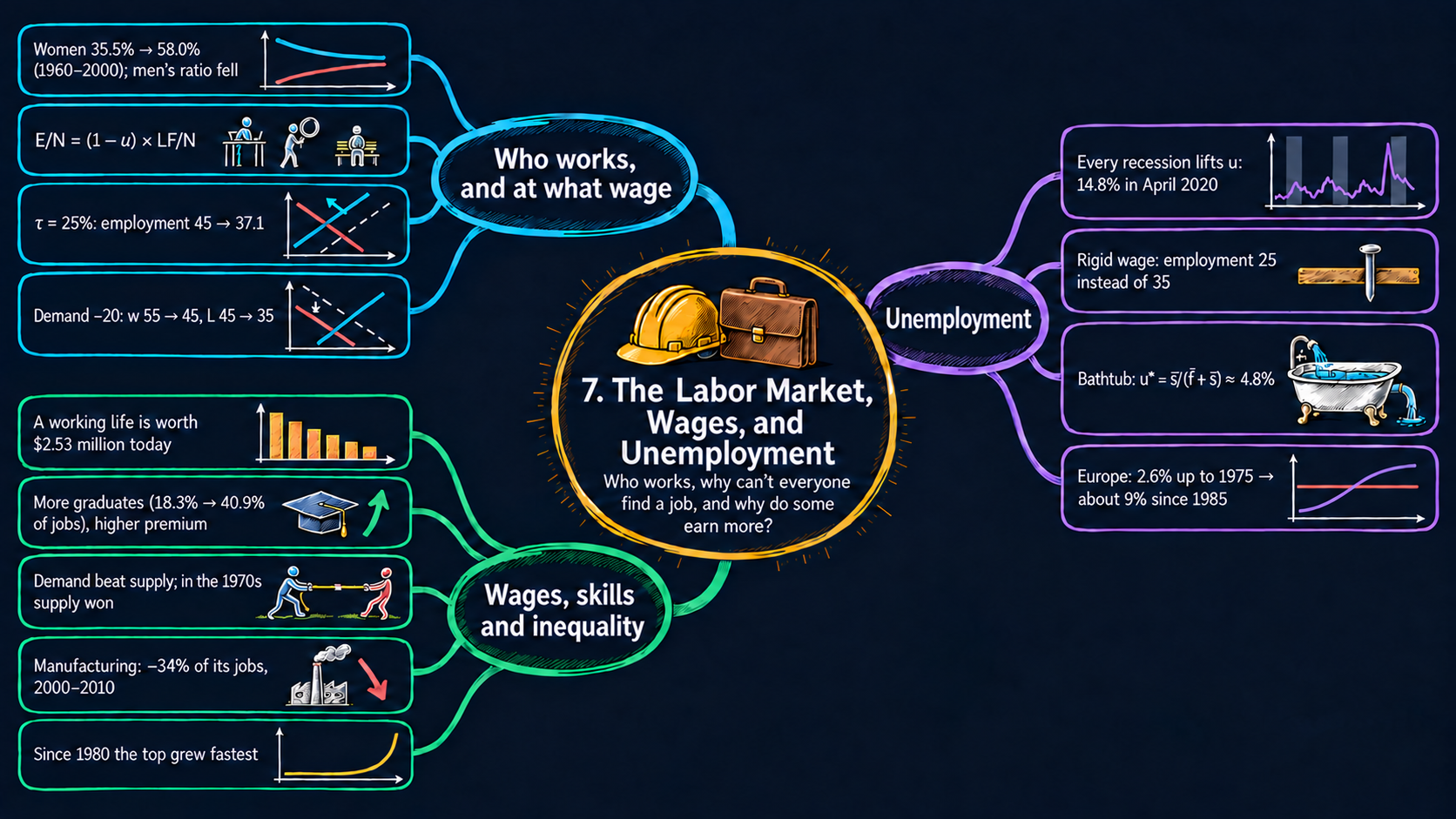




Learning goals
The labor market sets the price of work (the wage) and the amount of work (employment). By the end of this chapter you will be able to:
- read the main U.S. labor-market statistics: the employment-population ratio and the unemployment rate, and how both move in recessions;
- link the unemployment rate, the participation rate and the employment-population ratio with one identity;
- derive the equilibrium wage and employment of a supply-and-demand model of the labor market, read its comparative statics, and use it for experiments: an income tax, a fall in labor demand, and a wage that does not fall;
- derive the natural rate of unemployment from the bathtub model, and the path that unemployment follows on its way there;
- derive the present discounted value formulas from the geometric series, and use them to value a working life and a college degree;
- explain with two labor markets why the college wage premium rose while the supply of college graduates grew;
- load monthly data with pandas, shade recessions, recompute textbook tables, and build interactive Plotly figures with sliders, toggles, menus and buttons;
- go beyond the textbook’s countries: compare up to 187 countries with a country picker, and spot breaks, gaps and implausible values in the data.
Model overview
Back on Islandia, most islanders earn their living at Harbor Boatworks, the island’s firm, which builds and repairs boats. Every month some of them lose a job and some jobless islanders find one, and every year the wage is settled between the firm and the people who want to work. How many islanders have a job, what does a job pay, and why are some islanders without work even in calm years? And is it worth spending four years in college before starting to work? This section answers these questions with three small models, and we follow Islandia through each one.
NoteThe big idea
The question. What decides how many people work and what they are paid, why is there always some unemployment, and how do we put a value on a lifetime of wages?
The answer in one sentence. The wage and employment settle where labor supply and demand cross, unemployment settles where job losses equal job findings at the natural rate \(u^* = \bar{s}/(\bar{f}+\bar{s})\), and present discounted value turns any stream of future pay into one number today.
What goes in and what comes out. We choose the positions and slopes of the two labor-market lines, the tax rate, the monthly job separation and job finding rates, and the interest rate. The models give back employment and the wage, the unemployment rate in each month and in the steady state, and the value today of a working life or a college degree.
Road map.
- Measuring the labor market: the definitions, the identity that links the three ratios and what it tells us.
- Supply and demand in the labor market: the assumptions, solving the model for the equilibrium and three experiments, and what the model predicts.
- The bathtub model of unemployment: job losses and job findings, the natural rate and the path toward it.
- Present discounted value: one payment, a stream of payments and the value of a working life.
- The return to education: the college wage premium and the net present value of a degree.
- Model in code: every key result as a Python function, checked with numbers.
Notation. As in the book, a bar over a letter marks a parameter, a number fixed outside the model. Letters without a bar are endogenous variables: the model solves for them. A star marks an equilibrium or a steady state. Careful: in this chapter \(\bar{s}\) is the job separation rate, not the investment rate of the Solow model.
| Symbol | Meaning | Type |
|---|---|---|
| \(N, LF, E, U\) | adults, labor force, employed and unemployed | endogenous |
| \(u = U/LF\) | the unemployment rate | endogenous |
| \(L, w\) | employment and the wage in the supply-and-demand model | endogenous |
| \(\bar{a}_d, \bar{b}_d\) | intercept and slope of labor demand | parameters |
| \(\bar{a}_s, \bar{b}_s\) | intercept and slope of labor supply | parameters |
| \(\tau\) | tax rate on labor income | parameter |
| \(\bar{w}\) | a wage that does not fall | parameter |
| \(\bar{L}\) | the labor force in the bathtub model | parameter |
| \(\bar{s}, \bar{f}\) | monthly job separation and job finding rates | parameters |
| \(E_t, U_t, u_t\) | employed, unemployed and the unemployment rate in month \(t\) | endogenous |
| \(R\) | the interest rate | parameter |
| \(pdv\), \(NPV\) | present discounted value and net present value | endogenous |
| \(x_d, x_s\) | shifts of college labor demand and supply | parameters |
| \(L^*, w^*, u^*\) | a star marks an equilibrium or a steady state | endogenous |
| \(\Delta x_{t+1}\) | the change \(x_{t+1} - x_t\) | notation |
Measuring the labor market
Definitions
Before we explain anything, we need to count. Take the adults of Islandia, the population \(N\) aged 16 and over, and sort each of them into one of three groups:
- The employed \(E\) hold a paid job.
- The unemployed \(U\) hold no job, have looked for one during the last four weeks, and are ready to start now.
- Everyone else is not in the labor force: students, retirees, people caring for family, and discouraged workers who have stopped looking.
The labor force is the first two groups taken together:
\[LF = E + U.\]
Three ratios sum up the market:
| Ratio | Formula | What it measures |
|---|---|---|
| unemployment rate | \(u = U/LF\) | the share of people in the labor force who look for work and do not have it |
| participation rate | \(LF/N\) | the share of adults who work or want to work |
| employment-population ratio | \(E/N\) | the share of all adults who work |
Solving: how the three ratios fit together
An identity ties the three ratios together. Multiply and divide \(E/N\) by the labor force, then use \(E = LF - U\):
\[\frac{E}{N} = \frac{E}{LF}\cdot\frac{LF}{N} = \frac{LF - U}{LF}\cdot\frac{LF}{N} = \left(1 - \frac{U}{LF}\right)\frac{LF}{N}.\]
ImportantKey result: the employment identity
\[\frac{E}{N} = (1 - u)\times\frac{LF}{N}. \tag{1}\]
The share of adults who work is the share of the labor force with a job times the share of adults in the labor force.
Islandia in numbers. Islandia has 100 adults, a labor force of 62 and 3 unemployed. So \(u = 3/62 \approx 4.8\%\), participation is \(62\%\), and \(E/N = (1 - 0.048)\times 0.62 \approx 0.59\): 59 of the 100 adults work.
Taking logs turns the product into a sum (Appendix C.4): \(\ln(E/N) = \ln(1-u) + \ln(LF/N)\). Since \(\ln(1-u) \approx -u\) when \(u\) is small (Appendix C.6), one more point of unemployment lowers the employment-population ratio by about 1 percent, and 1 percent more participation raises it by 1 percent.
TipIn words: two ways to lose workers
Islandia’s employment-population ratio can fall for two different reasons. More of the labor force can be jobless, or fewer adults can be in the labor force at all. The unemployment rate sees only the first. Suppose one of Islandia’s 3 jobless islanders gives up looking. Then \(U\) falls to 2 and \(LF\) to 61, so the unemployment rate drops to \(3.3\%\). Yet nobody has found a job, and \(E/N\) is still 59 percent.
The kinds of unemployment. Economists split the unemployment rate into a part that is present in normal times and a part that rises and falls with booms and recessions:
- Frictional unemployment comes from the time it takes to move from one job to the next, even when the market works smoothly. An islander who leaves one boat crew needs a few weeks to join another.
- Structural unemployment comes from the rules and institutions of the labor market: hiring and firing costs, unemployment benefits, the minimum wage.
- The natural rate \(u^n\) is the sum of the two: the rate in an economy that is neither booming nor in recession. The bathtub model below explains its level.
- Cyclical unemployment is what is left, \(u - u^n\). It is positive in recessions and negative in booms.
ImportantKey result: the parts of unemployment
\[u = \underbrace{u_{\text{frictional}} + u_{\text{structural}}}_{\text{natural rate } u^n} + u_{\text{cyclical}}. \tag{2}\]
Only the cyclical part comes and goes with the business cycle. The natural rate stays even in normal years.
What the definitions tell us
- Read the two employment statistics together. By identity (1), a policy that pushes people out of the labor force lowers \(E/N\) but can leave \(u\) unchanged, or even lower it. That is why this chapter follows both statistics (Figs. 1 and 2).
- A recession shows up in both. Job losses raise \(u\), and by identity (1) they lower \(E/N\), by roughly one percent for each point of unemployment.
- The natural rate is not fixed by nature. By equation (2) it moves with the institutions of the labor market. This is how the chapter explains Europe’s high unemployment (Fig. 7).
The unemployment rate counts only people who look for work, so always read it together with the employment-population ratio.
NoteCheck your understanding
1. A bad season hits Islandia. Three more islanders lose their jobs and keep looking, so \(U\) rises from 3 to 6 while the labor force stays at 62 of 100 adults. What are the new unemployment rate and employment-population ratio?
Answer
Now \(u = 6/62 \approx 9.7\%\). By identity (1), \(E/N = (1 - 6/62)\times 0.62 = 0.56\): 56 of the 100 adults work, 3 fewer than before.
2. Islandia’s unemployment rate falls, and the employment-population ratio does not move. Is this good news?
Answer
Not necessarily. By identity (1), if \(E/N\) is unchanged while \(u\) falls, participation \(LF/N\) must have fallen too. The jobless islanders may simply have stopped looking and left the labor force, without anyone finding a job.
Supply and demand in the labor market
Assumptions
There is one kind of labor, measured by employment \(L\), and one price for it, the wage \(w\). As in the book’s diagrams, \(L\) goes on the horizontal axis and \(w\) on the vertical axis, so each curve tells us “the wage at each level of employment”.
1. Labor demand slopes down. Harbor Boatworks keeps hiring islanders as long as one more worker produces at least what he or she costs. It stops when the marginal product of labor, the output added by one more worker, has fallen to the wage. In the production model of Chapter 4, \(Y = \bar{A}\bar{K}^{1/3}L^{2/3}\), the rule reads \(w = \tfrac{2}{3}\bar{A}\bar{K}^{1/3}L^{-1/3}\). The exponent \(-1/3\) makes the wage the firm will pay fall as employment rises, because each extra worker shares the same tools and adds less output than the one before (diminishing returns, Appendix C.7).
2. Labor supply slopes up. An hour an islander spends on the beach costs the wage that hour could have earned. When the wage rises, free time becomes more expensive, and islanders choose to work more.
3. A straight-line version. The book draws the curves without equations. To compute with them we use straight lines, the simplest curves with the right slopes:
\[\text{labor demand: } w = \bar{a}_d - \bar{b}_d L, \qquad\qquad \text{labor supply: } w = \bar{a}_s + \bar{b}_s L.\]
- The intercept \(\bar{a}_d\) is what Harbor Boatworks would pay for its very first worker, and \(\bar{b}_d\) is how fast that offer falls as it hires more.
- The intercept \(\bar{a}_s\) is the lowest wage that gets any islander to work, and \(\bar{b}_s\) is how much more pay it takes to draw in each extra worker.
- We assume \(\bar{a}_d > \bar{a}_s\), so that the lines cross at positive employment.
4. The wage clears the market. The wage adjusts until the work islanders want to supply equals the work Harbor Boatworks wants to hire.
5. A fixed population. With \(N\) adults, employment also pins down the employment-population ratio \(L/N\).
Every diagram of this notebook starts from the same illustrative values: \(\bar{a}_d = 100\), \(\bar{b}_d = 1\), \(\bar{a}_s = 10\) and \(\bar{b}_s = 1\), the default positions of the sliders of Figs. 3 to 6. In this chapter’s baseline, these are Islandia’s two lines.
Solving the model
Step 1: the equilibrium. In equilibrium both curves give the same wage at the same employment. Set the two right-hand sides equal:
\[\bar{a}_d - \bar{b}_d L^* = \bar{a}_s + \bar{b}_s L^*.\]
Collect the terms with \(L^*\) on the right and the constants on the left, then divide by \(\bar{b}_d + \bar{b}_s\) (Appendix C.9):
\[\bar{a}_d - \bar{a}_s = (\bar{b}_d + \bar{b}_s)L^* \quad\Longrightarrow\quad L^* = \frac{\bar{a}_d - \bar{a}_s}{\bar{b}_d + \bar{b}_s}.\]
For the wage, put \(L^*\) back into the demand curve and write everything over the common denominator:
\[w^* = \bar{a}_d - \bar{b}_d\frac{\bar{a}_d - \bar{a}_s}{\bar{b}_d + \bar{b}_s} = \frac{\bar{a}_d\bar{b}_d + \bar{a}_d\bar{b}_s - \bar{b}_d\bar{a}_d + \bar{b}_d\bar{a}_s}{\bar{b}_d + \bar{b}_s}.\]
The terms \(\bar{a}_d\bar{b}_d\) cancel.
ImportantKey result: the labor-market equilibrium
\[L^* = \frac{\bar{a}_d - \bar{a}_s}{\bar{b}_d + \bar{b}_s}, \qquad\qquad w^* = \frac{\bar{b}_s\bar{a}_d + \bar{b}_d\bar{a}_s}{\bar{b}_d + \bar{b}_s}. \tag{3}\]
The wage is a weighted average of the two intercepts, and each intercept is weighted by the slope of the other curve.
Islandia in numbers. With the baseline values, \(L^* = 90/2 = 45\) and \(w^* = (100 + 10)/2 = 55\).
TipIn words
Employment depends on the gap between what Harbor Boatworks would pay for its first worker and what it takes to get the first islander to work, \(\bar{a}_d - \bar{a}_s\). The wider that gap, the more jobs. Steep curves, a large \(\bar{b}_d + \bar{b}_s\), close the gap after only a few hires.
Step 2: an income tax. Suppose the Islandia Treasury taxes labor income at the rate \(\tau\). Harbor Boatworks still pays \(w\), but islanders keep only \((1-\tau)w\). They decide how much to work from what they keep, so the supply curve becomes \((1-\tau)w = \bar{a}_s + \bar{b}_s L\). Solved for the wage the firm pays, it reads \(w = (\bar{a}_s + \bar{b}_s L)/(1-\tau)\). At every level of employment, the firm must now pay more to get the same work, so the supply curve shifts up and to the left. For the new equilibrium, multiply the demand curve by \((1-\tau)\) and set it equal to the taxed supply curve:
\[(1-\tau)(\bar{a}_d - \bar{b}_d L) = \bar{a}_s + \bar{b}_s L \quad\Longrightarrow\quad (1-\tau)\bar{a}_d - \bar{a}_s = \big[(1-\tau)\bar{b}_d + \bar{b}_s\big]L.\]
Divide by the bracket to get employment, and read the wage the firm pays off the demand curve:
ImportantKey result: the labor market with an income tax
\[L_\tau = \frac{(1-\tau)\bar{a}_d - \bar{a}_s}{(1-\tau)\bar{b}_d + \bar{b}_s}, \qquad w_\tau = \bar{a}_d - \bar{b}_d L_\tau. \tag{4}\]
With \(\tau = 0\) this is equation (3) again.
Islandia in numbers. With \(\tau = 0.25\) (the default of Fig. 4), \(L_\tau = (75 - 10)/(0.75 + 1) = 65/1.75 \approx 37.1\). Harbor Boatworks pays \(w_\tau = 100 - 37.1 = 62.9\), and islanders keep \(0.75 \times 62.9 = 47.1\). The gap between the two, 15.7, is the tax wedge: the tax collected on each unit of work.
To see that a higher tax always lowers employment, divide the numerator and the denominator of (4) by \(1-\tau\):
\[L_\tau = \frac{\bar{a}_d - \bar{a}_s/(1-\tau)}{\bar{b}_d + \bar{b}_s/(1-\tau)}.\]
A higher \(\tau\) raises \(1/(1-\tau)\). That shrinks the numerator and enlarges the denominator, so \(L_\tau\) falls.
Step 3: a fall in labor demand. Suppose Harbor Boatworks becomes less eager to hire, for example because new rules make firing costly or because the fuel its boats need becomes dearer. We model this as a downward shift of the demand curve by an amount \(\Delta\), so the intercept becomes \(\bar{a}_d - \Delta\). Equation (3) is linear in the intercepts, so the changes can be read off directly:
\[\Delta L^* = -\frac{\Delta}{\bar{b}_d + \bar{b}_s}, \qquad\qquad \Delta w^* = -\frac{\bar{b}_s\,\Delta}{\bar{b}_d + \bar{b}_s}.\]
With \(\Delta = 20\) (the default of Fig. 5), employment falls from 45 to 35 and the wage from 55 to 45. Both fall.
Step 4: a wage that does not fall. Now suppose the wage stays at its old level \(\bar{w} = w^*\) after demand falls. The market no longer clears. Harbor Boatworks hires what it wants at \(\bar{w}\), which we read off the new demand curve by solving \(\bar{w} = (\bar{a}_d - \Delta) - \bar{b}_d L\) for \(L\). At the old equilibrium \(\bar{a}_d - w^* = \bar{b}_d L^*\), so:
ImportantKey result: employment with a rigid wage
\[L'' = \frac{\bar{a}_d - \Delta - \bar{w}}{\bar{b}_d} = L^* - \frac{\Delta}{\bar{b}_d}. \tag{5}\]
At the wage \(\bar{w}\), the supply curve says that \(L^*\) islanders still want to work. The difference, \(L^* - L'' = \Delta/\bar{b}_d\), is the number who want a job at the going wage but cannot find one.
Islandia in numbers. With \(\Delta = 20\), \(L'' = 45 - 20 = 25\), and 20 islanders are left without a job.
TipIn words: why rigid wages hurt
When the wage can fall, a lower wage soaks up part of the shock, and some islanders choose to work less. When the wage is stuck, the whole shock lands on jobs. Comparing step 3 with equation (5), employment falls more by the factor \((\bar{b}_d + \bar{b}_s)/\bar{b}_d\), which is 2 with our slopes: 20 jobs lost instead of 10.
The wage and employment settle where supply meets demand, and a wage that cannot fall turns a demand shock into lost jobs.
NoteCheck your understanding
1. Islanders come to value their free time more, and the lowest wage that gets anyone to work rises from \(\bar{a}_s = 10\) to 30. The other baseline values stay the same. What are the new \(L^*\) and \(w^*\)?
Answer
By equation (3), \(L^* = (100 - 30)/2 = 35\) and \(w^* = (100 + 30)/2 = 65\). Supply shifts up, so employment falls by 10 and the wage rises by 10.
2. The same fall in demand, \(\Delta = 20\), costs Islandia 10 jobs when the wage is flexible and 20 when it is rigid. Where do the other 10 jobs go in the flexible case?
Answer
With a flexible wage, the wage falls from 55 to 45. Labor is now cheaper, so Harbor Boatworks hires 35 islanders, not 25. The other 10 islanders who no longer work have chosen to stop at the lower wage: at 45, the supply curve also gives 35, so nobody is left looking for work in vain. With the rigid wage, the firm hires only 25 while 45 islanders still want a job.
What the model predicts
Comparative statics. Each parameter of equation (3) moves one curve:
| A rise in … | Which curve moves | \(L^*\) | \(w^*\) | Elasticity of \(L^*\) | Elasticity of \(w^*\) |
|---|---|---|---|---|---|
| \(\bar{a}_d\) (firms value workers more) | demand shifts up | \(+\) | \(+\) | \(\bar{a}_d/(\bar{a}_d - \bar{a}_s) \approx +1.11\) | \(\bar{b}_s\bar{a}_d/(\bar{b}_s\bar{a}_d + \bar{b}_d\bar{a}_s) \approx +0.91\) |
| \(\bar{a}_s\) (people need more pay to work) | supply shifts up | \(-\) | \(+\) | \(-\bar{a}_s/(\bar{a}_d - \bar{a}_s) \approx -0.11\) | \(\bar{b}_d\bar{a}_s/(\bar{b}_s\bar{a}_d + \bar{b}_d\bar{a}_s) \approx +0.09\) |
| \(\bar{b}_d\) | demand gets steeper | \(-\) | \(-\) | \(-\bar{b}_d/(\bar{b}_d+\bar{b}_s) = -0.5\) | \(\approx -0.41\) |
| \(\bar{b}_s\) | supply gets steeper | \(-\) | \(+\) | \(-\bar{b}_s/(\bar{b}_d+\bar{b}_s) = -0.5\) | \(\approx +0.41\) |
| \(\tau\), equation (4) | supply shifts up and left | \(-\) | \(+\) (paid), \(-\) (kept) |
The elasticities come from taking logs of equation (3) (Appendix C.4). For example, \(\ln L^* = \ln(\bar{a}_d - \bar{a}_s) - \ln(\bar{b}_d + \bar{b}_s)\). A 1 percent rise in \(\bar{a}_d\) adds \(0.01\,\bar{a}_d\) to the gap \(\bar{a}_d - \bar{a}_s\), so it raises \(L^*\) by \(\bar{a}_d/(\bar{a}_d - \bar{a}_s)\) percent. The numbers are for our baseline values; the signs hold for any positive values.
- Demand shocks move the wage and employment in the same direction; supply shocks move them in opposite directions. This is the key to reading the data: when wages and employment both rise, demand has grown.
- A labor income tax lowers employment and the employment-population ratio. Its effect on the unemployment rate is less clear. Islanders who quit because of the tax and stop searching leave the labor force: by identity (1) they lower \(E/N\) but not \(u\). Islanders laid off because the firm now pays more are unemployed while they search, and if some of them give up, \(u\) falls back again.
- Who bears the tax depends on the slopes. With equal slopes, the wage the firm pays rises by 7.9 and the wage islanders keep falls by 7.9: the burden is split evenly. A steeper supply curve puts more of it on workers.
- Rigid wages amplify shocks. By equation (5), a wage that does not fall turns the same fall in demand into a larger fall in employment, and it creates people who want to work at the going wage but cannot find a job. Keynes used this idea to explain the mass unemployment of the 1930s, and rigid prices and wages return in the short-run chapters of the book.
When wages and jobs rise together, demand grew; when they move apart, supply moved.
NoteCheck your understanding
1. With the tax of Key result (4), \(\tau = 0.25\), how much more does Harbor Boatworks pay per unit of work than without the tax, and how much less do islanders keep?
Answer
Without the tax the wage is 55. With it, the firm pays about 62.9, so 7.9 more, and islanders keep about 47.1, so 7.9 less. With equal slopes the two sides share the wedge of 15.7 evenly.
2. One year Islandia’s wages rise while employment falls. Which curve most likely moved, and in which direction?
Answer
Supply shifted up (to the left): fewer islanders are willing to work at each wage. A demand shift would move the wage and employment in the same direction (the comparative statics table).
The bathtub model of unemployment
Assumptions
Time now runs in months, \(t = 0, 1, 2, \dots\)
1. A fixed labor force. Every member of Islandia’s labor force \(\bar{L}\) is either employed or unemployed:
\[E_t + U_t = \bar{L}.\]
2. Constant flow rates. Each month a fixed share \(\bar{s}\) of the employed lose their job, the job separation rate, and a fixed share \(\bar{f}\) of the unemployed find one, the job finding rate. Unemployment therefore changes by the inflow minus the outflow.
ImportantKey result: the bathtub equation
\[\Delta U_{t+1} \equiv U_{t+1} - U_t = \underbrace{\bar{s}E_t}_{\text{inflow: jobs lost}} - \underbrace{\bar{f}U_t}_{\text{outflow: jobs found}}. \tag{6}\]
Together with \(E_t + U_t = \bar{L}\), this equation carries the two endogenous variables, \(E_t\) and \(U_t\), from one month to the next, starting from a given \(U_0\).
U.S. data show that about 1 percent of the employed lose their job each month and about a fifth of the unemployed find one. We give Islandia the same rates in this chapter’s baseline, \(\bar{s} = 0.01\) and \(\bar{f} = 0.20\), the default positions of the sliders of the bathtub chart below.
The name comes from a bathtub with the tap running and the drain open. On Islandia, the islanders who lose a job at Harbor Boatworks are the tap, those who find one are the drain, and the number of jobless islanders is the water in the tub.
Solving the model
Step 1: the steady state. In a steady state unemployment does not change, \(\Delta U_{t+1} = 0\), so the inflow equals the outflow. Set (6) to zero and replace \(E\) with \(\bar{L} - U\) from assumption 1:
\[0 = \bar{s}(\bar{L} - U^*) - \bar{f}U^* = \bar{s}\bar{L} - \bar{s}U^* - \bar{f}U^* = \bar{s}\bar{L} - (\bar{s} + \bar{f})U^*.\]
Move the last term to the left and divide by \(\bar{s} + \bar{f}\): \(U^* = \bar{s}\bar{L}/(\bar{s} + \bar{f})\). Dividing by the labor force gives the steady-state unemployment rate:
ImportantKey result: the natural rate of unemployment
\[u^* \equiv \frac{U^*}{\bar{L}} = \frac{\bar{s}}{\bar{f} + \bar{s}}. \tag{7}\]
The size of the labor force does not matter: only the two flow rates do.
Islandia in numbers. With \(\bar{s} = 0.01\) and \(\bar{f} = 0.20\), \(u^* = 0.01/0.21 \approx 0.048\), or 4.8 percent. Because \(\bar{s}\) is small next to \(\bar{f}\), a quick approximation is \(u^* \approx \bar{s}/\bar{f} = 5\) percent.
TipIn words: a steady water level
The water in a tub stays at the same level when it drains out as fast as it flows in. A slow tap (few job losses) and a wide drain (jobs found quickly) leave little water in the tub: a low unemployment rate. In Islandia’s steady state, about 0.95 percent of the labor force loses a job each month and the same number finds one. Large flows run in both directions, with a small stock of jobless islanders in between.
Step 2: the path to the steady state. Divide (6) by \(\bar{L}\) to write it in terms of the rate \(u_t = U_t/\bar{L}\), and use \(E_t/\bar{L} = 1 - u_t\):
\[u_{t+1} - u_t = \bar{s}(1 - u_t) - \bar{f}u_t = \bar{s} - (\bar{s} + \bar{f})u_t.\]
Equation (7) says \(\bar{s} = (\bar{s} + \bar{f})u^*\). Use it in place of the first \(\bar{s}\):
\[u_{t+1} - u_t = -(\bar{s} + \bar{f})(u_t - u^*).\]
Add \(u_t - u^*\) to both sides: \(u_{t+1} - u^* = (1 - \bar{s} - \bar{f})(u_t - u^*)\). Every month the gap to the steady state shrinks by the same factor \(1 - \bar{s} - \bar{f}\). Apply this \(t\) times from the start (Appendix C.10):
ImportantKey result: the path of unemployment
\[u_t = u^* + (1 - \bar{s} - \bar{f})^t\,(u_0 - u^*). \tag{8}\]
Islandia in numbers. With the baseline rates the factor is \(1 - 0.01 - 0.20 = 0.79\), so each month the gap closes by 21 percent. The gap halves in \(\ln 0.5/\ln 0.79 \approx 2.9\) months. Starting from \(u_0 = 10\%\), the gap of 5.24 points shrinks in a year to \(5.24 \times 0.79^{12} \approx 0.31\) points, so \(u_{12} \approx 5.1\%\).
TipIn words
Islandia’s unemployment rate behaves like its stock of tools in the Solow model (Chapter 5). Wherever it starts, it heads to a steady state, fast when it is far away and slowly when it is close. Here the trip is short, because the monthly flows in and out of unemployment are large compared with the number of jobless islanders.
Unemployment settles where job losses equal job findings, and it gets back there within a few months.
What the model predicts
Comparative statics. Take logs of equation (7): \(\ln u^* = \ln\bar{s} - \ln(\bar{f} + \bar{s})\).
| A 1% rise in … | changes \(u^*\) by | In the bathtub |
|---|---|---|
| job separation rate \(\bar{s}\) | \(+\bar{f}/(\bar{f} + \bar{s}) = +(1 - u^*) \approx +0.95\%\) | the tap runs faster |
| job finding rate \(\bar{f}\) | \(-\bar{f}/(\bar{f} + \bar{s}) = -(1 - u^*) \approx -0.95\%\) | the drain gets wider |
| labor force \(\bar{L}\) | \(0\) | a bigger tub, same water level |
The elasticity with respect to \(\bar{s}\) is \(1 - \bar{s}/(\bar{f} + \bar{s})\), because \(\bar{s}\) appears in both the numerator and the denominator. With \(u^*\) small, both elasticities are close to \(\pm 1\): the natural rate is roughly proportional to \(\bar{s}/\bar{f}\).
- Only the two flow rates move the natural rate. A policy that aims at the natural rate must change how often people lose jobs or how fast the jobless find new ones.
- Policies can work against themselves. A firing cost lowers \(\bar{s}\), but it also makes Harbor Boatworks careful about hiring, which lowers \(\bar{f}\). If only \(\bar{s}\) falls, from 0.01 to 0.008, the natural rate falls to \(0.008/0.208 \approx 3.85\%\). If \(\bar{f}\) also falls, to 0.15, it rises to \(0.008/0.158 \approx 5.06\%\).
- Spells are short on average. If a fifth of the unemployed find a job each month, the average spell lasts \(1/\bar{f} = 5\) months.
- A shock fades fast. By equation (8), a recession that pushes unemployment above \(u^*\) is followed by a quick return, unless the shock also changes \(\bar{s}\) or \(\bar{f}\).
NoteCheck your understanding
1. Hiring on Islandia slows down: the job finding rate falls from 0.20 to 0.10, while \(\bar{s}\) stays at 0.01. What is the new natural rate? About how long does the average spell of unemployment now last?
Answer
By equation (7), \(u^* = 0.01/0.11 \approx 9.1\%\), almost twice the baseline. The average spell lasts \(1/\bar{f} = 10\) months instead of 5.
2. Islandia’s labor force doubles, and the two flow rates stay the same. What happens to the natural rate?
Answer
Nothing. \(\bar{L}\) does not appear in equation (7). Twice as many islanders lose and find jobs each month, so the number of jobless islanders doubles, but the rate stays the same: a bigger tub, same water level.
Present discounted value
Assumptions
- Money can be saved or borrowed at a constant interest rate \(R\) per year. One dollar saved today becomes \(1 + R\) dollars next year.
- Interest is compounded: interest earned in one year earns interest itself in later years.
- Payments arrive at the start of a year. “Year 0” is today.
- There is no risk: every promised payment is made.
Solving the model
Step 1: one future payment. Suppose an islander deposits \(X\) dollars today. After one year the account holds \(X(1+R)\), after two years \(X(1+R)(1+R) = X(1+R)^2\), and after \(T\) years \(X(1+R)^T\) (Appendix C.3). The present discounted value \(pdv\) of a payment received in \(T\) years is the deposit today that grows into exactly that payment: \(pdv \times (1+R)^T = \text{future value}\). Divide both sides by \((1+R)^T\):
ImportantKey result: the value today of one payment
\[pdv = \frac{\text{future value}}{(1 + R)^T}. \tag{9}\]
Dividing by \((1+R)^T\) is called discounting, and \(1/(1+R)^T\) is the discount factor (Appendix C.12).
In numbers. At \(R = 3\%\), 10,000 dollars received in 10 years are worth \(10{,}000/1.03^{10} \approx 7{,}441\) dollars today.
Step 2: a stream of payments. Now a payment of the same size arrives every year for \(n\) years, starting today, like a wage. Value each payment with equation (9) and add them up. To keep the notation short, write \(a = 1/(1+R)\), a number between 0 and 1:
\[pdv = \text{payment}\times\left[1 + \frac{1}{1+R} + \frac{1}{(1+R)^2} + \dots + \frac{1}{(1+R)^{n-1}}\right] = \text{payment}\times\left[1 + a + a^2 + \dots + a^{n-1}\right].\]
The last payment arrives in year \(n - 1\), because the first one arrives in year 0.
Step 3: the geometric-series trick. Call the sum in brackets \(S\). Multiply it by \(a\); every term moves up by one power:
\[S = 1 + a + a^2 + \dots + a^{n-1}, \qquad aS = a + a^2 + \dots + a^{n-1} + a^n.\]
Subtract the second line from the first. All the middle terms cancel, and only the first term of \(S\) and the last term of \(aS\) remain: \(S - aS = 1 - a^n\). Factor out \(S\) and divide by \(1 - a\):
ImportantKey result: the value today of a stream of payments
\[S = \frac{1 - a^n}{1 - a}, \qquad\text{so}\qquad pdv = \text{payment}\times\frac{1 - \left(\frac{1}{1+R}\right)^n}{1 - \frac{1}{1+R}}. \tag{10}\]
The bracket \(S\) is the value today of one dollar a year for \(n\) years.
Step 4: a simpler form. The denominator is \(1 - \frac{1}{1+R} = \frac{1+R-1}{1+R} = \frac{R}{1+R}\), and dividing by it means multiplying by \(\frac{1+R}{R}\):
\[pdv = \text{payment}\times\frac{1+R}{R}\left[1 - \frac{1}{(1+R)^n}\right].\]
Step 5: the value of a working life. Take an islander who works 45 years, from age 22 to 67, at \(R = 3\%\). Then \((1+R)/R = 34.33\) and \(1/1.03^{45} \approx 0.264\), so the factor is \(34.33 \times (1 - 0.264) \approx 25.25\). Each dollar of yearly pay is worth 25.25 dollars today. A constant wage of 100,000 dollars, the value used in the chart in Fig. 8’s section, is then worth about 2.53 million dollars today. The value of this stream of future earnings is the value of the islander’s human capital.
TipIn words
A dollar far in the future is worth little today, because a much smaller deposit today would grow into it. So the islander’s 45 yearly dollars add up to about 25 dollars today, not 45: each later year counts for less than the one before.
What the model predicts
- A higher interest rate lowers present values. In equation (9), \(\ln pdv = \ln(\text{future value}) - T\ln(1+R) \approx \ln(\text{future value}) - TR\) (Appendix C.6). So one more point of interest lowers the value of a payment \(T\) years away by about \(T\) percent: about 9 percent for a payment in 10 years.
- Distant payments add little. Each extra year adds \(a^{n}\) times the payment, which shrinks toward zero. Letting \(n\) grow without limit in Step 4 gives the value of a payment that lasts forever, \(\text{payment}\times(1+R)/R\): 34.33 dollars per dollar at \(3\%\). The 45 years of a working life already give 74 percent of that.
- Any two streams can be compared. Bring every payment to today with equation (9) and add them up. The stream with the larger total is worth more, however its payments are spread over time.
Discounting turns a lifetime of wages into one number today, and the far future counts for little.
NoteCheck your understanding
1. An islander is promised 10,000 dollars in 20 years. At \(R = 3\%\), what is the promise worth today?
Answer
By equation (9), \(10{,}000/1.03^{20} \approx 5{,}537\) dollars. The same payment received in 10 years is worth 7,441 dollars: waiting ten more years costs about a quarter of the value.
2. Why is a payment of one dollar a year for 45 years worth about 25 dollars today, and not 45?
Answer
Each payment is discounted by \((1+R)^t\) for the year \(t\) in which it arrives (equation 9). Only the first dollar, paid today, is worth a full dollar. The dollar of year 44 is worth \(1/1.03^{44}\), about a quarter of a dollar, and equation (10) adds all 45 of them up.
The return to education
This block puts the two tools above together. Supply and demand explain the college wage, and present values tell us what the wage gap is worth to an islander deciding whether to study.
Assumptions
1. Two labor markets. Islanders with a high school diploma and islanders with a college degree are different kinds of labor, each with its own straight-line supply and demand curves, as in the supply-and-demand block. The high school market keeps the baseline values, so its wage is 55. The college market has demand \(w = 90 - 0.4L\) and supply \(w = 30 + 0.6L\), the values of Figs. 9 and 13.
2. The college premium. The college wage premium is how much more a college graduate earns, in percent: \(w_{\text{college}}/w_{\text{high school}} - 1\).
3. Shifts. Demand for college graduates shifts out (up) by \(x_d\), so its intercept becomes \(90 + x_d\). Supply shifts out (down) by \(x_s\), so its intercept becomes \(30 - x_s\).
4. The decision to study. College takes 4 years. During them a student gives up a high school wage of 60,000 dollars and pays tuition, here an illustrative 15,000 dollars a year. After college, the graduate earns 90,000 dollars instead of 60,000, for 45 years. The interest rate is \(R = 3\%\).
Solving the model
Step 1: the college equilibrium. Equation (3) with \(\bar{a}_d = 90\), \(\bar{b}_d = 0.4\), \(\bar{a}_s = 30\) and \(\bar{b}_s = 0.6\) gives \(L^* = 60/1 = 60\) and \(w^* = (0.6 \times 90 + 0.4 \times 30)/1 = 66\). The premium over the high school wage is \(66/55 - 1 = 20\%\).
Step 2: how the shifts move the college wage. Equation (3) is linear in the intercepts. So raise \(\bar{a}_d\) by \(x_d\), lower \(\bar{a}_s\) by \(x_s\), and keep only the changes:
ImportantKey result: shifts in the college market
\[\Delta L^* = \frac{x_d + x_s}{\bar{b}_d + \bar{b}_s}, \qquad\qquad \Delta w^* = \frac{\bar{b}_s\,x_d - \bar{b}_d\,x_s}{\bar{b}_d + \bar{b}_s}. \tag{11}\]
Both shifts raise employment. For the wage they pull in opposite directions, and the wage rises only if \(\bar{b}_s x_d > \bar{b}_d x_s\), that is, if \(x_d/x_s > \bar{b}_d/\bar{b}_s\).
Islandia in numbers. With slopes 0.4 and 0.6, \(\Delta w^* = 0.6x_d - 0.4x_s\). The defaults of Fig. 9, \(x_d = 15\) and \(x_s = 10\), give \(\Delta w^* = 9 - 4 = 5\) and \(\Delta L^* = 25\). The college wage rises to 71, college employment to 85, and the premium to \(71/55 - 1 \approx 29\%\). The 1970s defaults of Fig. 13, \(x_d = 10\) and \(x_s = 25\), give \(\Delta w^* = 6 - 10 = -4\): the wage falls to 62.
TipIn words: a race between two shifts
More islanders with degrees push the college wage down; more demand for their skills at Harbor Boatworks pushes it up. Employment of graduates rises either way. The college premium rises only when demand wins the race, and with our slopes demand must shift by more than two thirds of the supply shift.
Step 3: what the degree is worth. Bring every cost and every gain to today with equations (9) and (10). Write \(S_n\) for the bracket of equation (10), the value today of one dollar a year for \(n\) years.
- The costs are 75,000 dollars a year (the lost wage plus tuition) in years 0 to 3, worth \(75{,}000\times S_4\).
- The gain is the extra 30,000 dollars a year for 45 years. As a stream starting in year 0 it would be worth \(30{,}000\times S_{45}\). It starts in year 4 instead, so by equation (9) we discount it four more years.
The difference between the two is the net present value of a degree:
ImportantKey result: the value of a college degree
\[NPV = (w_{\text{college}} - w_{\text{high school}})\times S_{45}\times\frac{1}{(1+R)^4} \;-\; (w_{\text{high school}} + \text{tuition})\times S_4. \tag{12}\]
Islandia in numbers. At \(R = 3\%\), \(S_4 \approx 3.83\), \(S_{45} \approx 25.25\) and \(1/1.03^4 \approx 0.888\). The gain is worth about \(30{,}000 \times 25.25 \times 0.888 \approx 673{,}000\) dollars and the cost about \(75{,}000 \times 3.83 \approx 287{,}000\) dollars, so \(NPV \approx 386{,}000\) dollars.
The interest rate at which \(NPV = 0\) is the degree’s rate of return. The code below finds it: about 8.6 percent a year.
TipIn words
College is an investment like a new boat for Harbor Boatworks: the islander pays first, in lost wages and tuition, and collects later, in higher pay. Because the costs come early and the gains come late, discounting hits the gains harder. Even so, at these numbers the gains are worth more than twice the costs.
A degree pays when the discounted wage gain beats the early costs, and the premium rises only if demand outruns supply.
NoteCheck your understanding
1. Suppose the college wage gain on Islandia were 20,000 dollars a year instead of 30,000, with everything else unchanged. Is the degree still worth it at \(R = 3\%\)?
Answer
Yes. By equation (12), the gain is now worth about \(20{,}000 \times 25.25 \times 0.888 \approx 449{,}000\) dollars, and the cost is still about 287,000 dollars, so \(NPV \approx 162{,}000\) dollars. It is smaller, but still positive.
2. More islanders earn degrees, so college supply shifts out by \(x_s = 10\), but demand for graduates does not move. What happens to the college wage and to employment?
Answer
By equation (11), with \(x_d = 0\), \(\Delta w^* = -0.4\times 10 = -4\), so the college wage falls from 66 to 62, and \(\Delta L^* = 10\): ten more graduates work. A supply shift alone always lowers the premium.
What the model predicts
- More graduates and a higher premium together mean that demand grew faster than supply. By equation (11), a supply shift alone lowers the college wage. A rising premium during decades of rapid growth in the number of graduates (Fig. 8) requires demand shifts large enough that \(x_d/x_s > \bar{b}_d/\bar{b}_s\) (Fig. 9). In the 1970s supply won and the premium fell (Fig. 13).
- Two candidate demand shifters. Skill-biased technical change (computers and software raise the productivity of skilled workers more) and globalization (trade with countries where skilled workers are scarce raises their value, and trade with countries rich in unskilled labor lowers the wages of the unskilled).
- A degree is a good investment at these numbers. By equation (12), the gain is more than twice the cost, and the return beats a 3 percent interest rate by a wide margin. A higher interest rate or a smaller premium shrinks the NPV, because the gains come later than the costs.
NoteRecap
- Two statistics, one identity: \(E/N = (1-u)\,LF/N\), so the unemployment rate and the employment-population ratio can tell different stories (Fig. 1, Fig. 2).
- Supply and demand set employment and the wage, \(L^* = (\bar{a}_d - \bar{a}_s)/(\bar{b}_d + \bar{b}_s)\); a tax drives a wedge between what firms pay and what workers keep (Fig. 3).
- Rigid wages turn a fall in labor demand into larger job losses and people who cannot find work at the going wage (Fig. 5 and Fig. 6).
- The natural rate is where job losses equal job findings, \(u^* = \bar{s}/(\bar{f}+\bar{s})\), and unemployment returns to it within months (the bathtub chart; Europe’s higher rate in Fig. 7).
- Present discounted value brings every future payment to today; a working life of 45 years is worth about 25 years of pay.
- The return to education rises only when demand for graduates outruns their supply, and the degree pays at these numbers (Fig. 8 and Fig. 9).
Model in code
Now we turn the Key results into Python. The section has four parts: the setup (folded, because it is the same in every chapter), the model as functions, numerical checks of the Key results, and the drawing and data tools that the figures use (folded too). Run its cells once, in order. Every later section of the notebook reuses them.
Setup
Run the setup cells once, before anything else. They load the Python libraries, give every chart the same look, store the address of the chapter’s data and define four helpers that only the book website needs. You can use the notebook without reading them; open the box if you are curious.
NoteShow the setup code
The first cell loads the libraries and sets the look of the charts. Its comments explain each step.
The website cannot run Python, so each interactive figure also gets a version with a precomputed slider. The next helper builds those versions. Run it and move on.
# @title Helper for the website versions (run this cell; you do not need to read it)
def slider_figure(make_figure, name, values, start, label=None):
    """Join precomputed versions of a figure with one slider (the website cannot run Python).

    Arguments
        make_figure : the function that draws the figure, e.g. labor_market
        name        : the argument the slider moves, e.g. "a_d"
        values      : the values of that argument to precompute
        start       : the value shown first
        label       : the slider's label (the argument name if None)
    Returns
        one Plotly figure with all versions and a slider that shows one at a time
    """
    # Step 1: draw the figure once for every value
    figures = [make_figure(**{name: v}) for v in values]
    first = values.index(start)
    # Step 2: copy every curve into one figure; only the start value's are visible
    fig = go.Figure(layout=figures[first].layout)
    owner = []                                  # which figure each trace comes from
    for i, f in enumerate(figures):
        for trace in f.data:
            trace.visible = (i == first)
            fig.add_trace(trace)
            owner.append(i)
    # Step 3: one slider step per value: its curves, title, labels and shapes
    steps = []
    for i, f in enumerate(figures):
        layout = {"title": f.layout.title.to_plotly_json(),
                  "annotations": [a.to_plotly_json() for a in f.layout.annotations],
                  "shapes": [s.to_plotly_json() for s in f.layout.shapes]}
        visible = [o == i for o in owner]
        steps.append(dict(method="update", label=str(values[i]), args=[{"visible": visible}, layout]))
    fig.update_layout(sliders=[dict(active=first, steps=steps, pad=dict(t=60),
                                    currentvalue=dict(prefix=(label or name) + " = "))])
    return fig
The multi-country charts have three more website helpers. region_menu adds a menu of world regions to a chart that holds many countries, because a legend with 180 names would be unreadable. region_groups lists the countries that each view of that menu shows together, so that we can give them different colors. legend_menu keeps the textbook’s lines on, puts the others in the legend, and adds two reset buttons.
# @title Helpers for the multi-country website charts (run this cell; you do not need to read it)
def region_menu(fig, regions, shown, label=None):
    """Add a region menu: the countries in `shown` stay on, the chosen region's go into the legend.

    The website cannot run Python, so this menu replaces the Colab country picker: pick a region,
    then click a country in the legend to add it.

    Arguments
        fig     : a Plotly figure with one trace per country
        regions : maps each country (trace name) to its region
        shown   : the countries drawn at the start (the textbook's)
        label   : the name of the first menu entry ("Textbook: ..." if None)
    Returns
        the same figure, with the textbook's countries on and the region menu
    """
    # Step 1: the trace names, and each region once, A to Z
    names = [trace.name for trace in fig.data]
    groups = sorted(set(regions[n] for n in names if n in regions))
    # Step 2: for each menu entry, which traces are drawn, in the legend only, or hidden
    buttons = []
    for group in [label or "Textbook: " + ", ".join(shown)] + groups:
        visible = []
        for n in names:
            if n in shown:
                visible.append(True)                # a textbook country: drawn
            elif regions.get(n) == group:
                visible.append("legendonly")        # in this region: a click away
            else:
                visible.append(False)               # another region: hidden
        buttons.append(dict(label=group, method="restyle", args=[{"visible": visible}]))
    # Step 3: start with the textbook's countries, and put the menu above the plot
    for trace in fig.data:
        trace.visible = True if trace.name in shown else False
    fig.update_layout(updatemenus=[dict(buttons=buttons, active=0, direction="down", showactive=True,
                                        x=0, xanchor="left", y=1.02, yanchor="bottom")],
                      margin=dict(t=120), legend_title_text="")
    return fig


def region_groups(regions, shown):
    """The views of `region_menu`, for `group_colors`.

    Arguments
        regions : maps each country to its region
        shown   : the textbook's countries
    Returns
        a list of country lists: `shown` alone, then `shown` plus each region's countries
    """
    # the first view, then one view per region, A to Z
    groups = [list(shown)]
    for region in sorted(set(regions.values())):
        groups.append(list(shown) + [n for n in regions if regions[n] == region])
    return groups


def legend_menu(fig, shown, label="Textbook view"):
    """For a chart with up to 40 lines: `shown` stay on, the others wait in the legend.

    Two buttons above the plot reset the chart to the textbook's lines or turn every line on.

    Arguments
        fig   : a Plotly figure with one trace per country
        shown : the countries drawn at the start
        label : the name of the first button
    Returns
        the same figure, with the visibility set and the two buttons
    """
    # Step 1: the two views, the textbook's lines and every line
    book = [True if t.name in shown else "legendonly" for t in fig.data]
    everything = [True for t in fig.data]
    # Step 2: start with the textbook view and add the two buttons
    for trace, v in zip(fig.data, book):
        trace.visible = v
    fig.update_layout(updatemenus=[dict(type="buttons", direction="right", x=0, xanchor="left", y=1.02,
                                        yanchor="bottom", buttons=[
                                            dict(label=label, method="restyle", args=[{"visible": book}]),
                                            dict(label="All lines", method="restyle", args=[{"visible": everything}])])],
                      margin=dict(t=120), legend_title_text="")
    return fig
The model as functions
The supply-and-demand model has two straight lines and their crossing, equations (3) to (5). We write each one as a Python function: a named recipe that takes inputs and gives back a result. The default values are Islandia’s two lines, \(\bar{a}_d = 100\), \(\bar{b}_d = 1\), \(\bar{a}_s = 10\) and \(\bar{b}_s = 1\), and tau is the income tax of equation (4). The last two functions read the lines the other way round: the employment at a given wage.
# `def` creates a function: a named recipe that takes inputs (the arguments in
# parentheses) and gives back a result with `return`. Writing `a_d=100.0` gives
# the argument a default value, used whenever we do not pass one.
def labor_demand(L, a_d=100.0, b_d=1.0):
    """Labor demand: the wage firms are willing to pay when they employ L.

    The demand line of assumption 3 and Fig. 3:  w = a_d - b_d L

    Arguments
        L   : employment
        a_d : intercept of labor demand, a-bar_d
        b_d : slope of labor demand, b-bar_d
    Returns
        the wage firms are willing to pay, w
    """
    # the offer falls by b_d with every extra worker (diminishing returns)
    return a_d - b_d * L


def labor_supply(L, a_s=10.0, b_s=1.0):
    """Labor supply: the wage workers need to receive to supply L.

    The supply line of assumption 3 and Fig. 3:  w = a_s + b_s L

    Arguments
        L   : employment
        a_s : intercept of labor supply, a-bar_s
        b_s : slope of labor supply, b-bar_s
    Returns
        the wage workers need, w
    """
    # it takes b_s more in pay to draw in each extra worker
    return a_s + b_s * L


def equilibrium(a_d=100.0, b_d=1.0, a_s=10.0, b_s=1.0, tau=0.0):
    """Employment L* and the wage firms pay w*, when workers keep (1 - tau) w.

    Equation (4), and equation (3) when tau = 0:
        L* = ((1 - tau) a_d - a_s) / ((1 - tau) b_d + b_s),   w* = a_d - b_d L*

    Arguments
        a_d, b_d : intercept and slope of labor demand, a-bar_d and b-bar_d
        a_s, b_s : intercept and slope of labor supply, a-bar_s and b-bar_s
        tau      : tax rate on labor income (0 without a tax)
    Returns
        L_star, w_star : employment and the wage firms pay
    """
    # Step 1: employment, where the take-home wage meets the supply line
    L_star = ((1 - tau) * a_d - a_s) / ((1 - tau) * b_d + b_s)
    # Step 2: the wage firms pay, read off the demand line at L*
    w_star = labor_demand(L_star, a_d, b_d)
    # a function can return two results at once, separated by a comma
    return L_star, w_star


def demand_at_wage(w, a_d=100.0, b_d=1.0):
    """The employment firms want at a given wage w (labor demand solved for L).

    Equation (5), with a wage that does not fall:  L = (a_d - w) / b_d

    Arguments
        w        : the wage
        a_d, b_d : intercept and slope of labor demand, a-bar_d and b-bar_d
    Returns
        the employment firms want, L
    """
    # with a rigid wage, employment is what firms want at that wage
    return (a_d - w) / b_d


def supply_at_wage(w, a_s=10.0, b_s=1.0):
    """The number of people who want to work at a given wage w (labor supply solved for L).

    The supply line of Fig. 3, read the other way round:  L = (w - a_s) / b_s

    Arguments
        w        : the wage
        a_s, b_s : intercept and slope of labor supply, a-bar_s and b-bar_s
    Returns
        the number of people who want to work, L
    """
    # the supply line w = a_s + b_s L, solved for L
    return (w - a_s) / b_s
Three more functions hold the closed forms of the bathtub model, equation (7), of present values, equation (10), and of the value of a degree, equation (12).
def natural_rate(s=0.01, f=0.20):
    """The natural rate of unemployment, the steady state of the bathtub model.

    Equation (7):  u* = s / (f + s)

    Arguments
        s : monthly job separation rate, s-bar
        f : monthly job finding rate, f-bar
    Returns
        the steady-state unemployment rate, u*
    """
    # jobs lost s E equal jobs found f U exactly at this rate
    return s / (f + s)


def annuity_factor(R, n):
    """The value today of 1 dollar a year for n years, the first payment today.

    Equation (10) for a payment of 1:  S_n = (1 - a^n) / (1 - a), with a = 1 / (1 + R)

    Arguments
        R : the interest rate
        n : the number of yearly payments
    Returns
        the present discounted value of the stream, S_n
    """
    # the discount factor: 1 dollar next year is worth a dollars today
    a = 1 / (1 + R)
    # the sum of the geometric series 1 + a + a^2 + ... + a^(n-1)
    return (1 - a ** n) / (1 - a)


def college_npv(R, premium=30_000, cost=75_000):
    """The net present value of 4 years of college followed by 45 years of a higher wage.

    Equation (12):  NPV = premium * S_45 / (1 + R)^4 - cost * S_4

    Arguments
        R       : the interest rate
        premium : the yearly wage gain after college, in dollars
        cost    : the yearly cost during college (the lost wage plus tuition), in dollars
    Returns
        the net present value of the degree, in dollars
    """
    # `30_000` is simply 30000: Python ignores the underscore, which only makes
    # large numbers easier to read. The gain starts in year 4, so we discount
    # it four more years; the costs come in years 0 to 3.
    return premium * annuity_factor(R, 45) / (1 + R) ** 4 - cost * annuity_factor(R, 4)
Checking the key results
The formulas came from algebra. Now we check them with numbers, one Key result at a time. First we try the functions on Islandia’s two lines: at the equilibrium of equation (3), the demand and supply lines must give the same wage, and a 25 percent income tax must lower employment, equation (4).
# Step 1: Islandia's equilibrium. `L_star, w_star = equilibrium()` stores the
# two results in two variables. An f-string, f"L* = {L_star:.1f}", puts a value
# into the text; ":.1f" means "one decimal".
L_star, w_star = equilibrium()
print(f"Equilibrium:            L* = {L_star:.1f}, w* = {w_star:.1f}")
# both lines give the same wage at L*
print(f"At L*, demand wage = {labor_demand(L_star):.1f} and supply wage = {labor_supply(L_star):.1f}: the market clears")
# Step 2: the same market with a 25% tax on labor income (equation 4)
L_tax, w_tax = equilibrium(tau=0.25)
print(f"With a 25% income tax:  L' = {L_tax:.2f}, firms pay w' = {w_tax:.2f}, workers keep {0.75 * w_tax:.2f}")
Equilibrium: L* = 45.0, w* = 55.0
At L*, demand wage = 55.0 and supply wage = 55.0: the market clears
With a 25% income tax: L' = 37.14, firms pay w' = 62.86, workers keep 47.14Check 1: the identity of the labor-market ratios. With 100 adults, a labor force of 62 and 3 unemployed, both sides of identity (1) must agree. Then one jobless person stops searching.
# Step 1: adults N, labor force LF and unemployed U; the employed are the rest
N, LF, U = 100, 62, 3
E = LF - U
# Step 2: both sides of identity (1), E/N = (1 - u) LF/N
print(f"E/N directly:            {E / N:.4f}")
print(f"(1 - u) x LF/N, eq. (1): {(1 - U / LF) * (LF / N):.4f}   with u = {100 * U / LF:.2f}%")
# Step 3: one unemployed person leaves the labor force: u falls, E/N stays
U, LF = 2, 61
print(f"After one person gives up: u = {100 * U / LF:.2f}%, E/N = {(LF - U) / N:.2f} (unchanged)")
E/N directly: 0.5900
(1 - u) x LF/N, eq. (1): 0.5900 with u = 4.84%
After one person gives up: u = 3.28%, E/N = 0.59 (unchanged)Check 2: the closed form and the elasticities of equation (3). The function equilibrium solves the model with the tax formula. Equation (3) must give the same numbers, and a 1 percent rise in each parameter must reproduce the elasticities of the table.
# Step 1: Islandia's parameters and equation (3) written out
a_d, b_d, a_s, b_s = 100.0, 1.0, 10.0, 1.0
print(f"Equation (3): L* = {(a_d - a_s) / (b_d + b_s):.2f}, w* = {(b_s * a_d + b_d * a_s) / (b_d + b_s):.2f}")
L0, w0 = equilibrium(a_d, b_d, a_s, b_s)
# Step 2: `cases` is a list of pairs: a name and the four parameter values, in the
# order a_d, b_d, a_s, b_s, with one of them 1% higher
cases = [["a_d", [101.0, 1.0, 10.0, 1.0]], ["a_s", [100.0, 1.0, 10.1, 1.0]],
         ["b_d", [100.0, 1.01, 10.0, 1.0]], ["b_s", [100.0, 1.0, 10.0, 1.01]]]
# Step 3: `for name, values in cases` unpacks each pair into two variables, and
# `values[0]` is the first element of the list `values`; ":+.3f" shows the sign
for name, values in cases:
    L1, w1 = equilibrium(values[0], values[1], values[2], values[3])
    print(f"1% higher {name}: L* {100 * (L1 / L0 - 1):+.3f}%, w* {100 * (w1 / w0 - 1):+.3f}%")
Equation (3): L* = 45.00, w* = 55.00
1% higher a_d: L* +1.111%, w* +0.909%
1% higher a_s: L* -0.111%, w* +0.091%
1% higher b_d: L* -0.498%, w* -0.407%
1% higher b_s: L* -0.498%, w* +0.407%Check 3: the tax and the rigid wage. A higher tax rate must always lower employment, equation (4). With a fall in demand of 20, a rigid wage must cut employment by \(\Delta/\bar{b}_d = 20\), twice the flexible fall, equation (5).
# Step 1: employment and the wedge for four tax rates (equation 4)
for tau in [0.0, 0.1, 0.25, 0.4]:
    L_t, w_t = equilibrium(tau=tau)
    print(f"tau = {tau:.2f}: L = {L_t:.2f}, firms pay {w_t:.2f}, workers keep {(1 - tau) * w_t:.2f}")
# Step 2: demand falls by 20. `[0]` takes the first result, employment;
# with a flexible wage the market clears again, with a rigid one firms hire
# what they want at the old wage w* (equation 5)
L_flex = equilibrium(a_d=80.0)[0]
L_rigid = demand_at_wage(w_star, a_d=80.0)
print(f"Demand falls by 20: flexible wage L' = {L_flex:.1f}, rigid wage L'' = {L_rigid:.1f}")
# Step 3: the people who want a job at the old wage, minus the jobs
print(f"Want a job at the old wage but have none: {supply_at_wage(w_star) - L_rigid:.1f}")
tau = 0.00: L = 45.00, firms pay 55.00, workers keep 55.00
tau = 0.10: L = 42.11, firms pay 57.89, workers keep 52.11
tau = 0.25: L = 37.14, firms pay 62.86, workers keep 47.14
tau = 0.40: L = 31.25, firms pay 68.75, workers keep 41.25
Demand falls by 20: flexible wage L' = 35.0, rigid wage L'' = 25.0
Want a job at the old wage but have none: 20.0Check 4: the bathtub model. We start at 10 percent unemployment and apply equation (6) month by month. The simulation must match the closed form (8) and settle at the natural rate (7), where the inflow equals the outflow.
# Step 1: Islandia's monthly rates, the labor force and the natural rate
s, f, L_bar = 0.01, 0.20, 100.0
u_star = natural_rate(s, f)
U = 10.0                                          # start at 10% unemployment
# Step 2: `range(1, 61)` counts 1, 2, ..., 60, one step per month. Inside the
# loop, `U = U + ...` replaces the old number of unemployed with the new one,
# and `if t in (3, 12, 60)` is true only in those three months.
for t in range(1, 61):
    U = U + s * (L_bar - U) - f * U               # equation (6), with E = L_bar - U
    if t in (3, 12, 60):
        closed = u_star + (1 - s - f) ** t * (0.10 - u_star)          # equation (8)
        print(f"Month {t:2d}: simulated u = {100 * U / L_bar:.4f}%, equation (8) gives {100 * closed:.4f}%")
# Step 3: the natural rate and the two flows in the steady state
print(f"Natural rate, equation (7): u* = {100 * u_star:.4f}%")
E_star = L_bar * (1 - u_star)
print(f"Steady-state flows: jobs lost {s * E_star:.3f} = jobs found {f * u_star * L_bar:.3f}")
Month 3: simulated u = 7.3445%, equation (8) gives 7.3445%
Month 12: simulated u = 5.0714%, equation (8) gives 5.0714%
Month 60: simulated u = 4.7619%, equation (8) gives 4.7619%
Natural rate, equation (7): u* = 4.7619%
Steady-state flows: jobs lost 0.952 = jobs found 0.952Check 5: the elasticities of the natural rate and the firing-cost example. A 1 percent rise in \(\bar{s}\) or \(\bar{f}\) must change \(u^*\) by about \(\pm(1 - u^*) = \pm 0.95\) percent.
# Step 1: u* at the base rates, then with s or f 1% higher (equation 7)
u0 = natural_rate(0.01, 0.20)
print(f"1% higher s: u* changes by {100 * (natural_rate(0.0101, 0.20) / u0 - 1):+.3f}%   (1 - u* = {1 - u0:.3f})")
print(f"1% higher f: u* changes by {100 * (natural_rate(0.01, 0.202) / u0 - 1):+.3f}%")
# Step 2: firing costs make firms fire less (lower s), and perhaps hire less (lower f)
print(f"Firing costs lower s only:     u* = {100 * natural_rate(0.008, 0.20):.2f}%")
print(f"Firing costs lower s and f:    u* = {100 * natural_rate(0.008, 0.15):.2f}%")
1% higher s: u* changes by +0.952% (1 - u* = 0.952)
1% higher f: u* changes by -0.943%
Firing costs lower s only: u* = 3.85%
Firing costs lower s and f: u* = 5.06%The change for \(\bar{f}\) comes out at \(-0.94\) rather than \(-0.95\) percent, because an elasticity describes very small changes and 1 percent is small but not zero.
Check 6: present values, two ways. A deposit of \(pdv\) from equation (9) must grow back into the future payment. The loop over 45 years must match the formula (10), and the formula must approach \((1+R)/R\) for a very long stream.
# Step 1: one payment of 10,000 dollars in 10 years, and the deposit that grows
# into it; ":,.2f" writes thousands with commas and two decimals
R = 0.03
deposit = 10_000 / (1 + R) ** 10                   # equation (9)
print(f"10,000 dollars in 10 years are worth {deposit:,.2f} today; {deposit:,.2f} x 1.03^10 = {deposit * (1 + R) ** 10:,.2f}")
# Step 2: add up one discounted dollar per year, t = 0 is today
total = 0.0
for t in range(45):
    total = total + 1 / (1 + R) ** t
print(f"1 dollar a year for 45 years: loop {total:.4f}, equation (10) {annuity_factor(R, 45):.4f}")
# Step 3: a working life, a very long stream, and one more point of interest
print(f"A working life at 100,000 dollars a year: {100_000 * annuity_factor(R, 45):,.0f} dollars")
print(f"1,000 years: {annuity_factor(R, 1000):.4f}   and (1 + R)/R = {(1 + R) / R:.4f}")
print(f"One more point of interest, payment in 10 years: {100 * (1.03 / 1.04) ** 10 - 100:+.1f}%")
10,000 dollars in 10 years are worth 7,440.94 today; 7,440.94 x 1.03^10 = 10,000.00
1 dollar a year for 45 years: loop 25.2543, equation (10) 25.2543
A working life at 100,000 dollars a year: 2,525,427 dollars
1,000 years: 34.3333 and (1 + R)/R = 34.3333
One more point of interest, payment in 10 years: -9.2%Check 7: the college market and the value of a degree. Equation (11) must agree with the equilibrium function for the shifts of Figs. 9 and 13, and equation (12) gives the net present value of a degree.
# Step 1: the high school wage and the college wage before the shifts
w_hs = equilibrium()[1]
w_1 = equilibrium(a_d=90.0, b_d=0.4, a_s=30.0, b_s=0.6)[1]
# Step 2: the shifts of Fig. 9 and of Fig. 13, solved again and by equation (11);
# ":.0%" shows a share as a percentage
for x_d, x_s in [[15.0, 10.0], [10.0, 25.0]]:
    w_2 = equilibrium(a_d=90.0 + x_d, b_d=0.4, a_s=30.0 - x_s, b_s=0.6)[1]
    formula = (0.6 * x_d - 0.4 * x_s) / (0.4 + 0.6)                      # equation (11)
    print(f"x_d = {x_d:4.1f}, x_s = {x_s:4.1f}: wage change {w_2 - w_1:+.2f} (equation 11: {formula:+.2f}), "
          f"premium {w_1 / w_hs - 1:.0%} -> {w_2 / w_hs - 1:.0%}")
# Step 3: the value of a degree at R = 3% (equation 12)
print(f"NPV of a degree at R = 3%: {college_npv(0.03):,.0f} dollars")
x_d = 15.0, x_s = 10.0: wage change +5.00 (equation 11: +5.00), premium 20% -> 29%
x_d = 10.0, x_s = 25.0: wage change -4.00 (equation 11: -4.00), premium 20% -> 13%
NPV of a degree at R = 3%: 385,997 dollarsThe rate of return on a degree. We raise the interest rate in small steps until the net present value of equation (12) turns negative.
# A `while` loop repeats its indented lines as long as its condition is true.
# Here it stops at the first interest rate at which the degree no longer pays.
R = 0.03
while college_npv(R) > 0:
    # one hundredth of a percentage point at a time
    R = R + 0.0001
print(f"The NPV of a degree turns negative at R = {100 * R:.2f}%: this is its rate of return")
The NPV of a degree turns negative at R = 8.59%: this is its rate of returnDrawing and data tools
The labor-market diagrams share three drawing tools: one draws a curve and writes its name on the plot, one marks an equilibrium, and one sets up the axes. Two data tools shade the U.S. recessions and give every country a fixed color. Run them and move on, or open the box to see how they work.
NoteShow the drawing and data tools
As in the textbook, every curve carries its name on the plot (such as \(L^s\)) at one end, so the diagrams need no legend. add_curve draws one curve and writes its name, and it skips the name when it would sit on top of another curve’s name (avoid).
# @title Drawing tool: a curve with its name on the plot
# `np.linspace(0, 110, 111)` creates 111 evenly spaced numbers from 0 to 110:
# the employment levels at which we compute every curve (the whole x-axis)
L_grid = np.linspace(0, 110, 111)


def add_curve(fig, w, label, color, dash="solid", row=None, col=None, start=False, avoid=None):
    """Draw one curve inside the axes and write its label at one end.

    Arguments
        fig      : the figure to draw on
        w        : the wage on the curve at each point of L_grid
        label    : the curve's name, e.g. "Lˢ" ("" for no name)
        color    : its color, e.g. TEAL
        dash     : "solid" or "dash"
        row, col : the panel to draw in; `None` means "the only panel"
        start    : True puts the label at the top-left end (for downward curves)
        avoid    : the spot of another curve's label, to keep the two apart
    Returns
        the spot (L, w) where the label goes
    """
    # Step 1: keep the part of the curve inside the axes. `(w >= 0) & (w <= 110)`
    # is True or False for each point; `w[inside]` keeps the points where it is True.
    inside = (w >= 0) & (w <= 110)
    L, w = L_grid[inside], w[inside]
    # `add_trace` adds one line or set of points to a chart made by `go.Figure()`
    fig.add_trace(go.Scatter(x=L, y=w, mode="lines", name=label, showlegend=False,
                             line=dict(color=color, width=3, dash=dash)), row=row, col=col)
    # Step 2: the label's spot; downward curves: above the top-left end
    if start:
        spot, anchor = (L[0], w[0]), "bottom"
    else:
        spot, anchor = (L[-1], w[-1]), "middle"
    # Step 3: skip a label that would sit on another one (`abs`: absolute value)
    near = avoid is not None and abs(spot[0] - avoid[0]) < 8 and abs(spot[1] - avoid[1]) < 8
    if label != "" and not near:
        fig.add_annotation(x=spot[0], y=spot[1], text=label, showarrow=False, xanchor="left", xshift=5,
                           yanchor=anchor, font=dict(color=color, size=15), row=row, col=col)
    return spot
add_point marks an equilibrium with a dot, a label and dotted lines down to the axes, and market_axes gives every diagram the same fixed axes, so that you can see the curves move.
# @title Drawing tools: an equilibrium point and the fixed axes
def add_point(fig, L_point, w_point, label, row=None, col=None):
    """Mark an equilibrium with a dot, a short label and dotted lines down to the axes.

    Arguments
        fig              : the figure to draw on
        L_point, w_point : employment and the wage at the point
        label            : the point's name, e.g. "A"
        row, col         : the panel to draw in (None: the only panel)
    """
    # Step 1: the dotted lines from the point to the two axes
    fig.add_trace(go.Scatter(x=[0, L_point, L_point], y=[w_point, w_point, 0], mode="lines", showlegend=False,
                             line=dict(color="black", width=1, dash="dot")), row=row, col=col)
    # Step 2: the dot and its label above it
    fig.add_trace(go.Scatter(x=[L_point], y=[w_point], mode="markers+text", text=[label], showlegend=False,
                             textposition="top center", textfont=dict(size=15),
                             marker=dict(color="black", size=11)), row=row, col=col)


def market_axes(fig, title, x_title="Employment, L", y_title="Wage, w"):
    """Fixed axes for every labor-market diagram (no tick label in the bottom-left corner) and the title.

    Arguments
        fig              : the figure to set up
        title            : the chart title
        x_title, y_title : the axis titles
    Returns
        the same figure
    """
    # both axes run from 0 to 110, with ticks at 20, 40, ..., 100
    fig.update_xaxes(title_text=x_title, range=[0, 110], tickvals=[20, 40, 60, 80, 100], zeroline=False)
    fig.update_yaxes(title_text=y_title, range=[0, 110], tickvals=[20, 40, 60, 80, 100], zeroline=False)
    fig.update_layout(title=title)
    return fig
Three data figures shade the U.S. recessions, so we write the shading once, here. A small file lists the start (peak) and end (trough) month of every U.S. recession since the 1950s, as dated by the NBER.
# @title Data tool: shading the U.S. recessions
# Step 1: `pd.read_csv(...)` reads a data file into a DataFrame, a table with
# named columns; `parse_dates=[...]` turns text such as "2020-02-01" into dates
recessions = pd.read_csv(DATA_URL + "recessions.csv", parse_dates=["peak", "trough"])


def shade_recessions(fig, start):
    """Shade every NBER recession (peak to trough) that ends after the date `start` (Figs. 1, 2 and 10).

    Arguments
        fig   : the figure to shade
        start : the first date of the chart, e.g. "1960-01-01"
    """
    # Step 2: `zip(recessions.peak, recessions.trough)` hands over one
    # (peak, trough) pair at a time; the `if` skips recessions that ended
    # before the chart starts, and `fig.add_vrect` shades the band between two dates
    for peak, trough in zip(recessions.peak, recessions.trough):
        if trough >= pd.Timestamp(start):
            fig.add_vrect(x0=peak, x1=trough, fillcolor=BLUE, opacity=0.15, line_width=0)


# Step 3: show the last three recessions
recessions.tail(3)| peak | trough | |
|---|---|---|
| 8 | 2001-03-01 | 2001-11-01 |
| 9 | 2007-12-01 | 2009-06-01 |
| 10 | 2020-02-01 | 2020-04-01 |
Most data figures of this chapter end with a section that goes beyond the textbook’s countries, where you can add any country to the chart. A line should keep its color when you add or remove others, so we give every country one fixed color. The textbook’s countries keep the colors of BOOK_COLORS. Two countries that can appear together (in the same menu view) should not share a color, so each country takes the first color that its neighbors do not use.
# @title Data tool: a palette of 44 colors and the first free color
# Step 1: `PALETTE` starts as Plotly's 24 dark colors, and the loop appends the
# colors of a second palette that are dark enough to read on white
# these colors are too pale on white
LIGHT = {"#F7E1A0", "#E2E2E2", "#FBE426", "#16FF32", "#1CFFCE", "#2ED9FF"}
PALETTE = list(px.colors.qualitative.Dark24)
for color in px.colors.qualitative.Alphabet:
    if color not in LIGHT:
        PALETTE.append(color)                       # 24 + 20 = 44 distinct colors
# Step 2: this blue is close to the U.S. navy: use it last
PALETTE.remove("#2E91E5")
PALETTE.append("#2E91E5")
# Step 3: the textbook's countries keep the book's colors
BOOK_COLORS = {"United States": BLUE, "France": TEAL, "Japan": GREEN, "Euro area (12 countries)": "#e0a33b"}


def first_free(used, taken):
    """The first PALETTE color not in `used`, if possible one that no country has `taken` yet.

    Arguments
        used  : the colors of the countries shown together with this one
        taken : the colors given to any country so far
    Returns
        a color of PALETTE
    """
    # Step 1: `first_free` returns as soon as it finds a free color
    for color in PALETTE:
        if color not in used and color not in taken:
            return color
    # Step 2: every color is used next to this country: share the one used least
    # often (`.count`), from the end of the palette (far from the default view)
    best = PALETTE[0]
    for color in PALETTE:
        if used.count(color) <= used.count(best):
            best = color
    return best
group_colors gives the colors out, one country at a time. Each figure below lists the countries of its website’s default view first, so they get the first colors.
# @title Data tool: one fixed color per country
def group_colors(names, groups, fixed=None):
    """Give each country a color that no other country in its groups uses, as far as the palette allows.

    Arguments
        names  : every country
        groups : the lists of countries shown together (the menu views)
        fixed  : {country: color} for the textbook's countries, so the default view keeps the book's colors
    Returns
        a dictionary {country: color}
    """
    # Step 1: `fixed or {}` is `fixed` when it is given and an empty dictionary
    # when it is `None`; `dict(...)` copies it, so the original stays unchanged
    colors = dict(fixed or {})
    for name in names:
        if name in colors:
            continue                                # `continue` skips to the next name
        # Step 2: the inner loops collect `used`, the colors of every country
        # that shares a group with `name`
        used = []
        for group in groups:
            if name in group:
                for other in group:
                    if other in colors:
                        used.append(colors[other])
        # Step 3: the first color that none of them uses
        colors[name] = first_free(used, list(colors.values()))
    return colors
The U.S. labor market in the data
We start with two monthly series: the share of adults who work and the share of the labor force without a job. Both swing sharply in every recession.
Fig. 1: The U.S. employment-population ratio
Goal. See the long-run trend and the recessions in the share of adults who work.
The employment-population ratio is the percentage of the population aged 16 and over that has a job. The data are monthly, from the Bureau of Labor Statistics. The recessions are shaded with shade_recessions from “Model in code”.
# Load the data of Fig. 1: the monthly employment-population ratio.
# `.tail()` shows the last five rows of the table
emp = pd.read_csv(DATA_URL + "fig7-1.csv", parse_dates=["date"])
emp.tail()| date | emp_pop_ratio | |
|---|---|---|
| 795 | 2026-05-01 | 59.2 |
| 796 | 2026-06-01 | 59.0 |
| 797 | 2026-07-01 | 58.9 |
| 798 | 2026-08-01 | 59.1 |
| 799 | 2026-09-01 | 59.2 |
September 2025 is followed by November 2025: October 2025 is missing because the survey was not carried out during that autumn’s federal government shutdown. The chart simply joins the two months.
Show the drawing code
# @title Drawing code: Fig. 1, the U.S. employment-population ratio
# Step 1: `px.area` draws a line and fills the area below it
fig = px.area(
    emp,
    x="date",
    y="emp_pop_ratio",
    hover_name="date",
    labels={"date": "Year", "emp_pop_ratio": "Employment-population ratio (%)"},
    title="More adults work than in 1960, but every recession cuts employment",
)
fig.update_traces(line=dict(color=TEAL, width=2))
# Step 2: the shaded bands: every recession since 1960 (shade_recessions)
shade_recessions(fig, "1960-01-01")
# Step 3: the axes. `tickvals` chooses the numbers printed on an axis (here, no
# label in the bottom-left corner). `rangeslider_visible=True` adds a small copy
# of the chart below the axis: drag its handles to zoom in on a period
fig.update_yaxes(range=[50, 66], tickvals=[52, 56, 60, 64])
fig.update_xaxes(rangeslider_visible=True)
fig.show()
Sources. Data: U.S. Bureau of Labor Statistics, Current Population Survey, Employment-Population Ratio (EMRATIO), via FRED; recession dates: NBER, U.S. Business Cycle Expansions and Contractions, via the FRED recession indicator USREC. Prepared files: data/ch07/fig7-1.csv, data/ch07/recessions.csv (see the data notes). Chart: inspired by Fig. 7.1 in Jones (2024), Macroeconomics, 6th ed.
What to notice.
- The trend rose from about 56 percent in 1960 to a peak of 64.7 percent in April 2000, and it has stayed below that peak ever since.
- The ratio falls in every recession (the shaded bands). The falls after 2007 and in spring 2020 are by far the deepest.
- The textbook’s figure ends in early 2023; our data go to September 2026.
Key numbers: the trend and the Great Recession
# The key numbers of Fig. 1. `set_index("date")` uses the dates as row labels, so
# `ratio.loc["1960"]` keeps every month of 1960 and `ratio.loc["2009":"2012"]`
# every month from 2009 to 2012
ratio = emp.set_index("date").emp_pop_ratio
crisis = ratio.loc["2009":"2012"]
# `.max()` is the largest value and `.idxmax()` its row label, here the month;
# `:%B %Y` prints a date as "April 2000"
print(f"1960 average:            {ratio.loc['1960'].mean():.1f}%")
print(f"Peak:                    {ratio.max():.1f}% in {ratio.idxmax():%B %Y}")
print(f"December 2006:           {ratio.loc['2006-12-01']:.1f}%")
# the Great Recession: January 2010, and the lowest month of 2009-2012
print(
    f"January 2010:            {ratio.loc['2010-01-01']:.1f}%  "
    f"(lowest 2009-2012: {crisis.min():.1f}% in {crisis.idxmin():%B %Y})"
)
print(
    "Fall, Dec. 2006 to Jan. 2010: "
    f"{ratio.loc['2006-12-01'] - ratio.loc['2010-01-01']:.1f} points"
)
# the Covid-19 low, and the latest month (`.iloc[-1]`: the last value)
print(
    f"Covid low:               {ratio.min():.1f}% in {ratio.idxmin():%B %Y};  "
    f"latest: {ratio.iloc[-1]:.1f}%"
)
1960 average: 56.1%
Peak: 64.7% in April 2000
December 2006: 63.4%
January 2010: 58.5% (lowest 2009-2012: 58.2% in November 2010)
Fall, Dec. 2006 to Jan. 2010: 4.9 points
Covid low: 51.2% in April 2020; latest: 59.2%The textbook’s numbers hold: 56 percent in 1960, 63.4 percent at the end of 2006, and a fall of about 5 points by early 2010 (58.5 percent in January 2010 in today’s data, against 58.4 in the textbook; the low point came later, in November 2010).
Key numbers: men and women
The textbook says that the rise in the ratio came entirely from women. A second file splits the ratio by sex. We average the months of each year to compare years.
# Load the ratios of men and women, then average the months of each year.
# `groupby(emp_sex.date.dt.year)` collects the rows of each calendar year, and
# `.mean()` averages them
emp_sex = pd.read_csv(DATA_URL + "emp_pop_by_sex.csv", parse_dates=["date"])
yearly = emp_sex.groupby(emp_sex.date.dt.year)[["men", "women"]].mean()
Show the drawing code
# @title Drawing code: Fig. 1, men and women
# Step 1: `y=["men", "women"]` draws one line per column, and the legend names
# the columns
fig = px.line(
    emp_sex,
    x="date",
    y=["men", "women"],
    hover_name="date",
    labels={
        "date": "Year",
        "value": "Employment-population ratio (%)",
        "variable": "Group",
    },
    title="Fewer men and many more women work than in the 1950s",
)
# Step 2: the shaded bands: every recession since 1948
shade_recessions(fig, "1948-01-01")
fig.show()
Sources. Data: U.S. Bureau of Labor Statistics, Current Population Survey, employment-population ratios of men (LNS12300001) and women (LNS12300002), via FRED; recession dates: NBER, U.S. Business Cycle Expansions and Contractions, via the FRED recession indicator USREC. Prepared files: data/ch07/emp_pop_by_sex.csv, data/ch07/recessions.csv (see the data notes). Chart: inspired by Fig. 7.1 in Jones (2024), Macroeconomics, 6th ed.
The next cell prints the yearly averages of four years, and the month of women’s peak.
# Four years of the `yearly` table: `.loc[[1960, 2000, 2019, 2025]]` picks four
# rows by their label
print(yearly.loc[[1960, 2000, 2019, 2025]].round(1))
# women's highest ratio, and its month: `idxmax` gives the row, `date[...]` its date
print(
    f"Women's peak: {emp_sex.women.max():.1f}% in "
    f"{emp_sex.date[emp_sex.women.idxmax()]:%B %Y}"
)
men women
date
1960 78.9 35.5
2000 71.9 57.5
2019 66.6 55.4
2025 64.9 54.9
Women's peak: 58.0% in April 2000Women’s ratio rose from 35.5 percent in 1960 to a peak of 58.0 percent in April 2000. Men’s fell from 78.9 percent in 1960 to 66.6 percent in 2019 and 64.9 percent in 2025. Both numbers match the textbook.
Beyond the United States
The International Labour Organization (ILO) estimates the employment-population ratio of almost every country in the same way, for people aged 15 and over. The World Bank publishes these estimates, which start in 1991. A wider file holds them, one row per country and year.
# Load the ILO estimates: one row per country and year
world_emp = pd.read_csv(DATA_URL + "emp_pop_countries.csv")
world_emp.head()| iso3 | country | region | year | emp_pop_ratio | |
|---|---|---|---|---|---|
| 0 | AFG | Afghanistan | Middle East, North Africa, Afghanistan & Pakistan | 1991 | 43.38 |
| 1 | AFG | Afghanistan | Middle East, North Africa, Afghanistan & Pakistan | 1992 | 43.34 |
| 2 | AFG | Afghanistan | Middle East, North Africa, Afghanistan & Pakistan | 1993 | 43.30 |
| 3 | AFG | Afghanistan | Middle East, North Africa, Afghanistan & Pakistan | 1994 | 43.25 |
| 4 | AFG | Afghanistan | Middle East, North Africa, Afghanistan & Pakistan | 1995 | 43.19 |
These are annual model estimates: where a country has no labor survey in a year, the ILO fills the gap with a statistical model. For the United States they run about 0.7 points below the BLS ratio above, because the ILO counts people from age 15 (the BLS from 16).
First the data: emp_pop_latest picks the rows of the chosen countries, and each country’s ratio in the latest year, which the title reports.
# The countries of the picker, A to Z, and each country's World Bank region:
# `dict(zip(a, b))` pairs each country with its region
EMP_COUNTRIES = sorted(world_emp.country.unique())
EMP_REGIONS = dict(zip(world_emp.country, world_emp.region))


def emp_pop_latest(names):
    """The rows of the chosen countries, and their ratios in the latest year (Fig. 1).

    Arguments
        names : the countries to show
    Returns
        chosen : their rows of world_emp
        last   : the latest year of those rows
        latest : each country's employment-population ratio in that year
    """
    # Step 1: `.isin(names)` is True for the rows of the chosen countries
    chosen = world_emp[world_emp.country.isin(names)]
    # Step 2: the latest year, and each country's ratio in it (country -> percent)
    last = chosen.year.max()
    latest = chosen[chosen.year == last].set_index("country").emp_pop_ratio
    return chosen, last, latest
Show the drawing code
# @title Drawing code: Fig. 1 for any countries, ages 15+
# the website's default view, and one fixed color per country (group_colors)
EMP_SHOWN = ["United States", "Germany", "Japan"]
EMP_COLORS = group_colors(
    EMP_SHOWN + EMP_COUNTRIES,
    region_groups(EMP_REGIONS, EMP_SHOWN),
    BOOK_COLORS,
)


def emp_pop_countries(names=("United States",)):
    """The employment-population ratio, ages 15+, of any countries (ILO estimates).

    Draws Fig. 1 for any countries (inspired by Fig. 7.1 in Jones), with the highest
    and the lowest ratio of the latest year in the title.

    Arguments
        names : the countries to draw
    Returns
        a Plotly figure
    """
    # Step 1: the data (emp_pop_latest); a message when no country is picked
    chosen, last, latest = emp_pop_latest(names)
    if len(chosen) == 0:
        return go.Figure(layout=dict(title="Pick at least one country"))
    # Step 2: the title, the highest ratio first and the lowest second
    title = (
        f"Share of adults with a job in {last}: "
        f"{latest.idxmax()} {latest.max():.1f}%"
    )
    if len(latest) > 1:
        title = title + f", {latest.idxmin()} {latest.min():.1f}%"
    # Step 3: one line per country; `color_discrete_map` gives each line its
    # fixed color
    fig = px.line(
        chosen,
        x="year",
        y="emp_pop_ratio",
        color="country",
        hover_name="country",
        color_discrete_map=EMP_COLORS,
        title=title,
        labels={
            "year": "Year",
            "emp_pop_ratio": "Employed, % of population 15+",
            "country": "Country",
        },
    )
    # Step 4: the U.S. range, or one wider range for countries far from the U.S.
    low, high = 50, 66
    if chosen.emp_pop_ratio.min() < low or chosen.emp_pop_ratio.max() > high:
        low, high = 15, 90
    fig.update_yaxes(range=[low, high])
    # no tick label in the bottom-left corner
    fig.update_xaxes(
        range=[1990, 2026],
        tickvals=[1995, 2000, 2005, 2010, 2015, 2020, 2025],
    )
    return fig
Below, Colab shows a country picker. On the website, the chart holds every country: pick a region in the menu, then click a country in the legend to add it.
# Fig. 1 with a country picker. `interact` calls emp_pop_countries and redraws the
# figure every time you change the choice. A `SelectMultiple` is a list in which
# you can pick several items: hold Ctrl (Cmd on a Mac) while you click. The `;`
# at the end only hides an extra line of text.
interact(
    emp_pop_countries,
    names=SelectMultiple(options=EMP_COUNTRIES,
                         value=("United States", "Germany", "Japan"), rows=10,
                         description="countries", style=WIDE),
);
Show the code of the website version
# @title Website version: Fig. 1 for every country (pick a region, then a country)
# every country in one chart, with a menu of regions (region_menu)
fig = emp_pop_countries(tuple(EMP_COUNTRIES))
region_menu(fig, EMP_REGIONS, shown=EMP_SHOWN, label="U.S., Germany, Japan")
fig.update_layout(
    title=("Since 2000 the U.S. ratio has fallen, "
           "while Germany's and Japan's have risen")
)
fig.update_yaxes(autorange=True)    # the axis adapts to the countries you add
fig
Sources. Data: International Labour Organization, modelled estimates, published in the World Bank, World Development Indicators, Employment to population ratio, 15+, total (SL.EMP.TOTL.SP.ZS). Prepared file: data/ch07/emp_pop_countries.csv (see the data notes). Chart: inspired by Fig. 7.1 in Jones (2024), Macroeconomics, 6th ed.
The next cell checks the numbers of What to notice: five countries in 2000 and 2025, and the lowest and the highest ratios of 2025.
# The ratios as a wide table: `.pivot(...)` turns the long table into one row per
# year and one column per country
ratios = world_emp.pivot(index="year", columns="country", values="emp_pop_ratio")
print(
    ratios.loc[[2000, 2025], ["United States", "Germany", "Japan", "France", "Italy"]]
)
# `.dropna()` drops the empty cells, and `.iloc[[0, 1, 2, -3, -2, -1]]` picks rows
# by position (`-1` is the last): the three lowest and the three highest of 2025
print(ratios.loc[2025].dropna().sort_values().iloc[[0, 1, 2, -3, -2, -1]])
country United States Germany Japan France Italy
year
2000 63.51 53.40 59.48 49.65 42.64
2025 59.11 58.32 61.89 51.17 46.15
country
São Tomé and Príncipe 21.21
Djibouti 23.49
Yemen 27.37
Madagascar 82.90
Solomon Islands 83.09
Qatar 86.90
Name: 2025, dtype: float64What to notice.
- Add Germany and Japan. Between 2000 and 2025 the U.S. ratio fell from 63.5 to 59.1 percent, while Germany’s rose from 53.4 to 58.3 and Japan’s from 59.5 to 61.9. Japan now employs a larger share of its adults than the United States.
- Add France and Italy: 51.2 and 46.2 percent in 2025, far below the U.S. ratio throughout.
- Look at your data. The highest ratios (above 82 percent) are in Qatar, whose residents are mostly migrant workers, and in poor countries such as Madagascar and Tanzania, where few people can afford not to work. The lowest (21 to 27 percent) are in São Tomé and Príncipe, Djibouti, Yemen and Somalia. Where surveys are rare, these numbers come mostly from the ILO’s model, so treat them with care.
Your turn. By how many points did women’s employment-population ratio rise between 1960 and 2000, and by how many did men’s fall? Use the yearly table.
Hint
yearly.loc[2000] - yearly.loc[1960] subtracts one row from another, column by column.
# Your turn: try it hereFig. 2: The U.S. unemployment rate
Goal. See how unemployment jumps in recessions and falls in recoveries.
A person is unemployed when she has no job, has looked for one in the past four weeks, and is available to work. The labor force is everybody who is employed or unemployed, and the unemployment rate is the share of the labor force that is unemployed.
# Load the data of Fig. 2: the monthly U.S. unemployment rate
unrate = pd.read_csv(DATA_URL + "fig7-2.csv", parse_dates=["date"])
Show the drawing code
# @title Drawing code: Fig. 2, the U.S. unemployment rate
# Step 1: the rate as a filled area
fig = px.area(
    unrate,
    x="date",
    y="unemployment_rate",
    hover_name="date",
    labels={"date": "Year", "unemployment_rate": "Unemployment rate (%)"},
    title="Unemployment jumps in every recession and falls slowly afterwards",
)
fig.update_traces(line=dict(color=BLUE, width=2))
# Step 2: the shaded bands: every recession since 1950
shade_recessions(fig, "1950-01-01")
# Step 3: no tick label in the bottom-left corner, and the range slider below
fig.update_yaxes(range=[0, 16], tickvals=[2, 4, 6, 8, 10, 12, 14])
fig.update_xaxes(rangeslider_visible=True)
fig.show()
Sources. Data: U.S. Bureau of Labor Statistics, Current Population Survey, Unemployment Rate (UNRATE), via FRED; recession dates: NBER, U.S. Business Cycle Expansions and Contractions, via the FRED recession indicator USREC. Prepared files: data/ch07/fig7-2.csv, data/ch07/recessions.csv (see the data notes). Chart: inspired by Fig. 7.2 in Jones (2024), Macroeconomics, 6th ed.
What to notice.
- Every shaded recession brings a jump in unemployment. The highest peaks are late 1982, October 2009 and April 2020.
- The Covid-19 jump was the largest and the shortest: the rate fell back much faster than after 2009.
- Between recessions, unemployment falls gradually, often for many years.
Key numbers: peaks and recoveries
# The key numbers of Fig. 2: the rates, with the months as row labels
u = unrate.set_index("date").unemployment_rate
print(
    f"May 2007: {u.loc['2007-05-01']:.1f}%   "
    f"October 2009: {u.loc['2009-10-01']:.1f}%"
)
print(
    f"February 2020: {u.loc['2020-02-01']:.1f}%   "
    f"April 2020: {u.loc['2020-04-01']:.1f}%"
)
# the months after each peak; `after_2009[after_2009 < 4]` keeps the months below
# 4 percent, and `.index[0]` is the first of them
after_2009 = u.loc["2009-11":]
after_2020 = u.loc["2020-05":]
print(f"First month below 4% after 2009:  {after_2009[after_2009 < 4].index[0]:%B %Y}")
print(f"First month below 4% after 2020:  {after_2020[after_2020 < 4].index[0]:%B %Y}")
May 2007: 4.4% October 2009: 10.0%
February 2020: 3.5% April 2020: 14.8%
First month below 4% after 2009: May 2018
First month below 4% after 2020: December 2021The rates match the textbook, except April 2020: 14.8 percent in today’s data, against 14.7 in the textbook (seasonal adjustment is revised every year). After the 2009 peak it took until May 2018, almost nine years, to get below 4 percent again. After the Covid peak it took until December 2021, under two years.
Table 7.1: the composition of the U.S. labor force
A wider file holds the monthly levels behind the unemployment rate, in millions of people. We rebuild Table 7.1 for January 2023, the textbook’s month, and for the latest month.
# Step 1: the monthly levels in millions, with the dates as row labels, and the
# unemployment rate computed from them
force = pd.read_csv(DATA_URL + "labor_force.csv", parse_dates=["date"])
force = force.set_index("date")
force["unemployment_rate"] = 100 * force.unemployed / force.labor_force
# Step 2: `.loc[[...]]` picks two rows by their dates (January 2023 and the latest
# month), and `.T` transposes the table: each month becomes a column
last = force.index[-1]
table = force.loc[[pd.Timestamp("2023-01-01"), last]].T
table.columns = ["January 2023", f"{last:%B %Y}"]
# Step 3: the textbook's numbers, for comparison
table["Textbook (Jan. 2023)"] = [266, 166, 160, 5.7, 100, 3.4]
table.round(2)| January 2023 | September 2026 | Textbook (Jan. 2023) | |
|---|---|---|---|
| population | 265.96 | 275.55 | 266.0 |
| labor_force | 165.94 | 170.26 | 166.0 |
| employed | 160.17 | 163.15 | 160.0 |
| unemployed | 5.77 | 7.11 | 5.7 |
| not_in_labor_force | 100.02 | 105.29 | 100.0 |
| unemployment_rate | 3.48 | 4.18 | 3.4 |
January 2023 agrees with the textbook within rounding, except that today’s data count 5.77 million unemployed (the textbook says 5.7), so the rate is 3.48 rather than 3.4 percent. By the latest month, the labor force has grown to about 170 million and unemployment to about 4.2 percent.
The textbook also notes that, with about 266 million people aged 16 and over, one point of the employment-population ratio is 2.7 million jobs:
# One percent of the population aged 16 and over, in millions of people
print(
    "1% of the population 16+, January 2023: "
    f"{0.01 * force.loc['2023-01-01', 'population']:.2f} million people"
)
print(
    f"1% of the population 16+, {last:%B %Y}:  "
    f"{0.01 * force.loc[last, 'population']:.2f} million people"
)
1% of the population 16+, January 2023: 2.66 million people
1% of the population 16+, September 2026: 2.76 million peopleBeyond the United States
The OECD publishes harmonised unemployment rates: every country counts the unemployed with the same definition as the United States (no job, looking for one, available to work). A wider file holds the monthly rates of 34 OECD countries, from the FRED database.
# Load the monthly rates of 34 OECD countries. `groupby("country").date.min()`
# gives each country's first month; the five latest starts come last
monthly = pd.read_csv(
    DATA_URL + "unemployment_countries_monthly.csv",
    parse_dates=["date"],
)
monthly.groupby("country").date.min().sort_values().tail()
country
Greece 1998-04-01
Switzerland 1999-04-01
Iceland 2003-01-01
Turkey 2005-01-01
Israel 2012-01-01
Name: date, dtype: datetime64[ns]The series start at different dates: Canada, Japan and the United States in 1955, most of Europe in the 1980s, Germany in 1991 (after reunification), Turkey in 2005 and Israel in 2012. New Zealand and Switzerland publish only quarterly rates. The U.S. rows are the BLS rate of the chart above.
First the data: unemployment_peak picks the rows of the chosen countries and finds the highest monthly rate among them, which the title reports.
# The countries of the picker, A to Z
MONTHLY_COUNTRIES = sorted(monthly.country.unique())


def unemployment_peak(names):
    """The monthly rates of the chosen countries, and the highest of them (Fig. 2).

    Arguments
        names : the countries to show
    Returns
        chosen : their rows of monthly
        peak   : the row of the highest rate (its country, date and rate)
    """
    # Step 1: the rows of the chosen countries
    chosen = monthly[monthly.country.isin(names)]
    if len(chosen) == 0:
        return chosen, None                    # nothing chosen: no peak
    # Step 2: `.idxmax()` gives the row label of the highest rate, and `.loc[...]`
    # picks that whole row, so `peak.country` and `peak.date` say where and when
    peak = chosen.loc[chosen.unemployment_rate.idxmax()]
    return chosen, peak
Show the drawing code
# @title Drawing code: Fig. 2 for OECD countries
# the website's default view, and one fixed color per country (group_colors)
MONTHLY_SHOWN = ["United States", "Germany"]
MONTHLY_COLORS = group_colors(
    MONTHLY_SHOWN + MONTHLY_COUNTRIES,
    [MONTHLY_SHOWN, MONTHLY_COUNTRIES],
    BOOK_COLORS,
)


def unemployment_countries(names=("United States",)):
    """The monthly harmonised unemployment rates of OECD countries.

    Draws Fig. 2 for any OECD countries (inspired by Fig. 7.2 in Jones), with the
    highest rate in the title.

    Arguments
        names : the countries to draw
    Returns
        a Plotly figure
    """
    # Step 1: the data (unemployment_peak); a message when no country is picked
    chosen, peak = unemployment_peak(names)
    if len(chosen) == 0:
        return go.Figure(layout=dict(title="Pick at least one country"))
    # Step 2: one line per country, in its fixed color
    fig = px.line(
        chosen,
        x="date",
        y="unemployment_rate",
        color="country",
        hover_name="country",
        color_discrete_map=MONTHLY_COLORS,
        title=(
            f"Highest rate: {peak.country}, {peak.unemployment_rate:.1f}% "
            f"in {peak.date:%B %Y}"
        ),
        labels={
            "date": "Year",
            "unemployment_rate": "Unemployment rate (%)",
            "country": "Country",
        },
    )
    # Step 3: 0 to 16 percent, widened only for very high rates; the range slider
    high = 16 if chosen.unemployment_rate.max() <= 16 else 30
    fig.update_yaxes(range=[0, high])
    fig.update_xaxes(rangeslider_visible=True)
    return fig
Below, Colab shows a country picker. On the website, the chart holds all 34 countries: click a country in the legend to add it, and double-click one to show it alone.
# Fig. 2 with a country picker (hold Ctrl or Cmd to pick several)
interact(
    unemployment_countries,
    names=SelectMultiple(options=MONTHLY_COUNTRIES, value=("United States",), rows=10,
                         description="countries", style=WIDE),
);
Show the code of the website version
# @title Website version: Fig. 2 for 34 OECD countries (click a country in the legend)
# every country in one chart; the legend buttons come from legend_menu
fig = unemployment_countries(tuple(MONTHLY_COUNTRIES))
legend_menu(fig, MONTHLY_SHOWN, label="U.S. and Germany")
fig.update_layout(
    title="Covid-19 sent U.S. unemployment to 14.8%; Germany's barely moved"
)
fig.update_yaxes(autorange=True)    # the axis adapts to the countries you add
fig
Sources. Data: OECD, Main Economic Indicators, harmonised unemployment rates, via FRED, series LRHUTTTT{CC}M156S (for example Germany, LRHUTTTTDEM156S; all the series); U.S. rows: U.S. Bureau of Labor Statistics, UNRATE, via FRED. Prepared file: data/ch07/unemployment_countries_monthly.csv (see the data notes). Chart: inspired by Fig. 7.2 in Jones (2024), Macroeconomics, 6th ed.
The next cell checks the numbers of What to notice: the spring of 2020 in four countries, and the euro-crisis peaks of Spain and Greece.
# The rates as a wide table: one row per month, one column per country
rates = monthly.pivot(index="date", columns="country", values="unemployment_rate")
print(
    rates.loc[
        "2020-02-01":"2020-05-01", ["United States", "Canada", "Germany", "Japan"]
    ]
)
# the highest rate of Spain and of Greece, and its month
print(rates[["Spain", "Greece"]].max(), rates[["Spain", "Greece"]].idxmax(), sep="\n")
country United States Canada Germany Japan
date
2020-02-01 3.5 5.8 3.3 2.4
2020-03-01 4.4 8.5 3.4 2.5
2020-04-01 14.8 13.7 3.5 2.6
2020-05-01 13.2 14.2 3.7 2.8
country
Spain 26.4
Greece 28.3
dtype: float64
country
Spain 2013-02-01
Greece 2013-07-01
dtype: datetime64[ns]What to notice.
- Add Canada, Germany and Japan. From February to April 2020, U.S. unemployment jumped from 3.5 to 14.8 percent and Canada’s from 5.8 to 13.7 percent. Germany’s rose only from 3.3 to 3.5 percent and Japan’s from 2.4 to 2.6: both countries subsidized firms that kept their workers on shorter hours instead of laying them off.
- Add Spain and Greece. After the euro crisis their rates passed 26 percent: 26.4 percent in Spain (February 2013) and 28.3 percent in Greece (July 2013), almost twice the U.S. peak of April 2020.
Your turn. Suppose that in the latest month the unemployment rate had been 10 percent, with the same labor force. How many fewer people would have had a job?
Hint
At 10 percent unemployment, employment is 0.9 * force.loc[last, "labor_force"]. Compare it with force.loc[last, "employed"].
# Your turn: try it hereSupply and demand in the labor market
Now the model. We draw the labor market, add an income tax, and let labor demand fall, first with a flexible wage and then with a wage that does not adjust.
Fig. 3: The labor market
Goal. Draw the supply-and-demand diagram of the labor market and see how its equilibrium moves.
Labor demand \(w = \bar{a}_d - \bar{b}_d L\) slopes down and labor supply \(w = \bar{a}_s + \bar{b}_s L\) slopes up. They cross at \((L^*, w^*)\), equation (3). If the population is a fixed number \(N\), the model also gives the employment-population ratio \(L^*/N\). When you move a slider, the starting curves stay on the chart as dashed gray lines, so you can see the shift.
The function below draws the diagram. It needs only equilibrium and the two lines of “Model in code”, so all of its code is drawing code.
Show the drawing code
# @title Drawing code: Fig. 3, the labor market
def labor_market(a_d=100.0, b_d=1.0, a_s=10.0, b_s=1.0):
    """Labor supply, labor demand and the equilibrium where they cross.

    Draws Fig. 3 (adapted from Fig. 7.3 in Jones). Once a parameter differs from
    Islandia's, the starting lines stay on the chart as dashed gray lines.

    Arguments
        a_d, b_d : intercept and slope of labor demand, a-bar_d and b-bar_d
        a_s, b_s : intercept and slope of labor supply, a-bar_s and b-bar_s
    Returns
        a Plotly figure
    """
    # Step 1: the equilibrium, equation (3)
    L_star, w_star = equilibrium(a_d, b_d, a_s, b_s)
    # Step 2: the two lines; demand is labeled at its top-left end (`start=True`)
    fig = go.Figure()
    add_curve(fig, labor_supply(L_grid, a_s, b_s), "Lˢ", TEAL)
    add_curve(fig, labor_demand(L_grid, a_d, b_d), "Lᵈ", BLUE, start=True)
    # Step 3: the starting lines in dashed gray, once a parameter has moved
    if (a_d, b_d, a_s, b_s) != (100.0, 1.0, 10.0, 1.0):
        add_curve(fig, labor_supply(L_grid), "", GRAY, "dash")
        add_curve(fig, labor_demand(L_grid), "", GRAY, "dash")
    # Step 4: the equilibrium point, and a title with the wage and employment
    add_point(fig, L_star, w_star, "")
    return market_axes(
        fig,
        f"The labor market clears at w* = {w_star:.1f} and L* = {L_star:.1f}",
    )
# Fig. 3 with sliders. A `FloatSlider` chooses a number between `min` and `max` in
# steps of `step`, starting at `value`; `interact` redraws the figure every time
# you move one
interact(
labor_market,
a_d=FloatSlider(value=100, min=80, max=120, step=5,
description="demand intercept a_d", style=WIDE),
b_d=FloatSlider(value=1.0, min=0.75, max=1.5, step=0.25,
description="demand slope b_d", style=WIDE),
a_s=FloatSlider(value=10, min=0, max=30, step=5,
description="supply intercept a_s", style=WIDE),
b_s=FloatSlider(value=1.0, min=0.75, max=1.5, step=0.25,
description="supply slope b_s", style=WIDE),
);Show the code of the website version
# @title Website version: Fig. 3 with a precomputed slider for the demand intercept
# one picture of Fig. 3 per value of a_d; the slider shows one at a time
slider_figure(
    labor_market,
    "a_d",
    [80, 90, 100, 110, 120],     # the values of a_d
    start=100,
    label="demand intercept a_d",
)
Source. Adapted from Fig. 7.3 in Jones (2024), Macroeconomics, 6th ed.
What to notice.
- With our illustrative numbers the market clears at \(L^* = 45\) and \(w^* = 55\).
- A higher \(\bar{a}_d\) (firms value every worker more) shifts demand up: the wage and employment rise.
- A higher \(\bar{a}_s\) (people need a higher wage before they work) shifts supply up: the wage rises but employment falls.
- Steeper curves (larger slopes) make employment respond less to a given shift.
Your turn. Raise the demand intercept \(\bar{a}_d\) from 100 to 110. By how much do \(L^*\) and \(w^*\) change? Check your answer with equilibrium(a_d=110).
Hint
With both slopes equal to 1, \(L^* = (\bar{a}_d - \bar{a}_s)/2\), so each extra unit of \(\bar{a}_d\) adds half a unit to \(L^*\).
# Your turn: try it hereFig. 4: An income tax at rate τ
Goal. See how a tax on labor income lowers employment and drives a wedge between the wage firms pay and the wage workers keep.
With a tax at rate \(\tau\), a worker keeps only \((1-\tau)w\) of the wage \(w\) the firm pays. To supply the same amount of work as before, workers now need a higher wage from the firm, \(w = (\bar{a}_s + \bar{b}_s L)/(1-\tau)\). Drawn against the wage firms pay, labor supply shifts back (up and to the left). The economy moves from \(A\) to \(B\) (equation 4).
First we compute the numbers the figure reports. tax_wedge solves the market without the tax (point \(A\)) and with it (point \(B\)), and the wage workers keep at \(B\).
def tax_wedge(tau, b_s):
    """The labor market without (A) and with (B) a tax on labor income (Fig. 4).

    Equations (3) and (4): workers keep (1 - tau) w of the wage w that firms pay

    Arguments
        tau : tax rate on labor income
        b_s : slope of labor supply, b-bar_s
    Returns
        L_A, w_A : employment and the wage at A, without the tax
        L_B, w_B : employment and the wage firms pay at B, with the tax
        kept     : the wage workers keep at B, (1 - tau) w_B
    """
    # Step 1: the equilibrium without and with the tax
    L_A, w_A = equilibrium(b_s=b_s)
    L_B, w_B = equilibrium(b_s=b_s, tau=tau)
    # Step 2: what workers keep at B; the gap w_B - kept is the tax per unit of work
    kept = (1 - tau) * w_B
    return L_A, w_A, L_B, w_B, kept
Show the drawing code
# @title Drawing code: Fig. 4, an income tax
def income_tax(tau=0.25, b_s=1.0):
    """A tax on labor income shifts labor supply back; the economy moves from A to B.

    Draws Fig. 4 (adapted from Fig. 7.4 in Jones), with the tax wedge as a green bar.

    Arguments
        tau : tax rate on labor income
        b_s : slope of labor supply, b-bar_s
    Returns
        a Plotly figure
    """
    # Step 1: the numbers of the figure (tax_wedge)
    L_A, w_A, L_B, w_B, kept = tax_wedge(tau, b_s)
    # Step 2: the taxed supply line (the wage firms must pay is the old one divided
    # by 1 - tau), the old one dashed, and demand
    fig = go.Figure()
    taxed = add_curve(fig, labor_supply(L_grid, b_s=b_s) / (1 - tau), "Lˢ′", TEAL)
    add_curve(fig, labor_supply(L_grid, b_s=b_s), "Lˢ", GRAY, "dash", avoid=taxed)
    add_curve(fig, labor_demand(L_grid), "Lᵈ", BLUE, start=True)
    # Step 3: the points A and B; with no tax, B is the same point as A
    add_point(fig, L_A, w_A, "A")
    if tau > 0:
        add_point(fig, L_B, w_B, "B")
    # Step 4: the green bar at B, from the wage workers keep up to the wage firms pay
    fig.add_trace(
        go.Scatter(
            x=[L_B, L_B],
            y=[kept, w_B],
            mode="lines+markers",
            name="Tax wedge",
            showlegend=True,
            line=dict(color=GREEN, width=6),
        )
    )
    title = (
        f"τ = {tau:.0%}: L′ = {L_B:.1f}, firms pay w′ = {w_B:.1f}, "
        f"workers keep {kept:.1f}"
    )
    return market_axes(fig, title, y_title="Wage paid by firms, w")
# Fig. 4 with sliders for the tax rate and the slope of labor supply
interact(
income_tax,
tau=FloatSlider(value=0.25, min=0, max=0.5, step=0.05,
description="tax rate τ", style=WIDE),
b_s=FloatSlider(value=1.0, min=0.5, max=2.0, step=0.25,
description="supply slope b_s", style=WIDE),
);Show the code of the website version
# @title Website version: Fig. 4 with a precomputed slider for the tax rate
# one picture of Fig. 4 per tax rate
slider_figure(
    income_tax,
    "tau",
    [0.0, 0.1, 0.2, 0.25, 0.3, 0.4, 0.5],     # the values of tau
    start=0.25,
    label="tax rate τ",
)
Source. Adapted from Fig. 7.4 in Jones (2024), Macroeconomics, 6th ed.
What to notice.
- With a 25 percent tax, employment falls from 45 to about 37.1. Firms pay more (62.9 instead of 55), but workers keep less (47.1). The green bar is the tax per unit of work.
- The textbook draws the taxed supply curve parallel to the old one. With a tax proportional to the wage, the new curve is a little steeper: the tax takes more when the wage is higher.
- The supply slope \(\bar{b}_s\) matters less here than in Fig. 5. A flatter supply curve means people respond more to the wage they keep, but a tax proportional to the wage also shifts a flatter curve up by less. Across the slider, the 25 percent tax cuts employment by between 6.4 and 8.1.
Your turn. What tax rate cuts employment from 45 to 30? Find it with the slider, then check it with equilibrium(tau=...).
Hint
Solve \(((1-\tau)\cdot 100 - 10)/((1-\tau) + 1) = 30\) for \((1-\tau)\), or try values of tau in steps of 0.05.
# Your turn: try it hereFig. 5: A reduction in labor demand
Goal. See what happens to the wage and employment when firms want fewer workers.
New rules that make firing workers costly, or a jump in the price of an input such as oil, can make firms less willing to hire. In the diagram, labor demand shifts down by an amount we call shift: \(w = (\bar{a}_d - \text{shift}) - \bar{b}_d L\). The economy moves from \(A\) to \(B\).
The function below draws the diagram. It needs only the two equilibria of equation (3), from equilibrium, so all of its code is drawing code.
Show the drawing code
# @title Drawing code: Fig. 5, a reduction in labor demand
def demand_fall(shift=20.0, b_s=1.0):
    """Labor demand shifts back by `shift`; the wage and employment both fall.

    Draws Fig. 5 (adapted from Fig. 7.5 in Jones): the economy moves from A to B.

    Arguments
        shift : the fall in labor demand (its intercept falls from 100 to 100 - shift)
        b_s   : slope of labor supply, b-bar_s
    Returns
        a Plotly figure
    """
    # Step 1: the old and the new equilibrium, equation (3)
    L_A, w_A = equilibrium(b_s=b_s)
    L_B, w_B = equilibrium(a_d=100 - shift, b_s=b_s)
    # Step 2: the new demand line, the old one dashed, and supply
    fig = go.Figure()
    after = add_curve(fig, labor_demand(L_grid, 100 - shift), "Lᵈ′", BLUE, start=True)
    add_curve(fig, labor_demand(L_grid), "Lᵈ", GRAY, "dash", start=True, avoid=after)
    add_curve(fig, labor_supply(L_grid, b_s=b_s), "Lˢ", TEAL)
    # Step 3: the points A and B; with no fall, B is the same point as A
    add_point(fig, L_A, w_A, "A")
    if shift > 0:
        add_point(fig, L_B, w_B, "B")
        # a black arrow at L = 60, from the old demand line down to the new one.
        # `add_annotation` with `showarrow=True` draws an arrow from (ax, ay) to
        # (x, y); with `axref="x"` and `ayref="y"` both points are in axis units
        fig.add_annotation(
            x=60,
            y=labor_demand(60, 100 - shift) + 1,
            ax=60,
            ay=labor_demand(60) - 1,
            xref="x",
            yref="y",
            axref="x",
            ayref="y",
            text="",
            showarrow=True,
            arrowhead=3,
            arrowwidth=2,
            arrowcolor="black",
        )
    return market_axes(
        fig,
        (
            f"Demand falls by {shift:.0f}: w {w_A:.1f} → {w_B:.1f}, "
            f"L {L_A:.1f} → {L_B:.1f}"
        ),
    )
# Fig. 5 with sliders for the fall in labor demand and the slope of labor supply
interact(
demand_fall,
shift=FloatSlider(value=20, min=0, max=40, step=5,
description="fall in labor demand", style=WIDE),
b_s=FloatSlider(value=1.0, min=0.5, max=2.0, step=0.25,
description="supply slope b_s", style=WIDE),
);Show the code of the website version
# @title Website version: Fig. 5 with a precomputed slider for the fall in labor demand
# one picture of Fig. 5 per size of the fall
slider_figure(
    demand_fall,
    "shift",
    [0, 10, 20, 30, 40],     # the values of shift
    start=20,
    label="fall in labor demand",
)
Source. Adapted from Fig. 7.5 in Jones (2024), Macroeconomics, 6th ed.
What to notice.
- A fall in demand of 20 lowers the wage from 55 to 45 and employment from 45 to 35: both fall.
- With both slopes equal to 1, the fall is split equally between the wage and employment. A flatter supply curve puts more of it on employment; a steeper one puts more of it on the wage.
- The employment-population ratio falls too. Unemployment rises at first, and may come back down as some discouraged workers stop looking for a job and leave the labor force.
Your turn. Set the supply slope \(\bar{b}_s\) to 0.5 and then to 2, with a fall in demand of 20. In which case does employment fall more? Why?
Hint
Compare equilibrium(a_d=80, b_s=0.5) with equilibrium(b_s=0.5), and do the same for b_s=2. A flat supply curve means many people leave work when the wage drops a little.
# Your turn: try it hereFig. 6: A reduction in labor demand with wage rigidity
Goal. See why a wage that does not fall turns a fall in demand into a much larger fall in employment.
Suppose the wage stays at its old level \(\bar{w} = w^*\) after labor demand falls. Firms then hire only what they want at \(\bar{w}\), so employment moves along the new demand curve to \(C\) (equation 5):
\[L'' = \frac{(\bar{a}_d - \text{shift}) - \bar{w}}{\bar{b}_d}\]
At \(\bar{w}\), the number of people who want to work is still \(L^*\), so \(L^* - L''\) people would like a job but cannot find one. In Colab, choose rigid or flexible with the buttons to compare \(C\) with \(B\); the website version shows the rigid wage.
First we compute the three points of the figure. rigid_wage finds \(B\) (flexible wage), \(C\) (rigid wage), and the people who want a job at \(\bar{w}\) but have none.
def rigid_wage(shift):
    """Employment after a fall in labor demand: flexible and rigid wage (Fig. 6).

    Equations (3) and (5): with a flexible wage the market clears again at B; with a
    rigid wage w-bar = w*, firms hire L'' = ((a_d - shift) - w-bar) / b_d, point C

    Arguments
        shift : the fall in labor demand
    Returns
        L_A, w_bar : employment and the wage before the fall (A); w* sets w-bar
        L_B, w_B   : employment and the wage with a flexible wage (B)
        L_C        : employment with the rigid wage (C)
        jobless    : the people who want to work at w-bar but have no job
    """
    # Step 1: A, the old equilibrium, sets the rigid wage w-bar
    L_A, w_bar = equilibrium()
    # Step 2: B, with a flexible wage; C, firms' demand at w-bar
    L_B, w_B = equilibrium(a_d=100 - shift)
    L_C = demand_at_wage(w_bar, a_d=100 - shift)
    # Step 3: want to work at w-bar (labor supply), minus the jobs at C
    jobless = supply_at_wage(w_bar) - L_C
    return L_A, w_bar, L_B, w_B, L_C, jobless
Show the drawing code
# @title Drawing code: Fig. 6, a reduction in labor demand with wage rigidity
def wage_rigidity(shift=20.0, wage="rigid"):
    """Labor demand falls; with a rigid wage w-bar the economy moves to C, not to B.

    Draws Fig. 6 (adapted from Fig. 7.6 in Jones).

    Arguments
        shift : the fall in labor demand
        wage  : "rigid" (point C, with the jobless gap) or "flexible" (point B)
    Returns
        a Plotly figure
    """
    # Step 1: the numbers of the figure (rigid_wage)
    L_A, w_bar, L_B, w_B, L_C, jobless = rigid_wage(shift)
    # Step 2: the new demand line, the old one dashed, and supply; the point A
    fig = go.Figure()
    after = add_curve(fig, labor_demand(L_grid, 100 - shift), "Lᵈ′", BLUE, start=True)
    add_curve(fig, labor_demand(L_grid), "Lᵈ", GRAY, "dash", start=True, avoid=after)
    add_curve(fig, labor_supply(L_grid), "Lˢ", TEAL)
    add_point(fig, L_A, w_bar, "A")
    # Step 3, rigid wage: the point C, and a green bar from C to A at w-bar
    # (with no fall, C is the same point as A)
    if wage == "rigid":
        if shift > 0:
            add_point(fig, L_C, w_bar, "C")
        fig.add_trace(
            go.Scatter(
                x=[L_C, L_A],
                y=[w_bar, w_bar],
                mode="lines",
                name="Want a job, cannot find one",
                showlegend=True,
                line=dict(color=GREEN, width=6),
            )
        )
        title = (
            f"Rigid wage w̄ = {w_bar:.1f}: L″ = {L_C:.1f} "
            f"(flexible: L′ = {L_B:.1f}); jobless gap {jobless:.1f}"
        )
    # Step 3, flexible wage: the point B (with no fall, the same point as A)
    else:
        if shift > 0:
            add_point(fig, L_B, w_B, "B")
        title = (
            f"Flexible wage: the wage falls to w′ = {w_B:.1f} "
            f"and employment to L′ = {L_B:.1f}"
        )
    return market_axes(fig, title)
# Fig. 6 with a slider and two buttons. `ToggleButtons` shows one button per
# option, and wage_rigidity receives the text of the chosen button
interact(
wage_rigidity,
shift=FloatSlider(value=20, min=0, max=40, step=5,
description="fall in labor demand", style=WIDE),
wage=ToggleButtons(options=["rigid", "flexible"], value="rigid",
description="wage"),
);Show the code of the website version
# @title Website version: Fig. 6 (rigid wage) with a precomputed slider for the fall
# one picture of Fig. 6 per size of the fall, with the rigid wage
slider_figure(
    wage_rigidity,
    "shift",
    [0, 10, 20, 30, 40],     # the values of shift
    start=20,
    label="fall in labor demand",
)
Source. Adapted from Fig. 7.6 in Jones (2024), Macroeconomics, 6th ed.
What to notice.
- With a flexible wage, a fall in demand of 20 moves the economy to \(B\): employment 35. With the wage stuck at \(\bar{w} = 55\) it moves to \(C\): employment 25, twice the fall.
- At \(C\), 45 people want to work at the going wage but only 25 are hired: a gap of 20. Wage rigidity creates unemployment that a flexible wage would not.
- This is the reason Keynes gave for the mass unemployment of the Great Depression, and rigid wages return in the short-run chapters of the book.
The bathtub model of unemployment
The textbook’s Section 7.4 explains the natural rate of unemployment with a simple model. The labor force \(\bar{L}\) is fixed, and each month a share \(\bar{s}\) of the employed lose their job (the job separation rate) while a share \(\bar{f}\) of the unemployed find one (the job finding rate), as in equation (6):
\[E_t + U_t = \bar{L} \qquad\qquad \Delta U_{t+1} = \bar{s}E_t - \bar{f}U_t\]
Unemployment is like water in a bathtub: job losses are the faucet and job findings the drain. The level stops changing when the two flows are equal, which gives the steady-state rate of equation (7)
\[u^* = \frac{\bar{s}}{\bar{f} + \bar{s}}\]
First the economics: bathtub_simulation applies equation (6) month by month for five years, and computes the natural rate of equation (7).
def bathtub_simulation(s, f):
    """The bathtub model: 60 months of unemployment, starting at 10 percent.

    Equation (6) once a month, E + U = L-bar and U' = U + s E - f U, and the
    natural rate of equation (7), u* = s / (f + s)

    Arguments
        s : monthly job separation rate, s-bar
        f : monthly job finding rate, f-bar
    Returns
        path   : a table with the month (0 to 60) and the unemployment rate (percent)
        u_star : the natural rate of unemployment, in percent
    """
    # Step 1: the labor force and the unemployed (only their ratio matters)
    L_bar, U = 100.0, 10.0
    # Step 2: `range(61)` counts 0, 1, ..., 60, one step per month. Each pass
    # stores the month and the current rate with `.append` (which adds one item to
    # the end of a list), then applies equation (6) once
    months, rates = [], []
    for t in range(61):
        months.append(t)
        rates.append(100 * U / L_bar)
        E = L_bar - U                          # the labor force: E + U = L_bar
        U = U + s * E - f * U                  # equation (6)
    # Step 3: the natural rate, equation (7), and the path as a table
    u_star = 100 * s / (f + s)
    path = pd.DataFrame({"month": months, "rate": rates})
    return path, u_star
Show the drawing code
# @title Drawing code: the bathtub model of unemployment
def bathtub_path(s=0.01, f=0.20):
    """Unemployment month by month, and the natural rate it settles at.

    Draws the bathtub figure of this section (our own figure: the textbook draws none
    for Section 7.4), with the natural rate u* as a dashed line.

    Arguments
        s : monthly job separation rate, s-bar
        f : monthly job finding rate, f-bar
    Returns
        a Plotly figure
    """
    # Step 1: the simulation (bathtub_simulation)
    path, u_star = bathtub_simulation(s, f)
    # Step 2: the path, and the natural rate as a dashed line
    fig = px.line(
        path,
        x="month",
        y="rate",
        hover_name="month",
        labels={
            "month": "Months from the start",
            "rate": "Unemployment rate (percent)",
        },
        title=(
            f"s = {s:.3f}, f = {f:.2f}: unemployment settles at "
            f"u* = s/(f+s) = {u_star:.1f}%"
        ),
    )
    fig.update_traces(line=dict(color=BLUE, width=3))
    fig.add_hline(y=u_star, line_dash="dash", line_color=GRAY)
    # Step 3: one tick a year (no label in the bottom-left corner), and 0 to 25%
    fig.update_xaxes(tickvals=[12, 24, 36, 48, 60])
    fig.update_yaxes(range=[0, 25])
    return fig
Choose a job separation rate and a job finding rate, then press Run the bathtub.
# The bathtub model with sliders. `interact_manual` adds a button, so nothing
# happens until you press it; `.options(manual_name=...)` sets the button's label
run_bathtub = interact_manual.options(manual_name="Run the bathtub")
run_bathtub(
    bathtub_path,
    s=FloatSlider(value=0.01, min=0.005, max=0.03, step=0.005,
                  description="job separation rate s", style=WIDE),
    f=FloatSlider(value=0.2, min=0.1, max=0.5, step=0.05,
                  description="job finding rate f", style=WIDE),
);
Show the code of the website version
# @title Website version: the bathtub model with a precomputed slider for the rate f
# one picture per job finding rate
slider_figure(
    bathtub_path,
    "f",
    [0.1, 0.15, 0.2, 0.3, 0.4, 0.5],     # the values of f
    start=0.2,
    label="job finding rate f",
)
Source. Adapted from the bathtub model of unemployment (Section 7.4) in Jones (2024), Macroeconomics, 6th ed. Our own simulation and interactive chart, with our own starting point, layout and code; the textbook draws no figure for it.
With the textbook’s monthly rates, \(\bar{s} = 0.01\) and \(\bar{f} = 0.20\), the natural rate is \(0.01/0.21 \approx 4.8\) percent. Starting from 10 percent, unemployment is already close to it after a year, because a fifth of the unemployed find a job every month.
# The natural rate, equation (7), for three pairs of rates: the textbook's, and
# two with firing costs; `:<6` pads a number to 6 characters, so the columns line up
for s, f in [[0.01, 0.20], [0.008, 0.20], [0.008, 0.15]]:
    print(f"s = {s:<6} f = {f:<5} natural rate u* = {100 * s / (f + s):.2f}%")
s = 0.01 f = 0.2 natural rate u* = 4.76%
s = 0.008 f = 0.2 natural rate u* = 3.85%
s = 0.008 f = 0.15 natural rate u* = 5.06%The textbook warns that firing costs cut job losses (\(\bar{s}\) falls) but can also make firms slow to hire (\(\bar{f}\) falls). In the second line, firing costs only lower \(\bar{s}\), and the natural rate falls to 3.85 percent. In the third line they also lower \(\bar{f}\), and the natural rate rises to 5.06 percent.
Your turn. Keep \(\bar{s} = 0.01\). What job finding rate \(\bar{f}\) gives a natural rate of 6.8 percent, Europe’s unemployment rate in 2022 (Fig. 7)? Check it with the formula.
Hint
Solve \(0.068 = 0.01/(\bar{f} + 0.01)\) for \(\bar{f}\). Then try that value with bathtub_path(f=...).
# Your turn: try it hereUnemployment around the world
Unemployment in Europe was once lower than in the United States and then rose well above it. We compare the three large economies and many more.
Fig. 7: Unemployment in the United States, Europe and Japan
Goal. Compare unemployment in three large economies, and see when Europe’s rate rose above the U.S. rate.
The file has annual rates. “Europe” is the euro area of 12 countries from the European Commission’s AMECO database, which starts in 1960. The textbook uses an OECD series instead, which runs up to about 1 point higher in the mid-1980s.
# Load the data of Fig. 7, and give the columns the economies' names
unemp = pd.read_csv(DATA_URL + "fig7-7.csv")
unemp = unemp.rename(
    columns={
        "unrate_us": "United States",
        "unrate_europe": "Europe",
        "unrate_japan": "Japan",
    }
)
unemp.head(7)| year | United States | Europe | Japan | |
|---|---|---|---|---|
| 0 | 1955 | 4.36667 | NaN | 2.50833 |
| 1 | 1956 | 4.12500 | NaN | 2.29167 |
| 2 | 1957 | 4.30000 | NaN | 1.92500 |
| 3 | 1958 | 6.84167 | NaN | 2.04167 |
| 4 | 1959 | 5.45000 | NaN | 2.22500 |
| 5 | 1960 | 5.54167 | 2.398 | 1.62500 |
| 6 | 1961 | 6.69167 | 2.153 | 1.43333 |
The empty cells (NaN, “not a number”) are the years 1955–1959, before the European series starts.
rates_in picks the three rates of one year, which the title of the figure reports.
def rates_in(year):
    """The unemployment rates of the three economies in one year (Fig. 7).

    Arguments
        year : the year, 1955 to 2025
    Returns
        the row of unemp for that year (its columns are the three economies)
    """
    # `unemp[unemp.year == year]` keeps the rows where the condition is true, and
    # `.iloc[0]` takes the first of them
    return unemp[unemp.year == year].iloc[0]
Show the drawing code
# @title Drawing code: Fig. 7, unemployment in three economies
def unemployment_in(year=2022):
    """Unemployment in the U.S., Europe and Japan, with one year's rates in the title.

    Draws Fig. 7 (inspired by Fig. 7.7 in Jones).

    Arguments
        year : the year marked by the dotted line and reported in the title
    Returns
        a Plotly figure
    """
    # Step 1: the year's three rates (rates_in)
    row = rates_in(year)
    # Step 2: one line per economy
    fig = px.line(
        unemp,
        x="year",
        y=["United States", "Europe", "Japan"],
        labels={
            "year": "Year",
            "value": "Unemployment rate (percent)",
            "variable": "Economy",
        },
    )
    # Step 3: `add_vline` draws a vertical line at the chosen year
    fig.add_vline(x=year, line_dash="dot", line_color=GRAY)
    fig.update_yaxes(range=[0, 14])
    # Step 4: the title reports the three rates; one hover box for all three lines
    fig.update_layout(
        title=(
            f"{year}: U.S. {row['United States']:.1f}%, Europe {row['Europe']:.1f}%, "
            f"Japan {row['Japan']:.1f}%"
        ),
        hovermode="x unified",
    )
    return fig
# Fig. 7 with a menu. A `Dropdown` is a menu: unemployment_in receives the year you
# pick, 1960 to 2025
interact(
unemployment_in,
year=Dropdown(options=list(range(1960, 2026)), value=2022, description="year",
style=WIDE),
);Show the code of the website version
# @title Website version: Fig. 7 with a precomputed slider for the year
# one picture of Fig. 7 per year
slider_figure(
    unemployment_in,
    "year",
    [1960, 1975, 1985, 1995, 2013, 2020, 2022, 2025],     # the years
    start=2022,
    label="year",
)
Sources. Data: U.S. Bureau of Labor Statistics, Unemployment Rate (UNRATE), via FRED, annual average; OECD, harmonised unemployment rate for Japan (LRHUTTTTJPA156S), via FRED; Europe: euro area of 12 countries, European Commission, AMECO database, unemployment rate (ZUTN), which replaces the textbook’s OECD series. Prepared file: data/ch07/fig7-7.csv (see the data notes). Chart: inspired by Fig. 7.7 in Jones (2024), Macroeconomics, 6th ed.
What to notice.
- In 2022, U.S. unemployment was 3.6 percent and Japan’s 2.6 percent, as in the textbook. Europe’s was 6.8 percent (the textbook’s OECD series: 6.7).
- Until the late 1970s, Europe’s rate was below the U.S. rate. It rose steeply between 1975 and 1985 and has stayed high since, with a peak of 12.1 percent in 2013.
- Japan’s rate stayed low throughout. It was above the U.S. rate only in 1999–2001.
Key numbers: Europe before and after 1975
# The key numbers: average rates before 1975 and since 1985 (`&` means "and":
# both conditions must be true)
early = unemp[(unemp.year >= 1960) & (unemp.year <= 1975)]
late = unemp[unemp.year >= 1985]
print(
    "Average 1960-1975:",
    early[["United States", "Europe", "Japan"]].mean().round(2).to_dict(),
)
print(
    "Average 1985-2025:",
    late[["United States", "Europe", "Japan"]].mean().round(2).to_dict(),
)
# the years in which Europe, or Japan, had a higher rate than the U.S.
print(
    "First year with Europe above the U.S.:",
    unemp[unemp["Europe"] > unemp["United States"]].year.min(),
)
print(
    "Japan above the U.S. in:",
    unemp[unemp["Japan"] > unemp["United States"]].year.tolist(),
)
Average 1960-1975: {'United States': 5.21, 'Europe': 2.6, 'Japan': 1.33}
Average 1985-2025: {'United States': 5.74, 'Europe': 9.08, 'Japan': 3.45}
First year with Europe above the U.S.: 1979
Japan above the U.S. in: [1999, 2000, 2001]Up to 1975, Europe averaged 2.6 percent (the textbook says about 2.5), half the U.S. average. Since 1985 it has averaged about 9 percent, against under 6 percent in the United States. The textbook explains the change with a mix of adverse shocks in the 1970s (the productivity slowdown and oil prices) and labor market institutions, such as generous unemployment benefits, that kept unemployment high once it had risen. In the bathtub model, both work through a lower job finding rate.
Beyond three economies
“Europe” in the textbook’s figure is an average. A wider file holds the annual unemployment rates of 42 countries from the same European Commission database (AMECO), for the EU members, other European countries, and the United States, Japan, Canada, Australia, New Zealand and South Korea, plus the euro area of 12 countries, the “Europe” line above.
# Load the annual rates of 42 countries and the euro area, and look at Germany
# around reunification (rows 29 to 32 of its series)
ameco = pd.read_csv(DATA_URL + "unemployment_countries.csv")
ameco[ameco.country == "Germany"].iloc[29:33]| iso3 | country | year | unemployment_rate | |
|---|---|---|---|---|
| 726 | DEU | Germany | 1989 | 5.6 |
| 727 | DEU | Germany | 1990 | 4.8 |
| 728 | DEU | Germany | 1991 | 5.2 |
| 729 | DEU | Germany | 1992 | 6.2 |
The rows show a splice: up to 1990 “Germany” is West Germany, and from 1991 the reunified country. Many Central and Eastern European series start only in the 1990s or 2000s, after the end of communism.
First the data: long_run_averages picks the chosen countries and computes each one’s average rate since 1985, which the title reports.
# The economies of the picker, A to Z, and the textbook's three
AMECO_COUNTRIES = sorted(ameco.country.unique())
BOOK_ECONOMIES = ("Euro area (12 countries)", "Japan", "United States")


def long_run_averages(names):
    """The rows of the chosen economies, and their average rates since 1985 (Fig. 7).

    Arguments
        names : the economies to show
    Returns
        chosen  : their rows of ameco
        average : each economy's average rate 1985-2025, from the lowest to the highest
    """
    # Step 1: the rows of the chosen economies
    chosen = ameco[ameco.country.isin(names)]
    if len(chosen) == 0:
        return chosen, None                    # nothing chosen: no averages
    # Step 2: one column per economy; `.loc[1985:2025]` keeps the rows from 1985 to
    # 2025, `.mean()` averages each column, and `.sort_values()` sorts the averages
    wide = chosen.pivot(index="year", columns="country", values="unemployment_rate")
    average = wide.loc[1985:2025].mean().sort_values()
    return chosen, average
Show the drawing code
# @title Drawing code: Fig. 7 for any economies
# the website's default view, and one fixed color per economy (group_colors)
AMECO_SHOWN = list(BOOK_ECONOMIES) + ["Spain", "South Korea"]
AMECO_COLORS = group_colors(
    AMECO_SHOWN + AMECO_COUNTRIES,
    [AMECO_SHOWN, AMECO_COUNTRIES],
    BOOK_COLORS,
)


def unemployment_long_run(names=BOOK_ECONOMIES):
    """Annual unemployment rates of any of 42 countries and the euro area.

    Draws Fig. 7 for any economies (inspired by Fig. 7.7 in Jones), with the highest
    and the lowest average since 1985 in the title.

    Arguments
        names : the economies to draw
    Returns
        a Plotly figure
    """
    # Step 1: the data (long_run_averages); a message when nothing is picked
    chosen, average = long_run_averages(names)
    if len(chosen) == 0:
        return go.Figure(layout=dict(title="Pick at least one country"))
    # Step 2: the title; `.index[-1]` is the highest average, `.index[0]` the lowest
    title = f"Average 1985–2025: {average.index[-1]} {average.iloc[-1]:.1f}%"
    if len(average) > 1:
        title = title + (
            f" (highest), {average.index[0]} {average.iloc[0]:.1f}% (lowest)"
        )
    # Step 3: one line per economy, in its fixed color
    fig = px.line(
        chosen,
        x="year",
        y="unemployment_rate",
        color="country",
        hover_name="country",
        color_discrete_map=AMECO_COLORS,
        title=title,
        labels={
            "year": "Year",
            "unemployment_rate": "Unemployment rate (percent)",
            "country": "Economy",
        },
    )
    # Step 4: 0 to 14 percent, widened only for very high rates; no tick label in
    # the bottom-left corner; one hover box for all lines
    high = 14 if chosen.unemployment_rate.max() <= 14 else 40
    fig.update_yaxes(range=[0, high])
    fig.update_xaxes(tickvals=[1970, 1980, 1990, 2000, 2010, 2020])
    fig.update_layout(hovermode="x unified")
    return fig
Below, Colab shows a country picker. On the website, the chart holds all 43 economies, with the textbook’s three shown; click a country in the legend to add it.
# Fig. 7 with a picker of economies (hold Ctrl or Cmd to pick several)
interact(
    unemployment_long_run,
    names=SelectMultiple(options=AMECO_COUNTRIES, value=BOOK_ECONOMIES, rows=10,
                         description="economies", style=WIDE),
);
Show the code of the website version
# @title Website version: Fig. 7 for 43 economies (click a country in the legend)
# every economy in one chart; the legend buttons come from legend_menu
fig = unemployment_long_run(tuple(AMECO_COUNTRIES))
legend_menu(fig, AMECO_SHOWN, label="Textbook view + Spain, South Korea")
fig.update_layout(
    title=("Since 1985 unemployment averaged 16.6% in Spain, "
           "3.5% in Japan and South Korea"),
    hovermode="closest",
)
fig.update_yaxes(autorange=True)    # the axis adapts to the countries you add
fig
Sources. Data: European Commission, AMECO database, unemployment rate, Eurostat definition (series <country>.1.0.0.0.ZUTN), 42 countries and the euro area of 12. Prepared file: data/ch07/unemployment_countries.csv (see the data notes). Chart: inspired by Fig. 7.7 in Jones (2024), Macroeconomics, 6th ed.
The next cell checks the numbers of What to notice: Spain, Switzerland and Norway in five years, and the lowest and the highest averages since 1985.
# The rates as a wide table: one row per year, one column per economy
yearly_rates = ameco.pivot(index="year", columns="country", values="unemployment_rate")
print(
    yearly_rates.loc[[1975, 1985, 1994, 2013, 2025], ["Spain", "Switzerland", "Norway"]]
)
# the averages since 1985, sorted: the five lowest and the three highest
print(
    yearly_rates.loc[1985:2025].mean().sort_values().round(1)
    .iloc[[0, 1, 2, 3, 4, -3, -2, -1]]
)
country Spain Switzerland Norway
year
1975 4.5 0.36 2.3
1985 17.8 0.99 2.6
1994 24.1 4.08 5.4
2013 26.1 4.75 3.9
2025 10.5 4.90 4.5
country
Japan 3.5
South Korea 3.5
Iceland 3.6
Switzerland 3.6
Norway 4.0
Spain 16.6
Montenegro 16.8
North Macedonia 27.4
dtype: float64What to notice.
- Add Spain: 4.5 percent in 1975, 17.8 in 1985, 24.1 in 1994 and 26.1 in 2013. Its average since 1985, 16.6 percent, is the highest of all the large economies in the file.
- Add Switzerland and Norway: averages of 3.6 and 4.0 percent since 1985, close to Japan’s 3.5. “European unemployment” is not one number: labor market institutions differ a lot across Europe.
- Look at your data. Some values are exactly 0: Luxembourg in 1960–1974, Switzerland in 1970–1973 and Lithuania in 1990. An exact 0 usually means that unemployment was barely measured, or rounded down, not that nobody was looking for work. Check such values before you average them.
Table 7.2: hours worked per person
Hours worked per person combine three things: how many people work, how many weeks they work, and how many hours a week. A wider file holds this measure from the Penn World Table, as an index with the U.S. in 2019 = 100. Column hours_pwt10 uses version 10.01, close to the textbook’s version 10.0; column hours_pwt11 uses the latest version, 11.0.
# Table 7.2. Step 1: the file, and the textbook's seven countries
hours = pd.read_csv(DATA_URL + "hours_per_person.csv")
countries = [
    "United States", "Italy", "France", "Germany", "U.K.", "Japan", "South Korea",
]
# Step 2: `.pivot(index="country", columns="year", values=...)` gives one row per
# country and one column per year; `.loc[countries, [1960, 1990, 2019]]` keeps
# the seven countries and three years
pwt10 = hours.pivot(index="country", columns="year", values="hours_pwt10")
pwt10 = pwt10.loc[countries, [1960, 1990, 2019]]
pwt11 = hours.pivot(index="country", columns="year", values="hours_pwt11")
pwt11 = pwt11.loc[countries, [1960, 1990, 2019, 2023]]
# Step 3: both versions, then the average of the four European countries in 2019
# (`.loc['Italy':'U.K.', 2019]` takes the rows from Italy to the U.K.)
print("PWT 10.01 (the textbook's table):")
print(pwt10.round(0))
print("\nPWT 11.0 (latest version):")
print(pwt11.round(1))
print(
    f"\nEurope (four countries) in 2019: PWT 10.01 "
    f"{pwt10.loc['Italy':'U.K.', 2019].mean():.1f}, "
    f"PWT 11.0 {pwt11.loc['Italy':'U.K.', 2019].mean():.1f}"
)
PWT 10.01 (the textbook's table):
year 1960 1990 2019
country
United States 88.0 103.0 100.0
Italy 107.0 87.0 86.0
France 111.0 79.0 75.0
Germany 131.0 93.0 88.0
U.K. 114.0 96.0 96.0
Japan 130.0 125.0 110.0
South Korea 89.0 134.0 122.0
PWT 11.0 (latest version):
year 1960 1990 2019 2023
country
United States 87.1 103.0 100.0 100.1
Italy 101.4 83.1 81.8 86.1
France 108.6 75.6 73.4 76.0
Germany 128.0 90.8 85.8 83.4
U.K. 103.1 86.7 86.7 85.5
Japan 124.5 122.4 102.7 103.6
South Korea 88.6 126.5 118.0 120.4
Europe (four countries) in 2019: PWT 10.01 86.0, PWT 11.0 81.9Version 10.01 reproduces every cell of the textbook’s table. In 2019, Japan worked about 10 percent more hours per person than the United States, and the four European countries about 86 percent of the U.S. level on average, while in 1960 all four had worked more than Americans. The latest version revises several countries down (the U.K. by about 9 points in 2019, Japan by 7), but the ranking is the same. When a data source is revised, say which version you used.
Your turn. In which of the seven countries did hours per person fall the most between 1960 and 2019? Use pwt10.
Hint
(pwt10[2019] - pwt10[1960]).sort_values() lists the changes from the largest fall to the largest rise.
# Your turn: try it hereThe rising return to education
College graduates earn much more than high school graduates, even though there are more of them every year. The data show the gap, and the model explains it with shifts in demand and supply.
Fig. 8: College versus high school wages and employment
Goal. Document a key fact of the labor market: college graduates earn much more than high school graduates, and the gap has grown while the number of college graduates rose.
The textbook uses private data from Acemoglu and Molina. We use the closest public series, from the Economic Policy Institute (EPI), based on the Current Population Survey:
- the college wage premium: how much more college graduates earn per hour than high school graduates with similar gender, race, age and region, from 1979;
- the share of employment held by workers with a bachelor’s or higher degree, from 1976. This is a different measure from the textbook’s share of hours, which is about twice as high.
# Load the data of Fig. 8: the college premium and the college share, by year
college = pd.read_csv(DATA_URL + "fig7-8.csv")
college.tail()| year | college_premium_log_pct | college_premium_pct | college_share_employment_pct | |
|---|---|---|---|---|
| 45 | 2021 | 46.90 | 59.84 | 40.54 |
| 46 | 2022 | 47.76 | 61.23 | 40.63 |
| 47 | 2023 | 46.69 | 59.50 | 40.93 |
| 48 | 2024 | 45.66 | 57.88 | 41.37 |
| 49 | 2025 | 43.95 | 55.19 | 41.82 |
The premium comes in two versions. college_premium_pct is the percent gap: a value of 60 means college graduates earn 60 percent more. college_premium_log_pct is the same gap in log points, \(100 \ln(1 + \text{gap})\), the unit economists usually plot (and the textbook uses). For small gaps the two are close; for large gaps the log version is smaller. Let us check that the two columns agree:
# The log version computed from the percent version: 100 ln(1 + gap)
check = 100 * np.log(1 + college.college_premium_pct / 100)
# the largest gap between the two (`.abs()`: the absolute value)
print(
    "Largest difference between the two versions: "
    f"{(check - college.college_premium_log_pct).abs().max():.2f} log points"
)
Largest difference between the two versions: 0.01 log pointsBefore plotting, we give the columns readable names for the legend.
# Readable column names for the legend: `.rename(columns={old: new})`
named = college.rename(
    columns={
        "college_premium_log_pct": "College wage premium (log points)",
        "college_share_employment_pct": "Share of employment with a college degree",
    }
)
Show the drawing code
# @title Drawing code: Fig. 8, the college premium and the college share
# Step 1: one line per column, blue and teal
fig = px.line(
    named,
    x="year",
    y=[
        "College wage premium (log points)",
        "Share of employment with a college degree",
    ],
    hover_name="year",
    color_discrete_sequence=[BLUE, TEAL],
    labels={"year": "Year", "value": "Percent"},
    title="College graduates became more numerous and better paid at the same time",
)
# Step 2: 0 to 60 percent, the legend below the chart, one hover box for both lines
fig.update_yaxes(range=[0, 60])
fig.update_layout(
    legend=dict(orientation="h", y=-0.2, yanchor="top"),
    legend_title_text="",
    hovermode="x unified",
)
fig.show()
Sources. Data: Economic Policy Institute, State of Working America Data Library, from the Current Population Survey: regression-adjusted hourly wage premium of college graduates and share of employment by education. They replace the textbook’s private Acemoglu–Molina series. Prepared file: data/ch07/fig7-8.csv (see the data notes). Chart: inspired by Fig. 7.8 in Jones (2024), Macroeconomics, 6th ed.
What to notice.
- The premium rose steeply in the 1980s and more slowly in the 1990s. Since 2000 it has moved between about 44 and 49 log points, and it has slipped since 2020.
- At the same time, the share of workers with a college degree more than doubled. More supply and a higher price: Fig. 9 shows how supply and demand can produce both.
- The textbook’s lines start in 1963 and show a dip in the premium in the 1970s (Fig. 13 explains it). The public data start in 1979.
Beyond the United States
EPI’s adjusted premium exists only for the United States. For other countries, the OECD publishes a simpler measure every year: the earnings of full-time workers aged 25–64 with a bachelor’s or higher degree, relative to those with only upper secondary (high school) education, which counts as 100. It also publishes the share of adults with such a degree. A wider file holds both for 48 countries, mostly from 2013.
# Load the OECD file, and look at the last four U.S. rows
oecd_college = pd.read_csv(DATA_URL + "college_premium_countries.csv")
oecd_college[oecd_college.country == "United States"].tail(4)| iso3 | country | year | relative_earnings | premium_log_points | bachelor_share | |
|---|---|---|---|---|---|---|
| 471 | USA | United States | 2022 | 185.12 | 61.58 | NaN |
| 472 | USA | United States | 2023 | 184.77 | 61.39 | 40.25 |
| 473 | USA | United States | 2024 | 183.87 | 60.91 | NaN |
| 474 | USA | United States | 2025 | NaN | NaN | 41.11 |
premium_log_points turns the relative earnings into log points, \(100 \ln(\text{relative earnings}/100)\), the unit of the chart above. This measure is not adjusted for age, gender or region, so for the United States it is about 14 log points above EPI’s (61 against 46 in 2024). Compare countries with one measure at a time. One value was dropped when the file was built: Slovakia’s 3.5 for 2013, a unit error in the source.
First the data: latest_premiums picks the chosen countries’ rows with a premium, and each country’s premium in its latest year, which the title reports.
# The countries with earnings data, A to Z. `.dropna(subset=[...])` drops the rows
# where that column is empty
PREMIUM_COUNTRIES = sorted(
    oecd_college.dropna(subset=["premium_log_points"]).country.unique()
)


def latest_premiums(names):
    """The chosen countries' college premiums, and the latest one of each (Fig. 8).

    Arguments
        names : the countries to show
    Returns
        chosen : their rows of oecd_college that have a premium
        latest : each country's premium in its latest year, from the lowest
    """
    # Step 1: the rows of the chosen countries that have a premium
    chosen = oecd_college[oecd_college.country.isin(names)]
    chosen = chosen.dropna(subset=["premium_log_points"])
    if len(chosen) == 0:
        return chosen, None                    # nothing chosen: no premiums
    # Step 2: `.groupby("country").last()` keeps the last row of each country, its
    # latest year; then sort the premiums from the lowest to the highest
    latest = chosen.groupby("country").last().premium_log_points.sort_values()
    return chosen, latest
Show the drawing code
# @title Drawing code: Fig. 8 for OECD countries
# one fixed color per country; every line can be on at once ("All lines")
PREMIUM_COLORS = group_colors(PREMIUM_COUNTRIES, [PREMIUM_COUNTRIES], BOOK_COLORS)


def premium_countries(names=("United States",)):
    """The college premium of any countries (log points, full-time workers 25-64).

    Draws Fig. 8 for any OECD countries (inspired by Fig. 7.8 in Jones), with the
    highest and the lowest latest premium in the title.

    Arguments
        names : the countries to draw
    Returns
        a Plotly figure
    """
    # Step 1: the data (latest_premiums); a message when no country is picked
    chosen, latest = latest_premiums(names)
    if len(chosen) == 0:
        return go.Figure(layout=dict(title="Pick at least one country"))
    # Step 2: the title, the highest premium first and the lowest second
    title = (
        f"College premium, latest year: {latest.index[-1]} "
        f"{latest.iloc[-1]:.0f} log points"
    )
    if len(latest) > 1:
        title = title + f", {latest.index[0]} {latest.iloc[0]:.0f}"
    # Step 3: one line per country, with a marker at each year of data
    fig = px.line(
        chosen,
        x="year",
        y="premium_log_points",
        color="country",
        hover_name="country",
        markers=True,
        color_discrete_map=PREMIUM_COLORS,
        title=title,
        labels={
            "year": "Year",
            "premium_log_points": "College premium (log points)",
            "country": "Country",
        },
    )
    # Step 4: 0 to 70, widened only for very high premiums; no tick label in the
    # bottom-left corner
    high = 70 if chosen.premium_log_points.max() <= 70 else 130
    fig.update_yaxes(range=[0, high])
    fig.update_xaxes(range=[1999, 2026], tickvals=[2005, 2010, 2015, 2020, 2025])
    return fig
Below, Colab shows a country picker. On the website, the chart holds all 38 countries with earnings data: click a country in the legend to add it.
# Fig. 8 with a country picker (hold Ctrl or Cmd to pick several)
interact(
    premium_countries,
    names=SelectMultiple(options=PREMIUM_COUNTRIES, value=("United States",), rows=10,
                         description="countries", style=WIDE),
);
Show the code of the website version
# @title Website version: Fig. 8 for 38 countries (click a country in the legend)
# every country in one chart; the legend buttons come from legend_menu
fig = premium_countries(tuple(PREMIUM_COUNTRIES))
legend_menu(fig, ["United States"], label="United States only")
fig.update_layout(
    title="The U.S. college premium is among the highest of the rich countries"
)
fig.update_yaxes(autorange=True)    # the axis adapts to the countries you add
fig
Sources. Data: OECD, Education at a Glance, via the OECD Data Explorer, dataflow DF_LSO_EARN_REL_UPPER (relative earnings of full-time workers aged 25–64 with a bachelor’s or higher degree, upper secondary = 100). Prepared file: data/ch07/college_premium_countries.csv (see the data notes). Chart: inspired by Fig. 7.8 in Jones (2024), Macroeconomics, 6th ed.
Does a country with more graduates pay them less, as supply and demand suggest? Each point below is one country: its latest premium against its latest share of adults with a degree.
# Step 1: each country's latest premium and latest share of adults with a degree
premium = oecd_college.dropna(subset=["premium_log_points"]).groupby("country").last()
share = oecd_college.dropna(subset=["bachelor_share"]).groupby("country").last()
# Step 2: `pd.concat([...], axis=1)` puts the two columns side by side, matching
# the rows by their label (the country); `.reset_index()` makes the country a column
latest_both = pd.concat([premium.premium_log_points, share.bachelor_share], axis=1)
latest_both = latest_both.dropna().reset_index()
Show the drawing code
# @title Drawing code: Fig. 8, the premium against the share of graduates
# one teal point per country
fig = px.scatter(
    latest_both,
    x="bachelor_share",
    y="premium_log_points",
    hover_name="country",
    color_discrete_sequence=[TEAL],
    labels={
        "bachelor_share": "Adults 25-64 with a bachelor's or higher degree (%)",
        "premium_log_points": "College premium (log points)",
    },
    title="Where graduates are scarce, they earn much more",
)
fig.update_traces(marker=dict(size=10))
fig.show()
Sources. Data: OECD, Education at a Glance, via the OECD Data Explorer, dataflows DF_LSO_EARN_REL_UPPER (relative earnings) and DF_LSO_NEAC_DISTR_EA (share of adults aged 25–64 with a bachelor’s or higher degree). Prepared file: data/ch07/college_premium_countries.csv (see the data notes). Chart: inspired by Fig. 7.8 in Jones (2024), Macroeconomics, 6th ed.
The next cell counts the countries and measures how closely the premium and the share move together.
# `.corr(...)` is the correlation of two columns: -1 to 1, negative when one tends
# to be low where the other is high
print(
    f"{len(latest_both)} countries; correlation: "
    f"{latest_both.bachelor_share.corr(latest_both.premium_log_points):.2f}"
)
38 countries; correlation: -0.58What to notice.
- Add Norway, Denmark and Sweden: the lowest premiums, 16 to 26 log points. The U.S. premium, 61 log points in 2024, is higher than in every other country of the file except Costa Rica, Chile, Brazil and South Africa.
- In the scatter, countries with more graduates tend to pay them less (a correlation of −0.58 across 38 countries). Most of that comes from four countries where graduates are scarce (8 to 26 percent of adults) and earn 2.2 to 3.1 times as much as high school graduates: South Africa, Brazil, Chile and Costa Rica. Among the other 34 countries the link is weak (−0.20): demand for skills differs as much as supply, as Fig. 9 explains.
Key numbers: present discounted value
To value a college degree we need a tool from the textbook’s Section 7.6. A payment received \(T\) years from now is worth less than the same payment today, because money today can earn interest at rate \(R\). Its present discounted value is (equation 9)
\[pdv = \frac{\text{future value}}{(1 + R)^T}\]
For a payment that arrives every year for \(n\) years, starting today, we add up the present values of all the payments. The geometric-series formula gives the sum directly (equation 10):
\[pdv = \text{payment} \times \frac{1 - \left(\frac{1}{1+R}\right)^n}{1 - \frac{1}{1+R}}\]
def pdv(payment, R, years):
    """The present value of a payment received every year, starting today.

    Equation (10), computed as a sum: payment / (1 + R)^t for t = 0, ..., years - 1

    Arguments
        payment : the yearly payment, in dollars
        R       : the interest rate
        years   : the number of yearly payments
    Returns
        the present discounted value of the stream, in dollars
    """
    # the loop adds one discounted payment per year, so we can check the formula;
    # `**` is a power: `(1 + R) ** t` is (1 + R)^t
    total = 0.0
    for t in range(years):                       # t = 0 is today, t = 1 next year, ...
        total = total + payment / (1 + R) ** t
    return total


# Four examples; `:,.0f` prints a number with thousands separators, no decimals
print(f"$1,000 in 5 years at R = 10%:          ${1000 / 1.10 ** 5:,.0f}")
print(f"$100 a year for 20 years at R = 10%:   ${pdv(100, 0.10, 20):,.0f}")
a = 1 / 1.10                                     # the discount factor of equation (10)
print(f"... and with the formula (10):         ${100 * (1 - a ** 20) / (1 - a):,.0f}")
print(f"$100,000 a year for 45 years at 3%:   ${pdv(100_000, 0.03, 45):,.0f}")
print(f"$30,000 a year for 45 years at 3%:    ${pdv(30_000, 0.03, 45):,.0f}")
$1,000 in 5 years at R = 10%: $621
$100 a year for 20 years at R = 10%: $936
... and with the formula (10): $936
$100,000 a year for 45 years at 3%: $2,525,427
$30,000 a year for 45 years at 3%: $757,628The loop and the formula agree. A prize of $1,000 in five years is worth $621 today, and $100 a year for 20 years is worth $936, so the second prize is better. A working life of 45 years at $100,000 a year is worth about $2.53 million today: in this sense a typical new worker is a millionaire. And the $30,000 a year that a college degree adds ($90,000 instead of $60,000) is worth about $758,000, far more than four years of tuition and lost earnings.
The chart shows why: each bar is one year’s $100,000 wage valued today. Distant wages count for less, but they still add up. (np.arange(45) gives the whole numbers 0, 1, …, 44.)
# One bar per year: a wage of 100,000 dollars received t years from now is worth
# 100,000 / 1.03^t today (equation 9). `np.arange(45)` gives 0, 1, ..., 44
years = np.arange(45)
today = pd.DataFrame({"year": years, "value": 100_000 / 1.03 ** years})
Show the drawing code
# @title Drawing code: the value today of 45 years of wages
# one teal bar per year; the title reports their sum, the value of the working life
fig = px.bar(
    today,
    x="year",
    y="value",
    hover_name="year",
    color_discrete_sequence=[TEAL],
    labels={"year": "Years from today", "value": "Value today (dollars)"},
    title=(
        "45 years of 100,000-dollar wages at R = 3% are worth "
        f"{today.value.sum():,.0f} dollars today"
    ),
)
fig.update_xaxes(tickvals=[10, 20, 30, 40])       # no label in the bottom-left corner
fig.show()
Source. Our own calculation with equation (10) and illustrative numbers (a wage of 100,000 dollars, \(R\) = 3 percent); the chart uses no data. Inspired by the present-value discussion in Section 7.6 of Jones (2024), Macroeconomics, 6th ed. To compare with real earnings by education, see the U.S. Bureau of Labor Statistics, Education pays.
Your turn. Recompute the value of the 45-year working life at \(R = 0.01\) and at \(R = 0.05\). Why does a higher interest rate lower the value?
Hint
Call pdv(100_000, 0.01, 45) and pdv(100_000, 0.05, 45). A higher \(R\) means a dollar saved today grows faster, so you need fewer dollars today to match a future payment.
# Your turn: try it hereFig. 9: Understanding the rising return to education
Goal. See how the college wage can rise even though many more people go to college.
Fig. 8 showed both more college graduates and a higher college premium. In a supply-and-demand diagram, more supply alone would lower the college wage. So demand for college graduates must have shifted out too, and by more than supply. Panel (a) is the market for high school graduates, which we keep unchanged. Panel (b) is the market for college graduates, with demand \(w = (90 + \text{shift}_d) - 0.4L\) and supply \(w = (30 - \text{shift}_s) + 0.6L\). Before the shifts, the college wage is 66 and the high school wage 55, a premium of 20 percent.
We draw the college market in a function of its own, because Fig. 13 uses it again. The curves before the shifts are dashed gray (\(L^s\), \(L^d\)) and the curves after them solid (\(L^{s\prime}\), \(L^{d\prime}\)). The equilibrium before the shifts is marked \(*\) and the one after them \(**\).
First the economics: college_premium solves the two markets of equation (3) and gives the college premium over high school before and after the shifts.
def college_premium(shift_d, shift_s):
    """The college wage and the premium over high school, before and after the shifts.

    Equation (3) for each market; the wage change follows equation (11). The high
    school market is Islandia's; the college market has demand w = (90 + shift_d)
    - 0.4 L and supply w = (30 - shift_s) + 0.6 L (Figs. 9 and 13).

    Arguments
        shift_d : how far college labor demand shifts out
        shift_s : how far college labor supply shifts out
    Returns
        w_hs           : the high school wage
        w_1, w_2       : the college wage before and after the shifts
        premium_1, premium_2 : the college premium before and after (0.2 = 20%)
    """
    # Step 1: the high school wage, and the college wage before and after
    w_hs = equilibrium()[1]
    w_1 = equilibrium(a_d=90.0, b_d=0.4, a_s=30.0, b_s=0.6)[1]
    w_2 = equilibrium(a_d=90.0 + shift_d, b_d=0.4, a_s=30.0 - shift_s, b_s=0.6)[1]
    # Step 2: the premium: how much more college graduates earn, as a share
    premium_1 = w_1 / w_hs - 1
    premium_2 = w_2 / w_hs - 1
    return w_hs, w_1, w_2, premium_1, premium_2
Show the drawing code
# @title Drawing code: Figs. 9 and 13, the college labor market
def college_market(fig, shift_d, shift_s, row=None, col=None):
    """The college labor market before (*) and after (**) both curves shift.

    Draws panel (b) of Fig. 9 and Fig. 13 (adapted from Figs. 7.9b and 7.13 in
    Jones): the curves before the shifts dashed gray, the curves after them solid.

    Arguments
        fig      : the figure to draw on
        shift_d  : how far college labor demand shifts out
        shift_s  : how far college labor supply shifts out
        row, col : the panel to draw in (None: the only panel)
    Returns
        w_1, w_2 : the college wage before and after the shifts
    """
    # Step 1: the equilibrium before and after the shifts, equation (3)
    L_1, w_1 = equilibrium(a_d=90.0, b_d=0.4, a_s=30.0, b_s=0.6)
    L_2, w_2 = equilibrium(a_d=90.0 + shift_d, b_d=0.4, a_s=30.0 - shift_s, b_s=0.6)
    # Step 2: the new curves solid, the old ones dashed gray
    supply = add_curve(
        fig, labor_supply(L_grid, 30.0 - shift_s, 0.6), "Lˢ′", TEAL, "solid", row, col
    )
    demand = add_curve(
        fig, labor_demand(L_grid, 90.0 + shift_d, 0.4), "Lᵈ′", BLUE, "solid", row, col,
        start=True,
    )
    add_curve(fig, labor_supply(L_grid, 30.0, 0.6), "Lˢ", GRAY, "dash", row, col,
              avoid=supply)
    add_curve(fig, labor_demand(L_grid, 90.0, 0.4), "Lᵈ", GRAY, "dash", row, col,
              start=True, avoid=demand)
    # Step 3: the two equilibria. `a or b` is true when at least one of the two is
    # true; with no shifts, ** is the same point as *
    add_point(fig, L_1, w_1, "*", row, col)
    if shift_d > 0 or shift_s > 0:
        add_point(fig, L_2, w_2, "**", row, col)
    return w_1, w_2
Show the drawing code
# @title Drawing code: Fig. 9, understanding the rising return to education
def rising_return(shift_d=15.0, shift_s=10.0):
    """(a) The high school market is unchanged; (b) college demand shifts out more.

    Draws Fig. 9 (adapted from Fig. 7.9 in Jones).

    Arguments
        shift_d : how far college labor demand shifts out
        shift_s : how far college labor supply shifts out
    Returns
        a Plotly figure
    """
    # Step 1: the numbers of the figure (college_premium), and the high school market
    w_hs, w_1, w_2, premium_1, premium_2 = college_premium(shift_d, shift_s)
    L_hs = equilibrium()[0]
    # Step 2: `make_subplots(rows=1, cols=2)` makes two panels side by side; the
    # last two arguments of each drawing tool (here 1, 1) say which panel to use
    fig = make_subplots(
        rows=1,
        cols=2,
        subplot_titles=("(a) High school graduates", "(b) College graduates"),
    )
    # Step 3: panel (a), the high school market
    add_curve(fig, labor_supply(L_grid), "Lˢ", TEAL, "solid", 1, 1)
    add_curve(fig, labor_demand(L_grid), "Lᵈ", BLUE, "solid", 1, 1, start=True)
    add_point(fig, L_hs, w_hs, "*", 1, 1)
    # Step 4: panel (b), the college market (college_market)
    college_market(fig, shift_d, shift_s, 1, 2)
    title = (
        f"College wage {w_1:.1f} → {w_2:.1f}; premium over high school "
        f"{premium_1:.0%} → {premium_2:.0%}"
    )
    return market_axes(fig, title, x_title="Employment", y_title="Wage")
# Fig. 9 with sliders for the two shifts of the college market
interact(
rising_return,
shift_d=FloatSlider(value=15, min=0, max=20, step=2.5,
description="college demand shifts out by", style=WIDE),
shift_s=FloatSlider(value=10, min=0, max=20, step=2.5,
description="college supply shifts out by", style=WIDE),
);Show the code of the website version
# @title Website version: Fig. 9 with a precomputed slider for the college demand shift
# one picture of Fig. 9 per shift in college labor demand
slider_figure(
    rising_return,
    "shift_d",
    [0, 5, 10, 15, 20],     # the values of shift_d
    start=15,
    label="college demand shifts out by",
)
Source. Adapted from Fig. 7.9 in Jones (2024), Macroeconomics, 6th ed.
What to notice.
- With the default shifts, college employment rises from 60 to 85 and the college wage rises from 66 to
- The premium over high school graduates rises from 20 to 29 percent.
- Set the demand shift to 0: the extra supply alone lowers the college wage. The rising premium needs a large shift in demand.
- Two explanations for that shift are skill-biased technical change (computers and software make skilled workers more productive) and globalization (trade with countries where skilled workers are scarce raises their value; trade with countries rich in unskilled labor lowers the wages of the unskilled).
Your turn. Keep the supply shift at 10. What is the smallest demand shift that keeps the college wage from falling? Find it with the sliders, then explain it with the slopes 0.4 and 0.6.
Hint
The wage stays put when the two shifts move the equilibrium wage by the same amount in opposite directions. For these lines that happens when \(0.6 \times \text{shift}_d = 0.4 \times \text{shift}_s\) (equation 11).
# Your turn: try it hereManufacturing jobs and income inequality
Three long series show how the economy has changed for different workers: the fall of manufacturing jobs, the rise of top incomes, and unequal growth across the income distribution.
Fig. 10: U.S. employment in manufacturing
Goal. See the long decline of manufacturing jobs, a part of the globalization story.
The file holds monthly employment in manufacturing, in millions of workers, from the Bureau of Labor Statistics payroll survey.
# Load the data of Fig. 10: monthly U.S. employment in manufacturing (millions)
manuf = pd.read_csv(DATA_URL + "fig7-10.csv", parse_dates=["date"])
Show the drawing code
# @title Drawing code: Fig. 10, U.S. employment in manufacturing
# Step 1: employment as a filled area
fig = px.area(
    manuf,
    x="date",
    y="manufacturing_emp_millions",
    hover_name="date",
    labels={
        "date": "Year",
        "manufacturing_emp_millions": "Manufacturing jobs (millions)",
    },
    title="Manufacturing jobs peaked in 1979 and fell sharply after 2000",
)
fig.update_traces(line=dict(color=GREEN, width=2))
# Step 2: the shaded bands: every recession since 1950
shade_recessions(fig, "1950-01-01")
# Step 3: no tick label in the bottom-left corner, and the range slider below
fig.update_yaxes(range=[10, 20], tickvals=[12, 14, 16, 18, 20])
fig.update_xaxes(rangeslider_visible=True, range=["1950-01-01", "2030-01-01"])
fig.show()
Sources. Data: U.S. Bureau of Labor Statistics, Current Employment Statistics, All Employees, Manufacturing (MANEMP), via FRED; recession dates: NBER, U.S. Business Cycle Expansions and Contractions, via the FRED recession indicator USREC. Prepared files: data/ch07/fig7-10.csv, data/ch07/recessions.csv (see the data notes). Chart: inspired by Fig. 7.10 in Jones (2024), Macroeconomics, 6th ed.
What to notice.
- Manufacturing employment grew until the late 1970s, fell in every recession, and was roughly flat in the 1990s.
- From 2000 to 2010 it dropped by about a third and never recovered.
- Research the textbook cites finds that rising imports from China explain about a quarter of that decline.
Key numbers: the fall after 2000
# The key numbers of Fig. 10: the series with the months as row labels, and its
# lowest point between 2000 and 2012
m = manuf.set_index("date").manufacturing_emp_millions
low = m.loc["2000":"2012"]
fall = m.loc["2000-01-01"] - low.min()
print(f"Peak: {m.max():.2f} million in {m.idxmax():%B %Y}")
print(
    f"January 2000: {m.loc['2000-01-01']:.2f} million;  "
    f"low: {low.min():.2f} million in {low.idxmin():%B %Y}"
)
# the fall after 2000, and the quarter of it linked to imports from China
print(
    f"Fall: {fall:.2f} million ({fall / m.loc['2000-01-01']:.0%});  "
    f"a quarter of it: {fall / 4:.2f} million jobs"
)
print(f"Latest: {m.iloc[-1]:.2f} million in {m.index[-1]:%B %Y}")
Peak: 19.55 million in June 1979
January 2000: 17.28 million; low: 11.44 million in February 2010
Fall: 5.84 million (34%); a quarter of it: 1.46 million jobs
Latest: 12.65 million in September 2026Between January 2000 and February 2010 the sector lost 5.84 million jobs, 34 percent of its employment. A quarter of that, the share linked to Chinese imports, is about 1.5 million jobs.
Beyond the United States
The ILO estimates employment in manufacturing for almost every country since 1991, from labor surveys. A wider file holds the number of manufacturing workers (millions) and their share of all employed people.
# Load the ILO estimates, and look at the last three U.S. rows
manuf_world = pd.read_csv(DATA_URL + "manufacturing_countries.csv")
manuf_world[manuf_world.country == "United States"].tail(3)| iso3 | country | region | year | manufacturing_millions | manufacturing_share | |
|---|---|---|---|---|---|---|
| 6248 | USA | United States | North America | 2023 | 16.951 | 10.01 |
| 6249 | USA | United States | North America | 2024 | 16.404 | 9.66 |
| 6250 | USA | United States | North America | 2025 | 16.198 | 9.52 |
The ILO counts 16.2 million U.S. manufacturing workers in 2025, about 3.5 million more than the payroll count above, because household surveys also count the self-employed and people whose employer is classified elsewhere. Different sources, different levels: compare shares across countries, and compare levels only within one source. A few series end before 2025 (Ukraine in 2021, Sudan in 2022).
First the data: manufacturing_change picks the chosen countries and computes each one’s change since 1991, in the measure you choose, which the title reports.
# Step 1: the countries of the picker, A to Z, and each country's region
MANUF_COUNTRIES = sorted(manuf_world.country.unique())
MANUF_REGIONS = dict(zip(manuf_world.country, manuf_world.region))
# Step 2: `MEASURES` is a dictionary of lists: for each choice of the buttons, the
# column to plot, its axis title, the usual and the wider axis top, and the unit
MEASURES = {
    "share of jobs": [
        "manufacturing_share", "Manufacturing, % of all jobs", 30, 40, "points",
    ],
    "millions of workers": [
        "manufacturing_millions", "Manufacturing workers (millions)",
        25, 180, "million",
    ],
}


def manufacturing_change(names, measure):
    """The chosen countries' rows, and each one's change since 1991 (Fig. 10).

    Arguments
        names   : the countries to show
        measure : "share of jobs" or "millions of workers"
    Returns
        chosen : their rows of manuf_world
        change : each country's change from its first to its last year, sorted
    """
    # Step 1: the rows of the chosen countries, and the column of the measure
    chosen = manuf_world[manuf_world.country.isin(names)]
    column = MEASURES[measure][0]
    if len(chosen) == 0:
        return chosen, None                    # nothing chosen: no change
    # Step 2: the last year minus the first year of each country
    by_country = chosen.groupby("country")
    change = (by_country.last()[column] - by_country.first()[column]).sort_values()
    return chosen, change
Show the drawing code
# @title Drawing code: Fig. 10 for any countries
# the website's default view, and one fixed color per country (group_colors)
MANUF_SHOWN = ["United States", "Germany", "Vietnam"]
MANUF_COLORS = group_colors(
    MANUF_SHOWN + MANUF_COUNTRIES,
    region_groups(MANUF_REGIONS, MANUF_SHOWN),
    BOOK_COLORS,
)


def manufacturing_countries(names=("United States",), measure="share of jobs"):
    """Manufacturing employment of any countries (ILO): a share of jobs, or millions.

    Draws Fig. 10 for any countries (inspired by Fig. 7.10 in Jones), with the
    largest fall and the largest rise since 1991 in the title.

    Arguments
        names   : the countries to draw
        measure : "share of jobs" or "millions of workers"
    Returns
        a Plotly figure
    """
    # Step 1: the data (manufacturing_change); a message when no country is picked
    chosen, change = manufacturing_change(names, measure)
    if len(chosen) == 0:
        return go.Figure(layout=dict(title="Pick at least one country"))
    # Step 2: `column, label, high, wider, unit = MEASURES[measure]` unpacks the
    # five items of one list into five variables
    column, label, high, wider, unit = MEASURES[measure]
    # Step 3: the title, the largest fall first; `round(...) + 0.0` avoids "-0.0"
    title = (
        f"Change since 1991 ({unit}): "
        f"{change.index[0]} {round(change.iloc[0], 1) + 0.0:+.1f}"
    )
    if len(change) > 1:
        title = title + f", {change.index[-1]} {round(change.iloc[-1], 1) + 0.0:+.1f}"
    # Step 4: one line per country, in its fixed color
    fig = px.line(
        chosen,
        x="year",
        y=column,
        color="country",
        hover_name="country",
        color_discrete_map=MANUF_COLORS,
        title=title,
        labels={"year": "Year", column: label, "country": "Country"},
    )
    # Step 5: one wider range, only when a country needs it
    if chosen[column].max() > high:
        high = wider
    fig.update_yaxes(range=[0, high])
    return fig
Below, Colab shows a country picker and a measure toggle. On the website, the chart holds every country (shares of jobs): pick a region in the menu, then click a country in the legend to add it.
# Fig. 10 with a country picker and two buttons for the measure
interact(
    manufacturing_countries,
    names=SelectMultiple(options=MANUF_COUNTRIES, value=("United States",), rows=10,
                         description="countries", style=WIDE),
    measure=ToggleButtons(options=["share of jobs", "millions of workers"],
                          value="share of jobs", description="measure", style=WIDE),
);
Show the code of the website version
# @title Website version: Fig. 10 for every country (pick a region, then a country)
# every country in one chart (shares of jobs), with a menu of regions (region_menu)
fig = manufacturing_countries(tuple(MANUF_COUNTRIES), "share of jobs")
region_menu(fig, MANUF_REGIONS, shown=MANUF_SHOWN, label="U.S., Germany, Vietnam")
fig.update_layout(
    title="Manufacturing's share of jobs fell in rich countries and rose in Vietnam"
)
fig.update_yaxes(autorange=True)    # the axis adapts to the countries you add
fig
Sources. Data: International Labour Organization, ILOSTAT, modelled estimates of employment by economic activity (EMP_2EMP_SEX_ECO_NB_A, manufacturing and total). Prepared file: data/ch07/manufacturing_countries.csv (see the data notes). Chart: inspired by Fig. 7.10 in Jones (2024), Macroeconomics, 6th ed.
The next cell checks the numbers of What to notice: the share of jobs in six countries, and the three largest manufacturing workforces of 2025.
# The shares as a wide table: one row per year, one column per country
shares = manuf_world.pivot(
    index="year", columns="country", values="manufacturing_share"
)
print(
    shares.loc[
        [1991, 2000, 2025],
        ["United States", "Germany", "Japan", "United Kingdom", "China", "Vietnam"],
    ]
)
# the three countries with the most manufacturing workers in 2025
print(
    manuf_world[manuf_world.year == 2025]
    .sort_values("manufacturing_millions")
    .tail(3)[["country", "manufacturing_millions"]]
)
country United States Germany Japan United Kingdom China Vietnam
year
1991 16.00 27.90 23.64 21.79 18.39 5.64
2000 13.78 23.76 20.09 16.91 19.64 8.93
2025 9.52 18.01 15.59 8.00 21.01 23.95
country manufacturing_millions
2694 Indonesia 19.742
2659 India 71.317
1189 China 154.959What to notice.
- Add Germany, Japan and the United Kingdom. Manufacturing’s share of jobs fell in all of them since 1991: from 27.9 to 18.0 percent in Germany, from 23.6 to 15.6 in Japan and from 21.8 to 8.0 in the U.K. (the U.S.: 16.0 to 9.5). The decline is not only an American story.
- Add China and Vietnam, and switch to millions of workers. China’s factories employ about 155 million people, almost ten times as many as American ones, and Vietnam’s share of jobs in manufacturing rose from 5.6 to 24.0 percent.
Your turn. How many manufacturing jobs were lost between the 1979 peak and January 2000? Compare it with the fall after 2000.
Hint
m.max() - m.loc["2000-01-01"] gives the first fall in millions.
# Your turn: try it hereFig. 11: Income inequality in the United States and France
Goal. Follow a century of top incomes in two countries.
The file gives the share of national income (before taxes and benefits) received by the richest 0.1 percent of adults, the top 1 in 1,000, from the World Inequality Database. These data come from tax records, which show the very top of the distribution well.
# Load the data of Fig. 11, and give the columns the countries' names
top = pd.read_csv(DATA_URL + "fig7-11.csv")
top = top.rename(
    columns={"top01_share_us": "United States", "top01_share_france": "France"}
)
top.tail()| year | United States | France | |
|---|---|---|---|
| 107 | 2020 | 8.14 | 4.20 |
| 108 | 2021 | 9.33 | 5.56 |
| 109 | 2022 | 9.93 | 4.86 |
| 110 | 2023 | 9.93 | NaN |
| 111 | 2024 | 9.93 | NaN |
Look at the last rows. France stops in 2022, and the U.S. value is exactly 9.93 in 2022, 2023 and 2024. Three identical values in a row are unusual for an economic series: the database seems to repeat its last estimate until new tax data arrive. We keep the rows but treat 2023–2024 with care.
Show the drawing code
# @title Drawing code: Fig. 11, top incomes in the United States and France
# Step 1: one line per country
fig = px.line(
    top,
    x="year",
    y=["United States", "France"],
    hover_name="year",
    labels={
        "year": "Year",
        "value": "Income share of the top 0.1% (percent)",
        "variable": "Country",
    },
    title=(
        "Top incomes fell after 1929 in both countries, "
        "but rose again only in the U.S."
    ),
)
# Step 2: 0 to 12 percent, and one hover box for both lines
fig.update_yaxes(range=[0, 12])
fig.update_layout(hovermode="x unified")
fig.show()
Sources. Data: World Inequality Database (WID), share of pre-tax national income of the top 0.1 percent, via Our World in Data; WID extends the tax-record series of Piketty and Saez (2003). Prepared file: data/ch07/fig7-11.csv (see the data notes). Chart: inspired by Fig. 7.11 in Jones (2024), Macroeconomics, 6th ed.
What to notice.
- From 1913 to 1929 the top 0.1 percent received about 9 percent of all income on average in both countries, and more than 10 percent in peak years (the textbook says about 10 percent).
- The Great Depression and World War II cut their share sharply, and it stayed low until about 1980.
- After 1980 the U.S. share rose back to almost 10 percent, while France’s stayed much lower.
Key numbers: three eras
# The average share of each era, in both countries
for start, end in [[1913, 1929], [1950, 1959], [1960, 1979], [2015, 2022]]:
    era = top[(top.year >= start) & (top.year <= end)]
    print(
        f"{start}-{end}: U.S. {era['United States'].mean():.1f}%, "
        f"France {era['France'].mean():.1f}%"
    )
1913-1929: U.S. 8.7%, France 9.4%
1950-1959: U.S. 5.0%, France 3.7%
1960-1979: U.S. 3.9%, France 3.3%
2015-2022: U.S. 8.8%, France 4.3%The 1950s average is 5.0 percent in the United States and 3.7 in France; the textbook’s “around 4 percent” fits the 1960s and 1970s better. Today’s data also differ from the textbook’s figure in two places: a U.S. spike in 1950 (7.25 percent) and a higher French share after 2015 (5.56 percent in 2021, against about 2.8 in the textbook). The database is revised as new tax records are added.
Beyond two countries
The World Inequality Database (WID) publishes the same top income shares for many countries. A wider file holds the share of the top 0.1 percent for 58 countries: the 38 OECD members and 20 large emerging economies.
# Load the WID file, and look at Brazil's first twelve rows
top_world = pd.read_csv(DATA_URL + "top01_share_countries.csv")
top_world[top_world.country == "Brazil"].head(12)| iso3 | country | region | year | top01_share | |
|---|---|---|---|---|---|
| 346 | BRA | Brazil | Latin America & Caribbean | 1820 | 9.70 |
| 347 | BRA | Brazil | Latin America & Caribbean | 1850 | 9.77 |
| 348 | BRA | Brazil | Latin America & Caribbean | 1880 | 9.84 |
| 349 | BRA | Brazil | Latin America & Caribbean | 1900 | 9.90 |
| 350 | BRA | Brazil | Latin America & Caribbean | 1910 | 10.03 |
| 351 | BRA | Brazil | Latin America & Caribbean | 1920 | 10.69 |
| 352 | BRA | Brazil | Latin America & Caribbean | 1930 | 12.50 |
| 353 | BRA | Brazil | Latin America & Caribbean | 1940 | 15.00 |
| 354 | BRA | Brazil | Latin America & Caribbean | 1950 | 12.50 |
| 355 | BRA | Brazil | Latin America & Caribbean | 1960 | 9.52 |
| 356 | BRA | Brazil | Latin America & Caribbean | 1970 | 11.28 |
| 357 | BRA | Brazil | Latin America & Caribbean | 1980 | 12.79 |
Look at your data. Every country has a value for every year since 1980. Before 1980, about 30 countries have long series from tax records, like the United States and France. The others, like Brazil above, have only a few benchmark years from WID’s historical estimates (1820, 1850, 1880, 1900, 1910, …), and a line chart joins them with straight segments that hide everything in between. In the latest year, WID repeats its previous estimate for 56 of the 58 countries. The chart starts in 1900 and marks each data point.
First the data: top_share_latest picks the chosen countries since 1900 and each one’s share in the latest year, which the title reports.
# The countries of the picker, A to Z, each country's region, and the textbook's two
TOP_COUNTRIES = sorted(top_world.country.unique())
TOP_REGIONS = dict(zip(top_world.country, top_world.region))
BOOK_PAIR = ("France", "United States")


def top_share_latest(names):
    """The chosen countries' top 0.1% shares since 1900, and the latest ones (Fig. 11).

    Arguments
        names : the countries to show
    Returns
        chosen : their rows of top_world from 1900 on
        last   : the latest year of those rows
        latest : each country's share in that year, from the lowest to the highest
    """
    # Step 1: the rows of the chosen countries from 1900 on (`&`: both must be true)
    chosen = top_world[top_world.country.isin(names) & (top_world.year >= 1900)]
    # Step 2: the latest year, and each country's share in it, sorted
    last = chosen.year.max()
    latest = chosen[chosen.year == last].set_index("country").top01_share.sort_values()
    return chosen, last, latest
Show the drawing code
# @title Drawing code: Fig. 11 for any countries
# one fixed color per country (group_colors)
TOP_COLORS = group_colors(
    TOP_COUNTRIES,
    region_groups(TOP_REGIONS, BOOK_PAIR),
    BOOK_COLORS,
)


def top_share_countries(names=BOOK_PAIR):
    """The income share of the top 0.1% of any countries since 1900 (WID).

    Draws Fig. 11 for any countries (inspired by Fig. 7.11 in Jones), with the
    highest and the lowest share of the latest year in the title.

    Arguments
        names : the countries to draw
    Returns
        a Plotly figure
    """
    # Step 1: the data (top_share_latest); a message when no country is picked
    chosen, last, latest = top_share_latest(names)
    if len(chosen) == 0:
        return go.Figure(layout=dict(title="Pick at least one country"))
    # Step 2: the title, the highest share first and the lowest second
    title = (
        f"Top 0.1% income share in {last}: "
        f"{latest.index[-1]} {latest.iloc[-1]:.1f}%"
    )
    if len(latest) > 1:
        title = title + f" (highest), {latest.index[0]} {latest.iloc[0]:.1f}% (lowest)"
    # Step 3: one line per country, with a small marker at each data point
    fig = px.line(
        chosen,
        x="year",
        y="top01_share",
        color="country",
        hover_name="country",
        markers=True,
        color_discrete_map=TOP_COLORS,
        title=title,
        labels={
            "year": "Year",
            "top01_share": "Income share of the top 0.1% (percent)",
            "country": "Country",
        },
    )
    fig.update_traces(marker=dict(size=4))
    # Step 4: 0 to 16 percent, widened only for very high shares; no tick label in
    # the bottom-left corner
    high = 16 if chosen.top01_share.max() <= 16 else 25
    fig.update_yaxes(range=[0, high])
    fig.update_xaxes(
        range=[1898, 2026],
        tickvals=[1920, 1940, 1960, 1980, 2000, 2020],
    )
    return fig
Below, Colab shows a country picker. On the website, the chart holds all 58 countries: pick a region in the menu, then click a country in the legend to add it.
# Fig. 11 with a country picker (hold Ctrl or Cmd to pick several)
interact(
    top_share_countries,
    names=SelectMultiple(options=TOP_COUNTRIES, value=BOOK_PAIR, rows=10,
                         description="countries", style=WIDE),
);
Show the code of the website version
# @title Website version: Fig. 11 for 58 countries (pick a region, then a country)
# every country in one chart, with a menu of regions (region_menu)
fig = top_share_countries(tuple(TOP_COUNTRIES))
region_menu(fig, TOP_REGIONS, shown=list(BOOK_PAIR))
fig.update_layout(
    title=("Top 0.1% shares fell in most countries until 1980, "
           "and rose in 40 of 58 since")
)
fig.update_yaxes(autorange=True)    # the axis adapts to the countries you add
fig
Sources. Data: World Inequality Database (WID), bulk download, variable sptincj992 (pre-tax national income share), percentile p99.9p100 (the top 0.1 percent). Prepared file: data/ch07/top01_share_countries.csv (see the data notes). Chart: inspired by Fig. 7.11 in Jones (2024), Macroeconomics, 6th ed.
The next cell checks the numbers of What to notice: five countries in four years.
# The shares as a wide table: one row per year, one column per country
top_wide = top_world.pivot(index="year", columns="country", values="top01_share")
print(
    top_wide.loc[
        [1913, 1950, 1980, 2023],
        ["United Kingdom", "Japan", "China", "India", "Russia"],
    ]
)
country United Kingdom Japan China India Russia
year
1913 14.10 7.62 NaN NaN NaN
1950 3.84 3.47 0.85 4.93 1.30
1980 1.78 2.26 2.39 2.05 0.60
2023 5.02 1.94 7.88 9.78 9.83What to notice.
- Add the United Kingdom: the same U-shape as the United States, from 14.1 percent in 1913 to 1.8 percent in 1980 and 5.0 percent in 2023.
- Add Japan: like France, no return to the old inequality. Its share fell from 7.6 percent in 1913 to 2.3 in 1980, and it was 1.9 percent in 2023.
- Add China, India and Russia: their shares rose fastest after 1980, as markets opened (China from 2.4 to 7.9 percent, India from 2.1 to 9.8, Russia from 0.6 to 9.8).
Your turn. In which year was the U.S. top 0.1 percent share lowest, and how high was it?
Hint
top["United States"].idxmin() gives the row label of the smallest value; read the year with top.loc[row, "year"].
# Your turn: try it hereFig. 12: Economic growth by income percentile
Goal. See that growth since 1980 has been very unequal across the income distribution.
Each point is the average annual growth of real income at one percentile of the distribution over 34 years: from 1946 to 1980, and from 1980 to 2014. Income is measured after taxes, transfers and noncash benefits, from the Distributional National Accounts of Piketty, Saez and Zucman. Above the 99th percentile the file zooms in: 99.1, 99.2, …, 99.99, 99.991, …, 99.999.
# Load the data of Fig. 12: growth by percentile, and growth of group averages
growth = pd.read_csv(DATA_URL + "fig7-12.csv")
growth.head()| year | start_year | series | percentile | group | growth_pct | |
|---|---|---|---|---|---|---|
| 0 | 1980 | 1946 | g-percentile (PSZ 2018) | 1.0 | NaN | 5.988 |
| 1 | 1980 | 1946 | g-percentile (PSZ 2018) | 2.0 | NaN | 4.400 |
| 2 | 1980 | 1946 | g-percentile (PSZ 2018) | 3.0 | NaN | 3.825 |
| 3 | 1980 | 1946 | g-percentile (PSZ 2018) | 4.0 | NaN | 3.476 |
| 4 | 1980 | 1946 | g-percentile (PSZ 2018) | 5.0 | NaN | 3.295 |
series tells the two kinds of rows apart: growth at each percentile (the textbook’s two curves), and growth of group averages (bottom 50 percent, middle 40 percent, top 10 percent, …) from the authors’ 2022 update, which also covers 1985–2019. As in the textbook, we start at the 5th percentile and stop the 1946–1980 curve at the 99th, because above it the curve jumps up and down between 1 and 3.6 percent.
# Step 1: the textbook's two curves, from the 5th percentile. `|` means "or": keep
# 1980-2014 everywhere, and 1946-1980 only up to the 99th percentile
curves = growth[
    (growth.series == "g-percentile (PSZ 2018)") & (growth.percentile >= 5)
].copy()
curves = curves[(curves.year == 2014) | (curves.percentile <= 99)]
# `.map({...})` replaces each end year with a readable label for the legend
curves["period"] = curves.year.map(
    {1980: "1946–1980 (“In 1980”)", 2014: "1980–2014 (“In 2014”)"}
)
# Step 2: the group averages, with their period as a label
groups = growth[growth.series == "group average (PSZ 2022)"].copy()
groups["period"] = (
    groups.start_year.astype(str) + "–" + groups.year.astype(str) + ", group averages"
)
Show the drawing code
# @title Drawing code: Fig. 12, growth by income percentile
# Step 1: the two curves, orange and blue, with a marker at each percentile
fig = px.line(
    curves,
    x="percentile",
    y="growth_pct",
    color="period",
    markers=True,
    hover_name="period",
    color_discrete_sequence=["#e0a33b", BLUE],
    labels={
        "percentile": "Income percentile",
        "growth_pct": "Average annual growth (percent)",
        "period": "Period",
    },
    title="Since 1980, the richest have seen the fastest income growth",
)
# Step 2: the group averages as diamonds; `fig.add_traces(...)` adds the traces of
# this second chart to the first one
dots = px.scatter(
    groups,
    x="percentile",
    y="growth_pct",
    color="period",
    hover_name="group",
    color_discrete_sequence=["#5aa0d8", TEAL, GREEN],
    symbol_sequence=["diamond"],
)
fig.add_traces(dots.data)
# Step 3: the marker size, the vertical axis, and the legend below the chart
fig.update_traces(marker=dict(size=6))
fig.update_yaxes(range=[-0.5, 7])
fig.update_layout(legend=dict(orientation="h", y=-0.2, yanchor="top"))
fig.show()
Sources. Data: Piketty, Saez and Zucman (2018), “Distributional National Accounts: Methods and Estimates for the United States,” Quarterly Journal of Economics 133(2), doi:10.1093/qje/qjx043: main data file, sheet TS11(NYT), and the February 2022 appendix tables II, sheet TC3, both from the authors’ Distributional National Accounts page. Prepared file: data/ch07/fig7-12.csv (see the data notes). Chart: inspired by Fig. 7.12 in Jones (2024), Macroeconomics, 6th ed.
What to notice.
- From 1946 to 1980 (orange), the poorer half grew fastest: above 2.5 percent a year at the bottom, under 2 percent in the upper middle.
- From 1980 to 2014 (blue), the pattern flipped: under 1 percent a year up to the 57th percentile, above 2 percent at the 99th percentile, and about 6 percent at the very top.
- The group averages (diamonds) tell the same story. The newest period, 1985–2019, still favors the top, though less steeply.
Key numbers: who grew how fast
# The key numbers: growth at each percentile, with the percentiles as row labels
p1980 = curves[curves.year == 1980].set_index("percentile").growth_pct
p2014 = growth[
    (growth.series == "g-percentile (PSZ 2018)") & (growth.year == 2014)
].set_index("percentile").growth_pct
print(
    f"Median (50th percentile): {p1980[50]:.2f}% a year in 1946-1980, "
    f"{p2014[50]:.2f}% in 1980-2014"
)
print("Percentiles with falling income, 1980-2014:", p2014[p2014 < 0].index.tolist())
# True where 1980-2014 growth beats 1946-1980, at the 5th to 99th percentiles
faster = p2014[(p2014.index >= 5) & (p2014.index <= 99)] > p1980
print(
    "First percentile where 1980-2014 growth beats 1946-1980: "
    f"{faster[faster].index.min():.0f}"
)
print(
    f"Top of the distribution, 1980-2014: 99.9th {p2014[99.9]:.2f}%, "
    f"99.99th {p2014[99.99]:.2f}%, 99.999th {p2014[99.999]:.2f}%"
)
Median (50th percentile): 1.93% a year in 1946-1980, 0.91% in 1980-2014
Percentiles with falling income, 1980-2014: [1.0, 2.0, 3.0, 4.0, 5.0]
First percentile where 1980-2014 growth beats 1946-1980: 96
Top of the distribution, 1980-2014: 99.9th 3.24%, 99.99th 4.04%, 99.999th 5.96%The textbook says that average growth was about 2 percent a year before 1980 and 1.4 percent after. Our file does not have the overall average, but the median tells the story: 1.93 percent a year before 1980 and 0.91 after. Only the bottom five percentiles lost income after 1980, and the 1980–2014 curve rises above the old one from the 96th percentile on. At the very top, growth reached 4 to 6 percent a year, as fast as the fastest-growing countries.
Beyond the United States
WID estimates the whole income distribution of every country, so we can draw the same “growth by percentile” curve elsewhere. A wider file holds it for the 58 countries of Fig. 11, for the textbook’s 34-year window, 1980–2014, and for the latest 34 years, 1990–2024.
# Load the WID curves of 58 countries, for 1980-2014 and 1990-2024
pct_world = pd.read_csv(DATA_URL + "percentile_growth_countries.csv")
pct_world.head()| iso3 | country | region | period | percentile | growth_pct | |
|---|---|---|---|---|---|---|
| 0 | ARG | Argentina | Latin America & Caribbean | 1980–2014 | 1.0 | 3.64 |
| 1 | ARG | Argentina | Latin America & Caribbean | 1980–2014 | 2.0 | 3.64 |
| 2 | ARG | Argentina | Latin America & Caribbean | 1980–2014 | 3.0 | 3.64 |
| 3 | ARG | Argentina | Latin America & Caribbean | 1980–2014 | 4.0 | 3.64 |
| 4 | ARG | Argentina | Latin America & Caribbean | 1980–2014 | 5.0 | 3.64 |
Two differences from the textbook’s curve. First, WID measures income before taxes and transfers for every country, while the textbook’s curve is after them. For the United States in 1980–2014, pre-tax income at the 10th percentile fell by 1.25 percent a year, while post-tax income rose by 0.26 percent: taxes and transfers lift the bottom. At the top the two measures agree. Second, WID’s numbers for countries with poor tax data are partly model estimates, and its last year (2024) extends 2023 forward. Treat small differences between countries with care.
Look at your data. In most countries WID gives the poorest 5 percent of adults no pre-tax income at all and fills the next few percentiles with a smooth model, so their “growth rates” are growth rates of tiny numbers. The chart therefore starts at the 10th percentile (the textbook’s starts at the 5th).
First the data: percentile_growth picks the chosen countries’ curves for one period, from the 10th percentile, and each one’s median growth, which the title reports.
# The countries of the picker, A to Z, and each country's region
PCT_COUNTRIES = sorted(pct_world.country.unique())
PCT_REGIONS = dict(zip(pct_world.country, pct_world.region))


def percentile_growth(names, period):
    """The chosen countries' growth by percentile, and their median growth (Fig. 12).

    Arguments
        names  : the countries to show
        period : "1980–2014" or "1990–2024"
    Returns
        chosen : their rows of pct_world for that period, from the 10th percentile
        median : each country's growth at the 50th percentile, from the lowest
    """
    # Step 1: three conditions joined with `&`: all three must be true
    chosen = pct_world[
        pct_world.country.isin(names)
        & (pct_world.period == period)
        & (pct_world.percentile >= 10)
    ]
    # Step 2: growth at the median, the 50th percentile, sorted
    median = chosen[chosen.percentile == 50].set_index("country").growth_pct
    return chosen, median.sort_values()
Show the drawing code
# @title Drawing code: Fig. 12 for any countries
# the website's default view, and one fixed color per country (group_colors)
PCT_SHOWN = ["United States", "China"]
PCT_COLORS = group_colors(
    PCT_SHOWN + PCT_COUNTRIES,
    region_groups(PCT_REGIONS, PCT_SHOWN),
    BOOK_COLORS,
)


def growth_by_percentile(names=("United States",), period="1980–2014"):
    """The growth of pre-tax income per adult at each percentile, any countries (WID).

    Draws Fig. 12 for any countries (inspired by Fig. 7.12 in Jones), with the
    highest and the lowest median growth in the title.

    Arguments
        names  : the countries to draw
        period : "1980–2014" or "1990–2024"
    Returns
        a Plotly figure
    """
    # Step 1: the data (percentile_growth); a message when no country is picked
    chosen, median = percentile_growth(names, period)
    if len(chosen) == 0:
        return go.Figure(layout=dict(title="Pick at least one country"))
    # Step 2: the title, the fastest median first; `round(...) + 0.0` avoids "-0.0"
    title = (
        f"Growth of median income, {period}: "
        f"{median.index[-1]} {round(median.iloc[-1], 1) + 0.0:.1f}% a year"
    )
    if len(median) > 1:
        title = title + f", {median.index[0]} {round(median.iloc[0], 1) + 0.0:.1f}%"
    # Step 3: one line per country, with a small marker at each percentile
    fig = px.line(
        chosen,
        x="percentile",
        y="growth_pct",
        color="country",
        hover_name="country",
        markers=True,
        color_discrete_map=PCT_COLORS,
        title=title,
        labels={
            "percentile": "Income percentile",
            "growth_pct": "Average annual growth (percent)",
            "country": "Country",
        },
    )
    fig.update_traces(marker=dict(size=4))
    # Step 4: the loop tries the three ranges in turn, and stops (`break`) at the
    # first one that holds every point
    for low, high in [(-2, 7), (-6, 12), (-14, 18)]:
        if chosen.growth_pct.min() >= low and chosen.growth_pct.max() <= high:
            break
    fig.update_layout(yaxis_range=[low, high], xaxis_range=[0, 101])
    # no tick label in the bottom-left corner
    fig.update_xaxes(tickvals=[10, 20, 30, 40, 50, 60, 70, 80, 90, 100])
    return fig
Below, Colab shows a country picker and both periods, 1980–2014 and 1990–2024. On the website, the chart holds all 58 countries for the textbook’s window, 1980–2014: pick a region in the menu, then click a country in the legend to add it.
# Fig. 12 with a country picker and two buttons for the period
interact(
    growth_by_percentile,
    names=SelectMultiple(options=PCT_COUNTRIES, value=("United States",), rows=10,
                         description="countries", style=WIDE),
    period=ToggleButtons(options=["1980–2014", "1990–2024"], value="1980–2014",
                         description="period", style=WIDE),
);
Show the code of the website version
# @title Website version: Fig. 12 for 58 countries, 1980-2014 (pick a region)
# every country in one chart for 1980-2014, with a menu of regions (region_menu)
fig = growth_by_percentile(tuple(PCT_COUNTRIES), "1980–2014")
region_menu(fig, PCT_REGIONS, shown=PCT_SHOWN, label="U.S. and China")
fig.update_layout(title="1980–2014: in China every percentile grew at least 3% a year")
fig.update_yaxes(autorange=True)    # the axis adapts to the countries you add
fig
Sources. Data: World Inequality Database (WID), bulk download, variable aptincj992 (average pre-tax national income per adult) at each g-percentile. Prepared file: data/ch07/percentile_growth_countries.csv (see the data notes). Chart: inspired by Fig. 7.12 in Jones (2024), Macroeconomics, 6th ed.
The next cell checks the numbers of What to notice: five percentiles in four countries, and the jumps near the bottom in Brazil and Colombia.
# The curves as wide tables, one per period: one row per country, one column per
# percentile
period_1980 = pct_world[pct_world.period == "1980–2014"].pivot(
    index="country", columns="percentile", values="growth_pct"
)
period_1990 = pct_world[pct_world.period == "1990–2024"].pivot(
    index="country", columns="percentile", values="growth_pct"
)
print(
    period_1980.loc[
        ["United States", "France", "China", "India"], [10, 50, 90, 99, 99.99]
    ]
)
print(period_1990.loc[["United States", "Brazil"], [10, 13, 50, 99.99]])
# a jump near the bottom: Colombia's 18th percentile
print("Colombia, 18th percentile, 1980-2014:", period_1980.loc["Colombia", 18])
percentile 10.00 50.00 90.00 99.00 99.99
country
United States -1.25 0.58 1.59 2.10 4.08
France 0.72 0.88 1.04 1.46 2.19
China 3.29 3.87 6.00 6.30 7.83
India 1.69 1.71 1.91 5.06 7.34
percentile 10.00 13.00 50.00 99.99
country
United States 0.53 0.73 0.65 2.71
Brazil -3.74 -12.55 0.75 -0.27
Colombia, 18th percentile, 1980-2014: 17.19What to notice.
- Add France: in 1980–2014 its curve is almost flat, between 0.7 and 2.2 percent a year from the 5th percentile to the very top. The steep U.S. curve is not the only possible pattern.
- Add China and India: every percentile from the 10th up grew faster than in the United States, 3 to 9 percent a year in China, but the top still grew fastest. Fast growth can lift all incomes and raise inequality at the same time.
- Switch to 1990–2024: the U.S. curve is flatter and positive everywhere (0.5 percent at the 10th percentile, 2.7 at the 99.99th).
- Add Brazil and Colombia: near the bottom their curves jump to −12.5 percent (Brazil, 13th percentile, 1990–2024) or +17 percent a year (Colombia, 18th percentile, 1980–2014). Such jumps come from very small incomes in the starting year, not from real booms or collapses.
Your turn. Use the groups table: how fast did the average income of the bottom 50 percent grow in 1980–2014, and how fast in 1985–2019?
Hint
Keep the rows with groups.group == "bottom 50%" and look at the year and growth_pct columns.
# Your turn: try it hereConcluding remarks
- The employment-population ratio rose for decades as women joined the labor force, while men’s ratio fell. Both the ratio and the unemployment rate swing sharply in recessions, and identity (1), \(E/N = (1-u)\,LF/N\), shows why the two statistics can tell different stories. Equation (2) splits unemployment into a natural rate and a cyclical part.
- In the supply-and-demand model of the labor market, equation (3) gives the equilibrium wage and employment. An income tax shifts supply back and lowers employment (equation 4); a fall in labor demand lowers both the wage and employment. If the wage does not fall, employment falls even more and some people who want a job cannot find one (equation 5).
- The bathtub model, equation (6), gives the natural rate of unemployment, \(u^* = \bar{s}/(\bar{f} + \bar{s})\) (equation 7): about 5 percent with U.S. job finding and separation rates. Unemployment returns to it quickly after a shock (equation 8). Europe’s higher unemployment since the 1980s reflects adverse shocks combined with labor market institutions.
- Present discounted values, equations (9) and (10), compare payments at different dates: a working life is worth millions of dollars today, and a college degree several hundred thousand (equation 12).
- The college premium rose while college graduates became more numerous, so demand for skills must have grown faster than supply (equation 11). Inequality at the very top has risen sharply in the United States since 1980.
- The next chapter turns to the other long-run topic of the book: inflation.
Practice problems
These problems come in three types: conceptual problems apply the chapter’s reasoning to real episodes, data-based problems send you back to the chapter’s data, and modeling problems use the chapter’s interactive models to answer policy questions. Each one is labeled Basic, Intermediate or Challenge: try it first, then open the Hint and, last, the Solution. The sliders in the modeling problems run in Colab (open the notebook with the badge at the top); on the website, use the website version of each figure above.
Conceptual problems
Problem 1 (Basic): The jobless who stopped looking. In September 2026 the Bureau of Labor Statistics counted 7.109 million unemployed people in a labor force of 170.262 million, out of 275.554 million adults (our file labor_force.csv, from the BLS Current Population Survey, via FRED). It also counted 0.394 million discouraged workers: people who want a job, are available and have searched in the past year, but have stopped looking because they believe no job is available for them (BLS, via FRED, series LNU05026645). Because they are not searching, they are outside the labor force.
Compute the official unemployment rate.
The BLS also publishes a broader rate, called U-4, that counts discouraged workers as unemployed. Compute it. Which two numbers in \(u = U/LF\) change?
Does the employment-population ratio change when discouraged workers are counted as unemployed? Check your answer with identity (1).
In December 2010, after the Great Recession, there were 14.348 million unemployed, a labor force of 153.650 million and 1.318 million discouraged workers. By how many points did U-4 exceed the official rate then? Compare with your answer to (b).
Hint
Follow one discouraged worker. When she is counted as unemployed, between which two groups does she move: the employed, the unemployed, or those not in the labor force? Then check which of \(U\), \(LF\), \(E\) and \(N\) change.
Your answer:
Solution
\(u = U/LF = 7.109/170.262 = 0.0418\), or 4.18 percent (the BLS rounds it to 4.2).
Both the unemployed and the labor force grow by 0.394 million:
\[u_{\text{U-4}} = \frac{7.109 + 0.394}{170.262 + 0.394} = \frac{7.503}{170.656} = 0.0440,\]
or 4.40 percent, 0.22 points above the official rate. The BLS’s own U-4 for that month is also 4.4 percent (FRED, series U4RATE).
No. Employment (163.152 million in the data) and the population are the same under both definitions, so \(E/N = 163.152/275.554 = 59.21\) percent either way. In identity (1) the two changes cancel: participation rises to \(170.656/275.554 = 61.93\) percent, and \((1 - 0.0440)\times 0.6193 = 0.5921\), the same 59.21 percent. A higher unemployment rate is exactly offset by a higher participation rate.
Official rate: \(14.348/153.650 = 9.34\) percent. U-4: \((14.348 + 1.318)/(153.650 + 1.318) = 15.666/154.968 = 10.11\) percent. The gap is 0.77 points, about 3.5 times the 0.22 points of September 2026. Discouraged workers pile up when jobs are scarce, so the official rate understates the jobless most when the labor market is weakest. This is one reason to watch the employment-population ratio, which does not depend on who counts as searching, next to the unemployment rate.
Problem 2 (Intermediate): April 2020 in the bathtub. The U.S. unemployment rate jumped from 4.4 percent in March 2020 to 14.8 percent in April, the largest one-month jump in our data, which start in 1950 (BLS, via FRED, UNRATE). In Germany, the harmonised rate rose only from 3.4 to 3.5 percent (OECD, via FRED, LRHUTTTTDEM156S).
Divide equation (6) by the labor force to write it in rates, \(u_{t+1} - u_t = \bar{s}(1 - u_t) - \bar{f}u_t\), and solve it for \(\bar{s}\). With \(\bar{f} = 0.20\), what job separation rate explains the jump from March to April? Compare it with the usual \(\bar{s} = 0.01\).
Payroll employment fell from 150.895 million in March 2020 to 130.426 million in April (BLS, via FRED,
PAYEMS). What share of jobs disappeared? Is it in the same range as your answer to (a)?Germany’s short-time work scheme (Kurzarbeit) lets firms cut hours instead of jobs; the Federal Employment Agency pays workers 60 percent of the net pay they lose, 67 percent if they have children (Eurofound, COVID-19 EU PolicyWatch). The number of short-time workers jumped from 134,000 in February 2020 to 6 million in April (ifo Institute). Which flow rate of the bathtub did the scheme hold down? Why did that keep German unemployment almost flat? Name one possible cost of the scheme.
Suppose that from April 2020 on, the U.S. flow rates were back at \(\bar{s} = 0.01\) and \(\bar{f} = 0.20\). Use equation (8) to predict the unemployment rate four months later (August 2020) and twelve months later (April 2021). Our data show 8.4 and 6.1 percent. What do you conclude?
Hint
- Move \(\bar{f}u_t\) to the left-hand side, then divide by \(1 - u_t\); use \(u_t = 0.044\) and \(u_{t+1} = 0.148\).
- The natural rate is \(0.01/0.21\), and the gap to it shrinks by the factor \(1 - \bar{s} - \bar{f} = 0.79\) every month.
Your answer:
Solution
- Adding \(\bar{f}u_t\) to both sides gives \(\bar{s}(1 - u_t) = u_{t+1} - u_t + \bar{f}u_t\), so
\[\bar{s} = \frac{u_{t+1} - u_t + \bar{f}u_t}{1 - u_t} = \frac{0.148 - 0.044 + 0.20 \times 0.044}{1 - 0.044} = \frac{0.1128}{0.956} = 0.118.\]
About 11.8 percent of the employed lost their job in a single month, roughly 12 times the usual 1 percent. In the language of the bathtub, the tap was opened twelvefold while the drain stayed the same.
\((150.895 - 130.426)/150.895 = 20.469/150.895 = 13.6\) percent of payroll jobs disappeared, the same range as the 11.8 percent of (a). The two numbers need not be equal: payrolls count jobs rather than people, and not everyone who lost a job counted as unemployed. In our file
labor_force.csvthe labor force itself shrank from 162.559 to 156.269 million between March and April, as many people who lost a job did not search for another.The scheme held down the job separation rate \(\bar{s}\). A worker on short hours keeps her job, so she does not flow into unemployment. With the tap barely open, the water level \(u\) stayed close to its steady state, even though the hours worked fell steeply. Possible costs: taxpayers pay part of the wages, and workers may be kept in firms or sectors that will not recover, which slows their move to growing firms.
The natural rate is \(u^* = 0.01/0.21 = 0.0476\), and in April 2020 the gap to it is \(0.148 - 0.0476 = 0.1004\). By equation (8),
\[u_4 = 0.0476 + 0.79^4 \times 0.1004 = 0.0476 + 0.3895 \times 0.1004 = 0.0867,\]
\[u_{12} = 0.0476 + 0.79^{12} \times 0.1004 = 0.0476 + 0.0591 \times 0.1004 = 0.0536.\]
The model predicts 8.7 percent for August 2020, close to the actual 8.4 percent, but 5.4 percent for April 2021, below the actual 6.1 percent. The first months fit the bathtub with normal flow rates, because most of those who lost a job in April expected to be called back: 18.1 of the 23.1 million unemployed were on temporary layoff (BLS, via FRED, LNS13023653). After that the recovery slowed, as if the job finding rate had fallen below 0.20 once the recalls were over.
Problem 3 (Challenge): Lump sum or annuity? When the U.S. armed forces shrank in the early 1990s, the Department of Defense offered people who left voluntarily a choice between two payments (U.S. General Accounting Office, 1995). Option 1 was a lump sum of 15 percent of annual basic pay times the years of service. Option 2 paid 2.5 percent of annual basic pay times the years of service every year, for twice as many years as the person had served. Assume, as in equation (10), that the first yearly payment of option 2 arrives on the day of separation, and ignore taxes.
Let \(B\) be annual basic pay and \(Y\) the years of service. Write the condition under which the two options are worth the same at the interest rate \(R\). Show that it reduces to \(S_{2Y}(R) = 6\), where \(S_n\) is the value today of 1 dollar a year for \(n\) years, the bracket of equation (10).
With
annuity_factor, find the break-even interest rate for 6, 10, 15 and 20 years of service. Above it, the lump sum is worth more.Show that, for a very long annuity, the break-even rate approaches 20 percent.
A service member with 10 years of service and a basic pay of 40,000 dollars a year (a hypothetical number) can save and borrow at 7 percent. What is each option worth today? Warner and Pleeter (2001) report that most of the more than 65,000 people who faced this choice took the lump sum, even though the break-even rates exceeded 17 percent (American Economic Review). What does that suggest about how people value future payments?
Hint
- The lump sum is worth \(0.15BY\) today; the annuity pays \(0.025BY\) a year for \(2Y\) years. (b) Reuse the
whileloop that found the rate of return on a degree in “Model in code”, starting at \(R = 0.01\) (the formula divides by zero at \(R = 0\)). (c) Model overview shows what \(S_n\) approaches when \(n\) grows without limit.
Your answer:
# Your answer hereSolution
- The two options are worth the same when
\[0.15\,B\,Y = 0.025\,B\,Y \times S_{2Y}(R).\]
Divide both sides by \(0.025\,B\,Y\): \(S_{2Y}(R) = 0.15/0.025 = 6\). Basic pay cancels, and the years of service matter only through the length of the annuity, \(2Y\) years.
- We raise \(R\) until the annuity is no longer worth more than the lump sum:
for years in [6, 10, 15, 20]:
    R = 0.01
    while 0.025 * years * annuity_factor(R, 2 * years) > 0.15 * years:
        R = R + 0.00001                    # one thousandth of a percentage point at a time
    print(f"{years} years of service: break-even interest rate {100 * R:.2f}%")
pay = 40_000                               # the hypothetical basic pay of part (d)
print(f"Lump sum: {0.15 * pay * 10:,.0f} dollars; S_20 at 7%: {annuity_factor(0.07, 20):.4f}")
print(f"Annuity: {0.025 * pay * 10:,.0f} dollars a year for 20 years, "
      f"worth {0.025 * pay * 10 * annuity_factor(0.07, 20):,.0f} dollars today at 7%")
The break-even rates are 16.15, 19.30, 19.90 and 19.98 percent for 6, 10, 15 and 20 years of service.
As \(n\) grows, \(\left(\frac{1}{1+R}\right)^n\) shrinks to zero, and \(S_n\) approaches \(\frac{1+R}{R}\) (Model overview). The break-even condition becomes \(\frac{1+R}{R} = 6\), so \(1 + R = 6R\) and \(R = 1/5 = 20\) percent. With 20 years of service the annuity already lasts 40 years, almost forever, which is why its break-even rate is 19.98 percent.
The lump sum is \(0.15 \times 40{,}000 \times 10 = 60{,}000\) dollars. The annuity pays \(0.025 \times 40{,}000 \times 10 = 10{,}000\) dollars a year for 20 years, worth \(10{,}000 \times S_{20}(0.07) = 10{,}000 \times 11.3356 = 113{,}356\) dollars today: almost twice the lump sum. Taking the lump sum makes sense only for someone who discounts the future at more than 19.30 percent a year, far above the 7 percent at which this person can save. That most people chose it suggests that many value money today far more than a market interest rate implies: they may be impatient, or unable to borrow against future payments. Warner and Pleeter estimate personal discount rates from 0 to over 30 percent, and report that the choices saved taxpayers 1.7 billion dollars.
Data-based problems
Problem 4 (Basic): Unemployment in the euro crisis. The file unemployment_countries.csv holds annual unemployment rates for 42 countries and the euro area from the European Commission’s AMECO database. Compare 2007, just before the global financial crisis, with 2013, the year euro-area unemployment peaked in our data.
Which five countries had the largest rise in unemployment between 2007 and 2013? In which countries did it fall?
Print the rates of Greece, Spain and Germany in 2007, 2013 and 2025. Have the crisis countries recovered?
Hint
Pivot the file into a table with one column per country, as in Fig. 7’s section, and subtract the 2007 row from the 2013 row. .dropna() removes countries without data in one of the two years, and .sort_values() puts the falls first and the largest rises last.
# Your answer hereSolution
We pivot the file, take the difference between the two rows and sort it:
euro = pd.read_csv(DATA_URL + "unemployment_countries.csv")
by_year = euro.pivot(index="year", columns="country", values="unemployment_rate")
change = (by_year.loc[2013] - by_year.loc[2007]).dropna().sort_values()
print(change.tail(5).round(1))             # the five largest rises
print(change.head(5).round(1))             # the falls
print(by_year.loc[[2007, 2013, 2025], ["Greece", "Spain", "Germany"]])
The largest rises, in percentage points, were in Greece (+19.2), Spain (+17.9), Cyprus (+12.0), Ireland (+8.8) and Portugal (+7.7): the economies hit hardest by the euro-area debt crisis. Unemployment fell in only five countries: North Macedonia (−6.0, from a very high level), Germany (−3.2), Malta (−0.4), South Korea and Turkey (−0.1 each).
Greece went from 8.6 percent in 2007 to 27.8 percent in 2013 and back to 8.9 percent in 2025. Spain went from 8.2 to 26.1 and then to 10.5 percent, still above its 2007 rate. Germany fell from 8.1 to 4.9 and then to 3.8 percent. The crisis countries recovered, but it took more than a decade.
Problem 5 (Intermediate): Why fewer Americans work than in 2000. Identity (1) says that \(E/N = (1-u)\times LF/N\). In logs, the change in \(\ln(E/N)\) splits exactly into a part due to unemployment, \(\Delta\ln(1-u)\), and a part due to participation, \(\Delta\ln(LF/N)\). Use labor_force.csv (the BLS Current Population Survey, via FRED).
Add columns for \(u\), \(LF/N\) and \(E/N\), and print them for February 2020, April 2020 and the latest month.
Split the log change of \(E/N\) into its two parts from February to April 2020, and from April 2000 (the peak of the ratio) to the latest month.
Which part explains each fall? What does that tell you about the causes?
Hint
np.log(b / a) is the log change from a to b; times 100, it is close to a percent change. Pick a month with .loc[pd.Timestamp("2020-02-01")]; lf.index[-1] is the latest month.
# Your answer hereSolution
We compute the three ratios, then the three log changes for each period:
lf = pd.read_csv(DATA_URL + "labor_force.csv", parse_dates=["date"]).set_index("date")
lf["u"] = lf.unemployed / lf.labor_force
lf["participation"] = lf.labor_force / lf.population
lf["emp_pop"] = lf.employed / lf.population
feb, apr, latest = pd.Timestamp("2020-02-01"), pd.Timestamp("2020-04-01"), lf.index[-1]
print((100 * lf.loc[[feb, apr, latest], ["u", "participation", "emp_pop"]]).round(2))
for start, end in [[feb, apr], [pd.Timestamp("2000-04-01"), latest]]:
    a, b = lf.loc[start], lf.loc[end]              # two rows; a.name is the date of row a
    total = np.log(b.emp_pop / a.emp_pop)
    from_u = np.log((1 - b.u) / (1 - a.u))
    from_part = np.log(b.participation / a.participation)
    print(f"{a.name:%b %Y} to {b.name:%b %Y}: log change of E/N {100 * total:.2f}"
          f" = unemployment {100 * from_u:.2f} + participation {100 * from_part:.2f}")
In February 2020: \(u\) = 3.50, \(LF/N\) = 63.35 and \(E/N\) = 61.13 percent. In April 2020: 14.77, 60.13 and 51.25 percent. In September 2026: 4.18, 61.79 and 59.21 percent. In every row, \((1-u)\times LF/N\) equals \(E/N\), up to the rounding of the levels in the file.
February to April 2020: \(-17.64 = -12.42 + (-5.22)\) log points. April 2000 to September 2026: \(-8.94 = -0.35 + (-8.59)\).
The Covid fall came mostly from unemployment (about 70 percent), but even then about 30 percent came from people leaving the labor force. The long fall since 2000 is almost entirely a fall in participation (96 percent): the unemployment rate is about the same as in 2000, but a smaller share of adults works or looks for work. Part of this is demography: Aaronson, Davis and Hu at the Federal Reserve Bank of Chicago estimate that just under half of the fall in participation from 1999 to 2011 came from long-running trends such as the retirement of the baby boomers (Chicago Fed Letter 296, 2012).
Problem 6 (Intermediate): Did the top always grow fastest? In Fig. 12 the U.S. curve rises steeply at the top. Is that true everywhere? Use percentile_growth_countries.csv from the World Inequality Database, for the period 1990–2024.
For each of the 58 countries, compute the gap between income growth at the 99th percentile and at the median (the 50th). In how many countries did the 99th percentile grow faster?
Which five countries have the largest gap, and which five the most negative one?
Compare the United States, China, India, Russia and Brazil at the 10th, 50th and 99th percentiles. Where did everyone grow fast? Where did the top pull away from a stagnant middle?
Hint
Keep the rows of one period (copy the label, with its dash, from pct_world.period.unique()), then use .pivot(index="country", columns="percentile", values="growth_pct"). The columns are the percentiles, so table[99] - table[50] gives the gap for every country at once.
# Your answer hereSolution
We keep the period 1990–2024, put the percentiles in columns and subtract:
pct = pd.read_csv(DATA_URL + "percentile_growth_countries.csv")
recent = pct[pct.period == "1990–2024"].pivot(index="country", columns="percentile", values="growth_pct")
gap = (recent[99] - recent[50]).sort_values()
# (gap > 0) is True or False for each country, and .sum() counts the True values
print(f"99th percentile faster than the median: {(gap > 0).sum()} of {len(gap)}; slower: {(gap < 0).sum()}")
print(gap.tail(5))
print(gap.head(5))
print(recent.loc[["United States", "China", "India", "Russia", "Brazil"], [10, 50, 99]])
The 99th percentile grew faster than the median in 32 of the 58 countries, more slowly in 23, and at the same rate in 3 (Belgium, Morocco and Saudi Arabia). Faster growth at the top is common, but not universal.
The largest gaps, in percentage points a year: Russia 3.83, South Africa 3.52, India 3.35, Latvia 2.23 and China 2.02. The most negative: Kenya −2.04, Ethiopia −1.81, Malaysia −1.48, Iran −1.06 and Argentina −0.95.
China grew fast at every level: 4.16, 4.55 and 6.57 percent a year at the 10th, 50th and 99th percentiles, with the top fastest. India: 2.40, 2.18 and 5.53. In Russia the top pulled away from a stagnant middle: −0.49, 0.16 and 3.99. The United States: 0.53, 0.65 and 1.72. In Brazil the 99th percentile (0.63) grew a little more slowly than the median (0.75). Remember the notebook’s warning: WID’s numbers for countries with few tax records are partly model estimates, so small gaps should not be over-read.
Problem 7 (Challenge): How fast does unemployment come back down? The bathtub model predicts that, after a shock, the gap between unemployment and its steady state halves in about 2.9 months (Model overview). Test this prediction with fig7-2.csv and recessions.csv, the BLS unemployment rate, via FRED and the NBER recession dates.
For each recession, find the highest unemployment rate between the peak month and 24 months after the trough (stop at the next recession’s peak if it comes sooner), and the number of months from the trough to that top.
Count the months it took, from the top, until unemployment had fallen back halfway to its level at the start of the recession.
Compare with the bathtub’s 2.9 months. Which recessions fit it, and which do not? What does that suggest about the job finding rate after recessions? Which recession needs special care?
Hint
Loop over the rows with for i in range(len(rec)). On the slice of months, .idxmax() gives the month of the top; after the top, later[later <= half].index[0] is the first month at or below the halfway mark. The number of months between two dates is (d2.year - d1.year) * 12 + d2.month - d1.month.
# Your answer hereSolution
For each recession we find the top, then the first month at or below the halfway mark:
u_rate = pd.read_csv(DATA_URL + "fig7-2.csv", parse_dates=["date"]).set_index("date").unemployment_rate
rec = pd.read_csv(DATA_URL + "recessions.csv", parse_dates=["peak", "trough"])
for i in range(len(rec)):
    peak, trough = rec.peak[i], rec.trough[i]
    end = trough + pd.DateOffset(months=24)                   # the date 24 months after the trough
    if i + 1 < len(rec):
        end = min(end, rec.peak[i + 1])                       # stop at the next recession
    window = u_rate.loc[peak:end]
    top_date, top = window.idxmax(), window.max()
    half = u_rate.loc[peak] + (top - u_rate.loc[peak]) / 2    # halfway from the start to the top
    later = u_rate.loc[top_date:]
    back = later[later <= half].index[0]                      # first month at or below halfway
    months = (back.year - top_date.year) * 12 + back.month - top_date.month
    lag = (top_date.year - trough.year) * 12 + top_date.month - trough.month
    print(f"{peak:%Y-%m}: start {u_rate.loc[peak]:.1f}%, top {top:.1f}% in {top_date:%Y-%m}, "
f"months after the trough: {lag}, months to halfway: {months}")| Recession starting | Start | Top | Months from trough to top | Months to halfway |
|---|---|---|---|---|
| 1953-07 | 2.6 | 6.1 | 4 | 8 |
| 1957-08 | 4.1 | 7.5 | 3 | 8 |
| 1960-04 | 5.2 | 7.1 | 3 | 6 |
| 1969-12 | 3.5 | 6.1 | 1 | 31 |
| 1973-11 | 4.8 | 9.0 | 2 | 26 |
| 1980-01 | 6.3 | 7.8 | 0 | 64 |
| 1981-07 | 7.2 | 10.8 | 0 | 11 |
| 1990-07 | 5.5 | 7.8 | 15 | 17 |
| 2001-03 | 4.3 | 6.3 | 19 | 19 |
| 2007-12 | 5.0 | 10.0 | 4 | 41 |
| 2020-02 | 3.5 | 14.8 | 0 | 4 |
- Only the Covid recession comes close to the bathtub: halfway back in 4 months. The three recessions of the 1950s took 6 to 8 months, and every recession from 1969 to 2007 took 11 months or more, up to 41 months after 2007–2009 (the 64 months of 1980 are a special case, see below). After 1990 and 2001, unemployment even kept rising for 15 and 19 months after the recession had officially ended. With constant flow rates the gap would halve in under 3 months, so after most recessions the job finding rate \(\bar{f}\) must stay low for a long time, as if firms were slow to start hiring again. The 1980 recession needs care: a new recession began in July 1981, before unemployment had come halfway down, so its 64 months mix two recessions.
Modeling problems
Problem 8 (Basic): Two roads to a lower natural rate. A hypothetical country has the flow rates of the bathtub model in Model overview, \(\bar{s} = 0.01\) and \(\bar{f} = 0.20\), so its natural rate is 4.8 percent. Its government wants to bring the natural rate down to 4.0 percent. It can pay for a job-search program that raises the job finding rate \(\bar{f}\), or subsidize firms that keep their workers, which lowers the separation rate \(\bar{s}\).
Keep \(\bar{s}\) at 0.01 and move \(\bar{f}\) until the title shows \(u^* = 4.0\%\). Then put \(\bar{f}\) back at 0.20: between which two values of \(\bar{s}\) does a natural rate of 4.0 percent lie?
Solve equation (7) for \(\bar{f}\) and for \(\bar{s}\), compute the exact values, and confirm them with
natural_rate. By what percent must each lever move?Under which policy is the average spell of unemployment, \(1/\bar{f}\), shorter? Under which do fewer people lose their job each month? Which policy would you choose, and why?
Hint
Multiply both sides of equation (7) by \(\bar{f} + \bar{s}\), then collect the terms that contain the lever you are solving for. Each month, \(\bar{s}(1 - u^*)\) of the labor force loses a job.
interact(bathtub_path,
         s=FloatSlider(value=0.01, min=0.006, max=0.012, step=0.001, readout_format=".3f",
                       description="job separation rate s", style=WIDE),
         f=FloatSlider(value=0.2, min=0.15, max=0.3, step=0.01, description="job finding rate f", style=WIDE));
Source. The bathtub model above, adapted from the bathtub model of unemployment (Section 7.4) in Jones (2024), Macroeconomics, 6th ed.
# Your answer hereSolution
With \(\bar{s} = 0.01\), the title shows \(u^* = 4.0\%\) at \(\bar{f} = 0.24\). With \(\bar{f} = 0.20\), it shows 3.8 percent at \(\bar{s} = 0.008\) and 4.3 percent at \(\bar{s} = 0.009\), so the separation rate must lie between the two.
Multiply equation (7) by \(\bar{f} + \bar{s}\): \(u^*\bar{f} + u^*\bar{s} = \bar{s}\), so \(u^*\bar{f} = \bar{s}(1 - u^*)\). Solving for each lever:
\[\bar{f} = \frac{\bar{s}(1 - u^*)}{u^*} = \frac{0.01 \times 0.96}{0.04} = 0.24, \qquad \bar{s} = \frac{u^*\bar{f}}{1 - u^*} = \frac{0.04 \times 0.20}{0.96} = 0.00833.\]
f_new = 0.01 * (1 - 0.04) / 0.04
s_new = 0.04 * 0.20 / (1 - 0.04)
print(f"f = {f_new:.4f} ({100 * (f_new / 0.20 - 1):+.1f}%), u* = {natural_rate(0.01, f_new):.4f}")
print(f"s = {s_new:.5f} ({100 * (s_new / 0.01 - 1):+.1f}%), u* = {natural_rate(s_new, 0.20):.4f}")
print(f"Average spell: {1 / f_new:.2f} months (raise f), {1 / 0.20:.2f} months (lower s)")
print(f"Job losses per month, % of the labor force: {100 * 0.01 * 0.96:.2f} (raise f), {100 * s_new * 0.96:.2f} (lower s)")
The job finding rate must rise by 20.0 percent, or the separation rate fall by 16.7 percent; both give \(u^* = 0.0400\). The two numbers differ because \(u^*\bar{f} = \bar{s}(1 - u^*)\) can be written as \(u^*/(1 - u^*) = \bar{s}/\bar{f}\): the target requires the ratio \(\bar{s}/\bar{f}\) to fall from 0.05 to 0.0417, by a factor of 1/1.2. Multiplying \(\bar{f}\) by 1.2 is a rise of 20 percent; dividing \(\bar{s}\) by 1.2 is a fall of 16.7 percent.
- With the job-search program the average spell lasts \(1/0.24 = 4.17\) months instead of 5, and unemployment also returns faster after a shock (the gap shrinks by the factor 0.75 a month instead of 0.79). With the job-retention subsidy, fewer people go through unemployment at all: 0.80 percent of the labor force loses a job each month, instead of 0.96 percent. Both answers can be defended. Faster job finding keeps workers moving to the firms that need them; fewer separations spare people the cost of losing a job, but may keep them in declining firms.
Problem 9 (Intermediate): A minimum wage that stays put. The U.S. federal minimum wage has been $7.25 an hour since July 24, 2009 (U.S. Department of Labor, history of the federal minimum wage), and it still is (U.S. Department of Labor, minimum wage). Model a market for low-wage work with the baseline curves of Fig. 3 and a minimum wage: firms may not pay less than the floor, but they may pay more. The widget below adds the floor to Fig. 3 as a dotted green line; the dot still marks the market without the floor.
A minimum wage of 65 is set in the baseline market, \(\bar{a}_d = 100\). How many people are employed, and how many want a job at that wage but cannot find one? Compare with the market without the floor.
Over the following years productivity grows and labor demand shifts up: \(\bar{a}_d\) rises to 110 and then to 120, while the floor stays at 65. What happens to employment and to the number of people who cannot find a job?
Use (b) to explain why a minimum wage that is fixed in dollars matters less and less over time. In this model, what would a minimum wage that rose with labor demand do?
Hint
The floor matters only if it is above the market wage \(w^*\). Then firms hire along the demand curve, demand_at_wage(65, a_d=...), while the number of people who want to work is read off the supply curve, supply_at_wage(65).
def minimum_wage(floor=65.0, a_d=100.0):
    """Fig. 7.3 with a minimum wage: above w*, firms hire only what they want at the floor."""
    fig = labor_market(a_d=a_d)
    L_eq, w_eq = equilibrium(a_d=a_d)
    fig.add_hline(y=floor, line_dash="dot", line_color=GREEN)
    if floor <= w_eq:                                            # the floor is below the market wage
        return market_axes(fig, f"Minimum wage {floor:.0f} ≤ w* = {w_eq:.1f}: no effect, L* = {L_eq:.1f}")
    hired, want = demand_at_wage(floor, a_d=a_d), supply_at_wage(floor)
    fig.add_trace(go.Scatter(x=[hired, want], y=[floor, floor], mode="lines", name="Want a job, cannot find one",
                             showlegend=True, line=dict(color=GREEN, width=6)))
    return market_axes(fig, f"Minimum wage {floor:.0f} > w* = {w_eq:.1f}: jobs {hired:.1f} "
                            f"(L* = {L_eq:.1f}), cannot find one {want - hired:.1f}")


interact(minimum_wage,
         floor=FloatSlider(value=65, min=50, max=80, step=5, description="minimum wage", style=WIDE),
         a_d=FloatSlider(value=100, min=90, max=120, step=5, description="demand intercept a_d", style=WIDE));
Source. The model of Fig. 3 above, adapted from Figs. 7.3 and 7.6 in Jones (2024), Macroeconomics, 6th ed.
# Your answer hereSolution
Without the floor, \(w^* = 55\) and \(L^* = 45\). The floor of 65 is above \(w^*\), so it binds. Firms hire \(100 - 65 = 35\) workers, while \(65 - 10 = 55\) people want to work at that wage: 35 jobs, and 20 people who cannot find one. Ten jobs are lost, and the higher wage draws ten more people into looking for work.
With \(\bar{a}_d = 110\), \(w^* = (110 + 10)/2 = 60\): the floor still binds, but only by 5. There are \(110 - 65 = 45\) jobs (against \(L^* = 50\) without the floor), and \(55 - 45 = 10\) people cannot find one. With \(\bar{a}_d = 120\), \(w^* = 65\): the floor no longer binds, and employment is \(L^* = 55\) with nobody left out.
for a_d in [100.0, 110.0, 120.0]:
    L_eq, w_eq = equilibrium(a_d=a_d)
    if 65 > w_eq:                                  # the floor binds
        hired, want = demand_at_wage(65, a_d=a_d), supply_at_wage(65)
    else:
        hired, want = L_eq, L_eq
    print(f"a_d = {a_d:.0f}: w* = {w_eq:.1f}, L* = {L_eq:.1f}; with the floor: jobs {hired:.1f}, "
f"cannot find one {want - hired:.1f}")- As productivity and prices rise, the market wage climbs toward a floor that stays put, so the floor binds less and less, and eventually not at all. In this model, a minimum wage that rose with labor demand, keeping the same distance above \(w^*\), would keep causing the same job loss year after year. The model’s prediction is debated, though: Card and Krueger (1993) found that fast-food employment in New Jersey did not fall relative to Pennsylvania after New Jersey raised its minimum wage in 1992 (NBER Working Paper 4509). When employers have the power to set wages, a moderate minimum wage need not cost jobs, something the competitive model of Fig. 3 rules out.
Problem 10 (Challenge): The tax rate that raises the most revenue. A hypothetical finance minister wants the labor income tax of Fig. 4 to raise as much revenue as possible. Revenue is the tax on each unit of work (the green bar) times employment: \(\tau\,w'\,L'\).
Set \(\tau\) to 0.2, 0.4, 0.6 and 0.8, and compute the revenue from the numbers in the title. Which of the four rates raises the most?
At employment \(L\), firms pay the wage on the demand curve and workers keep the wage on the supply curve. Show that the tax per unit of work is \((100 - L) - (10 + L) = 90 - 2L\), so that revenue is \((90 - 2L)L\). Find the employment that maximizes revenue, then the tax rate that produces it. Confirm with a loop over \(\tau\) that uses
equilibrium.The country taxes labor at 70 percent. The minister proposes to cut the rate to the value you found in (b). What happens to revenue and to employment? Why should no government choose a rate above that value?
Hint
- Revenue is (firms pay − workers keep) × \(L'\). (b) \((90 - 2L)L\) is an upside-down parabola: set its derivative to zero (Appendix C.7). Then \(1 - \tau\) is the wage workers keep divided by the wage firms pay.
interact(income_tax,
         tau=FloatSlider(value=0.25, min=0, max=0.8, step=0.05, description="tax rate τ", style=WIDE),
         b_s=fixed(1.0));
Source. The model of Fig. 4 above, adapted from Fig. 7.4 in Jones (2024), Macroeconomics, 6th ed.
# Your answer hereSolution
- From the titles: at \(\tau = 0.2\), \(L' = 38.9\), firms pay 61.1 and workers keep 48.9, so revenue is \((61.1 - 48.9)\times 38.9 \approx 475\). At 0.4, 0.6 and 0.8 the title numbers give about 861, 1010 and 609 (the loop below gives the exact values). Of the four rates, 60 percent raises the most. Revenue first rises and then falls with the tax rate: a Laffer curve.
for tau in [0.2, 0.4, 0.6, 0.8]:
    L_t, w_t = equilibrium(tau=tau)
    print(f"tau = {tau:.1f}: L' = {L_t:.1f}, revenue = {tau * w_t * L_t:.1f}")
best_tau, best_revenue = 0.0, 0.0
for i in range(90):                                # tau = 0.00, 0.01, ..., 0.89
    tau = i / 100
    L_t, w_t = equilibrium(tau=tau)
    if tau * w_t * L_t > best_revenue:
        best_tau, best_revenue = tau, tau * w_t * L_t
print(f"Highest revenue on the grid: tau = {best_tau:.2f}, revenue = {best_revenue:.1f}")
L_70, w_70 = equilibrium(tau=0.7)
print(f"At tau = 0.70: L' = {L_70:.1f}, revenue = {0.7 * w_70 * L_70:.1f}")
The loop prints revenues of 475.3, 859.4, 1010.2 and 611.1, and finds the highest revenue on its grid at \(\tau = 0.58\): 1012.5.
- At employment \(L\), firms pay \(w = 100 - L\) (demand) and workers keep \(10 + L\) (supply). The tax per unit of work is the gap, \(90 - 2L\), and revenue is
\[T(L) = (90 - 2L)\,L = 90L - 2L^2, \qquad T'(L) = 90 - 4L = 0 \;\Longrightarrow\; L = 22.5.\]
Revenue is highest when the tax cuts employment to half its no-tax level of 45. There, firms pay \(100 - 22.5 = 77.5\) and workers keep \(10 + 22.5 = 32.5\), so \(1 - \tau = 32.5/77.5 = 0.419\) and \(\tau = 0.581\), or 58.1 percent. Revenue is \(45 \times 22.5 = 1012.5\), as the loop found.
- At 70 percent, employment is 15.4 and revenue 911.2. Cutting the rate to 58.1 percent raises revenue to 1012.5, about 11 percent more, and employment to 22.5. Above the peak, a lower rate gives more revenue and more jobs at the same time, so a government there could do better on both counts. Below the peak, a tax cut costs revenue, and the government has to weigh revenue against jobs.
Problem 11 (Challenge): Free college and the wage gap. Start from the default of Fig. 9: college demand has shifted out by 15 and supply by 10, so the college wage is 71, the high school wage 55, and the premium 29 percent. A hypothetical free-college program leads 10 more people, at every wage, to work as college graduates instead of high school graduates.
The college supply curve has slope 0.6. Show that 10 more workers at every wage lower its intercept by 6, which adds 6 to the supply shift. Move the slider to 16 and read the new college wage and premium in the title. How much does college employment rise?
The same 10 people leave the high school market, whose supply curve \(w = 10 + L\) shifts up by 10. Find the new high school wage and employment with
equilibrium. The widget cannot show this, because Fig. 9 keeps the high school market fixed.Compute the premium after both effects. Which one narrows it more: the fall in the college wage or the rise in the high school wage?
Goldin and Katz (2007) describe the college premium as the result of a “race between education and technology” (NBER Working Paper 12984). Explain the phrase with your answers.
Hint
- Solve the supply curve \(w = \bar{a}_s + 0.6L\) for \(L\): to add 10 to \(L\) at every \(w\), by how much must \(\bar{a}_s\) fall? (b) The high school supply intercept rises from 10 to 20:
equilibrium(a_s=20.0). - The premium is the college wage divided by the high school wage, minus 1.
interact(rising_return,
         shift_d=fixed(15.0),
         shift_s=FloatSlider(value=10, min=0, max=20, step=1, description="college supply shifts out by", style=WIDE));
Source. The model of Fig. 9 above, adapted from Fig. 7.9 in Jones (2024), Macroeconomics, 6th ed.
# Your answer hereSolution
Solved for \(L\), the supply curve reads \(L = (w - \bar{a}_s)/0.6\). To raise \(L\) by 10 at every wage, \(\bar{a}_s\) must fall by \(0.6 \times 10 = 6\), so the supply shift grows from 10 to 16. At 16 the title reads “College wage 66.0 → 68.6; premium over high school 20% → 25%”. By equation (11) the college wage falls by \(0.4 \times 6/1 = 2.4\), from 71 to 68.6, and college employment rises by \(6/1 = 6\), from 85 to 91: less than 10, because the lower wage leads some graduates to work less.
and (c):
L_c, w_c = equilibrium(a_d=105.0, b_d=0.4, a_s=14.0, b_s=0.6)   # college: shifts of 15 and 16
L_h, w_h = equilibrium(a_s=20.0)                              # high school: supply up by 10
print(f"College: L = {L_c:.1f}, w = {w_c:.1f};  high school: L = {L_h:.1f}, w = {w_h:.1f}")
print(f"Premium: {w_c / w_h - 1:.1%}  (with the old high school wage of 55: {w_c / 55 - 1:.1%})")
print(f"College wage {100 * (w_c / 71 - 1):+.1f}%, high school wage {100 * (w_h / 55 - 1):+.1f}%")
The high school wage rises from 55 to 60 and high school employment falls from 45 to 40: with equal slopes, half of the shift of 10 shows up in the wage.
The premium falls to \(68.6/60 - 1 = 0.143\), or 14.3 percent, from 29.1 percent. The widget’s 25 percent, which keeps the high school wage at 55, misses more than half of the effect. The high school wage rises by 9.1 percent, while the college wage falls by only 3.4 percent: the rise at the bottom narrows the gap more.
Technology keeps shifting the demand for college graduates out, which widens the premium. Education shifts the supply of college graduates out and the supply of high school graduates back, which narrows the premium from both sides. Whichever moves faster wins the race. Goldin and Katz argue that fast growth in the supply of skills narrowed wage gaps from 1915 to 1980, and that its slowdown after 1980 is a major reason the college premium rose.