# @title Setup: libraries, chart colors and the data location
# Text after a "#" is a comment: Python ignores it, it is there for human readers.

# Step 1: load the libraries. `import` loads a library, a toolbox written by
# other people, and `as np` gives it a short nickname, so the code stays short.
import numpy as np                    # numbers and arrays
import pandas as pd                   # data tables
import plotly.express as px           # quick charts from data tables
import plotly.graph_objects as go     # charts built piece by piece (model figures)
import plotly.io as pio               # settings shared by every chart
# sliders, buttons and menus for the interactive figures
from ipywidgets import (interact, fixed, FloatSlider, IntSlider, IntRangeSlider, ToggleButtons, Dropdown,
                        SelectMultiple)

# Step 2: one light blue/green look for every chart
BLUE, TEAL, GREEN, GRAY = "#16528c", "#008070", "#7fb23a", "#8a96a3"
pio.templates.default = "plotly_white"
# the same chart size in Colab and on the website
pio.templates["plotly_white"].layout.update(width=860, height=480)
px.defaults.color_discrete_sequence = [BLUE, TEAL, GREEN, "#5aa0d8", "#0b4f47", "#e0a33b"]
WIDE = {"description_width": "initial"}         # show the full slider labels

# Step 3, Colab only: let Plotly charts appear inside the interactive widgets.
# `try` runs the indented lines; if the import fails (we are not in Colab),
# `except` skips them.
try:
    import google.colab
    google.colab.output.enable_custom_widget_manager()
except ImportError:
    pass                                        # not running in Colab: nothing to do

# Step 4: the data files of this chapter live in the book's GitHub repository
DATA_URL = "https://raw.githubusercontent.com/quarcs-lab/macro102-site/main/data/ch01/"1. Introduction to Macroeconomics
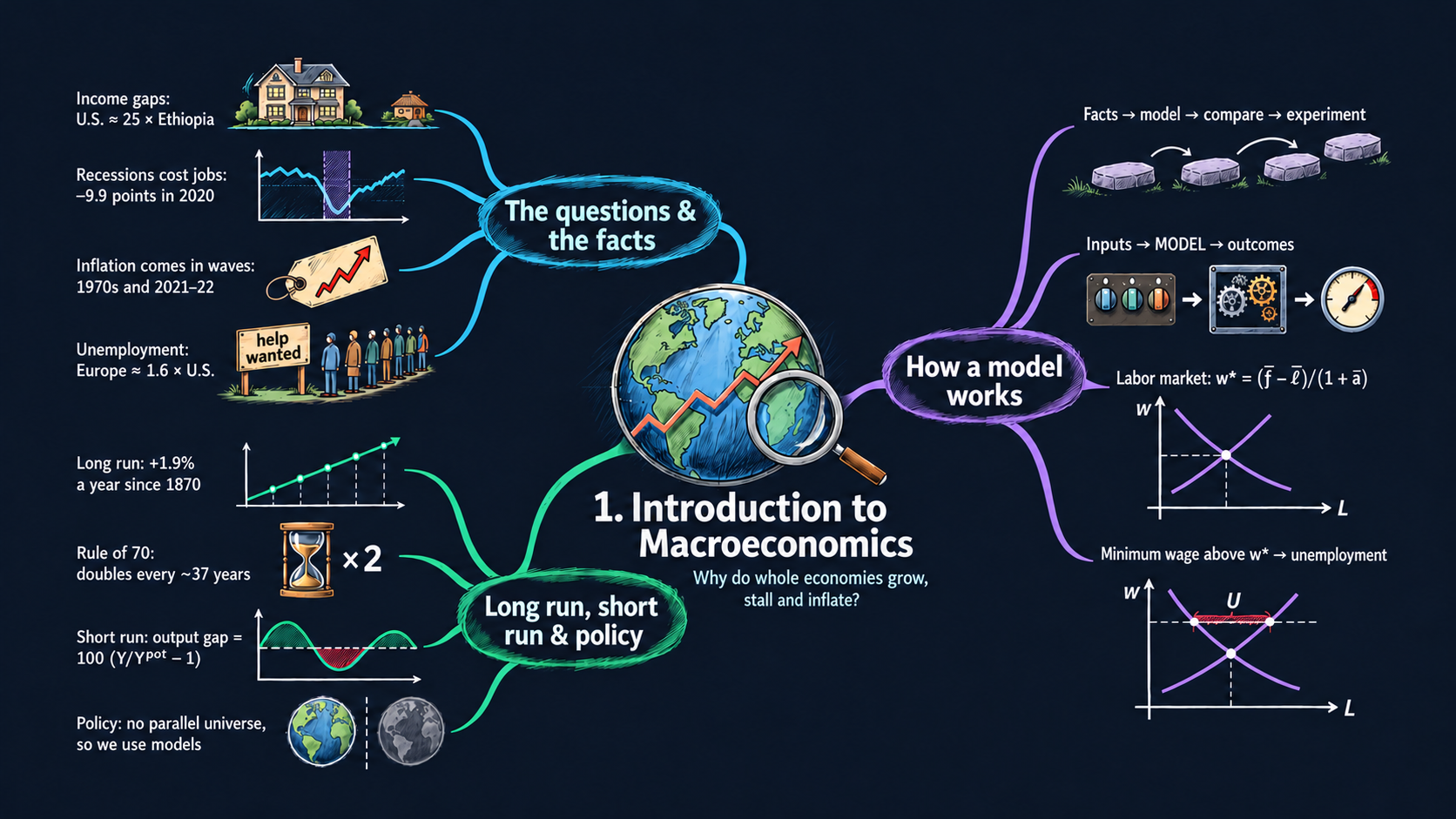




Learning goals
Macroeconomics studies the economy as a whole: income, employment, inflation, unemployment and deficits. It works in four steps: document the facts, build a model, compare the model with the facts, and use the model for experiments. By the end of this chapter you will be able to:
- describe the big facts behind the questions of macroeconomics, using real data for many countries;
- explain the structure of an economic model: parameters and exogenous variables go in, and endogenous variables come out;
- derive the equilibrium wage and employment of the supply-and-demand model of the labor market, read the comparative statics of each parameter, and derive the unemployment a minimum wage creates;
- derive the compound-growth formula, the average annual growth rate and the rule of 70, and explain why steady growth draws a straight line on a ratio scale;
- derive the link between the employment-population ratio and the unemployment rate, and measure the output gap;
- tell the long run (economic growth) from the short run (fluctuations around potential output);
- load data tables with pandas, check them, and draw interactive line charts with Plotly;
- write short Python functions and turn them into interactive figures with sliders.
Model overview
Meet Islandia, a small imaginary island country that we follow through the whole book. Before we can explain anything about Islandia, we must measure it: how fast its prices rise, how many islanders have jobs, how fast its income grows. Then we need a way to explain what we measured: a model, a small economy written as a few equations. This section builds both kits step by step, and every later chapter reuses them.
NoteThe big idea
The question. How do we turn an economy’s raw numbers into facts we can compare, and how does a model explain those facts?
The answer in one sentence. Rates, ratios and growth rates make the facts comparable across countries and decades, and a model turns inputs we choose into the outcomes we want to explain.
What goes in and what comes out. The two measurement blocks take data (prices, jobs, output) and give back inflation, the labor-market ratios, the output gap, growth rates and doubling times. The labor-market model takes three parameters and a minimum wage, and gives back the wage, employment and unemployment.
Road map.
- Measuring the facts: rates, ratios and the output gap: inflation, the key relations between the labor-market ratios, and the output gap.
- Growth rates and compound growth: compound growth, the average growth rate and the rule of 70.
- How a model works: the labor market: the assumptions, solving the model, and what the model predicts.
- Extension: a minimum wage: what happens when a law puts a floor under the wage.
- Model in code: the key results as Python functions, checked with numbers. Every later section reuses these functions.
Notation. A bar over a letter marks a parameter: a number the model builder chooses, such as \(\bar{a}\) or \(\bar{f}\). Letters without a bar are endogenous variables: the model determines them (in the measurement blocks, the data record them). A subscript \(t\) marks the year, as in \(y_t\). In the code we simply write a, l and f.
| Symbol | Meaning | Type |
|---|---|---|
| \(P_t\), \(\pi_t\) | the price level in year \(t\), and the inflation rate in percent | endogenous |
| \(E, U, LF, Pop\) | the employed, the unemployed, the labor force and the adult population | endogenous |
| \(u, e, p\) | unemployment rate, employment-population ratio, participation rate | endogenous |
| \(Y_t\), \(Y^{pot}_t\) | actual and potential output (GDP) in year \(t\) | endogenous |
| \(y_t\), \(g\) | a variable such as GDP per person, and its growth rate as a decimal | endogenous |
| \(\bar{a}\) | slope of labor supply: extra hours offered per extra dollar of wage | parameter |
| \(\bar{\ell}, \bar{f}\) | hours offered at a zero wage, and hours the firm would hire at a zero wage | parameters |
| \(\bar{w}_{\min}\) | a minimum wage set by law (last block only) | parameter |
| \(w\), \(L^s\), \(L^d\) | the wage, the hours supplied and the hours demanded | endogenous |
| \(w^*, L^*\) | a star marks the equilibrium, where supply equals demand | endogenous |
Measuring the facts: rates, ratios and the output gap
Definitions
Islandia keeps statistics like any real country. Almost every number in this chapter is a rate or a ratio, not a total. Dividing by the right total makes a small country comparable with a large one, and 1960 comparable with 2025.
- Inflation. Let \(P_t\) be the price level in year \(t\), for example a consumer price index. The inflation rate is the percentage change of prices over one year (Fig. 3): \[\pi_t = 100\times\frac{P_t - P_{t-1}}{P_{t-1}}.\]
- Jobs. Each adult is employed (\(E\)), unemployed (\(U\): has no job but is looking for one), or out of the labor force. The labor force is \(LF = E + U\), and \(Pop\) is the adult population. Three ratios describe the labor market: \[u = \frac{U}{LF}\ \ \text{(unemployment rate, Fig. 4)}, \qquad e = \frac{E}{Pop}\ \ \text{(employment-population ratio, Fig. 2)}, \qquad p = \frac{LF}{Pop}\ \ \text{(participation rate)}.\]
- Deficits. With \(Y\) for GDP, both deficits of Fig. 5 are measured as shares of GDP: \[\text{budget deficit} = \frac{\text{government spending} - \text{government revenue}}{Y}, \qquad \text{trade deficit} = \frac{\text{imports} - \text{exports}}{Y}.\] A negative deficit is a surplus.
- Potential output. \(Y^{pot}_t\) is what the economy would produce if all prices could adjust freely and all workers and machines were fully used. Actual output \(Y_t\) moves around it (Fig. 7).
Deriving the key relations
Step 1: from inflation back to prices. Multiply the definition of \(\pi_t\) by \(P_{t-1}/100\), then add \(P_{t-1}\) to both sides:
\[P_t = P_{t-1}\left(1 + \frac{\pi_t}{100}\right).\]
Each year multiplies the price level by a factor \(1 + \pi_t/100\). Inflation of 3,080 percent, as in Argentina in 1989 (Fig. 3), multiplies prices by \(1 + 30.8 = 31.8\) in a single year. For prices to rise a thousandfold within one year we need \(1 + \pi/100 = 1000\), that is \(\pi = 99{,}900\) percent. Over several years the yearly factors multiply:
\[\frac{P_T}{P_0} = \left(1 + \frac{\pi_1}{100}\right)\left(1 + \frac{\pi_2}{100}\right)\cdots\left(1 + \frac{\pi_T}{100}\right).\]
Two years of 10 percent inflation raise prices by \(1.1 \times 1.1 = 1.21\), that is by 21 percent and not 20: the second year’s inflation also applies to the first year’s increase.
Step 2: employment, participation and unemployment. Start from \(E = LF - U\) and divide both sides by \(Pop\). Then take \(LF/Pop\) out as a common factor:
\[e = \frac{E}{Pop} = \frac{LF - U}{Pop} = \frac{LF}{Pop}\left(1 - \frac{U}{LF}\right).\]
The first fraction on the right is \(p\) and the one in brackets is \(u\), which gives the first key result.
ImportantKey result: employment, participation and unemployment
\[e = p\,(1 - u) \tag{1}\]
The share of adults with a job is the share in the labor force times the share of the labor force that has a job.
In the data. In February 2020 about 63.3 percent of U.S. adults were in the labor force and 3.5 percent of them were unemployed, so \(e = 63.3 \times (1 - 0.035) \approx 61.1\) percent, the value in Fig. 2.
TipIn words
Islandia’s employment ratio can fall for two quite different reasons. Some islanders lose their jobs and keep looking for new ones, so unemployment rises. Or some islanders give up looking and leave the labor force, so participation falls. Equation (1) keeps the two stories apart, which no single headline number can do.
Step 3: the output gap. The gap measures how far actual output is from potential, in percent of potential:
ImportantKey result: the output gap
\[\text{gap}_t = 100\times\left(\frac{Y_t}{Y^{pot}_t} - 1\right) \tag{2}\]
It is negative when the economy makes less than it could.
Islandia in numbers. In a bad year when Islandia produces 95.3 percent of its potential output, its gap is \(100\times(0.953-1) = -4.7\) percent.
Multiplying out gives the gap in dollars, \(Y_t - Y^{pot}_t = (\text{gap}_t/100)\times Y^{pot}_t\). The same formula works per person: dividing both outputs by the population leaves the ratio \(Y_t/Y^{pot}_t\) unchanged, so the gap in percent is the same, and the gap in dollars per person is \((\text{gap}_t/100)\times Y^{pot}_t/Pop_t\). For small gaps, \(\ln(1+x) \approx x\) (Appendix C.6) gives the log form \(\text{gap}_t \approx 100\,(\ln Y_t - \ln Y^{pot}_t)\). The short-run chapters measure fluctuations in this way.
Step 4: why divide by GDP. The growth rate of a ratio is the growth rate of its numerator minus that of its denominator (Appendix C.5). For a deficit \(D\),
\[g_{D/Y} \approx g_D - g_Y.\]
A deficit that grows as fast as GDP keeps the same weight in the economy, even though in dollars it is many times larger than in 1960. That is why Fig. 5 compares shares of GDP and not dollars.
Dividing by the right total turns raw counts into rates that we can compare across countries and decades.
What the numbers tell us
The two labor-market ratios. The table reads equation (1) one input at a time, at the February 2020 values \(p = 63.3\%\) and \(u = 3.5\%\):
| A change of … | changes \(e = p(1-u)\) by | Why |
|---|---|---|
| \(+1\) point in the unemployment rate \(u\) | \(-p \approx -0.63\) points | a point of \(u\) is a point of the labor force, not of all adults |
| \(+1\) point in the participation rate \(p\) | \(+(1-u) \approx +0.97\) points | most new participants find a job |
In logs, \(\ln e = \ln p + \ln(1-u)\) (Appendix C.4), so the percentage change of \(e\) splits exactly into a participation part and an unemployment part. By April 2020 participation had dropped to about 60.1 percent and unemployment had jumped to about 14.8 percent. Check 5 in Model in code shows that roughly 70 percent of the fall in \(e\) came from higher unemployment and 30 percent from people leaving the labor force.
The output gap is negative in a recession and positive in a boom. Its log form is accurate only for small gaps: for a gap as deep as the Great Depression’s, the two versions differ by about 2 points (Check 6 in the code).
NoteCheck your understanding
1. Islandia’s prices rise by 10 percent this year and by 10 percent again next year. By how much do they rise over the two years, and why is the answer not 20 percent?
Answer
By 21 percent. Step 1 says that each year multiplies the price level by \(1 + \pi_t/100\), so the two years give \(1.1 \times 1.1 = 1.21\). The second year’s 10 percent also applies to the first year’s increase.
2. Islandia’s employment-population ratio falls, but its unemployment rate stays the same. What must have happened?
Answer
By equation (1), \(e = p(1-u)\). With \(u\) unchanged, the fall in \(e\) can only come from a fall in the participation rate \(p\): some islanders stopped looking for work and left the labor force.
Growth rates and compound growth
Definitions
The growth rate of a variable \(y_t\), such as Islandia’s GDP per person, from year \(t\) to year \(t+1\) is its percentage change, written as a decimal:
\[g_t = \frac{y_{t+1} - y_t}{y_t} \qquad\Longleftrightarrow\qquad y_{t+1} = y_t\,(1 + g_t).\]
The inflation rate of the block above is the growth rate of the price level, times 100. The average annual growth rate between year 0 and year \(T\) is the one constant rate \(g\) that would carry \(y_0\) to \(y_T\) in \(T\) years.
Solving: compound growth
Step 1: growth at a constant rate. If \(y\) grows at the same rate \(g\) every year, apply the rule year after year and substitute each line into the next:
\[y_1 = y_0(1+g), \qquad y_2 = y_1(1+g) = y_0(1+g)^2, \qquad y_3 = y_2(1+g) = y_0(1+g)^3, \qquad \dots\]
The exponent simply counts the years, so after \(t\) years we reach the box below.
ImportantKey result: compound growth
\[y_t = y_0\,(1+g)^t \tag{3}\]
This is compound growth (Appendix C.3): each year’s growth applies to a level that already includes the growth of all the years before.
Islandia in numbers. If Islandia’s income per person grows 2 percent a year, after 100 years it is \((1.02)^{100} \approx 7.2\) times its starting level.
TipIn words: growth feeds on itself
When Islandia’s income grows 2 percent this year, next year’s 2 percent is taken from a larger base. So the yearly gains themselves keep getting bigger. Over a century this multiplies income about seven times.
Step 2: the average growth rate. Solve equation (3) for \(g\), with \(T\) years. Divide by \(y_0\), raise both sides to the power \(1/T\) (because \(\left((1+g)^T\right)^{1/T} = 1+g\)), and subtract 1:
\[\frac{y_T}{y_0} = (1+g)^T \quad\Longrightarrow\quad \left(\frac{y_T}{y_0}\right)^{1/T} = 1 + g \quad\Longrightarrow\quad g = \left(\frac{y_T}{y_0}\right)^{1/T} - 1.\]
Fig. 7 applies this formula to U.S. GDP per person from 1870 to 2025, with \(T = 155\): the answer is about 1.9 percent a year. Read backwards, the same formula tells us the growth rate a target needs: a tenfold rise in a century needs \(g = 10^{1/100} - 1 \approx 2.3\) percent a year.
Step 3: logs and the ratio scale. Take the natural log of equation (3), using \(\ln(ab) = \ln a + \ln b\) and \(\ln(x^t) = t\ln x\) (Appendix C.4):
\[\ln y_t = \ln y_0 + t\,\ln(1+g).\]
The log of \(y\) is a straight line in time, with slope \(\ln(1+g)\). A ratio scale draws exactly this, so a series that grows at a constant rate is a straight line in Figs. 1 and 7, and a steeper line means faster growth. Every doubling covers the same vertical distance, because \(\ln(2y) - \ln y = \ln 2\) whatever the level of \(y\). For small \(g\), \(\ln(1+g) \approx g\) (Appendix C.6), which gives a second way to compute an average growth rate: \(g \approx (\ln y_T - \ln y_0)/T\).
Step 4: the rule of 70. How many years does it take for \(y\) to double? Put \(y_T/y_0 = 2\) into equation (3) and take logs: \(T\ln(1+g) = \ln 2\), so \(T = \ln 2/\ln(1+g)\). Now use \(\ln 2 \approx 0.693\) and \(\ln(1+g) \approx g\), which gives \(T \approx 0.70/g\). At 1.9 percent a year, U.S. income per person doubles about every \(70/1.9 \approx 37\) years, a little over four doublings between 1870 and 2025.
ImportantKey result: the average growth rate and the rule of 70
\[g = \left(\frac{y_T}{y_0}\right)^{1/T} - 1 \tag{4}\]
\[T_{\text{double}} \approx \frac{0.70}{g} = \frac{70}{100\,g} \tag{5}\]
Equation (4) finds the one constant rate that links two levels \(T\) years apart. Equation (5) turns a growth rate into a doubling time: divide 70 by the growth rate in percent.
Islandia in numbers. At 2 percent a year, Islandia’s income per person doubles about every \(70/2 = 35\) years; the exact answer, \(\ln 2/\ln 1.02\), is 35.0 years.
Growth compounds: a steady rate adds the same percentage each year, not the same amount, so the level climbs ever faster.
NoteCheck your understanding
1. Islandia’s income per person grows 3 percent a year. Use the rule of 70 to find how long it takes to double, and compare with the exact answer.
Answer
Equation (5) gives \(70/3 \approx 23.3\) years. The exact doubling time is \(\ln 2/\ln 1.03 \approx 23.4\) years.
2. Islandia’s income per person rose tenfold in a century. What average growth rate does equation (4) give?
Answer
With \(y_T/y_0 = 10\) and \(T = 100\), equation (4) gives \(g = 10^{1/100} - 1 \approx 0.023\), about 2.3 percent a year.
What the model predicts
Small differences in growth rates add up. Write equation (3) for two countries and divide one by the other. Relative income changes by the factor \(\left((1+g_1)/(1+g_2)\right)^t\), and in logs
\[\ln\frac{y_{1,t}}{y_{2,t}} = \ln\frac{y_{1,0}}{y_{2,0}} + t\left[\ln(1+g_1) - \ln(1+g_2)\right] \approx \ln\frac{y_{1,0}}{y_{2,0}} + t\,(g_1 - g_2).\]
A gap of only half a percentage point, kept up for 150 years, changes relative income by \(0.005 \times 150 = 0.75\) in logs, a factor of \(e^{0.75} \approx 2.1\). That is about what happened between the United States and Argentina (Fig. 7).
How the growth rate moves the outcomes. The log form gives the effect of the growth rate on the level after \(T\) years: \(d\ln y_T/dg = T/(1+g) \approx T\). One extra point of growth for 100 years adds about \(100 \times 0.01 = 1\) to \(\ln y_{100}\), which multiplies the final level by about \(e \approx 2.7\). The table shows the same effect exactly, from equations (3) and (5):
| Growth rate \(g\) | Exact doubling time \(\ln 2/\ln(1+g)\) | Rule of 70 | Factor after 100 years, \((1+g)^{100}\) |
|---|---|---|---|
| 1% | 69.7 years | 70 years | 2.7 |
| 2% | 35.0 years | 35 years | 7.2 |
| 3% | 23.4 years | 23.3 years | 19.2 |
| 5% | 14.2 years | 14 years | 131.5 |
The rule of 70 is very close for the growth rates of rich countries, and it only begins to drift for fast growth such as 10 percent a year.
Small differences in growth rates, kept up for generations, become large differences in living standards.
NoteCheck your understanding
1. Islandia and a neighboring island start out equally rich. Islandia then grows 2 percent a year and its neighbor 1 percent. About how many times richer is Islandia after 100 years?
Answer
By equation (3), the ratio of the two incomes after 100 years is \((1.02/1.01)^{100} \approx 2.7\). The log form gives the same answer: a gap of \(0.01 \times 100 = 1\) in logs is a factor of \(e \approx 2.72\).
How a model works: the labor market
Assumptions
Every model in this book has the same structure. The model builder chooses the inputs, and the model’s equations determine the outcomes:
- parameters are inputs that stay fixed, unless the model builder changes them in an experiment;
- exogenous variables are inputs that may change over time, along a path the model builder sets in advance (for example a population that grows by 1 percent a year);
- endogenous variables are the outcomes, the unknowns that the equations solve for.
The smallest example on Islandia is a single market for hours of work. The islanders offer hours, Harbor Boatworks, the island’s firm, hires them, and a single wage \(w\) is paid for every hour. Three equations describe the market:
\[L^s = \bar{a}\,w + \bar{\ell} \quad\text{(labor supply)}, \qquad L^d = \bar{f} - w \quad\text{(labor demand)}, \qquad L^s = L^d \quad\text{(the market clears)}.\]
The parameters are \(\bar{a} > 0\), the extra hours offered per extra dollar of wage, and the zero-wage hours \(\bar{\ell}\) and \(\bar{f}\). \(\bar{f}\) measures the boatworks’ capacity, and \(\bar{\ell}\) could also be an exogenous variable that grows with the population. The wage \(w\) and the hours \(L^s\) and \(L^d\) are endogenous.
Labor supply slopes up: a higher wage draws out more hours. Labor demand slopes down: each extra dollar of wage makes one hour less worth hiring. The model has three equations and three unknowns. Once the market clears, \(L^s\) and \(L^d\) are the same number, employment \(L\), so the outcomes are just \(w\) and \(L\). We assume \(\bar{f} > \bar{\ell}\): otherwise islanders would offer more hours at a zero wage than the boatworks wants, and the wage could not be positive.
A model is a small machine: parameters go in, the equations do the work, and endogenous variables come out.
Solving the model
Step 1: one equation in one unknown. Put the supply and demand equations into the market-clearing condition. Only the wage is left:
\[\bar{a}\,w + \bar{\ell} = \bar{f} - w.\]
Step 2: solve for the wage. Add \(w\) to both sides and subtract \(\bar{\ell}\), so that all the terms with \(w\) are on the left: \(\bar{a}w + w = \bar{f} - \bar{\ell}\), or \((1+\bar{a})\,w = \bar{f} - \bar{\ell}\). Dividing both sides by \(1+\bar{a}\) gives the equilibrium wage, equation (6) in the box below.
Step 3: solve for employment. Put \(w^*\) into the demand equation and write everything over the common denominator \(1+\bar{a}\):
\[L^* = \bar{f} - w^* = \frac{(1+\bar{a})\bar{f} - (\bar{f} - \bar{\ell})}{1+\bar{a}}.\]
In the numerator, \((1+\bar{a})\bar{f} - \bar{f} = \bar{a}\bar{f}\), which leaves equation (7).
ImportantKey result: the equilibrium wage and employment
\[w^* = \frac{\bar{f} - \bar{\ell}}{1 + \bar{a}} \tag{6}\]
\[L^* = \frac{\bar{a}\bar{f} + \bar{\ell}}{1 + \bar{a}} \tag{7}\]
The wage is high when Harbor Boatworks wants many hours compared with the hours islanders offer anyway.
Islandia in numbers. Every slider of Figs. 6 and 8 starts from the values of the textbook’s worked exercise, \(\bar{a} = 2\), \(\bar{\ell} = 30\) and \(\bar{f} = 60\). Then \(w^* = (60 - 30)/3 = 10\) and \(L^* = (2\times60 + 30)/3 = 50\).
The supply equation gives the same answer: \(\bar{a}w^* + \bar{\ell} = \left(\bar{a}\bar{f} - \bar{a}\bar{\ell} + \bar{\ell} + \bar{a}\bar{\ell}\right)/(1+\bar{a}) = (\bar{a}\bar{f} + \bar{\ell})/(1+\bar{a})\). At \(w^*\) the hours offered equal the hours wanted. Splitting the fraction in (7) shows that employment is a weighted average of the two zero-wage numbers, \(L^* = \frac{\bar{a}}{1+\bar{a}}\bar{f} + \frac{1}{1+\bar{a}}\bar{\ell}\).
TipIn words
Islanders would like a high wage, and Harbor Boatworks would like a low one. The wage settles where the hours the islanders offer just match the hours the boatworks wants. The more strongly islanders respond to the wage, the closer employment gets to what the boatworks would like to hire.
NoteCheck your understanding
1. Harbor Boatworks wins a large order and would now hire \(\bar{f} = 63\) hours at a zero wage. With \(\bar{a} = 2\) and \(\bar{\ell} = 30\), what are the new \(w^*\) and \(L^*\)?
Answer
Equation (6) gives \(w^* = (63 - 30)/3 = 11\), and equation (7) gives \(L^* = (2\times63 + 30)/3 = 52\). The wage rises by 1 dollar and employment by 2 hours.
What the model predicts
The fourth step of the method is to run experiments: change one input and compare the new outcomes with the old ones. Equations (6) and (7) are straight lines in \(\bar{f}\) and \(\bar{\ell}\), so their coefficients are the effects. For \(\bar{a}\) we differentiate (Appendix C.7): \(w^* = (\bar{f}-\bar{\ell})(1+\bar{a})^{-1}\) gives \(dw^*/d\bar{a} = -(\bar{f}-\bar{\ell})/(1+\bar{a})^2 = -w^*/(1+\bar{a})\), and \(L^* = \bar{f} - w^*\) moves by the same amount in the opposite direction.
| A rise of 1 in … | changes \(w^*\) by | changes \(L^*\) by | at the baseline | Which curve moves |
|---|---|---|---|---|
| \(\bar{f}\) | \(+\dfrac{1}{1+\bar{a}}\) | \(+\dfrac{\bar{a}}{1+\bar{a}}\) | \(+1/3\) and \(+2/3\) | demand shifts right |
| \(\bar{\ell}\) | \(-\dfrac{1}{1+\bar{a}}\) | \(+\dfrac{1}{1+\bar{a}}\) | \(-1/3\) and \(+1/3\) | supply shifts right |
| \(\bar{a}\) | \(-\dfrac{w^*}{1+\bar{a}}\) | \(+\dfrac{w^*}{1+\bar{a}}\) | \(-3.33\) and \(+3.33\) | supply pivots around its zero-wage point |
A shift of demand is shared between the wage and employment. The wage takes the share \(1/(1+\bar{a})\) and employment the rest: the more responsive islanders are, the more a rise in demand shows up as extra hours and the less as higher pay. A shift of supply moves the wage and employment in opposite directions.
Elasticities. Taking logs of equations (6) and (7), \(\ln w^* = \ln(\bar{f}-\bar{\ell}) - \ln(1+\bar{a})\) and \(\ln L^* = \ln(\bar{a}\bar{f}+\bar{\ell}) - \ln(1+\bar{a})\), gives the percentage effects:
| A 1% rise in … | changes \(w^*\) by | changes \(L^*\) by | at the baseline |
|---|---|---|---|
| \(\bar{f}\) | \(\dfrac{\bar{f}}{\bar{f}-\bar{\ell}}\) | \(\dfrac{\bar{a}\bar{f}}{\bar{a}\bar{f}+\bar{\ell}}\) | \(+2\%\) and \(+0.8\%\) |
| \(\bar{\ell}\) | \(-\dfrac{\bar{\ell}}{\bar{f}-\bar{\ell}}\) | \(\dfrac{\bar{\ell}}{\bar{a}\bar{f}+\bar{\ell}}\) | \(-1\%\) and \(+0.2\%\) |
| \(\bar{a}\) | \(-\dfrac{\bar{a}}{1+\bar{a}}\) | \(\dfrac{\bar{a}\bar{f}}{\bar{a}\bar{f}+\bar{\ell}} - \dfrac{\bar{a}}{1+\bar{a}}\) | \(-0.67\%\) and \(+0.13\%\) |
Because the model is made of straight lines rather than powers, these elasticities change with the starting point. The model is far simpler than any real labor market, with one wage and no schooling, training or distance, but it already shows the logic of every later model: write the equations, solve them for the endogenous variables, and read off how each input moves each outcome.
A shift in labor demand moves the wage and employment together; a shift in labor supply moves them apart.
NoteCheck your understanding
1. More islanders reach working age, so \(\bar{\ell}\) rises from 30 to 33 hours. Which curve shifts, and what happens to \(w^*\) and \(L^*\) at the baseline?
Answer
Labor supply shifts right. By the first table, each extra hour of \(\bar{\ell}\) lowers \(w^*\) by \(1/(1+\bar{a}) = 1/3\) of a dollar and raises \(L^*\) by \(1/3\) of an hour. So the wage falls from 10 to 9 and employment rises from 50 to 51.
Extension: a minimum wage
Assumptions
The textbook’s example of a parameter is a minimum wage set by law, \(\bar{w}_{\min}\). Suppose Islandia passes such a law. Keep the three equations above, but forbid any wage below the floor. When the floor is above \(w^*\), the wage equals the floor, and nobody can make Harbor Boatworks hire more hours than it wants at that wage. Employment is then read off the demand curve, and the extra hours that islanders offer are unemployment:
\[w = \max(w^*, \bar{w}_{\min}), \qquad L = L^d(w) = \bar{f} - w, \qquad U = L^s(w) - L^d(w).\]
Solving the model
Case 1: the floor does not bind, \(\bar{w}_{\min} \le w^*\). Nothing changes: \(w = w^*\), \(L = L^*\) and \(U = 0\).
Case 2: the floor binds, \(\bar{w}_{\min} > w^*\). Then \(w = \bar{w}_{\min}\). Subtract demand from supply at that wage:
\[U = (\bar{a}\,\bar{w}_{\min} + \bar{\ell}) - (\bar{f} - \bar{w}_{\min}) = (1+\bar{a})\,\bar{w}_{\min} - (\bar{f} - \bar{\ell}).\]
Equation (6) says that \(\bar{f} - \bar{\ell} = (1+\bar{a})\,w^*\). Substituting it and taking \(1+\bar{a}\) out as a common factor gives the box below.
ImportantKey result: unemployment under a binding minimum wage
\[U = (1+\bar{a})\,(\bar{w}_{\min} - w^*) \tag{8}\]
Employment falls to \(L = \bar{f} - \bar{w}_{\min} = L^* - (\bar{w}_{\min} - w^*)\). Unemployment is the hours islanders offer at the floor that Harbor Boatworks does not hire.
Islandia in numbers. With the baseline values, a floor of 12 is 2 dollars above \(w^* = 10\), so employment falls to \(50 - 2 = 48\) hours and unemployment is \(3 \times 2 = 6\) hours, the numbers Fig. 6 shows.
TipIn words
Each dollar of the floor above the market wage pulls two ways at once. Harbor Boatworks hires one hour less, and islanders offer \(\bar{a}\) hours more. So the gap between hours offered and hours hired widens by \(1+\bar{a}\) hours for every dollar.
What the model predicts
| Floor at or below \(w^*\) | Floor above \(w^*\) | |
|---|---|---|
| wage | \(w^*\) | \(\bar{w}_{\min}\) |
| employment | \(L^*\) | \(L^* - (\bar{w}_{\min} - w^*)\) |
| unemployment | \(0\) | \((1+\bar{a})(\bar{w}_{\min} - w^*)\) |
No curve moves: the floor is a horizontal line in the diagram, and the market slides up the demand curve. Above \(w^*\), each extra dollar of the floor cuts employment by 1 hour and raises unemployment by \(1+\bar{a} = 3\) hours. A floor below the market wage has no effect at all.
A minimum wage above the market wage buys higher pay with fewer hours hired and more unemployment.
NoteCheck your understanding
1. Islandia raises its minimum wage to 14, with the baseline values. What are the wage, employment and unemployment?
Answer
The floor binds, because 14 is above \(w^* = 10\). The wage is 14, employment is \(60 - 14 = 46\) hours, and by equation (8) unemployment is \(3\times(14-10) = 12\) hours.
NoteRecap
- Rates and ratios make the facts comparable: inflation, unemployment and deficits are percentages, not totals (Fig. 3).
- The labor-market ratios are linked: \(e = p(1-u)\), so the employment ratio falls when unemployment rises or when people leave the labor force (Fig. 2).
- The output gap measures how far output is from potential, \(100(Y_t/Y^{pot}_t - 1)\).
- Growth compounds: \(y_t = y_0(1+g)^t\) is a straight line on a ratio scale, and the rule of 70 turns a growth rate into a doubling time (Fig. 1, Fig. 7).
- A model turns inputs into outcomes: in the labor market, \(w^* = (\bar{f}-\bar{\ell})/(1+\bar{a})\) and \(L^* = (\bar{a}\bar{f}+\bar{\ell})/(1+\bar{a})\) (Fig. 8).
- A binding minimum wage creates unemployment of \((1+\bar{a})(\bar{w}_{\min} - w^*)\) hours (Fig. 6).
Model in code
Now we turn the Key results into Python. The section has three parts: the setup (folded, because it is the same in every chapter), the model as functions, and numerical checks of the Key results. Run its cells once, in order. Every later section of the notebook reuses them.
Setup
Run the setup cells once, before anything else. They load the Python libraries, give every chart the same look, store the address of the chapter’s data and define the helpers that only the book website needs. You can use the notebook without reading them; open the box if you are curious.
NoteShow the setup code
The first cell loads the libraries and sets the look of the charts. Its comments explain each step.
The website cannot run Python, so each interactive figure also gets a version with precomputed sliders or menus. The next three cells build those versions. Run them and move on.
# @title Helper for the website versions (run this cell; you do not need to read it)
def slider_figure(make_figure, name, values, start, label=None):
    """Join precomputed versions of a figure with one slider (the website cannot run Python).

    Arguments
        make_figure : the function that draws the figure, e.g. labor_market
        name        : the argument the slider moves, e.g. "f"
        values      : the values of that argument to precompute
        start       : the value shown first
        label       : the slider's label (the argument name if None)
    Returns
        one Plotly figure with all versions and a slider that shows one at a time
    """
    # Step 1: draw the figure once for every value
    figures = [make_figure(**{name: v}) for v in values]
    first = values.index(start)
    # Step 2: copy every curve into one figure; only the start value's are visible
    fig = go.Figure(layout=figures[first].layout)
    owner = []                                  # which figure each trace comes from
    for i, f in enumerate(figures):
        for trace in f.data:
            trace.visible = (i == first)
            fig.add_trace(trace)
            owner.append(i)
    # Step 3: one slider step per value: its curves, title, labels and shapes
    steps = []
    for i, f in enumerate(figures):
        layout = {"title": f.layout.title.to_plotly_json(),
                  "annotations": [a.to_plotly_json() for a in f.layout.annotations],
                  "shapes": [s.to_plotly_json() for s in f.layout.shapes]}
        visible = [o == i for o in owner]
        steps.append(dict(method="update", label=str(values[i]), args=[{"visible": visible}, layout]))
    fig.update_layout(sliders=[dict(active=first, steps=steps, pad=dict(t=60),
                                    currentvalue=dict(prefix=(label or name) + " = "))])
    return fig
The data figures of this chapter let you add other countries. On the website, a menu above each of these figures adds a group of countries (the G7, a world region, …); the next cell builds those menus.
# @title Helpers for the website's country menus (run this cell; you do not need to read it)
def country_traces(data, y, skip, x="year", fmt=".1f", markers=False):
    """One line per country of a long table (country, x, y), leaving out the countries in skip.

    Arguments
        data    : a long table with a "country" column, the x column and the y column
        y       : the name of the column to draw
        skip    : the countries to leave out (the ones the figure already draws)
        x       : the name of the column on the horizontal axis
        fmt     : the number format of the hover label, e.g. ".1f"
        markers : True to draw a dot at every point as well
    Returns
        a dictionary that maps each country to a list with its one trace
    """
    # one trace per country that is not in `skip`, in its own color from COLORS
    extra = {}
    for name, part in data.groupby("country"):
        if name not in skip:
            extra[name] = [go.Scatter(x=part[x], y=part[y], name=name,
                                      mode="lines+markers" if markers else "lines",
                                      line=dict(color=COLORS[name], width=2),
                                      hovertemplate=f"<b>{name}</b><br>%{{x}}: %{{y:{fmt}}}<extra></extra>")]
    return extra


def country_menu(fig, extra, countries):
    """Add the extra countries' traces hidden, and a menu that shows one group of them (G7, a region, ...).

    The traces already in fig (the textbook's) stay as they are, and slider steps only switch those.

    Arguments
        fig       : a Plotly figure with the textbook's traces (and maybe a slider)
        extra     : the extra countries' traces, from country_traces
        countries : the country table, with the columns country, region, g7, g20 and oecd
    Returns
        the same figure, with the extra traces hidden and the menu of groups above the plot
    """
    # Step 1: add every extra trace, hidden, and remember its country
    n = len(fig.data)
    owner = []
    for name, traces in extra.items():
        for trace in traces:
            trace.visible = False
            fig.add_trace(trace)
            owner.append(name)
    # Step 2: the groups of the menu: G7, G20, OECD, then each region, A to Z
    groups = {"G7": countries.country[countries.g7], "G20": countries.country[countries.g20],
              "OECD": countries.country[countries.oecd]}
    for region in sorted(countries.region.unique()):
        groups[region] = countries.country[countries.region == region]
    # Step 3: one button per group. A button switches only the extra traces (`rest`)
    # and rescales the y-axis to the lines that are shown.
    rest, autoscale = list(range(n, len(fig.data))), {"yaxis.autorange": True}
    # the first button hides every extra country
    buttons = [dict(label="Textbook only", method="update",
                    args=[{"visible": [False] * len(owner)}, autoscale, rest])]
    for label, members in groups.items():
        # True for the extra traces whose country is in this group
        visible = [o in set(members) for o in owner]
        # leave out the groups without any extra country
        if any(visible):
            buttons.append(dict(label=f"+ {label} ({sum(visible)})", method="update",
                                args=[{"visible": visible}, autoscale, rest]))
    # the menu sits above the plot, at the right, with room for it in the top margin
    menu = dict(type="dropdown", buttons=buttons, active=0, x=1, xanchor="right", y=1.02, yanchor="bottom")
    fig.update_layout(updatemenus=list(fig.layout.updatemenus) + [menu], margin=dict(t=110))
    # Step 4: the slider steps (if any) switch only the first n traces, the textbook's
    for slider in fig.layout.sliders:
        for step in slider.steps:
            step.args = [{"visible": list(step.args[0]["visible"])}, step.args[1], list(range(n))]
    return fig
The last helper builds the website version of a figure that shows one country at a time, chosen from a menu.
# @title Helper for the website's one-country menus (run this cell; you do not need to read it)
def dropdown_figure(make_figure, name, values, start):
    """Like slider_figure, but with a dropdown menu: one precomputed figure per value (e.g. per country).

    Arguments
        make_figure : the function that draws the figure
        name        : the argument the menu sets, e.g. "country"
        values      : the values of that argument to precompute
        start       : the value shown first
    Returns
        one Plotly figure with all versions and a menu that shows one at a time
    """
    # Step 1: draw the figure once for every value
    figures = [make_figure(**{name: v}) for v in values]
    # Step 2: copy every curve into one figure; only the start value's are visible
    fig = go.Figure(layout=figures[values.index(start)].layout)
    owner = []                                  # which figure each trace comes from
    for i, f in enumerate(figures):
        for trace in f.data:
            trace.visible = (values[i] == start)
            fig.add_trace(trace)
            owner.append(i)
    # Step 3: one menu entry per value: its curves, title, labels, shapes and axes
    buttons = []
    for i, f in enumerate(figures):
        layout = {"title": f.layout.title.to_plotly_json(),
                  "annotations": [a.to_plotly_json() for a in f.layout.annotations],
                  "shapes": [s.to_plotly_json() for s in f.layout.shapes],
                  "yaxis": f.layout.yaxis.to_plotly_json(),
                  "xaxis": f.layout.xaxis.to_plotly_json()}
        buttons.append(dict(label=str(values[i]), method="update",
                            args=[{"visible": [o == i for o in owner]}, layout]))
    # Step 4: put the menu above the plot, at the right, starting at the start value
    menu = dict(type="dropdown", buttons=buttons, active=values.index(start), x=1, xanchor="right", y=1.02,
                yanchor="bottom")
    fig.update_layout(updatemenus=[menu], margin=dict(t=110))
    return fig
The model as functions
The labor-market model has two curves, supply and demand, and one Key result: the equilibrium wage and employment, equations (6) and (7). We write each one as a Python function: a named recipe that takes inputs and gives back a result. Every later section of the notebook reuses labor_supply, labor_demand and equilibrium.
# `def` creates a function. Its inputs are the arguments in parentheses.
# `a=2.0` gives a a default value, used whenever we do not pass one.
# The text in triple quotes describes the function.
def labor_supply(w, a=2.0, l=30.0):
    """Hours of work the islanders offer at the wage w.

    The labor-supply curve of Fig. 8:  L^s = a-bar w + l-bar

    Arguments
        w : the wage
        a : the slope of labor supply, a-bar (extra hours per extra dollar)
        l : the hours offered at a zero wage, l-bar
    Returns
        the hours supplied, L^s
    """
    # `return` gives back the result
    return a * w + l


def labor_demand(w, f=60.0):
    """Hours of work Harbor Boatworks wants to hire at the wage w.

    The labor-demand curve of Fig. 8:  L^d = f-bar - w

    Arguments
        w : the wage
        f : the hours the firm would hire at a zero wage, f-bar
    Returns
        the hours demanded, L^d
    """
    # each extra dollar of wage makes one hour less worth hiring
    return f - w


def equilibrium(a=2.0, l=30.0, f=60.0):
    """The wage and employment at which supply equals demand.

    Equations (6) and (7):  w* = (f-bar - l-bar) / (1 + a-bar),  L* = (a-bar f-bar + l-bar) / (1 + a-bar)

    Arguments
        a : the slope of labor supply, a-bar
        l : the hours offered at a zero wage, l-bar
        f : the hours the firm would hire at a zero wage, f-bar
    Returns
        the equilibrium wage w* and employment L*, as two numbers
    """
    w_star = (f - l) / (1 + a)                  # equation (6)
    L_star = labor_demand(w_star, f)            # put w* into demand: equation (7)
    # a function can return two results at once, separated by a comma
    return w_star, L_star
The growth block gives two more formulas: the average growth rate that links two levels, equation (4), and the exact doubling time behind the rule of 70, equation (5).
def average_growth(start, end, years):
    """The constant yearly growth rate that turns `start` into `end` in `years` years.

    Equation (4):  g = (y_T / y_0)^(1/T) - 1

    Arguments
        start : the first level, y_0
        end   : the last level, y_T
        years : the number of years between them, T
    Returns
        the average growth rate g, as a decimal (0.02 = 2 percent)
    """
    # `**` means "to the power of"
    return (end / start) ** (1 / years) - 1


def doubling_time(g):
    """Exact number of years it takes to double at the growth rate g.

    Equation (5) is its approximation:  T = ln 2 / ln(1 + g), close to 70 / (100 g)

    Arguments
        g : the growth rate, as a decimal
    Returns
        the doubling time in years
    """
    # `np.log` is the natural logarithm, ln
    return np.log(2) / np.log(1 + g)
Checking the key results
The formulas came from algebra. Now we check them with numbers, one Key result at a time. First Islandia’s baseline, \(\bar{a} = 2\), \(\bar{\ell} = 30\) and \(\bar{f} = 60\): the wage from equation (6), put into either curve, must give the employment of equation (7).
# Islandia's equilibrium; the two results of the function go into two variables
w_star, L_star = equilibrium()
# An f-string, f"... {w_star:.1f}", puts a value into the text;
# ":.1f" means "one decimal".
print(f"Equilibrium wage       w* = {w_star:.1f}")
print(f"Equilibrium employment L* = {L_star:.1f}   (equation 7: {(2 * 60 + 30) / (1 + 2):.1f})")
# at w* the hours offered equal the hours wanted
print(
    f"At w*, supply = {labor_supply(w_star):.1f} and demand = {labor_demand(w_star):.1f}: the market clears")
Equilibrium wage w* = 10.0
Equilibrium employment L* = 50.0 (equation 7: 50.0)
At w*, supply = 50.0 and demand = 50.0: the market clearsCheck 1: the elasticities. We raise each parameter by 1 percent and see by what percentage \(w^*\) and \(L^*\) change. The table above predicts \(+2\%\) and \(+0.8\%\) for \(\bar{f}\), \(-1\%\) and \(+0.2\%\) for \(\bar{\ell}\), and \(-0.67\%\) and \(+0.13\%\) for \(\bar{a}\).
# Step 1: the baseline equilibrium
w0, L0 = equilibrium(a=2.0, l=30.0, f=60.0)
# Step 2: one parameter 1% higher at a time; ":+.2f" shows the sign and two decimals
w1, L1 = equilibrium(a=2.0, l=30.0, f=60.0 * 1.01)
print(f"1% higher f: w* {100 * (w1 / w0 - 1):+.2f}%,  L* {100 * (L1 / L0 - 1):+.2f}%")
w1, L1 = equilibrium(a=2.0, l=30.0 * 1.01, f=60.0)
print(f"1% higher l: w* {100 * (w1 / w0 - 1):+.2f}%,  L* {100 * (L1 / L0 - 1):+.2f}%")
w1, L1 = equilibrium(a=2.0 * 1.01, l=30.0, f=60.0)
print(f"1% higher a: w* {100 * (w1 / w0 - 1):+.2f}%,  L* {100 * (L1 / L0 - 1):+.2f}%")
1% higher f: w* +2.00%, L* +0.80%
1% higher l: w* -1.00%, L* +0.20%
1% higher a: w* -0.66%, L* +0.13%The answers for \(\bar{f}\) and \(\bar{\ell}\) are exact, because \(w^*\) and \(L^*\) are straight lines in those two parameters. For \(\bar{a}\) they are close but not exact, because an elasticity describes very small changes.
Check 2: the minimum wage. For several floors, we compute unemployment directly, as hours supplied minus hours demanded at the wage that holds, and compare the result with equation (8).
# the market wage, w* = 10, without a floor
w_star, L_star = equilibrium()
# `for w_min in (8, 11, 12, 14):` runs the indented lines once for each floor.
# `max(a, b)` is the larger of two numbers.
for w_min in (8, 11, 12, 14):
    w = max(w_star, w_min)                                   # the wage that holds
    # unemployment, directly: hours offered minus hours hired
    direct = labor_supply(w) - labor_demand(w)
    # equation (8); `max(..., 0)` gives zero when the floor does not bind
    formula = max((1 + 2.0) * (w_min - w_star), 0)
    print(f"floor {w_min:2d}: wage {w:4.1f}, employment {labor_demand(w):4.1f}, "
          f"unemployment {direct:4.1f} (direct) and {formula:4.1f} (equation 8)")
floor 8: wage 10.0, employment 50.0, unemployment 0.0 (direct) and 0.0 (equation 8)
floor 11: wage 11.0, employment 49.0, unemployment 3.0 (direct) and 3.0 (equation 8)
floor 12: wage 12.0, employment 48.0, unemployment 6.0 (direct) and 6.0 (equation 8)
floor 14: wage 14.0, employment 46.0, unemployment 12.0 (direct) and 12.0 (equation 8)Check 3: compound growth. We let GDP per person grow by 1.9 percent a year for 155 years, one year at a time, and compare the result with equation (3). Then equation (4) must recover the growth rate, and the log formula must come close.
# Step 1: grow a level of 1 by 1.9% a year. `range(155)` counts 0, 1, ..., 154, so
# the loop runs 155 times; `_` names a loop counter we do not need.
level = 1.0
for _ in range(155):
    # one year of growth: the new value replaces the old one
    level = level * (1 + 0.019)
# Step 2: compare with equations (3) and (4) and with the log formula
print(f"Year by year: level after 155 years = {level:.3f}")
print(f"Equation (3): (1.019)^155           = {(1 + 0.019) ** 155:.3f}")
print(f"Equation (4) recovers g             = {100 * average_growth(1.0, level, 155):.3f}%")
print(f"Log formula (ln y_T - ln y_0) / T   = {100 * (np.log(level) - np.log(1.0)) / 155:.3f}%")
# Step 3: the growth rate that makes income ten times larger in a century
print(f"Tenfold in 100 years needs g        = {100 * average_growth(1, 10, 100):.2f}%")
Year by year: level after 155 years = 18.493
Equation (3): (1.019)^155 = 18.493
Equation (4) recovers g = 1.900%
Log formula (ln y_T - ln y_0) / T = 1.882%
Tenfold in 100 years needs g = 2.33%Check 4: the rule of 70. We compare equation (5) with the exact doubling time, and add the factor after 100 years, as in the table above.
# for each growth rate: the exact doubling time, the rule of 70 and (1 + g)^100
for g in (0.01, 0.02, 0.03, 0.05, 0.10):
    print(f"g = {100 * g:4.1f}%: doubles in {doubling_time(g):5.1f} years "
          f"(rule of 70: {70 / (100 * g):5.1f}); "
          f"factor after 100 years {(1 + g) ** 100:7.1f}")
g = 1.0%: doubles in 69.7 years (rule of 70: 70.0); factor after 100 years 2.7
g = 2.0%: doubles in 35.0 years (rule of 70: 35.0); factor after 100 years 7.2
g = 3.0%: doubles in 23.4 years (rule of 70: 23.3); factor after 100 years 19.2
g = 5.0%: doubles in 14.2 years (rule of 70: 14.0); factor after 100 years 131.5
g = 10.0%: doubles in 7.3 years (rule of 70: 7.0); factor after 100 years 13780.6Check 5: two labor-market ratios. We plug the February and April 2020 values into both sides of equation (1). Then we split the fall of \(e\) into its two parts with logs.
# Step 1: February 2020, per 100 adults; both sides of equation (1)
# 63.3 of 100 adults are in the labor force
Pop, LF = 100.0, 63.3
# 3.5 percent of the labor force is unemployed
U = 0.035 * LF
# left side of equation (1): E / Pop, in percent
e_feb = 100 * (LF - U) / Pop
print(f"February 2020: E/Pop = {e_feb:.2f}%,   p(1 - u) = {63.3 * (1 - 0.035):.2f}%")
# Step 2: April 2020 from equation (1), and the fall of ln e split into its two parts
e_apr = 60.1 * (1 - 0.148)                       # equation (1) for April 2020
fall = np.log(e_apr) - np.log(e_feb)
part_p = np.log(60.1) - np.log(63.3)             # participation part
part_u = np.log(1 - 0.148) - np.log(1 - 0.035)   # unemployment part
# Step 3: the shares of the two parts; ":.0%" shows a share as a percentage
print(f"April 2020:    e = {e_apr:.1f}%, a fall of {e_feb - e_apr:.1f} points")
print(
    f"Share of the log fall due to participation: {part_p / fall:.0%}, to unemployment: {part_u / fall:.0%}")
print(f"The two parts add up: {part_p + part_u:.4f} = {fall:.4f}")
February 2020: E/Pop = 61.08%, p(1 - u) = 61.08%
April 2020: e = 51.2%, a fall of 9.9 points
Share of the log fall due to participation: 29%, to unemployment: 71%
The two parts add up: -0.1764 = -0.1764Check 6: compounding prices and the log form of the gap. A year of 3,080 percent inflation, two years of 10 percent, and equation (2) against its log form for small and large gaps.
# Step 1: inflation compounds: prices are multiplied by (1 + inflation) each year
print(f"3,080% inflation multiplies prices by {1 + 3080 / 100:.1f}")
print(f"Two years of 10% raise prices by {100 * ((1 + 0.10) * (1 + 0.10) - 1):.0f}%")
# Step 2: the output gap for 2009, the Great Depression and 1944, exactly and in logs
for ratio_to_potential in (0.953, 0.83, 1.23):
    exact = 100 * (ratio_to_potential - 1)                   # equation (2)
    approx = 100 * np.log(ratio_to_potential)                # log form
    print(
        f"Y / Y_pot = {ratio_to_potential:.3f}: gap {exact:+6.1f}% (equation 2), {approx:+6.1f}% (log form)")
3,080% inflation multiplies prices by 31.8
Two years of 10% raise prices by 21%
Y / Y_pot = 0.953: gap -4.7% (equation 2), -4.8% (log form)
Y / Y_pot = 0.830: gap -17.0% (equation 2), -18.6% (log form)
Y / Y_pot = 1.230: gap +23.0% (equation 2), +20.7% (log form)The log form is within a tenth of a point for a gap like 2009’s, but it is off by almost 2 points for the Great Depression’s 17 percent, and by more than 2 for the wartime boom of 1944.
Income over time and across countries
The first big fact of macroeconomics is how unequal incomes are, both across countries and across time. We compare GDP per person for six economies and for many more.
Fig. 1: GDP per person in six countries
Goal. Document the first big fact of macroeconomics: income differs enormously across countries and over time.
The data come from the Maddison Project, which estimates GDP per person for every country over long periods. GDP (gross domestic product) is the overall income of a country; Chapter 2 explains how it is measured. All values are in 2022 dollars, so they can be compared across years.
# Load the data of Fig. 1. `pd.read_csv` reads a data file into a DataFrame, a
# table with named columns; `DATA_URL + "fig1-1.csv"` glues the folder address and
# the file name together. `.head()` shows the first five rows.
six = pd.read_csv(DATA_URL + "fig1-1.csv")
six.head()| year | gdppc_usa | gdppc_gbr | gdppc_jpn | gdppc_arg | gdppc_zaf | gdppc_chn | |
|---|---|---|---|---|---|---|---|
| 0 | 1870 | 6197 | 7520 | 2038 | 3019 | 1659 | 1219 |
| 1 | 1890 | 8598 | 8831 | 2391 | 4968 | 2361 | 1244 |
| 2 | 1900 | 10370 | 9798 | 2739 | 5913 | 1928 | 1254 |
| 3 | 1929 | 15423 | 11317 | 4729 | 8981 | 3078 | 1294 |
| 4 | 1950 | 19662 | 14271 | 3950 | 10256 | 5214 | 1031 |
The table is wide: one column per country, and only the benchmark years the textbook uses (1870, 1890, 1900, 1929 and every decade from 1950). Plotly Express prefers long tables, with one row per country and year.
# From a wide table to a long one. A dictionary such as NAMES pairs keys (the
# column names) with values (readable country names)
NAMES = {
    "gdppc_usa": "United States",
    "gdppc_gbr": "United Kingdom",
    "gdppc_jpn": "Japan",
    "gdppc_arg": "Argentina",
    "gdppc_zaf": "South Africa",
    "gdppc_chn": "China",
}
# `.melt(id_vars="year")` turns the country columns into rows: the old column
# names go into a new column (`var_name`) and the numbers into another (`value_name`)
long = six.melt(id_vars="year", var_name="series", value_name="gdppc")
# `.map(NAMES)` replaces each column name with a readable country name
long["country"] = long.series.map(NAMES)
long.head()| year | series | gdppc | country | |
|---|---|---|---|---|
| 0 | 1870 | gdppc_usa | 6197 | United States |
| 1 | 1890 | gdppc_usa | 8598 | United States |
| 2 | 1900 | gdppc_usa | 10370 | United States |
| 3 | 1929 | gdppc_usa | 15423 | United States |
| 4 | 1950 | gdppc_usa | 19662 | United States |
Beyond the textbook’s six countries
The Maddison Project covers far more than six countries. The file maddison_world.csv holds all of them, already in long form and in the same 2022 dollars, for every year with an estimate. A second file, countries.csv, lists every economy with its world region and its membership of the G7, the G20 and the OECD. Every data figure of this notebook uses it.
# Load every country of the Maddison Project, and the table of country groups
world = pd.read_csv(DATA_URL + "maddison_world.csv")
countries = pd.read_csv(DATA_URL + "countries.csv")
# how many countries, which years, how many rows
print(
    f"{world.country.nunique()} countries, {world.year.min()}-{world.year.max()}, "
    f"{len(world):,} rows"
)
world.head()
169 countries, 1870-2022, 15,890 rows| iso3 | country | year | gdppc | |
|---|---|---|---|---|
| 0 | AFG | Afghanistan | 1950 | 1491 |
| 1 | AFG | Afghanistan | 1951 | 1509 |
| 2 | AFG | Afghanistan | 1952 | 1534 |
| 3 | AFG | Afghanistan | 1953 | 1600 |
| 4 | AFG | Afghanistan | 1954 | 1606 |
Before we use a new file, we check that it agrees with the one we trust. For the six countries at the benchmark years, the two files should hold exactly the same numbers.
# Compare the two files at the textbook's benchmark years
BENCHMARKS = list(six.year)                          # the textbook's benchmark years
# `.isin(list)` is True for the rows whose value is in the list
on_benchmarks = world[world.year.isin(BENCHMARKS)]
# `.merge(other, on=[...])` joins two tables, matching rows with the same year and
# country; columns with the same name get the endings _x (long) and _y (world)
check = long.merge(on_benchmarks, on=["year", "country"])
print(
    f"{len(check)} matching rows, largest difference: "
    f"{(check.gdppc_x - check.gdppc_y).abs().max()} dollars"
)
78 matching rows, largest difference: 0 dollarsEvery country keeps the same color in every figure. The textbook’s countries get fixed colors of our palette, and each of the other countries one of 24 distinct colors.
Show the drawing code
# @title Drawing code: Fig. 1, one color per country (for every data figure)
# Step 1: the textbook's countries get fixed colors of our palette
COLORS = {
    "United States": BLUE,
    "United Kingdom": TEAL,
    "Japan": GREEN,
    "Argentina": "#5aa0d8",
    "South Africa": "#0b4f47",
    "China": "#e0a33b",
    "Euro area": "#7b5ea7",
    "Europe": "#7b5ea7",
}
# Step 2: 24 distinct colors for the other countries
OTHER = px.colors.qualitative.Dark24
# `for i, name in enumerate(...)` hands over each name together with its position
# i (0, 1, 2, ...). `i % 24` is the remainder after dividing by 24, so the 24
# colors repeat in turn. `if name not in COLORS:` skips the names with a color.
for i, name in enumerate(countries.country):
    if name not in COLORS:
        COLORS[name] = OTHER[i % len(OTHER)]
The textbook draws this figure on a ratio scale: each step up the vertical axis doubles the value (1,000, 2,000, 4,000, …). Equal distances then mean equal percentage changes, so a country growing at a steady rate draws a straight line (the log form of equation 3). Chapter 3 explains ratio scales in detail.
The function gdp_per_person draws the chosen countries at the benchmark years, on a ratio or a linear scale. It is only drawing code, so it is folded: open it to see how it works.
Show the drawing code
# @title Drawing code: Fig. 1, GDP per person at the benchmark years
# the textbook's six countries, and the numbers printed on the ratio-scale axis
BOOK = (
    "United States",
    "United Kingdom",
    "Japan",
    "Argentina",
    "South Africa",
    "China",
)
TICKS = [500, 1000, 2000, 4000, 8000, 16000, 32000, 64000, 128000]


def gdp_per_person(scale="ratio", chosen=BOOK):
    """GDP per person of the chosen countries at the textbook's benchmark years.

    Draws Fig. 1 (inspired by Fig. 1.1 in Jones): 1870-2022, in 2022 dollars.

    Arguments
        scale  : "ratio" or "linear", the vertical scale
        chosen : the countries to draw
    Returns
        a Plotly figure
    """
    # Step 1: the rows of the chosen countries. `set(chosen) - set(data.country)`
    # keeps the chosen names that have no data
    data = on_benchmarks[on_benchmarks.country.isin(chosen)]
    missing = sorted(set(chosen) - set(data.country))
    title = (
        "2022: U.S. income per person 5× South Africa's; "
        "China's up 24-fold since 1950"
    )
    # `", ".join(missing)` writes the names in one line, separated by commas
    if missing:
        title = "No data for " + ", ".join(missing)

    # Step 2: one line per country (`color=`). `color_discrete_map=COLORS` fixes
    # each country's color, and `log_y=True` gives a ratio scale
    fig = px.line(
        data,
        x="year",
        y="gdppc",
        color="country",
        hover_name="country",
        markers=True,
        log_y=(scale == "ratio"),
        color_discrete_map=COLORS,
        category_orders={"country": list(chosen)},
        title=title,
        labels={
            "year": "Year",
            "gdppc": "GDP per person (2022 dollars)",
            "country": "Country",
        },
    )

    # Step 3: the vertical axis. `x if condition else y` picks x when the condition
    # is true: one step lower for a very poor country, higher for a very rich one
    low = 800 if data.gdppc.min() >= 800 else 400
    high = 90000 if data.gdppc.max() <= 90000 else 250000
    # `tickvals` sets the numbers printed on the axis (Plotly's own labels are hard
    # to read on a ratio scale). On a ratio scale the range is given in powers of
    # ten: `np.log10(800)`
    if scale == "ratio":
        fig.update_yaxes(tickvals=TICKS, range=[np.log10(low), np.log10(high)])
    else:
        fig.update_yaxes(range=[0, high - 10000])
    fig.update_xaxes(range=[1865, 2027])
    return fig
# Fig. 1 with controls. `interact` calls gdp_per_person and redraws its figure
# every time you change a control. `ToggleButtons` gives one button per option.
# `SelectMultiple` is a list from which you can pick several entries: hold Ctrl
# (Cmd on a Mac) and click to add or remove a country. The `;` at the end only
# hides an extra line of text.
interact(
gdp_per_person,
scale=ToggleButtons(options=["ratio", "linear"], value="ratio",
description="vertical scale"),
chosen=SelectMultiple(options=sorted(world.country.unique()), value=BOOK, rows=8,
description="countries"),
);Show the code of the website version
# @title Website version: Fig. 1 with buttons for the scale and a menu of countries
# Step 1: the figure with the textbook's six countries
fig = gdp_per_person()
# Step 2: two buttons switch the vertical axis between a ratio and a linear scale
fig.update_layout(
    updatemenus=[
        dict(
            type="buttons",
            direction="right",
            x=0.01,
            y=0.98,
            xanchor="left",
            yanchor="top",
            buttons=[
                dict(
                    label="ratio scale",
                    method="relayout",
                    args=[{"yaxis.type": "log", "yaxis.autorange": True,
                           "yaxis.tickvals": TICKS}],
                ),
                dict(
                    label="linear scale",
                    method="relayout",
                    args=[{"yaxis.type": "linear", "yaxis.autorange": True,
                           "yaxis.tickvals": None}],
                ),
            ],
        )
    ]
)
# Step 3: every other country's line, hidden, and the menu that adds a group of them
extra = country_traces(on_benchmarks, "gdppc", BOOK, fmt=",.0f", markers=True)
country_menu(fig, extra, countries)
Sources. Data: Maddison Project Database 2023, GDP per capita (gdppc), Groningen Growth and Development Centre (Bolt and van Zanden 2024, doi:10.34894/INZBF2), converted from 2011 to 2022 dollars with the U.S. Bureau of Economic Analysis GDP deflator (A191RD3A086NBEA), via FRED. Country groups: World Bank country classifications. Prepared files: data/ch01/fig1-1.csv, data/ch01/maddison_world.csv and data/ch01/countries.csv (see the data notes). Chart: inspired by Fig. 1.1 in Jones (2024), Macroeconomics, 6th ed.
On the website, the menu above the chart adds a group of countries; click a country in the legend to hide it, or double-click to show it alone.
What to notice.
- In every year, the richest of the six countries has several times the income of the poorest. In 2022 the United States leads and South Africa is last.
- The U.K. was richer than the United States in 1870 and 1890; by 1900 the United States was ahead.
- Japan’s income fell between 1929 and 1950 (World War II) and then rose very fast: it passed South Africa in the 1950s and Argentina in the 1960s. China was almost flat until 1950 and has grown fast since, passing Argentina by 2020.
- Switch to the linear scale: the lines for poorer countries are squeezed near zero, and the early growth of every country becomes invisible. That is why the textbook uses a ratio scale.
- Add South Korea: with 1,288 dollars per person in 1950 it was poorer than Japan was in 1870. It grew so fast that by 2020 it had passed Japan. Many countries have no estimate before 1950, so their lines start there.
Key numbers: how much richer?
The textbook asks why the typical American is “more than 10 times richer” than a century ago and “25 times richer” than the typical Ethiopian. A wider file holds every available year for the six countries and for Ethiopia, so we can check both numbers.
# Step 1: every year of the six countries and Ethiopia, as a wide table.
# `.pivot(index="year", columns="iso3", values="gdppc")` turns a long table back
# into a wide one, with the years as row labels and one column per country code
annual = pd.read_csv(DATA_URL + "maddison_annual.csv")
wide = annual.pivot(index="year", columns="iso3", values="gdppc")
us = wide["USA"]
# Step 2: the U.S. against a century ago. `us[us < x]` keeps only the years in
# which the condition is true
print(f"U.S. 2022 / U.S. 1922:  {us[2022] / us[1922]:.1f}")
print(
    "Last year with less than a tenth of the 2022 income: "
    f"{us[us < us[2022] / 10].index.max()}"
)
# Step 3: the U.S. against Ethiopia; `wide.loc[2022, "ETH"]` picks one number
print(f"U.S. / Ethiopia, 2022:  {us[2022] / wide.loc[2022, 'ETH']:.1f}")
print("U.S. / Ethiopia in other years:")
print((us / wide["ETH"]).loc[[1950, 1980, 2000, 2010, 2022]].round(1))
U.S. 2022 / U.S. 1922: 5.8
Last year with less than a tenth of the 2022 income: 1879
U.S. / Ethiopia, 2022: 25.5
U.S. / Ethiopia in other years:
year
1950 24.5
1980 28.7
2000 59.4
2010 44.5
2022 25.5
dtype: float64The 25-fold gap with Ethiopia is confirmed: in 2022 the ratio is about 25.5. The “10 times richer than a century ago” is not: in the current Maddison data, U.S. income in 2022 is about 5.8 times its 1922 level. A tenfold gap takes us back to 1879, about 140 years. (Fig. 7 checks the same claim with a different data source.) Notice too that the gap with Ethiopia was much larger around 2000 (about 59 times); the textbook’s later mention of a “50-fold” gap fits those years. Ethiopia has grown fast since then. Always check a claim against the data, and say which data and which year you used.
Your turn. By what factor did GDP per person rise between 1950 and 2022 in Japan? And in the United States? Use the wide table.
Hint
Divide wide.loc[2022, "JPN"] by wide.loc[1950, "JPN"], then do the same with "USA". Fast growth from a low starting point is called catch-up; Chapter 5 explains it.
# Your turn: try it hereRecessions, inflation and unemployment
Next come three facts about how economies move from year to year: jobs lost in recessions, bursts of inflation, and lasting differences in unemployment.
Fig. 2: The U.S. employment-population ratio
Goal. See how recessions show up in the labor market.
The employment-population ratio is the percentage of the adult population that has a job. It is monthly data, so we tell pandas that the date column holds dates. A second small file lists the start (peak) and end (trough) month of every U.S. recession since 1960, as dated by the NBER.
# Load the monthly ratio and the recession dates. `parse_dates=["date"]` turns
# text such as "2020-04-01" into real dates, so that Plotly and pandas can work
# with them. `.tail()` shows the last five rows.
emp = pd.read_csv(DATA_URL + "fig1-2.csv", parse_dates=["date"])
recessions = pd.read_csv(DATA_URL + "recessions.csv", parse_dates=["peak", "trough"])
emp.tail()| date | emp_pop_ratio | |
|---|---|---|
| 795 | 2026-05-01 | 59.2 |
| 796 | 2026-06-01 | 59.0 |
| 797 | 2026-07-01 | 58.9 |
| 798 | 2026-08-01 | 59.1 |
| 799 | 2026-09-01 | 59.2 |
Look at the dates in the last rows: September 2025 is followed by November 2025. A whole month is missing. Let us check how many months should be there.
# Which months are missing? `pd.date_range(..., freq="MS")` lists the first day
# of every month between two dates
months = pd.date_range("1960-01-01", "2026-09-01", freq="MS")
# `months.isin(emp.date)` is True for each month in the data, and `~` turns True
# into False and back, so `months[~ ...]` keeps the months that are missing
missing = months[~months.isin(emp.date)]
print(
    f"{len(emp)} rows of data for {len(months)} months. "
    f"Missing: {list(missing.strftime('%Y-%m'))}"
)
800 rows of data for 801 months. Missing: ['2025-10']October 2025 is missing because the Bureau of Labor Statistics did not collect its survey during the federal government shutdown of that autumn. The chart simply joins September and November. Gaps like this are common in real data, which is why we check before we compute.
Show the drawing code
# @title Drawing code: Fig. 2, the U.S. employment-population ratio
# Step 1: the monthly ratio, as a blue line
fig = px.line(
    emp,
    x="date",
    y="emp_pop_ratio",
    labels={"date": "Year", "emp_pop_ratio": "Employment-population ratio (percent)"},
    title=(
        "The ratio fell 4.5 points in 2007–09 and 9.9 points in the Covid-19 "
        "recession"
    ),
)
fig.update_traces(line=dict(color=BLUE, width=2))
# Step 2: the shaded bands are the recessions. The `for` loop repeats the indented
# line once for each recession: `zip(recessions.peak, recessions.trough)` hands
# over one (peak, trough) pair at a time, and `fig.add_vrect` shades the band
# between the two dates
for peak, trough in zip(recessions.peak, recessions.trough):
    fig.add_vrect(x0=peak, x1=trough, fillcolor=BLUE, opacity=0.12, line_width=0)
# Step 3: the axes; no tick label in the bottom-left corner
fig.update_yaxes(range=[50, 66], tickvals=[52, 54, 56, 58, 60, 62, 64, 66])
# `rangeslider_visible=True` adds a small copy of the chart below the axis: drag
# its handles to zoom in on a period
fig.update_xaxes(rangeslider_visible=True)
fig.show()
Sources. Data: U.S. Bureau of Labor Statistics, Current Population Survey, Employment-Population Ratio (EMRATIO), via FRED; recession dates: NBER business cycle dates, as in the NBER-based recession indicator (USREC), via FRED. Prepared files: data/ch01/fig1-2.csv and data/ch01/recessions.csv (see the data notes). Chart: inspired by Fig. 1.2 in Jones (2024), Macroeconomics, 6th ed.
What to notice.
- The ratio rose from about 56 percent in the early 1960s to a peak of 64.7 percent in April 2000.
- It falls in every recession (the shaded bands), but the last two falls are far deeper than the others: the 2007–09 recession and the Covid-19 collapse of spring 2020.
- After 2009 the recovery was slow. After the Covid drop the ratio bounced back within two years, but it has not returned to its February 2020 level of 61.1 percent.
Key numbers: how deep was each fall?
The textbook says that the two latest recessions brought the sharpest declines in employment in more than 50 years. For each recession, we compare the ratio in the peak month with its lowest value up to two years after the trough (employment often keeps falling after a recession ends).
# The fall of the ratio in each recession. `set_index("date")` uses the dates as
# row labels, so `ratio[:peak]` keeps every month up to the peak
ratio = emp.set_index("date").emp_pop_ratio
falls = []
for peak, trough in zip(recessions.peak, recessions.trough):
    # `.iloc[-1]` takes the last of those months: the ratio at the peak
    at_peak = ratio[:peak].iloc[-1]
    # the lowest value up to two years after the trough;
    # `pd.DateOffset(years=2)` adds two years to a date
    lowest = ratio[peak:trough + pd.DateOffset(years=2)].min()
    # each pass of the loop adds one row to the list `falls`
    falls.append([peak.strftime("%Y-%m"), at_peak, lowest, at_peak - lowest])
# the list becomes a DataFrame at the end
pd.DataFrame(
    falls,
    columns=["Recession peak", "Ratio at peak", "Lowest after", "Fall (points)"],
).round(1)| Recession peak | Ratio at peak | Lowest after | Fall (points) | |
|---|---|---|---|---|
| 0 | 1960-04 | 56.4 | 55.0 | 1.4 |
| 1 | 1969-12 | 58.1 | 56.2 | 1.9 |
| 2 | 1973-11 | 58.2 | 55.8 | 2.4 |
| 3 | 1980-01 | 60.0 | 57.7 | 2.3 |
| 4 | 1981-07 | 59.1 | 57.1 | 2.0 |
| 5 | 1990-07 | 62.8 | 61.2 | 1.6 |
| 6 | 2001-03 | 64.3 | 62.0 | 2.3 |
| 7 | 2007-12 | 62.7 | 58.2 | 4.5 |
| 8 | 2020-02 | 61.1 | 51.2 | 9.9 |
Before 2007, no recession lowered the ratio by more than 2.4 points. The 2007–09 recession lowered it by 4.5 points and the Covid-19 recession by 9.9 points, from 61.1 to 51.2 percent in just two months. The textbook’s claim holds.
Beyond the United States: employment around the world
The International Labour Organization (ILO) estimates the employment-population ratio for almost every country, once a year since 1991, and the World Bank publishes these estimates. The concept is the same as in the textbook’s figure, with one difference: the ILO counts adults from age 15, the U.S. Bureau of Labor Statistics from age 16. Let us see how much that matters for the United States.
# Step 1: load the ILO estimates of every country
employment = pd.read_csv(DATA_URL + "employment_world.csv")
# Step 2: the U.S. by both sources, once a year. `emp.date.dt.year` takes the year
# of each date, and `groupby(...).mean()` averages the months of each year
us_yearly = emp.groupby(emp.date.dt.year).emp_pop_ratio.mean()
ilo_us = (
    employment[employment.country == "United States"].set_index("year").emp_pop_ratio
)
print(
    f"{employment.country.nunique()} countries, "
    f"{employment.year.min()}-{employment.year.max()}"
)
# Step 3: the difference; subtracting two Series matches their rows by year
print("ILO (ages 15+) minus BLS (ages 16+), U.S., percentage points:")
print((ilo_us - us_yearly).dropna().round(1).loc[[1991, 2000, 2010, 2020, 2025]])
188 countries, 1991-2025
ILO (ages 15+) minus BLS (ages 16+), U.S., percentage points:
1991 -1.1
2000 -0.9
2010 -0.9
2020 -0.2
2025 -0.7
Name: emp_pop_ratio, dtype: float64The two U.S. series differ by about one point or less, because the ILO also counts 15-year-olds, few of whom work. The ups and downs are the same, so we can compare countries with the ILO series.
The function employment_chart draws the ILO ratio of the chosen countries; its code is folded below.
Show the drawing code
# @title Drawing code: Fig. 2 for other countries, the ILO estimates
def employment_chart(chosen=("United States",)):
    """The employment-population ratio, ages 15 and over, of the chosen countries.

    Draws Fig. 2 for many countries (inspired by Fig. 1.2 in Jones): 1991-2025,
    ILO estimates.

    Arguments
        chosen : the countries to draw
    Returns
        a Plotly figure
    """
    # Step 1: the rows of the chosen countries, and the names without data
    data = employment[employment.country.isin(chosen)]
    missing = sorted(set(chosen) - set(data.country))
    title = "Employment-population ratio, ages 15 and over (ILO estimates)"
    if missing:
        title = "No data for " + ", ".join(missing)
    # Step 2: one line per country, each in its own color
    fig = px.line(
        data,
        x="year",
        y="emp_pop_ratio",
        color="country",
        hover_name="country",
        color_discrete_map=COLORS,
        category_orders={"country": list(chosen)},
        title=title,
        labels={
            "year": "Year",
            "emp_pop_ratio": "Employment-population ratio (percent)",
            "country": "Country",
        },
    )
    # Step 3: the axes; the vertical one is widened in one step if needed
    low = 40 if data.emp_pop_ratio.min() >= 40 else 10
    high = 70 if data.emp_pop_ratio.max() <= 70 else 90
    fig.update_yaxes(range=[low, high])
    fig.update_xaxes(range=[1990, 2026])
    return fig
# Fig. 2 for other countries: hold Ctrl (Cmd on a Mac) to pick several
interact(
employment_chart,
chosen=SelectMultiple(options=sorted(employment.country.unique()),
value=("United States",), rows=8, description="countries"),
);Show the code of the website version
# @title Website version: Fig. 2 for other countries, with a menu of countries
# the figure with the United States, then every other country's line, hidden,
# and the menu that adds a group of them
fig = employment_chart()
country_menu(
    fig,
    country_traces(employment, "emp_pop_ratio", ["United States"]),
    countries,
)
Sources. Data: International Labour Organization modelled estimates, Employment to population ratio, 15+ (SL.EMP.TOTL.SP.ZS), via the World Bank’s World Development Indicators. Country groups: World Bank country classifications. Prepared files: data/ch01/employment_world.csv and data/ch01/countries.csv (see the data notes). Chart: inspired by Fig. 1.2 in Jones (2024), Macroeconomics, 6th ed.
On the website, the menu above the chart adds a group of countries; click a country in the legend to hide it.
- Add Germany and Japan. In 2020 the U.S. ratio (ILO, yearly) fell by 3.9 points, Germany’s by only 1.2 and Japan’s by 0.3. Both countries paid firms to keep workers on reduced hours instead of laying them off, so the Covid-19 recession cost far fewer jobs there.
- Germany’s ratio rose from 53.9 percent in 2007 to 59.4 percent in 2019, while the U.S. ratio fell from 62.0 to 60.5 percent: a recession is not the only thing that moves employment.
- Ratios differ a lot across countries, from below 30 percent (e.g. Yemen) to above 80 percent (e.g. Tanzania, Qatar). Low ratios often mean that few women work for pay; very high ones often mean that people cannot afford not to work. These numbers are model-based ILO estimates, so read single years for poor countries with care.
Your turn. In which month after April 2020 did the ratio first get back to 60 percent?
Hint
ratio["2020-05":] keeps the months from May 2020 on. Add a condition in square brackets to keep the months with a value of at least 60, then look at the first row with .head(1).
# Your turn: try it hereFig. 3: Inflation rates in certain rich countries
Goal. Document the history of inflation in four rich economies.
The inflation rate is the percentage change in consumer prices over a year. The file fig1-3.csv has one column per economy, for the textbook’s four. We rename the columns, because we will use this table to average inflation over eras below.
# Load Fig. 3's data and give the columns short names;
# `.rename(columns={old: new})` changes column names
inflation = pd.read_csv(DATA_URL + "fig1-3.csv")
inflation = inflation.rename(
    columns={
        "inflation_us": "U.S.",
        "inflation_uk": "U.K.",
        "inflation_euro_area": "Euro area",
        "inflation_japan": "Japan",
    }
)
inflation.tail(3)| year | U.S. | U.K. | Euro area | Japan | |
|---|---|---|---|---|---|
| 63 | 2023 | 4.11634 | 6.79397 | 5.94644 | 3.26813 |
| 64 | 2024 | 2.94953 | 3.27157 | 2.25650 | 2.73854 |
| 65 | 2025 | 2.69822 | 3.88307 | 2.46606 | 3.17253 |
The same inflation rates exist for about 200 economies. inflation_world.csv is a long table: the textbook’s four economies (copied from fig1-3.csv), and every other country from the World Bank. The source column says where each number comes from.
# Load the inflation rates of every economy. `.value_counts()` counts how often
# each value appears in a column: here, the numbers from each source
world_inflation = pd.read_csv(DATA_URL + "inflation_world.csv")
print(world_inflation.source.value_counts())
world_inflation[world_inflation.country == "Argentina"].head(3)
source
WDI 8954
GID 1691
fig1-3.csv 264
Name: count, dtype: int64| iso3 | country | year | inflation | source | |
|---|---|---|---|---|---|
| 259 | ARG | Argentina | 1970 | 13.59 | GID |
| 260 | ARG | Argentina | 1971 | 34.73 | GID |
| 261 | ARG | Argentina | 1972 | 58.45 | GID |
The World Bank’s main database (WDI) has no Argentine inflation before 2018: from 2007 to 2015 the official price index was widely judged to understate inflation. For such gaps the file uses the World Bank’s Global Inflation Database (GID), which collects the best available estimates. Always look at where a number comes from.
The chart below draws the chosen economies. The vertical axis runs from −5 to 25 percent, and it is widened in steps (to 50, 100, … percent) when a chosen country had higher inflation. add_hline draws a horizontal line, here a dashed zero line: below it, prices fall (deflation).
Show the drawing code
# @title Drawing code: Fig. 3, inflation in the chosen economies
# the textbook's four economies
BOOK_INFLATION = ("United States", "United Kingdom", "Euro area", "Japan")


def inflation_chart(chosen=BOOK_INFLATION):
    """CPI inflation, 1960-2025, of the chosen economies.

    Draws Fig. 3 (inspired by Fig. 1.3 in Jones), with a dashed zero line.

    Arguments
        chosen : the economies to draw
    Returns
        a Plotly figure
    """
    data = world_inflation[world_inflation.country.isin(chosen)]
    # Step 1: the top of the axis. `for top in [...]:` tries the steps in order,
    # and `break` leaves the loop at the first step that is high enough
    for top in [25, 50, 100, 250, 1000, 5000, 25000, 100000]:
        if data.inflation.max() <= top:
            break
    # Step 2: the title. `data.inflation.idxmax()` is the row label of the highest
    # inflation, and `data.loc[row]` reads that row
    title = (
        "Inflation peaked in the 1970s (24% in the U.K.) "
        "and surged again in 2021–22"
    )
    if set(chosen) != set(BOOK_INFLATION) and len(data) > 0:
        row = data.loc[data.inflation.idxmax()]
        title = (
            f"Highest inflation shown: {row.country}, "
            f"{row.inflation:,.1f}% in {row.year}"
        )
    missing = sorted(set(chosen) - set(data.country))
    if missing:
        title = "No data for " + ", ".join(missing)
    # Step 3: one line per economy
    fig = px.line(
        data,
        x="year",
        y="inflation",
        color="country",
        hover_name="country",
        title=title,
        color_discrete_map=COLORS,
        category_orders={"country": list(chosen)},
        labels={
            "year": "Year",
            "inflation": "Inflation rate (percent)",
            "country": "Economy",
        },
    )
    # Step 4: a dashed zero line (below it, prices fall), and the axes
    fig.add_hline(y=0, line_dash="dash", line_color=GRAY)
    fig.update_yaxes(range=[min(-5, data.inflation.min() - 2), top])
    fig.update_xaxes(range=[1959, 2026])
    # hover over a year to see every economy's rate in one box
    fig.update_layout(hovermode="x unified")
    return fig
# Fig. 3 with a list of economies: hold Ctrl (Cmd on a Mac) to pick several
interact(
inflation_chart,
chosen=SelectMultiple(options=sorted(world_inflation.country.unique()),
value=BOOK_INFLATION, rows=8, description="economies"),
);Show the code of the website version
# @title Website version: Fig. 3 with a menu of countries
# the textbook's four economies, then every other country's line, hidden, and the
# menu that adds a group of them
fig = inflation_chart()
country_menu(
    fig,
    country_traces(world_inflation, "inflation", BOOK_INFLATION, fmt=",.1f"),
    countries,
)
Sources. Data: World Bank, World Development Indicators, Inflation, consumer prices (FP.CPI.TOTL.ZG), also via FRED for the United Kingdom (FPCPITOTLZGGBR), the euro area (FPCPITOTLZGEMU) and Japan (FPCPITOTLZGJPN); United States: U.S. Bureau of Labor Statistics, Consumer Price Index for All Urban Consumers (CPIAUCNS), via FRED; gaps filled from the World Bank’s Global Inflation Database (Ha, Kose and Ohnsorge). Country groups: World Bank country classifications. Prepared files: data/ch01/fig1-3.csv, data/ch01/inflation_world.csv and data/ch01/countries.csv (see the data notes). Chart: inspired by Fig. 1.3 in Jones (2024), Macroeconomics, 6th ed.
On the website, the menu above the chart adds a group of countries; click a name in the legend to hide that line, or double-click it to show it alone.
What to notice.
- Inflation peaked in the 1970s: Japan at 23 percent in 1974, the U.K. at 24 percent in 1975, the United States at 13.5 percent in 1980.
- From the mid-1990s to 2019, inflation was low and stable everywhere, and Japan often had deflation.
- In 2021–2022 inflation jumped in all four economies. Hover over 2022 to compare them.
- Add Germany: its inflation peaked at only 7.0 percent in 1973, about as high as in 2022 (6.9 percent). Add Argentina: the axis jumps to 5,000 percent, because prices rose 3,080 percent in 1989 (hyperinflation); prices were almost stable from 1995 to 2001, and inflation was back above 100 percent in 2023–24.
Key numbers: three eras of inflation
To check the caption’s story, we average inflation over eras.
# Step 1: sort each year into an era. `pd.cut` puts each year into a bin: the
# years from 1960 to 1969 get the label "1960s", and so on (each bin includes
# its right edge)
inflation["era"] = pd.cut(
    inflation.year,
    bins=[1959, 1969, 1979, 1989, 2019, 2020, 2025],
    labels=["1960s", "1970s", "1980s", "1990-2019", "2020", "2021-2025"],
)
# Step 2: `groupby("era").mean()` averages every column within each era;
# + 0.0 avoids "-0.0"
(
    inflation.groupby("era", observed=True)[["U.S.", "U.K.", "Euro area", "Japan"]]
    .mean()
    .round(1)
    + 0.0
)| U.S. | U.K. | Euro area | Japan | |
|---|---|---|---|---|
| era | ||||
| 1960s | 2.3 | 3.5 | 2.9 | 5.3 |
| 1970s | 7.1 | 12.6 | 8.5 | 9.0 |
| 1980s | 5.6 | 7.2 | 6.8 | 2.5 |
| 1990-2019 | 2.4 | 2.5 | 2.6 | 0.5 |
| 2020 | 1.2 | 1.0 | 0.2 | 0.0 |
| 2021-2025 | 4.5 | 4.9 | 4.3 | 2.3 |
Average inflation in the 1970s ranged from about 7 percent (United States) to almost 13 percent (U.K.). From 1990 to 2019 it averaged about 2.5 percent in the United States, the U.K. and the euro area, and 0.5 percent in Japan. It then rose again after 2020. In our data, U.S. inflation in 2022 was 8.0 percent, higher than the 6.4 percent the textbook shows, probably because the full-year figure was not yet available when the book was written.
Your turn. In which year did inflation reach its highest value in each of the four economies?
Hint
inflation.set_index("year")[["U.S.", "U.K.", "Euro area", "Japan"]].idxmax() gives, for each column, the row label (the year) of its largest value.
# Your turn: try it hereFig. 4: The unemployment rate in the U.S., Europe and Japan
Goal. Compare unemployment across three large economies, and test a claim about Europe.
The unemployment rate is the share of the labor force (people who have a job or are looking for one) that is looking for work but does not have a job. “Europe” here is the euro area of 12 countries, from the European Commission’s AMECO database; it starts in 1960.
# Load Fig. 4's data and name the columns after the economies
unemp = pd.read_csv(DATA_URL + "fig1-4.csv")
unemp = unemp.rename(
    columns={
        "unrate_us": "United States",
        "unrate_europe": "Europe",
        "unrate_japan": "Japan",
    }
)
unemp.head(7)| year | United States | Europe | Japan | |
|---|---|---|---|---|
| 0 | 1955 | 4.36667 | NaN | 2.50833 |
| 1 | 1956 | 4.12500 | NaN | 2.29167 |
| 2 | 1957 | 4.30000 | NaN | 1.92500 |
| 3 | 1958 | 6.84167 | NaN | 2.04167 |
| 4 | 1959 | 5.45000 | NaN | 2.22500 |
| 5 | 1960 | 5.54167 | 2.398 | 1.62500 |
| 6 | 1961 | 6.69167 | 2.153 | 1.43333 |
The empty cells (NaN, “not a number”) in the Europe column are the years 1955–1959, before the series starts. pandas skips them when it computes averages.
Other countries publish unemployment rates too. unemployment_world.csv holds the textbook’s three series (copied from fig1-4.csv), the European Commission’s AMECO series for 40 other mostly European and rich countries (from 1960), and ILO estimates from the World Bank for the other OECD and G20 members (from 1991). All follow the same international (ILO) definition of unemployment.
# Load the rates of every economy, and count the countries from each source
world_unemp = pd.read_csv(DATA_URL + "unemployment_world.csv")
world_unemp.groupby("source").country.nunique()
source
AMECO 40
WDI (ILO modelled) 13
fig1-4.csv (AMECO EA12) 1
fig1-4.csv (BLS) 1
fig1-4.csv (OECD) 1
Name: country, dtype: int64The textbook says that over the past two decades unemployment has been “nearly twice as high in Europe as in the United States” (Jones 2024). The function below draws the chosen economies, shades a period, and computes the average ratio of the European rate to the U.S. rate in that period. The vertical axis runs to 14 percent, and to 30 or 40 percent when a chosen country had higher unemployment.
First the number in the title: europe_us_ratio divides Europe’s rate by the U.S. rate in every year of the period, and averages the result.
def europe_us_ratio(period):
    """The average ratio of Europe's unemployment rate to the U.S. rate (Fig. 4).

    The mean, over the years of the period, of  u(Europe) / u(United States)

    Arguments
        period : the first and the last year, (start, end)
    Returns
        the average ratio (2: Europe's rate is twice the U.S. rate)
    """
    # `start, end = period` unpacks a pair of numbers into two variables
    start, end = period
    # the years of the period: `&` means "and", and each condition needs its own
    # brackets
    chosen_years = unemp[(unemp.year >= start) & (unemp.year <= end)]
    # the ratio in each year, then its average
    return (chosen_years["Europe"] / chosen_years["United States"]).mean()
Show the drawing code
# @title Drawing code: Fig. 4, unemployment rates and a shaded period
# the textbook's three economies
BOOK_UNEMP = ("United States", "Europe", "Japan")


def unemployment_chart(period=(2006, 2025), chosen=BOOK_UNEMP):
    """Unemployment rates of the chosen economies, with a shaded period.

    Draws Fig. 4 (inspired by Fig. 1.4 in Jones); the title reports the average
    Europe/U.S. ratio over the shaded period.

    Arguments
        period : the shaded period, (start, end)
        chosen : the economies to draw
    Returns
        a Plotly figure
    """
    # Step 1: the ratio of the title (europe_us_ratio), and the chosen rows
    start, end = period
    ratio = europe_us_ratio(period)
    data = world_unemp[world_unemp.country.isin(chosen)]
    title = (
        f"{start}–{end}: Europe's rate was {ratio:.2f} times the U.S. rate "
        "on average"
    )
    missing = sorted(set(chosen) - set(data.country))
    if missing:
        title = "No data for " + ", ".join(missing)
    # Step 2: one line per economy
    fig = px.line(
        data,
        x="year",
        y="unrate",
        color="country",
        hover_name="country",
        title=title,
        color_discrete_map=COLORS,
        category_orders={"country": list(chosen)},
        labels={
            "year": "Year",
            "unrate": "Unemployment rate (percent)",
            "country": "Economy",
        },
    )
    # Step 3: the gray band: the chosen period
    fig.add_vrect(x0=start, x1=end, fillcolor=GRAY, opacity=0.15, line_width=0)
    # Step 4: the axes; the vertical one is widened in steps if needed
    top = 14 if data.unrate.max() <= 14 else (30 if data.unrate.max() <= 30 else 40)
    fig.update_yaxes(range=[0, top])
    fig.update_xaxes(range=[1954, 2026])
    fig.update_layout(hovermode="x unified")
    return fig
# Fig. 4 with controls. An `IntRangeSlider` has two handles, so it chooses a whole
# period at once
interact(
unemployment_chart,
period=IntRangeSlider(value=(2006, 2025), min=1960, max=2025, step=1,
description="period", style=WIDE),
chosen=SelectMultiple(options=sorted(world_unemp.country.unique()),
value=BOOK_UNEMP, rows=8, description="economies"),
);Show the code of the website version
# @title Website version: Fig. 4 with a slider for the period and a menu of countries
# Step 1: one picture of Fig. 4 per period; the slider shows one at a time
fig = slider_figure(
    unemployment_chart,
    "period",
    [(1960, 1979), (1980, 1999), (2000, 2019), (2006, 2025)],     # the periods
    start=(2006, 2025),
    label="period",
)
# Step 2: every other country's line, hidden, and the menu that adds a group
country_menu(fig, country_traces(world_unemp, "unrate", BOOK_UNEMP), countries)
Sources. Data: U.S. Bureau of Labor Statistics, Unemployment Rate (UNRATE), via FRED; Japan: OECD, Infra-annual labour statistics, unemployment rate (LRHUTTTTJPA156S), via FRED; Europe (the euro area of 12) and 40 other countries: European Commission, AMECO database, unemployment rate (ZUTN); other OECD and G20 members: International Labour Organization modelled estimates, Unemployment, total (SL.UEM.TOTL.ZS), via the World Bank’s World Development Indicators. Country groups: World Bank country classifications. Prepared files: data/ch01/fig1-4.csv, data/ch01/unemployment_world.csv and data/ch01/countries.csv (see the data notes). Chart: inspired by Fig. 1.4 in Jones (2024), Macroeconomics, 6th ed.
On the website, the menu above the chart adds a group of countries; click a country in the legend to hide it.
What to notice.
- Over the last 20 years (2006–2025), European unemployment was on average about 1.6 times the U.S. rate: much higher, though a bit less than “nearly twice”.
- From 1960 to 1978 Europe’s rate was below the U.S. rate every year, on average just over half of it. Choose the period 1960–1979 to see it.
- Japan’s unemployment rate stayed low throughout, never above 5.4 percent.
- “Europe” hides large differences. Add Spain and Greece: both passed 26 percent in 2013, after the euro-area debt crisis. Add Germany: its rate fell from 10.5 percent in 2005 to 3.8 percent in 2025, below the U.S. rate.
Key numbers: when did Europe overtake the United States?
# The first year with higher unemployment in Europe, and each economy's record
above = unemp[unemp["Europe"] > unemp["United States"]]
print(f"First year with higher unemployment in Europe: {above.year.min()}")
# `.idxmax()` gives the row label of the largest value, and
# `unemp.loc[row, "year"]` reads the year in that row
print(
    f"Highest rates: U.S. {unemp['United States'].max():.1f} "
    f"({unemp.loc[unemp['United States'].idxmax(), 'year']}), "
    f"Europe {unemp['Europe'].max():.1f} "
    f"({unemp.loc[unemp['Europe'].idxmax(), 'year']}), "
    f"Japan {unemp['Japan'].max():.1f} "
    f"({unemp.loc[unemp['Japan'].idxmax(), 'year']})"
)
First year with higher unemployment in Europe: 1979
Highest rates: U.S. 9.7 (1982), Europe 12.1 (2013), Japan 5.4 (2002)Europe first overtook the United States in 1979. The two rates crossed back and forth in the early 1980s; from 1984 on, Europe was higher in every year except 2020, when the Covid-19 shock sent U.S. unemployment to 8.1 percent.
Your turn. Japan’s unemployment rate was higher than the U.S. rate in only a few years. Which ones?
Hint
Copy the first line of the cell above, and compare the "Japan" column with the "United States" column.
# Your turn: try it hereBudget and trade deficits
Two deficits often make the news: the government spending more than it collects, and a country buying more from abroad than it sells. Here we look at both for the United States.
Fig. 5: Budget and trade deficits in the United States
Goal. Look at two deficits that often appear in the news.
The budget deficit is what the federal government spends beyond its revenue, and the trade deficit is what the country imports beyond its exports. Both are measured as a percentage of GDP, so that years with very different GDP can be compared. A negative deficit is a surplus.
# Load Fig. 5's data and give the two columns short names
deficits = pd.read_csv(DATA_URL + "fig1-5.csv")
deficits = deficits.rename(
    columns={
        "budget_deficit_pct_gdp": "Budget deficit",
        "trade_deficit_pct_gdp": "Trade deficit",
    }
)
deficits.tail(3)| year | Budget deficit | Trade deficit | |
|---|---|---|---|
| 63 | 2023 | 6.09529 | 2.74172 |
| 64 | 2024 | 6.47374 | 3.00009 |
| 65 | 2025 | 5.76103 | 2.98500 |
deficits_world.csv has the same two deficits for about 200 countries. Its U.S. rows are the textbook’s (the federal budget). For the other countries the budget deficit is that of the general government (federal, state and local governments together), from the IMF, and the trade deficit comes from the World Bank; IMF budget data start around 1980–2000. For the United States, the general-government deficit averaged about 1.2 points of GDP more than the federal one in 2001–2025, partly because states and cities borrow too. Keep this difference in mind when you compare countries.
# Load the two deficits of every country, and look at Germany's last rows
world_deficits = pd.read_csv(DATA_URL + "deficits_world.csv")
world_deficits[world_deficits.country == "Germany"].tail(3)| iso3 | country | year | budget_deficit | trade_deficit | source | |
|---|---|---|---|---|---|---|
| 3555 | DEU | Germany | 2023 | 2.2 | -3.97 | IMF WEO + WDI |
| 3556 | DEU | Germany | 2024 | 2.7 | -3.78 | IMF WEO + WDI |
| 3557 | DEU | Germany | 2025 | 2.9 | -2.36 | IMF WEO + WDI |
The function deficits_chart draws both deficits of one country, with a dashed zero line; its code is folded below.
Show the drawing code
# @title Drawing code: Fig. 5, budget and trade deficits of one country
def deficits_chart(country="United States"):
    """The budget and trade deficits of one country, in percent of GDP.

    Draws Fig. 5 (inspired by Fig. 1.5 in Jones); a negative deficit is a surplus.

    Arguments
        country : the country to draw
    Returns
        a Plotly figure
    """
    # Step 1: the country's rows, with readable column names
    data = world_deficits[world_deficits.country == country]
    data = data.rename(
        columns={"budget_deficit": "Budget deficit", "trade_deficit": "Trade deficit"}
    )
    title = f"{country}: budget deficit (general government) and trade deficit"
    if country == "United States":
        title = (
            "U.S. budget deficit near 14% of GDP in 2020; "
            "trade deficit peaked in 2006"
        )
    # Step 2: one line per deficit
    fig = px.line(
        data,
        x="year",
        y=["Budget deficit", "Trade deficit"],
        color_discrete_sequence=[BLUE, GREEN],
        labels={"year": "Year", "value": "Percent of GDP", "variable": "Deficit"},
        title=title,
    )
    # Step 3: a dashed zero line: below it, a surplus
    fig.add_hline(y=0, line_dash="dash", line_color=GRAY)
    # Step 4: the vertical axis. `np.floor` and `np.ceil` round down and up, so
    # `5 * np.ceil(x / 5)` is the next multiple of 5 above x: the axis grows in
    # steps of 5 points when a country's deficits are large
    values = data[["Budget deficit", "Trade deficit"]]
    low = min(-5, 5 * np.floor(values.min().min() / 5))
    high = max(15, 5 * np.ceil(values.max().max() / 5))
    fig.update_yaxes(range=[low, high])
    fig.update_xaxes(range=[1959, 2026])
    fig.update_layout(hovermode="x unified")
    return fig
# Fig. 5 with a menu. A `Dropdown` is a menu from which you choose one entry,
# here one country
interact(
deficits_chart,
country=Dropdown(options=sorted(world_deficits.country.unique()),
value="United States", description="country"),
);Show the code of the website version
# @title Website version: Fig. 5 with a menu of countries (the G20 and OECD members)
# Step 1: the menu's countries: the United States first, then the other G20 and
# OECD members with data, A to Z
members = countries[countries.g20 | countries.oecd].country
options = ["United States"] + sorted(
    set(members) & set(world_deficits.country) - {"United States"}
)
# Step 2: one precomputed figure per country, and the menu that shows one
dropdown_figure(deficits_chart, "country", options, start="United States")
Sources. Data: U.S. Bureau of Economic Analysis, national accounts, via FRED: federal government net saving (FGDEF), net exports (NETEXP) and GDP (GDP); other countries: IMF, World Economic Outlook, general government net lending/borrowing (GGXCNL_NGDP) and World Bank, World Development Indicators, External balance on goods and services (NE.RSB.GNFS.ZS). Country groups: World Bank country classifications. Prepared files: data/ch01/fig1-5.csv, data/ch01/deficits_world.csv and data/ch01/countries.csv (see the data notes). Chart: inspired by Fig. 1.5 in Jones (2024), Macroeconomics, 6th ed.
The website’s menu lists the G20 and OECD members; in Colab you can choose any of the countries.
What to notice.
- The budget deficit jumps in recessions (1975, the early 1980s, 2009–2010) and above all in 2020, when it reached almost 14 percent of GDP.
- The trade deficit was near zero, usually a small surplus, until the mid-1970s. It peaked in 2006 at 5.7 percent of GDP.
- In 2025 the budget deficit was still about 5.8 percent of GDP and the trade deficit about 3 percent.
- Choose Germany: it runs trade surpluses (negative deficits), 7.4 percent of GDP in 2015. Its budget deficit of 9.4 percent in 1995 is an accounting event, not a spending spree: that year the government took over the debts of the agency that had privatized East German firms. Choose Greece: a budget deficit of 15.4 percent of GDP in 2009 started its debt crisis.
Key numbers: surpluses and record deficits
# Step 1: the years with a budget surplus. `deficits[deficits["Budget deficit"] < 0]`
# keeps the rows with a negative deficit, and `.year.tolist()` lists their years
surplus = deficits[deficits["Budget deficit"] < 0]
print("Budget surplus in:", surplus.year.tolist())
# Step 2: the largest deficit of each kind. `.idxmax()` gives the row label of
# the largest value, and `.loc[row, column]` reads one cell
for column in ["Budget deficit", "Trade deficit"]:
    row = deficits[column].idxmax()
    print(
        f"Largest {column.lower()}: {deficits.loc[row, column]:.1f} percent of GDP "
        f"in {deficits.loc[row, 'year']}"
    )
Budget surplus in: [1960, 1998, 1999, 2000, 2001]
Largest budget deficit: 13.8 percent of GDP in 2020
Largest trade deficit: 5.7 percent of GDP in 2006Your turn. In how many years since 1960 were both deficits above 3 percent of GDP? Which years?
Hint
Combine two conditions with &, as in Fig. 4: deficits[(deficits["Budget deficit"] > 3) & (deficits["Trade deficit"] > 3)]. len(...) counts the rows.
# Your turn: try it hereWhat a model does
With the facts in hand, we turn to the tool that explains them. A small live model shows how inputs go in and outcomes come out.
Fig. 6: The structure of economic models
Goal. See what a model does: it takes inputs and determines outcomes.
Every economic model has the same structure. The model builder picks the inputs:
- parameters, fixed numbers such as \(\bar{a}\), \(\bar{\ell}\), \(\bar{f}\), or a minimum wage set by law;
- exogenous variables, inputs that may change over time in a way the model builder decides in advance, such as the number of people in the economy.
The model, a set of equations, then determines the endogenous variables, here the wage and employment. The textbook draws this as three boxes: inputs → MODEL → outcomes. Below, the boxes are live: every slider is an input, and the right box shows the outcomes the model computes.
We add one input the textbook mentions as an example of a parameter: a minimum wage. If it is below \(w^*\), it has no effect. If it is above \(w^*\), the wage equals the minimum wage, firms hire only the hours they demand at that wage, and the hours that workers offer but cannot sell are unemployment, \(L^s - L^d\), which is equation (8) of the Model overview. (Think of \(\bar{\ell}\) as growing with the number of people in the economy: more people offer more hours at any wage.)
First we compute the outcomes. labor_outcomes puts the inputs into the model: it finds \(w^*\), applies the minimum wage, and returns the wage, employment and unemployment.
def labor_outcomes(a, l, f, w_min):
    """The outcomes of the labor-market model with a minimum wage (Fig. 6).

    Equations (6) to (8):  w = max(w*, minimum wage),  L = L^d(w) = f-bar - w,
    unemployment = L^s(w) - L^d(w), zero when the minimum wage does not bind

    Arguments
        a     : the slope of labor supply, a-bar
        l     : the hours offered at a zero wage, l-bar
        f     : the hours the firm would hire at a zero wage, f-bar
        w_min : the minimum wage (0: none)
    Returns
        w          : the wage that holds
        L          : employment, the hours hired
        unemployed : the hours offered but not hired
    """
    # Step 1: the market equilibrium, equations (6) and (7)
    w_star, L_star = equilibrium(a, l, f)
    # Step 2: a minimum wage above w* sets the wage
    w = max(w_star, w_min)
    # firms hire the hours they demand at that wage
    L = labor_demand(w, f)
    # Step 3: hours offered but not hired, equation (8); `max(..., 0.0)` gives
    # zero, not -0.00, when w = w*
    unemployed = max(labor_supply(w, a, l) - L, 0.0)
    return w, L, unemployed
Show the drawing code
# @title Drawing code: Fig. 6, the three boxes and the two arrows
def add_boxes(fig, inputs, model, outcomes):
    """Draw the three boxes of Fig. 6 with their text, and the arrows between them.

    Arguments
        fig      : the figure to draw in
        inputs   : the text of the left box
        model    : the text of the middle box
        outcomes : the text of the right box
    """
    # Step 1: one pass of the loop per box. `fig.add_shape(type="rect", ...)` draws
    # a rectangle, and `fig.add_annotation(...)` writes the text in its middle
    boxes = [[0.0, 0.33, inputs], [0.39, 0.61, model], [0.67, 1.0, outcomes]]
    for x0, x1, text in boxes:
        fig.add_shape(
            type="rect",
            x0=x0,
            x1=x1,
            y0=0.12,
            y1=0.88,
            fillcolor="#ecf3fa",
            line=dict(color=BLUE),
        )
        fig.add_annotation(
            x=(x0 + x1) / 2,
            y=0.5,
            text=text,
            showarrow=False,
            font=dict(size=13),
        )
    # Step 2: one pass per green arrow, from a box to the next. An annotation with
    # `showarrow=True` draws an arrow from (ax, ay) to (x, y)
    for x_from, x_to in [[0.33, 0.39], [0.61, 0.67]]:
        fig.add_annotation(
            x=x_to,
            y=0.5,
            ax=x_from,
            ay=0.5,
            xref="x",
            yref="y",
            axref="x",
            ayref="y",
            text="",
            showarrow=True,
            arrowhead=3,
            arrowwidth=4,
            arrowcolor=GREEN,
        )
Show the drawing code
# @title Drawing code: Fig. 6, the structure of economic models
def structure_of_models(a=2.0, l=30.0, f=60.0, w_min=0.0):
    """A live model: inputs (parameters) -> MODEL -> outcomes (endogenous variables).

    Draws Fig. 6 (adapted from Fig. 1.6 in Jones) as three boxes; the right box
    shows the outcomes the model computes.

    Arguments
        a     : the slope of labor supply, a-bar
        l     : the hours offered at a zero wage, l-bar
        f     : the hours the firm would hire at a zero wage, f-bar
        w_min : the minimum wage (0: none)
    Returns
        a Plotly figure
    """
    # Step 1: the outcomes (labor_outcomes)
    w, L, unemployed = labor_outcomes(a, l, f, w_min)

    # Step 2: the text of the boxes; `<br>` starts a new line, `<b>...</b>` makes
    # text bold and `<i>...</i>` italic
    inputs = (
        f"<b>INPUTS</b><br><i>parameters and exogenous<br>variables</i><br><br>"
        f"supply slope a = {a:.1f}"
        f"<br>hours at zero wage l = {l:.0f}<br>demand at zero wage f = {f:.0f}"
        f"<br>minimum wage = {w_min:.0f}"
    )
    model = (
        "<b>MODEL</b><br><br>Lˢ = a·w + l<br>Lᵈ = f − w<br>Lˢ = Lᵈ, unless<br>"
        "a minimum wage<br>is above w*"
    )
    outcomes = (
        f"<b>OUTCOMES</b><br><i>endogenous variables</i><br><br>wage w = {w:.2f}"
        f"<br>employment L = {L:.2f}<br>unemployment = {unemployed:.2f}"
    )

    # Step 3: `go.Figure()` starts an empty chart; the boxes and arrows (add_boxes)
    fig = go.Figure()
    add_boxes(fig, inputs, model, outcomes)
    # Step 4: no axes, only the boxes; the title reports the outcomes
    fig.update_xaxes(visible=False, range=[0, 1])
    fig.update_yaxes(visible=False, range=[0, 1])
    fig.update_layout(
        title=f"Inputs → model → outcomes: wage w = {w:.2f}, employment L = {L:.2f}"
    )
    return fig
# Fig. 6 with sliders. A `FloatSlider` chooses a number between `min` and `max` in
# steps of `step`; `value` is where it starts: the textbook's numbers
interact(
structure_of_models,
a=FloatSlider(value=2.0, min=1.0, max=4.0, step=0.5,
description="supply slope a", style=WIDE),
l=FloatSlider(value=30, min=20, max=40, step=5,
description="hours at zero wage l", style=WIDE),
f=FloatSlider(value=60, min=50, max=70, step=5,
description="demand at zero wage f", style=WIDE),
w_min=FloatSlider(value=0, min=0, max=20, step=1,
description="minimum wage", style=WIDE),
);Show the code of the website version
# @title Website version: Fig. 6 with a precomputed slider for the minimum wage
# one picture of Fig. 6 per minimum wage; 12 is just above w* = 10
slider_figure(
    structure_of_models,
    "w_min",
    [0, 5, 10, 12, 15, 20],     # the minimum wages
    start=0,
    label="minimum wage",
)
Source. Adapted from Fig. 1.6 in Jones (2024), Macroeconomics, 6th ed.
What to notice.
- With the textbook’s inputs, the outcomes are \(w^* = 10\) and \(L^* = 50\), and nobody who wants to work at that wage is left out.
- A minimum wage of 5 or 10 changes nothing, because it is not above the market wage. A minimum wage of 12 raises the wage to 12, cuts employment to 48, and leaves 6 hours of unemployment.
- You never set the wage or employment directly: they are endogenous. You only change inputs, and the model works out the outcomes. That is what the textbook means by running an experiment with a model.
Your turn. Set the minimum wage to 15. How much unemployment does the model predict? Then check the number with labor_supply and labor_demand in the cell below.
Hint
Unemployment is labor_supply(15) - labor_demand(15), with the default values of a, l and f.
# Your turn: try it hereThe long run and the short run
One chart organizes the whole textbook: the steady rise of U.S. income per person over 150 years, and the swings around that trend.
Fig. 7: Per capita GDP in the United States
Goal. See the three features of the graph that organizes the whole textbook: long-run growth, short-run fluctuations, and the question of what comes next.
The file has two columns. gdppc_actual is real GDP per person. gdppc_potential is potential output: what GDP per person would be if prices were fully flexible and all resources were fully employed. From 1949 on, potential output comes from the Congressional Budget Office (CBO); before 1949 it is a smooth statistical trend of the actual series, so the early years should be read with care.
# Load Fig. 7's data: actual and potential GDP per person, year by year
usgdp = pd.read_csv(DATA_URL + "fig1-7.csv")
usgdp.head()| year | gdppc_actual | gdppc_potential | |
|---|---|---|---|
| 0 | 1870 | 4634 | 4583 |
| 1 | 1871 | 4746 | 4661 |
| 2 | 1872 | 4817 | 4740 |
| 3 | 1873 | 4937 | 4823 |
| 4 | 1874 | 4791 | 4911 |
The average annual growth rate \(g\) between 1870 and 2025 is the constant rate that turns the 1870 value into the 2025 value in 155 years: \(y_{2025} = y_{1870}(1+g)^{155}\) (equation 3), so \(g = (y_{2025}/y_{1870})^{1/155} - 1\) (equation 4).
# Average annual growth, equation (4). `usgdp.set_index("year").gdppc_actual`
# gives a column whose rows are labeled by year, so `y[2025]` is the 2025 value
y = usgdp.set_index("year").gdppc_actual
g = (y[2025] / y[1870]) ** (1 / 155) - 1
print(f"Average annual growth, 1870-2025: {100 * g:.2f}%")
Average annual growth, 1870-2025: 1.88%The same chart can be drawn for any country in the Maddison file of Fig. 1. Only the United States has an official estimate of potential output (from the CBO), so other countries show actual GDP per person only.
long_run_growth picks the data of one country and computes its average growth rate, equation (4), between its first and its last year.
def long_run_growth(country):
    """GDP per person of one country, and its average annual growth rate (Fig. 7).

    Equation (4), from the first year 0 to the last year T:  g = (y_T / y_0)^(1/T) - 1

    Arguments
        country : the country's name
    Returns
        data        : the country's rows; GDP per person is the column "Actual"
                      (and, for the United States, "Potential")
        series      : the names of the columns to draw
        first, last : the first and the last row
        growth      : the average annual growth rate g, as a decimal
    """
    # Step 1: the country's rows; only the United States has potential output
    if country == "United States":
        data = usgdp.rename(
            columns={"gdppc_actual": "Actual", "gdppc_potential": "Potential"}
        )
        series = ["Actual", "Potential"]
    else:
        data = world[world.country == country].rename(columns={"gdppc": "Actual"})
        series = ["Actual"]
    # Step 2: `data.iloc[0]` is the first row and `data.iloc[-1]` the last, so the
    # growth rate uses each country's own first and last year
    first, last = data.iloc[0], data.iloc[-1]
    growth = (last.Actual / first.Actual) ** (1 / (last.year - first.year)) - 1
    return data, series, first, last, growth
Show the drawing code
# @title Drawing code: Fig. 7, per capita GDP on a ratio scale
def per_capita_chart(country="United States"):
    """Per capita GDP on a ratio scale, with its average growth rate in the title.

    Draws Fig. 7 (inspired by Fig. 1.7 in Jones); for the United States, potential
    output too (dashed).

    Arguments
        country : the country to draw
    Returns
        a Plotly figure
    """
    # Step 1: the numbers of the figure (long_run_growth)
    data, series, first, last, growth = long_run_growth(country)
    # in percent, rounded for the title; + 0.0 turns "-0.0" into "0.0"
    growth_pct = round(100 * growth, 1) + 0.0

    # Step 2: one line per series, on a ratio scale; potential output dashed
    fig = px.line(
        data,
        x="year",
        y=series,
        log_y=True,
        color_discrete_sequence=[BLUE, GREEN],
        labels={
            "year": "Year",
            "value": "Per capita GDP (2022 dollars, ratio scale)",
            "variable": "Series",
        },
        title=(
            f"{country}: GDP per person grew {growth_pct:.1f}% a year, "
            f"{first.year:.0f}–{last.year:.0f}"
        ),
    )
    fig.update_traces(selector=dict(name="Potential"), line_dash="dash")

    # Step 3: the axes; the vertical one goes lower for a poor country and higher
    # for a very rich one
    smallest = data.Actual.min()
    low = 3500 if smallest >= 3500 else (1000 if smallest >= 1000 else 400)
    high = 100000 if data.Actual.max() <= 100000 else 250000
    fig.update_yaxes(
        tickvals=[500, 1000, 2000, 4000, 8000, 16000, 32000, 64000, 128000],
        range=[np.log10(low), np.log10(high)],
    )
    fig.update_xaxes(range=[1865, 2030])

    # Step 4: the factor of growth, top left. On a ratio-scale axis an
    # annotation's height is also given in powers of ten: `y=np.log10(30000)`
    fig.add_annotation(
        x=1870,
        y=np.log10(0.8 * high),
        showarrow=False,
        xanchor="left",
        font=dict(size=14),
        text=(
            f"Income in {last.year:.0f}: {last.Actual / first.Actual:.1f} times"
            f"<br>its {first.year:.0f} level"
        ),
    )
    return fig
# Fig. 7 with a menu of countries
interact(
per_capita_chart,
country=Dropdown(options=sorted(world.country.unique()), value="United States",
description="country"),
);Show the code of the website version
# @title Website version: Fig. 7 with a menu of countries (the G20 and OECD members)
# Step 1: the menu's countries: the United States first, then the other G20 and
# OECD members, A to Z
members = countries[countries.g20 | countries.oecd].country
options = ["United States"] + sorted(
    set(members) & set(world.country) - {"United States"}
)
# Step 2: one precomputed figure per country, and the menu that shows one
dropdown_figure(per_capita_chart, "country", options, start="United States")
Sources. Data: U.S. Bureau of Economic Analysis via FRED: real GDP (GDPCA), population (B230RC0A052NBEA) and GDP deflator (A191RD3A086NBEA); Congressional Budget Office, Real Potential GDP (GDPPOT), via FRED; before 1929 and for other countries: Maddison Project Database 2023, GDP per capita (gdppc), Groningen Growth and Development Centre (Bolt and van Zanden 2024, doi:10.34894/INZBF2) (the textbook uses the Barro-Ursúa data before 1929). Prepared files: data/ch01/fig1-7.csv and data/ch01/maddison_world.csv (see the data notes). Chart: inspired by Fig. 1.7 in Jones (2024), Macroeconomics, 6th ed.
The website’s menu lists the G20 and OECD members; in Colab you can choose any of the countries.
What to notice.
- The long run. Income per person rose enormously, and on a ratio scale the line is close to straight: growth of almost 2 percent a year, sustained for over 150 years.
- The short run. Actual GDP (solid) moves around potential output (dashed). The Great Depression of the 1930s and the World War II boom of the 1940s are the only deviations you can see easily.
- The future. The line raises an obvious question: will growth continue at the same rate?
- Choose Japan: 2.1 percent a year from 1870 to 2022, faster than the United States. Choose Argentina: only 1.4 percent, so its income fell from about half of the U.S. level in 1870 to less than a third in
- Small differences in growth rates add up to large differences in income.
Key numbers: the long run
# The long run in numbers: the levels, two factors of growth and the growth rate
print(f"1870: ${y[1870]:,}    2022: ${y[2022]:,}    2025: ${y[2025]:,}")
print(f"Rise from 1870 to 2022: a factor of {y[2022] / y[1870]:.1f}")
print(f"Rise from 1922 to 2022: a factor of {y[2022] / y[1922]:.1f}")
print(f"Average growth, 1870-2025: {100 * g:.2f}% a year")
1870: $4,634 2022: $77,942 2025: $82,643
Rise from 1870 to 2022: a factor of 16.8
Rise from 1922 to 2022: a factor of 8.1
Average growth, 1870-2025: 1.88% a yearThe textbook reports $4,200 in 1870 and $76,000 in 2022, “more than a factor of 15”. Our 2022 value is close ($77,942). Our 1870 value is about 10 percent higher, because we use newer historical estimates (the Maddison Project) for the years before 1929. The rise is a factor of almost 17, and average growth is 1.9 percent a year, which the textbook rounds to 2 percent.
This series also lets us revisit the claim of Fig. 1. Here, U.S. income in 2022 is about 8.1 times its 1922 level: more than the 5.8 of the Maddison data, but still short of “more than 10 times”. The two sources disagree because estimating income a century ago is hard, and they measure prices differently. When sources disagree, report the range.
The short run: the output gap
This part stays U.S.-only: potential output comes from the CBO, which estimates it only for the United States. (The IMF and the OECD publish output-gap estimates for rich countries, but only since about 1980 and from models that differ from the CBO’s.)
The gap between actual and potential output, in percent, is \(100 \times (\text{actual} / \text{potential} - 1)\) (equation 2). It is negative in recessions. The chart below plots it for every year, and the title converts the gap of the chosen year into dollars per person and for a family of four.
First the numbers. A new column holds the gap of every year, and gap_in_year reads the gap of one year, in percent and in dollars per person.
# the output gap of every year, equation (2). `usgdp["gap"] = ...` adds a new
# column, computed row by row from two other columns
usgdp["gap"] = 100 * (usgdp.gdppc_actual / usgdp.gdppc_potential - 1)


def gap_in_year(year):
    """The output gap of one year, in percent and in dollars per person (Fig. 7).

    Equation (2):  gap = 100 (actual / potential - 1); in dollars: actual - potential

    Arguments
        year : the year
    Returns
        row     : that year's row of usgdp; row.gap is the gap in percent
        dollars : actual minus potential GDP per person, in dollars
    """
    # `usgdp[usgdp.year == year].iloc[0]` picks the one row of the chosen year
    row = usgdp[usgdp.year == year].iloc[0]
    # negative in a recession: output below potential
    dollars = row.gdppc_actual - row.gdppc_potential
    return row, dollars
Show the drawing code
# @title Drawing code: Fig. 7, the U.S. output gap
def output_gap_chart(year=2009):
    """Actual GDP per person relative to potential, in percent, year by year.

    Draws the second feature of Fig. 7 (inspired by Fig. 1.7 in Jones), with a dot
    on the chosen year.

    Arguments
        year : the year marked and reported in the title
    Returns
        a Plotly figure
    """
    # Step 1: the numbers of the title (gap_in_year)
    row, dollars = gap_in_year(year)
    # Step 2: one bar per year; `px.bar` draws a bar chart
    fig = px.bar(
        usgdp,
        x="year",
        y="gap",
        color_discrete_sequence=[TEAL],
        labels={"year": "Year", "gap": "Actual relative to potential (percent)"},
    )
    # Step 3: a black dot on the chosen year; `add_trace` adds one curve or set of
    # points to a figure
    fig.add_trace(
        go.Scatter(
            x=[year],
            y=[row.gap],
            mode="markers",
            name=str(year),
            marker=dict(color="black", size=11),
        )
    )
    fig.update_yaxes(range=[-20, 25])
    # Step 4: the title; `:+,.0f` in an f-string shows a sign, thousands separators
    # and no decimals
    fig.update_layout(
        title=(
            f"{year}: gap {row.gap:+.1f}%, or {dollars:+,.0f} dollars per person "
            f"({4 * dollars:+,.0f} for a family of four)"
        )
    )
    return fig
# The output gap with a slider for the year
interact(
output_gap_chart,
year=IntSlider(value=2009, min=1870, max=2025, step=1,
description="year", style=WIDE),
);Show the code of the website version
# @title Website version: Fig. 7's output gap with a precomputed slider for the year
# the Great Depression, World War II, 1982, 2009, Covid-19 and the latest year
slider_figure(
    output_gap_chart,
    "year",
    [1933, 1944, 1982, 2009, 2020, 2025],
    start=2009,
    label="year",
)
Sources. Data: U.S. Bureau of Economic Analysis via FRED: real GDP (GDPCA) and population (B230RC0A052NBEA); Congressional Budget Office, Real Potential GDP (GDPPOT), via FRED, from 1949 (before 1949 a smooth statistical trend); before 1929: Maddison Project Database 2023, GDP per capita (gdppc), Groningen Growth and Development Centre (Bolt and van Zanden 2024, doi:10.34894/INZBF2). Prepared files: data/ch01/fig1-7.csv (see the data notes). Chart: inspired by Fig. 1.7 in Jones (2024), Macroeconomics, 6th ed.
What to notice.
- The Great Depression is by far the deepest gap: 17 percent below potential in 1933. The World War II boom put output 23 percent above potential in 1944.
- Since 1949 (the CBO years), no gap has been larger than about 6 percent. The largest is 1982 (6.2 percent below potential).
- The textbook says output in 2009 was about 6 percent below potential, a loss of about $4,000 per person. With today’s revised data the 2009 gap is 4.7 percent, or about $3,100 per person and $12,300 for a family of four. Statistical agencies revise their estimates of the past as new information arrives.
Key numbers: issues for the future
The textbook asks whether the next century will bring another tenfold rise in income. We compute what a tenfold rise would mean and what growth rate it would need.
# A tenfold rise in a century: the level it means, where the historical growth
# rate leads, and the rate it needs (equation 4 with a factor of 10)
print(f"Ten times the 2022 level: ${10 * y[2022]:,}")
print(
    "Income after 100 more years at the historical rate: "
    f"${y[2025] * (1 + g) ** 100:,.0f}"
)
print(
    "Growth rate needed for a tenfold rise in 100 years: "
    f"{100 * (10 ** (1 / 100) - 1):.2f}% a year"
)
Ten times the 2022 level: $779,420
Income after 100 more years at the historical rate: $530,230
Growth rate needed for a tenfold rise in 100 years: 2.33% a yearTen times today’s income is about $780,000 per person, close to the textbook’s $750,000. At the historical growth rate of 1.9 percent, income would rise by a factor of about 6.4 in a century; a tenfold rise needs about 2.3 percent a year (equation 4 with a factor of 10). Small differences in growth rates add up over long periods.
Your turn. Find the year after 1949 in which actual output was furthest above potential.
Hint
usgdp[usgdp.year >= 1949] keeps the CBO years. Then use .gap.idxmax() to find the row with the largest gap, and read its year with usgdp.loc[row, "year"].
# Your turn: try it hereSolving a model: the labor market
Finally, we draw the labor-market model from the Model overview and use it for experiments, changing one input at a time.
Fig. 8: The labor market
Goal. Draw the supply-and-demand diagram of the labor market and see how the equilibrium moves when a parameter changes.
The diagram puts employment \(L\) on the horizontal axis and the wage \(w\) on the vertical axis. Labor supply \(L^s = \bar{a}w + \bar{\ell}\) slopes up, and labor demand \(L^d = \bar{f} - w\) slopes down. They cross at the equilibrium \((L^*, w^*)\). When you move a slider away from the textbook’s values, the textbook’s curves stay on the chart as dashed gray lines, so you can see the shift.
The function labor_market draws the two curves and the equilibrium that equilibrium computes. It is only drawing code, in three folded parts: the curves, their labels and the equilibrium, then the figure.
Show the drawing code
# @title Drawing code: Fig. 8, the supply and demand curves
def add_labor_curves(fig, w, a, l, f):
    """Draw labor supply and demand of Fig. 8, and the textbook's curves for comparison.

    Arguments
        fig     : the figure to draw in
        w       : the wages at which we draw the curves
        a, l, f : the parameters a-bar, l-bar and f-bar
    """
    # Step 1: away from the textbook's values, keep its curves as dashed gray lines
    if (a, l, f) != (2.0, 30.0, 60.0):
        fig.add_trace(
            go.Scatter(
                x=labor_supply(w),
                y=w,
                name="Textbook curves (a=2, l=30, f=60)",
                line=dict(color=GRAY, width=2, dash="dash"),
            )
        )
        fig.add_trace(
            go.Scatter(
                x=labor_demand(w),
                y=w,
                showlegend=False,
                line=dict(color=GRAY, width=2, dash="dash"),
            )
        )
    # Step 2: the wage is on the vertical axis, so the hours supplied and demanded
    # at each wage are the x values: supply in teal, demand in blue
    fig.add_trace(
        go.Scatter(
            x=labor_supply(w, a, l),
            y=w,
            name="Lˢ",
            showlegend=False,
            line=dict(color=TEAL, width=3),
        )
    )
    fig.add_trace(
        go.Scatter(
            x=labor_demand(w, f),
            y=w,
            name="Lᵈ",
            showlegend=False,
            line=dict(color=BLUE, width=3),
        )
    )
Show the drawing code
# @title Drawing code: Fig. 8, the curve labels and the equilibrium
def add_labels_and_equilibrium(fig, a, l, f, w_star, L_star):
    """Write the names of the curves of Fig. 8, and mark the equilibrium (L*, w*).

    Arguments
        fig            : the figure to draw in
        a, l, f        : the parameters a-bar, l-bar and f-bar
        w_star, L_star : the equilibrium wage and employment, w* and L*
    """
    # Step 1: as in the textbook, the curves are named on the chart, at their ends.
    # `xanchor`/`yanchor` say which corner of the label touches that point.
    # Supply leaves the chart at the top or at the right edge
    w_end = min(30, (100 - l) / a)
    fig.add_annotation(
        x=labor_supply(w_end, a, l),
        y=w_end,
        text="Lˢ",
        showarrow=False,
        xanchor="right",
        yanchor="bottom",
        font=dict(size=18, color=TEAL),
    )
    fig.add_annotation(
        x=labor_demand(30, f),
        y=30,
        text="Lᵈ",
        showarrow=False,
        xshift=-4,
        xanchor="right",
        yanchor="top",
        font=dict(size=18, color=BLUE),
    )
    # Step 2: dotted lines from the equilibrium to both axes, and a black dot on it
    fig.add_trace(
        go.Scatter(
            x=[0, L_star, L_star],
            y=[w_star, w_star, 0],
            mode="lines",
            showlegend=False,
            line=dict(color="black", width=1, dash="dot"),
        )
    )
    fig.add_trace(
        go.Scatter(
            x=[L_star],
            y=[w_star],
            mode="markers",
            name="Equilibrium (L*, w*)",
            marker=dict(color="black", size=12),
        )
    )
Show the drawing code
# @title Drawing code: Fig. 8, the labor market
def labor_market(a=2.0, l=30.0, f=60.0):
    """Labor supply and demand, and the equilibrium (L*, w*).

    Draws Fig. 8 (adapted from Fig. 1.8 in Jones). Away from the textbook's values,
    the textbook's curves stay on the chart as dashed gray lines.

    Arguments
        a : the slope of labor supply, a-bar
        l : the hours offered at a zero wage, l-bar
        f : the hours the firm would hire at a zero wage, f-bar
    Returns
        a Plotly figure
    """
    # Step 1: `np.linspace(0, 30, 100)` creates 100 evenly spaced wages from 0 to
    # 30; and the equilibrium, equations (6) and (7)
    w = np.linspace(0, 30, 100)
    w_star, L_star = equilibrium(a, l, f)
    # Step 2: `go.Figure()` starts an empty chart; then the curves, their labels
    # and the equilibrium
    fig = go.Figure()
    add_labor_curves(fig, w, a, l, f)
    add_labels_and_equilibrium(fig, a, l, f, w_star, L_star)
    # Step 3: the title reports the equilibrium; fixed axes, so the curves move
    fig.update_layout(
        title=f"Equilibrium: wage w* = {w_star:.2f}, employment L* = {L_star:.2f}",
        showlegend=True,
        xaxis=dict(
            title="Employment, L",
            range=[0, 100],
            tickvals=[20, 40, 60, 80, 100],
        ),
        yaxis=dict(title="Wage, w", range=[0, 30]),
    )
    return fig
# Fig. 8 with sliders for the three parameters
interact(
labor_market,
a=FloatSlider(value=2.0, min=1.0, max=4.0, step=0.5,
description="supply slope a", style=WIDE),
l=FloatSlider(value=30, min=20, max=40, step=5,
description="hours at zero wage l", style=WIDE),
f=FloatSlider(value=60, min=50, max=70, step=5,
description="demand at zero wage f", style=WIDE),
);Show the code of the website version
# @title Website version: Fig. 8 with a precomputed slider for demand at a zero wage
# one picture of Fig. 8 per value of f-bar
slider_figure(
    labor_market,
    "f",
    [50, 55, 60, 65, 70],     # the values of f
    start=60,
    label="demand at zero wage f",
)
Source. Adapted from Fig. 1.8 in Jones (2024), Macroeconomics, 6th ed.
What to notice.
- With the textbook’s parameters the curves cross at \(w^* = 10\) and \(L^* = 50\), the answer to the textbook’s worked exercise.
- A higher \(\bar{f}\) shifts labor demand to the right: the wage and employment both rise.
- A higher \(\bar{\ell}\) shifts labor supply to the right: employment rises but the wage falls.
- A larger \(\bar{a}\) makes supply respond more to the wage. The supply curve gets flatter in this diagram, and it pivots around the point where the wage is zero.
Key numbers: three experiments
Equations (6) and (7), \(w^* = (\bar{f} - \bar{\ell})/(1+\bar{a})\) and \(L^* = \bar{f} - w^*\), show how much each parameter moves the outcomes. With \(\bar{a} = 2\), raising \(\bar{f}\) by 3 raises \(w^*\) by \(3/3 = 1\); raising \(\bar{\ell}\) by 3 lowers \(w^*\) by 1.
# Three experiments: the textbook's inputs, then l-bar or f-bar 3 higher. The loop
# goes through a list of lists: each inner list holds a name and three parameter
# values, which the line `for name, a, l, f in ...` unpacks
for name, a, l, f in [
    ["textbook", 2, 30, 60],
    ["l up by 3", 2, 33, 60],
    ["f up by 3", 2, 30, 63],
]:
    w_new, L_new = equilibrium(a, l, f)
    print(f"{name:10}  w* = {w_new:5.2f}   L* = {L_new:5.2f}")
textbook w* = 10.00 L* = 50.00
l up by 3 w* = 9.00 L* = 51.00
f up by 3 w* = 11.00 L* = 52.00Your turn. Find values of \(\bar{\ell}\) and \(\bar{f}\) that keep the wage at \(w^* = 10\) but raise employment to \(L^* = 60\) (keep \(\bar{a} = 2\)). Check your answer with equilibrium.
Hint
\(L^* = \bar{f} - w^*\), so \(L^* = 60\) with \(w^* = 10\) needs \(\bar{f} = 70\). Then choose \(\bar{\ell}\) so that \((\bar{f} - \bar{\ell})/3 = 10\). Try it with the sliders too.
# Your turn: try it hereConcluding remarks
- Macroeconomics studies the economy as a whole. Its big questions start from facts like these: huge income gaps across countries, deep recessions such as 2008–09 and 2020, the inflation of the 1970s and of 2021–22, high unemployment in Europe, and large U.S. budget and trade deficits. It answers them in four steps: document the facts, build a model, compare the model with the facts, and use the model for experiments.
- A model takes parameters and exogenous variables as inputs and determines the endogenous variables. In the labor-market model, equations (6) and (7) give \(w^* = (\bar{f} - \bar{\ell})/(1 + \bar{a})\) and \(L^* = (\bar{a}\bar{f} + \bar{\ell})/(1 + \bar{a})\). A demand shift moves both in the same direction, a supply shift moves them in opposite directions, and a binding minimum wage creates the unemployment of equation (8).
- Growth compounds, equation (3). The average growth rate is equation (4), and the rule of 70, equation (5), turns a growth rate into a doubling time. U.S. GDP per person has grown at almost 2 percent a year since 1870 (the long run), doubling about every 37 years, with output gaps, equation (2), that are small except in the Great Depression and World War II (the short run).
- The employment-population ratio is the participation rate times the employed share of the labor force, equation (1). Checking claims against the data matters: some textbook numbers hold exactly, others change with newer data.
- The next chapter shows how GDP, the measure behind most of these figures, is defined and measured.
Practice problems
These problems practise the chapter in three ways: conceptual problems apply its equations to real episodes, data-based problems send you back to its data files, and modeling problems use the labor-market model to answer policy questions. Each one is labeled Basic, Intermediate or Challenge: try it in the answer cell first, and only then open the Hint and the Solution. The sliders of the modeling problems run in Colab (open the notebook with the badge at the top); on the website, use the website versions of Figs. 6 and 8 above.
Conceptual problems
Problem 1 (Basic): How much did U.S. prices rise in 2021–23? In the data of Fig. 3 (the consumer price index of the U.S. Bureau of Labor Statistics (CPIAUCNS), via FRED), U.S. inflation was 4.7 percent in 2021, 8.0 percent in 2022 and 4.1 percent in 2023.
By what percentage was the price level of 2023 higher than that of 2020?
Suppose a news report adds up the three rates and says that prices rose 16.8 percent. Why is that too low?
The Federal Reserve aims for inflation of 2 percent a year over the longer run. It measures inflation with a different price index, but take the target at face value: how many years of 2 percent inflation would raise prices as much as these three years did?
Hint
Step 1 of the Model overview: each year multiplies the price level by \(1 + \pi_t/100\). For (c), set \(1.02^T\) equal to your factor from (a) and take logs, as in the derivation of the rule of 70.
Your answer:
Solution
- The yearly factors multiply:
\[\frac{P_{2023}}{P_{2020}} = 1.047 \times 1.080 \times 1.041 = 1.1771,\]
so the 2023 price level was 17.7 percent above that of 2020. By equation (4), that is an average of \(1.1771^{1/3} - 1 = 5.6\) percent a year.
- Adding the rates ignores compounding. Multiply out the product:
\[(1 + 0.047)(1 + 0.080)(1 + 0.041) = 1 + \underbrace{0.047 + 0.080 + 0.041}_{0.168} + \underbrace{0.047 \times 0.080 + 0.047 \times 0.041 + 0.080 \times 0.041 + 0.047 \times 0.080 \times 0.041}_{0.0091}.\]
The sum, 16.8 percent, is only the first part. The cross terms, 0.9 points, are there because the 8.0 percent of 2022 applied to prices that were already 4.7 percent higher, and so on. The longer and higher the inflation, the bigger the error from adding.
- Set \(1.02^T = 1.1771\) and take logs:
\[T = \frac{\ln 1.1771}{\ln 1.02} = \frac{0.1631}{0.0198} = 8.2 \text{ years}.\]
In three years, prices rose as much as they would in about eight years at the Fed’s target. Prices do not go back down when inflation falls: in 2023 the price level was 10.9 percent above the path of 2 percent inflation (\(1.1771/1.02^3 = 1.109\)).
Problem 2 (Intermediate): Spain and the United States in the Great Recession: lost jobs or lost workers? The table holds two ratios from this chapter’s data: the employment-population ratio \(e\) (ages 15 and over, ILO modelled estimates via the World Bank) and the unemployment rate \(u\) (Spain: European Commission, AMECO; United States: Bureau of Labor Statistics (UNRATE), via FRED).
| \(e\), percent | \(u\), percent | |
|---|---|---|
| Spain, 2007 | 53.5 | 8.2 |
| Spain, 2013 | 43.7 | 26.1 |
| United States, 2007 | 62.0 | 4.6 |
| United States, 2013 | 58.1 | 7.4 |
Use equation (1) to compute the participation rate \(p\) of each country in both years. (The ratios come from different sources, so treat \(p\) as an approximation.)
Split the change of \(\ln e\) from 2007 to 2013 into a participation part and an unemployment part, as in Check 5 of “Model in code”. What share of the fall does each part explain, in each country?
In which country did the crisis show up partly as people leaving the labor force? Suggest one reason why participation could even rise in a deep recession.
Hint
Solve equation (1) for \(p\), with \(u\) written as a decimal. Taking logs of equation (1) turns the product into a sum, so the change of \(\ln e\) is the change of \(\ln p\) plus the change of \(\ln(1-u)\).
Your answer:
Solution
- Equation (1), \(e = p(1-u)\), gives \(p = e/(1-u)\):
| \(p = e/(1-u)\) | |
|---|---|
| Spain, 2007 | \(53.5/0.918 = 58.3\) |
| Spain, 2013 | \(43.7/0.739 = 59.1\) |
| United States, 2007 | \(62.0/0.954 = 65.0\) |
| United States, 2013 | \(58.1/0.926 = 62.7\) |
- In logs, \(\ln e = \ln p + \ln(1-u)\), so \(\Delta\ln e = \Delta\ln p + \Delta\ln(1-u)\).
- Spain: \(\Delta\ln e = \ln(43.7/53.5) = -0.202\). The participation part is \(\ln(59.13/58.28) = +0.015\), and the unemployment part is \(\ln(0.739/0.918) = -0.217\). Higher unemployment explains 107 percent of the fall; participation explains \(-7\) percent, because it rose and so softened the fall.
- United States: \(\Delta\ln e = \ln(58.1/62.0) = -0.065\). The participation part is \(-0.035\) (54 percent of the fall), and the unemployment part is \(-0.030\) (46 percent).
- In the United States, about half of the drop in the share of adults with a job came from people who stopped looking for work. Spain lost far more jobs (its ratio fell by 9.8 points, against 3.9 in the United States), but almost all of the loss shows up in its 26 percent unemployment rate. One reason participation can rise in a slump is the added-worker effect: when one earner of a family loses a job, others start to look for work to keep up the family’s income. The lesson for reading Figs. 2 and 4 is that the same fall of \(e\) can mean very different things for \(u\), so look at both.
Problem 3 (Challenge): When could China catch up with the United States? In the Maddison data of Fig. 1 (Maddison Project Database 2023), GDP per person in 2022 was 75,459 dollars in the United States and 24,821 dollars in China, a ratio of 3.04. In these data, China’s income per person grew 7.4 percent a year from 2000 to 2010 and 5.9 percent a year from 2010 to 2022. The IMF’s World Economic Outlook of October 2026 projects that China’s real GDP growth will slow from 5.0 percent in 2025 to 3.3 percent in 2030.
Suppose both countries grow at constant rates, \(g_C\) and \(g_U\), from 2022 on. Use equation (3) to derive the number of years \(T\) until China’s income per person reaches the U.S. level. Give the approximate version for small growth rates too.
Compute \(T\) for \(g_C = 5\) percent and \(g_U = 1.5\) percent (a scenario, not a forecast).
Compute \(T\) again for \(g_C = 3.3\) percent, using the IMF’s projection for 2030 as a rough stand-in for growth per person.
What constant growth rate would China need to catch up by 2050, if U.S. income per person grows 1.5 percent a year? Why might any constant-growth answer be too optimistic for a country that is catching up?
Hint
Write equation (3) once for each country, set the two incomes equal in year \(T\), and move both growth factors to one side. Taking logs turns the powers into products. For (d), solve the same equation for \(g_C\), with \(T = 28\).
Your answer:
# Your answer hereSolution
- Catch-up happens when \(y_{C,0}(1+g_C)^T = y_{U,0}(1+g_U)^T\). Divide both sides by \(y_{C,0}(1+g_U)^T\):
\[\left(\frac{1+g_C}{1+g_U}\right)^T = \frac{y_{U,0}}{y_{C,0}}.\]
Take logs, using \(\ln(x^T) = T\ln x\) and \(\ln(a/b) = \ln a - \ln b\):
\[T\left[\ln(1+g_C) - \ln(1+g_U)\right] = \ln\frac{y_{U,0}}{y_{C,0}} \quad\Longrightarrow\quad T = \frac{\ln(y_{U,0}/y_{C,0})}{\ln(1+g_C) - \ln(1+g_U)} \approx \frac{\ln(y_{U,0}/y_{C,0})}{g_C - g_U},\]
where the last step uses \(\ln(1+g) \approx g\). China has to close a log gap of \(\ln 3.04 = 1.112\), and it closes it at a speed equal to the difference of the growth rates. This is the “small differences add up” result of the Model overview, read backwards.
\(T = 1.112/(\ln 1.05 - \ln 1.015) = 1.112/(0.0488 - 0.0149) = 1.112/0.0339 = 32.8\) years, so around 2055. The approximation gives \(1.112/0.035 = 31.8\) years.
\(T = 1.112/(\ln 1.033 - \ln 1.015) = 1.112/0.0176 = 63.3\) years, so around 2085. Growth of 3.3 instead of 5 percent cuts the speed of catch-up from 3.5 to 1.8 points a year, and so almost doubles the time.
With \(T = 28\), solve for \(g_C\): \(1 + g_C = 1.015 \times 3.04^{1/28} = 1.015 \times 1.0405 = 1.0561\), so China would need 5.6 percent a year in every year until 2050. That is faster than the 5.0 percent of 2025 and far above the projected 3.3 percent. A constant rate is optimistic because catch-up growth tends to slow down as a country gets richer: it can no longer grow fast just by building machines from a low base and copying technologies that already exist. Chapters 5 and 6 explain why.
ratio = 75459 / 24821
for g_C in (0.05, 0.033):
    T = np.log(ratio) / (np.log(1 + g_C) - np.log(1 + 0.015))
    print(f"China at {100 * g_C:.1f}%: catches up after {T:.1f} years (approximation {np.log(ratio) / (g_C - 0.015):.1f})")
print(f"Growth needed to catch up by 2050: {100 * (1.015 * ratio ** (1 / 28) - 1):.2f}% a year")
Data-based problems
Problem 4 (Basic): The misery index. Adding the inflation rate and the unemployment rate gives a rough measure of economic hardship, often called the misery index. Use the U.S. columns of fig1-3.csv (consumer prices from the Bureau of Labor Statistics (CPIAUCNS)) and fig1-4.csv (the Bureau of Labor Statistics unemployment rate (UNRATE)), both via FRED.
Compute the U.S. misery index for every year in both files.
Which five years had the highest index? What do they have in common?
Inflation reached 8.0 percent in 2022. Where does 2022 rank, and why was it a less miserable year than 1980?
Hint
.merge(other, on="year") keeps the years that are in both tables. Add the columns inflation_us and unrate_us, then use .sort_values(..., ascending=False). To find the rank of 2022, count the years with a higher index.
# Your answer hereSolution
Merge the two files on the year (1960–2025), add the two U.S. columns, and sort.
prices = pd.read_csv(DATA_URL + "fig1-3.csv")
jobs = pd.read_csv(DATA_URL + "fig1-4.csv")
misery = prices.merge(jobs, on="year")
misery["misery"] = misery.inflation_us + misery.unrate_us
ranked = misery.sort_values("misery", ascending=False)
print(ranked[["year", "inflation_us", "unrate_us", "misery"]].head(5).round(1))
value_2022 = misery[misery.year == 2022].misery.iloc[0]
higher = misery[misery.misery > value_2022]
print(f"2022: index {value_2022:.1f}, rank {len(higher) + 1} of {len(misery)} years")
print("Years with a higher index:", higher.year.tolist())
The five worst years are 1980 with an index of 20.7 (inflation 13.5 percent plus unemployment 7.2 percent), then 1981 with 18.0, 1975 with 17.6, 1979 with 17.1 and 1974 with 16.7. All of them fall in the high-inflation decade of Fig. 3, and each has inflation above 9 percent. The 2022 index is 11.7, only 13th of the 66 years: every year from 1974 to 1984 was worse, and so was 2011 (low inflation, but unemployment near 9 percent). In 2022 high inflation came with very low unemployment, 3.65 percent, while in 1980 it came with a recession. The index treats a point of inflation and a point of unemployment as equally painful, which is a strong assumption, so read it as a rough summary.
Problem 5 (Intermediate): Growth miracles and growth disasters since 1950. Use maddison_world.csv, GDP per person from the Maddison Project Database 2023 (Bolt and van Zanden 2024).
For every country with an estimate in both 1950 and 2022, compute the average annual growth rate of GDP per person with equation (4).
Which five countries grew fastest, and which five slowest?
How many countries were poorer in 2022 than in 1950? Which ones?
What is the median growth rate, and how often does income double at that rate (equation (5))?
Hint
Keep the rows of one year with maddison[maddison.year == 1950], and use .set_index("country").gdppc to get a column labeled by country; do the same for 2022. Dividing the two columns matches the countries, and .dropna() drops the countries that miss one of the years. The period is 72 years long.
# Your answer hereSolution
Take each country’s 1950 and 2022 values, apply equation (4) with \(T = 72\), and sort.
maddison = pd.read_csv(DATA_URL + "maddison_world.csv")
start = maddison[maddison.year == 1950].set_index("country").gdppc
end = maddison[maddison.year == 2022].set_index("country").gdppc
growth = 100 * ((end / start) ** (1 / 72) - 1)               # equation (4), in percent a year
growth = growth.dropna().sort_values(ascending=False)
print(f"{len(growth)} countries with estimates for 1950 and 2022")
print(growth.head(5).round(2))
print(growth.tail(5).round(2))
print("Poorer in 2022 than in 1950:", sorted(growth[growth < 0].index))
print(f"Median: {growth.median():.2f}% a year, doubling every {70 / growth.median():.0f} years")
146 countries have both estimates. The fastest growers are Oman with 5.53 percent a year, South Korea with 5.31, Taiwan with 5.12, Botswana with 5.00 and Equatorial Guinea with 4.76; China is sixth, with 4.52. At 5.3 percent a year, South Korea’s income doubled about every 13 years, so it rose about 41-fold. The slowest are Liberia (\(-1.87\) percent a year), the Central African Republic (\(-1.08\)), Mozambique (\(-0.70\)), Venezuela (\(-0.66\)) and Syria (\(-0.60\)).
Eight countries were poorer in 2022 than in 1950: the Central African Republic, DR Congo, Haiti, Liberia, Madagascar, Mozambique, Syria and Venezuela. The median country grew 2.08 percent a year, so its income doubled about every 34 years. The United States grew 1.89 percent a year in the same data (growth["United States"]), so the median country grew a little faster than the United States. Estimates for poor countries in 1950 are rough (Liberia’s 4,065 dollars is more than three times South Korea’s 1,288), so check the extremes before you build a story on them.
Problem 6 (Challenge): Output gaps and unemployment. When output falls below potential, firms need fewer workers, so the output gap of Fig. 7 and the unemployment rate of Fig. 4 should move together. Use fig1-7.csv (real GDP from the Bureau of Economic Analysis (GDPCA) and potential output from the Congressional Budget Office (GDPPOT), both via FRED) and the U.S. column of fig1-4.csv.
Compute the output gap with equation (2) and merge it with the unemployment rate. Which years do both files cover?
Compute the correlation of the gap and the unemployment rate. Then fit a straight line \(u = \alpha + \beta \times \text{gap}\). What do \(\alpha\) and \(\beta\) mean?
Which two years lie furthest above the line, and which two furthest below? Suggest a reason for one of them.
Hint
.corr() gives the correlation of two columns. np.polyfit(x, y, 1) fits the best straight line through the points and returns its slope first and its intercept second. The distance of a year from the line is its actual unemployment rate minus the rate that the line predicts.
# Your answer hereSolution
The merged table covers 1955–2025, the years of the unemployment file. The fitted line gives each year’s predicted rate, and the “miss” is the actual rate minus the prediction.
okun = pd.read_csv(DATA_URL + "fig1-7.csv").merge(pd.read_csv(DATA_URL + "fig1-4.csv"), on="year")
okun["gap"] = 100 * (okun.gdppc_actual / okun.gdppc_potential - 1)        # equation (2)
print(f"{len(okun)} years, {okun.year.min()}-{okun.year.max()}")
print(f"Correlation: {okun.gap.corr(okun.unrate_us):.2f}")
slope, intercept = np.polyfit(okun.gap, okun.unrate_us, 1)
print(f"Fitted line: u = {intercept:.2f} + ({slope:.2f}) x gap")
okun["miss"] = okun.unrate_us - (intercept + slope * okun.gap)
print(okun.sort_values("miss")[["year", "gap", "unrate_us", "miss"]].round(2).iloc[[0, 1, -2, -1]])
71 years, 1955–2025.
The correlation is \(-0.86\): years with output below potential are years of high unemployment. The line is \(u = 5.71 - 0.64 \times \text{gap}\). The slope \(\beta = -0.64\) says that each point of output below potential comes with about 0.64 points more unemployment. The intercept \(\alpha = 5.71\) is the unemployment rate the line predicts when output equals potential, a rough estimate of the rate that does not come from the business cycle. This relation is known as Okun’s law. Ball, Leigh and Loungani (2013) test it on U.S. data since 1948 and on twenty advanced economies, and find a strong and stable relationship in most countries. Chapter 9 returns to it.
Furthest above the line: 2010 (unemployment 9.61 percent, 1.76 points above the line) and 1966 (1.47 above). Furthest below: 2017 (1.75 below) and 2018 (1.65 below). In 2010 the gap was closing, but unemployment had not yet come down: a possible reason is that firms waited to see whether the recovery after the financial crisis would last before they hired again. In 2016–2019 unemployment fell to rates that the line would only predict for a boom: the rate that does not come from the business cycle may have fallen, or the CBO’s estimate of potential output may be too high for those years. Either way, a fitted line summarizes the average year, and the exceptions are where the interesting questions are.
Modeling problems
Problem 7 (Basic): A city council’s minimum-wage menu. The labor market of a hypothetical city is the model of Fig. 6, with the baseline values \(\bar{a} = 2\), \(\bar{\ell} = 30\) and \(\bar{f} = 60\). The council considers minimum wages of 11, 12, 13 and 14 dollars. It wants to raise the total pay of employed workers, \(w \times L\), by at least 20 percent over its value without a minimum wage, and to keep unemployment below 10 hours.
Use the slider to read employment and unemployment at each floor, and compute total pay.
Which floors meet both goals?
Under the floor you would choose, who gains and who loses?
Hint
Without a minimum wage, total pay is \(w^* L^* = 10 \times 50\). Raising it by 20 percent sets the target. Read employment and unemployment off the OUTCOMES box at each floor.
interact(structure_of_models, a=fixed(2.0), l=fixed(30.0), f=fixed(60.0),
         w_min=FloatSlider(value=10, min=10, max=20, step=1, description="minimum wage", style=WIDE));
Source. The model of Fig. 6 above, adapted from Fig. 1.6 in Jones (2024), Macroeconomics, 6th ed.
# Your answer hereSolution
- Without a floor, total pay is \(10 \times 50 = 500\), so the target is \(1.2 \times 500 = 600\). Above \(w^* = 10\), employment is read off the demand curve, \(L = 60 - \bar{w}_{\min}\), and unemployment is equation (8), \(U = 3(\bar{w}_{\min} - 10)\):
| Floor | Employment \(L\) | Unemployment \(U\) | Total pay \(\bar{w}_{\min} \times L\) |
|---|---|---|---|
| 11 | 49 | 3 | 539 |
| 12 | 48 | 6 | 576 |
| 13 | 47 | 9 | 611 |
| 14 | 46 | 12 | 644 |
Only a floor of 13 meets both goals: total pay of 611 is above 600, and unemployment of 9 hours is below 10. A floor of 12 does not raise pay enough, and a floor of 14 creates too much unemployment.
Workers who keep their hours gain: their pay rises 30 percent, from 10 to 13 an hour, so total pay rises although 3 fewer hours are worked. Workers who lose those 3 hours lose, and 6 more hours are offered by people drawn in by the higher wage who find no job, which makes 9 hours of unemployment. Firms pay more and hire less. The U.S. Congressional Budget Office’s 2019 study of a $15 federal minimum wage weighs the same trade-off for the whole country: higher pay for many low-wage workers and fewer jobs for some, with a lot of uncertainty about how many.
w_star, L_star = equilibrium()
print(f"No floor: total pay {w_star * L_star:.0f}")
for w_min in (11, 12, 13, 14):
    L = labor_demand(w_min)                                  # firms hire on their demand curve
    U = labor_supply(w_min) - L                              # equation (8)
    print(f"floor {w_min}: employment {L:.0f}, unemployment {U:.0f}, total pay {w_min * L:.0f}")
Problem 8 (Intermediate): A hiring subsidy. Instead of a minimum wage, the government pays firms \(s\) dollars for every hour of work they hire. Real wage subsidies are close to this: the U.S. Work Opportunity Tax Credit, for example, gave employers a tax credit on the first-year wages of job seekers from certain groups whom they hired (generally up to $2,400 per worker, for hires who started by the end of 2025). Start from the baseline of Fig. 8.
Show that with the subsidy, labor demand becomes \(L^d = (\bar{f} + s) - w\), where \(w\) is the wage workers receive. Which curve moves?
The government wants employment of 54 hours. Use the sliders to find the subsidy. By how much do the wage of workers and the net cost of an hour to firms change, and what does the subsidy cost the government?
In Problem 7, a minimum wage of 12 also raised the wage to 12. Compare the two policies: employment, unemployment, and who pays.
Set \(\bar{a} = 4\), so that workers respond more to pay, and keep the subsidy from (b). What share of the subsidy do workers get now?
Hint
With the subsidy, an hour of work costs the firm \(w - s\). Use that cost in place of \(w\) in the demand equation. For (b), equation (7) with \(\bar{f} + s\) in place of \(\bar{f}\) gives employment as a function of \(s\).
def subsidy_market(s=0.0, a=2.0):
    """Fig. 8 with a hiring subsidy of s dollars an hour: labor demand becomes (f + s) - w."""
    fig = labor_market(a, 30.0, 60.0 + s)
    w_sub, L_sub = equilibrium(a, 30.0, 60.0 + s)
    fig.update_layout(title=f"Subsidy {s:.0f}: workers get w* = {w_sub:.2f}, firms pay {w_sub - s:.2f}, L* = {L_sub:.2f}")
    return fig


interact(subsidy_market,
         s=FloatSlider(value=0, min=0, max=7, step=1, description="subsidy per hour s", style=WIDE),
         a=FloatSlider(value=2.0, min=1.0, max=4.0, step=0.5, description="supply slope a", style=WIDE));
Source. The model of Fig. 8 above with a hiring subsidy added, adapted from Fig. 1.8 in Jones (2024), Macroeconomics, 6th ed.
# Your answer hereSolution
Without a subsidy, the firm hires \(\bar{f} - w\) hours when an hour costs it \(w\). With the subsidy, an hour costs only \(w - s\), so it hires \(\bar{f} - (w - s) = (\bar{f} + s) - w\) hours. At any wage, the firm wants \(s\) more hours: the demand curve shifts right by \(s\), exactly like a rise of \(\bar{f}\) by \(s\). The supply curve does not move.
Equation (7) with \(\bar{f} + s\): \(L^* = \left(2(60 + s) + 30\right)/3 = 50 + 2s/3\). Employment of 54 needs \(2s/3 = 4\), so \(s = 6\). Equation (6) gives the wage workers receive, \(w^* = (66 - 30)/3 = 12\): it rises by 2. Firms pay \(12 - 6 = 6\) an hour, 4 less than before. The subsidy costs \(6 \times 54 = 324\) dollars. Workers get a third of the subsidy, \(1/(1+\bar{a})\), and firms two thirds, \(\bar{a}/(1+\bar{a})\).
Both policies raise the wage to 12. The minimum wage of 12 cuts employment to 48 hours and leaves 6 hours of unemployment, but it costs the government nothing: firms and the workers who lose hours pay for it. The subsidy raises employment to 54 hours with no unemployment, but taxpayers pay 324 dollars. The choice is between a cost that falls on some workers and firms and a cost that falls on taxpayers.
With \(\bar{a} = 4\), the market starts at \(w^* = 30/5 = 6\) and \(L^* = 54\). With \(s = 6\), \(w^* = 36/5 = 7.2\) and \(L^* = 58.8\). Workers get \(1.2\) of the 6 dollars, a fifth, which is \(1/(1+\bar{a})\). When workers respond strongly to pay, a small rise in the wage draws out many hours, so the wage needs to rise less and firms keep most of the subsidy.
for a in (2.0, 4.0):
    w0, L0 = equilibrium(a, 30.0, 60.0)
    w1, L1 = equilibrium(a, 30.0, 60.0 + 6)                 # the subsidy s = 6 shifts demand
    print(f"a = {a}: wage {w0:.2f} -> {w1:.2f}, firms pay {w1 - 6:.2f}, employment {L0:.2f} -> {L1:.2f}, "
          f"workers' share {(w1 - w0) / 6:.2f}, cost {6 * L1:.1f}")
Problem 9 (Challenge): A wave of new workers, with and without a minimum wage. In 1980, the Mariel boatlift brought Cuban immigrants to Miami and raised the city’s labor force by about 7 percent. Yet Card (1990) found almost no effect on the wages or the unemployment of the less-skilled workers who already lived there. Use the model of Fig. 6 to think about such an inflow, which shifts labor supply to the right by raising \(\bar{\ell}\).
Without a minimum wage, how large an inflow would cut the market wage by a tenth, from 10 to 9 dollars? Find the new \(\bar{\ell}\) with the slider and check it with equation (6). Before the inflow, the city’s workers offer 50 hours at \(w^* = 10\). What wage cut, in percent, does the model predict for an inflow of Miami’s size, 7 percent of those hours?
Now let the inflow raise \(\bar{\ell}\) from 30 to 35, with a minimum wage of 12 in place before and after it. Show that employment does not change and that unemployment rises by the full 5 hours. Then derive the general result: when the floor binds, how do \(L\) and \(U\) change with \(\bar{\ell}\)?
The newcomers also spend their income, so firms may want more workers. Without a floor, which rise of \(\bar{f}\) would keep the market wage at 10 after the inflow of (b)? What then happens to employment, and to unemployment under the floor of 12?
Policy question: does a minimum wage protect the workers already in a city from an inflow of new workers? Use your results, and say what Card’s finding suggests about the model.
Hint
For (a), equation (6) tells you by how much \(w^*\) falls for each extra hour of \(\bar{\ell}\); turn it around. An inflow of 7 percent adds the same number of hours at every wage. When the floor binds, employment is read off the demand curve at the floor: which parameters appear in \(L = \bar{f} - \bar{w}_{\min}\)? For (c), equation (6) shows that \(w^*\) depends on \(\bar{f}\) and \(\bar{\ell}\) only through their difference.
interact(structure_of_models, a=fixed(2.0),
         l=FloatSlider(value=30, min=30, max=40, step=1, description="hours at zero wage l", style=WIDE),
         f=FloatSlider(value=60, min=60, max=70, step=1, description="demand at zero wage f", style=WIDE),
         w_min=FloatSlider(value=0, min=0, max=15, step=1, description="minimum wage", style=WIDE));
Source. The model of Fig. 6 above, adapted from Fig. 1.6 in Jones (2024), Macroeconomics, 6th ed.
# Your answer hereSolution
By equation (6), \(w^* = (\bar{f} - \bar{\ell})/(1+\bar{a})\) falls by \(1/(1+\bar{a}) = 1/3\) of a dollar for each extra hour of \(\bar{\ell}\). A cut of 1 dollar therefore needs \(\bar{\ell}\) to rise by \(1 + \bar{a} = 3\) hours, to 33: the slider shows \(w^* = (60 - 33)/3 = 9\). An inflow of 7 percent of the 50 hours adds \(0.07 \times 50 = 3.5\) hours at every wage, so \(\bar{\ell}\) rises to 33.5 and \(w^* = (60 - 33.5)/3 = 8.83\): a cut of 1.17 dollars, or 11.7 percent. In the model, the wage falls by a larger percentage than the labor force rises. Employment rises by only 1.17 hours, to 51.17, a third of the 3.5 extra hours offered, because the lower wage makes everyone offer fewer hours. Card found almost no wage cut at all.
Before the inflow, the floor of 12 gives \(w = 12\), \(L = 60 - 12 = 48\) and \(U = 3(12 - 10) = 6\). After it, equation (6) gives \(w^* = (60 - 35)/3 = 8.33\), still below 12, so the floor binds again: \(w = 12\) and \(L = 48\), but \(U = (2 \times 12 + 35) - 48 = 11\). In general, when the floor binds,
\[L = \bar{f} - \bar{w}_{\min}, \qquad U = (1 + \bar{a})\,\bar{w}_{\min} - (\bar{f} - \bar{\ell}),\]
(the second is equation (8) with \(w^*\) written out), so \(\partial L/\partial\bar{\ell} = 0\) and \(\partial U/\partial\bar{\ell} = 1\): every extra hour offered becomes an hour of unemployment.
By equation (6), \(w^* = (\bar{f} - \bar{\ell})/(1+\bar{a})\) stays at 10 if \(\bar{f}\) rises by as much as \(\bar{\ell}\), to 65. Then \(L^* = 65 - 10 = 55\): employment rises by the full 5 hours, and nobody’s wage falls. Under the floor of 12, \(L = 65 - 12 = 53\), also 5 more hours, and \(U = (24 + 35) - 53 = 6\), the same as before the inflow.
A binding minimum wage protects the wage of those who work, but if demand does not grow, it does not protect jobs: the same 48 hours are shared among more people offering work, and unemployment absorbs the whole inflow. Without a floor, the wage falls instead, by almost 12 percent for an inflow of Miami’s size (a). Card’s finding of almost no effect on wages or unemployment fits neither case on its own; it fits case (c), in which demand grows with the newcomers. The model is too simple to say how much demand grows. That is a question for data, and a good example of the fourth step of the method: compare the model’s predictions with the facts.
cases = [(30, 60, 0), (33, 60, 0), (33.5, 60, 0), (35, 60, 0), (30, 60, 12), (35, 60, 12), (35, 65, 0), (35, 65, 12)]
for l, f, w_min in cases:
    w_star, L_star = equilibrium(2.0, l, f)
    w = max(w_star, w_min)                                   # the wage that holds
    L = labor_demand(w, f)
    U = max(labor_supply(w, 2.0, l) - L, 0.0)                # equation (8); zero if the floor does not bind
    print(f"l = {l}, f = {f}, floor {w_min:2d}: wage {w:5.2f}, employment {L:5.2f}, unemployment {U:5.2f}")