# @title Setup: libraries, chart colors and the data location
# Text after a "#" is a comment: Python ignores it, it is there for human readers.

# Step 1: load the libraries. `import` loads a library, a toolbox written by
# other people, and `as np` gives it a short nickname, so the code stays short.
import numpy as np                    # numbers and arrays
import pandas as pd                   # data tables
import plotly.express as px           # quick charts from data tables
import plotly.graph_objects as go     # charts built piece by piece
import plotly.io as pio               # settings shared by every chart
# menus, buttons, lists and sliders for the interactive figures
from ipywidgets import interact, Dropdown, ToggleButtons, SelectMultiple, FloatSlider, IntSlider

# Step 2: one light blue/green look for every chart
BLUE, TEAL, GREEN, GRAY = "#16528c", "#008070", "#7fb23a", "#8a96a3"
# an extra color for the six-country comparison
ORANGE = "#e0a33b"
pio.templates.default = "plotly_white"
# the same chart size in Colab and on the website
pio.templates["plotly_white"].layout.update(width=860, height=480)
px.defaults.color_discrete_sequence = [BLUE, TEAL, GREEN, "#5aa0d8", "#0b4f47"]
WIDE = {"description_width": "initial"}         # show the full widget labels

# Step 3, Colab only: let Plotly charts appear inside the interactive widgets.
# `try` runs the indented lines; if the import fails (we are not in Colab),
# `except` skips them.
try:
    import google.colab
    google.colab.output.enable_custom_widget_manager()
except ImportError:
    pass                                        # not running in Colab: nothing to do

# Step 4: the data files of this chapter live in the book's GitHub repository
DATA_URL = "https://raw.githubusercontent.com/quarcs-lab/macro102-site/main/data/ch10/"10. The Great Recession and the Covid-19 Pandemic: A First Look



Learning goals
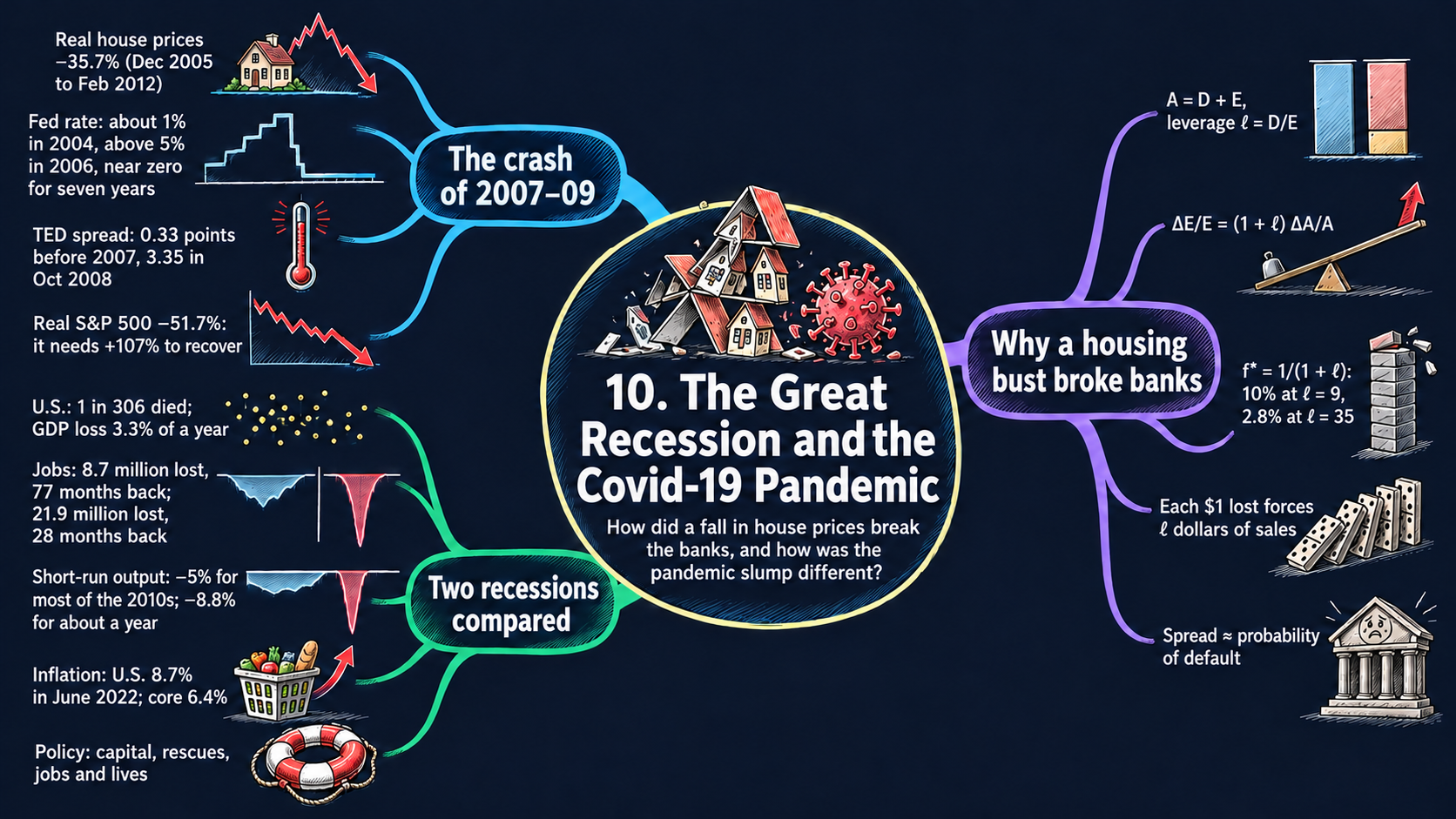
Two shocks hit the world economy in less than 15 years: the global financial crisis of 2008–09 and the Covid-19 pandemic of 2020. This chapter looks at both in the data. By the end of it you will be able to:
- tell the story of the financial crisis with data: the housing bubble, the Fed’s interest rate, the spreads between interest rates and the fall of the stock market;
- compare the Covid-19 recession across countries, in lives lost and in GDP lost;
- measure how deep the two recessions were (employment, short-run output, unemployment, Table 10.1) and describe the inflation that followed the pandemic;
- derive the measurement tools behind the figures: average growth rates, the climb back after a crash, short-run output, the cumulative GDP loss, and the gap between log changes and percent changes;
- use a balance sheet to derive how leverage magnifies returns, how small a fall in asset prices wipes out net worth, and why losses force asset sales; solve a simple model of a bank run;
- read an interest rate spread as lenders’ fear of default, split a fall in GDP into the contributions of its components, and read the comparative statics of each result;
- in Python: find peaks and troughs with
idxmaxandidxmin, shade recessions with one small function, reshape a table withmelt, compare two vintages of the same data, and turn log changes into percent changes; - go beyond the textbook’s countries: pick any of up to 61 economies from long (tidy) data files, and spot breaks, gaps and changes of definition in international data.
Model overview
Picture Islandia again. For about ten years its house prices climbed; then they fell by roughly a third, and its biggest commercial bank, which had lent heavily against houses, came close to failing. Years later a new virus shut its shops and ferries for a season, and output dropped faster than ever. How deep was each slump, how long did it last, and how could cheaper houses bring a bank to its knees? This chapter answers with a kit of tools, not a new model, and we try each one on Islandia.
NoteThe big idea
The question. How do we measure how bad a recession is, and how can losses on houses spread to the banks and then to the whole economy?
The answer in one sentence. Banks fund a large pile of assets with a thin layer of their owners’ money, so leverage turns a modest fall in asset prices into failures, fire sales and runs, while a handful of measures (percent changes, the climb back, the output gap, contributions to growth) tell us how deep and how long the slump is.
What goes in and what comes out. There is no new model to solve. What goes in is the data on two recessions, the financial crisis of 2007–09 and the far shorter Covid-19 slump of 2020, plus a few given numbers such as a bank’s balance sheet. What comes out are seven small frameworks, each built like a model: definitions, the algebra that turns them into a result, and what the result predicts.
Road map.
- Measuring booms, busts and recoveries: percent changes, growth rates and the climb back.
- Balance sheets and leverage: how borrowing magnifies gains and losses.
- Bank runs and liquidity crises: how withdrawals can sink a sound bank.
- Interest rate spreads: a thermometer of fear: what the gap between a risky and a safe rate measures.
- Short-run output and the cost of a slump: the output gap and the output a slump destroys.
- The components of GDP in a recession: which spending pulled GDP down.
- Lives lost and their value: the value of the years of life the pandemic took.
- Model in code: every result as a Python function, checked with numbers, plus the tools for comparing countries behind the “Beyond the U.S.” charts. Every later section reuses these functions.
Notation. As in the rest of the book, a bar over a letter marks a value we take as given, such as potential output \(\bar{Y}_t\), and a tilde marks short-run output \(\tilde{Y}_t\). The textbook describes balance sheets only in words, so we give each item a letter where it first appears. Inside formulas, rates are decimals (0.05); in the text and the charts they are percentages (5 percent).
| Symbol | Meaning | Type |
|---|---|---|
| \(X_t\) | any series at date \(t\) | endogenous |
| \(g\), \(f\) | average growth rate; fraction lost from the peak | endogenous |
| \(\pi_t\), \(\pi^{\log}_t\) | 12-month inflation as a percent change and as a log change | endogenous |
| \(A, D, E\) | a bank’s assets, liabilities and net worth | endogenous |
| \(\ell\) | the leverage ratio \(D/E\) | endogenous |
| \(R\), \(W\) | cash and reserves; the deposits withdrawn in a run | endogenous |
| \(\delta\) | the fire-sale discount on illiquid assets | parameter |
| \(i\), \(i^f\), \(p\) | the risky loan rate, the safe rate, the probability of default | endogenous |
| \(Y_t\), \(\tilde{Y}_t\) | real GDP and short-run output | endogenous |
| \(\bar{Y}_t\) | potential output | parameter |
| \(C, I, G, EX, IM\) | consumption, investment, government purchases, exports, imports | endogenous |
| \(V\), \(T\), \(r\) | value of a statistical life, years ahead, discount rate | parameters |
| \(v\), \(m\) | the value of one year of life; deaths per million people | endogenous |
| \(x^*\) | a star marks a threshold | notation |
Measuring booms, busts and recoveries
Definitions
Islandia’s statisticians follow many series: house prices, GDP, jobs. Call any one of them \(X_t\), observed at date \(t\). Most figures compare an earlier date \(s\) with a later date \(t\).
ImportantKey result: the percent change
\[\%\Delta X = 100\times\left(\frac{X_t}{X_s}-1\right). \tag{1}\]
The change is measured relative to the starting value \(X_s\): a positive number is a rise, a negative one a fall.
- A peak is the highest value inside a window of dates, and a trough is the lowest value after that peak. The fall from peak to trough is equation (1) with \(s\) the peak and \(t\) the trough, so it is a negative number.
- The drawdown at date \(t\) is the percent change from the highest value reached so far, \(100\times\left(X_t/\max_{s\le t}X_s - 1\right)\). It is zero at every new record (Fig. 1).
- For a series that is itself a rate, such as the unemployment rate \(u_t\), an interest rate or an inflation rate, we report the difference \(u_t - u_s\) in percentage points. If Islandia’s unemployment goes from 4 to 6 percent, it has risen by 2 points, but by 50 percent.
- The NBER dates each U.S. recession by a peak, the last month of the expansion, and a trough, the last month of the recession. The number of months between two dates is \(12\times(\text{difference in years}) + (\text{difference in months})\).
Solving: four results we use again and again
Step 1: the average growth rate over many years. Suppose \(X\) grew at the same rate \(g\) in each of \(T\) years. Then \(X_T = X_0(1+g)^T\). Divide both sides by \(X_0\) and raise them to the power \(1/T\), using \(\left((1+g)^T\right)^{1/T} = 1+g\) (Appendix C.3). What is left is \(g\) alone on one side, equation (2) in the box below.
Logs give a handy shortcut. Since \(\ln(X_T/X_0) = T\ln(1+g)\) and \(\ln(1+g)\approx g\) when \(g\) is small (Appendix C.6), \(g \approx \ln(X_T/X_0)/T\). In our data, real U.S. house prices were 1.72 times higher in 2006 than in 1996 (Fig. 1). Equation (2) gives \(1.72^{1/10}-1 \approx 5.6\) percent a year, and the shortcut gives \(\ln 1.72/10 \approx 5.4\) percent. By the rule of 70, a price that grows at that pace doubles in about \(70/5.6 \approx 12.5\) years.
Step 2: the climb back after a fall. If a series falls by the fraction \(f\) from its peak, the trough is \(X_{\text{trough}} = (1-f)X_{\text{peak}}\). To get back to the peak, the series must be multiplied by \(X_{\text{peak}}/X_{\text{trough}} = 1/(1-f)\). As a percentage, the rise needed is that factor minus one, times 100. Writing the one as \((1-f)/(1-f)\) puts both terms over the same denominator:
\[100\times\left(\frac{1}{1-f}-\frac{1-f}{1-f}\right) = 100\times\frac{1-(1-f)}{1-f}.\]
The numerator simplifies to \(f\), which gives equation (3).
ImportantKey result: average growth and the climb back
\[g = \left(\frac{X_T}{X_0}\right)^{1/T}-1 \tag{2}\]
\[\text{rise needed} = 100\times\frac{f}{1-f} \tag{3}\]
Islandia in numbers. Islandia’s house prices fell by about a third, \(f = 1/3\). By equation (3) they must rise by \(100\times(1/3)/(2/3) = 50\) percent just to get back to the peak.
TipIn words: why the climb back is steeper
When Islandia’s house prices fall, the climb back starts from a lower base, so each percent of the recovery adds back less than each percent of the fall took away. After a fall by half, prices must double.
Step 3: why a ratio scale. Figs. 1 and 4 use a ratio (log) scale. On it, the vertical distance between two values is \(\ln X_t - \ln X_s = \ln(X_t/X_s)\) (Appendix C.4), which depends only on their ratio. A fall by one half and a rise of 100 percent cover the same distance, \(\ln 2 \approx 0.69\). That is why busts of different decades, at very different price levels, can be compared by eye.
Step 4: log changes and percent changes. The inflation data of Fig. 10 measure the 12-month change in the price level \(P_t\) as a log change, \(\pi^{\log}_t = 100\ln(P_t/P_{t-12})\), while the usual inflation rate is the percent change \(\pi_t = 100\times(P_t/P_{t-12}-1)\). To go from the first to the second, divide the log change by 100 and undo the log with the exponential function, \(P_t/P_{t-12} = e^{\pi^{\log}_t/100}\). Putting this ratio into the percent change gives equation (4).
ImportantKey result: from a log change to a percent change
\[\pi_t = 100\times\left(e^{\pi^{\log}_t/100}-1\right) \tag{4}\]
Because \(e^x = 1 + x + x^2/2 + \dots\), the percent change is close to \(\pi^{\log}_t + (\pi^{\log}_t)^2/200\): the two measures differ by a term that grows with the square of inflation.
How large is the difference? About 0.02 points at 2 percent inflation, but about 0.4 points at 9 percent.
What the measures tell us
| A fall of … | needs a rise of … (equation 3) | where it happened |
|---|---|---|
| 10 percent | 11.1 percent | |
| 25 percent | 33.3 percent | |
| 35.7 percent | 55.5 percent | real U.S. house prices, Dec 2005 to Feb 2012 (Fig. 1) |
| 51.7 percent | 107 percent | the real S&P 500, Oct 2007 to Mar 2009 (Fig. 4) |
- The rise needed in equation (3) grows faster than the fall: its slope with respect to \(f\) is \(1/(1-f)^2\), which is above one and increases with \(f\) (Appendix C.7). Deep crashes take a long time to undo, even when growth afterwards is strong.
- Percent changes do not add up over time, but log changes do. A fall of 50 percent followed by a rise of 50 percent leaves a series 25 percent below its start, and indeed \(\ln 0.5 + \ln 1.5 = \ln 0.75\).
- When inflation is low, log and percent changes are interchangeable. When it is high, as in 2022, the choice moves the peaks by about half a point (Fig. 10).
A deep fall needs an even bigger climb back: losing half means doubling. That is why deep crashes take so long to undo.
NoteCheck your understanding
1. Islandia’s real house prices fall by 20 percent from their peak. By how much must they rise to get back there?
Answer
By equation (3), the rise needed is \(100\times0.2/0.8 = 25\) percent.
2. Islandia’s unemployment rate goes from 5 to 8 percent. One report says unemployment “rose by 60 percent”, another that it “rose by 3 points”. Who is right, and which should we report?
Answer
Both are right. The rate rose by \(8 - 5 = 3\) percentage points, and by \(100\times(8/5-1) = 60\) percent of its starting value, by equation (1). For a rate, we report the difference in points.
Balance sheets and leverage
Definitions and assumptions
Islandia’s commercial banks take the islanders’ deposits, borrow in other ways, and lend the money out. To see how cheaper houses can hurt them, we need a balance sheet: a snapshot, on one date, of what an institution owns and what it owes. It works the same way for a bank, a firm, a household or a government.
- Assets \(A\) are what it owns (in this chapter \(A\) stands for assets, not for productivity). For a bank: loans, securities and other investments, and cash and reserves.
- Liabilities \(D\) (for debt) are what it owes to others. For a bank: deposits, short-term debt and long-term debt.
- Net worth \(E\), also called equity or capital, is what is left for the owners: assets minus liabilities. Because net worth is defined as that difference, the two sides of a balance sheet always match. The leverage ratio \(\ell\) counts the dollars borrowed per dollar of the owners’ own money.
ImportantKey result: the balance sheet and leverage
\[A = D + E, \qquad \ell \equiv \frac{D}{E}. \tag{5}\]
Every asset is paid for with borrowed money or with the owners’ money.
Regulators watch two more ratios. The capital ratio \(E/A\) is the share of assets paid for by the owners, and a capital requirement sets a floor for it, for example 6 percent. The reserve ratio is cash and reserves divided by deposits, and a reserve requirement sets a floor for it, for example 3 percent.
The experiments below rest on one assumption: liabilities are promises to repay fixed amounts, while the market value of assets moves with house prices, stock prices and defaults.
Our running example is Islandia’s biggest commercial bank. We give it the balance sheet of the hypothetical bank in the textbook’s Table 10.3, in billions. Its assets are loans of 1,000, investments of 900 and cash and reserves of 100, so \(A = 2{,}000\). It owes 1,000 in deposits, 400 in short-term debt and 400 in long-term debt, so \(D = 1{,}800\) and \(E = 200\). Equation (5) gives \(\ell = 1{,}800/200 = 9\). Its capital ratio is \(200/2{,}000\) and its reserve ratio \(100/1{,}000\), both 10 percent, above the two floors.
Solving
Step 1: leverage and the capital ratio carry the same information. Divide both sides of \(A = D + E\) by \(E\):
\[\frac{A}{E} = \frac{D}{E} + 1 = 1 + \ell, \qquad\text{so}\qquad \frac{E}{A} = \frac{1}{1+\ell}.\]
With \(\ell = 9\), every 10 dollars of the bank’s assets rest on 1 dollar of equity. A capital requirement is therefore a ceiling on leverage: \(E/A \ge 0.06\) means \(1+\ell \le 1/0.06\), or \(\ell \le 15.7\).
Step 2: leverage magnifies returns. Let the value of the assets change by \(\Delta A\). The liabilities do not move, \(\Delta D = 0\), so the change in \(A = D + E\) is \(\Delta E = \Delta A\): every dollar gained or lost lands on the owners. Divide by \(E\), then multiply and divide by \(A\):
\[\frac{\Delta E}{E} = \frac{\Delta A}{E} = \frac{A}{E}\times\frac{\Delta A}{A}.\]
Step 1 showed that \(A/E = 1+\ell\), which gives equation (6).
ImportantKey result: leverage magnifies returns
\[\frac{\Delta E}{E} = (1+\ell)\,\frac{\Delta A}{A} \tag{6}\]
Islandia in numbers. The bank has \(\ell = 9\), so \(1+\ell = 10\). A 1 percent gain on its assets, 20 billion, is a 10 percent gain for its owners, and a 1 percent loss is a 10 percent loss.
When only one item changes, measure its change relative to total assets: a gain of 100 billion on the investments is \(100/2{,}000 = 5\) percent of all assets, and so 50 percent for the owners. Households work the same way. An islander family that pays 20 percent of the price of a house and borrows the other 80 percent has \(E/A = 0.2\), so \(1+\ell = 5\): each 1 percent change in the price of the house moves the family’s equity by 5 percent, up or down.
TipIn words: a thin layer on a big pile
Islandia’s bank pays its lenders a fixed amount, first. The owners get what is left: a thin layer on a big pile of debt. A small change in the pile is a big change in the layer.
Step 3: how small a fall wipes out the owners. Let the value of the assets fall by the fraction \(f\), so that \(A\) becomes \((1-f)A\) while \(D\) stays the same. Net worth becomes
\[E' = (1-f)A - D = (A - D) - fA = E - fA.\]
The owners are wiped out, \(E' \le 0\), as soon as \(fA \ge E\), that is, once the fall reaches \(f^* = E/A\). By Step 1 this is \(1/(1+\ell)\), equation (7) in the box below. Beyond that point the bank is insolvent, or bankrupt: even if it sold everything at market prices, it could not repay what it owes. Bear Stearns had a leverage of about 35 when it collapsed in 2008, so its \(f^*\) was \(1/36\), about 2.8 percent.
Step 4: losses force sales (deleveraging). After a loss of \(x\) dollars, assets are \(A - x\) and equity is \(E - x\), so leverage jumps to \(D/(E-x)\), above \(\ell\). Suppose the bank wants, or its regulators require, to bring leverage back to \(\ell\), and it cannot raise new equity. Then its assets must shrink to \((1+\ell)(E-x)\): it sells assets and uses the cash to repay debt. The sales needed are the assets left after the loss minus that target. Expanding,
\[(A - x) - (1+\ell)(E - x) = A - x - (1+\ell)E + (1+\ell)x.\]
By Step 1, \(A = (1+\ell)E\), so the first and third terms cancel, and \(-x + (1+\ell)x = \ell x\).
ImportantKey result: the cushion and the forced sales
\[f^* = \frac{E}{A} = \frac{1}{1+\ell} \tag{7}\]
\[(A - x) - (1+\ell)(E - x) = \ell\,x \tag{8}\]
A larger fall than \(f^*\) makes the bank insolvent, and each dollar lost forces \(\ell\) dollars of sales.
Islandia in numbers. With \(\ell = 9\), the bank is wiped out by a fall of \(1/10\), or 10 percent, of its assets, and a loss of 10 billion forces it to sell 90 billion.
TipIn words: the fire-sale loop
When all of Islandia’s banks lose on housing loans at once, they all sell the same assets. Prices fall further, new losses follow, and equation (8) turns them into new sales. Small losses can shake the whole system.
What the model predicts
| Higher leverage \(\ell\) means … | formula | sign | at \(\ell = 9\) | at \(\ell = 35\) |
|---|---|---|---|---|
| a bigger multiplier on the owners’ returns | \(1+\ell\), equation (6) | \(+\) | 10 | 36 |
| a smaller fall that wipes out equity | \(1/(1+\ell)\), equation (7) | \(-\) | 10 percent | 2.8 percent |
| more forced sales per dollar of losses | \(\ell\), equation (8) | \(+\) | 9 | 35 |
- As an elasticity, equation (6) says that net worth responds to the value of assets with elasticity \(A/E = 1+\ell\). Taking logs of equation (7), \(\ln f^* = -\ln(1+\ell)\): doubling \(1+\ell\) halves the cushion.
- The multiplier works in both directions. When asset prices rise, a 5 percent gain becomes 50 percent for the owners; when they fall, the same multiplier turns small losses into bankruptcies.
- Households are exposed in the same way. With an 80 percent mortgage, \(\ell = 4\), and equation (7) says a fall of 20 percent in the price of the house wipes out the owner’s equity; any further fall leaves the house worth less than the mortgage. Lost housing wealth helps explain why consumption fell in the Great Recession (see the components of GDP below).
- Who holds the losses matters. Losses spread over millions of unleveraged shareholders, like the dot-com crash of 2000–03, hurt but do not bankrupt anyone; similar losses concentrated in a few highly leveraged banks do (Fig. 4).
Borrowing turns small changes in asset prices into large changes in the owners’ wealth, for gains and losses alike.
NoteCheck your understanding
1. Islandia’s regulators raise the capital requirement from 6 to 8 percent. What is the highest leverage a bank may now have, and how large a fall in the value of its assets would wipe out a bank at that limit?
Answer
Step 1 gives \(E/A = 1/(1+\ell)\), so \(E/A \ge 0.08\) means \(1+\ell \le 1/0.08 = 12.5\), or \(\ell \le 11.5\). By equation (7), a bank at that limit is wiped out by a fall of \(1/12.5\), or 8 percent of its assets.
Bank runs and liquidity crises
Assumptions
Now a rumor spreads among the islanders that their biggest bank has lost money on housing loans, and depositors queue at its doors.
- The bank’s assets come in two kinds. Liquid assets, cash and reserves \(R\), can be paid out at full value at once. Illiquid assets, the loans and most investments, are worth their full value if the bank keeps them. Sold in a hurry, each dollar of them brings only \(1-\delta\) dollars of cash, where the fire-sale discount \(\delta\) is between 0 and 1.
- Depositors may take their money out at any time. Suppose they withdraw \(W\) dollars.
Solving the model
If \(W \le R\), the bank pays out of its cash and nothing else happens. If \(W > R\), it needs \(W - R\) more cash, so it sells illiquid assets with a book value \(S\) such that \((1-\delta)S = W - R\). Solving for \(S\) gives \(S = (W-R)/(1-\delta)\). The bank gives up assets worth \(S\) but receives only \((1-\delta)S\) in cash, so it loses the difference, \(\delta S\).
ImportantKey result: the cost of a run
\[\text{loss} = \delta S = \frac{\delta\,(W-R)}{1-\delta} \tag{9}\]
The loss comes out of net worth, which falls to \(E - \delta(W-R)/(1-\delta)\). The run bankrupts the bank when the loss is larger than \(E\).
Islandia in numbers. The bank holds \(R = 100\) in cash. If islanders withdraw \(W = 400\) and assets sell at a discount of \(\delta = 0.25\), the bank gives up assets worth 400 to raise 300 in cash, and loses \(0.25\times300/0.75 = 100\), half of its net worth of 200.
TipIn words: a run that feeds on itself
At normal prices Islandia’s bank can pay everyone. The trouble is speed: to pay a long queue it must sell loans in a hurry, at a discount, and each sale burns some of the owners’ money. A long enough queue burns all of it, and the fear comes true.
We can solve the bankruptcy condition, loss \(= E\), in two directions.
- How large a discount bankrupts the bank in a full run? If every depositor leaves, \(W\) is equal to total deposits. Set the loss equal to \(E\) and solve for \(\delta\): \(\delta(W-R) = E(1-\delta)\), so \(\delta(W-R+E) = E\) and \[\delta^* = \frac{E}{E + W - R}.\] For Islandia’s bank, \(\delta^* = 200/(200 + 1{,}000 - 100) = 200/1{,}100\), about 18 percent.
- How large a run bankrupts the bank at a given discount? Solve the same condition for \(W\) instead: \(W^* = R + E(1-\delta)/\delta\). With a discount of one quarter, \(W^* = 100 + 200\times 0.75/0.25 = 700\). A run on 70 percent of the deposits is enough.
What the model predicts
- Runs can be self-fulfilling. At normal prices the bank is solvent. But if each depositor expects the others to run, running first is the best thing to do, and the forced sales then make the bank insolvent. The same bank survives or fails depending only on what depositors expect.
- Illiquid is not the same as insolvent. Without a run, \(\delta\) never matters. The fire-sale discount is what turns a liquidity problem into a solvency problem.
- Comparative statics. A run is harder to trigger, \(W^*\) is larger, when the bank holds more liquid assets \(R\), has more equity \(E\) or faces a smaller discount \(\delta\). Each policy works on one of these: capital requirements raise \(E\), reserve requirements raise \(R\), and a central bank that lends against illiquid assets, the lender of last resort, spares the bank the fire sale. On Islandia that lender is the Bank of Islandia. Deposit insurance, run by the FDIC in the United States since 1933, takes away the reason to run in the first place.
- In 2007–08 the runs hit mostly the short-term debt of banks and investment banks. Unlike insured deposits, those loans could simply not be renewed. When lenders pull back across a whole market at once, the volume of lending dries up: a liquidity crisis.
A bank that is solvent at normal prices can still fail in a run, because selling in a hurry destroys value.
NoteCheck your understanding
1. Suppose the fire-sale discount on the loans of Islandia’s bank is only \(\delta = 0.2\). How large a run would bankrupt the bank, as a share of its 1,000 in deposits?
Answer
Solving equation (9) for the run that costs exactly the net worth, \(W^* = R + E(1-\delta)/\delta = 100 + 200\times0.8/0.2 = 900\), or 90 percent of the deposits.
2. Islandia introduces deposit insurance. Why does it make runs unlikely, even though in quiet years it pays out nothing?
Answer
An insured islander gets the money back whatever the others do, so there is no reason to rush to the front of the queue. Without a run, withdrawals stay below the cash \(R\), and equation (9) gives no fire-sale loss at all. The guarantee removes the self-fulfilling fear itself.
Interest rate spreads: a thermometer of fear
Definitions
Islandia’s banks lend to one another for a few months at a time, and the Islandia Treasury borrows by selling short-term bills, the island’s safe asset. An interest rate spread is the difference between the interest rate on a risky loan, \(i\), and the rate on a safe one, \(i^f\), measured in percentage points. The TED spread of Fig. 3 is the U.S. version: the 3-month LIBOR rate, at which banks lent to one another, minus the 3-month Treasury bill rate, at which the U.S. government borrows.
Solving: what a spread measures
A lender with one dollar can buy a Treasury bill, which pays \(1 + i^f\) for sure. Or it can lend to another bank, which pays \(1+i\) if the borrower survives, with probability \(1-p\), and in the simplest case nothing if it fails. A lender who cares only about the expected payoff is willing to lend to the bank when the two options pay the same on average:
\[(1-p)(1+i) = 1+i^f.\]
Divide by \(1-p\), subtract \(1+i^f\) from both sides and factor out \(1+i^f\):
\[i - i^f = \frac{1+i^f}{1-p} - (1+i^f) = (1+i^f)\left(\frac{1}{1-p}-1\right).\]
The bracket is \(p/(1-p)\), which gives equation (10).
ImportantKey result: the spread measures the fear of default
\[i - i^f = \frac{(1+i^f)\,p}{1-p} \approx p \tag{10}\]
The approximation holds when \(p\) and \(i^f\) are both small, so that \(1+i^f \approx 1\) and \(1-p\approx 1\). The spread is then roughly the probability of default, as lenders see it.
Islandia in numbers. With a safe rate of 1 percent, a bank that lenders think will fail with probability 0.032 must pay a spread of \(100\times1.01\times0.032/0.968 \approx 3.34\) points.
TipIn words: what a lender on Islandia weighs
A lender on Islandia can buy a Treasury bill and sleep well, or lend to a bank and risk a default. It lends only if the extra interest makes up for that risk. So the extra interest reads how likely others think a failure is.
A spread of a third of a point, typical of the calm U.S. years before 2007, corresponds to a perceived default risk of about 0.3 percent a year. The monthly peak of the TED spread, about 3.35 points in October 2008, corresponds to about 3.2 percent: ten times more fear.
What the model predicts
- The spread rises almost one for one with perceived default risk: its slope with respect to \(p\) is \((1+i^f)/(1-p)^2\), close to 1.
- If lenders get part of their money back when a borrower fails, the spread is smaller for the same \(p\). If they dislike risk, they ask for more than equation (10). Either way the spread moves with the fear of default.
- Flight to safety. When fear rises, lenders leave interbank loans for Treasury bills. That pushes \(i^f\) down and \(i\) up, so the spread widens from both sides.
- Banks that worry about their own funding also hoard cash rather than lend it, which adds a liquidity premium on top of the default premium. A spread that jumps is a sign of a liquidity crisis (Fig. 3).
A spread is a thermometer of fear: it rises almost one for one with the default risk that lenders perceive.
NoteCheck your understanding
1. On Islandia the safe rate is 2 percent, and banks lend to one another at 3 percent. What probability of default does this imply, exactly and with the shortcut of equation (10)?
Answer
From \((1-p)(1+i) = 1+i^f\), \(p = 1 - (1+i^f)/(1+i) = 1 - 1.02/1.03 \approx 0.0097\), or about 0.97 percent a year. The shortcut \(p \approx i - i^f\) gives 1 percent, very close.
Short-run output and the cost of a slump
Definitions
Potential output \(\bar{Y}_t\) is the GDP the economy would produce with its resources in normal use; Islandia’s statisticians estimate it, as the Congressional Budget Office does for the United States. Short-run output (Chapter 9) is the percent gap between actual GDP \(Y_t\) and potential.
ImportantKey result: short-run output
\[\tilde{Y}_t \equiv \frac{Y_t - \bar{Y}_t}{\bar{Y}_t}, \tag{11}\]
shown in percent in the charts. Rearranged, \(Y_t = \bar{Y}_t(1+\tilde{Y}_t)\): a value of \(-0.05\) means that GDP is 5 percent below potential.
The OECD calls the same measure the output gap.
Solving
Step 1: in logs. Take logs of \(Y_t = \bar{Y}_t(1+\tilde{Y}_t)\) and use \(\ln(1+x)\approx x\) (Appendix C.6):
\[\ln Y_t = \ln\bar{Y}_t + \ln(1+\tilde{Y}_t) \approx \ln\bar{Y}_t + \tilde{Y}_t.\]
Short-run output is approximately log GDP minus log potential output.
Step 2: growth and the gap. Write this equation for two consecutive years and subtract. A difference in logs is a growth rate (Appendix C.5), so
\[g_{Y,t} \approx \bar{g}_t + \Delta\tilde{Y}_t,\]
where \(\bar{g}_t\) is the growth rate of potential output. To close a negative gap, GDP must grow faster than potential. Closing a gap of 5 percent in five years takes growth one point a year above potential, every year. Growth only a little above potential closes the gap slowly, which is why \(\tilde{Y}\) stayed negative for most of the 2010s in the United States (Fig. 8).
TipIn words: running to catch up
Islandia’s potential output keeps moving ahead, like a ferry that has left the dock. If GDP grows only as fast as potential, the gap stays as wide as it was. To catch up, GDP must grow faster, and the extra speed decides how long that takes.
Step 3: the cumulative loss. Fig. 5 measures the pandemic’s GDP loss against the pre-pandemic level \(Y_0\) of 2019Q4, not against potential. Write real GDP in quarter \(q\) as an index, \(I_q = 100\,Y_q/Y_0\). Quarterly GDP is reported at an annual rate, so a quarter produces one fourth of that rate. The output lost in quarter \(q\), as a share of one year’s GDP, is therefore \((Y_0 - Y_q)/(4Y_0) = (100 - I_q)/400\), or \((100 - I_q)/4\) in percent. Quarters above the old level count as no loss. Adding up the quarters from the start of the slump gives equation (12).
ImportantKey result: the cumulative loss of output
\[\text{GDP loss} = \frac{1}{4}\sum_{q}\max\left(0,\;100 - I_q\right) \tag{12}\]
in percent of one year’s GDP. The same sum with \(-100\,\tilde{Y}_q\) in place of \(100 - I_q\) measures the loss against potential output instead.
Islandia in numbers. In the pandemic, Islandia’s output drops 8 percent at once and climbs back in a straight line over 8 quarters. Equation (12) adds the shortfalls 8, 7, …, 1 and divides by 4: a loss of 9 percent of a year’s GDP, close to the triangle \(\tfrac12\times8\times2 = 8\).
What it predicts
- Depth times duration. If output drops by \(d\) percent at once and climbs back in a straight line over \(T\) years, the sum in equation (12) is close to the area of a triangle, \(\tfrac{1}{2}dT\). A slump twice as deep costs twice as much, and so does a slump twice as long.
- So a deep but short slump can cost less than a moderate but long one. Against potential, the Great Recession pushed \(\tilde{Y}\) to about \(-5\) percent and kept it below zero for about nine years: a triangle of about \(\tfrac{1}{2}\times5\times9 \approx 22\) percent of a year’s GDP. The 2020 slump, near \(-9\) percent but over within about a year, gives a triangle of about 4. Model in code computes the exact sums with the data.
- Potential output is an estimate, and GDP is revised for years. Both change \(\tilde{Y}\), as the two vintages of Fig. 8 show.
A slump’s cost is its depth times its length, so a long, moderate slump can cost more than a deep, short one.
NoteCheck your understanding
1. Islandia’s GDP is 4 percent below potential, and potential output grows by 2 percent a year. How fast must GDP grow to close the gap in two years?
Answer
By Step 2, \(g_{Y} \approx \bar{g} + \Delta\tilde{Y}\). The gap must shrink by 4 points in two years, 2 points a year, so GDP must grow by about \(2 + 2 = 4\) percent a year.
2. Which costs Islandia more: a slump that keeps output 10 percent below normal for one year, or one that keeps it 4 percent below normal for five years?
Answer
By equation (12), the loss is the depth times the length when the gap stays constant: \(10\times1 = 10\) percent of a year’s GDP for the first, and \(4\times5 = 20\) percent for the second.
The components of GDP in a recession
Definitions
When a recession hits Islandia, which kinds of spending fall? The national income identity of Chapter 2 splits GDP into consumption, investment, government purchases, exports and imports:
\[Y_t = C_t + I_t + G_t + EX_t - IM_t.\]
The share of a component \(X\) in GDP is \(X/Y\), measured at the peak of the recession.
Solving
Between the peak and the trough the identity holds in changes: \(\Delta Y = \Delta C + \Delta I + \Delta G + \Delta EX - \Delta IM\). Divide both sides by \(Y\):
\[\frac{\Delta Y}{Y} = \frac{\Delta C}{Y} + \frac{\Delta I}{Y} + \frac{\Delta G}{Y} + \frac{\Delta EX}{Y} - \frac{\Delta IM}{Y}.\]
Then write each term as a share times a percent change, for example \(\Delta C/Y = (C/Y)\times(\Delta C/C)\).
ImportantKey result: contributions to GDP growth
\[\frac{\Delta Y}{Y} = \frac{C}{Y}\frac{\Delta C}{C} + \frac{I}{Y}\frac{\Delta I}{I} + \frac{G}{Y}\frac{\Delta G}{G} + \frac{EX}{Y}\frac{\Delta EX}{EX} - \frac{IM}{Y}\frac{\Delta IM}{IM} \tag{13}\]
Each term is a contribution to GDP growth, in points: a share times a percent change.
Islandia in numbers. If investment is a sixth of Islandia’s GDP and falls by 30 percent, it alone subtracts \(\tfrac16\times30 = 5\) points from GDP growth.
TipIn words: size versus swing
A component’s pull on GDP depends on its size and on how much it moves. Islanders’ everyday spending is large but steady. The boats, workshops and houses Islandia builds are a smaller slice, but orders for them can collapse in a bad year.
Table 10.1 reports the percent changes; the contributions show which of them moved GDP the most.
What it predicts
- A small component that swings a lot can matter more than a large one that barely moves. In the United States, investment is only about a sixth of GDP, but it fell by almost 30 percent between the quarterly peak and trough of the Great Recession. Its contribution, close to \(-5\) points, is larger than the whole fall in GDP. Consumption is two thirds of GDP, so even its fall of about 2 percent subtracted about 1.5 points.
- Imports enter with a minus sign. A fall in imports adds to GDP growth, because part of what households and firms stopped buying had been made abroad.
- In most recessions consumption hardly moves, because households smooth consumption: they base it on their long-run (permanent) income rather than on this year’s income (Chapter 16). In 2008–09 the falls in house and stock prices cut household wealth, and with it permanent income, so consumption fell. In 2020 people stayed away from shops, restaurants and travel, and consumption led the fall.
- Real GDP is measured in chained dollars, which do not add up exactly, so the contributions miss GDP growth by a small residual.
Small but volatile components, like investment, can pull GDP down more than large, steady ones like consumption.
NoteCheck your understanding
1. In a recession on Islandia, consumption, 65 percent of GDP, falls by 2 percent, and investment, 17 percent of GDP, falls by 20 percent. Nothing else changes. By how much does GDP fall, and which component matters more?
Answer
By equation (13), consumption contributes \(0.65\times(-2) = -1.3\) points and investment \(0.17\times(-20) = -3.4\) points, so GDP falls by about 4.7 percent. Investment, about a quarter the size of consumption, accounts for almost three quarters of the fall.
Lives lost and their value
Definitions
The pandemic also took lives on Islandia, and they belong in its cost.
- Deaths are counted per million people, \(m\). The mortality rate is \(m/10^6\), and “one out of every \(X\) people” means \(X = 10^6/m\).
- The value of a statistical life \(V\) is the amount society is willing to pay, on average, to avoid one death. Agencies such as the U.S. Environmental Protection Agency use it to weigh safety rules against their cost. A person of middle age has about \(T\) years of life ahead.
Solving
The simplest approach spreads \(V\) evenly over the remaining years, so a year of life is worth \(v = V/T\). Losing \(\Delta\) years of life expectancy then costs about \(\Delta\times v\) per person (the key numbers of Fig. 5).
Years far in the future usually count for less (Appendix C.12). If \(V\) is the present value of \(T\) equal yearly values \(v\), discounted at the rate \(r\), then by the sum of a geometric series
\[V = \sum_{t=1}^{T}\frac{v}{(1+r)^t} = v\,\frac{1-(1+r)^{-T}}{r}.\]
Solving for \(v\) gives the second formula in the box.
ImportantKey result: the value of a year of life
\[v = \frac{V}{T}\ \ \text{(no discounting)}, \qquad v = \frac{r\,V}{1-(1+r)^{-T}}\ \ \text{(discounting at the rate } r\text{)}.\]
Losing \(\Delta\) years of life expectancy costs about \(\Delta\times v\) per person.
Islandia in numbers. With the chapter’s values, \(V = 10\) million dollars, \(T = 40\) years and \(r = 0.03\), a year of life is worth about 433,000 dollars with discounting, against 250,000 without.
TipIn words: why discounting raises the value of a year
Society puts one fixed value on an islander’s life. With discounting, its distant years count for less, so for the total to stay the same each year must be worth more.
What it predicts
- The value of a year of life rises with \(V\) and falls with \(T\). Discounting raises it: later years count for less, so for the same \(V\) each year must be worth more.
- Even without discounting, the value of the life expectancy lost in the pandemic is many times the lost output of equation (12), which for the United States was a few percent of one year’s income per person.
Valuing the years of life lost shows that the pandemic’s human cost dwarfed its cost in lost output.
NoteCheck your understanding
1. The pandemic cuts Islandia’s life expectancy by half a year. With \(V = 10\) million dollars, \(T = 40\) years and no discounting, what is the loss per person?
Answer
A year of life is worth \(v = V/T = 10{,}000{,}000/40 = 250{,}000\) dollars, so half a year costs about \(0.5\times250{,}000 = 125{,}000\) dollars per person, using \(\Delta\times v\).
NoteRecap
- Measuring a slump: percent changes, growth rates and the climb back, \(100f/(1-f)\): a fall by half needs a doubling (Fig. 4).
- Leverage magnifies: the owners’ returns are \(1+\ell\) times the return on assets, a fall of \(1/(1+\ell)\) wipes them out, and each dollar of losses forces \(\ell\) dollars of sales (Balance sheets and leverage).
- Bank runs: a fire-sale discount can turn a liquidity problem into insolvency; deposit insurance and a lender of last resort remove the reason to run (Bank runs and liquidity crises).
- Spreads measure fear: the gap between a risky and a safe rate is roughly the perceived probability of default (Interest rate spreads, Fig. 3).
- The cost of a slump is roughly its depth times its length, measured with short-run output and the cumulative loss of equation (12) (Fig. 5, Fig. 6).
- Components and lives: contributions show that investment drove the Great Recession and consumption the 2020 slump (Table 10.1), and the value of the years of life lost dwarfs the lost output.
Model in code
Now we turn the chapter’s results into Python. The section has four parts: the setup (folded, because it is the same in every chapter), the results as functions, numerical checks of the Key results, and the data tools behind the recession shading and the “Beyond the U.S.” charts (folded too). Run its cells once, in order. Every later section of the notebook reuses them.
Setup
Run the setup cells once, before anything else. They load the Python libraries, give every chart the same look, store the address of the chapter’s data and define a helper that only the book website needs. You can use the notebook without reading them; open the box if you are curious.
NoteShow the setup code
The first cell loads the libraries and sets the look of the charts. Its comments explain each step.
The website cannot run Python, so each interactive figure also gets a version with a precomputed slider. The next helper builds those versions. Run it and move on.
# @title Helper for the website versions (run this cell; you do not need to read it)
def slider_figure(make_figure, name, values, start, label=None):
    """Join precomputed versions of a figure with one slider (the website cannot run Python).

    Arguments
        make_figure : the function that draws the figure, e.g. housing_chart
        name        : the argument the slider moves, e.g. "bust"
        values      : the values of that argument to precompute
        start       : the value shown first
        label       : the slider's label (the argument name if None)
    Returns
        one Plotly figure with all versions and a slider that shows one at a time
    """
    # Step 1: draw the figure once for every value
    figures = [make_figure(**{name: v}) for v in values]
    first = values.index(start)
    # Step 2: copy every curve into one figure; only the start value's are visible
    fig = go.Figure(layout=figures[first].layout)
    owner = []                          # which precomputed figure each trace is from
    for i, f in enumerate(figures):
        for trace in f.data:
            trace.visible = (i == first)
            fig.add_trace(trace)
            owner.append(i)
    # Step 3: one slider step per value: its curves, title, labels and shapes
    steps = []
    for i, f in enumerate(figures):
        layout = {"title": f.layout.title.to_plotly_json(),
                  "annotations": [a.to_plotly_json() for a in f.layout.annotations],
                  "shapes": [s.to_plotly_json() for s in f.layout.shapes]}
        visible = [o == i for o in owner]
        steps.append(dict(method="update", label=str(values[i]), args=[{"visible": visible}, layout]))
    fig.update_layout(sliders=[dict(active=first, steps=steps, pad=dict(t=60),
                                    currentvalue=dict(prefix=(label or name) + " = "))])
    return fig
The model as functions
Each framework of the Model overview becomes one or two Python functions: named recipes that take inputs and give back a result. Each function’s description names the equation it computes. The first three measure changes in any series: the percent change of equation (1), and the peak-to-trough fall that the figures report.
# `def` creates a function. Its inputs are the arguments in parentheses, and
# `return` gives back the result. The text in triple quotes describes the function.
def percent_change(new, old):
    """Percent change from an old value to a new one.

    Equation (1):  %change = 100 (X_t / X_s - 1)

    Arguments
        new : the value at the later date, X_t
        old : the value at the earlier date, X_s
    Returns
        the percent change from old to new
    """
    return 100 * (new / old - 1)


def peak_to_trough(series, start, end):
    """The highest point between start and end, the lowest point after it, and the fall in percent.

    Equation (1) from the peak to the trough:  fall = 100 (X_trough / X_peak - 1)

    Arguments
        series     : a pandas Series with dates as row labels
        start, end : the first and the last date of the search window
    Returns
        the peak date, the trough date and the percent change between them
    """
    # Step 1: for a Series with dates as row labels, `series[start:end]` keeps
    # the rows between the two dates
    window = series[start:end]
    # Step 2: `.idxmax()` gives the date of the largest value, `.idxmin()` the date
    # of the smallest
    peak = window.idxmax()                      # date of the highest value
    # date of the lowest value after the peak
    trough = window[peak:].idxmin()
    # Step 3: a function can return several results at once, separated by commas
    return peak, trough, percent_change(window[trough], window[peak])


def low_to_high(series, start, end):
    """The opposite measure: the highest point, the lowest point before it, and the rise.

    For a series that rises in a recession, such as the unemployment rate of Fig. 9

    Arguments
        series     : a pandas Series with dates as row labels
        start, end : the first and the last date of the search window
    Returns
        the low date, the high date and the rise, in the units of the series
    """
    window = series[start:end]
    high = window.idxmax()                      # date of the highest value
    low = window[:high].idxmin()                # date of the lowest value before it
    # the rise is a difference, not a percent change: percentage points for a rate
    return low, high, window[high] - window[low]
For a series that rises in a recession, such as the unemployment rate, low_to_high measures the rise from the lowest point to the highest one, in the units of the series (percentage points for a rate). Two more functions compute equations (2) and (3): the average growth rate and the rise needed to undo a fall.
def annual_growth(factor, years):
    """Average growth rate per year when a series is multiplied by `factor` in `years` years.

    Equation (2):  g = (X_T / X_0)^(1/T) - 1

    Arguments
        factor : how many times the series is multiplied, X_T / X_0
        years  : the number of years, T
    Returns
        the average growth rate per year, g (a decimal)
    """
    # `**` means "to the power of"
    return factor ** (1 / years) - 1


def rise_needed(fall):
    """Percent rise needed to undo a fall.

    Equation (3):  rise needed = 100 f / (1 - f)

    Arguments
        fall : the fraction lost from the peak, f (a decimal, e.g. 0.357)
    Returns
        the rise, in percent, that climbs back to the peak
    """
    # what is left after the fall, 1 - f, must grow by f / (1 - f) to get back to 1
    return 100 * fall / (1 - fall)
A balance sheet gives two more functions: net worth and the leverage ratio of equation (5).
def net_worth(assets, liabilities):
    """Equity, or net worth: what the owners keep after all debts are repaid.

    Equation (5):  E = A - D

    Arguments
        assets      : total assets, A
        liabilities : total liabilities, D
    Returns
        net worth, E
    """
    # assets minus what is owed to others
    return assets - liabilities


def leverage(liabilities, equity):
    """The leverage ratio: dollars borrowed per dollar of the owners' money.

    Equation (5):  l = D / E

    Arguments
        liabilities : total liabilities, D
        equity      : net worth, E
    Returns
        the leverage ratio, l (ell)
    """
    # liabilities per dollar of net worth
    return liabilities / equity
A run costs the bank money only when the withdrawals exceed its cash. Then it must sell illiquid assets at a fire-sale discount. run_loss computes that loss, equation (9).
def run_loss(withdrawals, cash, discount):
    """Loss from selling illiquid assets at a discount to pay withdrawals beyond the cash.

    Equation (9):  loss = delta (W - R) / (1 - delta), and 0 when W <= R

    Arguments
        withdrawals : the deposits withdrawn, W
        cash        : cash and reserves, R
        discount    : the fire-sale discount, delta (a decimal)
    Returns
        the loss from the fire sales
    """
    # `if` runs its indented line only when the condition is true. A `return`
    # inside it leaves the function early with that result: the cash covers the run.
    if withdrawals <= cash:
        return 0.0
    # sell (W - R) / (1 - delta) of assets to raise W - R in cash;
    # the loss is delta times that
    return discount * (withdrawals - cash) / (1 - discount)
The last function adds up the output that a slump destroys, quarter by quarter: the cumulative GDP loss of equation (12).
def gdp_loss(index):
    """Cumulative GDP loss, in percent of one year's GDP.

    Equation (12):  GDP loss = (1/4) sum over the quarters q of max(0, 100 - I_q)

    Arguments
        index : quarterly output as an index, 100 at the old level (an array or Series)
    Returns
        the cumulative loss, in percent of one year's GDP
    """
    # `np.maximum(a, 0)` replaces every negative number by 0, so quarters above the
    # old level count as no loss; dividing by 4 turns quarters into years
    return np.maximum(100 - index, 0).sum() / 4
Checking the key results
The formulas came from algebra. Now we check them with numbers, one Key result at a time.
Check 1: the measurement tools. Compound the growth rate of equation (2) for 10 years and see whether we get the factor back. Then let a series fall and rise by the amount equation (3) gives. Last, take a price level that rises by 9 percent and compute both inflation measures and equation (4).
# Step 1: equation (2) for real house prices, 1996 to 2006 (Fig. 1).
# An f-string, f"... {value:.2f}", puts a value into the text; ":.2f" shows two
# decimals and ":+.1f" one decimal with its sign. `np.log` is the natural logarithm.
factor, years = 1.72, 10
g = annual_growth(factor, years)
print(f"Equation (2): g = {100 * g:.2f}% a year;  shortcut ln(factor) / T = {100 * np.log(factor) / years:.2f}%")
# compounding g for 10 years must give the factor back
print(f"Compounded for 10 years: (1 + g)^10 = {(1 + g) ** years:.4f}   (the factor was {factor})")

# Step 2: equation (3). A `for` loop repeats its indented lines once for each
# element of a list, here three falls.
for fall in [0.10, 0.357, 0.517]:
    rise = rise_needed(fall)
    back = 100 * (1 - fall) * (1 + rise / 100)   # start at 100, fall, then rise
    print(f"Fall {100 * fall:4.1f}%: rise needed {rise:5.1f}%;  100 -> {100 * (1 - fall):.1f} -> {back:.1f}")

# Step 3: prices 9% higher than 12 months earlier, as a log change and as a percent
# change; `np.exp` is the exponential function e^x, used by equation (4)
ratio = 1.09
log_change = 100 * np.log(ratio)
print(f"Log change {log_change:.3f}; percent change {100 * (ratio - 1):.3f}; equation (4) gives "
      f"{100 * (np.exp(log_change / 100) - 1):.3f}; approximation {log_change + log_change ** 2 / 200:.3f}")
Equation (2): g = 5.57% a year; shortcut ln(factor) / T = 5.42%
Compounded for 10 years: (1 + g)^10 = 1.7200 (the factor was 1.72)
Fall 10.0%: rise needed 11.1%; 100 -> 90.0 -> 100.0
Fall 35.7%: rise needed 55.5%; 100 -> 64.3 -> 100.0
Fall 51.7%: rise needed 107.0%; 100 -> 48.3 -> 100.0
Log change 8.618; percent change 9.000; equation (4) gives 9.000; approximation 8.989Balance sheets. The hypothetical bank of Table 10.3 (billions of dollars) is a small table. We store it and compute its net worth and leverage with equation (5).
# Step 1: the bank of Table 10.3. `pd.Series({...})` builds a list of numbers with
# labels from a dictionary, a set of `key: value` pairs in curly braces.
assets = pd.Series({"Loans": 1000, "Investments": 900, "Cash and reserves": 100})
liabilities = pd.Series({"Deposits": 1000, "Short-term debt": 400, "Long-term debt": 400})
# Step 2: equation (5); `.sum()` adds up all the values
equity = net_worth(assets.sum(), liabilities.sum())
# Step 3: show them; in an f-string, "{x:,}" adds thousands separators and
# "{x:.0f}" rounds to 0 decimals
print(f"Total assets {assets.sum():,}, total liabilities {liabilities.sum():,}, net worth {equity:,}")
print(f"Leverage = {liabilities.sum():,} / {equity} = {leverage(liabilities.sum(), equity):.0f}")
print(f"Capital ratio = {100 * equity / assets.sum():.0f}% of assets; reserves = "
      f"{100 * assets['Cash and reserves'] / liabilities['Deposits']:.0f}% of deposits")
Total assets 2,000, total liabilities 1,800, net worth 200
Leverage = 1,800 / 200 = 9
Capital ratio = 10% of assets; reserves = 10% of depositsCheck 2: leverage magnifies gains and losses (equation 6). Let the investments gain or lose value. The liabilities do not change, so all of the gain or loss lands on net worth:
# The investments rise from 900 to 1,000, or fall to 600; the liabilities stay
# the same, so net worth absorbs the whole change
for new_investments in [1000, 600]:
    new_equity = net_worth(assets.sum() - assets["Investments"] + new_investments, liabilities.sum())
    print(f"Investments {assets['Investments']} -> {new_investments}: return "
          f"{percent_change(new_investments, assets['Investments']):+.1f}%, net worth {equity} -> {new_equity}, "
          f"return to the owners {percent_change(new_equity, equity):+.1f}%")
Investments 900 -> 1000: return +11.1%, net worth 200 -> 300, return to the owners +50.0%
Investments 900 -> 600: return -33.3%, net worth 200 -> -100, return to the owners -150.0%A gain of 100 is 5 percent of total assets and becomes a gain of 50 percent for the owners, \(1+\ell = 10\) times as much. A loss of 300, only 15 percent of total assets, is more than the 10 percent cushion of equation (7): net worth turns negative and the bank is insolvent. The same arithmetic works for a house bought for 500,000 dollars with 20 percent down, where \(1+\ell = 5\):
# A house of 500,000 dollars with a mortgage of 400,000: the owner's equity is 100,000
house, mortgage = 500_000, 400_000
for price_change in [10, -10, -20]:
    # the house price changes, the mortgage does not
    new_equity = net_worth(house * (1 + price_change / 100), mortgage)
    print(f"House price {price_change:+d}%: equity {house - mortgage:,} -> {new_equity:,.0f} "
          f"({percent_change(new_equity, house - mortgage):+.0f}%)")
House price +10%: equity 100,000 -> 150,000 (+50%)
House price -10%: equity 100,000 -> 50,000 (-50%)
House price -20%: equity 100,000 -> 0 (-100%)Check 3: the cushion and forced sales (equations 7 and 8). Raise all assets by 1 percent and compare with equation (6). Then let them fall by exactly \(f^* = 1/(1+\ell)\): net worth should be zero. Last, give the bank a loss of 10 and let it sell assets until leverage is back at 9: equation (8) says it must sell \(9\times10 = 90\).
# Step 1: assets 1% higher; equation (6) predicts a (1 + l) % change in net worth
A, D = assets.sum(), liabilities.sum()
L = leverage(D, equity)
print(f"Assets +1%: net worth changes by {percent_change(net_worth(1.01 * A, D), equity):+.1f}%;  "
      f"equation (6): {(1 + L) * 1:+.1f}%")
# Step 2: equation (7), the fall f* = 1 / (1 + l) that wipes out net worth,
# for this bank and for a bank with a leverage of 35
for L_bank in [L, 35]:
    f_star = 1 / (1 + L_bank)
    # a bank of the same size with leverage L_bank
    E_bank = A / (1 + L_bank)
    left = net_worth((1 - f_star) * A, A - E_bank)
    print(f"Leverage {L_bank:.0f}: wipe-out fall {100 * f_star:.1f}%; net worth after that fall {left:.1f}")

# Step 3: equation (8), the sales that bring leverage back to l after a loss
x = 10                                           # a loss of 10 billion dollars
# the sales: the assets after the loss minus the target, (1 + l) times net worth
sales = (A - x) - (1 + L) * (equity - x)
new_A, new_D = A - x - sales, D - sales          # the cash from the sales repays debt
print(f"Loss {x}: sales needed {sales:.0f} (equation (8): {L * x:.0f}); "
      f"leverage after the sales {leverage(new_D, net_worth(new_A, new_D)):.1f}")
Assets +1%: net worth changes by +10.0%; equation (6): +10.0%
Leverage 9: wipe-out fall 10.0%; net worth after that fall 0.0
Leverage 35: wipe-out fall 2.8%; net worth after that fall 0.0
Loss 10: sales needed 90 (equation (8): 90); leverage after the sales 9.0Check 4: a bank run (equation 9). We let the bank’s depositors withdraw more and more, with a fire-sale discount of 25 percent, and compute the loss and the net worth that is left. Then we confirm the two thresholds: a full run at the discount \(\delta^*\), and a run of size \(W^*\) at the discount of 25 percent, should both cost exactly the bank’s net worth.
# Step 1: the bank's cash R and deposits, and runs of growing size at a discount of 25%
R, deposits = assets["Cash and reserves"], liabilities["Deposits"]
for W in [100, 400, 700, 1000]:
    loss = run_loss(W, R, 0.25)
    print(f"Withdrawals {W:5,}: loss {loss:6.1f}, net worth left {equity - loss:7.1f}")

# Step 2: the two thresholds, the critical discount of a full run and the critical
# run at a discount of 25%; the loss at each must equal the net worth
d_star = equity / (equity + deposits - R)
W_star = R + equity * (1 - 0.25) / 0.25
print(f"Full run: critical discount {100 * d_star:.1f}%, loss {run_loss(deposits, R, d_star):.1f} = net worth {equity}")
print(f"Discount 25%: critical run {W_star:.0f} ({100 * W_star / deposits:.0f}% of deposits), "
      f"loss {run_loss(W_star, R, 0.25):.1f} = net worth {equity}")
Withdrawals 100: loss 0.0, net worth left 200.0
Withdrawals 400: loss 100.0, net worth left 100.0
Withdrawals 700: loss 200.0, net worth left 0.0
Withdrawals 1,000: loss 300.0, net worth left -100.0
Full run: critical discount 18.2%, loss 200.0 = net worth 200
Discount 25%: critical run 700 (70% of deposits), loss 200.0 = net worth 200Check 5: spreads and default risk (equation 10). For two default probabilities, we compute the loan rate that makes a lender indifferent, with a safe rate of 1 percent. The expected payoff of the loan must equal the T-bill’s, and the spread should be close to \(p\).
# A safe rate of 1% and two probabilities of default, p
i_safe = 0.01
for p in [0.003, 0.032]:
    i_loan = (1 + i_safe) / (1 - p) - 1          # from (1 - p)(1 + i) = 1 + i_safe
    print(f"Default probability {100 * p:.1f}%: loan rate {100 * i_loan:.2f}%, spread {100 * (i_loan - i_safe):.2f} "
          f"points; expected payoff {(1 - p) * (1 + i_loan):.4f} vs T-bill {1 + i_safe:.4f}")
Default probability 0.3%: loan rate 1.30%, spread 0.30 points; expected payoff 1.0100 vs T-bill 1.0100
Default probability 3.2%: loan rate 4.34%, spread 3.34 points; expected payoff 1.0100 vs T-bill 1.0100Check 6: the cumulative GDP loss (equation 12). First a made-up slump: output drops by 8 percent at once and climbs back in a straight line over 2 years (8 quarters). The triangle rule gives \(\tfrac12\times8\times2 = 8\). Then the real thing: the loss against potential output, from short-run output in the data of Fig. 8.
# Step 1: the made-up slump. `np.linspace(92, 100, 9)` gives 9 evenly spaced numbers
# from 92 to 100: 2019Q4 = 100, then 92 at the trough, back to 100 after 8 quarters.
path = np.linspace(92, 100, 9)
print(f"Straight-line slump: equation (12) gives {gdp_loss(path):.2f}; the triangle rule gives {0.5 * 8 * 2:.2f}")

# Step 2: short-run output of Fig. 8, in percent of potential. `parse_dates=[...]`
# turns text such as "2007-12-01" into real dates, and `.set_index("date")` makes
# the dates the row labels.
short_run = pd.read_csv(DATA_URL + "fig10-8.csv", parse_dates=["date"]).set_index("date").short_run_output
# Step 3: the loss of each slump; 100 + short-run output is output with potential = 100
for name, start, end in [("Great Recession", "2008-01-01", "2017-12-01"),
                         ("Covid-19", "2020-01-01", "2021-12-01")]:
    window = short_run[start:end]
    print(f"{name}: lowest short-run output {window.min():.1f}%; "
          f"loss against potential {gdp_loss(100 + window):.1f}% of a year's GDP")
Straight-line slump: equation (12) gives 9.00; the triangle rule gives 8.00
Great Recession: lowest short-run output -5.0%; loss against potential 21.3% of a year's GDP
Covid-19: lowest short-run output -8.8%; loss against potential 3.4% of a year's GDPThe sum is 9, not 8: with quarterly steps, the first quarter at the trough counts in full, which adds the depth times half a quarter of a year, \(8\times\tfrac18 = 1\). In the data the Great Recession cost about 21 percent of a year’s GDP against potential, more than six times the 3.4 percent of the Covid-19 slump, close to the triangles of about 22 and 4.
Check 7: the contributions of the components (equation 13). We take real GDP and its components at the quarterly NBER peak and trough of each recession, from the file us_quarterly.csv that Table 10.1 uses. The contributions should add up to the change in GDP, apart from a small residual.
# Step 1: real GDP and its components, one row per quarter, and the sign of each
# component in equation (13): imports get the sign -1
components = pd.read_csv(DATA_URL + "us_quarterly.csv", parse_dates=["date"]).set_index("date")
SIGN = {"consumption": 1, "investment": 1, "government": 1, "exports": 1, "imports": -1}
for name, peak, trough in [("Great Recession", "2007-10-01", "2009-04-01"),
                           ("Covid-19", "2019-10-01", "2020-04-01")]:
    # Step 2: `.loc["2007-10-01"]` picks the row of one date: the peak and the trough
    before, after = components.loc[peak], components.loc[trough]
    print(f"{name}: GDP {percent_change(after.gdp, before.gdp):+.2f}%")
    # Step 3: `SIGN.items()` hands the loop each key and its value
    total = 0
    for part, sign in SIGN.items():
        share = 100 * before[part] / before.gdp
        change = percent_change(after[part], before[part])
        # equation (13): the share in GDP times the percent change, with its sign
        contribution = sign * share * change / 100
        total = total + contribution
        print(f"   {part:12} share {share:4.1f}%, change {change:+6.1f}%, contribution {contribution:+.2f} points")
    # the sum should be close to the change in GDP
    print(f"   sum of the contributions {total:+.2f} points")
Great Recession: GDP -3.82%
consumption share 67.0%, change -2.3%, contribution -1.51 points
investment share 16.3%, change -29.3%, contribution -4.79 points
government share 19.9%, change +5.3%, contribution +1.05 points
exports share 10.7%, change -9.2%, contribution -0.99 points
imports share 14.0%, change -17.9%, contribution +2.50 points
sum of the contributions -3.74 points
Covid-19: GDP -9.09%
consumption share 67.3%, change -10.2%, contribution -6.86 points
investment share 18.0%, change -16.1%, contribution -2.89 points
government share 17.4%, change +3.3%, contribution +0.57 points
exports share 11.8%, change -23.9%, contribution -2.82 points
imports share 14.5%, change -19.9%, contribution +2.88 points
sum of the contributions -9.13 pointsIn the Great Recession, investment alone subtracted 4.8 points from GDP, more than the whole fall of 3.8 percent, and falling imports added 2.5 points back. In 2020, consumption subtracted 6.9 of the 9.1 points. The contributions miss GDP growth by less than 0.1 points.
Check 8: the value of a year of life. We compute \(v\) with and without discounting, and then add up the present value of 40 years at the discounted \(v\), one year at a time: it should give back the 10 million dollars.
# Step 1: the value of a statistical life V, the years ahead T and the discount rate r
V, T, r = 10e6, 40, 0.03
# Step 2: v without discounting, V / T, and with discounting at r
v_simple = V / T
v_discounted = r * V / (1 - (1 + r) ** -T)
# Step 3: `range(1, T + 1)` counts 1, 2, ..., T; on each pass of the loop,
# `present_value = present_value + ...` adds one more year to the total
present_value = 0
for t in range(1, T + 1):
    present_value = present_value + v_discounted / (1 + r) ** t
print(f"Value of a year of life: {v_simple:,.0f} dollars without discounting, {v_discounted:,.0f} at 3%")
print(f"Present value of {T} years at {v_discounted:,.0f}: {present_value:,.0f} dollars")
Value of a year of life: 250,000 dollars without discounting, 432,624 at 3%
Present value of 40 years at 432,624: 10,000,000 dollarsDrawing and data tools
The figures share a few data tools: one shades the U.S. recessions, and the others read, color, pick and summarize the countries of the “Beyond the U.S.” charts. Run them and move on, or open the box to see how they work.
NoteShow the drawing and data tools
Five figures shade the U.S. recessions, as dated by the National Bureau of Economic Research (NBER). The file recessions.csv lists, for each recession since 1953, the peak (the last month before the recession) and the trough (its last month), and the same dates in quarters. One small function adds the shaded bands to any figure.
# @title Data tool: shade the NBER recessions
# Step 1: the peak and the trough of every recession since 1953, in months and quarters
recessions = pd.read_csv(DATA_URL + "recessions.csv",
                         parse_dates=["peak", "trough", "peak_quarter", "trough_quarter"])


def shade_recessions(fig, start="2000-01-01"):
    """Shade every NBER recession that ends after `start` (Figs. 2, 3, 7, 8 and 9).

    Arguments
        fig   : the figure to shade
        start : the first date of the chart; earlier recessions are skipped
    Returns
        the same figure, with one shaded band per recession
    """
    # `zip(recessions.peak, recessions.trough)` hands the loop one (peak, trough)
    # pair at a time
    for peak, trough in zip(recessions.peak, recessions.trough):
        # the `if` skips the recessions that ended before the chart starts
        if trough >= pd.Timestamp(start):
            # `fig.add_vrect` shades the band between two dates
            fig.add_vrect(x0=peak, x1=trough, fillcolor=BLUE, opacity=0.15, line_width=0)
    return fig


# Step 2: show the last three recessions
recessions.tail(3)| peak | trough | peak_quarter | trough_quarter | |
|---|---|---|---|---|
| 8 | 2001-03-01 | 2001-11-01 | 2001-01-01 | 2001-10-01 |
| 9 | 2007-12-01 | 2009-06-01 | 2007-10-01 | 2009-04-01 |
| 10 | 2020-02-01 | 2020-04-01 | 2019-10-01 | 2020-04-01 |
The Great Recession runs from the peak in December 2007 to the trough in June 2009, and the Covid-19 recession from February to April 2020, only two months.
The textbook’s figures show the United States, and two of them the U.K. and the euro area. But the financial crisis and the pandemic hit the whole world, and the same data exist for many other economies: the Bank for International Settlements (BIS) collects house prices and central bank interest rates, the OECD unemployment, employment, stock prices and output gaps, and the IMF and Eurostat consumer prices. Most figures below therefore get a “Beyond the U.S.” part, where you pick the countries. Each of those data files is long: one row per country and date. The small file countries.csv lists every economy with its region.
# @title Data tool: the economies and their regions
# one row per economy, with its region
countries = pd.read_csv(DATA_URL + "countries.csv")
countries.head()| iso3 | country | region | |
|---|---|---|---|
| 0 | ARG | Argentina | Americas |
| 1 | AUS | Australia | Asia and Pacific |
| 2 | AUT | Austria | Europe |
| 3 | BEL | Belgium | Europe |
| 4 | BRA | Brazil | Americas |
A country should keep its color in every chart, so we give each one a fixed color once. The textbook’s economies keep the chapter’s colors.
# @title Data tool: a fixed color for every country
# Step 1: a long list of colors, three Plotly palettes joined with `+`
PALETTE = px.colors.qualitative.Dark24 + px.colors.qualitative.Alphabet + px.colors.qualitative.Light24
# Step 2: `enumerate(...)` hands over each country name with its position i
# (0, 1, 2, ...).
# `i % len(PALETTE)` is the remainder of the division, so the positions cycle
# through the list of colors.
COUNTRY_COLORS = {}
for i, name in enumerate(countries.country):
    COUNTRY_COLORS[name] = PALETTE[i % len(PALETTE)]
# Step 3: `.update({...})` overwrites some entries of a dictionary: the textbook's
# economies get the chapter's colors
COUNTRY_COLORS.update({"United States": BLUE, "United Kingdom": GREEN, "Euro area": TEAL,
                       "S. Korea": "#5aa0d8", "Sweden": ORANGE, "Germany": "#0b4f47"})
Three small functions do the work in every “Beyond the U.S.” chart. pick keeps the rows of the chosen countries and lists the chosen countries that have no data, and no_data_note names them in the title.
# @title Data tools: the chosen countries, and a note on those without data
def pick(panel, names, column):
    """Rows of the chosen countries that have a value in `column`, and the chosen countries without data.

    Arguments
        panel  : a long data table, one row per country and date
        names  : the chosen countries
        column : the variable to plot
    Returns
        the rows of the chosen countries with a value, and the list of chosen countries without data
    """
    # Step 1: `panel.country.isin(names)` is True for the rows of the chosen countries,
    # and `panel[column].notna()` for the rows with a value; `&` requires both
    chosen = panel[panel.country.isin(names) & panel[column].notna()]
    # Step 2: the chosen countries that have no row left
    missing = []
    for name in names:
        if name not in set(chosen.country):
            missing.append(name)
    return chosen, missing


def no_data_note(missing):
    """A second, smaller title line that names the chosen countries without data.

    Arguments
        missing : the chosen countries without data (from pick)
    Returns
        the extra title line, or an empty text when every country has data
    """
    # `", ".join(missing)` glues the names into one text, separated by commas.
    # In a Plotly title, <br> starts a new line and <sup>...</sup> writes smaller text.
    if missing:
        return "<br><sup>No data: " + ", ".join(missing) + "</sup>"
    return ""
largest_fall and largest_rise apply peak_to_trough and low_to_high to each chosen country and report the most extreme one.
# @title Data tools: the largest fall and the largest rise among the chosen countries
def largest_fall(chosen, column, start, end):
    """Among the chosen countries, the largest peak-to-trough fall between start and end.

    Arguments
        chosen     : the rows of the chosen countries (from pick)
        column     : the variable, e.g. "real_house_price"
        start, end : the search window
    Returns
        (country, peak date, trough date, percent change), or None if no country has data
    """
    # `None` means "nothing found yet"
    worst = None
    # `chosen.groupby("country")` visits one country at a time, with `rows`
    # holding its rows
    for name, rows in chosen.groupby("country"):
        series = rows.set_index("date")[column]
        # only countries with at least two values in the window
        if len(series[start:end]) > 1:
            peak, trough, change = peak_to_trough(series, start, end)
            # keep this country if its fall is the largest so far
            if worst is None or change < worst[3]:
                worst = (name, peak, trough, change)
    # (country, peak date, trough date, percent change)
    return worst


def largest_rise(chosen, column, start, end):
    """Among the chosen countries, the largest rise from a low to a later high between start and end.

    Arguments
        chosen     : the rows of the chosen countries (from pick)
        column     : the variable, e.g. "policy_rate"
        start, end : the search window
    Returns
        (country, low date, high date, rise in points), or None if no country has data
    """
    # the same steps as largest_fall, with low_to_high
    most = None
    for name, rows in chosen.groupby("country"):
        series = rows.set_index("date")[column]
        if len(series[start:end]) > 1:
            low, high, rise = low_to_high(series, start, end)
            # keep this country if its rise is the largest so far
            if most is None or rise > most[3]:
                most = (name, low, high, rise)
    # (country, low date, high date, rise in points)
    return most
The website cannot run Python, so its versions of these charts draw every country at once and show only the textbook’s countries; a click on a name in the legend adds a country, and a menu shows one region at a time. The next helper sets that up. Run it and move on.
# @title Helper for the website versions with all countries (run this cell; you do not need to read it)
def all_countries(make_figure, names, shown):
    """Draw make_figure(names) for every country; show only `shown` and add a menu by region.

    Arguments
        make_figure : the function that draws the chart, e.g. house_world
        names       : every country with data
        shown       : the countries drawn at the start (the textbook's view)
    Returns
        one Plotly figure with every country, the others one click away in the legend
    """
    # Step 1: draw every country, with the title of the textbook's view
    fig = make_figure(tuple(names))
    fig.update_layout(title=make_figure(tuple(shown)).layout.title)
    # Step 2: the menu entries: the textbook's view, all countries, and one per region
    region = dict(zip(countries.country, countries.region))
    choices = [("Textbook's view", list(shown)), ("All countries", list(names))]
    for r in ["Americas", "Europe", "Asia and Pacific", "Africa and Middle East"]:
        choices.append((r, [n for n in names if region.get(n) == r]))
    # each entry draws its countries and puts the others in the legend only
    buttons = []
    for label, members in choices:
        visible = [True if t.name in members else "legendonly" for t in fig.data]
        buttons.append(dict(label=label, method="restyle", args=[{"visible": visible}]))
    # Step 3: start with the textbook's view, and make the page lighter: the country
    # name once in the hover text instead of once per point, months without the day
    # and time, and values rounded to 2 decimals
    for trace in fig.data:
        trace.visible = True if trace.name in shown else "legendonly"
        trace.hovertemplate = trace.hovertemplate.replace("%{hovertext}", trace.name)
        trace.hovertext = None
        if trace.x is not None and len(trace.x) > 0 and hasattr(trace.x[0], "strftime"):
            trace.x = [d.strftime("%Y-%m") for d in pd.to_datetime(trace.x)]
        trace.y = np.round(np.asarray(trace.y, dtype=float), 2)
    # Step 4: the y-axis follows the visible countries, and the menu goes above the plot
    fig.update_yaxes(autorange=True, tickmode="auto")
    fig.update_layout(margin=dict(t=120), legend=dict(title_text="Click to add"),
                      updatemenus=[dict(type="dropdown", direction="down", x=0, y=1.02, xanchor="left",
                                        yanchor="bottom", buttons=buttons, showactive=True)])
    return fig
The Great Recession of 2007–2009
The financial crisis in four pictures: a boom and bust in house prices, the Fed’s interest rate, the stress between banks, and the stock market crash.
Fig. 1: A bursting bubble in U.S. housing prices?
Goal. Measure the boom and bust in U.S. house prices that started the financial crisis.
Robert Shiller’s index measures the price of a typical U.S. house, divided by the consumer price index so that it is in real terms, with 1953 = 100. We read it with dates as row labels, as a Series called house.
# Load the data of Fig. 1: one row per month, with the date and the real index
housing = pd.read_csv(DATA_URL + "fig10-1.csv", parse_dates=["date"])
# `set_index("date")` makes the dates the row labels, and `.real_home_price_index`
# then picks one column as a Series, so that house["2005-12-01"] is one month
house = housing.set_index("date").real_home_price_index
# `.tail()` shows the last five rows
housing.tail()| date | real_home_price_index | |
|---|---|---|
| 878 | 2026-03-01 | 186.726 |
| 879 | 2026-04-01 | 186.689 |
| 880 | 2026-05-01 | 186.867 |
| 881 | 2026-06-01 | 188.396 |
| 882 | 2026-07-01 | 188.778 |
The index has one value per month from January 1953 to July 2026. Each boom and bust gets a search window, and peak_to_trough finds the peak and trough inside it.
# The search window of each boom and bust. `BUSTS` is a dictionary: each name (the
# key) gives a pair of dates (the value), and `BUSTS[bust]` looks one up.
BUSTS = {
    "1970s boom and bust": ("1977-01-01", "1985-12-01"),
    "1980s boom and bust": ("1986-01-01", "1997-12-01"),
    "2000s boom and bust": ("2000-01-01", "2015-12-01"),
    "2020s so far": ("2021-01-01", "2026-07-01"),
}
The chart function only looks up a window and calls peak_to_trough from “Model in code”, so all of its code is drawing code. It draws the index on a ratio scale, shades the bust and marks its peak and trough.
Show the drawing code
# @title Drawing code: Fig. 1, the shaded bust with its dots and label
def mark_bust(fig, peak, trough, change):
    """Shade one boom and bust of Fig. 1, and mark its peak and its trough.

    The shading runs from the peak to the trough; a label in the top left corner
    reports the dates and the percent change.

    Arguments
        fig    : the chart of Fig. 1
        peak   : the date of the peak
        trough : the date of the trough
        change : the percent change from the peak to the trough
    """
    # Step 1: shade the bust; `fig.add_trace(go.Scatter(...))` adds one more set of
    # points to the chart, here the two black dots for the peak and the trough
    fig.add_vrect(x0=peak, x1=trough, fillcolor=TEAL, opacity=0.15, line_width=0)
    fig.add_trace(
        go.Scatter(
            x=[peak, trough],
            y=[house[peak], house[trough]],
            mode="markers",
            marker=dict(color="black", size=11),
            showlegend=False,
            name="Peak and trough",
        )
    )
    # Step 2: the label. With xref="paper" and yref="paper", its position is a share
    # of the plot area (0 = left or bottom, 1 = right or top), not a date or a value.
    # In an f-string, {peak:%b %Y} prints a date as "Dec 2005", and {change:+.1f}
    # a number with its sign
    fig.add_annotation(
        x=0.02,
        y=0.97,
        xref="paper",
        yref="paper",
        xanchor="left",
        yanchor="top",
        showarrow=False,
        text=(
            f"Shaded: {peak:%b %Y} to {trough:%b %Y}<br>"
            f"real prices {change:+.1f}%"
        ),
        font=dict(size=13),
    )
Show the drawing code
# @title Drawing code: Fig. 1, real home prices with one boom and bust
def housing_chart(bust="2000s boom and bust"):
    """The real home price index on a ratio scale, with one boom and bust shaded.

    Draws Fig. 1 (inspired by Fig. 10.1 in Jones). The fall from the peak to the
    trough is equation (1), measured by peak_to_trough.

    Arguments
        bust : the name of the episode, a key of BUSTS
    Returns
        a Plotly figure
    """
    # Step 1: the episode's window, then its peak, trough and percent change;
    # `start, end = ...` unpacks the pair of dates into two variables
    start, end = BUSTS[bust]
    peak, trough, change = peak_to_trough(house, start, end)

    # Step 2: the index as a line; `log_y=True` gives a ratio (log) scale
    fig = px.line(
        housing,
        x="date",
        y="real_home_price_index",
        log_y=True,
        labels={
            "date": "Year",
            "real_home_price_index": "Real home prices (1953 = 100)",
        },
        title=(
            f"{bust}: real home prices fell {-change:.1f}% "
            f"from {peak:%b %Y} to {trough:%b %Y}"
        ),
    )
    fig.update_traces(line=dict(color=BLUE, width=3))

    # Step 3: the shaded bust, its dots and its label (mark_bust)
    mark_bust(fig, peak, trough, change)

    # Step 4: fixed axes. `update_xaxes` sets the dates shown; on a ratio axis,
    # Plotly wants the range as powers of ten, so we pass np.log10(...)
    fig.update_xaxes(range=["1952-01-01", "2027-06-01"])
    fig.update_yaxes(
        tickvals=[100, 120, 140, 160, 180, 200],
        range=[np.log10(84), np.log10(250)],
    )
    return fig
# Fig. 1 with a menu. `interact` calls housing_chart and shows the figure it
# returns; `bust=Dropdown(...)` turns the argument `bust` into a menu (`list(BUSTS)`
# gives the names in the dictionary), and the figure is drawn again each time you
# pick an episode. The `;` at the end only hides an extra line of text.
interact(
housing_chart,
bust=Dropdown(options=list(BUSTS), value="2000s boom and bust",
description="boom and bust", style=WIDE),
);Show the code of the website version
# @title Website version: Fig. 1 with a precomputed slider for the boom and bust
# one picture of Fig. 1 per episode; the slider shows one at a time
slider_figure(
    housing_chart,
    "bust",
    ["1970s boom and bust", "1980s boom and bust", "2000s boom and bust",
     "2020s so far"],
    start="2000s boom and bust",
    label="episode",
)
Sources. Data: Robert J. Shiller, U.S. Home Price and Related Data, real home price index (from 1987 the S&P CoreLogic Case-Shiller U.S. National Home Price Index, deflated by the BLS consumer price index). Prepared file: data/ch10/fig10-1.csv (see the data notes). Chart: inspired by Fig. 10.1 in Jones (2024), Macroeconomics, 6th ed.
What to notice.
- Real house prices hardly changed for 45 years: the index was still near 100 in the late 1990s. Then it rose steeply to a peak of 171 in December 2005 and fell by 35.7 percent to February 2012.
- Choose the 1970s and 1980s episodes: those busts were 12.2 and 14.4 percent, less than half of the 2006–2012 bust. That is why the textbook calls the decline after 2006 “by far the largest” since 1953.
- On a ratio scale, equal distances are equal percentage changes, so the busts of different decades can be compared by eye. Since 2022 the index has stayed close to its new record (choose “2020s so far”).
Key numbers: the bubble in numbers
The textbook gives three numbers: a decline of 36 percent from the middle of 2006 to the first quarter of 2012, a next-largest decline of 14 percent, and a rise “by a factor of nearly 3 between 1996 and 2006”. house.cummax() is the highest value reached so far, so house / house.cummax() - 1 is the fall from the latest record, called the drawdown.
# Step 1: the drawdown, the fall from the latest record, in percent;
# `house.cummax()` is the highest value reached so far
drawdown = 100 * (house / house.cummax() - 1)
print(
    f"Largest drawdown since 1953: {drawdown.min():.1f}% "
    f"in {drawdown.idxmin():%b %Y}"
)
# Step 2: the textbook's dates as quarterly averages, 2006Q2 and 2012Q1, and the
# percent change between them (equation 1)
mid_2006 = house["2006-04-01":"2006-06-01"].mean()
early_2012 = house["2012-01-01":"2012-03-01"].mean()
print(
    "2006Q2 to 2012Q1 (quarterly averages): "
    f"{percent_change(early_2012, mid_2006):.1f}%"
)
# Step 3: the factor from 1996 to 2006, and the growth rate per year (equation 2)
factor = house["2006"].mean() / house["1996"].mean()
print(
    f"1996 to 2006 (annual averages): prices x {factor:.2f}, "
    f"or {100 * (factor ** (1 / 10) - 1):.1f}% a year"
)
Largest drawdown since 1953: -35.7% in Feb 2012
2006Q2 to 2012Q1 (quarterly averages): -35.1%
1996 to 2006 (annual averages): prices x 1.72, or 5.6% a yearThe first two numbers match the textbook. The third does not: in this real index, prices rose by a factor of 1.72 between 1996 and 2006, or 5.6 percent a year (equation 2), not “nearly 3” and “about 10 percent per year”. The textbook’s prose probably uses another index (for example nominal prices, or a 20-city index with the booming coastal markets). Always check which series a number comes from.
Beyond the U.S.: house prices in other countries
Was the U.S. bubble unusual? The BIS publishes real residential property prices (house prices divided by the consumer price index) for about 60 economies, quarterly, as an index with 2010 = 100. For the U.S. the BIS uses a different house-price index than Shiller, but it tells the same story: a fall of 38.9 percent from the 2006 peak, against Shiller’s 35.3 percent in quarterly averages.
# Load the BIS house prices: one row per country and quarter (a long table)
house_panel = pd.read_csv(DATA_URL + "house_prices_panel.csv", parse_dates=["date"])
house_panel.tail(3)| iso3 | country | date | real_house_price | |
|---|---|---|---|---|
| 8838 | USA | United States | 2025-10-01 | 158.21 |
| 8839 | USA | United States | 2026-01-01 | 156.53 |
| 8840 | USA | United States | 2026-04-01 | 154.21 |
The chart function only calls tools from “Model in code” (pick, largest_fall and no_data_note), so all of its code is drawing code. It draws one line per chosen country, and its title reports the largest bust of 2000–15.
Show the drawing code
# @title Drawing code: Fig. 1, house prices in the chosen countries
def house_world(names=("United States",)):
    """BIS real house prices (2010 = 100, ratio scale) in the chosen countries.

    Draws Fig. 1 beyond the U.S. (inspired by Fig. 10.1 in Jones), with the largest
    bust of 2000-15 among the chosen countries in the title.

    Arguments
        names : the chosen countries (a tuple of names)
    Returns
        a Plotly figure
    """
    # Step 1: the rows of the chosen countries, and the countries without data
    chosen, missing = pick(house_panel, names, "real_house_price")
    # Step 2: `color="country"` draws one line per country, and
    # `color_discrete_map=COUNTRY_COLORS` gives each its fixed color
    fig = px.line(
        chosen,
        x="date",
        y="real_house_price",
        color="country",
        log_y=True,
        hover_name="country",
        color_discrete_map=COUNTRY_COLORS,
        labels={
            "date": "Year",
            "real_house_price": "Real house prices (2010 = 100)",
            "country": "Country",
        },
    )
    # Step 3: the title reports the largest bust of 2000-15 (largest_fall)
    worst = largest_fall(chosen, "real_house_price", "2000-01-01", "2015-12-31")
    title = "No data between 2000 and 2015"
    if worst is not None:
        name, peak, trough, change = worst
        # `peak.quarter` is the quarter of a date, 1 to 4
        title = (
            f"Largest 2000–15 bust: {name}, {change:.1f}% "
            f"({peak.year}Q{peak.quarter} to {trough.year}Q{trough.quarter})"
        )
    fig.update_layout(title=title + no_data_note(missing))
    return fig
# Fig. 1 beyond the U.S., with a list of countries. `SelectMultiple` is a list from
# which you can pick several entries: hold Ctrl (Cmd on a Mac) and click. It hands
# the function a tuple of names, such as ("United States", "Spain").
interact(
house_world,
names=SelectMultiple(options=sorted(house_panel.country.unique()),
value=("United States",), rows=8, description="countries"),
);Show the code of the website version
# @title Website version: house prices in every country (click a country to add it)
# every country at once, with only the U.S. shown at the start (all_countries)
all_countries(house_world, sorted(house_panel.country.unique()), ["United States"])
Sources. Data: Bank for International Settlements, residential property prices, real (dataset WS_SPP), BIS data portal, compiled from national sources; the same series are on FRED, e.g. U.S. real residential property prices (QUSR628BIS). Prepared files: data/ch10/house_prices_panel.csv, data/ch10/countries.csv (see the data notes). Chart: inspired by Fig. 10.1 in Jones (2024), Macroeconomics, 6th ed.
Click a country in the legend to add it, or choose a region in the menu.
What to notice.
- The title reports the U.S. bust in the BIS data: 38.9 percent from 2006Q1 to 2011Q3. Add Ireland and Spain: their real house prices fell by 56.7 and 44.5 percent after 2007, more than in the U.S. Both had banking crises too.
- Add Germany and Japan: real house prices in Germany fell slowly for three decades, by 30.8 percent from 1981 to 2010, and Japan’s bubble burst in 1991, long before the U.S. one. Not every country had a boom in the 2000s.
- Data hygiene. The series start in different years (Italy in 1947, Poland in 2010), so check the first date of a country before you compare long-run changes.
Your turn. How many months did it take, after the trough of February 2012, for real house prices to climb back above their December 2005 peak?
Hint
Keep the months after the trough that are above the peak: house["2012-02-01":][house["2012-02-01":] > house["2005-12-01"]]. The first date of the result (.index[0]) is the answer.
# Your turn: try it hereFig. 2: The Fed funds rate
Goal. Follow the Federal Reserve’s main interest rate through the boom, the crisis and the pandemic.
The Fed funds rate is the interest rate banks charge one another for overnight loans. The Federal Reserve sets a target for it, and the data show the effective rate, the monthly average of what banks actually paid.
# Load the data of Fig. 2: the effective Fed funds rate, one row per month
fed = pd.read_csv(DATA_URL + "fig10-2.csv", parse_dates=["date"])
# the same rate as a Series, with the months as row labels
fed_rate = fed.set_index("date").fed_funds
fed.head()| date | fed_funds | |
|---|---|---|
| 0 | 2000-01-01 | 5.45 |
| 1 | 2000-02-01 | 5.73 |
| 2 | 2000-03-01 | 5.85 |
| 3 | 2000-04-01 | 6.02 |
| 4 | 2000-05-01 | 6.27 |
Four periods tell the story, and the menu zooms in on one of them. lowest_and_highest finds the months of the lowest and the highest rate in a period, which the title reports.
# The four periods of the menu: a name, then the first and the last month
PERIODS = {
    "2000–2026": ("2000-01-01", "2026-09-01"),
    "2004–06 hikes": ("2003-06-01", "2007-06-01"),
    "2007–08 cuts": ("2007-06-01", "2009-06-01"),
    "2022–23 hikes": ("2021-06-01", "2024-06-01"),
}


def lowest_and_highest(period):
    """The months of the lowest and the highest Fed funds rate in one period (Fig. 2).

    Arguments
        period : the name of the period, a key of PERIODS
    Returns
        low  : the month of the lowest rate in the period
        high : the month of the highest rate in the period
    """
    # Step 1: with the months as row labels, fed_rate[start:end] keeps the period
    start, end = PERIODS[period]
    window = fed_rate[start:end]
    # Step 2: `.idxmin()` and `.idxmax()` give the months of the smallest and the
    # largest value
    return window.idxmin(), window.idxmax()
Show the drawing code
# @title Drawing code: Fig. 2, the Fed funds rate over one period
def fed_chart(period="2000–2026"):
    """The effective Fed funds rate, with the recessions shaded, over one period.

    Draws Fig. 2 (inspired by Fig. 10.2 in Jones), with the lowest and the highest
    rate of the period in the title.

    Arguments
        period : the name of the period, a key of PERIODS
    Returns
        a Plotly figure
    """
    # Step 1: the numbers of the title (lowest_and_highest), and the period's dates
    low, high = lowest_and_highest(period)
    start, end = PERIODS[period]

    # Step 2: `px.area` draws a line with the area below it filled in
    fig = px.area(
        fed,
        x="date",
        y="fed_funds",
        labels={"date": "Year", "fed_funds": "Percent"},
        title=(
            f"{period}: lowest {fed_rate[low]:.2f}% ({low:%b %Y}), "
            f"highest {fed_rate[high]:.2f}% ({high:%b %Y})"
        ),
    )
    fig.update_traces(
        line=dict(color=BLUE, width=3),
        fillcolor="rgba(138, 150, 163, 0.3)",     # a light gray area
    )
    # Step 3: the recessions, with shade_recessions from "Model in code"
    shade_recessions(fig)

    # Step 4: `fig.update_xaxes(range=[a, b])` sets the dates shown: the period,
    # with six months of room before it and three after it
    fig.update_xaxes(
        range=[
            pd.Timestamp(start) - pd.DateOffset(months=6),
            pd.Timestamp(end) + pd.DateOffset(months=3),
        ]
    )
    # no 0 label: it would crowd the first year
    fig.update_yaxes(range=[0, 8], tickvals=[1, 2, 3, 4, 5, 6, 7])
    return fig
# Fig. 2 with a menu of the four periods
interact(
fed_chart,
period=Dropdown(options=list(PERIODS), value="2000–2026",
description="period", style=WIDE),
);Show the code of the website version
# @title Website version: Fig. 2 with buttons for the four periods
# Step 1: the whole chart, and one button per period. A button moves the x-axis
# to its period and changes the title ("relayout" changes only the layout)
fig = fed_chart()
buttons = []
for name in PERIODS:
    zoomed = fed_chart(name)
    buttons.append(
        dict(
            label=name,
            method="relayout",
            args=[
                {
                    "xaxis.range": list(zoomed.layout.xaxis.range),
                    "title.text": zoomed.layout.title.text,
                }
            ],
        )
    )
# Step 2: the row of buttons, in the top right corner
fig.update_layout(
    updatemenus=[
        dict(
            type="buttons",
            direction="right",
            x=0.99,
            y=0.98,
            xanchor="right",
            yanchor="top",
            buttons=buttons,
        )
    ]
)
fig
Sources. Data: Board of Governors of the Federal Reserve System, Federal Funds Effective Rate (FEDFUNDS), via FRED; NBER recession dates (USREC), via FRED. Prepared files: data/ch10/fig10-2.csv, data/ch10/recessions.csv (see the data notes). Chart: inspired by Fig. 10.2 in Jones (2024), Macroeconomics, 6th ed.
What to notice.
- After the 2001 recession, the Fed kept the rate at about 1 percent until mid-2004, then raised it step by step to above 5 percent by mid-2006. Higher rates made mortgages more expensive just as house prices peaked.
- From August 2007 the Fed cut, and by December 2008 the rate was close to zero. It stayed there for seven years: zero is a floor for interest rates, the zero lower bound of Chapters 11 and 14.
- In 2020 the rate went back to zero. In 2022 the Fed raised it again, quickly, to fight inflation (Fig. 10), to 5.33 percent by August 2023.
Key numbers: target rates and effective rates
The textbook says that between May 2004 and May 2006 the Fed raised its rate “from 1.25 percent to 5.25 percent”.
# Step 1: the effective rate in the months of the textbook's target changes
for month in ["2004-05-01", "2004-07-01", "2006-05-01", "2006-07-01"]:
    print(f"{pd.Timestamp(month):%b %Y}: {fed_rate[month]:.2f}%")
# Step 2: the highest rate while the target stayed near zero
print(
    "Highest rate from Jan 2009 to Nov 2015: "
    f"{fed_rate['2009-01-01':'2015-11-01'].max():.2f}%"
)
# Step 3: the first rise, and the latest month; `.iloc[-1]` picks the last value
# by its position
print(
    f"Dec 2015: {fed_rate['2015-12-01']:.2f}%   "
    f"Latest ({fed_rate.index[-1]:%b %Y}): {fed_rate.iloc[-1]:.2f}%"
)
May 2004: 1.00%
Jul 2004: 1.26%
May 2006: 4.94%
Jul 2006: 5.24%
Highest rate from Jan 2009 to Nov 2015: 0.22%
Dec 2015: 0.24% Latest (Sep 2026): 3.75%The textbook’s numbers are the Fed’s targets. The effective rate follows the target with a short delay: 1.00 percent in May 2004 and 4.94 percent in May 2006, and 1.26 and 5.24 percent two months later. From January 2009 to November 2015 the rate never rose above 0.22 percent, and it first moved up in December 2015.
Beyond the U.S.: central bank policy rates
Every central bank has a policy rate like the Fed’s. The BIS collects them for 41 economies, as the rate in force at the end of each month. For the U.S. the BIS uses the middle of the Fed’s target range, so its line steps where the effective rate of Fig. 2 moves smoothly; the two differ by 0.04 points in a typical month.
# Load the BIS policy rates: one row per country and month
rates_panel = pd.read_csv(DATA_URL + "policy_rates_panel.csv", parse_dates=["date"])
rates_panel.tail(3)| iso3 | country | date | policy_rate | |
|---|---|---|---|---|
| 12410 | USA | United States | 2026-07-01 | 3.625 |
| 12411 | USA | United States | 2026-08-01 | 3.625 |
| 12412 | USA | United States | 2026-09-01 | 3.875 |
The chart function only calls tools from “Model in code”, so all of its code is drawing code. Its title measures the rate hikes of 2021–24 with largest_rise: the rise from the lowest rate to the highest later rate, in percentage points.
Show the drawing code
# @title Drawing code: Fig. 2, policy rates in the chosen countries
def policy_world(names=("United States",)):
    """BIS central bank policy rates (end of month) in the chosen countries.

    Draws Fig. 2 beyond the U.S. (inspired by Fig. 10.2 in Jones), with the largest
    rate hike of 2021-24 among the chosen countries in the title.

    Arguments
        names : the chosen countries (a tuple of names)
    Returns
        a Plotly figure
    """
    # Step 1: the rows of the chosen countries, and the countries without data
    chosen, missing = pick(rates_panel, names, "policy_rate")
    # Step 2: one line per country. `line_shape="hv"` draws each line as steps
    # (horizontal, then vertical): a policy rate stays put until the bank moves it
    fig = px.line(
        chosen,
        x="date",
        y="policy_rate",
        color="country",
        hover_name="country",
        color_discrete_map=COUNTRY_COLORS,
        line_shape="hv",
        labels={
            "date": "Year",
            "policy_rate": "Policy rate (percent)",
            "country": "Country",
        },
    )
    # Step 3: the title reports the largest hike of 2021-24 (largest_rise)
    most = largest_rise(chosen, "policy_rate", "2021-01-01", "2024-12-31")
    title = "No data for 2021–24"
    if most is not None:
        name, low, high, rise = most
        title = (
            f"Largest 2021–24 hike: {name}, +{rise:.2f} points "
            f"({low:%b %Y} to {high:%b %Y})"
        )
    # Step 4: `fig.add_hline` draws a horizontal line, here a dashed line at zero
    fig.add_hline(y=0, line_dash="dash", line_color="black", line_width=1)
    fig.update_layout(title=title + no_data_note(missing))
    return fig
# Fig. 2 beyond the U.S., with a list of countries (Ctrl- or Cmd-click to pick several)
interact(
policy_world,
names=SelectMultiple(options=sorted(rates_panel.country.unique()),
value=("United States",), rows=8, description="countries"),
);Show the code of the website version
# @title Website version: policy rates in every country (click a country to add it)
# every country at once, with only the U.S. shown at the start
all_countries(policy_world, sorted(rates_panel.country.unique()), ["United States"])
Sources. Data: Bank for International Settlements, central bank policy rates (dataset WS_CBPOL), BIS data portal. Prepared files: data/ch10/policy_rates_panel.csv, data/ch10/countries.csv (see the data notes). Chart: inspired by Fig. 10.2 in Jones (2024), Macroeconomics, 6th ed.
Click a country in the legend to add it, or choose a region in the menu.
What to notice.
- Add the euro area and the United Kingdom: like the Fed, the Bank of England and the European Central Bank cut to almost zero after 2008 and raised their rates in 2022–23, by 5.15 and 4.50 points.
- Add Switzerland and Japan: their policy rates were negative for years (Switzerland −0.75 percent from 2015), so zero is not quite a floor. Banks paid the central bank to hold their reserves.
- Add Brazil or Türkiye: emerging economies raised rates much more (+11.75 and +41.5 points), because their inflation was much higher. The y-axis widens to fit them.
- Data hygiene. The euro area never goes below zero here, although the ECB charged −0.5 percent on deposits from 2019 to 2022: until September 2024 the BIS uses the ECB’s main refinancing rate, and from then on its deposit rate. A series can change its definition in the middle.
Your turn. By how many percentage points did the Fed raise the rate from March 2022 to August 2023, and by how many from May 2004 to July 2006? Which tightening was larger, and which was faster?
Hint
Subtract two values of fed_rate, for example fed_rate["2023-08-01"] - fed_rate["2022-03-01"]. Then count the months between the two dates.
# Your turn: try it hereFig. 3: Liquidity and risk shocks from interest rate spreads
Goal. See the financial crisis in the price banks paid to borrow from one another.
The TED spread is the 3-month LIBOR rate (what banks charged one another) minus the 3-month Treasury bill rate (what the U.S. government pays). Lending to the government is safe, so the spread is a risk premium: it rises when banks fear that other banks might not repay (equation 10). LIBOR was discontinued in 2022, so the data file adds a second, similar spread that continues: AA-rated financial commercial paper minus the Treasury bill.
# Load the data of Fig. 3: two spreads, one row per month
spreads = pd.read_csv(DATA_URL + "fig10-3.csv", parse_dates=["date"])
spread = spreads.set_index("date")
# the rows with a missing value: `spreads.isna()` is True where a value is NaN,
# and `.any(axis=1)` is True for a row with at least one of them
spreads[spreads.isna().any(axis=1)].head(3)| date | ted_spread | cp_tbill_spread | |
|---|---|---|---|
| 243 | 2020-04-01 | 0.9605 | NaN |
| 265 | 2022-02-01 | NaN | 0.055044 |
| 266 | 2022-03-01 | NaN | 0.288101 |
NaN (“not a number”) marks a missing value, and spreads.isna().any(axis=1) is true for the rows with at least one missing value, so the cell shows the first three of them. The TED spread stops in January 2022, and the commercial-paper spread has one gap, April 2020, when the Federal Reserve published no commercial-paper rate. Plotly simply leaves a small gap in the line.
Before we draw, we give the two spreads readable names and find the month of the TED spread’s peak.
# `rename(columns={...})` gives the columns readable names, which then appear in
# the legend
named = spreads.rename(
    columns={
        "ted_spread": "TED spread: LIBOR minus T-bill",
        "cp_tbill_spread": "Commercial paper minus T-bill",
    }
)
# the month of the highest TED spread
peak_date = spread.ted_spread.idxmax()
Show the drawing code
# @title Drawing code: Fig. 3, the TED spread and the commercial-paper spread
# Step 1: `px.line` with a list `y=[...]` draws one line per column; the title
# reports the peak of the TED spread
fig = px.line(
    named,
    x="date",
    y=["TED spread: LIBOR minus T-bill", "Commercial paper minus T-bill"],
    color_discrete_sequence=[BLUE, TEAL],
    labels={"date": "Year", "value": "Percentage points", "variable": "Spread"},
    title=(
        "Banks stopped trusting each other: the TED spread reached "
        f"{spread.ted_spread.max():.2f} points"
    ),
)
# Step 2: a thick line for the TED spread and a thin one for the other;
# `selector=dict(name=...)` changes only the line with that name
fig.update_traces(selector=dict(name="TED spread: LIBOR minus T-bill"), line_width=3)
fig.update_traces(selector=dict(name="Commercial paper minus T-bill"), line_width=1.5)
# Step 3: `fig.add_annotation` writes a label with an arrow that points at the
# peak; `ax` and `ay` set where the label sits, in pixels from that point
fig.add_annotation(
    x=peak_date,
    y=spread.ted_spread.max(),
    text=f"Lehman Brothers fails:<br>{peak_date:%B %Y}",
    showarrow=True,
    arrowhead=2,
    ax=90,
    ay=10,
    font=dict(size=13),
)
# Step 4: the recessions, fixed axes, and the legend in the top right corner
shade_recessions(fig)
fig.update_xaxes(range=["1999-07-01", "2026-12-01"])
fig.update_yaxes(range=[0, 3.6], tickvals=[0.5, 1, 1.5, 2, 2.5, 3, 3.5])
fig.update_layout(
    legend=dict(
        x=0.99,
        y=0.99,
        xanchor="right",
        yanchor="top",
        bgcolor="rgba(255,255,255,0.8)",          # white, a little see-through
    )
)
fig.show()
Sources. Data: ICE Benchmark Administration and Federal Reserve Board, TED Spread (TEDRATE), via FRED; Board of Governors of the Federal Reserve System, 90-Day AA Financial Commercial Paper Interest Rate (RIFSPPFAAD90NB), via FRED; Board of Governors of the Federal Reserve System, 3-Month Treasury Bill Secondary Market Rate (DTB3), via FRED; NBER recession dates (USREC), via FRED. Prepared files: data/ch10/fig10-3.csv, data/ch10/recessions.csv (see the data notes). Chart: inspired by Fig. 10.3 in Jones (2024), Macroeconomics, 6th ed.
What to notice.
- Before the crisis the spread was small and calm. It jumped in August 2007, when banks first doubted one another, and exploded in the autumn of 2008, after Lehman Brothers failed in September.
- The two spreads move closely together, so the commercial-paper spread is a good stand-in after 2022. Click a spread in the legend to hide it.
- Covid-19 also caused a spike in March 2020, but a short one: the Federal Reserve quickly lent to the markets. Since 2022 there has been no stress episode like 2007–08.
Key numbers: three phases of the crisis
# Step 1: the TED spread in the calm phase and in the first year of stress
ted = spread.ted_spread
calm, stress = ted["2002-01-01":"2007-07-01"], ted["2007-08-01":"2008-08-01"]
print(
    f"Jan 2002 - Jul 2007: average {calm.mean():.2f}, "
    f"range {calm.min():.2f} to {calm.max():.2f} points"
)
print(
    f"Aug 2007 - Aug 2008: average {stress.mean():.2f}, "
    f"range {stress.min():.2f} to {stress.max():.2f} points"
)
# Step 2: the peak, and how closely the two spreads move together (a correlation
# of 1 would mean exactly together)
print(f"Peak: {ted.max():.2f} points in {ted.idxmax():%b %Y}")
print(
    "Correlation of the two spreads, 2000-2022: "
    f"{spread.ted_spread.corr(spread.cp_tbill_spread):.2f}"
)
# Step 3: the commercial-paper spread after LIBOR ended
recent = spread.cp_tbill_spread["2022-02-01":]
print(
    "Commercial-paper spread since Feb 2022: "
    f"highest {recent.max():.2f} points ({recent.idxmax():%b %Y})"
)
Jan 2002 - Jul 2007: average 0.33, range 0.16 to 0.75 points
Aug 2007 - Aug 2008: average 1.31, range 0.91 to 2.00 points
Peak: 3.35 points in Oct 2008
Correlation of the two spreads, 2000-2022: 0.97
Commercial-paper spread since Feb 2022: highest 0.38 points (Jun 2022)The textbook’s “modest premium of 0.2 to 0.4 percentage points” is the calm phase, on average 0.33 points. From August 2007 the spread averaged 1.31 points, close to the textbook’s “between 1.0 and 1.5”. The textbook’s “more than 4.5 percentage points” refers to single days in October 2008: monthly averages, as in our file, smooth the spike to 3.35 points.
Beyond the U.S.: stress in other money markets
The TED spread exists only in U.S. dollars, and LIBOR is gone. But the OECD publishes two money-market rates for 35 economies: a 3-month interbank rate (a 3-month loan between banks, like LIBOR) and an overnight interbank rate (a one-day loan, which follows the policy rate). Their difference is a risk premium too: a bank that lends for three months instead of one day fears more that the borrower fails. It is not the TED spread, and it also moves when banks expect the policy rate to change. For the U.S. it peaks in the same month as the TED spread, October 2008, but at 2.22 instead of 3.35 points.
# Load the OECD money-market spreads: one row per country and month
spreads_panel = pd.read_csv(
    DATA_URL + "interbank_spreads_panel.csv", parse_dates=["date"]
)
spreads_panel.tail(3)| iso3 | country | date | interbank_3m | overnight | spread | |
|---|---|---|---|---|---|---|
| 9323 | USA | United States | 2026-07-01 | 3.82 | 3.628 | 0.192 |
| 9324 | USA | United States | 2026-08-01 | 3.82 | 3.630 | 0.190 |
| 9325 | USA | United States | 2026-09-01 | 3.94 | 3.742 | 0.198 |
The euro-area countries share the euro area’s money-market rates once they adopt the euro, so the file keeps them only for the years when they had rates of their own (Greece in 2000, for example); choose “Euro area” for the rest.
crisis_peak finds, among the chosen countries, the largest spread of 2007–09: where and when it happened.
def crisis_peak(names):
    """The largest interbank spread of 2007-09 among the chosen countries (Fig. 3).

    Arguments
        names : the chosen countries (a tuple of names)
    Returns
        chosen  : the rows of the chosen countries that have a spread
        missing : the chosen countries without data
        top     : the row with the largest spread in 2007-09 (None if no data)
    """
    # Step 1: the rows of the chosen countries (pick, from "Model in code")
    chosen, missing = pick(spreads_panel, names, "spread")
    # Step 2: the crisis years; `chosen.date.dt.year.between(2007, 2009)` is True
    # for the dates in the years 2007 to 2009
    crisis = chosen[chosen.date.dt.year.between(2007, 2009)]
    top = None
    if len(crisis) > 0:
        # `.idxmax()` is the row label of the largest spread, and `.loc[...]` picks
        # that whole row, so top.country and top.date say where and when
        top = crisis.loc[crisis.spread.idxmax()]
    return chosen, missing, top
Show the drawing code
# @title Drawing code: Fig. 3, interbank spreads in the chosen countries
def spread_world(names=("United States",)):
    """The 3-month interbank rate minus the overnight rate, in the chosen countries.

    Draws Fig. 3 beyond the U.S. (inspired by Fig. 10.3 in Jones), with the largest
    spread of 2007-09 in the title.

    Arguments
        names : the chosen countries (a tuple of names)
    Returns
        a Plotly figure
    """
    # Step 1: the numbers of the figure (crisis_peak)
    chosen, missing, top = crisis_peak(names)
    # Step 2: one line per country, in its fixed color
    fig = px.line(
        chosen,
        x="date",
        y="spread",
        color="country",
        hover_name="country",
        color_discrete_map=COUNTRY_COLORS,
        labels={
            "date": "Year",
            "spread": "Spread (percentage points)",
            "country": "Country",
        },
    )
    # Step 3: the title reports the largest spread of 2007-09
    title = "No data for 2007–09"
    if top is not None:
        title = (
            f"Largest spread in 2007–09: {top.country}, {top.spread:.2f} points "
            f"({top.date:%b %Y})"
        )
    # Step 4: the U.S. recessions, shaded
    shade_recessions(fig)
    fig.update_layout(title=title + no_data_note(missing))
    return fig
# Fig. 3 beyond the U.S., with a list of countries (Ctrl- or Cmd-click to pick several)
interact(
spread_world,
names=SelectMultiple(options=sorted(spreads_panel.country.unique()),
value=("United States",), rows=8, description="countries"),
);Show the code of the website version
# @title Website version: interbank spreads in every country (click to add one)
# every country at once, with only the U.S. shown at the start
all_countries(spread_world, sorted(spreads_panel.country.unique()), ["United States"])
Sources. Data: OECD, Financial market statistics (dataflow DSD_STES@DF_FINMARK, measures IR3TIB and IRSTCI), OECD Data Explorer; NBER recession dates (USREC), via FRED. Prepared files: data/ch10/interbank_spreads_panel.csv, data/ch10/countries.csv, data/ch10/recessions.csv (see the data notes). Chart: inspired by Fig. 10.3 in Jones (2024), Macroeconomics, 6th ed.
Click a country in the legend to add it, or choose a region in the menu. The shaded bands are U.S. recessions.
What to notice.
- Add the euro area and the United Kingdom: their spreads also jumped in August 2007 and peaked in October 2008, at 1.29 and 1.72 points. The crisis spread through the money markets of the whole world at once.
- Add Canada: its spread hardly moved (at most 0.11 points in 2007–09). Canada’s banks were not hit by the crisis.
- Data hygiene. Add Russia and Romania: in their currency crises the spread reaches 14.8 points (Russia, January
- and 19.6 points (Romania, March 2000), and Russia’s falls to −27 points in 2000. An overnight rate can spike when a central bank defends its currency, so a large negative spread here is not a sign of calm.
Your turn. Compare the two spreads in March 2020. Which one rose more, and how does the March 2020 spike compare with October 2008?
Hint
spread.loc["2020-03-01"] gives both spreads in March 2020, and spread.loc["2008-10-01"] both in October 2008.
# Your turn: try it hereFig. 4: The S&P 500 stock price index (real)
Goal. Measure how far the stock market fell in the financial crisis, and compare it with other crashes.
The S&P 500 is an index of the stock prices of 500 large U.S. companies. Divided by the consumer price index, it is in real terms. Our file uses September 2026 dollars, so its levels are about 11 percent higher than the textbook’s, which uses 2023 dollars. Percent changes are the same.
# Load the data of Fig. 4: the real S&P 500, one row per month
stocks = pd.read_csv(DATA_URL + "fig10-4.csv", parse_dates=["date"])
sp500 = stocks.set_index("date").sp500_real
stocks.tail(3)| date | sp500_real | |
|---|---|---|
| 438 | 2026-07-01 | 7517.03 |
| 439 | 2026-08-01 | 7723.55 |
| 440 | 2026-09-01 | 7669.41 |
As for house prices, each crash gets a search window, and peak_to_trough finds its peak and trough.
# The search window of each crash: a name, then the first and the last month
CRASHES = {
    "Dot-com bust, 2000–03": ("1999-01-01", "2003-12-01"),
    "Financial crisis, 2007–09": ("2007-01-01", "2009-12-01"),
    # ends before prices pass the January peak
    "Covid-19, 2020": ("2020-01-01", "2020-06-01"),
    "Rate hikes, 2022": ("2021-06-01", "2022-12-01"),
}
The chart function only looks up a window and calls peak_to_trough, so all of its code is drawing code. It draws the index on a ratio scale, shades the crash and marks its peak and trough.
Show the drawing code
# @title Drawing code: Fig. 4, the real S&P 500 with one crash
def stock_chart(crash="Financial crisis, 2007–09"):
    """The real S&P 500 on a ratio scale, with one crash shaded and measured.

    Draws Fig. 4 (inspired by Fig. 10.4 in Jones). The fall from the peak to the
    trough is equation (1), measured by peak_to_trough.

    Arguments
        crash : the name of the crash, a key of CRASHES
    Returns
        a Plotly figure
    """
    # Step 1: the crash's window, then its peak, trough and percent change
    start, end = CRASHES[crash]
    peak, trough, change = peak_to_trough(sp500, start, end)

    # Step 2: the index as a filled area, on a ratio scale
    fig = px.area(
        stocks,
        x="date",
        y="sp500_real",
        log_y=True,
        labels={"date": "Year", "sp500_real": "Real stock price index (ratio scale)"},
        title=(
            f"{crash}: real stock prices fell {-change:.1f}% "
            f"from {peak:%b %Y} to {trough:%b %Y}"
        ),
    )
    fig.update_traces(
        line=dict(color=BLUE, width=3),
        fillcolor="rgba(138, 150, 163, 0.3)",
    )

    # Step 3: shade the crash, and mark its peak and trough with black dots
    fig.add_vrect(x0=peak, x1=trough, fillcolor=BLUE, opacity=0.15, line_width=0)
    fig.add_trace(
        go.Scatter(
            x=[peak, trough],
            y=[sp500[peak], sp500[trough]],
            mode="markers",
            marker=dict(color="black", size=10),
            showlegend=False,
            name="Peak and trough",
        )
    )

    # Step 4: fixed axes; each tick of the ratio scale doubles the one below it
    fig.update_xaxes(range=["1989-07-01", "2027-06-01"])
    fig.update_yaxes(
        tickvals=[640, 1280, 2560, 5120, 10240],
        range=[np.log10(700), np.log10(9500)],
    )
    return fig
# Fig. 4 with a menu of the four crashes
interact(
stock_chart,
crash=Dropdown(options=list(CRASHES), value="Financial crisis, 2007–09",
description="crash", style=WIDE),
);Show the code of the website version
# @title Website version: Fig. 4 with a precomputed slider for the crash
# one picture of Fig. 4 per crash
slider_figure(
    stock_chart,
    "crash",
    ["Dot-com bust, 2000–03", "Financial crisis, 2007–09", "Covid-19, 2020",
     "Rate hikes, 2022"],
    start="Financial crisis, 2007–09",
    label="crash",
)
Sources. Data: Robert J. Shiller, U.S. Stock Market Data, S&P Composite price index and consumer price index (Irrational Exuberance, updated). Prepared file: data/ch10/fig10-4.csv (see the data notes). Chart: inspired by Fig. 10.4 in Jones (2024), Macroeconomics, 6th ed.
What to notice.
- Each tick on the vertical axis doubles the one below it. From its 2007 peak to March 2009, the real index lost about half of its value.
- The dot-com bust of 2000–03 was almost as deep, but it did not cause a financial crisis: its losses were spread over millions of shareholders, not concentrated in a few highly leveraged banks.
- The Covid-19 crash was sharp but short: real prices fell 19.1 percent from January to March 2020 and were back above January’s level by August. Since 2009 the real index has risen to new records, the latest in 2026.
Key numbers: the textbook’s crash and the long recovery
# Step 1: the textbook's dates, Nov 2007 to Mar 2009 (equation 1)
print(
    "Nov 2007 to Mar 2009: "
    f"{percent_change(sp500['2009-03-01'], sp500['2007-11-01']):.1f}%"
)
# Step 2: the monthly peak and trough of the crash
peak, trough, change = peak_to_trough(sp500, "2007-01-01", "2009-12-01")
print(f"Monthly peak {peak:%b %Y} to trough {trough:%b %Y}: {change:.1f}%")
# Step 3: March 2009 against the lowest month of 1997-1999; {x:,.0f} rounds to a
# whole number with thousands separators
print(
    f"March 2009 level {sp500[trough]:,.0f}; "
    f"lowest month of 1997-1999 {sp500['1997':'1999'].min():,.0f}"
)
# Step 4: the first month after the trough above the old peak
after = sp500[trough:]
print(
    f"Back above the {peak:%b %Y} level in "
    f"{after[after > sp500[peak]].index[0]:%b %Y}"
)
# Step 5: the fall from the record of August 2000
print(
    "Fall from the Aug 2000 record to Mar 2009: "
    f"{percent_change(sp500[trough], sp500['2000-08-01']):.1f}%"
)
Nov 2007 to Mar 2009: -48.9%
Monthly peak Oct 2007 to trough Mar 2009: -51.7%
March 2009 level 1,194; lowest month of 1997-1999 1,600
Back above the Oct 2007 level in Nov 2013
Fall from the Aug 2000 record to Mar 2009: -58.6%From November 2007 to March 2009, the textbook’s dates, the real index fell 48.9 percent; from the monthly peak in October 2007 it fell 51.7 percent. By March 2009 it was below every month of 1997–1999, “below levels from a decade earlier”. It took until November 2013 to get back to the 2007 peak, after the rise of about 107 percent that a fall of 51.7 percent requires (equation 3), and in March 2009 the index was 58.6 percent below its record of August 2000.
Beyond the U.S.: real stock prices in other countries
The OECD publishes a broad share-price index for 45 economies, monthly. Dividing it by each country’s consumer price index (from the IMF) gives real stock prices, which the file stores as an index with 2015 = 100. For the U.S. this broad index fell 54.1 percent from October 2007 to March 2009, close to the S&P 500’s 51.7 percent.
# Load the OECD real share prices: one row per country and month
stocks_panel = pd.read_csv(DATA_URL + "share_prices_panel.csv", parse_dates=["date"])
stocks_panel.tail(3)| iso3 | country | date | real_share_price | |
|---|---|---|---|---|
| 18333 | USA | United States | 2026-07-01 | 159.1 |
| 18334 | USA | United States | 2026-08-01 | 163.2 |
| 18335 | USA | United States | 2026-09-01 | 159.0 |
The chart function only calls tools from “Model in code”, so all of its code is drawing code. It draws one line per chosen country, and its title reports the largest crash of 2007–09.
Show the drawing code
# @title Drawing code: Fig. 4, real stock prices in the chosen countries
def stocks_world(names=("United States",)):
    """Real share prices (2015 = 100, ratio scale) in the chosen countries.

    Draws Fig. 4 beyond the U.S. (inspired by Fig. 10.4 in Jones), with the largest
    crash of 2007-09 among the chosen countries in the title.

    Arguments
        names : the chosen countries (a tuple of names)
    Returns
        a Plotly figure
    """
    # Step 1: the rows of the chosen countries, and the countries without data
    chosen, missing = pick(stocks_panel, names, "real_share_price")
    # Step 2: one line per country, in its fixed color, on a ratio scale
    fig = px.line(
        chosen,
        x="date",
        y="real_share_price",
        color="country",
        log_y=True,
        hover_name="country",
        color_discrete_map=COUNTRY_COLORS,
        labels={
            "date": "Year",
            "real_share_price": "Real stock prices (2015 = 100)",
            "country": "Country",
        },
    )
    # Step 3: the title reports the largest crash of 2007-09 (largest_fall)
    worst = largest_fall(chosen, "real_share_price", "2007-01-01", "2009-12-31")
    title = "No data for 2007–09"
    if worst is not None:
        name, peak, trough, change = worst
        title = (
            f"Largest 2007–09 crash: {name}, {change:.1f}% "
            f"({peak:%b %Y} to {trough:%b %Y})"
        )
    fig.update_layout(title=title + no_data_note(missing))
    return fig
# Fig. 4 beyond the U.S., with a list of countries (Ctrl- or Cmd-click to pick several)
interact(
stocks_world,
names=SelectMultiple(options=sorted(stocks_panel.country.unique()),
value=("United States",), rows=8, description="countries"),
);Show the code of the website version
# @title Website version: real stock prices in every country (click to add one)
# every country at once, with only the U.S. shown at the start
all_countries(stocks_world, sorted(stocks_panel.country.unique()), ["United States"])
Sources. Data: OECD, Financial market statistics, share prices (dataflow DSD_STES@DF_FINMARK, measure SHARE), OECD Data Explorer; IMF, Consumer Price Index dataset (IMF.STA:CPI). Prepared files: data/ch10/share_prices_panel.csv, data/ch10/countries.csv (see the data notes). Chart: inspired by Fig. 10.4 in Jones (2024), Macroeconomics, 6th ed.
Click a country in the legend to add it, or choose a region in the menu.
What to notice.
- The crash was global. Add Germany, Japan and the United Kingdom: real stock prices fell by 55.4, 57.6 and 45.5 percent. Add Iceland: its banks collapsed, and its real stock prices fell by 96 percent.
- After 2009 the paths split. Real U.S. stock prices in 2026 are about 1.5 times their 2007 high, but Greece’s are only a third of theirs, after the euro crisis of 2010–15.
- Data hygiene. The file starts Brazil in 1993 and Slovenia in mid-1994: before that their indexes jump more than threefold in a single month, a sign of a break (a new index or a currency reform), so
build_data.pydrops those months.
Your turn. Real stock prices also fell in 1990. Measure that fall with peak_to_trough, using the window January to December 1990.
Hint
peak_to_trough(sp500, "1990-01-01", "1990-12-01") returns three things: the peak date, the trough date and the change in percent.
# Your turn: try it hereThe Covid-19 pandemic
In 2020 a health crisis became an economic one. We compare countries by the lives and the output they lost.
Fig. 5: International Covid-19 deaths and lost GDP
Goal. Compare countries in the two costs of the pandemic: lives and output.
The file has one row per country. The death counts are cumulative confirmed Covid-19 deaths per million people, on the textbook’s date (22 March 2023) and on the latest date (30 August 2026). The GDP loss adds up, quarter by quarter from 2020Q1, how far real GDP was below its level of 2019Q4, in percent of one year’s GDP (equation 12). A value of 6 means the country lost as much output as 6 percent of one year’s GDP.
# Load the data of Fig. 5: one row per country
covid = pd.read_csv(DATA_URL + "fig10-5.csv")
covid.head()| iso3 | country | deaths_pm_2023_03_22 | gdp_loss_2022q3 | deaths_pm_2026_08_30 | gdp_loss_2026q2 | |
|---|---|---|---|---|---|---|
| 0 | ARG | Argentina | 2873.330 | 9.650 | 2881.86 | 9.650 |
| 1 | AUS | Australia | 785.848 | 2.816 | 963.17 | 2.816 |
| 2 | AUT | Austria | 2453.700 | 8.186 | 2485.91 | 8.186 |
| 3 | BEL | Belgium | 2914.840 | 6.382 | 2949.63 | 6.382 |
| 4 | BGR | Bulgaria | 5593.730 | 2.772 | 5681.04 | 2.772 |
The chart can count the deaths to two dates. death_columns picks the two columns for a date and computes their correlation across countries, which the title reports.
def death_columns(date):
    """The two columns of Fig. 5 for one date, and their correlation.

    Arguments
        date : "March 2023" (the textbook's date) or "August 2026" (the latest)
    Returns
        x : the column of deaths per million to that date
        y : the column of the GDP loss (equation 12) to the matching quarter
        r : the correlation of the two across countries (from -1 to 1)
    """
    # Step 1: deaths to March 2023 go with the GDP loss to 2022Q3, as in the textbook
    if date == "March 2023":
        x, y = "deaths_pm_2023_03_22", "gdp_loss_2022q3"
    else:
        x, y = "deaths_pm_2026_08_30", "gdp_loss_2026q2"
    # Step 2: the correlation; close to 0 means no straight-line relation
    r = covid[x].corr(covid[y])
    return x, y, r
Show the drawing code
# @title Drawing code: Fig. 5, which countries get a label, and where
# Step 1: only these countries get a label (hover shows them all).
# `.isin([...])` is True for the rows whose value is in a list, and
# `.where(condition, "")` keeps the name where it is True and puts "" elsewhere
LABELED = [
    "United States", "Spain", "United Kingdom", "Iceland", "Portugal", "Mexico",
    "Italy", "India", "Saudi Arabia", "China", "Japan", "S. Korea", "Norway",
    "Ireland", "Brazil", "Sweden", "Bulgaria", "Hungary", "Slovenia", "Germany",
]
covid["label"] = covid.country.where(covid.country.isin(LABELED), "")
# Step 2: where each label goes. `.map(SIDES)` looks up each country in the
# dictionary SIDES, and `.fillna("middle right")` gives every other country the
# usual place: labels move only where they would be cut off at the edge or overlap
# a neighbor
SIDES = {
    "Bulgaria": "middle left",
    "Hungary": "middle left",
    "Norway": "top right",
    "Japan": "top right",
    "United States": "bottom left",
}
covid["side"] = covid.country.map(SIDES).fillna("middle right")
Show the drawing code
# @title Drawing code: Fig. 5, Covid-19 deaths and lost GDP
def covid_chart(date="March 2023"):
    """Covid-19 deaths per million and the GDP loss, one dot per country.

    Draws Fig. 5 (inspired by Fig. 10.5 in Jones), with the deaths counted to
    `date` and their correlation with the GDP loss in the title.

    Arguments
        date : "March 2023" (the textbook's date) or "August 2026" (the latest)
    Returns
        a Plotly figure
    """
    # Step 1: the numbers of the figure (death_columns)
    x, y, r = death_columns(date)
    # Step 2: one dot per country, with the name from the `label` column
    fig = px.scatter(
        covid,
        x=x,
        y=y,
        text="label",
        hover_name="country",
        color_discrete_sequence=[TEAL],
        labels={
            x: "Covid-19 deaths per million people",
            y: "GDP loss (percent of a year's GDP)",
        },
        title=(
            f"Deaths to {date}: more deaths did not mean more lost GDP "
            f"(correlation {r:.2f})"
        ),
    )
    # Step 3: bigger dots, and each label on its own side (the `side` column)
    fig.update_traces(
        marker_size=10,
        textposition=covid.side,
        textfont=dict(size=11, color=TEAL),
    )
    # Step 4: fixed axes, the same for both dates
    fig.update_xaxes(range=[0, 6300], tickvals=[1000, 2000, 3000, 4000, 5000, 6000])
    fig.update_yaxes(range=[0, 19.5], tickvals=[0, 2, 4, 6, 8, 10, 12, 14, 16, 18])
    return fig
# Fig. 5 with two buttons: `ToggleButtons` shows the two dates as a row of buttons
interact(
covid_chart,
date=ToggleButtons(options=["March 2023", "August 2026"], value="March 2023",
description="deaths counted to"),
);Show the code of the website version
# @title Website version: Fig. 5 with a precomputed slider for the date
# one picture of Fig. 5 per date of the death count
slider_figure(
    covid_chart,
    "date",
    ["March 2023", "August 2026"],
    start="March 2023",
    label="deaths counted to",
)
Sources. Data: Our World in Data, Covid-19 deaths (cumulative confirmed deaths per million people), from the WHO Covid-19 dashboard; OECD, Quarterly National Accounts, real GDP volume index (dataflow DSD_NAMAIN1@DF_QNA), OECD Data Explorer. Prepared file: data/ch10/fig10-5.csv (see the data notes). Chart: inspired by Fig. 10.5 in Jones (2024), Macroeconomics, 6th ed.
What to notice.
- The cloud has almost no slope. Spain lost the most output, but Bulgaria and Hungary had the most deaths per person; China, Japan and South Korea were low on both.
- Several countries with few deaths, such as India and Iceland, still lost a lot of output, while the United States had many deaths and a fairly small GDP loss.
- Switch to August 2026. The dots move right, because deaths kept rising after the textbook was written (by more than 500 per million in Sweden), but the ranking of countries hardly changes.
Key numbers: 1 out of every 300 people
The textbook says that around 3,300 per million Americans had died by March 2023, “1 out of every 300 people”. One out of every \(X\) people means \(X = 1{,}000{,}000 / \text{deaths per million}\).
# Step 1: `set_index("country")` labels the rows by country, so that `.loc[...]`
# can pick rows by name
deaths = covid.set_index("country")
# Step 2: two new columns, each computed row by row from another column: one out
# of every X people died, X = 1,000,000 / deaths per million, and how many times
# the U.S. death rate is each country's
deaths["one_in"] = 1e6 / deaths.deaths_pm_2023_03_22
deaths["us_times_more"] = (
    deaths.loc["United States", "deaths_pm_2023_03_22"] / deaths.deaths_pm_2023_03_22
)
# Step 3: eight countries and four columns, rounded to one decimal
deaths.loc[
    ["United States", "Brazil", "United Kingdom", "Spain", "Italy", "Norway", "Japan",
     "S. Korea"],
    ["deaths_pm_2023_03_22", "one_in", "us_times_more", "gdp_loss_2022q3"]
].round(1)| deaths_pm_2023_03_22 | one_in | us_times_more | gdp_loss_2022q3 | |
|---|---|---|---|---|
| country | ||||
| United States | 3264.6 | 306.3 | 1.0 | 3.3 |
| Brazil | 3328.1 | 300.5 | 1.0 | 4.4 |
| United Kingdom | 3278.4 | 305.0 | 1.0 | 13.5 |
| Spain | 2520.7 | 396.7 | 1.3 | 17.4 |
| Italy | 3167.9 | 315.7 | 1.0 | 9.6 |
| Norway | 972.2 | 1028.6 | 3.4 | 4.8 |
| Japan | 588.7 | 1698.5 | 5.5 | 2.4 |
| S. Korea | 660.5 | 1514.1 | 4.9 | 1.9 |
The United States lost 1 in 306 people and Brazil 1 in 300. U.S. death rates were 3.4 times Norway’s, 5.5 times Japan’s and 4.9 times South Korea’s, the textbook’s “lower by a factor of 3 or 5”. The U.S. GDP loss is 3.3 percent of a year’s GDP with today’s data; the textbook’s 3.7 percent used GDP as published in early 2023.
What is a lost year of life worth? The textbook values the life of a middle-aged American at about 10 million dollars, with 40 more years to live:
# The textbook's numbers: a life worth 10 million dollars, 40 years left to live,
# and 3 years of life expectancy lost
value_of_life, years_left, years_lost = 10e6, 40, 3
# the value of one year of life, without discounting
per_year = value_of_life / years_left
print(f"Value of one year of life: {per_year:,.0f} dollars")
print(
    "Three years of life expectancy lost: "
    f"{years_lost * per_year:,.0f} dollars per person"
)
Value of one year of life: 250,000 dollars
Three years of life expectancy lost: 750,000 dollars per personAt 250,000 dollars per year of life, the 3 years of life expectancy the pandemic took are worth about 750,000 dollars per person: far more than the lost GDP, which is about 3 percent of one year’s income.
Data hygiene. Cumulative deaths can only rise, yet one country’s count falls between the two dates:
# The change in each country's death count between the two dates: a true
# cumulative count can only rise, so we list the countries where it fell
covid["rise"] = covid.deaths_pm_2026_08_30 - covid.deaths_pm_2023_03_22
covid[covid.rise < 0][
    ["country", "deaths_pm_2023_03_22", "deaths_pm_2026_08_30", "rise"]
]| country | deaths_pm_2023_03_22 | deaths_pm_2026_08_30 | rise | |
|---|---|---|---|---|
| 8 | Chile | 3294.17 | 3216.53 | -77.64 |
Chile’s count fell by 78 deaths per million, because Chile later revised its earlier reports and the WHO dashboard took over the revision. Data on a crisis are often revised long after the crisis.
Your turn. Which countries had a GDP loss of more than 8 percent of a year’s GDP (to 2022Q3)? Check the textbook’s list: India, Italy, Argentina, Mexico, the U.K. and Spain.
Hint
covid[covid.gdp_loss_2022q3 > 8] keeps those rows. Add .country.tolist() to see just the names.
# Your turn: try it hereFig. 6: GDP in select OECD countries
Goal. Follow real GDP quarter by quarter in six countries, from the end of 2019 to today.
Each column is real GDP of one country, as an index with 2019Q4 = 100. A value of 90 means GDP was 10 percent below its pre-pandemic level.
# Load the data of Fig. 6: real GDP of six countries, one column per country
oecd = pd.read_csv(DATA_URL + "fig10-6.csv", parse_dates=["date"])
oecd.head(3)| date | gdp_index_usa | gdp_index_kor | gdp_index_swe | gdp_index_deu | gdp_index_gbr | gdp_index_esp | |
|---|---|---|---|---|---|---|---|
| 0 | 2019-10-01 | 100.000 | 100.000 | 100.000 | 100.000 | 100.000 | 100.000 |
| 1 | 2020-01-01 | 98.684 | 98.633 | 100.072 | 98.123 | 97.172 | 94.823 |
| 2 | 2020-04-01 | 90.911 | 96.027 | 91.250 | 89.350 | 77.808 | 77.953 |
The file is wide: one column per country. Plotly Express prefers a long (tidy) table, with one row per country and quarter, so that color="country" can draw one line per country.
# Step 1: a readable name for each column code
NAMES = {
    "gdp_index_usa": "U.S.",
    "gdp_index_kor": "S. Korea",
    "gdp_index_swe": "Sweden",
    "gdp_index_deu": "Germany",
    "gdp_index_gbr": "U.K.",
    "gdp_index_esp": "Spain",
}
# Step 2: `melt(id_vars="date", ...)` stacks the country columns into two columns,
# `country` (the old column name) and `index` (its value)
long = oecd.melt(id_vars="date", var_name="country", value_name="index")
# Step 3: `.map({...})` replaces each code by its readable name, using the dictionary
long["country"] = long.country.map(NAMES)
long.tail(3)| date | country | index | |
|---|---|---|---|
| 159 | 2025-10-01 | Spain | 110.467 |
| 160 | 2026-01-01 | Spain | 111.163 |
| 161 | 2026-04-01 | Spain | 111.924 |
The OECD publishes the same quarterly GDP for 49 economies. The file gdp_quarterly_panel.csv is already long, with the same index (2019Q4 = 100); its six textbook countries are identical to fig10-6.csv.
# Load the OECD panel: real GDP of 49 economies (2019Q4 = 100), one row per quarter
gdp_panel = pd.read_csv(DATA_URL + "gdp_quarterly_panel.csv", parse_dates=["date"])
gdp_panel.tail(3)| iso3 | country | date | gdp_index | |
|---|---|---|---|---|
| 1301 | USA | United States | 2025-10-01 | 114.963 |
| 1302 | USA | United States | 2026-01-01 | 115.672 |
| 1303 | USA | United States | 2026-04-01 | 116.309 |
The chart function takes the countries to show, and its title compares the deepest fall in 2020 with the mildest. First, lowest_2020 finds the lowest index of 2020 in each chosen country.
# The textbook's six countries, shown at the start
BOOK_SIX = (
    "Germany", "S. Korea", "Spain", "Sweden", "United Kingdom", "United States"
)


def lowest_2020(names):
    """The lowest GDP index of 2020 in each of the chosen countries (Fig. 6).

    Arguments
        names : the chosen countries (a tuple of names)
    Returns
        chosen  : the rows of the chosen countries that have a GDP index
        missing : the chosen countries without data
        lowest  : each country's lowest index in 2020, from the deepest fall to
                  the mildest
    """
    # Step 1: the rows of the chosen countries (pick, from "Model in code")
    chosen, missing = pick(gdp_panel, names, "gdp_index")
    # Step 2: `groupby("country").gdp_index.min()` gives each country's lowest
    # index, and `.sort_values()` sorts them from small to large
    lowest = (
        chosen[chosen.date.dt.year == 2020]
        .groupby("country")
        .gdp_index.min()
        .sort_values()
    )
    return chosen, missing, lowest
Show the drawing code
# @title Drawing code: Fig. 6, GDP in the chosen countries since 2019Q4
def gdp_chart(names=BOOK_SIX):
    """Real GDP (index, 2019Q4 = 100) in the chosen countries, from 2019Q4 to today.

    Draws Fig. 6 (inspired by Fig. 10.6 in Jones), with the deepest and the mildest
    fall of 2020 in the title.

    Arguments
        names : the chosen countries (a tuple of names)
    Returns
        a Plotly figure
    """
    # Step 1: the numbers of the figure (lowest_2020)
    chosen, missing, lowest = lowest_2020(names)
    # Step 2: one thick line per country, in its fixed color
    fig = px.line(
        chosen,
        x="date",
        y="gdp_index",
        color="country",
        hover_name="country",
        color_discrete_map=COUNTRY_COLORS,
        labels={
            "date": "Quarter",
            "gdp_index": "Real GDP (index, 2019Q4 = 100)",
            "country": "Country",
        },
    )
    fig.update_traces(line_width=3)
    # Step 3: the title. `.index[0]` is the country with the deepest fall and
    # `.index[-1]` the one with the mildest; `.iloc[0]` is the first value
    title = "No data for 2020"
    if len(lowest) > 0:
        title = f"Lowest point in 2020: {lowest.index[0]} {lowest.iloc[0] - 100:.1f}%"
    if len(lowest) > 1:
        title = title + f", {lowest.index[-1]} only {lowest.iloc[-1] - 100:.1f}%"
    # Step 4: a dashed line at the 2019Q4 level, and a dotted vertical line where
    # the textbook's data end (`fig.add_vline` draws a vertical line)
    fig.add_hline(y=100, line_dash="dash", line_color="black", line_width=1)
    fig.add_vline(x="2022-10-01", line_dash="dot", line_color=GRAY)
    fig.add_annotation(
        x="2022-10-01",
        y=80,
        text="The textbook's data end here",
        showarrow=False,
        xshift=95,
        font=dict(size=12, color=GRAY),
    )
    # Step 5: fixed axes: the textbook's range, or a wider one for fast growers
    fig.update_xaxes(range=["2019-09-01", "2026-06-01"])
    if chosen.gdp_index.max() < 117:
        fig.update_yaxes(
            range=[75, 119],
            tickvals=[80, 85, 90, 95, 100, 105, 110, 115],
        )
    else:
        fig.update_yaxes(
            range=[75, 155],
            tickvals=[80, 90, 100, 110, 120, 130, 140, 150],
        )
    fig.update_layout(title=title + no_data_note(missing))
    return fig
# Fig. 6 with a list of countries (Ctrl- or Cmd-click to pick several)
interact(
gdp_chart,
names=SelectMultiple(options=sorted(gdp_panel.country.unique()), value=BOOK_SIX,
rows=8, description="countries"),
);Show the code of the website version
# @title Website version: Fig. 6 with every country (click a country to add it)
# every country at once, with only the textbook's six shown at the start
all_countries(gdp_chart, sorted(gdp_panel.country.unique()), list(BOOK_SIX))
Sources. Data: OECD, Quarterly National Accounts, real GDP, chain-linked volumes, seasonally adjusted (dataflow DSD_NAMAIN1@DF_QNA), OECD Data Explorer. Prepared files: data/ch10/gdp_quarterly_panel.csv, data/ch10/fig10-6.csv, data/ch10/countries.csv (see the data notes). Chart: inspired by Fig. 10.6 in Jones (2024), Macroeconomics, 6th ed.
Click a country in the legend to add it, or choose a region in the menu. In Colab, pick countries in the list.
What to notice.
- In the second quarter of 2020, GDP fell by about 22 percent in the U.K. and Spain, by about 9–11 percent in the U.S., Germany and Sweden, and by only 4 percent in South Korea.
- The U.K. had a second dip in early 2021, during a new lockdown. Spain took the longest to get back to its 2019 level.
- After the textbook’s data end, the paths spread out: the U.S. kept growing fast, while German GDP has been close to its 2019 level for four years.
- Add India: its GDP fell the most of all 49 economies, by 23.8 percent, but by 2026 it was 46.5 percent above its 2019 level, and the y-axis widens to show it. Data hygiene: add Ireland too. Its GDP is 41 percent above 2019, but much of that is profits that multinational firms book in Ireland, not output made by people living there.
Key numbers: the trough, the recovery and the GDP loss of Fig. 5
We can now compute the GDP loss of Fig. 5 ourselves. In each quarter from 2020Q1 to 2022Q3, the shortfall is \(100 - \text{index}\) when the index is below 100, and zero otherwise. Each quarter is a quarter of a year, so the loss in percent of a year’s GDP is the sum of the shortfalls divided by 4, as in equation (12).
# One row per country: the lowest index, the first quarter back at 100, the GDP
# loss of equation (12) and the latest index
wide = oecd.set_index("date")
rows = []
for code, name in NAMES.items():
    level = wide[code]
    # Step 1: `level[level >= 100]` keeps the quarters at or above the 2019 level,
    # and `.index[0]` is the first of them (from 2020Q3 on)
    after = level["2020-07-01":]
    back = after[after >= 100].index[0]
    # Step 2: the loss, 2020Q1 to 2022Q3; `(100 - level).clip(lower=0)` replaces
    # negative numbers by 0, so quarters above the 2019 level count as no loss
    loss = (100 - level["2020-01-01":"2022-07-01"]).clip(lower=0).sum() / 4
    rows.append([name, level.min(), back.strftime("%Y-%m"), loss, level.iloc[-1]])
# Step 3: `pd.DataFrame(rows, columns=[...])` turns the list of rows into a table
table = pd.DataFrame(
    rows,
    columns=[
        "Country",
        "Lowest index",
        "Back at 100",
        "GDP loss to 2022Q3",
        "Index 2026Q2",
    ],
)
table.round(1)| Country | Lowest index | Back at 100 | GDP loss to 2022Q3 | Index 2026Q2 | |
|---|---|---|---|---|---|
| 0 | U.S. | 90.9 | 2021-01 | 3.3 | 116.3 |
| 1 | S. Korea | 96.0 | 2021-01 | 1.9 | 114.5 |
| 2 | Sweden | 91.2 | 2021-01 | 3.5 | 109.3 |
| 3 | Germany | 89.4 | 2021-10 | 5.0 | 101.9 |
| 4 | U.K. | 77.8 | 2021-10 | 13.5 | 106.2 |
| 5 | Spain | 78.0 | 2022-04 | 17.4 | 111.9 |
Our GDP losses are close to the values in Fig. 5: for the U.S. we get 3.3 percent of a year’s GDP, the gdp_loss_2022q3 of Fig. 5. South Korea, Sweden and the U.S. were back at their 2019 level in 2021Q1, Germany and the U.K. in 2021Q4, and Spain only in 2022Q2.
Your turn. Compare the GDP loss of Spain in this table with the value for Spain in Fig. 5’s data (covid). Are they the same? Then compute Germany’s index in 2026Q2 minus its index in 2022Q4. What does that say about German growth since the textbook?
Hint
covid[covid.country == "Spain"] shows Spain’s row of Fig. 5. For Germany use wide.gdp_index_deu["2026-04-01"] and wide.gdp_index_deu["2022-10-01"].
# Your turn: try it hereMacroeconomic outcomes since 2007
How deep were the two recessions, and how fast did the economy recover? We measure them with jobs, short-run output and unemployment, and then follow the inflation that came after the pandemic.
Fig. 7: Nonfarm employment in the U.S. economy
Goal. Count the jobs lost in the two recessions and compare how fast they came back.
The data are total nonfarm payroll employment in millions of jobs, monthly, seasonally adjusted.
# Load the data of Fig. 7: nonfarm employment in millions, one row per month
jobs = pd.read_csv(DATA_URL + "fig10-7.csv", parse_dates=["date"])
emp = jobs.set_index("date").nonfarm_emp
# the peak and the trough of employment in each recession, and the percent change
gr_peak, gr_trough, gr_change = peak_to_trough(emp, "2007-01-01", "2011-12-01")
cv_peak, cv_trough, cv_change = peak_to_trough(emp, "2020-01-01", "2020-12-01")
Show the drawing code
# @title Drawing code: Fig. 7, nonfarm employment
# Step 1: employment as a filled area; the title reports the jobs lost, peak
# minus trough, in each recession
fig = px.area(
    jobs,
    x="date",
    y="nonfarm_emp",
    labels={"date": "Year", "nonfarm_emp": "Millions of jobs"},
    title=(
        f"Jobs lost: {emp[gr_peak] - emp[gr_trough]:.1f} million in 2008–10, "
        f"{emp[cv_peak] - emp[cv_trough]:.1f} million in two months of 2020"
    ),
)
fig.update_traces(
    line=dict(color=BLUE, width=3),
    fillcolor="rgba(138, 150, 163, 0.3)",
)
# Step 2: the recessions, shaded
shade_recessions(fig)
# Step 3: fixed axes. `rangeslider_visible=True` adds a small copy of the chart
# below it: drag its handles to zoom in on a period (this works on the website too)
fig.update_xaxes(range=["1999-07-01", "2026-12-01"], rangeslider_visible=True)
fig.update_yaxes(range=[125, 162], tickvals=[130, 135, 140, 145, 150, 155, 160])
fig.show()
Sources. Data: U.S. Bureau of Labor Statistics, All Employees, Total Nonfarm (PAYEMS), via FRED; NBER recession dates (USREC), via FRED. Prepared files: data/ch10/fig10-7.csv, data/ch10/recessions.csv (see the data notes). Chart: inspired by Fig. 10.7 in Jones (2024), Macroeconomics, 6th ed.
What to notice.
- In the Great Recession, employment fell for two years, from the end of 2007 to early 2010, and kept falling after the recession had officially ended in June 2009.
- In 2020 the fall was much larger, and it came in two months. The recovery was fast too: more than half of the lost jobs were back by the end of 2020.
- Drag the range slider to zoom in on 2007–2015 and then on 2020–2023, and compare how long each recovery took.
Key numbers: jobs lost and months to recover
# One row per recession. The list holds two pairs of dates, and the loop visits
# one pair at a time
rows = []
for peak, trough in [(gr_peak, gr_trough), (cv_peak, cv_trough)]:
    after = emp[trough:]
    # the first month at or above the old peak
    back = after[after >= emp[peak]].index[0]
    # months between two dates: 12 x (difference in years) + (difference in months)
    months = 12 * (back.year - peak.year) + back.month - peak.month
    rows.append(
        [
            peak.strftime("%Y-%m"),
            trough.strftime("%Y-%m"),
            emp[peak] - emp[trough],
            percent_change(emp[trough], emp[peak]),
            back.strftime("%Y-%m"),
            months,
        ]
    )
# the table, rounded to two decimals
pd.DataFrame(
    rows,
    columns=["Peak", "Trough", "Jobs lost (millions)", "Change (%)", "Back at peak",
             "Months from peak"],
).round(2)| Peak | Trough | Jobs lost (millions) | Change (%) | Back at peak | Months from peak | |
|---|---|---|---|---|---|---|
| 0 | 2007-12 | 2010-02 | 8.69 | -6.28 | 2014-05 | 77 |
| 1 | 2020-02 | 2020-04 | 21.87 | -14.36 | 2022-06 | 28 |
The Great Recession cost 8.7 million jobs, 6.3 percent of employment, and it took 77 months, more than six years, to get them back. The Covid-19 recession cost 21.9 million jobs, 14.4 percent, more than twice as much, but employment was back at its old peak after 28 months.
Beyond the U.S.: employment in other countries
Payroll employment comes from a U.S. survey of employers; other countries count jobs differently. What every OECD country has is a labour force survey of households, which counts the employed people aged 15 and over. The OECD publishes it quarterly and seasonally adjusted, in thousands of people. Countries differ hugely in size, so we compare indexes: employment divided by its level in 2019Q4, times 100.
# Step 1: load employment from the labour force surveys, one row per country and
# quarter
jobs_panel = pd.read_csv(DATA_URL + "employment_panel.csv", parse_dates=["date"])
# Step 2: each country's employment in 2019Q4, with the country names as labels
base = jobs_panel[jobs_panel.date == "2019-10-01"].set_index("country").employment
# Step 3: the index. `jobs_panel.country.map(base)` looks up the 2019Q4 value for
# every row, so each quarter is compared with the same country's 2019Q4; a country
# with no 2019Q4 value gets NaN
jobs_panel["index_2019q4"] = 100 * jobs_panel.employment / jobs_panel.country.map(base)
jobs_panel.tail(3)| iso3 | country | date | employment | index_2019q4 | |
|---|---|---|---|---|---|
| 4374 | USA | United States | 2026-01-01 | 162952.3 | 102.696930 |
| 4375 | USA | United States | 2026-04-01 | 162552.3 | 102.444839 |
| 4376 | USA | United States | 2026-07-01 | 162691.7 | 102.532693 |
The chart function only calls tools from “Model in code”, so all of its code is drawing code. It draws one line per chosen country, and its title reports the largest fall in employment during Covid-19.
Show the drawing code
# @title Drawing code: Fig. 7, employment in the chosen countries
def jobs_world(names=("United States",)):
    """Household-survey employment (2019Q4 = 100) in the chosen countries.

    Draws Fig. 7 beyond the U.S. (inspired by Fig. 10.7 in Jones), with the largest
    Covid-19 fall in employment among the chosen countries in the title.

    Arguments
        names : the chosen countries (a tuple of names)
    Returns
        a Plotly figure
    """
    # Step 1: the rows of the chosen countries, and the countries without data
    chosen, missing = pick(jobs_panel, names, "index_2019q4")
    # Step 2: one line per country, in its fixed color
    fig = px.line(
        chosen,
        x="date",
        y="index_2019q4",
        color="country",
        hover_name="country",
        color_discrete_map=COUNTRY_COLORS,
        labels={
            "date": "Year",
            "index_2019q4": "Employment (index, 2019Q4 = 100)",
            "country": "Country",
        },
    )
    # Step 3: the title reports the largest fall from 2019Q4 to 2020 (largest_fall)
    worst = largest_fall(chosen, "index_2019q4", "2019-10-01", "2020-12-31")
    title = "No data for 2019–20"
    if worst is not None:
        name, peak, trough, change = worst
        title = (
            f"Largest Covid-19 fall in employment: {name}, {change:.1f}% "
            f"({peak.year}Q{peak.quarter} to {trough.year}Q{trough.quarter})"
        )
    # Step 4: a dashed line at the 2019Q4 level
    fig.add_hline(y=100, line_dash="dash", line_color="black", line_width=1)
    fig.update_layout(title=title + no_data_note(missing))
    return fig
# Fig. 7 beyond the U.S., with a list of countries (Ctrl- or Cmd-click to pick several)
interact(
jobs_world,
names=SelectMultiple(options=sorted(jobs_panel.country.unique()),
value=("United States",), rows=8, description="countries"),
);Show the code of the website version
# @title Website version: employment in every country (click a country to add it)
# every country at once, with only the U.S. shown at the start
all_countries(jobs_world, sorted(jobs_panel.country.unique()), ["United States"])
Sources. Data: OECD, Infra-annual labour statistics, employment from labour force surveys (dataflow DSD_LFS@DF_IALFS_EMP_Q), OECD Data Explorer. Prepared files: data/ch10/employment_panel.csv, data/ch10/countries.csv (see the data notes). Chart: inspired by Fig. 10.7 in Jones (2024), Macroeconomics, 6th ed.
Click a country in the legend to add it, or choose a region in the menu.
What to notice.
- In the household survey, U.S. employment fell by 13.3 percent from 2019Q4 to 2020Q2, a little more than payroll employment (11.8 percent in quarterly averages). Add Canada: almost the same fall, 13.0 percent.
- Add Germany, Japan and the United Kingdom: employment fell by only 1.7 to 2.4 percent. These countries paid firms to keep workers on reduced hours (Kurzarbeit, furlough), so the pandemic showed up in hours, not in jobs.
- Add Spain: before Covid-19 it had a much worse crisis. Its employment fell by 17.5 percent from 2008 to 2013.
- Data hygiene. Brazil and Indonesia appear in the list but report “no data”: their series stop in 2015 and 2013, before the 2019Q4 base, so the index cannot be computed.
Your turn. How many jobs did the U.S. economy add over the last 12 months of the data? Compare it with the average yearly gain from 2015 to 2019.
Hint
emp.iloc[-1] - emp.iloc[-13] is the change over the last 12 months. For 2015–2019 use (emp["2019-12-01"] - emp["2014-12-01"]) / 5.
# Your turn: try it hereFig. 8: U.S. short-run output, Ỹ
Goal. Compare the depth and the length of the two slumps with short-run output.
Recall from Chapter 9 that short-run output is the percent gap between actual GDP \(Y_t\) and potential GDP \(\bar{Y}_t\) (equation 11):
\[\tilde{Y}_t = \frac{Y_t - \bar{Y}_t}{\bar{Y}_t}.\]
The file has two vintages: \(\tilde{Y}\) with today’s data, and \(\tilde{Y}\) computed with the data as published in February 2023, when the textbook was written. Since then the BEA has revised GDP and the Congressional Budget Office (CBO) has re-estimated potential output.
# Load the data of Fig. 8: short-run output in two vintages, one row per quarter
gap = pd.read_csv(DATA_URL + "fig10-8.csv", parse_dates=["date"])
srun = gap.set_index("date")
gap.tail(3)| date | short_run_output | short_run_output_vintage2023 | |
|---|---|---|---|
| 103 | 2025-10-01 | 1.31978 | NaN |
| 104 | 2026-01-01 | 1.37500 | NaN |
| 105 | 2026-04-01 | 1.40033 | NaN |
The older vintage stops in 2022Q4, so its last rows are NaN.
# `rename(columns={...})` gives the two vintages readable names for the legend
named = gap.rename(
    columns={
        "short_run_output": "Data as of 2026",
        "short_run_output_vintage2023": "Data as published in 2023",
    }
)
Show the drawing code
# @title Drawing code: Fig. 8, short-run output in two data vintages
# Step 1: one line per vintage
fig = px.line(
    named,
    x="date",
    y=["Data as of 2026", "Data as published in 2023"],
    color_discrete_sequence=[BLUE, GRAY],
    labels={
        "date": "Year",
        "value": "Short-run output, Ỹ (percent)",
        "variable": "Data vintage",
    },
    title="Below potential for years after 2009, for about a year after 2020",
)
# Step 2: today's data thick, the 2023 vintage dashed
fig.update_traces(selector=dict(name="Data as of 2026"), line_width=3)
fig.update_traces(
    selector=dict(name="Data as published in 2023"),
    line_dash="dash",
    line_width=2,
)
# Step 3: a dashed line at zero, where output equals potential, and the recessions
fig.add_hline(y=0, line_dash="dash", line_color="black", line_width=1)
shade_recessions(fig)
# Step 4: fixed axes, and the legend in the bottom left corner
fig.update_xaxes(range=["1999-07-01", "2026-12-01"])
fig.update_yaxes(range=[-12, 4.5], tickvals=[-10, -8, -6, -4, -2, 0, 2, 4])
fig.update_layout(
    legend=dict(
        x=0.01,
        y=0.02,
        xanchor="left",
        yanchor="bottom",
        bgcolor="rgba(255,255,255,0.8)",          # white, a little see-through
    )
)
fig.show()
Sources. Data: U.S. Bureau of Economic Analysis, Real Gross Domestic Product (GDPC1), via FRED; Congressional Budget Office, Real Potential Gross Domestic Product (GDPPOT), via FRED; the 2023 vintage from ALFRED, as published on 1 February 2023 (GDPC1, GDPPOT); NBER recession dates (USREC), via FRED. Prepared files: data/ch10/fig10-8.csv, data/ch10/recessions.csv (see the data notes). Chart: inspired by Fig. 10.8 in Jones (2024), Macroeconomics, 6th ed.
What to notice.
- In the Great Recession, \(\tilde{Y}\) fell by about 5 percent and stayed below zero for years: output was below potential for most of the 2010s.
- In 2020, \(\tilde{Y}\) fell twice as far in one quarter, then came back to zero within about a year.
- The two vintages have the same shape, but today’s data put output higher: the 2020 trough is \(-8.8\) instead of \(-10.4\), and since 2021 output has been above potential. Click a vintage in the legend to hide it.
Key numbers: depth and length in two vintages
# For each vintage: the depth of the two slumps, the mean of the 2010s, and the
# first quarter above zero after each slump
for column in ["short_run_output", "short_run_output_vintage2023"]:
    y = srun[column]
    after_2009, after_2020 = y["2009-07-01":], y["2020-07-01":]
    print(f"{column}:")
    print(
        f"  lowest 2008-09: {y['2008':'2009'].min():.2f}%   "
        f"lowest 2020: {y['2020'].min():.2f}%"
    )
    print(f"  mean 2010-2019: {y['2010':'2019'].mean():.2f}%")
    # `series[series > 0]` keeps the quarters with positive short-run output, and
    # `.index[0]` gives the first one
    print(
        "  first quarter above zero after 2009: "
        f"{after_2009[after_2009 > 0].index[0]:%Y-%m}; "
        f"after 2020: {after_2020[after_2020 > 0].index[0]:%Y-%m}"
    )
short_run_output:
lowest 2008-09: -4.98% lowest 2020: -8.83%
mean 2010-2019: -1.48%
first quarter above zero after 2009: 2018-01; after 2020: 2021-04
short_run_output_vintage2023:
lowest 2008-09: -5.48% lowest 2020: -10.42%
mean 2010-2019: -2.41%
first quarter above zero after 2009: 2021-10; after 2020: 2021-10With the 2023 data, \(\tilde{Y}\) fell to \(-5.48\) percent in 2009 and to \(-10.42\) percent in 2020, the textbook’s “more than 5 percent” and “\(-10\) percent”. In that vintage output stayed below potential through 2019 and came back above it in 2021Q4. With today’s data the 2009 slump is a bit shallower, \(-4.98\) percent, \(\tilde{Y}\) turned positive in 2018Q1, and after 2020 it was back above zero by 2021Q2. Either way, the recovery from 2020 took about a year, against almost a decade after 2009.
Beyond the U.S.: output gaps in OECD countries
The CBO estimates potential output only for the U.S. The OECD estimates it for its members, and publishes the output gap, the same \(\tilde{Y}\) in percent, once a year in its Economic Outlook (number 119, June 2026). The file is annual, from 1990 to 2027; the values for 2026 and 2027 are the OECD’s projections.
# Load the OECD output gaps: one row per country and year, 1990 to 2027
gaps_panel = pd.read_csv(DATA_URL + "output_gap_panel.csv")
gaps_panel.tail(3)| iso3 | country | year | output_gap | projection | |
|---|---|---|---|---|---|
| 1416 | USA | United States | 2025 | -0.06 | False |
| 1417 | USA | United States | 2026 | -0.23 | True |
| 1418 | USA | United States | 2027 | -0.44 | True |
Two estimates of the same U.S. gap can differ, because potential output is never observed. We compare the OECD’s annual gap with the yearly average of the CBO-based \(\tilde{Y}\) of Fig. 8.
# Step 1: the OECD's U.S. gap by year, and the yearly average of the CBO-based
# short-run output of Fig. 8 (`groupby(srun.index.year)` groups the quarters by year)
us_oecd = (
    gaps_panel[gaps_panel.country == "United States"].set_index("year").output_gap
)
us_cbo = srun.short_run_output.groupby(srun.index.year).mean()
# Step 2: the two side by side, in six years; `pd.DataFrame({...})` makes a table
# with one column per entry of the dictionary
pd.DataFrame({"OECD": us_oecd, "CBO-based": us_cbo}).loc[
    [2009, 2010, 2019, 2020, 2022, 2025]
].round(2)| OECD | CBO-based | |
|---|---|---|
| 2009 | -3.98 | -4.66 |
| 2010 | -2.64 | -3.34 |
| 2019 | 0.15 | 0.74 |
| 2020 | -4.22 | -3.28 |
| 2022 | -0.66 | 0.92 |
| 2025 | -0.06 | 1.40 |
deepest_gap finds the deepest output gap since 2007 among the chosen countries, which the title reports.
def deepest_gap(names):
    """The deepest output gap since 2007 among the chosen countries (Fig. 8).

    Arguments
        names : the chosen countries (a tuple of names)
    Returns
        chosen  : the rows of the chosen countries that have an output gap
        missing : the chosen countries without data
        low     : the row with the most negative gap since 2007 (None if no data)
    """
    # Step 1: the rows of the chosen countries (pick, from "Model in code")
    chosen, missing = pick(gaps_panel, names, "output_gap")
    # Step 2: the row with the lowest gap since 2007
    since_2007 = chosen[chosen.year >= 2007]
    low = None
    if len(since_2007) > 0:
        low = since_2007.loc[since_2007.output_gap.idxmin()]
    return chosen, missing, low
Show the drawing code
# @title Drawing code: Fig. 8, output gaps in the chosen countries
def gap_world(names=("United States",)):
    """OECD output gaps (percent of potential output) in the chosen countries.

    Draws Fig. 8 beyond the U.S. (inspired by Fig. 10.8 in Jones), with the deepest
    gap since 2007 in the title and the OECD's projections shaded.

    Arguments
        names : the chosen countries (a tuple of names)
    Returns
        a Plotly figure
    """
    # Step 1: the numbers of the figure (deepest_gap)
    chosen, missing, low = deepest_gap(names)
    # Step 2: `x="year"` with `markers=True` draws one dot per year, joined by lines
    fig = px.line(
        chosen,
        x="year",
        y="output_gap",
        color="country",
        hover_name="country",
        markers=True,
        color_discrete_map=COUNTRY_COLORS,
        labels={
            "year": "Year",
            "output_gap": "Output gap, Ỹ (percent)",
            "country": "Country",
        },
    )
    # Step 3: the title reports the deepest gap since 2007
    title = "No data since 2007"
    if low is not None:
        title = (
            f"Deepest output gap since 2007: {low.country}, "
            f"{low.output_gap:.1f}% in {low.year}"
        )
    # Step 4: a dashed line at zero, and a gray band over the projection years, from
    # 2025.5 to 2027.5, so that it covers the dots of 2026 and 2027
    fig.add_hline(y=0, line_dash="dash", line_color="black", line_width=1)
    fig.add_vrect(x0=2025.5, x1=2027.5, fillcolor=GRAY, opacity=0.2, line_width=0)
    fig.add_annotation(
        x=2026.5,
        y=1,
        yref="paper",
        yanchor="top",
        text="OECD<br>projections",
        showarrow=False,
        font=dict(size=12, color=GRAY),
    )
    fig.update_layout(title=title + no_data_note(missing))
    return fig
# Fig. 8 beyond the U.S., with a list of countries (Ctrl- or Cmd-click to pick several)
interact(
gap_world,
names=SelectMultiple(options=sorted(gaps_panel.country.unique()),
value=("United States",), rows=8, description="countries"),
);Show the code of the website version
# @title Website version: output gaps in every OECD country (click to add one)
# every country at once, with only the U.S. shown at the start
all_countries(gap_world, sorted(gaps_panel.country.unique()), ["United States"])
Sources. Data: OECD, Economic Outlook 119 (June 2026), output gap (dataflow DSD_EO@DF_EO, measure GAP), OECD Data Explorer. Prepared files: data/ch10/output_gap_panel.csv, data/ch10/countries.csv (see the data notes). Chart: inspired by Fig. 10.8 in Jones (2024), Macroeconomics, 6th ed.
Click a country in the legend to add it, or choose a region in the menu.
What to notice.
- The two U.S. estimates agree on the shape but not on the numbers: in 2020 the OECD’s gap is −4.2 percent against −3.3 for the CBO-based average, and in 2022 the OECD still sees output below potential (−0.7) while the CBO-based measure is above it. Potential output is an estimate, and so is every output gap.
- Add Greece, Italy and Spain: their output gaps stayed below −3 percent until 2015 (Spain) or 2016 (Greece and Italy), because the euro crisis of 2010–13 followed the financial crisis. Greece’s gap reached −10.6 percent in 2012.
- Add the United Kingdom: its 2020 gap, −9.0 percent, was twice the U.S. one, as in Fig. 6.
Your turn. Find the quarter in which the two vintages differ the most, and by how much.
Hint
difference = (srun.short_run_output - srun.short_run_output_vintage2023).abs() is the gap in each quarter. Then use .max() and .idxmax().
# Your turn: try it hereFig. 9: The U.S. unemployment rate
Goal. Measure how much unemployment rose in each recession since 2000, and recompute Table 10.1.
The unemployment rate is the share of the labor force (the people who have a job or are looking for one) who have no job but are looking for one. The data are monthly and seasonally adjusted.
# Load the data of Fig. 9: the unemployment rate, one row per month
unemployment = pd.read_csv(DATA_URL + "fig10-9.csv", parse_dates=["date"])
unemp = unemployment.set_index("date").unemp_rate
# `unemployment.date.between(a, b)` is True for the dates from a to b: here the
# months from August to December 2025
unemployment[unemployment.date.between("2025-08-01", "2025-12-01")]| date | unemp_rate | |
|---|---|---|
| 307 | 2025-08-01 | 4.3 |
| 308 | 2025-09-01 | 4.4 |
| 309 | 2025-11-01 | 4.5 |
| 310 | 2025-12-01 | 4.4 |
Data hygiene. October 2025 is missing: the Bureau of Labor Statistics could not run its household survey during the federal government shutdown. The chart simply joins September and November.
To measure the rise in unemployment we use low_to_high from “Model in code”, the opposite of peak_to_trough: the highest unemployment rate in a window and the lowest rate before it.
# The search window of each recession: a name, then the first and the last month
RISES = {
    "2001 recession": ("2000-01-01", "2003-12-01"),
    "Great Recession": ("2007-01-01", "2010-12-01"),
    "Covid-19 recession": ("2019-01-01", "2020-12-01"),
}
The chart function only looks up a window and calls low_to_high, so all of its code is drawing code. It marks the low and the high of one recession and writes the rise next to the high.
Show the drawing code
# @title Drawing code: Fig. 9, the unemployment rate with the rise in one recession
def unemployment_chart(recession="Great Recession"):
    """The U.S. unemployment rate, with the rise in one recession marked.

    Draws Fig. 9 (inspired by Fig. 10.9 in Jones). The rise from the low to the high
    is measured by low_to_high, in percentage points.

    Arguments
        recession : the name of the recession, a key of RISES
    Returns
        a Plotly figure
    """
    # Step 1: the recession's window, then the low, the high and the rise
    start, end = RISES[recession]
    low, high, rise = low_to_high(unemp, start, end)

    # Step 2: the rate as a filled area, with the recessions shaded
    fig = px.area(
        unemployment,
        x="date",
        y="unemp_rate",
        labels={"date": "Year", "unemp_rate": "Percent"},
        title=(
            f"{recession}: unemployment rose from {unemp[low]:.1f}% ({low:%b %Y}) "
            f"to {unemp[high]:.1f}% ({high:%b %Y})"
        ),
    )
    fig.update_traces(
        line=dict(color=BLUE, width=3),
        fillcolor="rgba(138, 150, 163, 0.3)",
    )
    shade_recessions(fig)

    # Step 3: black dots at the low and the high, and the rise next to the high
    fig.add_trace(
        go.Scatter(
            x=[low, high],
            y=[unemp[low], unemp[high]],
            mode="markers",
            showlegend=False,
            marker=dict(color="black", size=10),
            name="Low and high",
        )
    )
    fig.add_annotation(
        x=high,
        y=unemp[high],
        text=f"+{rise:.1f} points",
        showarrow=True,
        arrowhead=2,
        ax=60,
        ay=-10,
        font=dict(size=13),
    )

    # Step 4: fixed axes
    fig.update_xaxes(range=["1999-07-01", "2026-12-01"])
    fig.update_yaxes(range=[3, 16], tickvals=[4, 6, 8, 10, 12, 14, 16])
    return fig
# Fig. 9 with a menu of the three recessions
interact(
unemployment_chart,
recession=Dropdown(options=list(RISES), value="Great Recession",
description="recession", style=WIDE),
);Show the code of the website version
# @title Website version: Fig. 9 with a precomputed slider for the recession
# one picture of Fig. 9 per recession
slider_figure(
    unemployment_chart,
    "recession",
    ["2001 recession", "Great Recession", "Covid-19 recession"],
    start="Great Recession",
    label="recession",
)
Sources. Data: U.S. Bureau of Labor Statistics, Unemployment Rate (UNRATE), via FRED; NBER recession dates (USREC), via FRED. Prepared files: data/ch10/fig10-9.csv, data/ch10/recessions.csv (see the data notes). Chart: inspired by Fig. 10.9 in Jones (2024), Macroeconomics, 6th ed.
What to notice.
- In the Great Recession, unemployment rose from 4.4 percent in March 2007 to 10.0 percent in October 2009, the textbook’s numbers. It then took six years to fall back to 5 percent.
- In 2020 it jumped from 3.5 to 14.8 percent in two months, and was back below 4 percent by the end of 2021.
- The 2001 recession raised unemployment by 2.5 points, and its peak came only in mid-2003, long after the recession had ended.
Table 10.1: changes in key macroeconomic variables in recessions
Table 10.1 compares the two recent recessions with the average of the earlier ones since 1950. Each number is the change from the NBER peak quarter to the trough quarter: a percent change for GDP, its components and employment, and a change in percentage points for the unemployment rate. The wider file us_quarterly.csv holds the quarterly data, and recessions.csv the quarterly peaks and troughs.
# Load the quarterly U.S. data of Table 10.1, with the quarters as row labels
quarterly = pd.read_csv(
    DATA_URL + "us_quarterly.csv", parse_dates=["date"]
).set_index("date")
quarterly.head(3)| gdp | consumption | investment | government | exports | imports | employment | unemployment | |
|---|---|---|---|---|---|---|---|---|
| date | ||||||||
| 1953-01-01 | 2896.811 | 1679.665 | 298.847 | 1138.261 | 64.752 | 83.877 | 50.319 | 2.700 |
| 1953-04-01 | 2919.206 | 1689.777 | 300.547 | 1161.607 | 65.156 | 88.227 | 50.481 | 2.567 |
| 1953-07-01 | 2902.785 | 1685.752 | 294.261 | 1149.285 | 67.767 | 87.891 | 50.464 | 2.733 |
The columns are real GDP and its components (billions of 2017 dollars), employment (millions) and the unemployment rate (percent), as quarterly averages.
# One column of changes per recession, from the NBER peak quarter to the trough;
# `zip(...)` hands the loop one (peak, trough) pair at a time
changes = {}
for peak, trough in zip(recessions.peak_quarter, recessions.trough_quarter):
    # `quarterly.loc[peak]` is a whole row, so percent_change (equation 1) works
    # on all the columns at once
    before, after = quarterly.loc[peak], quarterly.loc[trough]
    change = percent_change(after, before)
    # the unemployment rate changes in points, not percent
    change["unemployment"] = after.unemployment - before.unemployment
    # store this recession's changes under the year of its peak
    changes[peak.year] = change
# `pd.DataFrame(changes)` makes one column per recession
changes = pd.DataFrame(changes)
changes.round(1)| 1953 | 1957 | 1960 | 1969 | 1973 | 1980 | 1981 | 1990 | 2001 | 2007 | 2019 | |
|---|---|---|---|---|---|---|---|---|---|---|---|
| gdp | -2.4 | -3.0 | -0.1 | -0.2 | -3.1 | -2.2 | -2.5 | -1.4 | 0.5 | -3.8 | -9.1 |
| consumption | 0.7 | -0.5 | -0.3 | 1.7 | -0.7 | -1.2 | 2.8 | -1.1 | 2.2 | -2.3 | -10.2 |
| investment | -10.0 | -15.7 | -9.0 | -6.4 | -24.8 | -14.5 | -20.2 | -8.7 | -6.9 | -29.3 | -16.1 |
| government | -7.1 | 3.3 | 4.7 | -1.2 | 4.1 | -1.2 | 3.9 | 1.3 | 3.3 | 5.3 | 3.3 |
| exports | 9.9 | -12.2 | 2.0 | 5.9 | 3.9 | 1.7 | -11.8 | 1.5 | -11.1 | -9.2 | -23.9 |
| imports | -2.7 | 6.2 | -8.0 | 3.0 | -11.0 | -13.9 | -1.2 | -3.8 | -6.4 | -17.9 | -19.9 |
| employment | -2.9 | -4.0 | -1.7 | -0.8 | -1.2 | -0.9 | -3.0 | -0.8 | -1.2 | -5.0 | -11.8 |
| unemployment | 3.2 | 3.1 | 1.6 | 2.3 | 3.5 | 1.4 | 3.3 | 0.9 | 1.3 | 4.5 | 9.4 |
The first nine columns are the recessions from 1953 to 2001. Their average, next to the Great Recession (peak 2007Q4) and the Covid-19 recession (peak 2019Q4), is the table. We put the textbook’s numbers next to ours.
# Step 1: the rows of the table, with readable names
ROWS = {
    "gdp": "GDP",
    "employment": "Nonfarm employment",
    "unemployment": "Unemployment rate (points)",
    "consumption": "Consumption",
    "investment": "Investment",
    "government": "Government purchases",
    "exports": "Exports",
    "imports": "Imports",
}
# Step 2: our table. `changes.iloc[:, :9]` keeps all rows and the first nine
# columns (1953 to 2001), and `.mean(axis=1)` averages across each row
table = pd.DataFrame(
    {
        "Previous (average)": changes.iloc[:, :9].mean(axis=1),
        "Great Recession": changes[2007],
        "Covid-19": changes[2019],
    }
)
table = table.loc[list(ROWS)].rename(index=ROWS)
Then we put the textbook’s numbers, in the same order of rows, next to ours.
# Step 1: the textbook's Table 10.1
book = pd.DataFrame(
    {
        "Previous, textbook": [-1.7, -2.5, 2.5, 0.4, -14.4, 1.2, -1.5, -4.2],
        "Great Recession, textbook": [-4.7, -6.3, 4.5, -3.4, -34.0, 5.5, -10.3, -18.7],
        "Covid-19, textbook": [-9.6, -11.9, 9.4, -10.6, -16.5, 2.6, -24.1, -20.2],
    },
    index=table.index,
)
# Step 2: `pd.concat([a, b], axis=1)` puts two tables side by side
pd.concat([table.round(1), book], axis=1)| Previous (average) | Great Recession | Covid-19 | Previous, textbook | Great Recession, textbook | Covid-19, textbook | |
|---|---|---|---|---|---|---|
| GDP | -1.6 | -3.8 | -9.1 | -1.7 | -4.7 | -9.6 |
| Nonfarm employment | -1.8 | -5.0 | -11.8 | -2.5 | -6.3 | -11.9 |
| Unemployment rate (points) | 2.3 | 4.5 | 9.4 | 2.5 | 4.5 | 9.4 |
| Consumption | 0.4 | -2.3 | -10.2 | 0.4 | -3.4 | -10.6 |
| Investment | -12.9 | -29.3 | -16.1 | -14.4 | -34.0 | -16.5 |
| Government purchases | 1.2 | 5.3 | 3.3 | 1.2 | 5.5 | 2.6 |
| Exports | -1.1 | -9.2 | -23.9 | -1.5 | -10.3 | -24.1 |
| Imports | -4.2 | -17.9 | -19.9 | -4.2 | -18.7 | -20.2 |
With today’s data, every pattern of the textbook’s table holds. Both recent recessions were much deeper than the average one. In a typical recession consumption barely changes (+0.4 percent), but it fell in the Great Recession and fell by 10 percent in 2020. Investment, exports and imports fell sharply, and government purchases rose.
Some numbers differ from the textbook’s, for two reasons. First, data revisions: today’s data make the Great Recession milder (GDP \(-3.8\) instead of \(-4.7\) percent, investment \(-29.3\) instead of \(-34.0\)). The data notes of this chapter show that the same calculation with the data as published in 2012 gives the textbook’s values. Second, dates: the textbook’s employment fall of 6.3 percent is the monthly peak-to-trough fall of Fig. 7, from December 2007 to February 2010, not the change between the NBER quarters (5.0 percent).
Table 10.2: a comparison to other financial crises
How does the Great Recession compare with other financial crises? A case study in the textbook (Table 10.2) reports the average financial crisis of the twentieth century, from the work of Carmen Reinhart and Kenneth Rogoff. We do not have their data, so we copy their averages and put our U.S. numbers next to them: the falls in house and stock prices of Figs. 1 and 4, the rise in unemployment of Fig. 9, and the fall in GDP from Table 10.1.
# Step 1: the rise in unemployment in the Great Recession (low_to_high)
gr_low, gr_high, gr_rise = low_to_high(unemp, "2007-01-01", "2010-12-01")
# Step 2: our U.S. numbers next to the average crisis; `[2]` picks the third
# result of peak_to_trough, the percent change
crises = pd.DataFrame(
    {
        "U.S. 2007-09": [
            peak_to_trough(house, "2000-01-01", "2015-12-01")[2],
            peak_to_trough(sp500, "2007-01-01", "2009-12-01")[2],
            gr_rise,
            table.loc["GDP", "Great Recession"],
        ],
        "Average crisis (Table 10.2)": [-35, -56, 7, -9.3],
    },
    index=[
        "Real house prices (%)",
        "Real stock prices (%)",
        "Unemployment (points)",
        "Real GDP (%)",
    ],
)
crises.round(1)| U.S. 2007-09 | Average crisis (Table 10.2) | |
|---|---|---|
| Real house prices (%) | -35.7 | -35.0 |
| Real stock prices (%) | -51.7 | -56.0 |
| Unemployment (points) | 5.6 | 7.0 |
| Real GDP (%) | -3.8 | -9.3 |
The U.S. house and stock prices fell about as much as in the typical financial crisis. Unemployment rose a little less, and real GDP fell much less: by our NBER-quarter measure 3.8 percent, against 9.3 percent in the average crisis. A deep recession, then, but milder than the crises Reinhart and Rogoff studied.
Beyond the U.S.: unemployment rates in other countries
The OECD publishes harmonised unemployment rates for 40 economies: each country’s labour force survey, adjusted to the same international definition, monthly and seasonally adjusted. For the U.S. the OECD rate is exactly the BLS rate of Fig. 9 (the largest difference over 320 months is 0.0).
# Load the OECD unemployment rates: one row per country and month
unemp_panel = pd.read_csv(DATA_URL + "unemployment_panel.csv", parse_dates=["date"])
unemp_panel.tail(3)| iso3 | country | date | unemployment_rate | |
|---|---|---|---|---|
| 12344 | USA | United States | 2026-07-01 | 4.1 |
| 12345 | USA | United States | 2026-08-01 | 4.1 |
| 12346 | USA | United States | 2026-09-01 | 4.2 |
highest_unemployment finds the highest unemployment rate among the chosen countries, which the title reports.
def highest_unemployment(names):
    """The highest unemployment rate among the chosen countries (Fig. 9).

    Arguments
        names : the chosen countries (a tuple of names)
    Returns
        chosen  : the rows of the chosen countries that have a rate
        missing : the chosen countries without data
        top     : the row with the highest rate (None if no data)
    """
    # Step 1: the rows of the chosen countries (pick, from "Model in code")
    chosen, missing = pick(unemp_panel, names, "unemployment_rate")
    # Step 2: the row with the highest rate
    top = None
    if len(chosen) > 0:
        top = chosen.loc[chosen.unemployment_rate.idxmax()]
    return chosen, missing, top
Show the drawing code
# @title Drawing code: Fig. 9, unemployment rates in the chosen countries
def unemployment_world(names=("United States",)):
    """OECD harmonised unemployment rates in the chosen countries.

    Draws Fig. 9 beyond the U.S. (inspired by Fig. 10.9 in Jones), with the highest
    rate since 2000 in the title.

    Arguments
        names : the chosen countries (a tuple of names)
    Returns
        a Plotly figure
    """
    # Step 1: the numbers of the figure (highest_unemployment)
    chosen, missing, top = highest_unemployment(names)
    # Step 2: one line per country, in its fixed color
    fig = px.line(
        chosen,
        x="date",
        y="unemployment_rate",
        color="country",
        hover_name="country",
        color_discrete_map=COUNTRY_COLORS,
        labels={
            "date": "Year",
            "unemployment_rate": "Unemployment rate (percent)",
            "country": "Country",
        },
    )
    # Step 3: the title reports the highest rate
    title = "No data"
    if top is not None:
        title = (
            f"Highest unemployment since 2000: {top.country}, "
            f"{top.unemployment_rate:.1f}% ({top.date:%b %Y})"
        )
    # Step 4: the U.S. recessions, shaded
    shade_recessions(fig)
    fig.update_layout(title=title + no_data_note(missing))
    return fig
# Fig. 9 beyond the U.S., with a list of countries (Ctrl- or Cmd-click to pick several)
interact(
unemployment_world,
names=SelectMultiple(options=sorted(unemp_panel.country.unique()),
value=("United States",), rows=8, description="countries"),
);Show the code of the website version
# @title Website version: unemployment rates in every country (click to add one)
# every country at once, with only the U.S. shown at the start
all_countries(
    unemployment_world, sorted(unemp_panel.country.unique()), ["United States"]
)
Sources. Data: OECD, harmonised unemployment rates, monthly (dataflow DSD_LFS@DF_IALFS_UNE_M), OECD Data Explorer; NBER recession dates (USREC), via FRED. Prepared files: data/ch10/unemployment_panel.csv, data/ch10/countries.csv, data/ch10/recessions.csv (see the data notes). Chart: inspired by Fig. 10.9 in Jones (2024), Macroeconomics, 6th ed.
Click a country in the legend to add it, or choose a region in the menu. The shaded bands are U.S. recessions.
What to notice.
- Add Spain and Greece: their unemployment rates rose above 26 and 28 percent in 2013, during the euro crisis, far above the U.S. peak of 10.0 percent in 2009. The euro area as a whole peaked at 12.3 percent in 2013.
- Add Germany: its unemployment rate fell through the Great Recession, from 11.2 percent in 2005 to below 4 percent. In 2020 it hardly moved (at most 3.9 percent), while the U.S. rate jumped to 14.8 and Canada’s to 14.2.
- Unemployment is not the only measure of a slump: countries that paid firms to keep workers (Fig. 7) kept their unemployment low, while the U.S. let it jump and then fall quickly.
Your turn. Which of the nine earlier recessions had the largest fall in GDP? And in which of them did consumption fall?
Hint
changes.loc["gdp"] is the GDP row, with one value per recession; .idxmin() gives the year of the largest fall. changes.loc["consumption"] < 0 is true where consumption fell.
# Your turn: try it hereFig. 10: Consumer price index inflation in the U.S., U.K., and euro area
Goal. See the return of inflation in 2021–22, after decades of low inflation.
The inflation rate is the change in the consumer price index over the previous 12 months. The data file follows the textbook’s figure, which uses the log change \(100 \times \ln(P_t / P_{t-12})\). For small changes the log change is almost the same as the percent change \(100 \times (P_t / P_{t-12} - 1)\), but for large ones it is a bit smaller (equation 4).
# Load the data of Fig. 10: 12-month inflation in three economies, one row per month
cpi = pd.read_csv(DATA_URL + "fig10-10.csv", parse_dates=["date"])
# the months with a missing value (NaN) in at least one column
cpi[cpi.isna().any(axis=1)]| date | inflation_us | inflation_uk | inflation_euro_area | |
|---|---|---|---|---|
| 129 | 2025-10-01 | NaN | 3.799 | 2.076 |
| 140 | 2026-09-01 | 3.67 | NaN | 3.691 |
Two months have a gap: the U.S. has no CPI for October 2025 (prices were not collected during the government shutdown), and the U.K. figure for September 2026 was not yet published.
percent_from_log turns a log change into a percent change, with equation (4). We try it on two numbers.
def percent_from_log(log_change):
    """Turn a log change into a percent change.

    Equation (4): if L = 100 ln(P_t / P_t-12), then P_t / P_t-12 = e^(L/100), and
    the percent change is 100 (e^(L/100) - 1)

    Arguments
        log_change : the log change, L = 100 ln(P_t / P_t-12)
    Returns
        the percent change, 100 (P_t / P_t-12 - 1)
    """
    # `np.exp` is e^x, and it works on a whole column at once
    return 100 * (np.exp(log_change / 100) - 1)


# Readable names for the columns of the three economies
AREAS = {
    "inflation_us": "U.S.",
    "inflation_uk": "U.K.",
    "inflation_euro_area": "Euro area",
}
# a check: for small changes the two measures are almost the same
print(
    f"Log change 2.00 -> percent change {percent_from_log(2.0):.2f};  "
    f"log change 10.00 -> {percent_from_log(10.0):.2f}"
)
Log change 2.00 -> percent change 2.02; log change 10.00 -> 10.52inflation_rates gives the three series in the chosen measure, and their peaks in 2022, which the title reports.
def inflation_rates(measure):
    """The three inflation series of Fig. 10 in one measure, and their 2022 peaks.

    Arguments
        measure : "log change" (as in the data) or "percent change" (equation 4)
    Returns
        data  : the table of Fig. 10, one column per economy (U.S., U.K., Euro area)
        peaks : the highest value of each column in 2022
    """
    # Step 1: readable column names, then the percent change if asked for
    data = cpi.rename(columns=AREAS)
    if measure == "percent change":
        for area in AREAS.values():
            data[area] = percent_from_log(data[area])
    # Step 2: `data.date.dt.year == 2022` is True for the months of 2022, so
    # `.max()` gives the highest value of each column in 2022
    peaks = data[data.date.dt.year == 2022].max()
    return data, peaks
Show the drawing code
# @title Drawing code: Fig. 10, inflation in the U.S., the U.K. and the euro area
# a fixed color for each of the three economies (Figs. 10 and 11)
AREA_COLORS = {"U.S.": BLUE, "U.K.": GREEN, "Euro area": TEAL}


def inflation_chart(measure="log change"):
    """12-month CPI inflation in the U.S., the U.K. and the euro area, 2015-2026.

    Draws Fig. 10 (inspired by Fig. 10.10 in Jones), with the 2022 peaks in the
    title.

    Arguments
        measure : "log change" (as in the data) or "percent change" (equation 4)
    Returns
        a Plotly figure
    """
    # Step 1: the numbers of the figure (inflation_rates)
    data, peaks = inflation_rates(measure)
    # Step 2: one thick line per economy; `.capitalize()` writes the first letter
    # of the measure in upper case
    fig = px.line(
        data,
        x="date",
        y=list(AREAS.values()),
        color_discrete_map=AREA_COLORS,
        labels={"date": "Year", "value": "Percent", "variable": "Economy"},
        title=(
            f"{measure.capitalize()}: 2022 peaks U.S. {peaks['U.S.']:.1f}%, "
            f"U.K. {peaks['U.K.']:.1f}%, euro area {peaks['Euro area']:.1f}%"
        ),
    )
    fig.update_traces(line_width=3)
    # Step 3: a dashed line at zero, fixed axes, and the legend in the top left
    fig.add_hline(y=0, line_dash="dash", line_color="black", line_width=1)
    fig.update_xaxes(range=["2014-10-01", "2026-12-01"])
    fig.update_yaxes(range=[-1.5, 12], tickvals=[0, 2, 4, 6, 8, 10, 12])
    fig.update_layout(
        legend=dict(
            x=0.01,
            y=0.99,
            xanchor="left",
            yanchor="top",
            bgcolor="rgba(255,255,255,0.8)",
        )
    )
    return fig
# Fig. 10 with two buttons: `ToggleButtons` shows the two measures as a row of buttons
interact(
inflation_chart,
measure=ToggleButtons(options=["log change", "percent change"], value="log change",
description="measure"),
);Show the code of the website version
# @title Website version: Fig. 10 with a precomputed slider for the measure of inflation
# one picture of Fig. 10 per measure
slider_figure(
    inflation_chart,
    "measure",
    ["log change", "percent change"],
    start="log change",
    label="measure",
)
Sources. Data: U.S. Bureau of Labor Statistics, Consumer Price Index for All Urban Consumers: All Items (CPIAUCNS), via FRED; U.K. Office for National Statistics, CPIH, via the OECD prices database (dataflow DSD_PRICES@DF_PRICES_ALL), OECD Data Explorer; Eurostat, HICP, euro area (prc_hicp_minr). Prepared file: data/ch10/fig10-10.csv (see the data notes). Chart: inspired by Fig. 10.10 in Jones (2024), Macroeconomics, 6th ed.
What to notice.
- From 2015 to 2019 inflation stayed between about \(-0.5\) and 3 percent in all three economies, and in 2020 it fell, in the euro area even below zero.
- U.S. inflation took off first, in spring 2021; the U.K. and the euro area followed later in 2021 and then went higher, above 9 and 10 percent in October 2022.
- Switch to the percent change: the peaks rise by about half a point (the U.S. from 8.7 to 9.1 percent). By 2026 inflation was back to about 3–4 percent, still above the 2 percent the central banks aim for.
Key numbers: when inflation returned
# For each economy: the peak, the first month above 3 percent since 2020, and the
# latest value
by_date = cpi.set_index("date")
for column, area in AREAS.items():
    rate = by_date[column]
    above = rate["2020-01-01":][rate["2020-01-01":] > 3]
    # `.dropna()` drops the missing months, so that `.iloc[-1]` is the latest value
    print(
        f"{area:9} peak {rate.max():5.2f}% ({rate.idxmax():%b %Y}), percent change "
        f"{percent_from_log(rate.max()):5.2f}%; "
        f"first above 3%: {above.index[0]:%b %Y}; "
        f"latest {rate.dropna().iloc[-1]:.2f}% ({rate.dropna().index[-1]:%b %Y})"
    )
U.S. peak 8.67% (Jun 2022), percent change 9.06%; first above 3%: Apr 2021; latest 3.67% (Sep 2026)
U.K. peak 9.18% (Oct 2022), percent change 9.61%; first above 3%: Oct 2021; latest 3.19% (Aug 2026)
Euro area peak 10.09% (Oct 2022), percent change 10.61%; first above 3%: Sep 2021; latest 3.69% (Sep 2026)The textbook says inflation “peaked at more than 8 percent in the United States and at more than 10 percent in the euro area during 2022”: 8.67 percent in June 2022 and 10.09 percent in October 2022. Inflation first passed 3 percent in April 2021 in the U.S., in September 2021 in the euro area and in October 2021 in the U.K. That is a year after the pandemic began, so the pandemic did not raise inflation at once.
Beyond the U.S., U.K. and euro area: inflation around the world
Was the inflation of 2021–23 a rich-country story? The file inflation_panel.csv has 12-month inflation (log changes, as above) for 61 economies, monthly from 2015. It combines three sources, named in its source column: the textbook’s three series exactly as in fig10-10.csv, Eurostat’s harmonised index (HICP) for the other European countries, and the IMF’s national consumer price indexes for the rest. It also holds the core inflation of Fig. 11.
# Load the inflation panel: 61 economies, one row per country and month
world_cpi = pd.read_csv(DATA_URL + "inflation_panel.csv", parse_dates=["date"])
# how many economies come from each source
world_cpi.groupby("source").country.nunique()
source
Eurostat HICP 33
IMF CPI; core: OECD 25
textbook figure (fig10-10, fig10-11) 3
Name: country, dtype: int64highest_inflation finds the highest inflation rate of 2021–23 among the chosen countries, which the title reports. The chart starts with the textbook’s three economies, BOOK_THREE.
# The textbook's three economies, shown at the start
BOOK_THREE = ("Euro area", "United Kingdom", "United States")


def highest_inflation(names):
    """The highest inflation rate of 2021-23 among the chosen countries (Fig. 10).

    Arguments
        names : the chosen countries (a tuple of names)
    Returns
        chosen  : the rows of the chosen countries that have an inflation rate
        missing : the chosen countries without data
        top     : the row with the highest rate in 2021-23 (None if no data)
    """
    # Step 1: the rows of the chosen countries (pick, from "Model in code")
    chosen, missing = pick(world_cpi, names, "inflation")
    # Step 2: the row with the highest rate in the years 2021 to 2023
    recent = chosen[chosen.date.dt.year.between(2021, 2023)]
    top = None
    if len(recent) > 0:
        top = recent.loc[recent.inflation.idxmax()]
    return chosen, missing, top
The y-axis keeps the textbook’s range up to 12 percent and widens in a few fixed steps only when a chosen country needs it, so the chart does not jump around with every country you add.
Show the drawing code
# @title Drawing code: Figs. 10 and 11, the top of the y-axis
def axis_top(value, tops=(12, 25, 50, 100, 150)):
    """The smallest of a few fixed axis tops that is at least `value`.

    Fixed steps keep the axis still while you add countries with similar inflation.

    Arguments
        value : the highest value to show
        tops  : the possible tops, from small to large
    Returns
        the first top that is not below value (the largest top if none is)
    """
    # walk through the tops; `return` leaves the loop at the first one that fits
    for top in tops:
        if value <= top:
            return top
    return tops[-1]
Show the drawing code
# @title Drawing code: Fig. 10, inflation in the chosen countries
def inflation_world(names=BOOK_THREE):
    """12-month CPI inflation in the chosen countries.

    Draws Fig. 10 beyond the textbook's economies (inspired by Fig. 10.10 in Jones),
    with the highest inflation of 2021-23 in the title.

    Arguments
        names : the chosen countries (a tuple of names)
    Returns
        a Plotly figure
    """
    # Step 1: the numbers of the figure (highest_inflation)
    chosen, missing, top = highest_inflation(names)
    # Step 2: one line per country, in its fixed color
    fig = px.line(
        chosen,
        x="date",
        y="inflation",
        color="country",
        hover_name="country",
        color_discrete_map=COUNTRY_COLORS,
        labels={
            "date": "Year",
            "inflation": "Inflation (percent)",
            "country": "Country",
        },
    )
    # Step 3: the title reports the highest inflation of 2021-23
    title = "No data for 2021–23"
    if top is not None:
        title = (
            f"Highest inflation in 2021–23: {top.country}, {top.inflation:.1f}% "
            f"({top.date:%b %Y})"
        )
    # Step 4: a dashed line at zero, and fixed axes: the top from axis_top, and
    # room below zero for deflation too
    fig.add_hline(y=0, line_dash="dash", line_color="black", line_width=1)
    fig.update_xaxes(range=["2014-10-01", "2026-12-01"])
    y_top = axis_top(chosen.inflation.max())
    fig.update_yaxes(
        range=[min(-1.5 * y_top / 12, chosen.inflation.min() - 0.5), y_top]
    )
    fig.update_layout(title=title + no_data_note(missing))
    return fig
# Fig. 10 around the world, with a list of countries (Ctrl- or Cmd-click for several)
interact(
inflation_world,
names=SelectMultiple(options=sorted(world_cpi.country.unique()), value=BOOK_THREE,
rows=8, description="countries"),
);Show the code of the website version
# @title Website version: inflation in every country (click a country to add it)
# every country at once, with only the textbook's three shown at the start
all_countries(inflation_world, sorted(world_cpi.country.unique()), list(BOOK_THREE))
Sources. Data: the U.S., U.K. and euro-area series of Fig. 10 (BLS, ONS and Eurostat); Eurostat, HICP (prc_hicp_minr) for the other European economies; IMF, Consumer Price Index dataset (IMF.STA:CPI) for the rest. Prepared files: data/ch10/inflation_panel.csv, data/ch10/countries.csv (see the data notes). Chart: inspired by Fig. 10.10 in Jones (2024), Macroeconomics, 6th ed.
Click a country in the legend to add it, or choose a region in the menu.
What to notice.
- The inflation wave was almost everywhere. Add Germany and Brazil: 10.9 percent in October 2022 and 11.5 percent in April 2022. Add Estonia and Hungary: above 22 percent.
- Add China, Japan and Switzerland: inflation stayed below 4.5 percent all through 2021–23. Not every economy had the same shock, or the same policy.
- Add Türkiye or Argentina: the axis widens to 100 or 150 percent. Their inflation was high before the pandemic and has other causes, which Chapter 8 discusses.
- Data hygiene. Australia starts only in 2025: for decades it published its consumer price index once a quarter, and its monthly index in these data begins in April 2024, so the first 12-month change is April 2025.
Your turn. In which months of 2020 was euro-area inflation negative (falling prices)?
Hint
Keep the rows of 2020 with cpi[(cpi.date.dt.year == 2020) & (cpi.inflation_euro_area < 0)].
# Your turn: try it hereFig. 11: Core inflation in the U.S., U.K., and euro area
Goal. Separate the volatile food and energy prices from the rest of inflation.
Core inflation leaves out food and energy, whose prices jump around with harvests and oil markets. We join the core rates to the headline rates of Fig. 10, so we can compare the two in each economy.
# Load the core inflation rates of Fig. 11, one row per month
core = pd.read_csv(DATA_URL + "fig10-11.csv", parse_dates=["date"])
# `merge(other, on="date")` joins two tables row by row, matching the dates: here
# the headline rates of Fig. 10 and the core rates
both = cpi.merge(core, on="date")
both.tail(3)| date | inflation_us | inflation_uk | inflation_euro_area | core_inflation_us | core_inflation_uk | core_inflation_euro_area | |
|---|---|---|---|---|---|---|---|
| 138 | 2026-07-01 | 3.309 | 2.987 | 2.899 | 2.448 | 2.899 | 2.451 |
| 139 | 2026-08-01 | 3.340 | 3.188 | 3.194 | 2.417 | 2.890 | 2.376 |
| 140 | 2026-09-01 | 3.670 | NaN | 3.691 | 2.532 | NaN | 2.460 |
The menu shows the core rates of all three economies, as in the textbook, or the headline and core rates of one economy. Besides the textbook’s three, it offers every economy of world_cpi (the panel of Fig. 10) that has a core inflation series: 46 in all, with the textbook’s three.
# Step 1: the columns of the core and the headline rates of the three economies
CORE = {
    "U.S.": "core_inflation_us",
    "U.K.": "core_inflation_uk",
    "Euro area": "core_inflation_euro_area",
}
HEADLINE = {
    "U.S.": "inflation_us",
    "U.K.": "inflation_uk",
    "Euro area": "inflation_euro_area",
}
# Step 2: the menu: the textbook's view, then every country with core inflation.
# `dropna(subset=["core_inflation"])` drops the rows without core inflation, and
# `.country.unique()` lists the countries that remain
VIEWS = ["core, all three"] + sorted(
    world_cpi.dropna(subset=["core_inflation"]).country.unique()
)
core_view gives the data of one view, and the number its title reports: the U.S. core peak, or the largest gap in 2022 between headline and core inflation, the part due to food and energy.
def core_view(view):
    """The data of one view of Fig. 11, and the number its title reports.

    Arguments
        view : "core, all three" or the name of one country (an entry of VIEWS)
    Returns
        data   : the table to draw
        series : the columns of data to draw
        number : the U.S. core peak (all three), or the largest 2022 gap between
                 headline and core inflation (one country; NaN without 2022 data)
    """
    # Step 1: the core rates of the three economies, with readable names
    if view == "core, all three":
        data = both.rename(
            columns={
                CORE["U.S."]: "U.S.",
                CORE["U.K."]: "U.K.",
                CORE["Euro area"]: "Euro area",
            }
        )
        series = ["U.S.", "U.K.", "Euro area"]
        number = both[CORE["U.S."]].max()
    # Step 2, for one country: headline and core inflation, and the gap between
    # them, which food and energy add to inflation
    else:
        data = world_cpi[world_cpi.country == view].rename(
            columns={"inflation": "Headline", "core_inflation": "Core"}
        )
        series = ["Headline", "Core"]
        number = (data.Headline - data.Core)[data.date.dt.year == 2022].max()
    return data, series, number
Show the drawing code
# @title Drawing code: Fig. 11, core and headline inflation
def core_chart(view="core, all three"):
    """Core inflation in three economies, or headline and core inflation in one.

    Draws Fig. 11 (inspired by Fig. 10.11 in Jones).

    Arguments
        view : "core, all three" or the name of one country (an entry of VIEWS)
    Returns
        a Plotly figure
    """
    # Step 1: the numbers of the figure (core_view)
    data, series, number = core_view(view)
    # Step 2: the colors and the title of the view; `pd.isna(number)` is True when
    # the number is missing, for a country with no 2022 data
    if view == "core, all three":
        colors = AREA_COLORS
        title = (
            f"Core inflation peaked at {number:.1f}% in the U.S., "
            "the highest of the three"
        )
    else:
        colors = {"Headline": GRAY, "Core": COUNTRY_COLORS[view]}
        title = (
            f"{view}: in 2022, food and energy added up to {number:.1f} points "
            "to inflation"
        )
        if pd.isna(number):
            title = f"{view}: no headline and core inflation for 2022"
    # Step 3: one thick line per series, and a dashed line at zero
    fig = px.line(
        data,
        x="date",
        y=series,
        color_discrete_map=colors,
        title=title,
        labels={"date": "Year", "value": "Percent", "variable": "Inflation"},
    )
    fig.update_traces(line_width=3)
    fig.add_hline(y=0, line_dash="dash", line_color="black", line_width=1)
    # Step 4: fixed axes; the top is 12, or wider for high-inflation countries
    # (axis_top), and `.max().max()` is the largest value of all the columns
    fig.update_xaxes(range=["2014-10-01", "2026-12-01"])
    top = axis_top(data[series].max().max())
    fig.update_yaxes(range=[min(-1.5 * top / 12, data[series].min().min() - 0.5), top])
    fig.update_layout(
        legend=dict(
            x=0.01,
            y=0.99,
            xanchor="left",
            yanchor="top",
            bgcolor="rgba(255,255,255,0.8)",
        )
    )
    return fig
# Fig. 11 with a menu of the views: the textbook's three, or one country
interact(
core_chart,
view=Dropdown(options=VIEWS, value="core, all three", description="show",
style=WIDE),
);Show the code of the website version
# @title Website version: Fig. 11 with a menu of the views (every country)
# Step 1: draw every view once
figures = []
for view in VIEWS:
    figures.append(core_chart(view))
# Step 2: copy every line into one figure; only the first view's lines are visible
fig = go.Figure(layout=figures[0].layout)
owner = []                                      # which view each trace belongs to
for i, f in enumerate(figures):
    for trace in f.data:
        trace.visible = (i == 0)
        # a lighter page: months only, and values rounded to 2 decimals
        trace.x = [d.strftime("%Y-%m") for d in pd.to_datetime(trace.x)]
        trace.y = np.round(np.asarray(trace.y, dtype=float), 2)
        fig.add_trace(trace)
        owner.append(i)
# Step 3: one menu entry per view: its lines, its title and its y-axis
buttons = []
for i, f in enumerate(figures):
    visible = [o == i for o in owner]
    buttons.append(
        dict(
            label=VIEWS[i],
            method="update",
            args=[
                {"visible": visible},
                {
                    "title.text": f.layout.title.text,
                    "yaxis.range": list(f.layout.yaxis.range),
                },
            ],
        )
    )
# Step 4: the menu, above the plot on the left
fig.update_layout(
    margin=dict(t=120),
    updatemenus=[
        dict(
            type="dropdown",
            direction="down",
            x=0,
            y=1.02,
            xanchor="left",
            yanchor="bottom",
            buttons=buttons,
        )
    ],
)
fig
Sources. Data: U.S. Bureau of Labor Statistics, CPI for All Urban Consumers: All Items Less Food and Energy (CPILFENS), via FRED; U.K. Office for National Statistics, CPIH excluding food and energy, via the OECD prices database (dataflow DSD_PRICES@DF_PRICES_ALL), OECD Data Explorer; Eurostat, HICP excluding energy, food, alcohol and tobacco (prc_hicp_minr); for the other economies, Eurostat, the IMF Consumer Price Index dataset and the OECD prices database, as in Fig. 10’s panel; headline rates from Fig. 10. Prepared files: data/ch10/fig10-11.csv, data/ch10/fig10-10.csv, data/ch10/inflation_panel.csv (see the data notes). Chart: inspired by Fig. 10.11 in Jones (2024), Macroeconomics, 6th ed.
What to notice.
- Core inflation peaked lower than headline inflation: in the U.S. at 6.4 percent in September 2022, against 8.7 percent for headline inflation.
- In 2022, core inflation rose less in the U.K. and the euro area than in the U.S., the opposite of headline inflation. Choose the euro area: the gap between headline and core is largest there, because energy prices soared after Russia invaded Ukraine.
- After 2022 core inflation in the U.K. and the euro area kept rising for a while: it peaked only in 2023.
- Choose Estonia: in 2022 food and energy added up to 11.3 points to its inflation, more than twice as much as in the euro area as a whole. Choose Türkiye: its core inflation peaked at 55.9 percent in April 2024, and the axis widens to show it.
- Data hygiene. Choose Japan: the title says there are no data for 2022, because the OECD’s monthly Japanese core index stops in June 2021. Always check the last date of a series before comparing countries.
Key numbers: food and energy
# For each economy: the core peak, the highest core rate of 2022, and the largest
# 2022 gap between headline and core inflation (food and energy)
by_date = both.set_index("date")
for area in ["U.S.", "U.K.", "Euro area"]:
    c, h = by_date[CORE[area]], by_date[HEADLINE[area]]
    gap = (h - c)["2022"]
    print(
        f"{area:9} core peak {c.max():.2f}% ({c.idxmax():%b %Y}); "
        f"highest 2022 core {c['2022'].max():.2f}%; "
        f"largest 2022 gap headline - core {gap.max():.2f} points "
        f"({gap.idxmax():%b %Y})"
    )
U.S. core peak 6.42% (Sep 2022); highest 2022 core 6.42%; largest 2022 gap headline - core 2.92 points (Jun 2022)
U.K. core peak 6.29% (May 2023); highest 2022 core 5.66%; largest 2022 gap headline - core 3.52 points (Oct 2022)
Euro area core peak 5.51% (Mar 2023); highest 2022 core 5.05%; largest 2022 gap headline - core 5.19 points (Oct 2022)U.S. core inflation peaked at 6.42 percent in September 2022, “just over 6 percent”. In 2022 core inflation reached 5.66 percent in the U.K. and 5.05 percent in the euro area, below the U.S. peak, while food and energy added up to 5.2 points to euro-area inflation. Core inflation in the U.K. and the euro area peaked only in 2023 (6.29 percent in May and 5.51 percent in March), after the textbook was written.
Your turn. Find the latest month in which U.S. core inflation was above U.S. headline inflation. What does a positive gap “core minus headline” tell you about food and energy prices in that month?
Hint
above = by_date[by_date.core_inflation_us > by_date.inflation_us] keeps those months; above.index[-1] is the latest one.
# Your turn: try it hereConcluding remarks
- The global financial crisis began with a housing bubble: real U.S. house prices rose for a decade and then fell by more than a third, the largest decline since 1953.
- Banks held many of the mortgage-backed securities, with high leverage. Falling asset values threatened their net worth, interest rate spreads exploded in 2007–08, and stock prices lost about half their value.
- The Great Recession was deep and long: 8.7 million jobs lost, and output below potential for most of the 2010s. The Covid-19 recession was even deeper but very short, with a fast recovery in most countries.
- Inflation returned in 2021–22, above 8 percent in the U.S. and 10 percent in the euro area. Core inflation shows that food and energy prices drove much of it, above all in Europe.
- The tools behind these facts: percent changes and growth rates, equations (1) and (2); the climb back after a crash, equation (3); log and percent changes, equation (4); short-run output and the cumulative GDP loss, equations (11) and (12); and the contributions of the components of GDP, equation (13).
- The finance: the balance sheet and leverage, equation (5). Leverage multiplies the owners’ returns by \(1+\ell\), equation (6), shrinks the fall in asset prices that wipes them out to \(1/(1+\ell)\), equation (7), and forces \(\ell\) dollars of sales per dollar of losses, equation (8). Fire sales in a bank run, equation (9), can make a solvent bank insolvent, and an interest rate spread measures the fear of default, equation (10).
- The next chapters build the short-run model that explains these booms, slumps and inflation, starting with the IS curve in Chapter 11.
Practice problems
These problems apply the chapter’s tools in three ways: conceptual problems use the equations of the Model overview on real episodes, data-based problems send you back to the chapter’s data files, and modeling problems answer policy questions with small calculators built on the chapter’s frameworks. Each problem is marked Basic, Intermediate or Challenge; try it on your own before you open the Hint, and then the Solution. The calculators run in Colab (open the notebook with the badge at the top); on the website, the interactive figures above still work.
Conceptual problems
Problem 1 (Basic): Japan’s 34-year climb back. Japan’s main stock index, the Nikkei 225, closed at a record of 38,915.87 on 29 December 1989, at the top of a bubble; Japan’s real house prices in the BIS data of Fig. 1 peaked a year later, in 1991Q1. After the bubble burst, the stock index fell on and off for two decades, to a low of 7,054.98 on 10 March 2009. It closed above its 1989 record for the first time on 22 February 2024, at 39,098.68. All three values are from Nikkei Inc., Nikkei Stock Average (NIKKEI225), via FRED.
- By how many percent did the index fall from the record to the 2009 low, equation (1)? By how many percent did it then have to rise to get back to the record, equation (3)?
- The climb from the low to February 2024 took 14.95 years. What average growth rate per year does equation (2) give? Compare it with the log shortcut \(\ln(X_T/X_0)/T\).
- Suppose the index had grown by 5 percent a year from its 2009 low. How many years would the climb back to the record have taken?
Hint
In (a) the fraction that was lost is \(f = 1 - 7{,}054.98/38{,}915.87\). In (b) the factor is \(39{,}098.68/7{,}054.98\). In (c), write \(1.05^T\) = record / low and take logs of both sides to solve for \(T\). The functions rise_needed and annual_growth of “Model in code” do the arithmetic of (a) and (b).
# Your answer hereYour answer:
Solution
(a) The fraction lost is \(f = 1 - 7{,}054.98/38{,}915.87 = 0.8187\), so the index fell by 81.9 percent. Equation (3) gives the rise needed:
\[100\times\frac{f}{1-f} = 100\times\frac{0.8187}{0.1813} = 451.6 \text{ percent}.\]
This is the same as \(100\times(38{,}915.87/7{,}054.98 - 1)\), because \(1/(1-f)\) is the record divided by the low. After losing four fifths of its value, the index had to multiply by about 5.5 to recover.
(b) The factor is \(39{,}098.68/7{,}054.98 = 5.542\). Equation (2) gives
\[g = 5.542^{1/14.95} - 1 = 0.121,\]
or 12.1 percent a year, for 15 years. The log shortcut gives \(\ln 5.542/14.95 = 11.5\) percent. It is lower because \(\ln(1+g) < g\), and the gap grows with \(g\): the shortcut works best for slow growth.
(c) Solve \(1.05^T = 38{,}915.87/7{,}054.98 = 5.516\). Taking logs of both sides, \(T\ln 1.05 = \ln 5.516\), so
\[T = \frac{\ln 5.516}{\ln 1.05} = \frac{1.708}{0.0488} = 35.0 \text{ years}.\]
Even with fast growth of 12 percent a year, the climb took 15 years; at a more normal 5 percent it would have taken 35. That is the lesson of equation (3): the rise needed grows much faster than the fall, so a deep crash is undone only slowly. The real S&P 500 of Fig. 4 lost 51.7 percent in 2007–09 and needed a rise of 107 percent; the Nikkei needed more than four times that.
record, low, back = 38915.87, 7054.98, 39098.68
fall = 1 - low / record
print(f"(a) fall {100 * fall:.1f}%, rise needed {rise_needed(fall):.1f}%")
factor = back / low
print(f"(b) factor {factor:.3f}: g = {100 * annual_growth(factor, 14.95):.1f}% a year, "
      f"shortcut {100 * np.log(factor) / 14.95:.1f}%")
print(f"(c) years at 5% a year: {np.log(record / low) / np.log(1.05):.1f}")
Problem 2 (Intermediate): Long-Term Capital Management, 1998. LTCM was a hedge fund that bet on small price differences between similar securities, such as government bonds. Each bet earned little, so the fund borrowed a lot: at the end of 1997 it held about 30 dollars of debt for every dollar of its own capital. In August 1998, after Russia stopped paying its debts, LTCM lost 44 percent of its value in that one month. In September the Federal Reserve Bank of New York brought its creditors together, and 14 banks and brokers put 3.6 billion dollars of new capital into the fund, so that it did not have to sell its assets in a hurry. All facts are from Federal Reserve History, “Near Failure of Long-Term Capital Management”.
- With a leverage ratio \(\ell = 30\), what fall in the value of LTCM’s assets would have wiped out its owners, equation (7)?
- The fund’s debts did not change in August. By how many percent did the value of its assets fall, if the loss cost the owners 44 percent of their equity, equation (6)?
- After that loss, and before selling anything, what was LTCM’s leverage ratio?
- Suppose LTCM had tried to bring its leverage back to 30 without new capital. How many dollars of assets would it have had to sell per dollar of its equity before the loss, equation (8)? What share of the assets it still held is that? Use the answer to explain why the New York Fed preferred new capital to a sale of the fund’s assets.
Hint
Work per dollar of equity: set \(E = 1\), so that \(D = 30\) and \(A = D + E = 31\). The August loss is \(x = 0.44\). In (c) the new leverage is \(D/(E - x)\). In (d), equation (8) gives the sales, and the assets still held are \(A - x\).
Your answer:
Solution
(a) Equation (7): \(f^* = 1/(1+\ell) = 1/31 = 3.2\) percent. A fall of only 3.2 percent in the value of everything LTCM owned would have left its owners with nothing.
(b) Equation (6) says \(\Delta E/E = (1+\ell)\,\Delta A/A\). Solving for the return on the assets,
\[\frac{\Delta A}{A} = \frac{\Delta E/E}{1+\ell} = \frac{-44}{31} = -1.42 \text{ percent}.\]
A loss of less than one and a half percent on its assets cost the owners 44 percent of their money.
(c) Per dollar of equity, the fund had \(E = 1\), \(D = 30\) and \(A = 31\). After the loss \(x = 0.44\), equity is \(E - x = 0.56\) and assets are \(A - x = 30.56\), while the debt is still 30. Leverage jumps to
\[\frac{D}{E - x} = \frac{30}{0.56} = 53.6.\]
The fund was now much closer to the edge: its new cushion, equation (7), was \(0.56/30.56 = 1.8\) percent of its assets.
(d) Equation (8): the sales needed are \(\ell\,x = 30\times0.44 = 13.2\) dollars per dollar of the original equity. That is \(13.2/30.56 = 43.2\) percent of the assets the fund still held. Check: after the sales, assets are \(30.56 - 13.2 = 17.36\) and debt is \(30 - 13.2 = 16.8\), so leverage is \(16.8/0.56 = 30\) again.
Interpretation. Selling more than two fifths of a huge portfolio of hard-to-trade securities in a few weeks would have pushed their prices down. Other leveraged banks and funds that held similar securities would then have lost equity, and equation (8) would have forced them to sell as well: the loop of losses and sales of the Model overview. The Fed feared exactly such a fire sale, which could have harmed the whole economy (same source). New capital raised \(E\) without any sales, so leverage came down without a fire sale.
Problem 3 (Challenge): What did lenders fear in Greece? Before the euro crisis, lenders treated Greek government bonds almost like German ones. In 2007 the 10-year yield averaged 4.50 percent in Greece and 4.22 percent in Germany. In February 2012 it averaged 29.24 percent in Greece and 1.85 percent in Germany (OECD long-term government bond yields, monthly averages, via FRED: Greece, IRLTLT01GRM156N; Germany, IRLTLT01DEM156N). Treat each bond as a one-year loan that is renewed every year: the Greek yield is the risky rate \(i\), the German yield is the safe rate \(i^f\), and \(p\) is the probability that Greece defaults within the year.
- Use the approximation in equation (10) to read the default probability that lenders saw in 2007.
- Solve \((1-p)(1+i) = 1+i^f\) exactly for \(p\), and compute \(p\) for February 2012. Why is the approximation poor now?
- Equation (10) assumes that lenders get nothing back after a default. Suppose they recover a fraction \(R\) of what they were owed. Write the lender’s new indifference condition, solve it for \(p\), and show that the spread is then approximately \(p(1-R)\), the expected loss per year.
- In March 2012 Greece did restructure the bonds held by private lenders, who lost about 65 percent of the present value of their claims (Zettelmeyer, Trebesch and Gulati 2013). With \(R = 0.35\), what default probability does the February 2012 spread imply? Give two reasons why a spread can overstate the true probability of default.
Hint
In (b), divide by \(1+i\) and isolate \(p\). In (c), a default now pays the lender \(R(1+i)\) instead of 0: add that case, with its probability, to the expected payoff, set the sum equal to \(1+i^f\) and factor out \(1+i\). For (d), the Model overview names two things besides default risk that move a spread.
# Your answer hereYour answer:
Solution
(a) The spread was \(4.50 - 4.22 = 0.28\) points, so \(p \approx 0.28\) percent a year. Lenders saw almost no risk of a Greek default.
(b) Divide \((1-p)(1+i) = 1+i^f\) by \(1+i\), then solve for \(p\):
\[1 - p = \frac{1+i^f}{1+i} \quad\Longrightarrow\quad p = 1 - \frac{1+i^f}{1+i} = \frac{i - i^f}{1+i}.\]
For February 2012, \(p = (0.2924 - 0.0185)/1.2924 = 0.2739/1.2924 = 21.2\) percent a year. The approximation \(p \approx i - i^f\) would say 27.4 percent. It is poor because it needs \(p\) and \(i^f\) to be small, so that \(1+i \approx 1\); here \(1 + i = 1.29\).
(c) With recovery, the expected payoff of the loan must still equal the safe payoff:
\[(1-p)(1+i) + pR(1+i) = 1+i^f \quad\Longrightarrow\quad (1+i)\,\big[1 - p(1-R)\big] = 1+i^f.\]
Solving as in (b), \(p(1-R) = 1 - (1+i^f)/(1+i) = (i - i^f)/(1+i)\), so
\[p = \frac{i - i^f}{(1+i)(1-R)}.\]
With \(R = 0\) this is the result of (b). To see the spread, solve the same condition for \(1+i = (1+i^f)/[1 - p(1-R)]\) and subtract \(1+i^f\):
\[i - i^f = \frac{(1+i^f)\,p(1-R)}{1 - p(1-R)} \approx p(1-R)\]
when \(p\) and \(i^f\) are small. The spread prices the expected loss: the chance of a default times the share of the money lost in it. For the same \(p\), a higher recovery means a smaller spread, which the Model overview stated in words.
(d) \(p = 0.2119/0.65 = 32.6\) percent a year. Lenders priced Greek bonds as if there were about a one-in-three chance of a default within the year, and a month later the restructuring came. The spread can overstate the true probability because (1) lenders dislike risk and ask for more than the expected loss, and (2) in a crisis the bonds are hard to sell, so lenders also ask for a liquidity premium. In 2012 lenders also worried that Greece might leave the euro and repay in a new, weaker currency, a risk that a default probability does not capture.
i, i_safe = 0.2924, 0.0185
p = (i - i_safe) / (1 + i)
print(f"(b) p = {100 * p:.1f}% a year; approximation {100 * (i - i_safe):.1f}%")
R = 0.35
p_R = (i - i_safe) / ((1 + i) * (1 - R))
payoff = (1 - p_R) * (1 + i) + p_R * R * (1 + i)
print(f"(d) p = {100 * p_R:.1f}% a year; expected payoff {payoff:.4f} = safe payoff {1 + i_safe:.4f}")
Data-based problems
Problem 4 (Basic): Inflation at its most extreme. The file inflation_panel.csv of Fig. 10 holds 12-month inflation, measured as a log change, for 61 economies. Besides the textbook’s three series, it uses Eurostat’s harmonised index of consumer prices and the IMF’s Consumer Price Index dataset.
- Find the highest value in the whole file: which country, and which month?
- Turn it into a percent change with equation (4), using the function
percent_from_logof Fig. 10. Compare the result with the approximation \(\pi^{\log} + (\pi^{\log})^2/200\) of the Model overview.
- Turn it into a percent change with equation (4), using the function
- Why does the choice between the two measures matter so much here, and so little for the U.S. in 2022?
Hint
Read the file into a table, say world. Then world.inflation.idxmax() gives the row label of the largest value, and world.loc[...] gives that whole row, with its country and date. For (c), look at the size of the second-order term in the approximation.
# Your answer hereSolution
Read the file, find the row with the largest log change, and convert it with equation (4).
world = pd.read_csv(DATA_URL + "inflation_panel.csv", parse_dates=["date"])
top = world.loc[world.inflation.idxmax()]
print(f"Highest: {top.country}, {top.date:%b %Y}, log change {top.inflation:.1f}")
print(f"Percent change, equation (4): {percent_from_log(top.inflation):.1f}%")
print(f"Approximation pi + pi^2 / 200: {top.inflation + top.inflation ** 2 / 200:.1f}%")
us = world[world.country == "United States"]
us_top = us.loc[us.inflation.idxmax()]
print(f"U.S. peak: {us_top.date:%b %Y}, log change {us_top.inflation:.2f}, percent change "
      f"{percent_from_log(us_top.inflation):.2f}%")
(a) The highest value is Argentina’s in April 2024: a log change of 135.9.
(b) Equation (4) turns it into a percent change of 289.4 percent: prices were almost four times as high as a year earlier. The two-term approximation gives only 228.4 percent, 61 points too little.
(c) The gap between the two measures grows with the square of inflation, and faster still at very high rates, where the terms left out of the approximation (\(x^3/6\), \(x^4/24\), …) are large too. At the U.S. peak of June 2022 the log change was 8.67 and the percent change 9.06, a gap of 0.4 points. At Argentina’s peak the gap is more than 150 points. With high inflation, always check which of the two measures a table reports.
Problem 5 (Intermediate): Investment, the engine of recessions? Equation (13) splits the change in GDP into the contributions of its components. Apply it to every U.S. recession since 1953, from the NBER peak quarter to the trough quarter, with the files us_quarterly.csv (real GDP and its components from the BEA’s national accounts, via FRED, e.g. GDPC1) and recessions.csv (NBER recession dates, via FRED, USREC).
- In how many of the 11 recessions did investment subtract from GDP growth? In how many was investment’s contribution alone larger than the whole change in GDP?
- Average the contributions over the nine recessions before 2007. Which component accounts for the fall in GDP in a typical recession?
- In which two recessions was investment not the largest negative contribution? Suggest a reason for each.
Hint
Check 7 of “Model in code” computes the contributions for two recessions. Read recessions.csv into a table, say nber, put Check 7’s inner loop inside a loop over zip(nber.peak_quarter, nber.trough_quarter), and store one dictionary per recession in a list; then pd.DataFrame(rows) makes the table. For (c), contrib[list(SIGN)].idxmin(axis=1) names the most negative contribution in each row.
# Your answer hereSolution
For each recession, take the rows of the peak and trough quarters, compute each component’s share of GDP at the peak times its percent change (imports with a minus sign), and collect the results in a table.
quarterly = pd.read_csv(DATA_URL + "us_quarterly.csv", parse_dates=["date"]).set_index("date")
nber = pd.read_csv(DATA_URL + "recessions.csv", parse_dates=["peak", "trough", "peak_quarter", "trough_quarter"])
SIGN = {"consumption": 1, "investment": 1, "government": 1, "exports": 1, "imports": -1}
rows = []
for peak, trough in zip(nber.peak_quarter, nber.trough_quarter):
    before, after = quarterly.loc[peak], quarterly.loc[trough]
    row = {"peak": peak.year, "GDP (%)": percent_change(after.gdp, before.gdp)}
    for part, sign in SIGN.items():
        row[part] = sign * 100 * (after[part] - before[part]) / before.gdp     # share x change, equation (13)
    rows.append(row)
contrib = pd.DataFrame(rows).set_index("peak")
print(contrib.round(2))
print("Investment negative in", (contrib.investment < 0).sum(), "of", len(contrib), "recessions")
print("Investment alone below the GDP change in", (contrib.investment < contrib["GDP (%)"]).sum(), "recessions")
print(contrib.iloc[:9].mean().round(2))
print(contrib[list(SIGN)].idxmin(axis=1))
(a) Investment subtracted from GDP growth in all 11 recessions. In 6 of them, those of 1960, 1969, 1973, 1981, 2001 and 2007, its contribution alone was larger than the whole change in GDP. In 2001, GDP even rose by 0.50 percent between the NBER quarters, while investment subtracted 1.15 points.
(b) In the nine recessions before 2007, GDP fell by 1.60 percent on average and investment contributed \(-1.62\) points: investment accounts for all of the typical fall. Consumption (+0.24), government purchases (+0.25) and imports (+0.27) added a little on average, and exports subtracted 0.13. Investment is only about a sixth of GDP, but it swings so much that it drives the typical recession.
(c) In 1953, government purchases subtracted 2.83 points, more than the whole fall in GDP of 2.43 percent. The Korean War ended with an armistice in July 1953 (National Archives), and U.S. defense spending fell by 10.9 percent from 1953Q2 to 1954Q2 (BEA, national defense consumption expenditures and gross investment, FDEFX, via FRED). In 2020, consumption subtracted 6.86 points, because people stayed away from shops, restaurants and travel during the pandemic, as the Model overview explained.
Problem 6 (Intermediate): Fewer jobs or fewer hours? Fig. 7 noted that some countries paid firms to keep their workers on reduced hours in 2020. Test the idea across countries with two OECD files (OECD Data Explorer): real GDP from the quarterly national accounts in gdp_quarterly_panel.csv (index, 2019Q4 = 100) and employment from labour force surveys in employment_panel.csv (thousands of people).
- For each economy, compute the percent change in real GDP and in employment from 2019Q4 to 2020Q2. How many economies have both? What is the correlation between the two changes?
- Compute the ratio of the employment change to the GDP change: the percent of jobs lost per percent of output lost. What is its median? Which economies have the lowest and the highest ratios, and where are the U.S., Canada, Germany, Japan and the U.K.?
- Data hygiene. Which economy’s ratio says more about its GDP data than about its jobs?
Hint
Make two Series with the countries as labels, for example gdp[gdp.date == "2020-04-01"].set_index("country").gdp_index - 100. pd.DataFrame({"gdp": ..., "jobs": ...}) lines them up by country, and .dropna() keeps the economies with both. For (c), look at the top of the ranking, and reread the data-hygiene note under Fig. 6.
# Your answer hereSolution
Compute both changes as Series labeled by country, put them side by side and divide.
gdp = pd.read_csv(DATA_URL + "gdp_quarterly_panel.csv", parse_dates=["date"])
workers = pd.read_csv(DATA_URL + "employment_panel.csv", parse_dates=["date"])
gdp_change = gdp[gdp.date == "2020-04-01"].set_index("country").gdp_index - 100       # index 2019Q4 = 100
before = workers[workers.date == "2019-10-01"].set_index("country").employment
after = workers[workers.date == "2020-04-01"].set_index("country").employment
q2 = pd.DataFrame({"gdp": gdp_change, "jobs": percent_change(after, before)}).dropna()
q2["ratio"] = q2.jobs / q2.gdp
print(len(q2), "economies; correlation", round(q2.gdp.corr(q2.jobs), 2))
print("median ratio", round(q2.ratio.median(), 2))
print(q2.sort_values("ratio").round(2).iloc[[0, 1, 2, 3, -4, -3, -2, -1]])
print(q2.loc[["United States", "Canada", "Germany", "Japan", "United Kingdom", "Spain"]].round(2))
(a) 43 economies have both changes, and their correlation is only 0.21. In 2020 the size of the fall in output said little about the size of the fall in jobs.
(b) The median ratio is 0.24: in the typical economy, employment fell by about a quarter of a percent for each percent of lost output. The lowest ratios are New Zealand’s, \(-0.07\) (its employment even rose by 0.70 percent while GDP fell by 10.54 percent), Luxembourg’s, 0.02, and the U.K.’s and Slovenia’s, 0.06. The U.K. lost 22.19 percent of its output but only 1.30 percent of its jobs. Germany, 0.19, is below the median, and Japan, 0.24, is the median economy. At the other end are Ireland, 3.07, Costa Rica, 2.42, Chile, 1.91, and the United States, 1.46, where GDP fell by 9.09 percent and employment by 13.30 percent; Canada’s ratio is close to one, 1.02. Where firms were paid to keep their workers, the fall in output showed up as fewer hours per worker; in the U.S. and Canada, firms laid workers off.
(c) Ireland. Its GDP fell by only 1.67 percent, because much of Irish GDP is the profits of multinational firms (Fig. 6), which hardly fell. Its ratio of 3.07 says more about how Irish GDP is measured than about Irish jobs.
Problem 7 (Challenge): Bigger bubbles, deeper slumps? Did the countries with the largest house-price busts after 2005 also have the largest rises in unemployment? Use the file house_prices_panel.csv of Fig. 1 (BIS real residential property prices) and the file unemployment_panel.csv of Fig. 9 (OECD harmonised unemployment rates).
- For each economy, compute the largest fall in real house prices between 2005 and 2014 with
peak_to_trough, and the largest rise in the unemployment rate between 2007 and 2014 withlow_to_high. Keep only economies with all 40 quarters (house prices) and all 96 months (unemployment) of data, and drop the euro area, which is an average of its members.
- For each economy, compute the largest fall in real house prices between 2005 and 2014 with
- Compute the correlation, and fit a straight line with
np.polyfit. On average, by how many points more did unemployment rise for each 10 points of extra fall in house prices?
- Compute the correlation, and fit a straight line with
- Which economies lie furthest above and below the line? Does the correlation show that falling house prices caused the rise in unemployment?
Hint
Read the house-price file into a table, say house_data, and loop over house_data.groupby("country"), as largest_fall does. Store each result in a dictionary under the country’s name; peak_to_trough(...)[2] is the change in percent. Do the same for unemployment. pd.DataFrame({"house_fall": falls, "unemp_rise": rises}).dropna() lines the two up. np.polyfit(x, y, 1) returns the slope and the intercept.
# Your answer hereYour answer:
Solution
Measure the bust and the slump country by country, keep the economies with complete data, and compare.
house_data = pd.read_csv(DATA_URL + "house_prices_panel.csv", parse_dates=["date"])
unemp_data = pd.read_csv(DATA_URL + "unemployment_panel.csv", parse_dates=["date"])
falls = {}
for name, rows in house_data.groupby("country"):
    series = rows.set_index("date").real_house_price
    if len(series["2005":"2014"]) == 40:                 # all 40 quarters of 2005-2014
        falls[name] = peak_to_trough(series, "2005-01-01", "2014-12-31")[2]
rises = {}
for name, rows in unemp_data.groupby("country"):
    series = rows.set_index("date").unemployment_rate
    if len(series["2007":"2014"]) == 96:                 # all 96 months of 2007-2014
        rises[name] = low_to_high(series, "2007-01-01", "2014-12-31")[2]
crisis = pd.DataFrame({"house_fall": falls, "unemp_rise": rises}).dropna().drop("Euro area")
print(len(crisis), "economies; correlation", round(crisis.house_fall.corr(crisis.unemp_rise), 2))
slope, intercept = np.polyfit(crisis.house_fall, crisis.unemp_rise, 1)
crisis["above_line"] = crisis.unemp_rise - (intercept + slope * crisis.house_fall)
print(f"slope {slope:.3f}, intercept {intercept:.2f}")
print(crisis.sort_values("above_line").round(1))
(a) 29 economies have complete data in both files. A fall of 0.0 means that real house prices were at their highest in the last quarter of the window, 2014Q4 (Australia, Canada, Chile, Colombia, Sweden). peak_to_trough looks for a trough only after the peak, so it finds none, and earlier dips do not count: Sweden’s real house prices fell by 10.2 percent to 2008Q4, and Canada’s by 9.3 percent to 2009Q1. Germany’s rise of 0.0 has the same cause: its unemployment rate was highest in January 2007, at the start of the window.
(b) The correlation is \(-0.79\): the larger the fall in house prices, the larger the rise in unemployment. The slope is \(-0.224\), so each 10 points of extra fall in real house prices go with about 2.2 points more of a rise in unemployment.
(c) Greece (9.6 points above the line) and Spain (7.0) had far larger rises in unemployment than their house-price busts predict: in both, the euro crisis of 2010–13 followed the financial crisis. Hungary (\(-5.1\)), the United States (\(-4.6\)) and the United Kingdom (\(-4.0\)) lie furthest below the line. The correlation does not prove causation. Busts and slumps had common causes, such as the banking crises behind both, and causation also runs the other way: people who lose their jobs cannot pay their mortgages, which pushes house prices down further. The data are consistent with the chapter’s story, in which lost housing wealth and damaged banks cut spending, but they cannot prove it.
Modeling problems
Problem 8 (Basic): Short and sharp, or long and mild? A hypothetical government must choose between two ways to fight an epidemic. A strict lockdown makes real GDP fall by 15 percent at once, and GDP then climbs back to its old level in a straight line over 4 quarters. Milder rules make GDP fall by only 5 percent, but the climb back takes 16 quarters. The calculator below draws such a slump and adds up its cost with equation (12).
- Find the cumulative GDP loss of each strategy. Which one costs more output?
- Compare each loss with the triangle rule \(\tfrac12\,d\,T\) of the Model overview, with \(T\) in years.
- Keep the 4 quarters. How deep could the strict lockdown’s fall be before it costs as much output as the mild rules?
Hint
Set the two sliders to each strategy in turn and read the title. For (c), raise the fall one point at a time and compare the loss with the one you found for the mild rules.
def slump_calculator(depth=15, quarters=4):
    """The cumulative GDP loss of a slump that climbs back in a straight line (equation 12)."""
    climb = np.linspace(100 - depth, 100, quarters + 1)          # from the trough back to the old level
    index = np.concatenate([[100.0], climb, np.full(28 - quarters, 100.0)])
    quarter = np.arange(len(index))                              # quarter 0 is the old peak
    unit = "quarters"
    if quarters == 1:
        unit = "quarter"
    fig = go.Figure()
    fig.add_trace(go.Scatter(x=quarter, y=np.full(len(index), 100.0), mode="lines", name="Old level",
                             line=dict(color=GRAY, dash="dash")))
    fig.add_trace(go.Scatter(x=quarter, y=index, mode="lines+markers", fill="tonexty", name="Real GDP",
                             line=dict(color=BLUE, width=3), fillcolor="rgba(0, 128, 112, 0.25)"))
    fig.update_layout(title=f"Fall {depth}%, back in {quarters} {unit}: loss {gdp_loss(index):.1f}% of a year's GDP "
                            f"(triangle {0.5 * depth * quarters / 4:.1f})",
                      xaxis=dict(title="Quarters after the old peak", range=[-0.5, 29.5]),
                      yaxis=dict(title="Real GDP (old peak = 100)", range=[72, 103]))
    return fig


interact(slump_calculator,
         depth=IntSlider(value=15, min=1, max=25, step=1, description="fall in GDP (percent)", style=WIDE),
         quarters=IntSlider(value=4, min=1, max=24, step=1, description="quarters to climb back", style=WIDE));
Source. A calculator built on the cumulative GDP loss of the Model overview, equation (12), adapted from the discussion of the pandemic’s lost GDP in Chapter 10 of Jones (2024), Macroeconomics, 6th ed.
# Your answer hereYour answer:
Solution
(a) The strict lockdown costs 9.4 percent of a year’s GDP and the mild rules 10.6 percent. The mild rules cost more output, although their fall is only a third as deep.
(b) The triangle rule gives \(\tfrac12\times15\times1 = 7.5\) for the strict lockdown and \(\tfrac12\times5\times4 = 10.0\) for the mild rules, so it ranks them the same way. Both sums are larger than the triangles. With quarterly steps the shortfalls are \(d,\ d(T_q-1)/T_q,\ \dots,\ d/T_q,\ 0\) over the \(T_q\) quarters of the climb. Their sum is \(d(T_q+1)/2\), so equation (12) gives
\[\text{GDP loss} = \frac{d\,(T_q+1)}{8},\]
which is the triangle \(\tfrac12 d\,(T_q/4)\) plus \(d/8\): the trough quarter counts in full. That adds 1.9 points for the strict lockdown and 0.6 for the mild rules.
(c) A fall of 17 percent: then \(17\times5/8 = 10.6\), the cost of the mild rules. A fall of 16 percent costs 10.0. Duration matters as much as depth: a slump twice as long costs about twice as much. A lockdown also saves lives, which Problem 10 adds to the comparison.
strict = np.linspace(85, 100, 5)       # a 15 percent fall, back in 4 quarters
mild = np.linspace(95, 100, 17)        # a 5 percent fall, back in 16 quarters
print(f"strict {gdp_loss(strict):.3f}, mild {gdp_loss(mild):.3f}")
for depth in [16, 17]:
    print(f"strict with a {depth}% fall: {gdp_loss(np.linspace(100 - depth, 100, 5)):.3f}")
Problem 9 (Intermediate): Silicon Valley Bank, March 2023. At the end of 2022, SVB Financial Group, the parent of Silicon Valley Bank, reported total assets of 211.79 billion dollars, cash of 13.80 billion, deposits of 173.11 billion and equity of 16.00 billion. Its assets included bonds to be held to maturity, carried on its balance sheet at a book value of 91.32 billion but with a market value of only 76.17 billion, because interest rates had risen since it bought them (SVB Financial Group, 2022 annual report on Form 10-K, SEC EDGAR). Almost all deposits, 94 percent, were uninsured. On 9 March 2023 depositors withdrew more than 40 billion dollars and asked for about 100 billion more for the next day, and the bank was closed on 10 March (Federal Reserve, review of the supervision of SVB).
- If SVB had had to sell those bonds, what fire-sale discount \(\delta\) would it have faced? What was its net worth at market prices?
- The calculator starts at SVB’s numbers, in billions: cash 13.8, equity 16.0, \(\delta = 0.17\). Could the bank survive the first day’s run of 40? The two days’ run of 140? What is the largest run \(W^*\) it could survive?
- On 12 March the Federal Reserve began to lend to banks against such bonds valued at par, their face value, so that banks would not have to sell them (Federal Reserve, 12 March 2023). What does that do to \(\delta\) in the model, and to the loss from a run of 140? Alternatively, how much cash would SVB have needed to survive a run of 140 at \(\delta = 0.17\)?
- The same day, the authorities guaranteed all of SVB’s deposits, insured or not (joint statement, 12 March 2023). Use the model’s idea of a self-fulfilling run to explain why.
Hint
In (a), the discount is the share of the book value that a sale at market prices would lose; at market prices, net worth falls by that same loss, in dollars. In (b), move the withdrawals slider and watch the black dot and the title; \(W^*\) is equation (9) set equal to the equity. In (c), set the discount to 0, then put it back and raise the cash.
def run_calculator(withdrawals=140, cash=13.8, discount=0.17, equity=16.0):
    """A bank run with fire sales (equation 9): the net worth left after runs of every size."""
    runs = np.arange(0, 181, 1)
    left = []
    for W in runs:
        left.append(equity - run_loss(W, cash, discount))
    now = round(equity - run_loss(withdrawals, cash, discount), 1) + 0.0     # + 0.0: never print -0.0
    limit = "no run can sink it"
    if discount > 0:
        limit = f"it survives runs up to {cash + equity * (1 - discount) / discount:.1f}"
    fig = go.Figure()
    fig.add_trace(go.Scatter(x=runs, y=left, mode="lines", name="Net worth left", line=dict(color=BLUE, width=3)))
    fig.add_trace(go.Scatter(x=[withdrawals], y=[now], mode="markers", name="This run",
                             marker=dict(color="black", size=11)))
    fig.add_hline(y=0, line_dash="dash", line_color="black", line_width=1)
    fig.update_layout(title=f"Run of {withdrawals}: net worth left {now:.1f} billion; {limit}",
                      xaxis=dict(title="Withdrawals W (billions of dollars)", range=[0, 180]),
                      yaxis=dict(title="Net worth left (billions)", range=[-100, 45]))
    return fig


interact(run_calculator,
         withdrawals=IntSlider(value=140, min=0, max=175, step=5, description="withdrawals W", style=WIDE),
         cash=FloatSlider(value=13.8, min=0, max=80, step=0.2, description="cash and reserves R", style=WIDE),
         discount=FloatSlider(value=0.17, min=0, max=0.3, step=0.01, description="fire-sale discount δ", style=WIDE),
         equity=FloatSlider(value=16.0, min=2, max=40, step=0.5, description="equity E", style=WIDE));
Source. A calculator built on the bank-run model of the Model overview, equation (9), adapted from the discussion of bank runs in Chapter 10 of Jones (2024), Macroeconomics, 6th ed.
# Your answer hereYour answer:
Solution
(a) \(\delta = 1 - 76.17/91.32 = 16.6\) percent. At market prices the bonds were worth \(91.32 - 76.17 = 15.15\) billion less than on the books, almost all of the 16.00 billion of equity: net worth at market prices was only 0.85 billion. On paper SVB was solvent; at market prices it had almost no cushion left.
(b) With \(\delta = 0.17\), a run of 40 costs \(0.17\times(40-13.8)/0.83 = 5.4\) billion, equation (9), and leaves a net worth of 10.6: the bank survives the first day. A run of 140 costs 25.8 billion and leaves \(-9.8\): the bank is insolvent. Setting the loss equal to \(E\) gives
\[W^* = R + E\,\frac{1-\delta}{\delta} = 13.8 + 16.0\times\frac{0.83}{0.17} = 91.9 \text{ billion},\]
about 53 percent of the deposits. With the unrounded discount of 16.6 percent, \(W^* = 94.2\). The run that came was far larger than that.
(c) Lending against the bonds at par means the bank can raise cash on their full face value without selling them, so in the model \(\delta = 0\). Then equation (9) gives a loss of 0 for any run, and the title says that no run can sink the bank. (In the model every asset can be turned into cash this way; in reality SVB’s cash, its bonds held to maturity and its other bonds, 26.07 billion in the same 10-K, came to 131.2 billion on its balance sheet, less than 140, so it would also have needed loans against its other assets.) Without such lending, the cash it needed solves \(W - R = E(1-\delta)/\delta\): \(R = 140 - 78.1 = 61.9\) billion, about 4.5 times what it had. Set the cash slider to 62: the net worth left is 0.0, just enough.
(d) Uninsured depositors run when they expect the others to run, because those who come late may lose their money. Each run forces fire sales that make the bank insolvent, so the expectation fulfills itself. A guarantee of all deposits removes the reason to run, as deposit insurance does in the Model overview. The authorities also feared that depositors at other banks with many uninsured deposits would run next: the same statement guaranteed all the deposits of Signature Bank in New York, which was closed that day.
book, market, R, E = 91.32, 76.17, 13.80, 16.00          # SVB Financial Group, end of 2022, billions
print(f"(a) discount {100 * (1 - market / book):.1f}%; net worth at market prices {E - (book - market):.2f}")
for W in [40, 140]:
    print(f"(b) run {W}: loss {run_loss(W, 13.8, 0.17):.1f}, net worth left {16.0 - run_loss(W, 13.8, 0.17):.1f}")
print(f"(b) W* = {13.8 + 16.0 * 0.83 / 0.17:.1f}; with the exact discount {R + E * market / (book - market):.1f}")
print(f"(c) cash needed {140 - 16.0 * 0.83 / 0.17:.1f}; net worth left with cash of 62: {16.0 - run_loss(140, 62, 0.17):.2f}")
print(f"(c) run of 140 at zero discount: loss {run_loss(140, 13.8, 0):.1f}; cash and bonds {R + book + 26.07:.1f}")
Problem 10 (Challenge): Was the lockdown worth it? A hypothetical country has an income of 60,000 dollars per person. Health experts expect a strict lockdown to avert 500 deaths per million people, each saving on average 10 years of life, at a cost of 4 percent of a year’s GDP in lost output. Value a life as the chapter does, at \(V = 10\) million dollars spread over \(T = 40\) years; the calculator computes the value of a year of life \(v\) with or without discounting.
- Without discounting (\(r = 0\)), compare the cost and the benefit per person. Is the lockdown worth it? And with \(r = 3\) percent?
- Find the break-even number of deaths averted, first with the sliders and then with a formula that you derive. How does it change with the cost, the years of life saved and the discount rate?
- In the real pandemic, many people stayed home on their own. In U.S. phone data, visits to businesses fell by 60 percentage points, and legal restrictions explain only 7 of them (Goolsbee and Syverson 2021). How should this change the cost and the benefit you count for a lockdown? Name one more thing the calculator leaves out.
Hint
The cost per person is the lost share of income times 60,000. The benefit is the life-years saved per person, \(m/10^6\) times the years per death, times \(v\). Set the two equal and solve for \(m\). For (c), ask what would have happened without the lockdown.
def lockdown_calculator(cost=4.0, deaths_averted=500, years_saved=10, r=0.0):
    """Lost output against the value of the life-years a lockdown saves (lives lost and their value)."""
    V, T, income = 10e6, 40, 60_000               # value of a life, years left, income per person (hypothetical)
    v = V / T                                     # value of a year of life, without discounting
    if r > 0:
        v = r * V / (1 - (1 + r) ** -T)           # with discounting
    lost, saved = cost / 100 * income, deaths_averted / 1e6 * years_saved * v      # dollars per person
    verdict = "break-even"
    if round(saved) > round(lost):
        verdict = "worth it"
    if round(saved) < round(lost):
        verdict = "not worth it"
    top = 7500
    if max(lost, saved) > 7000:
        top = 30000                               # a wider axis only when a bar needs it
    fig = go.Figure(go.Bar(x=["Lost output", "Value of life-years saved"], y=[lost, saved], marker_color=[GRAY, TEAL],
                           text=[f"{lost:,.0f}", f"{saved:,.0f}"], textposition="outside", cliponaxis=False))
    fig.update_layout(title=f"Per person: lost output {lost:,.0f}, life-years saved {saved:,.0f} dollars: {verdict}",
                      yaxis=dict(title="Dollars per person", range=[0, top]))
    return fig


interact(lockdown_calculator,
         cost=FloatSlider(value=4.0, min=0.5, max=10, step=0.5, description="lost output (% of GDP)", style=WIDE),
         deaths_averted=IntSlider(value=500, min=0, max=2000, step=5, description="deaths averted (per million)", style=WIDE),
         years_saved=IntSlider(value=10, min=1, max=20, step=1, description="years of life per death", style=WIDE),
         r=FloatSlider(value=0.0, min=0, max=0.06, step=0.01, description="discount rate r", style=WIDE));
Source. A calculator built on the value of a statistical life in the Model overview, adapted from the discussion of lives lost in the pandemic in Chapter 10 of Jones (2024), Macroeconomics, 6th ed.
# Your answer hereYour answer:
Solution
(a) The cost is \(0.04\times60{,}000 = 2{,}400\) dollars per person. The lockdown saves \(500/10^6\times10 = 0.005\) years of life per person. Without discounting a year of life is worth \(v = V/T = 250{,}000\) dollars, so the benefit is \(0.005\times250{,}000 = 1{,}250\) dollars: not worth it at these numbers. With \(r = 3\) percent, \(v = 0.03\times10^7/(1-1.03^{-40}) = 432{,}624\) dollars and the benefit is 2,163 dollars, still a little below the cost: 90 percent of it.
(b) Write \(c\) for the cost in percent of income \(y\), \(m\) for the deaths averted per million and \(\Delta L\) for the years of life per death. Break-even means
\[\frac{c}{100}\,y = \frac{m}{10^6}\,\Delta L\,v \quad\Longrightarrow\quad m^* = \frac{10^6\,c\,y}{100\,\Delta L\,v}.\]
Without discounting, \(m^* = 10^6\times2{,}400/(10\times250{,}000) = 960\) deaths averted per million; with \(r = 3\) percent, \(m^* = 555\). On the sliders, the title reads “break-even” at 960 when \(r = 0\), and it turns from “not worth it” to “worth it” between 550 and 555 when \(r = 0.03\). The break-even rises in proportion to the cost \(c\) (and to income \(y\)), falls in proportion to the years saved \(\Delta L\), and falls with \(r\), because discounting raises the value of each year, \(v\).
(c) Only what the lockdown itself changes should count. If people would have stayed home anyway, much of the lost output would have been lost without the lockdown, so its own cost is smaller than the whole fall in GDP. For the same reason, staying home on one’s own would have averted some deaths, so the deaths averted by the lockdown itself are fewer. Both sides of the comparison shrink, and the answer depends on which shrinks more. The calculator also leaves out illness that does not kill, lost schooling, who pays the cost and who gains the life-years, and the uncertainty about \(m\) and \(\Delta L\) when the decision has to be made. If most of the deaths averted are of older people, who have fewer years ahead, try 5 years of life per death: the break-even doubles.
V, T, r, income = 10e6, 40, 0.03, 60_000
cost = 4 / 100 * income
for v in [V / T, r * V / (1 - (1 + r) ** -T)]:
    benefit = 500 / 1e6 * 10 * v
    print(f"v = {v:,.0f}: benefit {benefit:,.0f} vs cost {cost:,.0f}; break-even {1e6 * cost / (10 * v):.1f} per million")